
Fedora’s Copr project that tries to make it “easy and cool” to have third-party package repositories like Ubuntu’s Launchpad PPA or the openSUSE Build Service, is continuing to march forward with new versions…
Read more at Phoronix
Clemens Toennies has announced the release of Netrunner 13.12, a Kubuntu-based Linux distribution featuring the KDE 4.11.2 desktop: “The Netrunner team is proud to release Netrunner 13.12 – 32-bit and 64-bit stable. New features: Kicker Menu (Super, Windows or Meta key to invoke); expanding taskbar (drag-and-drop support); sidebar…

I can see the brightness of curiosity in my 6 years old niece Shuchi’s eyes when she explores a mobile phone or manipulates the idiot box with its remote control or becomes creatively destructive with any other electronic device. She, like a lot of kids her age, love experimenting.
This curiosity reaches its peak when she sits in front of my laptop or her father’s laptop. A lot of times, however, I observe that she is lost in complicated applications that are suitable only to adults. An operating system that an adult uses and the system running it can look like a beast to a lot of kids. These applications are beyond the comprehension of very young kids and do not provide an ideal (and playful) introduction to computers. Futher, adults’ laptops and tablets do not serve as a good learning environment for any kid (younger or older) who is just onboarding into the world of computing. Besides, letting a kid run wild on a computer with an online connection can be daunting for the parents.
CES is a beast: hundreds of announcements, overbooked hotels and crowded booths combine to make even the most frequent conference goer’s head spin. But it’s not the beast that’s of note. It’s the silent giant in those crowded booths that inspires my work for the year ahead. At CES, I get to see the very tangible results of the amazing work of thousands of Linux developers and users from around the world all in one place.
Linux is everywhere at CES, and as I walked the show floor and people read my name badge, I got lots of high five’s and thank you’s from people I’ve never even met. I’m really proud to be a part of a community that is transforming industry after industry and wanted to share with you some of the most interesting trends and coolest things I saw last week that your work is making possible.
Chromebooks Outselling MacBook
Just a week after it was reported that Chromebooks outsold MacBooks to U.S. commercial buyers in 2013, hardware makers all over CES were making announcements about their plans to ship new Chromebooks. From Toshiba to Acer to Lenovo (now the world’s biggest PC maker, according to IDC), companies are using the Linux-based ChromeOS to build lighter, faster, better hardware. Who would have believed five years ago that Linux would outship Mac? It’s happening.
Connected Everything
The chatter about the Internet of Things has been getting louder over the last year and this year’s CES it’s in high gear. But it’s about a lot more than your coffee maker or your Android-based toothbrush. I’m finding more companies talking about how to use open source software as a defacto standard for integrating your home, office, car and more in ways we can’t even image yet. Linux and open source are primed to be the foundation for this future. In fact, the AllSeen Alliance, which we recently announced and that uses the AllJoyn open source project to help connect everything, garnered a lot of attention at the event. There was a great demo on display and the technology was in a lot of products at the show.
No Rest for Valve
Valve has been disrupting the gaming space and making Linux users and developers very excited ever since it first teased its SteamOS introduction during LinuxCon North America in New Orleans. At CES the company demonstrated its commitment to Linux and StemOS by announcing 13 Steam Machine partnerships with hardware makers. This company is not slowing down, and I’d expect their efforts to turn the gaming market upside down this year.
Linux-based Products Represent Real Innovation
From 3D printers to drones, phones, tablets, TVs and even crockpots, Linux is running almost everything on display on the CES show floor. One of my favorite picks is Makerbot. These Linux-based 3D printers are creating everything from mechanical hands to clothing to dinosaur skulls. Originally introduced 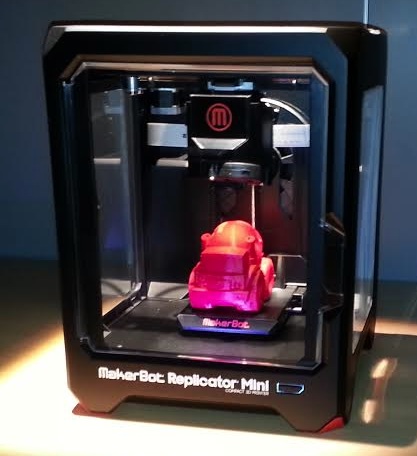 at SXSW with the founders hanging out in bars around Austin making shot glasses with their printers, this company was white hot this week at CES. It introduced three new printers, a digital store that is being referred to as the iTunes of 3D printing and a variety of new apps. All built on Linux.
From the embedded systems running the brains inside our appliances to the televisions, phones, tablets, cars, printers, games and more that play increasingly relevant roles in all of our daily lives, Linux is putting new technologies within our reach. It is the Linux community and its ongoing collaboration and investment in the operating system that is making this possible. Linux might sit silently inside these devices, gadgets and gizmos but the community that helps put it there should be applauded because it’s this work that is changing the way we do everything. Congratulations. You’re building the software that runs our lives and paving the way for the future.

Google has just purchased Nest Labs, the maker of the Nest Learning Thermostat and Protect smoke detector, for $3.2 billion in cash. According to a Google press release, Nest will continue to operate independently under the leadership of co-founder and CEO Tony Fadell; co-founder Matt Rogers will also make the move to Google. While the transaction is subject to the usual regulatory review, Google says it expects the sale to close within the next few months.
It’s not yet clear exactly how Google plans to use Nest, but the company obviously see it is an important part of its future. A combination of Nest’s home solutions coupled with Google’s language recognition could give Google its strongest path yet into your home.
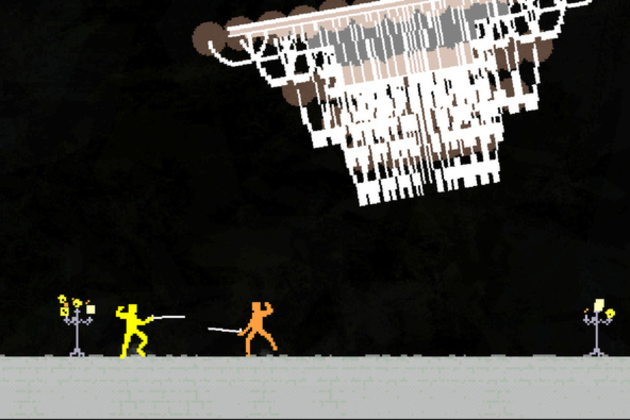
Nidhogg is here. The insanely fast indie dueling video game has arrived on Steam, over three years after it began winning accolades from the gaming press. Originally only playable at video game exhibitions where crowds would cheer as a pair of players faced off in the epic tug-of-war like swordfighting game, its creator Mark “Messhof” Essen is finally selling Nidhogg to the masses, complete with online multiplayer. For $14.99 (or $11.99 through January 20th) you can buy the game for Windows PC, which has been greatly expanded with new fighting moves, new animations, four distinct arenas, full PC gamepad support for Steam’s Big Picture mode, local tournament and arcade modes, and music that dynamically changes as you play.
It’s hard to…