
Home Blog Page 1675

Review: SteamOS Beta for Linux Experts

Valve recently released an early-access preview of its future strategy for game distribution: the Steam Machine, and the SteamOS operating system that runs it. The company has developed a beta reference platform, but the really interesting part is SteamOS: an open OS with fairly flexible hardware specs that anyone can download and play with.
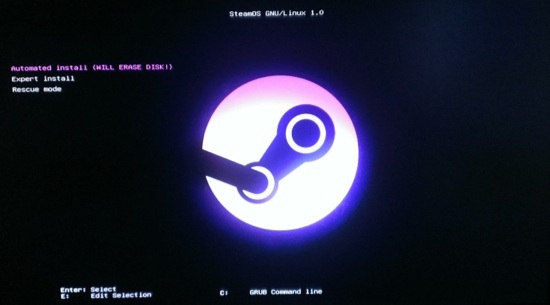
SteamOS screen shotSteamOS has generated a lot of interest, but the “beta” label makes one hesitate a bit. Is it a “Google beta”, where most everything works pretty well, or is it a big pile of bugs and misfeatures? Let’s find out.

SteamOS Architecture

With previous releases of Steam for Linux, Valve had shown a preference for Ubuntu as a platform; it was therefore a bit of a surprise when SteamOS was revealed to be a direct derivative of Debian rather than Ubuntu. Valve’s explanation pitches Debian as a better base for customization than Ubuntu, and they continue to recommend Ubuntu for Linux game development and the best Steam experience. Ubuntu is itself based on Debian, so the differences between the two environments are small.

Most of the interesting software consists of Steam itself and the games; all you need beyond that is “just enough OS” to deal with the hardware, graphics drivers, and so on, as well as infrastructure for installing and maintaining the complete system. SteamOS does provide a GNOME 3 desktop with the Iceweasel browser (a fork of Firefox); these are just carried over from Debian 7. A “Valve Bug Reporter” app is also included in the desktop, along with an icon which returns you to Steam.

But the clear intent of the system is to run the Steam client, and not a general-purpose desktop. You can’t even get to the desktop without checking a box in the Steam client’s settings (under “Interface” if you’re interested). And you’ll find that the desktop is missing lots of functionality you’d expect, with no way to install what’s missing. This is not a Debian system so much as it is a Steam system which happens to use Debian under the hood.

Installation: For Experts Only

Arguably, SteamOS is targeted more at hardware integrators than end users, so the smoothness of the install process is probably not a high priority. Add to that its beta status, and you can understand how installing SteamOS is definitely “for experts only” at this point.

The “Custom” install I used started out trouble-free. The SteamOS installer is the Debian installer with SteamOS theming, with most steps automated. Be careful not to boot this USB stick on any system you care about, as the installer is preset to blow away the first disk on the system with no warning!

Not everything got set up correctly, however; I was greeted with a very nice-looking Steam client, but no sound. The SteamOS install process is clearly aimed at preferring the “connect to TV” environment, as it preferred my HDMI audio support on the video card to the motherboard’s sound interface. If you’re not running SteamOS on a HDTV, be prepared for a bit of fiddling with PulseAudio configuration and kernel module tweaking. One helpful tip: Debian 7 software works fine on SteamOS, so you can add Debian’s repositories to SteamOS to get any missing utilities for getting things working.

(For a full installation guide, including audio and wifi configuration, see Micah Ferrill’s tutorial on Linux.com.)

Getting Down To Business

Once installation is complete and the hardware all works, SteamOS fades into the background, and you’re presented with Steam in Big Picture Mode.

After answering a few questions and accepting the license, I was able to log in to my regular Steam account. Note that SteamOS counts as a new device from Valve’s point of view; I had to type in an emailed code before I was able to successfully log in. It’s also worth remembering that Steam only allows one device at a time to be logged in, so you’ll be logged out of your SteamOS system if you try to run Steam anywhere else at the same time.

Gameplay was pretty much like Steam on Linux. My Steam for Linux games (or game, in my case) showed up in the Library. Downloading and running games from the Library was straightforward, and my saved games were also synchronized from my other system. Before long, I was
stumbling through Portal with the same ineptitude I was showing on Ubuntu.

Similarly, I was able to easily browse the Steam Store on SteamOS and pick up a few free-to-play favorites: DOTA 2 and Team Fortress 2. My video card turned out to be a little too weak for DOTA 2, but Team Fortress 2 played fine.

I had never played with Big Picture mode on Ubuntu, which turns out to be identical to the SteamOS environment. There were a few quirks with graphics not loading on the SteamOS version. I was occasionally irritated by the keyboard navigation; for example, Escape typically took you to the beginning of the last screen’s entries, rather than where you left off. Overall, though, the interface works well.

Verdict: Promising, But Needs Work

SteamOS is off to a good start. Their previous work on Steam for Linux pays off in SteamOS, and the choice to wrap Steam in a Debian base seems to be working.

There are still a number of technical glitches to work out, especially in the installation process. It’s not entirely clear how far Valve will go in providing a pain-free installer, given that it’s targeted at system integrators and power users rather than the average consumer.

If you just want to play Steam games on your custom-built Linux box, your best bet for now is to stick with Steam for Linux running on Ubuntu (or, if you’re so inclined, your favorite non-Ubuntu distribution). For the complete SteamOS experience, switch to Big Picture mode. It will tend to work more smoothly, and some may prefer the traditional Steam interface over Big Picture.

For Linux experts, SteamOS is an easy to moderate challenge, especially if the installer gets your hardware right the first time through. Brave and curious non-experts should anticipate getting an education in Linux hardware support. The challenge is worth taking, though, especially for those who want to help Valve make gaming on Linux as awesome as possible.

But if you’re a Debian fan excited by the prospect of a Debian-flavored Steam experience, you’re likely to be disappointed. It’s nice to see the Debian installer handling installation duties, but after that, you could use SteamOS for years without seeing even a hint of Debian. Even if you’re wanting a custom box running Steam on Debian, you might be happier with just that instead of SteamOS, if only because of the broader hardware support in the underlying OS and the support for non-gaming tasks.

Behind Closed Doors at Mercedes-Benz’s Tech-Filled Silicon Valley R&D Facility

We look into how one of the world’s oldest car brands is using Google Glass, Pebble smartwatches, and Nest Thermostats to make its vehicles smarter. [Read more]

Read more at CNET News

Samsung to Unveil Galaxy Pro Tablets in Early 2014 — Report

Models with screen sizes of 8.4 inches, 10.1 inches, and 12.2 inches are in the works for next year, says blog site Sammobile. [Read more]

 
Read more at CNET News

A Summer Spent on the Linux Kernel Virtual File System

Calvin Owens has learned a lot about bug hunting and fixing just by following the discussion among developers on the Linux kernel mailing list. He’s even contributed a few small driver fixes over the past year. But his first real deep dive into kernel development came during his Google Summer of Code internship with The Linux Foundation this year.

Calvin Owens“I’ve always thought the kernel is deeply fascinating, and the opportunity to have the time to work on it in a meaningful way was a
very exciting prospect,” said Owens, a computer science and music major, studying clarinet, at Southern Methodist University in Dallas.

Owens was one of 15 GSoC interns with The Linux Foundation, where he worked with Yongqiang Yang on efficient sparse file handling in the page cache of the Linux kernel Virtual File System (VFS). He developed a “sparse page deduplication” method to avoid backing sparse regions of files with physical pages full of zeros.

A method for sparse files

Reading from sparse files, which contain(potentially very large) regions that aren’t extant on the disk, returns all zeros, Owens said. “This is advantageous, especially for virtual hard drives for VM’s, since the unused portions of the file don’t have to waste space on the disk,” he said.

“However, the VFS layer of the kernel isn’t aware of what pages in a file are and are not sparse. So when you read a page corresponding to a sparse region in a file, the FS knows to return zeros, but the page cache dutifully allocates a physical page to back it,” Owens said.

Owens’ program adds logic to VFS to make note of the sparse regions but prevents it from allocating a page to back the region, unless it’s later written to. The update should improve any workload that makes heavy use of sparse files, he said.

“The page cache, being in RAM, is orders of magnitude faster than the hard disk itself. Keeping pages of zeros in it prevents pages of real data from being ready to go when they’re needed,” Owens said.

Headed upstream

While the method works for the major in-tree filesystems, it needs more work before it can be merged upstream. 

“Originally, I accomplished this by putting references to the ZERO_PAGE in the page cache radix tree for the file,” he said. “I’ve spoken to a couple kernel developers who aren’t wild about that solution, so I’m currently working on implementing it more cleanly.”

In the meantime, Owens says he finds kernel development to be rewarding work and hopes to find a job as a kernel developer after graduation.

“I learned a great deal about the inner workings of the kernel, VFS and memory management in particular,” Owens said. “Digesting huge swaths of dense kernel code was a bit overwhelming at first. Learning to deal with that was a very valuable experience.”

Editor’s note: See our previous profiles of GSoC intern Eduard Bachmakov who contributed to the LLVM Clang Static Analyzer for the Linux kernel and Anton Kirilenko, who worked with Linux Foundation Fellow Till Kamppeter to improve the PHP/ MySQL application that manages submissions to the growing printer and printer driver database on the OpenPrinting website.

And if you’re interested in learning more about Google Summer of Code internships in 2014 please visit: http://www.google-melange.com/gsoc/homepage/google/gsoc2014

The next round of applications starts Feb. 3, 2014.

OpenStack Takes Over The Datacenter

openstacklogo

I’ve been watching the rise of OpenStack with an ambivalent mixture of curiosity and dread over the past few years. With the recent announcement of OpenStack support baked into Red Hat Enterprise Linux 7, it seems OpenStack is emerging as the de facto standard for virtualization and abstraction in the private could. Another new requirement for the working systems administrator. It could be that I’m just getting old, but when I look at the diagrams of OpenStack, I see a lot of moving parts.

My philosophy in dealing with computers is to always keep it simple. In my experience, the more interconnected components there are to an application, the more likely it is to break. Likewise, the more complex, the harder it becomes to diagnose the failure and fix what’s broken. When I look at this diagram by Ken Pepple, I see moving parts, connected like gears, and I have to ask “how fragile is this?”.

 
Read more at Ostatic


Linux 3.13 Kernel Power Consumption Benchmarks

With word recently of a 50 Watt Linux kernel power regression that’s still being investigated, I carried out some more power consumption tests of a Core i7 4770K Haswell system to see if its power usage has been impacted by recent kernel upgrades…

Read more at Phoronix

Startup Manager Renews Shine on Android’s Boot

For some inexplicable reason, probably related to egocentric human nature, software developers can’t seem to resist designing their programs as if they were default services: always on and ready. If you’re familiar with maintaining a PC and like tinkering with programs, you’ll know that you need to periodically disable or get rid of accumulating, seemed-like-a-good-idea-at-the-time programs that automatically run processes. These automatically loading tools hog resources, clog up RAM and CPU and slow overall operating system startup.

Read more at LinuxInsider

Android ‘Started Over’ the Day the iPhone Was Announced

Apple’s boast that the iPhone changed everything about the mobile industry has received some support from one of Android’s original software architects. Chris DeSalvo, who worked alongside Andy Rubin at Danger before joining Google to build its mobile OS, says that the iPhone’s announcement forced everyone on his team to realize that they “are going to have to start over.”

Already in intensive development for two years by 2007, Android was Google’s vision for a mobile operating system of the future. Still, in spite of all the work that had already gone into it, the Mountain View company was sure it couldn’t carry on along the trajectory it’d been following — the earliest Android devices looked very much like Googlified BlackBerrys…

Continue reading…

Read more at The Verge

Open Source Vehicles Get a Green Light with Tabby

Open source vehicles

Open hardware is gaining speed. The appetite for open source vehicles is growing. And while we may not have flying cars yet, we do have Tabby—an open source car design released by Open Source Vehicle this October.

Want to swap out an internal combustible engine for an eco-friendly electric? Tabby can do that. And, this open source vehicle is not just for makers—it’s production ready. Tabby will be rolling off the assembly line in early 2014. Will you see Tabby cruising your streets?

In this interview, we found out more about Tabby and got some insight into the open hardware movement from the team at Open Source Vehicle.

read more

Read more at OpenSource.com

Mutter, GNOME Shell Updated For GNOME 3.11.3

New development releases of the Mutter window manager and GNOME Shell are out this week for GNOME’s 3.11.3 development milestone…

Read more at Phoronix