
Home Blog Page 1693

Open Source, Closed Doors? FOSS and the Racial Divide

FOSS fans are no strangers to difficult topics, and for proof one need look no further than the ongoing sexism controversy that has been debated so many times in every bar and watering hole of the Linux blogosphere. Recently, however, one came up that’s enjoyed far less prominence — at least since Linux Girl began keeping track lo these many years ago. “Why Isn’t Open Source a Gateway for Coders of Color?” was the title of the post that brought the issue to light last week, and it’s generated more than a little discussion among Linux fans.

Read more at LinuxInsider

How to Develop Cross-Platform Mobile Apps on Linux

The last few years have witnessed dramatic growth of the mobile market, mostly driven by a large selection of applications. As consumers, we all hate to see some kind of market monopoly by any one platform. The more competition, the more innovation. As developers, we have mixed feelings about cross-platform development. Cross-platform development has several […]
Continue reading…

The post How to develop cross-platform mobile apps on Linux appeared first on Xmodulo.

Read more at Xmodulo

Obama and Republicans Unite for ‘Hour of Code’ Computer Literacy Campaign

Today marks the launch of the “Hour of Code,” a massive publicity campaign to promote computer science education in schools across the globe. As the Wall Street Journal reports, the approximately $1 million campaign was launched by Code.org, a nonprofit organization that has so far raised $10 million from supporters like Mark Zuckerberg, Bill Gates, and major technology companies. More than 33,000 schools in 166 countries will dedicate at least one hour this week to computer science education as part of Code.org’s initiative, which is timed to coincide with this year’s Computer Science Education Week.

The effort has earned endorsements from tech companies, celebrities, and politicians, including both President Barack Obama and House…

Continue reading…

Read more at The Verge

How to Make the Brave Move from Commercial to Open Source

open source business

I work for a private ISV and consultancy company focused on delivering software products for financial institutions. Three years ago my company decided to share our achievements and knowledge by publishing our application, FinTP, for processing financial transactions under an open source license.

Here, I will explore the changes a company has to undertake when embarking on the transition from a traditional business model to a business model that supports open source. This is based on nine years of experience with a once commercially-available solution. The motivation for a transition like this comes from our company’s ambition to be in a position of leadership in this changing and challenging industry.


read more

Read more at OpenSource.com

Proprietary Unix Continues to Fall

Linux_rgb_white-bckgrnd-298x300

Analysts at International Data Corporation (IDC) posted a press release Wednesday highlighting the rapid decline of IBM’s AIX and P-Series hardware. Along side the drop in proprietary Unix systems is an associated rise in sales of X86 servers running Linux. IBM has clearly identified this as a long term trend, investing $1 billion dollars in Linux development on Power systems. With the reported 20% drop in sales, the writing may finally be on the wall for AIX.

I’ve had the dubious pleasure of administering both AIX and Linux systems for the past several years, and if I could pick and choose, I would take the flexibility and ease of use of Linux and the stability of Power. In my experience, AIX is difficult to set up, and difficult to change after it is set up, but once it is up and running it just runs. A properly configured AIX server can run for years without intervention, but when that time for modification comes, which it always does, prepare for a long hard slog. By contrast, Linux has become exponentially easier to manage over the years, thanks to the contributions of thousands of developers and sysadmins, as well as the contributions of big name corporations. 
 
Read more at Ostatic

Intel Developer Finds 50 Watt Power Regression In Linux

An Intel Linux kernel developer has discovered that since the Linux 3.10 kernel one of his powerful Xeon-based systems is going through 50 Watts more energy while idling than on pre-3.10 kernels. This power regression could affect smaller systems too, but fortunately the issue has been bisected and an investigation is in process…

Read more at Phoronix

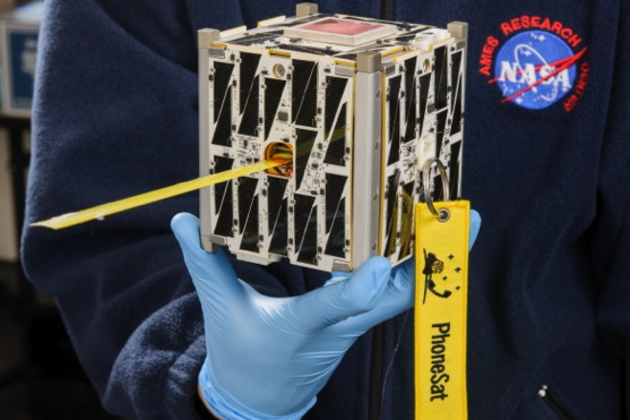
‘PhoneSat’ Made from Samsung Nexus S Calls Earth from Space

NASA’s newest tiny, cheap “PhoneSat” — a super cheap satellite made out of off-the-shelf Android hardware — has dialed home from orbit, meaning all systems are go.

The 2.2-pound satellite was built using a heavily-modified Samsung Nexus S and uses a two-way S-band radio so that engineers can command it remotely. It’s part of NASA’s effort to explore cheaper satellite technology.

Continue reading…

Read more at The Verge

Stable Kernel Updates for the Weekend

The 3.12.4, 3.10.23, and 3.4.73stable kernel updates are available. These updates contain fewer patches than their immediate predecessors, but they still have a lot of important fixes and updates.

Read more at LWN

NVIDIA Helping Nouveau With Video Decoding

While it isn’t in the form of any complete documentation, a NVIDIA engineer has begun answering questions by the open-source Nouveau driver developers about video decoding with their H.264 engine…

Read more at Phoronix

Setting up an ARM Based Cassandra Cluster with Beagle Bone Black

A great project to try on cheap ARM boards such as the BeagleBone cluster is to set up a database cluster. For a developer, this is useful both for storage for projects and to gain experience administrating NoSQL databases with replication. Using my existing three BeagleBone Black cluster I decided to try using the Cassandra database. Cassandra is easy to use for those already familiar with SQL databases and is freely available. All of these steps were done on an Ubuntu install and should work on any ARM board running an Ubuntu based OS.

To get started, you need the Cassandra binaries. I was unable to find a repository that had an arm version of Cassandra so I downloaded straight from the apache site and untared it. You can go to http://cassandra.apache.org/download/ and use wget to get the gzip file from one of the mirrors. The version I downloaded was apache-cassandra-2.0.2-bin.tar.gz. Once you have it on each machine, place it in a directory you want to use for its home, for example /app/cassandra and then unzip it:

tar -xvzf apache-cassandra-2.0.2-bin.tar.gz

Now you have everything you need to configure and run cassandra. To run in a cluster, we need to set up some basic properties on each machine so they know how to join the cluster. Start by navigating to the conf directory inside the folder you just extracted and open the cassandra.yaml file for editing. First find listen_address and set it to the ip or name of the current machine. For example for the first machine in my cluster:

listen_address: 192.168.1.51

Then do the same for rpc_address:

rpc_address: 192.168.1.51

Finally we list all of our ips in the seeds section. As I have three nodes in my cluster, the setting on each machine looked like this:

- seeds: "192.168.1.51,192.168.1.52,192.168.1.53"

Additionally if you want to give your cluster a specific name, you can set the cluster_name property. Once all three machines are set up as you like them, you can start up cassandra by going to the bin directory on each and running:

sudo ./cassandra

Using Cassandra

Once all three nodes are running, we can test on one of the nodes with cqlsh and create a database. Cqlsh is a command line program for using Cassandra’s SQL like language called CQL. I connected to the utility from my first node like this:

./cqlsh 192.168.1.51

The first step is to create a keyspace which acts like a schema in a SQL database like Oracle. Keyspaces store columnsets which act like tables and store data with like columns:

>create keyspace testspace with replication = { 'class': 'SimpleStrategy', 'replication_factor': 3 };
>use testspace;

Now we can create our column set and add some rows to it. It looks just like creating a database table:

>create table machines (id int primary key, name text);
>insert into machines values (1, 'beaglebone1');
>insert into machines values (2, 'beaglebone2');
> insert into machines values (3, 'beaglebone3');
>select * from machines;

Now we have a simple set of columns with some rows of data. We can check that replication is working by logging in from a different node and performing the same selection:

./cqlsh 192.168.1.52
>use testspace;
>select * from machines;

So now we have a working arm based database cluster. There is a lot more you can do with Cassandra and some good documentation can be found here. The biggest issue with using the BeagleBone Black for this is the speed of the reads and writes. The SD card is definitely not ideal for real time applications or anything needing performance but this tutorial is certainly applicable for faster arm machines like the Cubieboard and of course desktop clusters as well.