It’s always been prudent to wrap a warm comfy layer of encryption over your Internet travels to foil snoops of all kinds, and with our own government slurping up every bit wholesale it’s more crucial than ever. OpenVPN is the top choice for protecting networking over untrusted networks. Today we’ll learn a quick way to set up OpenVPN so you can securely access your home server when you’re on the road.
A quick note on VPNs: there are many commercial VPNs that aren’t worth the bits they’re printed on. They’re little better than SSL-protected Web sites, because they trust all clients. A true VPN (virtual private network) connects two trusted endpoints over untrusted networks. You can’t just log in from whatever random PC you find, and this is good because (presumably) you understand that logging in to your private network from an infected host is a bad thing to do, no matter how secure the connection is. So you have to configure both your server and client.
OpenVPN Quickstart
You need two computers on different subnets, like a wired and wireless PC on the same network (or a couple of Linux guests in Virtualbox), and you need to know the IP addresses of both PCs. Let’s call our example computers Studio and Shop. Install OpenVPN on both of them. OpenVPN is included in most Linux distributions, so you can install it with your favorite package manager. This example is for Debian, Ubuntu, and their myriad descendants:
$ sudo apt-get install openvpn openvpn-blacklist
That installs the server and a little program to check the blacklist of compromised keys. You must install the blacklist checker! Because once upon a time Debian distributed a broken version of OpenSSL which had a broken random number generator, so keys created with this are assumed to be too vulnerable to trust. The random number generator was not really random, but predictable. This happened way back in 2008, and everyone who used the defective OpenSSL was supposed to hunt down and replace their weak keys. Even though it’s been over five years, it’s cheap insurance to use the blacklist checker.
Now let’s test it by creating an unencrypted tunnel between our two PCs. First ping each machine to make sure they’re talking to each other. Then make sure that OpenVPN is not running, because we’re going to start it manually:
$ ps ax|grep openvpn
If it is, kill it. Let’s say that Studio’s IP address is 192.168.1.125, and Shop’s is 192.168.2.125. Open an unencrypted tunnel from Studio to Shop:
$ sudo openvpn –remote 192.168.2.125 –dev tun0 –ifconfig 10.0.0.1 10.0.0.2
Then from Shop to Studio:
$ sudo openvpn --remote 192.168.1.125 --dev tun0 --ifconfig 10.0.0.2 10.0.0.1
When you make a successful connection you’ll see something like this:
Wed Oct 16 2013 ******* WARNING *******: all encryption and authentication
features disabled -- all data will be tunnelled as cleartext
Wed Oct 16 2013 TUN/TAP device tun0 opened
Wed Oct 16 2013 do_ifconfig, tt->ipv6=0, tt->did_ifconfig_ipv6_setup=0
Wed Oct 16 2013 /sbin/ifconfig tun0 10.0.0.1 pointopoint 10.0.0.2 mtu 1500
Wed Oct 16 2013 UDPv4 link local (bound): [undef]
Wed Oct 16 2013 UDPv4 link remote: [AF_INET]192.168.2.125:1194
Wed Oct 16 2013 Peer Connection Initiated with [AF_INET]192.168.2.125:1194
Wed Oct 16 2013 Initialization Sequence Completed
“Initialization Sequence Completed” are the magic words that confirm you did it right. You should be able to ping back and forth with the tunnel addresses, ping 10.0.0.1 and ping 10.0.0.2. When you build your tunnel you may use whatever IP addresses you want that don’t overlap with your existing network. To close your tunnel press Ctrl+c.
Just for fun open an SSH session over your tunnel. Figure 1 shows a successful SSH login over a VPN tunnel, and it also demonstrates the fancy Message of the Day from Put a Talking Cow in Your Linux Message of the Day:
$ ssh carla@10.0.0.2
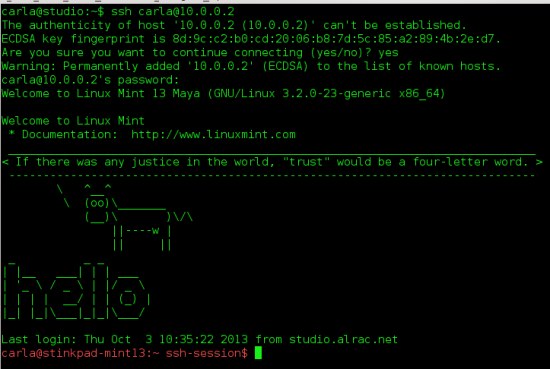
Hurrah, it works!
Encrypted VPN Tunnel
This is all fun and exciting, but pointless without encryption, so we’ll set up a simple static key configuration. It’s not as strong as a proper public key infrastructure (PKI) with root certificates and revocations and all that good stuff, but it’s a good-enough solution for the lone nerd needing to call home from the road. OpenVPN helpfully includes a command to create the static key, so create a directory to store the key in, create the key, and make it read-only for the file owner:
$ sudo mkdir /etc/openvpn/keys/
$ sudo openvpn --genkey --secret /etc/openvpn/keys/static.key
$ sudo chmod 0400 /etc/openvpn/keys/static.key
This is a plain-text key that you can open in a text editor and look at if you’re curious, and you can name it anything you want; you don’t have to call it “static.key”. Copy this key to both computers– yes, the same key. It’s not a private-public key pair, but just one single shared key.
Now we’ll create some simple barebones configuration files for each computer. (On Debuntu etc. there are no default configuration files, but rather a wealth of example files in/usr/share/doc/openvpn/.) In my little test tab Studio is the server, and Shop is the wandering laptop that will log into the server. My server configuration file is/etc/openvpn/studio.conf, and this is all it has:
# config for Studio
dev tun
ifconfig 10.0.0.1 10.0.0.2
secret /etc/openvpn/keys/static.key
Make this file readable and writable only to the file owner:
$ sudo chmod 0600 /etc/openvpn/studio.conf
The configuration file on the client is similar, with the addition of the IP address of the server:
# config for Shop
dev tun
ifconfig 10.0.0.2 10.0.0.1
secret /etc/openvpn/keys/static.key
remote 192.168.1.125
Mind the order of your IP addresses on the ifconfig line, because they need to be in the order of local > remote. Now fire up OpenVPN on the server, specifying the server configuration file, and do the same on your client:
$ sudo openvpn /etc/openvpn/studio.conf
$ sudo openvpn /etc/openvpn/shop.conf
You’ll see the same “Initialization Sequence Completed” message for a successful connection, and you must also look for the absence of this message, which should have appeared when you created your un-encrypted tunnel:
******* WARNING *******: all encryption and authentication features disabled
Firewalls and Dynamic IP Addresses
OpenVPN itself is simple to configure. The biggest hassles are dealing with firewalls and dynamic IP addresses. There are a skillion different firewalls in the world, so I shall leave it as your homework to figure out how to get through it safely. OpenVPN wants port 1194, and then you’ll want to have a forwarding rule that points to the computer you want to access.
Dynamic IP addresses are another hassle. Dyn.com is an inexpensive way to manage dynamic IP assignment from your ISP. Or you might be able to pay your ISP a few bucks to get a static address.
At this point you could stop and call it good, because you can manually start OpenVPN on your server and leave it waiting for you, take your laptop out into the world, and connect to your server whenever you want. However, there are some refinements we can add such as daemonizing OpenVPN on the server, using Network Manager to make the connection automatically, and the biggest missing piece in OpenVPN howtos: how to access your remote resources. So come back next week for the rest of the story.

 Supercomputing is no longer the reserve of a few select universities, but rather on the priority list for both the government and education bodies. To this end, Nvidia’s CUDA Centres of Excellence recognizes, rewards and fosters collaboration with institutions at the forefront of massively parallel many-core computing research.


 The next major release of the OpenStack public, private and hybrid cloud computing platform, dubbed Havana,