Hello guys, i’m the new user in this community. Hope all of you guys take me as the familly in this community.
 In this article, i would share about “how to disable usb from the terminal”. This article i take from my blog, but, I write the article in Bahasa. So, I just convert it into english. The concept is very easy. In this case, I use several command from linux to operate the usb on/off with the bash shell scripting. And you must use the root for the access user. I have tried in linux ubuntu and work normally.
Before we going into the topic, I would to say something about my purpose creating this article. So, i have modem and my modem can connect with linux by using wvdial service. Wvdial is package on debian variety, used to dial your modem by terminal with carrier. So, i have problem after I dial with this modem. That is, whenever i didn’t got signal and the modem automatically disconnect. And whenever I tried to connect again with wvdial without I pull out my modem, the wvdial will be error and I can’t connect again. So, to fix the problem, I thinking something. Yes, and that is “How I can control the usb off and on by terminal?”. Here we go, this is way how to do it :
- First time, our modem must be plugged into our usb.
- After that, we trying to connect with wvdial command. Ups, I cannot got carrier.The first solution for a long time is I pull out the modem from usb and wait a few second than I plug again into usb. it’s very make me feel bored and angry.
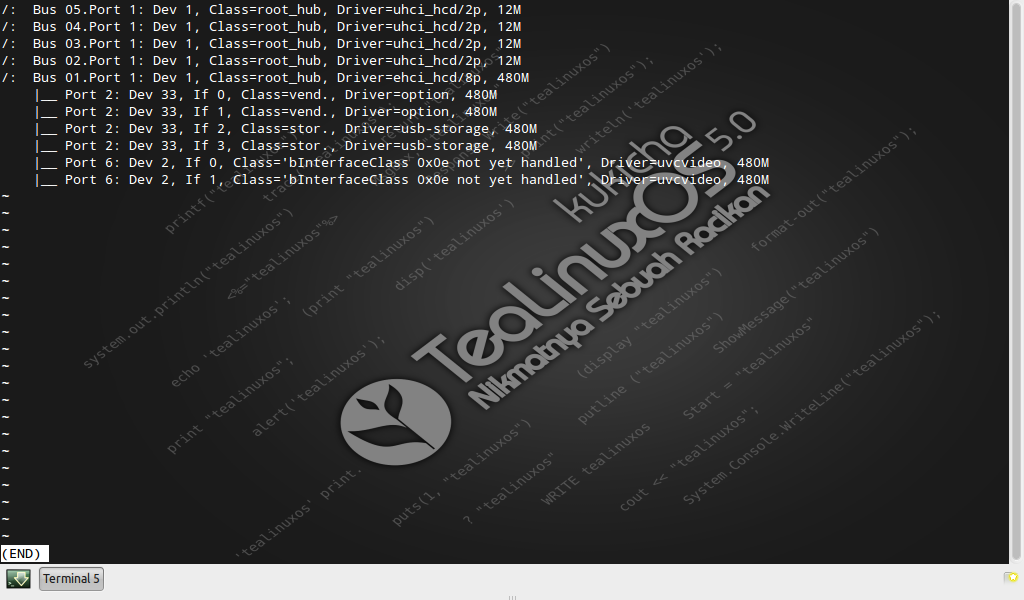
- So, to fix the problem without do the really bad clue. First time, You must open the terminal and make access as super user : “sudo lsusb -t|less”, this command will be give you list the active usb. And in the result is :
- “”””””””””””””””””””””””””””””””””””””””””””””””””””””””””””””””””””””””
/: Bus 05.Port 1: Dev 1, class=”root_hub”, Driver=uhci_hcd/2p, 12M
/: Bus 04.Port 1: Dev 1, class=”root_hub”, Driver=uhci_hcd/2p, 12M
/: Bus 03.Port 1: Dev 1, class=”root_hub”, Driver=uhci_hcd/2p, 12M
|__ Port 1: Dev 2, If 0, class=”HID”, Driver=usbhid, 1.5M
/: Bus 02.Port 1: Dev 1, class=”root_hub”, Driver=uhci_hcd/2p, 12M
|__ Port 1: Dev 6, If 0, class=”vend”., Driver=usbserial_generic, 12M
|__ Port 1: Dev 6, If 1, class=”vend”., Driver=usbserial_generic, 12M
|__ Port 1: Dev 6, If 2, class=”vend”., Driver=usbserial_generic, 12M
|__ Port 1: Dev 6, If 3, class=”stor”., Driver=usb-storage, 12M
|__ Port 2: Dev 3, If 0, class=”HID”, Driver=usbhid, 1.5M
|__ Port 2: Dev 3, If 1, class=”HID”, Driver=usbhid, 1.5M
/: Bus 01.Port 1: Dev 1, class=”root_hub”, Driver=ehci_hcd/8p, 480M
|__ Port 6: Dev 5, If 0, Class=’bInterfaceClass 0x0e not yet handled’, Driver=uvcvideo, 480M |__ Port 6: Dev 5, If 1, Class=’bInterfaceClass 0x0e not yet handled’, Driver=uvcvideo, 480M
“”””””””””””””””””””””””””””””””””””””””””””””””””””””””””””””””””””””””
- After we know the actived usb that connect with our modem. Do this command
“echo ‘2-1’ |sudo tee /sys/bus/usb/drivers/usb/unbind” <- to make usb disable/turn off
NB : ‘2-1’ is the process that we will be kill.
after you do that command, the usb will be disable.
- Trying to dial again with wvdial. So we have the result :
eject: unable to find or open device for: `/dev/sr0′
–> WvDial: Internet dialer version 1.60
–> Cannot open /dev/ttyUSB0: No such file or directory
–> Cannot open /dev/ttyUSB0: No such file or directory
–> Cannot open /dev/ttyUSB0: No such file or directory
*This is good information.That’s have mean, the usb succesfully set as disable.
- We do again the command such as step number 5 but with different input at the end. So ,like this :
echo ‘2-1’ |sudo tee /sys/bus/usb/drivers/usb/bind <- to make usb active again // the different command just in the end of syntax.
NB : ‘2-1’ is process that will be make enable.
- Try again with the wvdial command like as before. And…. i no need to pull out and plug in again modem in usb. So, the mainly command is in step 5 and 7.
Thanks
e-mail :
This e-mail address is being protected from spambots. You need JavaScript enabled to view it
