Ubuntu, Mint, and other glamorous Debian derivatives get all the attention. So why not go to the source and try Debian itself?
Debian is currently the most influential Linux distribution. It has inspired the popular derivatives Ubuntu and Knoppix, and their derivatives including Mint, Kubuntu, Dream Studio, Bodhi, Mepis, Damn Small Linux, and Mythbuntu. (See the Linux family tree on Wikipedia.) Debian is volunteer-driven, includes more packages than any other distribution, supports more hardware architectures, supports multiple kernels (Linux, FreeBSD, and GNU Hurd) and is 100% Free. It is also free of cost, and the good Debian people came up with a simple, elegant way to meet the needs of users who want to install non-Free software on their Debian systems. They put non-Free packages in separate repositories, so controlling what goes on your system is super easy.
Controlling Debian Versions
Debian comes in three flavors: Stable, Testing, and Unstable. Packages start out in Unstable, and migrate down through Testing and Stable. Stable is great for servers because it is thoroughly tested and gets swift security updates. Testing and Unstable are great for desktop systems because they have newer packages. Unstable really isn’t unstable, but works fine for a desktop system. The downside is irregular security updates, so you don’t want to use Testing or Unstable on servers. There is also an Experimental repository, which contains bleeding-edge packages still under development. (See the DebianGNU/Linux FAQ for more information.)
Debian also has codenames for each version, and these names come from the Toy Story movies. The current stable release is Squeeze, and the current Testing release is Wheezy. Unstable is always Sid, the bratty kid who breaks things. There is a bit of a gotcha you need to watch out for, because when you configure your software repositories you’ll get different results depending on which naming convention you use. If you use the Stable/Testing/Unstable codenames then your packages will come from the latest releases of each one. If you use the Toy Story names then you will stay within those specific releases, like the current Squeeze and Wheezy. So if you want to keep Squeeze or Wheezy, then you need to specify Squeeze or Wheezy.
Your Debian repos are configured in /etc/apt/sources.list. Here is a simple example I’m using on my Debian Squeeze system:
deb http://mirrors.kernel.org/debian/ squeeze main contrib non-free
deb-src http://mirrors.kernel.org/debian/ squeeze main contrib non-free
deb http://security.debian.org/ squeeze/updates main
deb-src http://security.debian.org/ squeeze/updates main
# squeeze-updates, previously known as 'volatile'
deb http://mirrors.kernel.org/debian/ squeeze-updates main contrib non-free
deb-src http://mirrors.kernel.org/debian/ squeeze-updates main contrib non-free
If I wanted to always be in the latest Stable release, then I would replace “squeeze” with “stable” in sources.list. (See wiki.debian.org/SourcesList for more information.) This example was generated automatically at installation, and I made one post-installation change, which was adding “contrib non-free”. The contrib and non-free repos include non-free and third-party software, such as Adobe Flash and the Nvidia binary graphics driver. We’ll walk through the excellent, easy Debian way of installing these in a moment.
Installing Debian
Installing Debian is similar to any Linux distro: download an installation image, copy it to a CD, DVD, or USB stick, boot to the installation medium and away you go. You can also purchase installation disks for a few bucks. There are multiple installation methods: netinstall, a complete installation image, and a live DVD/USB image with a hard disk installation option. The netinstall is a 168MB image that boots your system, sets up the installer, and then you select and download only the packages you want to install. The Debian installation manual is exhaustively thorough, and I recommend that even experienced Debian users take a look at it because it is so detailed. The Debian installer is a powerhouse cram-full of options so you can micro-manage the whole process, or you can elect an automatic installation and let Debian make the decisions for you. It’s not a completely hands-off process, so you’ll need to stick around to answer a few questions.
Debian does not create an all-powerful sudo user at installation the way Ubuntu and Mint do, but rather sticks to the traditional root user/unprivileged user scheme. If you like the Ubuntu/Mint way, here is how to create it on Debian. First change to the root user, and then run the special visudo editor:
$ su
# visudo
Then add these lines to the sudoers configuration file:
# Allow members of group sudo to execute any command
%sudo   ALL=(ALL:ALL) ALL
Save and close the file, and then add your user to the sudo group in /etc/group. Log out and log back in, and you are now an all-powerful sudo user.
Maintaining Debian
A well-maintained Debian system can run forever without ever needing to be re-installed. For maintaining your Debian system I recommend the excellent Synaptic graphical package manager. If you prefer the command-line then you want apt-get and dpkg, and there are dozens of excellent cheatsheets for these all over the Web. Here is your handy cheatsheet for common operations:
Update your package lists:
# apt-get update
Upgrade all packages to their latest versions:
# apt-get upgrade
Search for a particular package, for example the Tux Racer game:
$ apt-cache search tuxracer
Install a package, like Tux Racer:
# apt-get install extremetuxracer
Remove a package:
# apt-get remove extremetuxracer
Remove a package and its configuration files:
# apt-get remove --purge extremetuxracer
 Is this package installed?
$ dpkg -l | grep extremetuxracer
Get information on packages that are not installed:
$ apt-cache show extremetuxracer
What files are in this installed package?
$ dpkg -L extremetuxracer
What packages does this file belong to, for example testparm?
$ dpkg -S testparm
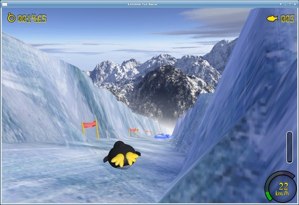
Figure 2: Tux Racer
Another good way to search for packages and get information on them is to go to debian.org/distrib/packages, which gives you multiple ways to search different releases, package names, and file names.
Installing Nvidia Driver
The Debian way of installing the Nvidia graphics driver builds it from sources, so it is exactly matched to your kernel, which means it’s more stable and reliable. Make sure you have the contrib and non-free repos enabled in sources.list. The run these commands, as root, exactly as shown:
# apt-get update && apt-get upgrade
# apt-get install module-assistant nvidia-kernel-common
# m-a auto-install nvidia-kernel${VERSION}-source
# apt-get install nvidia-glx${VERSION}
# apt-get install nvidia-xconfig
This will install the necessary kernel headers, source code, and build tools, and generate an /etc/X11/xorg.conf file. Reboot, and your new Nvidia driver will replace the default Nouveau driver. (See Non-free drivers for additional help.)
Adobe Flash
Adobe Flash is a great example of how not to maintain an essential plugin; you’d think a big company with truckloads of money could do better. Sadly, we’re stuck with it because there are no good alternatives. Debian eases the pain with its Flash plugin installer. Make sure you have the Contrib repo enabled, then install it:
# apt-get install flashplugin-nonfree
Then run it:
# update-flashplugin-nonfree --install
And that should take care of all the major Web browsers on your system.
Debian Reference
The Debian reference is the exhaustive Debian how-to — there are no mysteries in Debian.

 IDC has released its Top 10 HPC Market Predictions for 2013. The big takeaways? While the outlook is good for business, the industry goal of reaching Exascale by 2018 looks to be slipping by at least two years.