There you are typing happily away, when all of a sudden you accidentally hit some hotkeys and weird things happen. Linux does not yet have a universal “undo” button, which I think is the most needed feature for any computer, so you have to know what you did so you can undo it. If you don’t find the offending keyboard shortcut after reading this article, you’ll know where to look to find out how they’re configured on your system.
The good news is keyboard shortcuts can speed up your productivity a lot. The bad news is keyboard shortcuts are a moving target on Linux: You’ll see different behaviors in different applications, desktop environments, and command shells.
The good news is you can customize them. The bad news is even when you have a central keyboard configuration for your particular desktop environment, many applications can be customized individually.
The good news is that all this flexibility lets you fine-tune your workflow. The bad news is all this flexibility can drive you nuts.
That’s enough good-news, bad-news. So let’s explore the fine world of keyboard shortcuts on Linux.
What are Meta, Super, and Hyper Keys?
The meta, super, and hyper keys go way, way back to the days of the Space Cadet keyboard, which had keys with those labels. Those days are long gone, but the terminology persists, to the confusion of modern computer users. None of these keys exist on modern keyboards, but are mapped to other keys, such as the Alt key, Windows key, or Ctrl key. Howto authors that refer to the meta key expect that you know which key your particular system has mapped it to.
The Super key is the least ambiguous of the three terms. It is usually the key with the Windows logo, unless you have a proper keyboard with a Linux logo.
I have not seen the hyper key mentioned in a long time, but just like the meta key it can be mapped to other keys. Keymappings are particular to desktop environments, individual applications and command shells, so that’s where you look when you’re figuring it all out. For example in KDE4 it’s System Settings > Shortcuts and Gestures. Look in the Settings Manager in XFCE4, Preferences > Keyboard in GNOME 2, and System Settings > Keyboard > Shortcuts in GNOME 3.
Common Keybindings
These are usually the same in KDE4 and GNOME, and in some other Linux graphical environments, though if you find out differently don’t be surprised.
alt+f1 opens the system menu. Then you navigate with the arrow keys and select with the Return key.
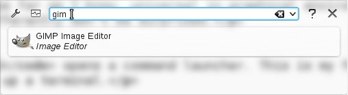 alt+f2
alt+f4 closes the focused window.
alt+mouse grabs a window anywhere you want to place the cursor. This is great for dragging back a window that has been moved past the edge of the screen.
shift+del permanently deletes a file without sending it to the Trash.
ctrl+alt+l locks the screen.
alt+tab cycles between open applications.
ctrl+backspace deletes an entire word in many text editors.
ctrl+z is undo, and ctrl+shift+z is redo.
ctrl+a selects all, ctrl+c copies the selection, ctrl+x cuts, and ctrl+v pastes.
shift+arrow keys selects, and crtl+right-left arrow keys moves the cursor a word at a time.
crtl+up-down arrow keys either scrolls up and down a line at a time without moving the cursor, or moves the cursor a line at a time, depending which application you’re using.
More Keyboard Shortcuts
Sadly, the wonderfully useful Unix style of copy-and-paste is inconsistently supported in Linux. When it works right, selecting text copies it and middle-click pastes it, and the copied text stays in the buffer until it is overwritten with a new selection.
Pressing the Print Screen button takes a screenshot of your entire desktop and opens a save dialog in both KDE4 and GNOME 3. alt+prtsc in GNOME 3 takes a screenshot of the active window.
F11 toggles the fullscreen view in a lot of applications, for example Firefox, Chrome, Gedit, and Gimp. But not in most KDE4 applications.
When you want to select multiple files in a file manager the ctrl and shift keys are your friends. To make a consecutive selection first click on a filename, then press the shiftkey and click at the end of your selection. As long as you are pressing the shift key you can select more or fewer files by clicking in different places, or using the arrow keys.
Use ctrl+click to select batches of arbitrary files one at a time, or to add or de-select individual items from a shift+click batch.
ctrl+double-click has special abilities in Firefox and LibreOffice Writer– you can select multiple arbitrary words on the page (figure 2).
Figure 2: ctrl+double-click selects arbitrary words.
There is probably some documentation for your particular Linux flavor on keymappings, but it’s faster and more accurate to look at your keyboard configurator to get the real story.

 Here’s a quick list of what I’m most looking forward to:
 What have the boot speed of openSUSE, a sandbox for KVM development, OpenStack, CUPS, Linux UEFI support and Enlightenment 17 to do with each other? They’re among the projects SUSE engineers worked on at Hackweek 8! From the 23rd to the 27th of July, the ‘normal’ development and maintenance tasks at SUSE took a backseat and the developers turned their attention to the various Open Source projects they fancied working on. Past projects have resulted in awesome tools like SUSE Paste, Debian support in OBS and of course Hackweek 7 brought us ARM in OBS! Read on to find out a some projects which were worked on and a bit about the results.