Our ‘Blockchain development made easy’ series continues with Hyperledger Iroha, a simple blockchain platform you can use to make trusted, secure, and fast applications. What are the advantages and how can developers get started with it? We talked to Makoto Takemiya, co-founder and co-CEO of Soramitsu about what’s under this project’s hood.
JAXenter: Is Hyperledger Iroha some sort of supplement to Fabric and Sawtooth? How does that work?
Makoto Takemiya: Hyperledger Iroha is an open-source, distributed ledger supported by an open source community of developers. Hyperledger Iroha has its own technical properties and vision that is equally important to the vision and technical characteristics of other blockchain platforms governed by the Hyperledger Project, run by the Linux Foundation. There are numerous use cases and different applications, so all platforms are important for the users to be able to test and select the blockchain platform that performs best in their specific use case.
Iroha contributes to the diversity of the Hyperledger frameworks. Hyperledger Iroha is written in C++ and has a small set of commands and queries focused on enabling financial applications, digital asset management, and digital identity use-cases for enterprises of any size.
Artificial Intelligence (AI), Machine Learning, and Deep Learning are all topics of considerable interest in news articles and industry discussions these days. However, to the average person or to senior business executives and CEO’s, it becomes increasingly difficult to parse out the technical differences which distinguish these capabilities. …
I met last week with Ben Lorica, Chief Data Scientist at O’Reilly Media, and a co-host of the annual O’Reilly Strata Data and AI Conferences. O’Reilly recently published their latest study, The State of Machine Learning Adoption in the Enterprise. Noting that “machine learning has become more widely adopted by business”, O’Reilly sought to understand the state of industry deployments on machine learning capabilities, finding that 49% of organizations reported they were exploring or “just looking” into deploying machine learning, while a slight majority of 51% claimed to be early adopters (36%) or sophisticated users (15%). Lorica went on to note that firms identified a range of issues that make deployment of machine learning capabilities an ongoing challenge. These issues included a lack of skilled people, and ongoing challenges with lack of access to data in a timely manner.
SSH tunneling (also referred to as SSH port forwarding) is simply routing local network traffic through SSH to remote hosts. This implies that all your connections are secured using encryption. It provides an easy way of setting up a basic VPN (Virtual Private Network), useful for connecting to private networks over unsecure public networks like the Internet.
You may also be used to expose local servers behind NATs and firewalls to the Internet over secure tunnels, as implemented in ngrok.
SSH sessions permit tunneling network connections by default and there are three types of SSH port forwarding: local, remote and dynamic port forwarding.
In this article, we will demonstrate how to quickly and easily setup a SSH tunneling or the different types of port forwarding in Linux.
It’s still a bit unsettling to see a Microsoft speaker at a Linux Foundation conference. Yet, at the recent Linux Security Summit, Ryan Fairfax, Microsoft’s head of OS development for Azure Sphere, quickly put the audience at ease with his knowledge of tuxified tech. His presentation on “Azure Sphere: Fitting Linux Security in 4 MiB of RAM” fits into the genre of stories in which developers are challenged to strip down their precious code to the spartan essentials for IoT.
As we saw last year in Michael Opdenacker’s presentation about reducing the Linux kernel and filesystem for IoT, Linux can be made to run — just barely — in as little as 4MB of RAM. That was Microsoft’s target for Azure Sphere OS, the open source Linux-based distribution at the heart of the Azure Sphere platform for IoT. Azure Sphere also includes a proprietary crypto/secure boot stack called the Microsoft Pluton Security Subsystem, which runs on an MCU, as well an Azure Sphere Security Service, a turnkey cloud service for secure device-to-device and device-to-cloud communication.
Last week, Seeed launched the first dev kit for Azure Sphere. The Azure Sphere MT3620 Development Kitfeatures MediaTek’s MT3620, a 500MHz Cortex-A7/Cortex-M4F hybrid SoC that runs the lightweight Azure Sphere OS on a single -A7 core. The SoC’s 4MB of RAM is the only RAM on Seeed’s Grove compatible dev board. Other SoC vendors besides MediaTek will offer their own Cortex-A/Cortex-M SoCs for Azure Sphere, says Microsoft.
Major shrinkage
Fitting an entire Linux stack into 4MB was a tall order considering that “most of us hadn’t touched Linux in 10 years,” said Fairfax. Yet, the hard part of creating Azure Sphere OS was not so much the kernel modification, as it was the development of the rest of the stack. This includes the custom Linux Security Module, which coordinates with the Cortex-M4’s proprietary Pluton security code using a mailbox-based protocol.
“We decided early on to go with Linux,” said Fairfax. “Most of our changes to the kernel were small, and the core Linux features ‘just worked’ even with limited resources. That’s a credit to the effort of the community and flexibility of the kernel.”
Fairfax’s team started working on Azure Sphere in secret in 2016 after struggling to convince Microsoft leadership that working with a Linux kernel “was viable,” said Fairfax. The project was unveiled in April 2018, and the first public preview will be released soon.
One of the main goals of Azure Sphere was to bring security to the MCU world where “security is basically nonexistent,” said Fairfax. Microsoft somewhat confusingly refers to the MediaTek MT3620 as an MCU rather than an application processor due to its inclusion of Cortex-M4 MCU cores. In part, this may be a marketing ploy since Microsoft intends to compete directly with the Cortex-M oriented Amazon FreeRTOS.
Sign up to receive updates on Open Source Summit and ELC+OpenIoT Europe:
Azure Sphere OS sits on top of the MCU’s Pluton stack, architecturally speaking, and the base layer is a security stack based on Arm TrustZone. This is followed by the custom Linux kernel, which in turn is topped by a cloud services update connectivity layer. The top level is for POSIX and real-time I/O app containers.
The custom kernel is currently based on mainline Linux 4.9. Patches are merged upstream every month, and there are plans to upgrade to LTS branches yearly.
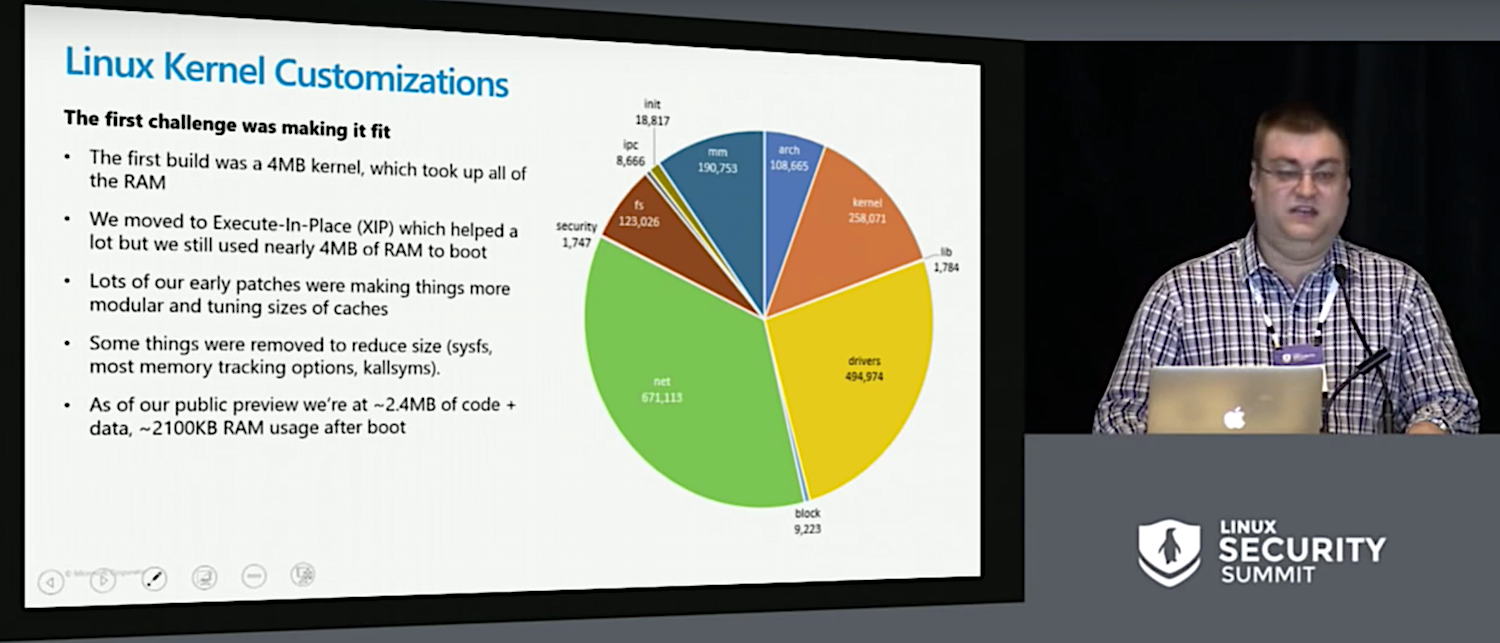
The first step in reducing the kernel was “to avoid putting text into memory,” said Fairfax. To do this, the OS depends a lot on Execute-In-Place (XiP) technology, which is commonly integrated in MCU flash controllers. “XiP lets you take a flash region and map it into the address space in read only, but also in a mode where you can execute it as code.”
In addition, “we tuned the kernel to make things modular so we could turn things off,” explained Fairfax. “We tuned cache sizes and patched to tweak default sizes.”
The team turned off a lot of the memory tracking options and things like kallsyms. They reluctantly cut sysfs, which saved almost 1MB, but for Fairfax was the coder equivalent of the writer’s challenge to kill your darlings. In the end, much of the kernel space was taken up by the network stack and hardware drivers.”
A lightweight Linux Security Module
Initially, the Azure Sphere OS team tried using SSH server with a fixed root password for security, but they quickly realized that this “was not going to cut it long term,” said Fairfax. To reduce the attack surface, they experimented with different security models, including “baking things into the file system and leveraging set UID and SGID to create predictable environments.”
These approaches caused some IPC problems and were otherwise flawed because “they put all the burden at build time,” said Fairfax. “Any mistake would propagate through the system and leave you vulnerable.”
Fairfax and his team revisited existing Linux technologies that might help make permissions more granular and “create a model where apps can access resources with the principle of least privilege,” said Fairfax. They finally decided on a stripped-down version of the Linux Security Model (LSM), a set of kernel extensions that “would reduce attack surface by taking certain features completely off the table. There’s no shell or user account management, which really isn’t relevant for an IoT device, and there’s no sophisticated job and process management.”
Fairfax also added fields that created an app identity for every task. “Applications and kernel modules can use these new fields for extended access control,” said Fairfax. “Values are immutable — once set, they inherit by default.”
The developers “experimented a lot with file systems,” said Fairfax. They tried the read-only cramfs with XIP patches, as well as writable file systems like ext2, jfffs, and yaffs, but “they all took hundreds of kilobytes to initialize, or about 1/16th of the total system memory available.” In the end, they ported the ultra-lightweight littlefs from Arm’s Mbed OS to Linux as a VFS module.
One problem with securing a Linux IoT device is that “Linux treats the entire GPIO infrastructure as a single resource,” said Fairfax. “In the real world not everything connected to your chip has the same sensitivity. I might have one GPIO pin that toggles an LED saying I’m connected to the network, which is not super sensitive, but another GPIO might open the solenoid on my furnace to start gas flow, which is more worrisome.” To compensate, the team added access control to existing features like GPIO to provide more granular access control.
User and application model
If Azure Sphere’s kernel is not radically different than any other extremely reduced Linux kernel, the user mode differs considerably. “The current Linux model is not designed for resource constrained environments,” said Fairfax. “So we built a custom init called the application manager that loads apps, configures their security environments, and launches them. It’s the only traditional process that runs on our system — everything else is part of an application.”
Azure Sphere applications are self describing and independently updatable. In fact, “they’re actually their own independent file systems,” explained Fairfax. “They run isolated from each other and cannot access any resource from another app.”
There are initially four pre-loaded system applications: network management, updates, command and control via USB, hardware crypto and RNG acceleration. GDBServer is optional, and OEMs can “add one or two apps that contain their own business logic,” said Fairfax.
One Azure Sphere rule is that “everything is OTA updatable and everything is renewable,” said Fairfax. In addition, because “quick OTA is critical” in responding to new threats, the team is aiming for OTA security patch updates within 24 hours of public disclosure, a feat they achieved with the Crack virus. Microsoft will manage all the OS updates, but OEMs control their own app updates.
The Microsoft team tried hard to find a way to run containers, including using LXC, but “we couldn’t get it to fit,” said Fairfax. “Containers are great, but they have some serious RAM overhead.” They also tried using namespaces to create self-contained apps but found that “many peripherals such as GPIO don’t play right with namespaces.”
For now, “we have pivoted off of containers and are focused on isolating apps and making sure that our permission model is sane,” said Fairfax. “We ensure that a buffer overrun in an application only gives you what that application can already do. We build each app as its own file system so they mount or unmount as part of install or uninstall. There’s no copying of files around for installation.
“Each application has metadata in the file system that says: ‘Here’s how to run me and here’s what I need,” continued Fairfax. “By default, all you get is compute and RAM — even network access must be declared as part of the manifest. This helps us reason about the security state and helps developers to do least privilege in apps.”
Future plans call for revisiting namespaces to create “something like a container,” and there’s a plan to “reduce cap_sys_admin or make it more granular,” says Fairfax. He also wants to explore integrating parts of SELinux or AppArmor. More immediately, the team plans to upstream some of the work in memory improvements and file systems, which Fairfax says “are applicable elsewhere even if you’re talking about something like a Raspberry Pi.”
You can find more information about Azure Sphere on Microsoft’s product page, and you can watch the complete presentation below.
More than anything, open source programs are responsible for fostering “open source culture,” according to a survey The New Stack conducted with The Linux Foundation’s TODO Group. By creating an open source culture, companies with open source programs see the benefits we’ve previously reported, including increased speed and agility in the development cycle, better licence compliance and more awareness of which open source projects a company’s products depend on.
But what is open source culture, why is it important and how do we measure it? Based on survey data and reporting from this summer’s Open Source Summit, we believe open source programs support a corporate culture that prioritizes DevOps and microservices architecture, and enables developers to quickly use and participate in internal and external projects. It’s no longer sufficient to measure a company’s open source culture by counting what percentage of their technology stack is open source. Businesses interested in improved developer efficiency should examine their participation in open source projects and support a culture that nurtures code sharing and collaboration on externally maintained projects.
Defining Open Source Culture
Open source culture is more than just reusing free code on GitHub to get products to market faster. It is is an ethos that values sharing. The culture embraces an approach to software development that emphasizes internal and external collaboration, an increasing focus on core competencies instead of core infrastructure, and implementation of DevOps processes commonly associated with microservices and cloud native technologies.
In an effort to identify early edge applications, we recently partnered with IHS Markit to interview edge thought leaders representing major telcos, manufacturers, MSOs, equipment vendors, and chip vendors that hail from open source, startups, and large corporations from all over the globe. The survey revealed that edge application deployments are still young but they will require new innovation and investment requiring open source.
The research investigated not only which applications will run on the edge, but also deployment timing, revenue potential and existing and expected barriers and difficulties of deployment. Presented onsite at ONS Europe by IHS Markit analyst Michael Howard, the results represent an early look at where organizations are headed in their edge application journeys.
Key findings which were presented onstage at ONS Europe by IHS analyst Michael Howard, indicate:
Video and other big-bandwidth applications and connected things that move drive top services, expected revenue.
The following overview is for you. It covers some of the basics of SRE: what it is, how it’s used, and what you need to keep in mind before adopting SRE methods.
In the book Site Reliability Engineering, contributor Benjamin Treynor Sloss—the originator of the term “Site Reliability Engineering”—explains how SRE emerged at Google….
The attributes of SRE
…site reliability engineers need a holistic understanding of the systems and the connections between those systems. “SREs must see the system as a whole and treat its interconnections with as much attention and respect as the components themselves,” Schlossnagle says.
In addition to an understanding of systems, site reliability engineers are also responsible for specific tasks and outcomes. These are outlined in the following seven principles of SRE written by the contributors of The Site Reliability Workbook.
1. Operations is a software problem — “The basic tenet of SRE is that doing operations well is a software problem. SRE should therefore use software engineering approaches to solve that problem.”
The llnode plugin lets you inspect Node.js processes and core dumps; it adds the ability to inspect JavaScript stack frames, objects, source code and more. At Node+JS Interactive, Matheus Marchini, Node.js Collaborator and Lead Software Engineer at Sthima, will host a workshop on how to use llnode to find and fix issues quickly and reliably, without bloating your application with logs or compromising performance. He explains more in this interview.
Linux.com: What are some common issues that happen with a Node.js application in production?
Matheus Marchini:One of the most common issues Node.js developers might experience — either in production or during development — are unhandled exceptions. They happen when your code throws an error, and this error is not properly handled. There’s a variation of this issue with Promises, although in this case, the problem is worse: if a Promise is rejected but there’s no handler for that rejection, the application might enter into an undefined state and it can start to misbehave.
The application might also crash when it’s using too much memory. This usually happens when there’s a memory leak in the application, although we usually don’t have classic memory leaks in Node.js. Instead of unreferenced objects, we might have objects that are not used anymore but are still retained by another object, leading the Garbage Collector to ignore them. If this happens with several objects, we can quickly exhaust our available memory.
Memory is not the only resource that might get exhausted. Given the asynchronous nature of Node.js and how it scales for a large number of requests, the application might start to run out on other resources such as opened file descriptions and a number of concurrent connections to a database.
Infinite loops are not that common because we usually catch those during development, but every once in a while one manages to slip through our tests and get into our production servers. These are pretty catastrophic because they will block the main thread, rendering the entire application unresponsive.
The last issues I’d like to point out are performance issues. Those can happen for a variety of reasons, ranging from unoptimized function to I/O latency.
Linux.com: Are there any quick tests you can do to determine what might be happening with your Node.js application?
Marchini: Node.js and V8 have several tools and features built-in which developers can use to find issues faster. For example, if you’re facing performance issues, you might want to use the built-in V8 CpuProfiler. Memory issues can be tracked down with V8 Sampling Heap Profiler. All of these options are interesting because you can open their results in Chrome DevTools and get some nice graphical visualizations by default.
If you are using native modules on your project, V8 built-in tools might not give you enough insights, since they focus only on JavaScript metrics. As an alternative to V8 CpuProfiler, you can use system profiler tools, such as perf for Linux and Dtrace for FreeBSD / OS X. You can grab the result from these tools and turn them into flamegraphs, making it easier to find which functions are taking more time to process.
You can use third-party tools as well: node-report is an amazing first failure data capture which doesn’t introduce a significant overhead. When your application crashes, it will generate a report with detailed information about the state of the system, including environment variables, flags used, operating system details, etc. You can also generate this report on demand, and it is extremely useful when asking for help in forums, for example. The best part is that, after installing it through npm, you can enable it with a flag — no need to make changes in your code!
Linux.com: When would you want to use something like llnode; and what exactly is it?
Marchini:llnode is useful when debugging infinite loops, uncaught exceptions or out of memory issues since it allows you to inspect the state of your application when it crashed. How does llnode do this? You can tell Node.js and your operating system to take a core dump of your application when it crashes and load it into llnode. llnode will analyze this core dump and give you useful information such as how many objects were allocated in the heap, the complete stack trace for the process (including native calls and V8 internals), pending requests and handlers in the event loop queue, etc.
The most impressive feature llnode has is its ability to inspect objects and functions: you can see which variables are available for a given function, look at the function’s code and inspect which properties your objects have with their respective values. For example, you can look up which variables are available for your HTTP handler function and which parameters it received. You can also look at headers and the payload of a given request.
llnode is a plugin for lldb, and it uses lldb features alongside hints provided by V8 and Node.js to recreate the process heap. It uses a few heuristics, too, so results might not be entirely correct sometimes. But most of the times the results are good enough — and way better than not using any tool.
This technique — which is called post-mortem debugging — is not something new, though, and it has been part of the Node.js project since 2012. This is a common technique used by C and C++ developers, but not many dynamic runtimes support it. I’m happy we can say Node.js is one of those runtimes.
Linux.com: What are some key items folks should know before adding llnode to their environment?
Marchini: To install and use llnode you’ll need to have lldb installed on your system. If you’re on OS X, lldb is installed as part of Xcode. On Linux, you can install it from your distribution’s repository. We recommend using LLDB 3.9 or later.
You’ll also have to set up your environment to generate core dumps. First, remember to set the flag –abort-on-uncaught-exception when running a Node.js application, otherwise, Node.js won’t generate a core dump when an uncaught exception happens. You’ll also need to tell your operating system to generate core dumps when an application crashes. The most common way to do that is by running `ulimit -c unlimited`, but this will only apply to your current shell session. If you’re using a process manager such as systemd I suggest looking at the process manager docs. You can also generate on-demand core dumps of a running process with tools such as gcore.
Linux.com: What can we expect from llnode in the future?
Marchini: llnode collaborators are working on several features and improvements to make the project more accessible for developers less familiar with native debugging tools. To accomplish that, we’re improving the overall user experience as well as the project’s documentation and installation process. Future versions will include colorized output, more reliable output for some commands and a simplified mode focused on JavaScript information. We are also working on a JavaScript API which can be used to automate some analysis, create graphical user interfaces, etc.
If this project sounds interesting to you, and you would like to get involved, feel free join the conversation inour issues tracker or contact me on social @mmarkini. I would love to help you get started!
Learn more at Node+JS Interactive, coming up October 10-12, 2018 in Vancouver, Canada.
If you’re a network or a Linux admin, sometimes you need to monitor network traffic coming and going to/from your Linux servers. As there are a number of tools with which to handle this task, where do you turn? One very handy tool is vnStat. With vnStat you get a console-based network traffic monitor that is capable of monitoring and logging traffic on selected interfaces for specific dates, times, and intervals. Along with vnStat, comes a PHP script that allows you to view network traffic of your configured interface via a web-based interface.
I want to show you how to install and use both vnStat and vnStat-PHP on Linux. I’ll demonstrate on Ubuntu Server 18.04, but the tool is available for most distributions.
Where do you see your career in 10 years? This classic interview question is getting harder to answer. It’s likely that many of the jobs people will hold in the year 2028 haven’t been invented yet. It’s even more likely that all jobs, especially those in IT, will be different in some way – altered, improved, extinguished, or created as a result of technology.
That’s one reason why adaptability is becoming a must-have skill in IT. In a new report from Harvard Business Review Analytic Services, CIOs stress that in this era of agile work styles and digital disruption, every single person in IT must be able to cope with changing roles and responsibilities, learn new skills, and work with a wider range of colleagues.
“The nature of work is changing,” says Malhotra. “Job descriptions are starting to become hybrid in nature, and the millennial workforce is taking on positions that require multiple skills from several disciplines. IT hires who are unable to make clever transitions will be at a distinct disadvantage.”