The Netflix Security Intelligence and Response Team (SIRT) announces the release of Diffy under an Apache 2.0 license. Diffy is a triage tool to help digital forensics and incident response (DFIR) teams quickly identify compromised hosts on which to focus their response, during a security incident on cloud architectures.
Features
* Efficiently highlights outliers in security-relevant instance behavior. For example, you can use Diffy to tell you which of your instances are listening on an unexpected port, are running an unusual process, include a strange crontab entry, or have inserted a surprising kernel module.
* Uses one, or both, of two methods to highlight differences: 1) Collection of a “functionalbaseline” from a “clean” running instance, against which your instance group is compared, and 2) a “clustering” method, in which all instances are surveyed, and outliers are made obvious.
* Uses a modular plugin-based architecture. We currently include plugins for collection using osquery via AWS EC2 Systems Manager (formerly known as Simple Systems Manager or SSM).
There are seemingly countless Linux distributions on the market, each one hoping to carve out its own little niche and enjoy a growing user base. Some of those distributions have some pretty nifty tricks up their sleeves, while others are gorgeous works of art on the desktop. Still, others go to great lengths to simply be a desktop distribution capable of making Linux a simple experience, with a hint of elegance.
It’s that latter form in which DuZeru OS lives. This take on Linux is developed in Brazil and is based on the Debian stable branch. The default desktop (out of the box) is xfce 4.12.1, which helps to make DuZeru a serious contender in the lightweight Linux distribution arena. You won’t find much information about DuZeru OS, because it’s relatively new. Nor will you find much in the way of documentation. Fortunately, that’s okay, as DuZeru OS is as straightforward a Linux distribution as you will find. The added bonus is that the developers have created a desktop that is incredibly easy on the eyes and just as easy on the mind. It’s not a challenge to install or to use. It just is.
That, in and of itself, makes reviewing such a distribution a challenge, as it doesn’t really go too far out of its way to differentiate itself from others. However, that also makes it a great contender for the average user.
Why?
Simple: Users prefer the familiar. Instead of looking to a desktop operating system which will challenge their knowledge of how their daily workflow should be, they want to hop on board and instantly know how to work. That’s where DuZeru OS shines. It’s familiar. It’s simple. Anyone could sit down with this desktop and immediately know how it works.
Let me give you a quick tour.
Installation
We’ve reached the point where the installation of most Linux distributions has become as easy as installing an app. DuZeru OS is no exception. The installation is handled in eight screens:
Welcome — greetings from the developers.
Location — choose your location.
Keyboard — select your desired keyboard.
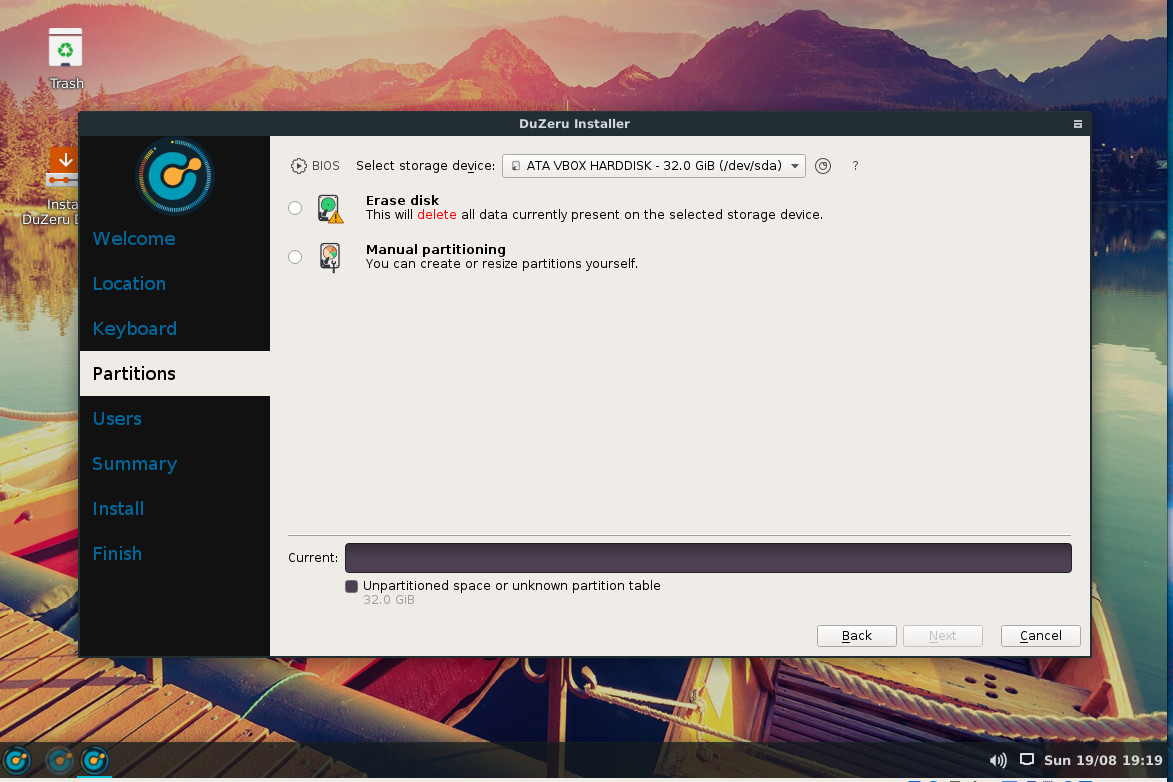
Partitions (Figure 1) — partition your device.
Users — create a user account.
Summary — view the installation summary and OK the install.
Install — view the installation as it occurs.
Finish — you’re done. Reboot.
Figure 1: The installation of DuZeru OS is quite user-friendly.
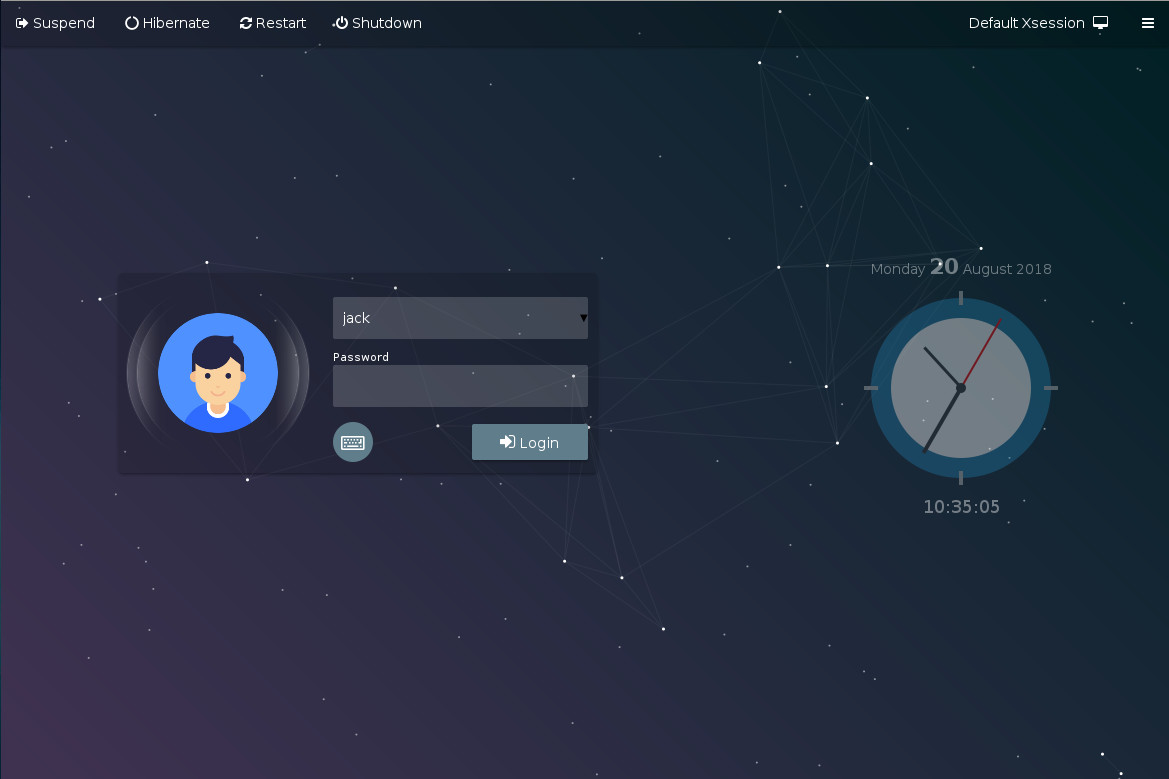
Once installed, reboot the machine and you’ll be greeted by the DuZeru OS login (Figure 2).
Figure 2: The DuZeru OS login screen.
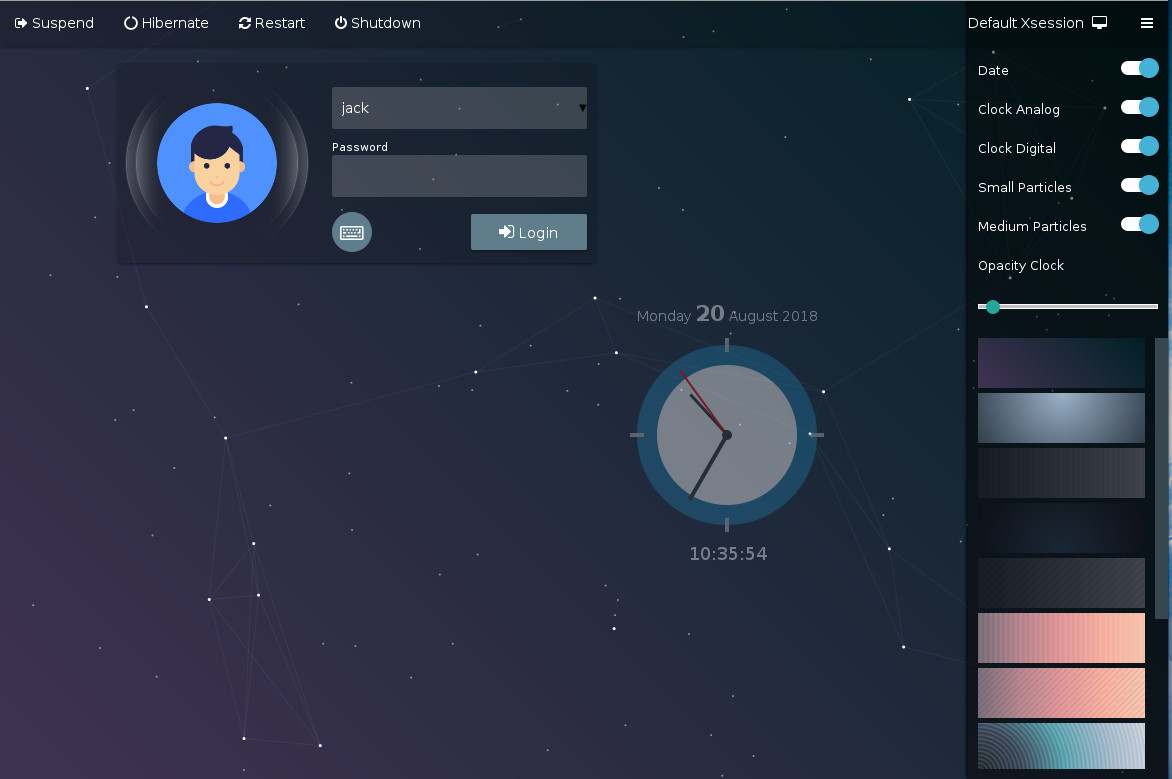
One really nice touch added to the login screen is the ability to configure it. Click on the menu button in the upper right corner to reveal a sidebar that allows you to set a few options for the login screen (Figure 3).
Figure 3: Configuring the DuZeru OS login screen.
The Desktop
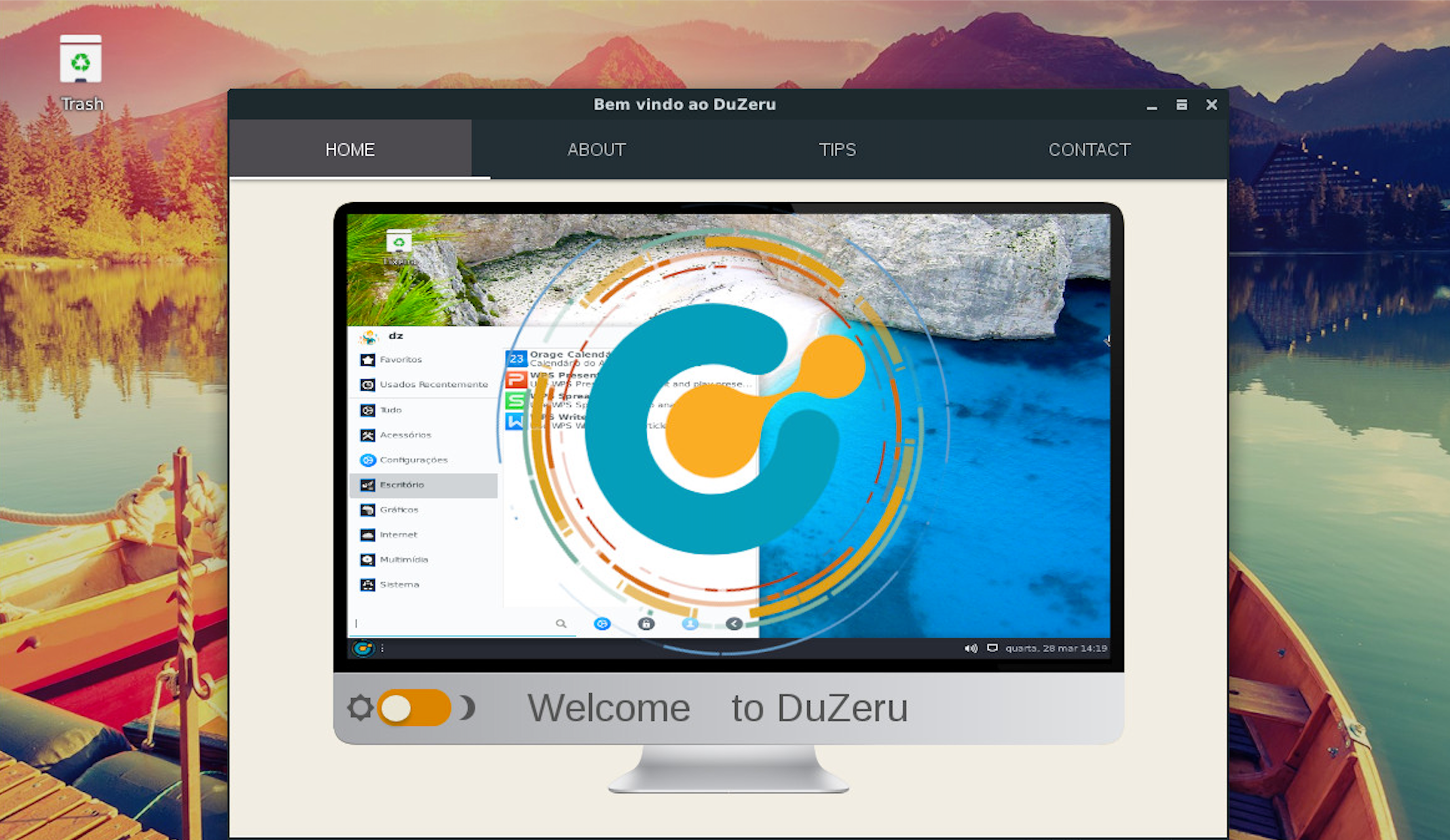
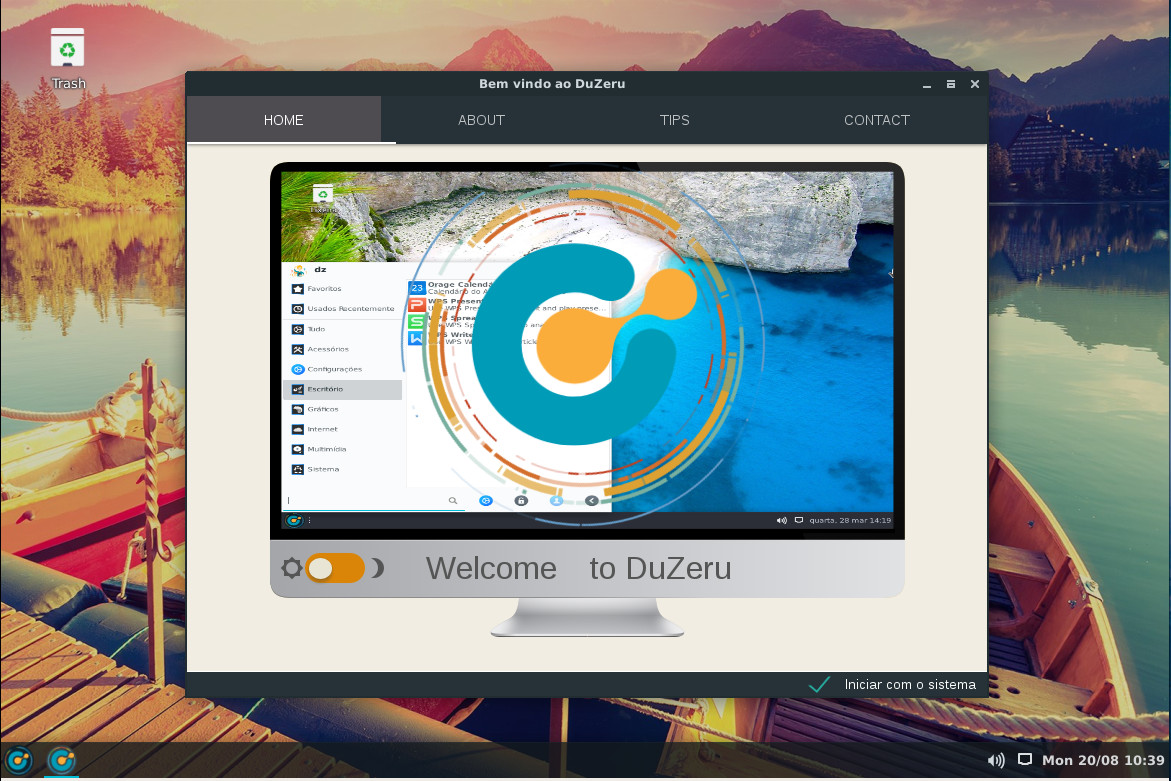
Once you login, you’ll be greeted by a window that includes three helpful tabs (Figure 4):
ABOUT — An introduction to DuZeru OS.
TIPS — A few handy tips regarding installation, kernel installation (more on this in a bit), customizing the appearance, system settings, and system information.
CONTACT — How to contact the developers.
Figure 4: The handy Welcome screen includes plenty of information to get you started.
Click on the desktop menu button and you’ll find a bare minimum of applications. In fact, your first reaction will probably be that DuZeru OS is seriously lacking in default apps. You’ll find:
Application finder
Archive Manager
Calculator
Document Viewer
DuZeru Kernel Installer
FIle Manager
GDebi Package Installer
Google Chrome
ImageMagick
Log Out
PulseAudio Volume Control
Ristretto Image Viewer
Run Program
Screenshot
Slingscold (GNOME Dash-like application launcher)
Software Manager
Stacer
System Monitor
Terminal
Text Editor
VLC media player
Welcome
And that’s it.
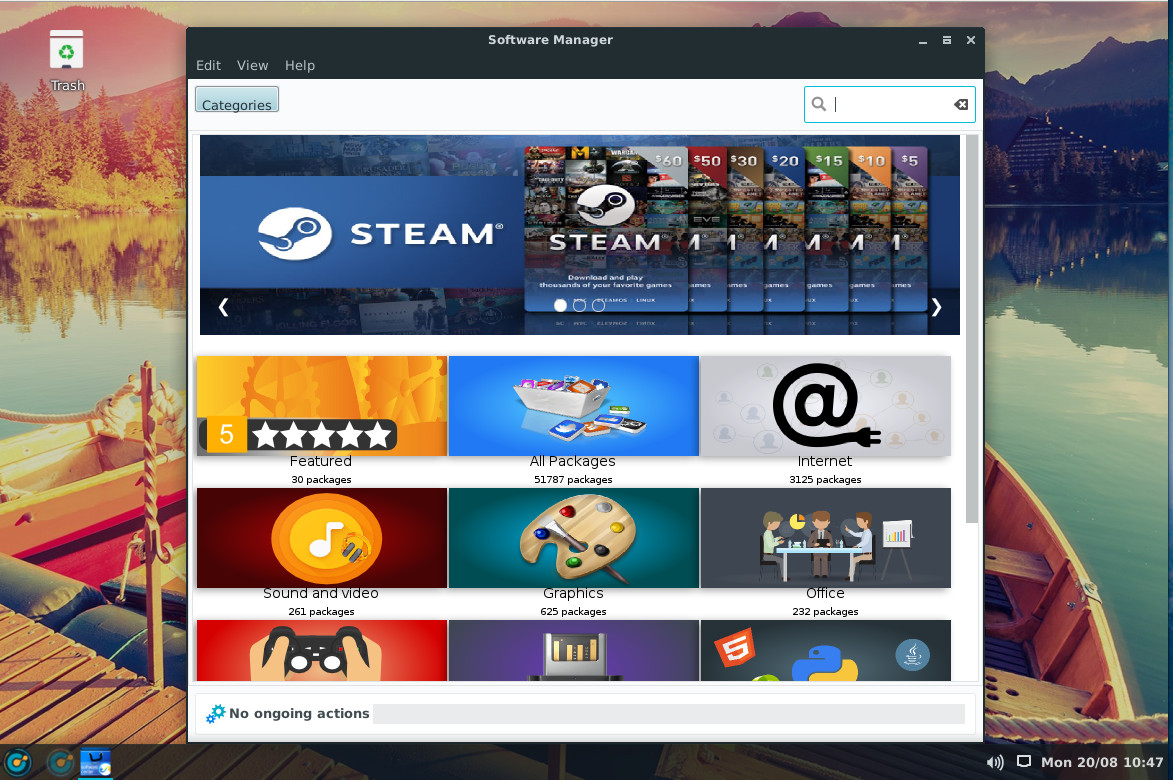
Fortunately, DuZeru OS includes a Software Manager that should be instantly familiar to anyone. Open the tool (Figure 5), search for the software you want, and install.
Figure 5: The DuZeru Software Manager is incredibly easy to use.
Kernel Installer
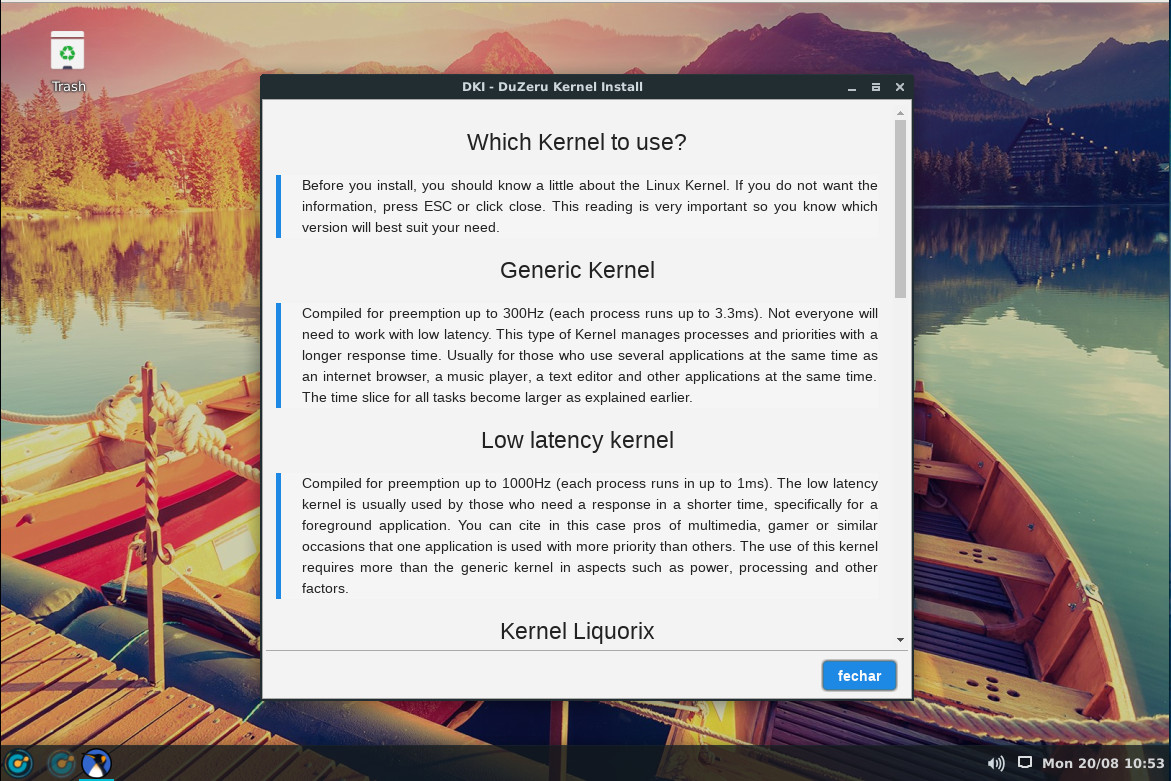
This is the one area where DuZeru OS ventures away from the average user. From the desktop menu, type kernel and then click on DuZeru Kernel Install. After typing your administrative password, you will be greeted with a window explaining the different types of kernels you can download and install (Figure 6).
Figure 6: The DuZeru Kernel Installer welcome screen.
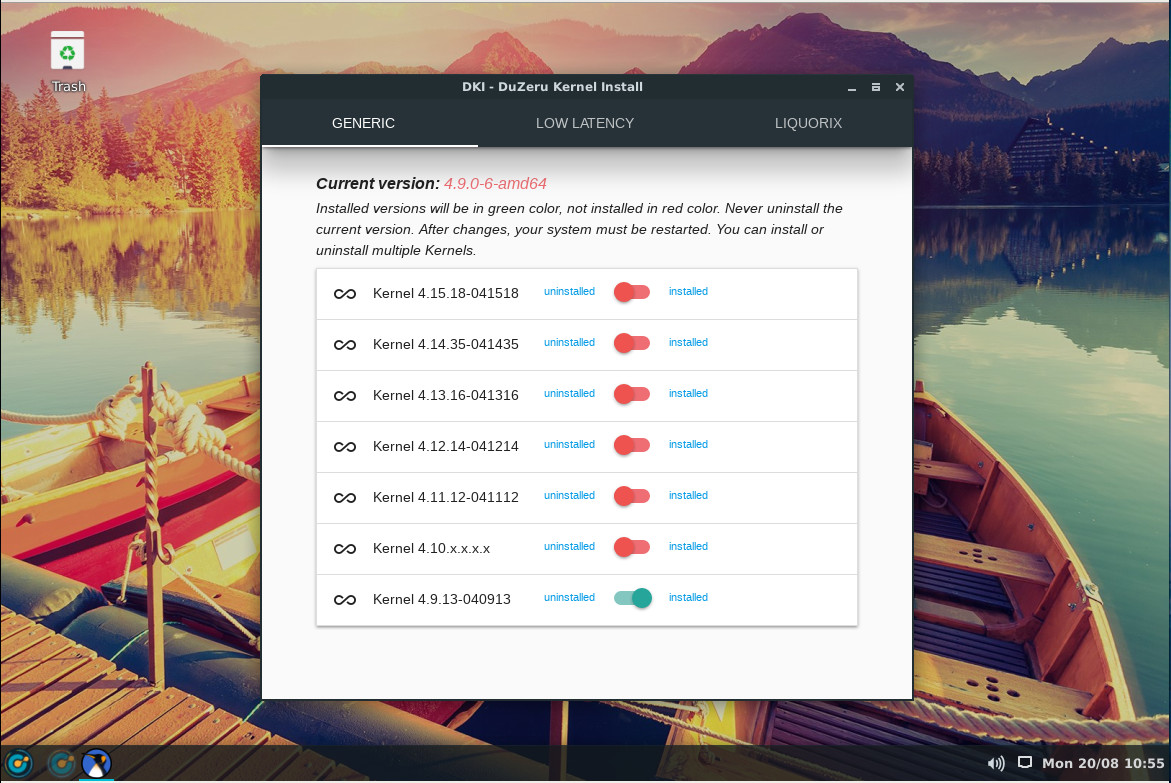
Click on the button in the bottom-right corner and you’ll see a new window (Figure 7), which allows you to select from the available kernel types (such as GENERIC and LOW LATENCY) and then install the version of that kernel type you want.
Figure 7: Installing a new kernel on DuZeru OS is quite easy.
Click the slider for the kernel you want, OK the installation, and wait for the installation to complete. When the process finishes, reboot and select the newly installed kernel.
Control Center
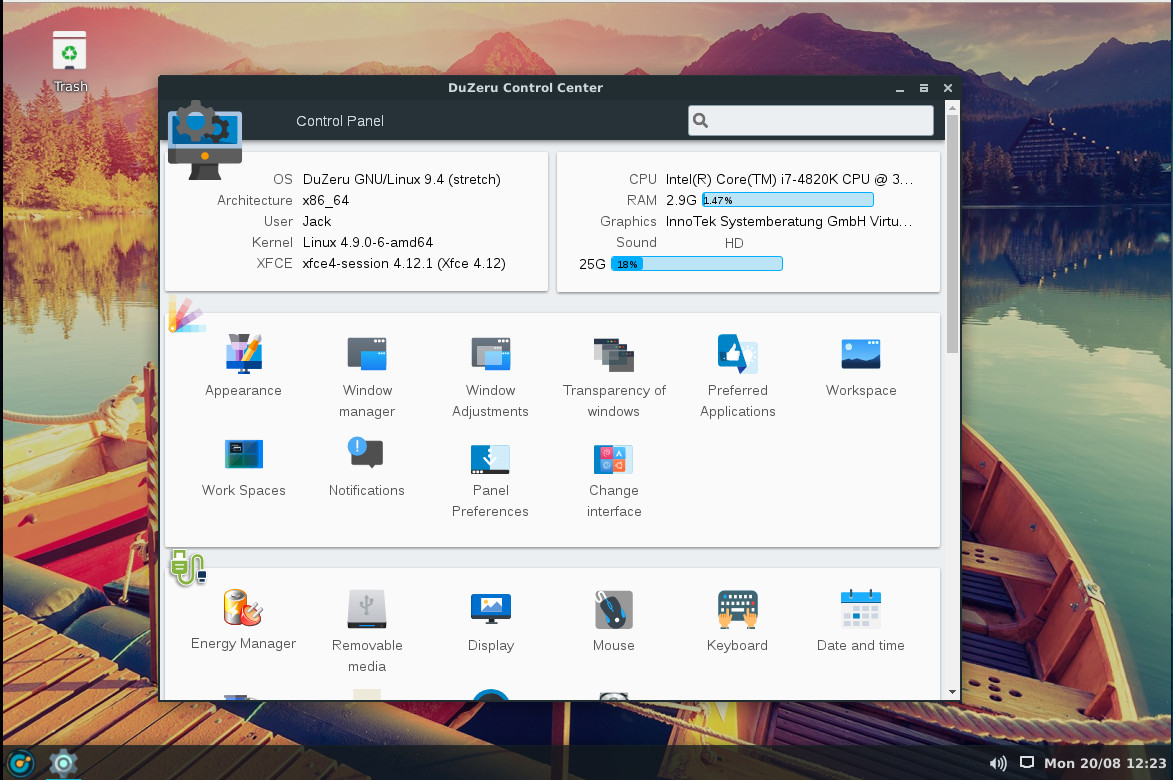
Open the desktop menu and click on the gear icon directly to the right of the search bar. This will open up the DuZeru Control Center, where you can configure every aspect of the operating system and even get a quick glance at system information (Figure 8).
Figure 8: The DuZeru Control Center.
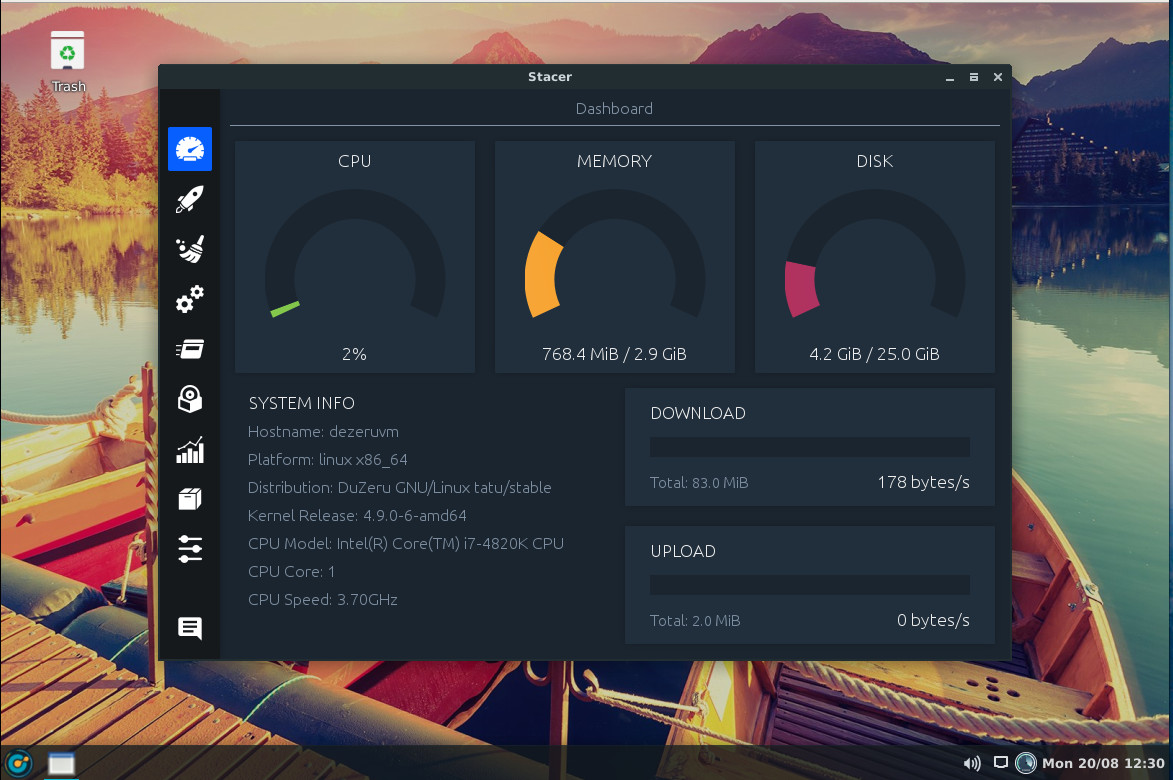
From both the desktop menu and the Control Center, you can start the Stacer application. Stacer is an amazing tool that allows you to optimize your system in numerous ways (which further expands the capability of the Control Center). Within Stacer (Figure 9), you can:
Get a glimpse of system information
Manage startup applications
Run a system cleaner
Configure/manage services
Manage processes
Uninstall packages
View system resource usage
Manage apt repositories
Configure Stacer
Figure 9: The Stacer system optimizer.
Solid and simple Linux
DuZeru isn’t going to blow your mind — it’s not that kind of distribution. What it does do is prove that simplicity on the desktop can go a long, long way to winning over new users. So if you’re looking for a solid and simple Linux distribution, that’s perfectly suited for new users, you should certainly consider this flavor of Linux.
Learn more about Linux through the free “Introduction to Linux” course from The Linux Foundation and edX.
Join 500+ CIOs, senior technologists, and IT decision makers at Open FinTech Forum to learn the best strategies for building internal open source programs and how to leverage cutting-edge open source technologies for the financial services industry, including AI, Blockchain, Kubernetes, Cloud Native and more, to drive efficiencies and flexibility.
Featured Sessions Include:
Build Intelligent Applications with Azure Cognitive Service and CNTK – Bhakthi Liyanage, Bank of America
Smart Money Bets on Open Source Adoption in AI/ML Fintech Applications – Laila Paszti, GTC Law Group P.C.
Adapting Kubernetes for Machine Learning Workflows – Ania Musial & Keith Laban, Bloomberg
Real-World Kubernetes Use Cases in Financial Services: Lessons learned from Capital One, BlackRock and Bloomberg – Jeffrey Odom, Capital One; Michael Francis, BlackRock; Kevin Fleming, Bloomberg; Paris Pittman, Google; and Ron Miller, TechCrunch
The ubiquitous topic of edge computing has so far primarily focused on IoT and machine learning. A new Linux Foundation project called Akraino Edge Stack intends to standardize similar concepts for use on edge telecom and networking systems in addition to IoT gateways. The goal to build an “open source software stack that supports high-availability cloud services optimized for edge computing systems and applications,” says the project.
“The Akraino Edge Stack project is focused on anything related to the edge, including both telco and enterprise use cases,” said Akraino evangelist Kandan Kathirvel, Director of Cloud Strategy & Architecture at AT&T, in an interview with Linux.com.
The project announced it has “moved from formation into execution,” and revealed a slate of new members including Arm, Dell, Juniper, and Qualcomm. New member Ericsson is joining AT&T Labs to host the first developer conference on Aug. 23-24.
Akraino Edge Stack was announced in February based on code contributions from AT&T for carrier-scale edge computing. In March, Intel announced it was joining the project and open sourcing parts of its Wind River Titanium Cloud and Network Edge Virtualization SDK for the emerging Akraino stack. Intel was joined by a dozen, mostly China-based members including China Mobile, China Telecom, China Unicom, Docker, Huawei, Tencent, and ZTE.
The Akraino Edge Stack project has now announced broader based support with new members Arm, Dell EMC, Ericsson, inwinSTACK, Juniper Networks, Nokia, Qualcomm, Radisys, Red Hat, and Wind River. The project says it has begun to develop “blueprints that will consist of validated hardware and software configurations against defined use case and performance specifications.” The initial blueprints and seed code will be opened to the public at the end of the week following the Akraino Edge Stack Developer Summit at AT&T Labs in Middletown, New Jersey.
The project announced a lightweight governance framework with a Technical Steering Committee (TSC), composed of “active committers within the community.” There is “no prerequisite of financial contribution,” says the project.
Edge computing meets edge networking
Like most edge computing projects and products, such as AWS Greengrass, the Linux Foundation’s EdgeX Foundry, and Google’s upcoming Cloud IoT Edge, the technology aims to bring cloud technologies and analytics to smaller-scale computers that sit closer to the edge of the network. The goal is to reduce the latency of cloud/device interactions, while also reducing costly bandwidth delivery and improving reliability via a distributed network.
Akraino will offer blueprints for IoT, but it is more focused more on bringing edge services to telecom and networking systems such as cellular base stations, smaller networking servers, customer premises equipment, and virtualized central offices (VCOs). The project will supply standardized blueprints for implementing virtual network functions (VNFs) in these systems for applications ranging from threat detection to augmented reality to specialized services required to interconnect cars and drones. Virtualization avoids the cost and complexity of integrating specialized hardware with edge networking systems.
“One key difference from other communities is that we offer blueprints,” said AT&T’s Kathirvel. “Blueprints are declarative configurations of everything including the hardware, software, operational and security tools, security tools — everything you need to run production in large scale.”
When asked for further clarification between Akraino’s stack and the EdgeX Foundry’s middleware for industrial IoT, Kathirvel said that EdgeX is more focused on the intricacies of IIoT gateway/sensor communications whereas Akraino has a broader focus and is more concerned with cloud connections.
“Akraino Edge Stack is not limited to IoT — we’re bringing everything together in respect to the edge,” said Kathirvel. “It’s complementary with EdgeX Foundry in that you could take EdgeX code and create a blueprint and maintain that within the Akraino Edge Stack as an end to end stack. In addition, the community is working on additional use cases to support different classes of edge hardware.”
Meeting new demands for sub-20ms latency
Initially, Akraino Edge Stack use cases will be “focused on provider deployment,” said Kathirvel, referring to telecom applications. These will include emerging, 5G-enabled applications such as “AR/VR and connected cars” in which sub 20 millisecond or lower latency is required. In addition, edge computing can reduce the extent to which network bandwidth must be boosted to accommodate demanding multimedia-rich and cloud-intensive end-user applications.
Akraino Edge Stack borrows virtualization and container technologies from open source networking projects such as OpenStack. The goal is to create a common API stack for deploying applications using VNFs running within containers. A VNF is a software-based implementation of the networked virtual machines implemented via closely related NFV (network functions virtualization) initiatives.
In a May 23 presentation (YouTube video) at the OpenStack Summit Vancouver, Kathirvel and fellow Akraino contributor Melissa Evers-Hood of Intel, listed several other projects and technologies that the stack will accommodate with blueprints, including Ceph (distributed cloud storage), Kata Containers, Kubernetes, and the Intel/Wind River backed StarlingX for open cloud infrastructure. Aside from EdgeX and OpenStack, other Linux Foundation hosted projects on the list include DANOS (Disaggregated Network Operating System) and the LF’s new Acumos AI project for developing a federated platform to manage and share models for AI and machine learning.
Akraino aligns closely with OpenStack edge computing initiatives, as well as the Linux Foundation’s ONAP(Open Network Automation Platform). ONAP, which was founded in Feb. 2017 from the merger of the earlier ECOMP and OPEN-O projects, is developing a framework for real-time, policy-driven software automation of VNFs.
Prometheus is a free and open source software ecosystem that allows us to collect metrics from our applications and stores them in a database, especially a time-series based DB. It is a very powerful monitoring system suitable for dynamic environments. Prometheus is written in Go and use query language for data processing. Prometheus provides metrics of CPU, memory, disk usage, I/O, network statistics, MySQL server and Nginx.
In this tutorial, we will explain how to install Prometheus on Ubuntu 18.04 server.
Requirements
A server running Ubuntu 18.04 LTS.
A non-root user with sudo privileges.
Install Prometheus
By default, Prometheus is not available in the Ubuntu 18.04 LTS (Bionic Beaver) default repository. So you will need to add the repository for that.
LF Networking (LFN), launched on January 1st of this year, has already made a significant impact in the open source networking ecosystem gaining over 100 members in the just the first 100 days. Critically, LFN has also continues to attract support and participation from many of the world’s top network operators, including six new members announced in May: KT, KDDI, SK Telecom, Sprint, Swisscom; and Deutsche Telekom announced just last month. In fact, member companies of LFN now represent more than 60% of the world’s mobile subscribers. Open source is becoming the de facto way to develop software and it’s the technical collaboration at the project level that makes it so powerful.
Similar to the demos in the LFN Booth at ONS North America, the LFN Booth at ONS Europe will once again showcase the top, community-led, technical demos from the LFN family of projects. We have increased the number of demo stations from 8 to 10, and for the first time, are showcasing demos from the big data analytics project PNDA, and demos that include the newly added LFN Project, Tungsten Fabric (formerly OpenContrail). Technology from founding LFN Projects FD.io, ONAP, OPNFV, and OpenDaylight will also be represented, along with adjacent projects like Acumos, Kubernetes, OpenCI, Open Compute Project, and OpenStack.
NFS clients and servers push file traffic over clear-text connections in the default configuration, which is incompatible with sensitive data. TLS can wrap this traffic, finally bringing protocol security. Before you use your cloud provider’s NFS tools, review all of your NFS usage and secure it where necessary.
The Network File System (NFS) is the most popular file-sharing protocol in UNIX. Decades old and predating Linux, the most modern v4 releases are easily firewalled and offer nearly everything required for seamless manipulation of remote files as if they were local.
The most obvious feature missing from NFSv4 is native, standalone encryption. Absent Kerberos, the protocol operates only in clear text, and this presents an unacceptable security risk in modern settings. NFS is hardly alone in this shortcoming, as I have already covered clear-text SMB in a previous article. Compared to SMB, NFS over stunnel offers better encryption (likely AES-GCM if used with a modern OpenSSL) on a wider array of OS versions, with no pressure in the protocol to purchase paid updates or newer OS releases.
This is the first of a series of articles intended to make Machine Learning more approachable to those who do not have a technical training. I hope it is helpful.
Advancements in computer technology over the past decades have meant that the collection of electronic data has become more commonplace in most fields of human endeavor. Many organizations now find themselves holding large amounts of data spanning many prior years. This data can relate to people, financial transactions, biological information, and much, much more.
Simultaneously, data scientists have been developing iterative computer programs called algorithms that can look at this large amount of data, analyse it and identify patterns and relationships that cannot be identified by humans. Analyzing past phenomena can provide extremely valuable information about what to expect in the future from the same, or closely related, phenomena. In this sense, these algorithms can learn from the past and use this learning to make valuable predictions about the future.
While learning from data is not in itself a new concept, Machine Learning differentiates itself from other methods of learning by a capacity to deal with a much greater quantity of data, and a capacity to handle data that has limited structure. This allows Machine Learning to be successfully utilized on a wide array of topics that had previously been considered too complex for other learning methods.
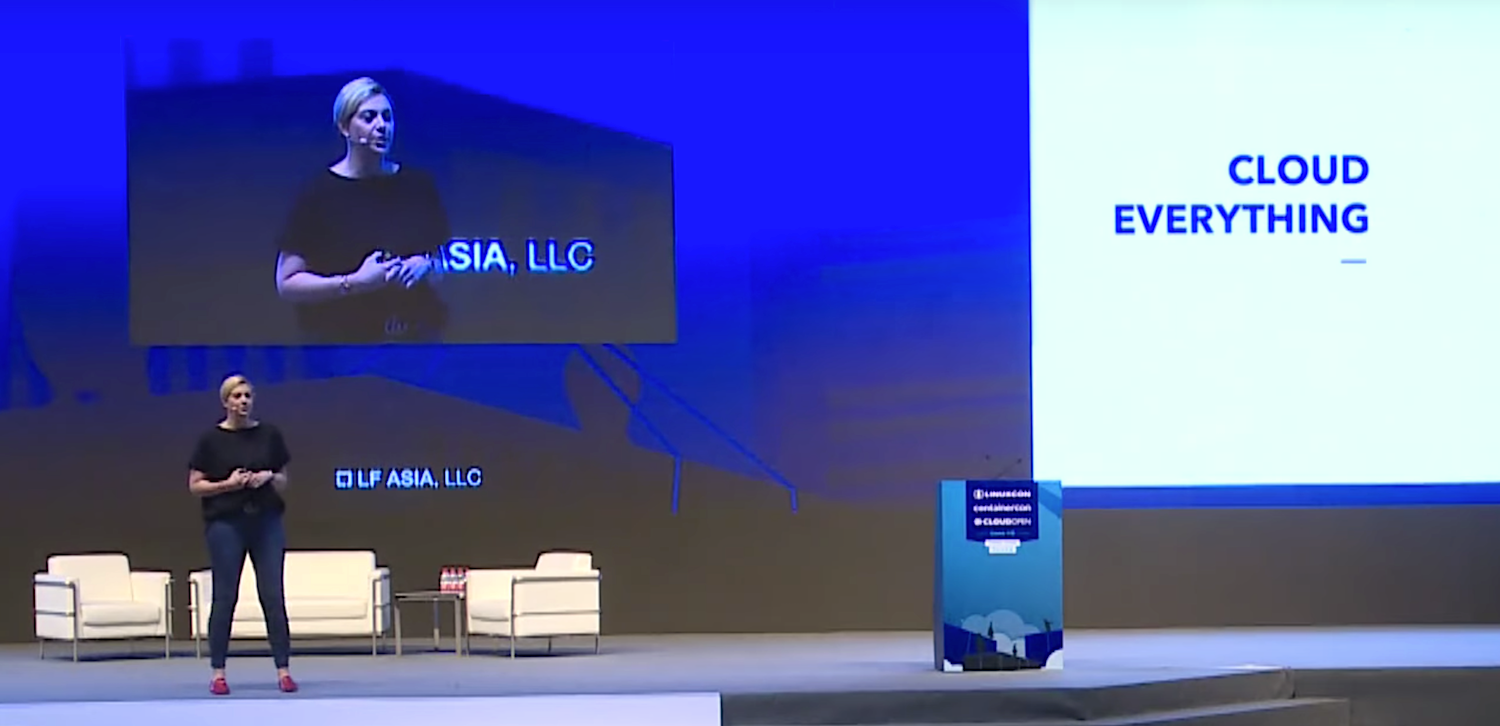
Cloud and open source are changing the world and can play an integral role in how companies transform themselves. That was the message from Abby Kearns, executive director of open source platform as a service provider Cloud Foundry Foundation, who delivered a keynote address earlier this summer at LinuxCon + ContainerCon + CloudOpen China, known as LC3.
“Cloud native technologies and cloud native applications are growing,’’ Kearns said. Over the next 18 months, there will be a 100 percent increase in the number of cloud native applications organizations are writing and using, she added. “This means you can no longer just invest in IT,” but need to in cloud and cloud technologies as well. …
To give the audience an idea of what the future will look like and where investments are being made in cloud and open source, Kearns cited a few examples. The automotive industry is changing rapidly, she said, and a Volkswagen automobile, for example, is no longer just a car; it has become a connected mobile device filled with sensors and data.
“Volkswagen realized they need to build out developer teams and applications that could take advantage of many clouds across 12 different brands,” she said. The car company has invested in Cloud Foundry and cloud native technologies to help them do that, she added.
“At the end of the day it’s about the applications that extend that car through mobile apps, supply chain management — all of that pulled together to bring a single concise experience for the automotive industry.”
Most Linux distributions are simply that: A distribution of Linux that offers a variation on an open source theme. You can download any of those distributions, install it, and use it. Simple. There’s very little mystery to using Linux these days, as the desktop is incredibly easy to use and server distributions are required in business.
But not every Linux distribution ends with that idea; some go one step further and create both a distribution and a platform. Such is the case with AryaLinux. What does that mean? Easy. AryaLinux doesn’t only offer an installable, open source operating system, they offer a platform with which users can build a complete GNU/Linux operating system. The provided scripts were created based on the instructions from Linux From Scratch and Beyond Linux From Scratch.
If you’ve ever attempted to build you own Linux distribution, you probably know how challenging it can be. AryaLinux has made that process quite a bit less stressful. In fact, although the build can take quite a lot of time (up to 48 hours), the process of building the AryaLinux platform is quite easy.
But don’t think that’s the only way you can have this distribution. You can download a live version of AryaLinux and install as easily as if you were working with Ubuntu, Linux Mint, or Elementary OS.
Let’s get AryaLinux up and running from the live distribution and then walk through the process of building the platform, using the special builder image.
The Live distribution
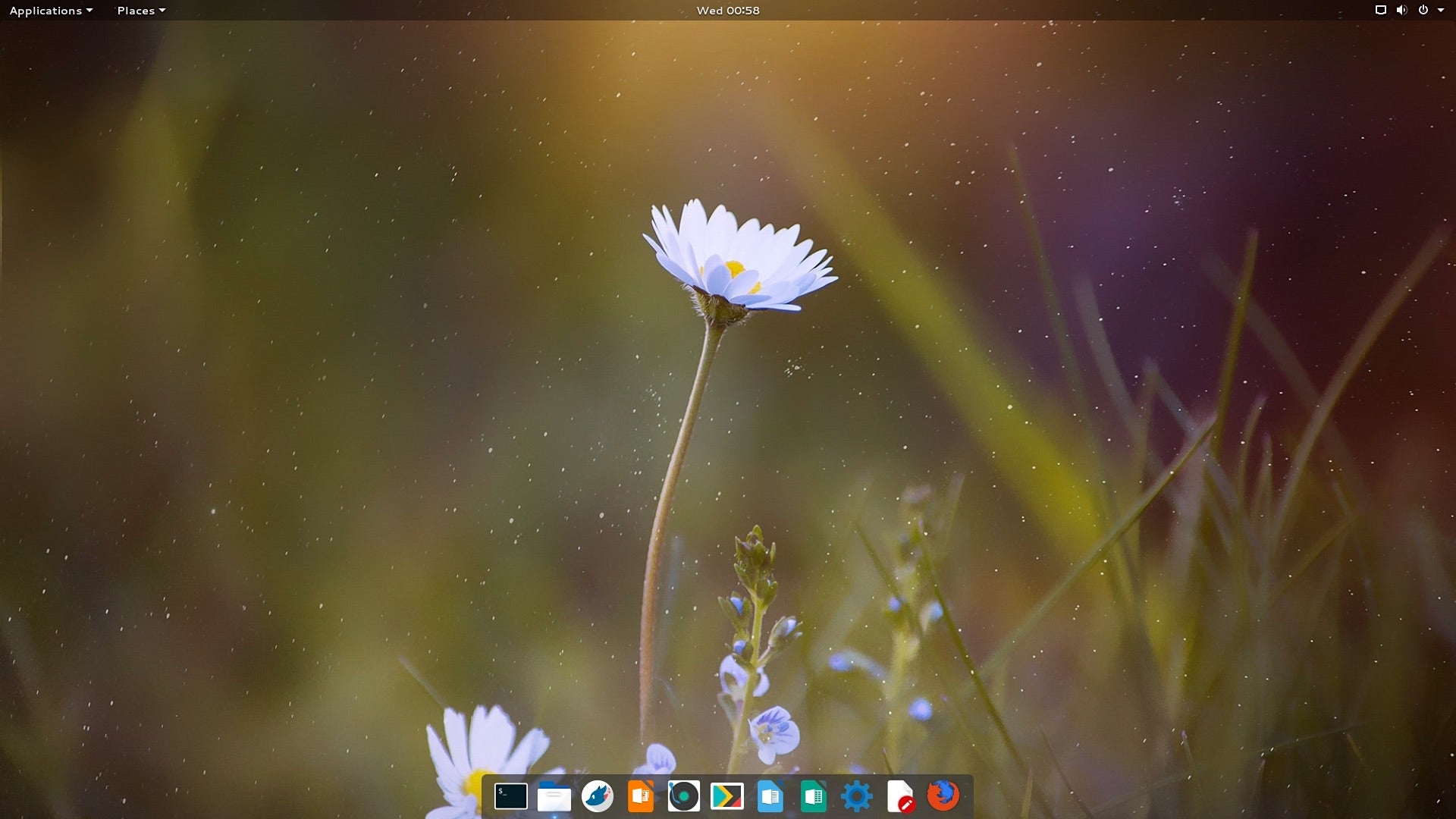
From the AryaLinux download page, you can get a version of the operating system that includes either GNOME or Xfce. I chose the GNOME route and found it to be configured to include Dash to dock and Applications menu extensions. Both of these will please most average GNOME users. Once you’ve downloaded the ISO image, burn it to either a DVD/CD or to a USB flash drive and boot up the live instance. Do note, you need to have at least 25GB of space on a drive to install AryaLinux. If you’re planning on testing this out as a virtual machine, create a 30-40 GB virtual drive, otherwise the installer will fail every time.
Once booted, you will be presented with a login screen, with the default user selected. Simply click the user and login (there is no password required).
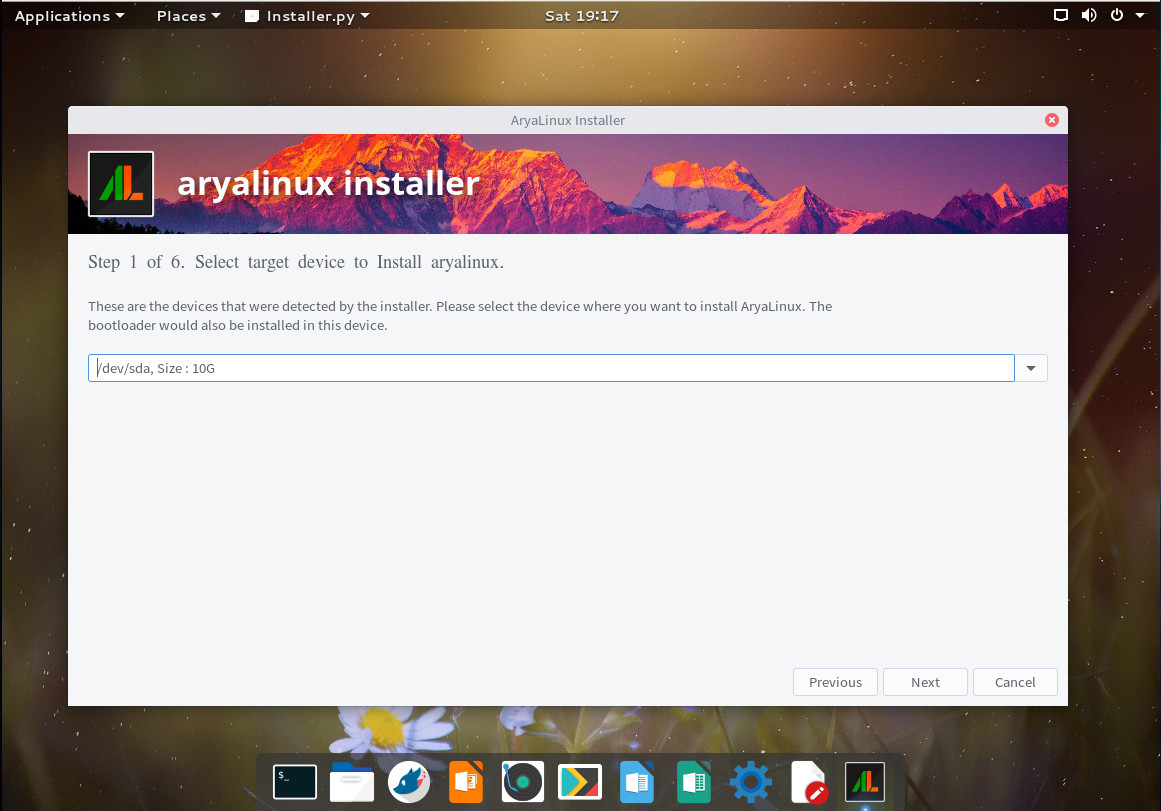
To locate the installer, click the Applications menu, click Activities Overview, type “installer” and click on the resulting entry. This will launch the AryaLinux installer … one that looks very familiar to many Linux installers (Figure 1).
Figure 1: The AryaLinux installer is quite easy to navigate.
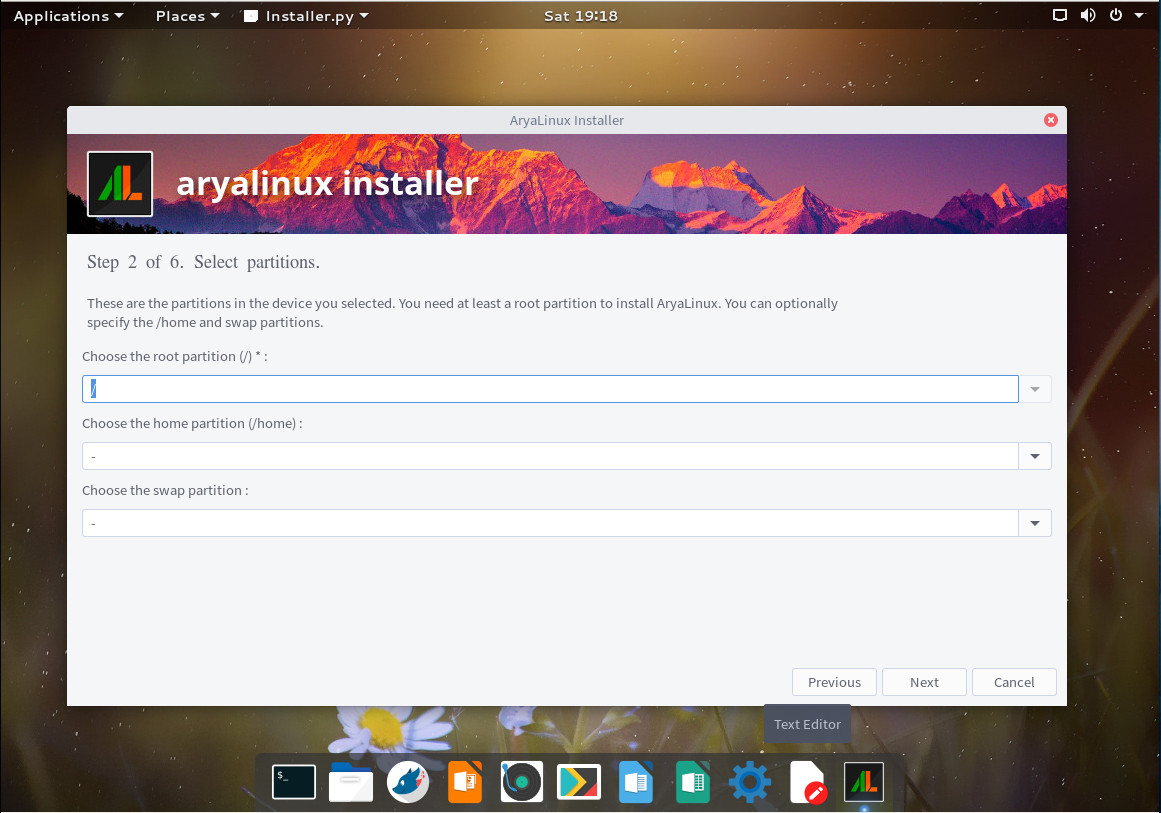
In the next window (Figure 2), you are required to define a root partition. To do this, type “/” (no quotes) in the Choose the root partition section.
Figure 2: Defining your root partition for the AryaLinux installation.
If you don’t define a home partition, it will be created for you. If you don’t define a swap partition, none will be created. If you have a need to create a home partition outside of the standard/home, do it here. The next installation windows have you do the following:
Create a standard user.
Create an administrative password.
Choose locale and keyboard.
Choose your timezone.
That’s all there is to the installation. Once it completes, reboot, remove the media (or delete the .iso from your Virtual Machine storage listing), and boot into your newly-installed AryaLinux operating system.
What’s there?
Out of the box, you should find everything necessary to use AryaLinux as a full-functioning desktop distribution. Included is:
LibreOffice
Rhythmbox
Files
GNOME Maps
GIMP
Simple Scan
Chromium
Transmission
Avahi SSH/VNC Server Browser
Qt5 Assistant/Designer/Linguist/QDbusViewer
Brasero
Cheese
Echomixer
VLC
Network Tools
GParted
dconf Editor
Disks
Disk Usage Analyzer
Document Viewer
And more
The caveats
It should be noted that this is the first official release of AryaLinux, so there will be issues. Right off the bat I realized that no matter what I tried, I could not get the terminal to open. Unfortunately, the terminal is a necessary tool for this distribution, as there is no GUI for updating or installing packages. In order to get to a bash prompt, I had to use a virtual screen. That’s when the next caveat came into play. The package manager for AryaLinux is alps, but its primary purpose is working in conjunction with the build scripts to install the platform. Unfortunately there is no included man page for alps on AryaLinux and the documentation is very scarce. Fortunately, the developers did think to roll in Flatpak support, so if you’re a fan of Flatpak, you can install anything you need (so long as it’s available as a flatpak package) using that system.
Building the platform
Let’s talk about building the AryaLinux platform. This isn’t much harder than installing the standard distribution, only it’s done via the command line. Here’s what you do:
Once you reach the desktop, open a terminal window from the menu.
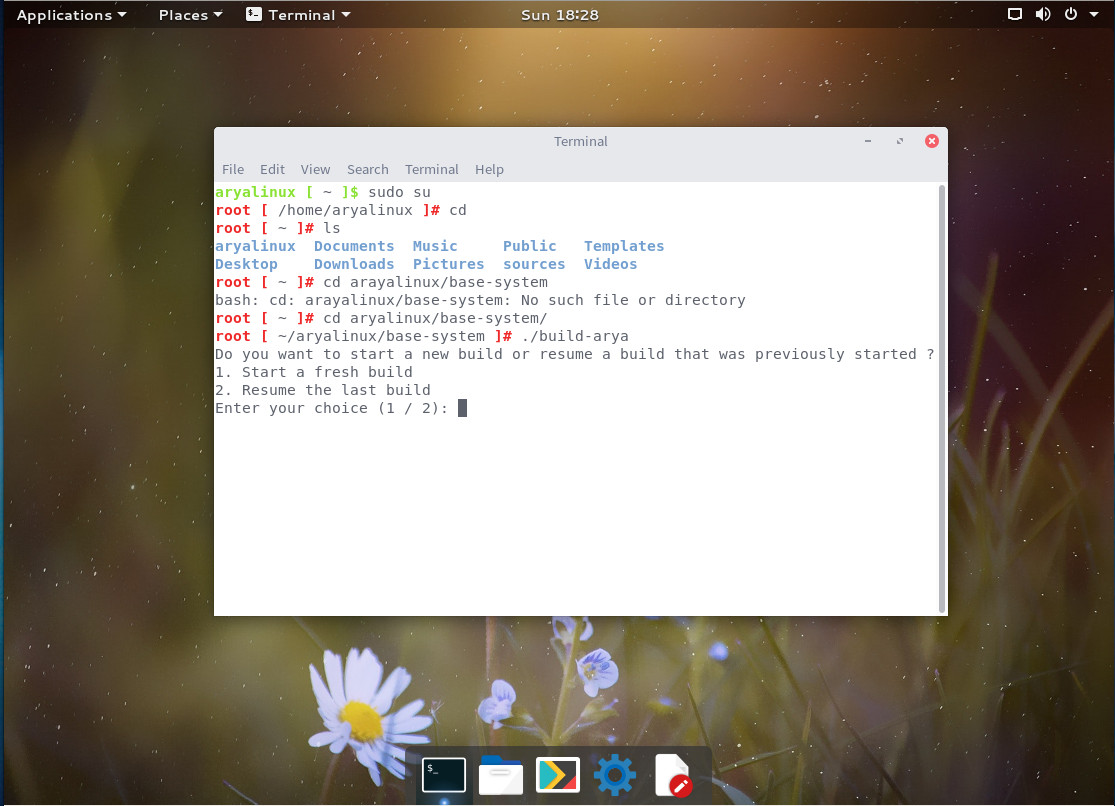
Change to the root user with the command sudo su.
Change directories with the command cd aryalinux/base-system
Run the build script with the command ./build-arya
You will first be asked if you want to start a fresh build or resume a build (Figure 3). Remember, the AryaLinux build takes a LOT of time, so there might be an instance where you’ve started a build and need to resume.
Figure 3: Running the AryaLinux build script.
To start a new build, type “1” and then hit Enter on your keyboard. You will now be asked to define a number of options (in order to fulfill the build script requirements). Those options are:
After you’ve completed the above, the build will start. Don’t bother watching it, as it will take a very long time to complete (depending upon your system and network connection). In fact, the build can take anywhere from 8-48 hours. After the build completes, reboot and log into your newly built AryaLinux platform.
Who is AryaLinux for?
I’ll be honest, if you’re just a standard desktop user, AryaLinux is not for you. Although you can certainly get right to work on the desktop, if you need anything outside of the default applications, you might find it a bit too much trouble to bother with. If, on the other hand, you’re a developer, AryaLinux might be a great platform for you. Or, if you just want to see what it’s like to build a Linux distribution from scratch, AryaLinux is a pretty easy route.
Even with its quirks, AryaLinux holds a lot of promise as both a Linux distribution and platform. If the developers can see to it to build a GUI front-end for the alps package manager, AryaLinux could make some serious noise.
Learn more about Linux through the free “Introduction to Linux” course from The Linux Foundation and edX.