

Home Blog Page 371

How and Why to Secure Your Linux System with VPN and Firejail

We have previously discussed VPNs and Firejail here on Linux.com, but here’s a quick refresher to help you remember why you would want to use these tools:

  • VPNs help protect your Internet traffic from prying eyes — such as those of your ISP, the wi-fi provider you happen to be using, or any malicious attackers who may be in control of various pieces of routing equipment between you and the resource you are trying to access. VPNs may also enable you to gain access to online content that is for some reason unavailable via your current online provider.

  • Firejail is a tool that helps set up additional sandboxing around your desktop applications to help further reduce the impact of accessing potentially malicious content online. It is most commonly used in conjunction with Firefox.

I am very fond of combining both VPN and Firejail on my travel laptop (where I cannot use QubesOS), but I have recently discovered that I was leaving myself exposed to online tracking via so-called “WebRTC leaks.” My VPN provider offers a convenient testing page to see how well protected my connection is, and they very helpfully alerted me to this problem:
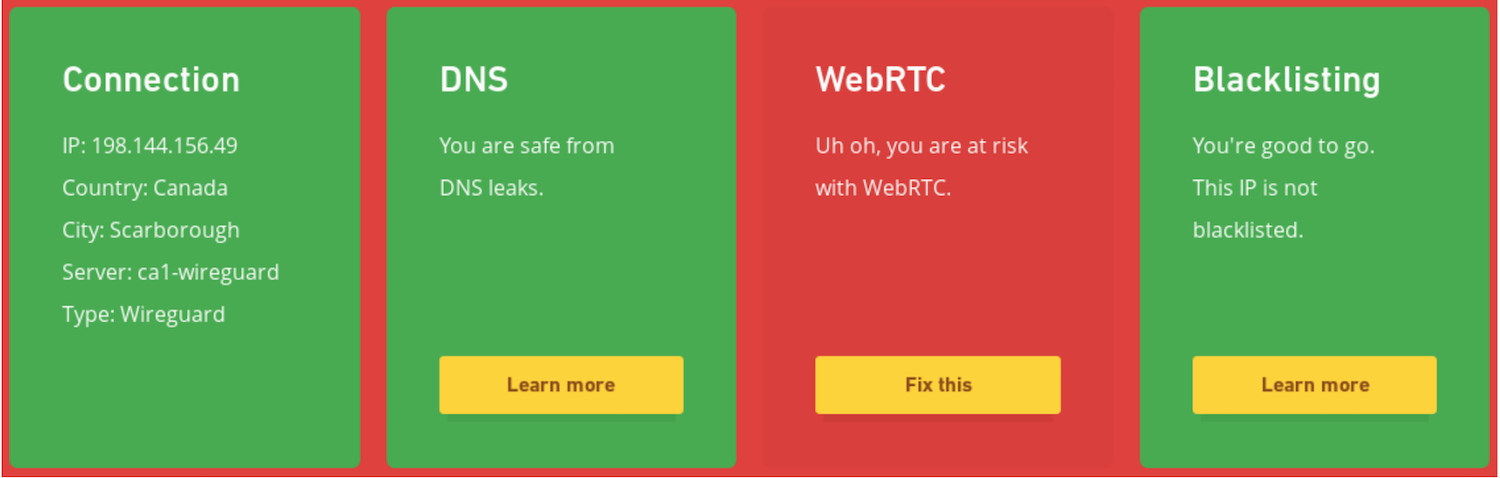
WebRTC is an open-source protocol that allows establishing peer-to-peer Real-Time Communication (RTC) via two browsers. It is normally used for native audio and video conferencing that does not require any additional plug-ins or extensions, and works across different browsers and different platforms. If you’ve ever used Google Hangouts, you’ve relied on WebRTC.

What makes WebRTC leak your real IP address? As part of establishing the communication channel, both parties exchange their networking information in order to find the network route that offers the least amount of latency. So, WebRTC will tell the remote party all of your local IP addresses, in hopes that it will help establish a better communication channel. Obviously, if exposing your local IP address is specifically something you do not want, then this is a problem.

One way to plug this leak is to turn off WebRTC entirely. However, if you do this, then you will no longer be able to use online conferencing — and depending on your needs, this may not be what you want. Thankfully, if you’re already using Firejail, then you can benefit from its support for network namespaces in order to hide your local networking information from WebRTC.

Setting up network namespaces manually is a bit of a chore, since in addition to the virtual interface, you will need to set up things like IP forwarding and DNS resolving (this script may help get you going, if you are interested). However, if you are using Fedora, then you should already have something you can use for this purpose: a virbr0 virtual bridge that is automatically available after the default workstation install.

Here’s what happens when you start Firefox inside a firejail and tell it to use virbr0 for its networking:

$ firejail --net=virbr0 firefox -no-remote

Interface     MAC             IP                         Mask                 Status
 
lo                                   127.0.0.1             255.0.0.0          UP  

eth0          x:x:x:x:x:x    192.168.124.38   255.255.255.0  UP    

Default gateway 192.168.124.1

Firejail automatically obtains a private IP address inside the virtual networking range and sets up all the necessary routing information to be able to get online. And indeed, if I now look on my VPN provider’s verification page, they give me a clean bill of health:
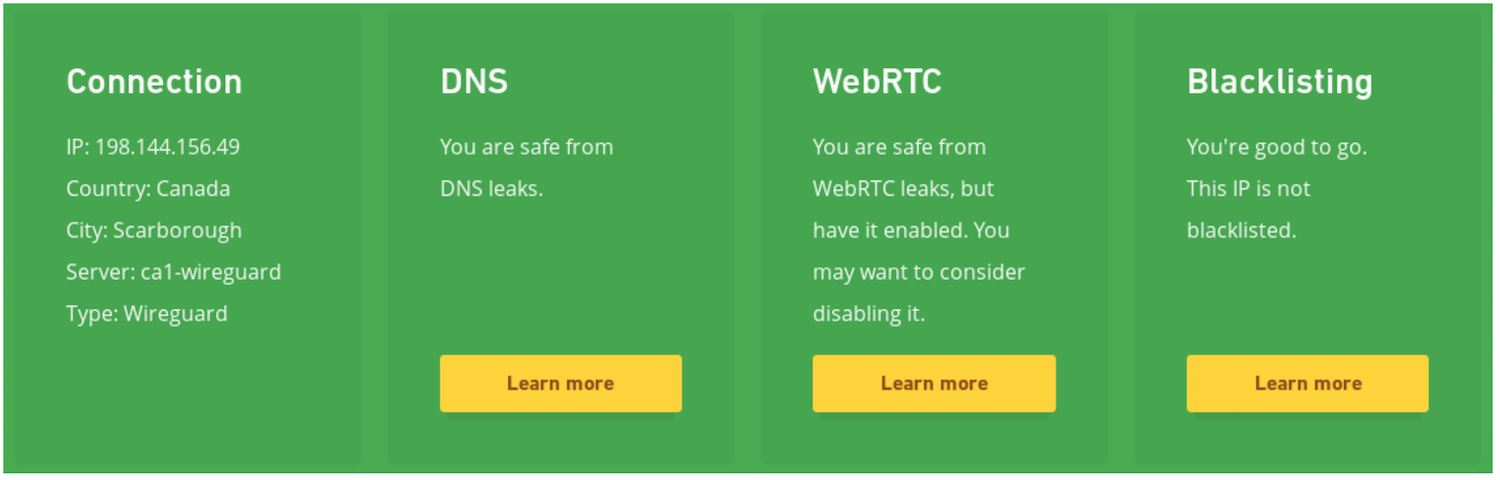
I ended up writing a small wrapper that helps me bring up Firefox in various profiles — one I use for work, one I use for personal browsing, and one I bring up when I want a temporary junk profile for testing (a kind of “incognito mode” on steroids).

You can test if you are vulnerable to WebRTC leaks yourself on the browserleaks site. If there is anything showing up in the “Local IP Address” field, then you are potentially leaking your IP information online to people who can use it against you. Hopefully, you are now well-protected against this leak — but also against others that may use similar mechanisms of passing your local networking information to a remote adversary.


Kubernetes and Microservices: A Developers’ Movement to Make the Web Faster, Stable, and More Open

As web development has evolved, there has been a tendency to develop “monolithic” applications — that is, software that contains most or all parts of the code for a given company or service. Over time, those code bases have grown to massive sizes and become hugely complex, which has led to a wide array of problems.

Developing and maintaining such applications can take an enormous number of developers. Even for companies that have made the necessary investments and hired those developers, making any changes or updates can be cumbersome and take weeks. For others, the resources needed to build the technology can seem like an insurmountable challenge.

“Software has gotten a lot more complex,” said Ben Sigelman, cofounder and CEO of LightStep, a San Francisco-based startup that makes performance management tools for microservices. “It’s gotten a lot more powerful, but it crossed a threshold where the complexity of the code to deliver those features requires hundreds and hundreds of developers….”

Read more at VentureBeat

Tutorial: Git for Absolutely Everyone

Imagine you have a brand new project. Naturally, you plan to store all related files in a single new directory. As work progresses, these files will change. A lot. Things will get disorganized, even messy, and at some point even completely fubar. At that point, you would want to go back in time to the most recent not-messy, still-working version of your project — if only that were possible!

Well, thanks to git, it is. Version control happens when you install git on your computer. Git is built to create that new project directory, and to keep track of all the changes you make to any and all files you put in that directory. As things progress and you make additions and changes, git takes a “snapshot” of the current version. And that, friends, is version control: make a small change, take a snapshot, make another small change, take a snapshot…And save all of these snapshots in chronological order. You can then use git to step back and forth as necessary through each version of your project directory.

So when you screw up, git is like having this magic ability to go back in time to the last good version before you gaffed. Thus, version control. git is not the only version control systems out there, but it is probably the most widely used.

Read more at The New Stack

Docker for Desktop is Certified Kubernetes

“You are now Certified Kubernetes.” With this comment, Docker for Windows and Docker for Mac passed the Kubernetes conformance tests. Kubernetes has been available in Docker for Mac and Docker for Windows since January, having first being announced at DockerCon EU last year. But why is this important to the many of you who are using Docker for Windows and Docker for Mac?

Kubernetes is designed to be a platform that others can build upon. As with any similar project, the risk is that different distributions vary enough that applications aren’t really portable. The Kubernetes project has always been aware of that risk – and this led directly to forming the Conformance Working Group. The group owns a test suite that anyone distributing Kubernetes can run, and submit the results for to attain official certification. This test suite checks that Kubernetes behaves like, well, Kubernetes; that the various APIs are exposed correctly and that applications built using the core APIs will run successfully. In fact, our enterprise container platform, Docker Enterprise Edition, achieved certification using the same test suite  You can find more about the test suite at https://github.com/cncf/k8s-conformance.

Read more at Docker

Did You Know Linux Is in Your TV?

From humble beginnings, Linux has been adopted for everything from low-power electronics to supercomputers running in space. It is able to do this because of its versatility and the openness of the Linux community to entertain new use-cases. The multiplier effect of community software development allows companies and individuals in different industries to work together on the same software and do the things that are important to them.

Let’s look deeper into four interesting places you’ll find Linux.

In your TV

If you have a SmartTV, BluRay player, or set-top box from your internet provider, chances are you are streaming your home entertainment over Linux. Linux has become a leading embedded OS for SmartTVs.

Read more at OpenSource.com

In-Vehicle Computers Run Linux on Apollo Lake

Lanner’s Linux-friendly V3 Series of Apollo Lake based in-vehicle computers includes V3G and V3S models with -40 to 70°C and MIL-STD-810G ruggedization. The V3S adds a third mini-PCIe slot and 4x PoE-ready GbE ports for IP cameras.


Lanner has launched the first two models in a rugged new V3 Series of “vehicle gateway controllers.” The V3G is designed for smart bus implementation, including fleet management and passenger information display, while the similar, but more feature rich V3S is intended for video surveillance, recording, and analytics.

Both the V3G and V3S are equipped with quad-core, 1.6GHz Atom x7-E3950 SoC from Intel’s Apollo Lake generation. They run Red Hat Enterprise Linux (RHEL) 5 and Fedora 14, with Linux Kernel 2.6.18 or later, as well as Windows 10.

Read more at LinuxGizmos

Systemd Services: Beyond Starting and Stopping

In the previous article, we showed how to create a systemd service that you can run as a regular user to start and stop your game server. As it stands, however, your service is still not much better than running the server directly. Let’s jazz it up a bit by having it send out emails to the players, alerting them when the server becomes available and warning them when it is about to be turned off:

# minetest.service

[Unit] 
Description= Minetest server 
Documentation= https://wiki.minetest.net/Main_Page 

[Service] 
Type= simple 

ExecStart= /usr/games/minetest --server
ExecStartPost= /home/<username>/bin/mtsendmail.sh "Ready to rumble?" "Minetest Starting up" 

TimeoutStopSec= 180 
ExecStop= /home/<username>/bin/mtsendmail.sh "Off to bed. Nightie night!" "
         Minetest Stopping in 2 minutes" 
ExecStop= /bin/sleep 120 
ExecStop= /bin/kill -2 $MAINPID

There are a few new things in here. First, there’s the ExecStartPost directive. You can use this directive for anything you want to run right after the main application starts. In this case, you run a custom script, mtsendmail (see below), that sends an email to your friends telling them that the server is up.

#!/bin/bash 
# mtsendmail
echo $1 | mutt -F /home/<username>/.muttrc -s "$2" my_minetest@mailing_list.com 

You can use Mutt, a command-line email client, to shoot off your messages. Although the script shown above is to all practical effects only one line long, remember you can’t have a line with pipes and redirections as a systemd unit argument, so you have to wrap it in a script.

For the record, there is also an ExecStartPre directive for things you want to execute before starting the service proper.

Next up, you have a block of commands that close down the server. The TimeoutStopSec directive pushes up the time before systemd bails on shutting down the service. The default time out value is round about 90 seconds. Anything longer, and systemd will force the service to close down and report a failure. But, as you want to give your users a couple of minutes before closing the server completely, you are going to push the default up to three minutes. This will stop systemd from thinking the closedown has failed.

Then the close down proper starts. Although there is no ExecStopPre as such, you can simulate running stuff before closing down your server by using more than one ExecStop directive. They will be executed in order, from topmost to bottommost, and will allow you to send out a message before the server is actually stopped.

With that in mind, the first thing you do is shoot off an email to your friends, warning them the server is going down. Then you wait two minutes. Finally you close down the server. Minetest likes to be closed down with [Ctrl] + [c], which translates into an interrupt signal (SIGINT). That is what you do when you issue the kill -2 $MAINPID command. $MAINPID is a systemd variable for your service that points to the PID of the main application.

This is much better! Now, when you run

systemctl --user start minetest

The service will start up the Minetest server and send out an email to your users. Likewise when you are about to close down, but giving two minutes to users to log off.

Starting at Boot

The next step is to make your service available as soon as the machine boots up, and close down when you switch it off at night.

Start be moving your service out to where the system services live, The directory youa re looking for is /etc/systemd/system/:

sudo mv /home/<username>/.config/systemd/user/minetest.service /etc/systemd/system/

If you were to try and run the service now, it would have to be with superuser privileges:

sudo systemctl start minetest

But, what’s more, if you check your service’s status with

sudo systemctl status minetest

You would see it had failed miserably. This is because systemd does not have any context, no links to worlds, textures, configuration files, or details of the specific user running the service. You can solve this problem by adding the User directive to your unit:

# minetest.service

[Unit] 
Description= Minetest server 
Documentation= https://wiki.minetest.net/Main_Page 

[Service] 
Type= simple 
User= <username> 

ExecStart= /usr/games/minetest --server
ExecStartPost= /home/<username>/bin/mtsendmail.sh "Ready to rumble?" 
        "Minetest Starting up" 

TimeoutStopSec= 180 
ExecStop= /home/<username>/bin/mtsendmail.sh "Off to bed. Nightie night!" 
        "Minetest Stopping in 2 minutes" 
ExecStop= /bin/sleep 120 
ExecStop= /bin/kill -2 $MAINPID 

The User directive tells systemd which user’s environment it should use to correctly run the service. You could use root, but that would probably be a security hazard. You could also use your personal user and that would be a bit better, but what many administrators do is create a specific user for each service, effectively isolating the service from the rest of the system and users.

The next step is to make your service start when you boot up and stop when you power down your computer. To do that you need to enable your service, but, before you can do that, you have to tell systemd where to install it.

In systemd parlance, installing means telling systemd when in the boot sequence should your service become activated. For example the cups.service, the service for the Common UNIX Printing System, will have to be brought up after the network framework is activated, but before any other printing services are enabled. Likewise, the minetest.service uses a user’s email (among other things) and will have to be slotted in when the network is up and services for regular users become available.

You do all that by adding a new section and directive to your unit:

...
[Install]
WantedBy= multi-user.target

You can read this as “wait until we have everything ready for a multiples user system.” Targets in systemd are like the old run levels and can be used to put your machine into one state or another, or, like here, to tell your service to wait until a certain state has been reached.

Your final minetest.service file will look like this:

# minetest.service
[Unit] 
Description= Minetest server 
Documentation= https://wiki.minetest.net/Main_Page 

[Service] 
Type= simple 
User= <username> 

ExecStart= /usr/games/minetest --server
ExecStartPost= /home/<username>/bin/mtsendmail.sh "Ready to rumble?" 
         "Minetest Starting up" 

TimeoutStopSec= 180 
ExecStop= /home/<username>/bin/mtsendmail.sh "Off to bed. Nightie night!" 
        "Minetest Stopping in 2 minutes" 
ExecStop= /bin/sleep 120 
ExecStop= /bin/kill -2 $MAINPID 

[Install] 
WantedBy= multi-user.target

Before trying it out, you may have to do some adjustments to your email script:

#!/bin/bash 
# mtsendmail

sleep 20 
echo $1 | mutt -F /home/<username>/.muttrc -s "$2" my_minetest@mailing_list.com
sleep 10

This is because the system will need some time to set up the emailing system (so you wait 20 seconds) and also some time to actually send the email (so you wait 10 seconds). Notice that these are the wait times that worked for me. You may have to adjust these for your own system.

And you’re done! Run:

sudo systemctl enable minetest

and the Minetest service will come online when you power up and gracefully shut down when you power off, warning your users in the process.

Conclusion

The fact that Debian, Ubuntu, and distros of the same family have a special package called minetest-server that does some of the above for you (but no messaging!) should not deter you from setting up your own customised services. In fact, the version you set up here is much more versatile and does more than Debian’s default server.

Furthermore, the process described here will allow you to set up most simple servers as services, whether they are for games, web applications, or whatever. And those are the first steps towards veritable systemd guruhood.

Vint Cerf on Open Networking and Design of the Internet

The secret behind Internet protocol is that it has no idea what it’s carrying – it just a bag of bits going from point A to point B. So said Vint Cerf, vice president and chief internet evangelist at Google, speaking at the recent Open Networking Summit.

Cerf, who is generally acknowledged as a “Father of the Internet” said that one of the objectives of this project, which was turned on in 1983, was to explore the implications of open networking, including “open source, open standards and the process for which the standards were developed, open protocol architectures, which allowed for new protocols to be invented and inserted into this layered architecture.” This was important, he said, because people who wanted to do new things with the network were not constrained to its original design but could add functionality.

Open Access

When he and Bob Kahn (co-creator for the TCP/IP protocol) were doing the original design, Cerf said, they hoped that this approach would lead to a kind of organic growth of the Internet, which is exactly what has been seen.  

They also envisioned another kind of openness, that of open access to the resources of the network, where people were free both to access information or services and to inject their own information into the system. Cerf said they hoped that, by lowering the barriers to access this technology, they would open the floodgates for the sharing of content, and, again, that is exactly what happened.

There is, however, a side effect of reducing these barriers, which, Cerf said, we are living through today, which includes the proliferation of fake news, malware, and other malicious content. It has also created a set of interesting socioeconomic problems, one of which is dealing with content in a way that allows you decide which content to accept and which to reject, Cerf said. “This practice is called critical thinking, and we don’t do enough of it. It’s hard work, and it’s the price we pay for the open environment that we have collectively created.”

Read more and watch Vint Cerf’s complete presetation at The Linux Foundation

New Keynotes & Executive Leadership Track Announced for LinuxCon + ContainerCon + CloudOpen China

Attend LC3 in Beijing, June 25 – 27, 2018, and hear from Chinese and international open source experts from Accenture, China Mobile, Constellation Research, Huawei, IBM, Intel, OFO, Xturing Biotechnology and more.

中国论坛推出新的主题演讲和执行领导力会议 | 立即注册


New Keynote Speakers:

  • Peixin Hou, Chief Architect of Open Software and Systems in the Central Software InstituteHuawei
  • Sven Loberg, Managing Director within Accenture’s Emerging Technology practice with responsibility for Open Source and Software Innovation
  • Evan Xiao, Vice President, Strategy & Industry DevelopmentHuawei
  • Cloud Native Computing Panel Discussion featuring panelists from Alibaba, Huawei, IBM, Microsoft and Tencent, and hosted by Dan Kohn, Executive DirectorCloud Native Computing Foundation

Read more at The Linux Foundation

How the Kubernetes Release Team Works

As a community project, Kubernetes also has a community process for how releases are managed and delivered.

At the KubeCon and CloudNativeCon Europe 2018 event, Jaice Singer DuMars, OSS Governance Program Manager, and Caleb Miles, technical program manager at Google, outlined the core process and activities of the Kubernetes Release Special Interest Group (SIG).

“Fundamentally and philosophically, a release is representative of a critical bond between a project and its community,” DuMars said. “At the heart of that is really a covenant of trust and on the release team, or anything to do with releasing, you are actually holder of that trust.”

Given the growing importance of Kubernetes, DuMars said it wouldn’t be a good idea to put out a release that breaks production installations all over the world. 

“Our SIG is committed to constantly improving the release process from all perspectives,” DuMars said.
 

Read more at ServerWatch