Want to join the 27 million open-source programmers who develop on GitHub? Here’s how to get your start.
The most popular open-source development site in the world is GitHub. It’s used by tens of millions of developers to work on over 80 million projects.
It’s not just a site where people use Linus Torvalds’ Git open-source distributed version control system. It’s also an online home for collaboration, a sandbox for testing, a launchpad for deployment, and a platform for learning new skills. The GitHub Training Team has now released an app, GitHub Learning Lab, so you can join the programming party.
GitHub Learning Lab is not a tutorial or webcast. It’s an app that gives you a hands-on learning experience within GitHub.
OPA is a general-purpose policy engine that let’s you offload decisions from your service. To do so, OPA needs to have access to policies and data that it can use to make decisions.
Prior to v0.8, OPA only exposed low-level HTTP APIs that let you push policy and data into the engine. With v0.8, we’re excited to provide new management features in OPA which make it easier to distribute policies (and data) as well as monitor the health of your agents.
Bundle API
To simplify distribution of policy and data, you can now configure OPA to download “bundles” from remote HTTP endpoints. Bundles are simply gzipped tarballs containing Rego and JSON files. When you configure the Bundle feature, OPA will periodically call out to the remote HTTP and GET the named bundle:
Most enterprises still have monolithic applications, but many are exploring the use of microservices. The monoliths are accessible via APIs and monitored by the traditional application performance management (APM) tools, with deep dives provided by Splunk and other log investigation tools. With microservices — usually, run on platforms such as Kubernetes or Cloud Foundry — monitoring is usually done through tools such as Prometheus (scalable monitoring) and Open Tracing (transactional logging). Typically, the microservices monitoring tools and the traditional ones do not play well together, necessitating two sets of tools that must be maintained for monitoring.
Adding to this architectural complexity is that many organizations are also exploring the realm of serverless, which is mostly cloud-driven at this point through services like AWS Lambda or Google Cloud Functions. These, too, have their own sets of monitoring tools, such as AWS X-Ray.
Solo’s approach is to treat any of these distinct styles of computing as a single entity, that of the function, so they then can be monitored and managed with a single system. To realize this vision, the company built a function gateway, which is like an API gateway but for functions.
The punchline: Microsoft just unveiled a mostly open source, embedded Arm SoC design with a custom Linux kernel.
The correct response?
1. Ha! Ha! Ha! Ha! You’re killing me!
2. Good one, dude, but April 1st was weeks ago.
3. Hallelujah! Linux and open source have finally beaten the evil empire. Can Apple be next?
4. We’re doomed! After Redmond gets its greedy hands on it, Linux will never be the same.
5. Smart strategic move — let’s see if they can manage not to screw it up like they did with Windows RT.
Microsoft’s Azure Sphere announcement was surprising on many levels. This crossover Cortex-A/Cortex-M SoC architecture for IoT offers silicon-level security, as well as an Azure Sphere OS based on a secure custom Linux kernel. There’s also a turnkey cloud service for secure device-to-device and device-to-cloud communication.
Azure Sphere is notable for being Microsoft’s first major Arm-based hardware since its failed Windows RT-based Surface tablets. It’s also one of its biggest hardware plays since the Xbox, which contributed some of its silicon security technology to Azure Sphere.
Azure Sphere is not only Microsoft’s first Linux-based product, but also one of the most open source. Precise details await the release of the first Azure Sphere products later this year, but Microsoft stated is offering “royalty-free” licensing of its “silicon security technologies” to silicon partners. These include MediaTek, NXP, Nordic, Qualcomm, Silicon Labs, ST Micro, Toshiba, and Arm, which collaborated with Microsoft on the technology. Microsoft is not likely to build its own SoCs, but it has set itself up as an IP intermediary between Arm and the SoC vendors.
Considering how tightly the Azure Sphere architecture is intertwined with the silicon and OS security, the media has interpreted Microsoft’s licensing verbiage as indicating an essentially open source design. Because the technology is based on Arm IP, it’s not as open source as RISC-V technology, but it would likely be more open than most processors.
“Microsoft is putting Azure Sphere up against Amazon FreeRTOS, so I assume it will be pretty permissive open source licensing,” said Roy Murdock, an analyst at VDC Research Group’s IoT & Embedded Technology unit. “Microsoft has finally realized it doesn’t make sense to alienate potential embedded engineers. It realizes it can get more from licensing Azure cloud services than from OS revenues. It’s a smart move.”
Under Satya Nadella’s leadership, Microsoft has further experimented with open source technologies while offering a friendlier face toward the Linux community, especially in regard to Azure. Microsoft is a regular contributor to the Linux kernel and a member of the Linux Foundation. The bad old days of Steve Ballmer deriding Linux while warning about its threat to the tech industry seem long gone. Still, these have all been baby steps compared to Azure Sphere.
Azure Sphere is not an MCU
Despite all the surprises, Azure Sphere is not quite as revolutionary as Microsoft suggests. Its billed as a major new cross-over microcontroller platform, but it’s really more like an application processor than an MCU.
“It’s not accurate to call it an MCU just because it has Cortex-M cores,” noted VDC’s Murdock. “It’s more like an SoC. But if you’re competing with Amazon FreeRTOS, it’s smart marketing.”
Based on the specs listed by the first Azure Sphere SoC — the MediaTek MT3620 — which is due to ship in products by the end of the year, this is a relatively normal Cortex-A7 based SoC with dual Cortex-M4 MCUs backed up by exceptional end-to-end security. NXP has been making similar, hybrid Cortex-A/Cortex-M SoCs for years, including its Cortex-A7 based i.MX7 and -A53-based i.MX8. Others such as Renesas and Marvell have also paired the low-power, Linux-oriented Cortex-A7 with Cortex-M MCUs on various SoCs.
Microsoft hints that other SoC vendors may choose different combinations of Cortex-A and -M chips. One interesting choice for IoT is a single-core implementation of Cortex-A53, such as used by NXP’s LS1012A SoC. Other possibilities may be found in the low-power Cortex-A35.
Security blanket
What makes Azure Sphere potentially attractive to chipmakers beyond the royalty-free licensing and Microsoft’s robust market presence is the multi-layered security, which is desperately needed at the vulnerable IoT edge. In addition to providing a 500MHz Cortex-A7 core and dual Cortex-M4F MCUs for real-time processing, the flagship MT3620 SoC has a third Cortex-M4F core that handles secure boot and system operation within an isolated subsystem. There’s also a separate Andes N9 RISC core supports an isolated WiFi subsystem.
The Linux-based Azure Sphere OS features a Microsoft Pluton Security Subsystem that works closely with the hardware security subsystem. It “creates a hardware root of trust, stores private keys, and executes complex cryptographic operations,” says Microsoft. Underlying the kernel layer is a security monitor layer and at the top is a container layer for application-level security.
The third major security component lies in the cloud. The Azure Sphere Security Service is a cloud-based turnkey platform that brokers trust for device-to-device and device-to-cloud links via certificate-based authentication. The service detects “emerging security threats across the entire Azure Sphere ecosystem through online failure reporting, and renewing security through software updates,” says Microsoft.
Microsoft would love you to connect Azure Sphere Security Service with Azure Cloud and its Azure IoT Suite. To its credit, however, it is also supporting other major cloud services like Amazon AWS and Google Cloud. In this way, it may be more open than Amazon AWS IoT ecosystem with the related, Linux-oriented AWS Greengrass platform for edge devices, which also offers end-to-end security. Amazon FreeRTOS, which was announced in December along with a major investment in the open source FreeRTOS project, expands upon FreeRTOS with libraries that add AWS and AWS Greengrass support for secure cloud-based or local processing and connectivity.
VDC’s Murdock speculates that most Azure Sphere customers will stick with Azure. “We can definitely expect tight integration between Azure Sphere and Azure IoT Suite,” he said. “Microsoft will offer developers a one-click option to turn their data telemetry over to Azure and get security updates. You will be able to connect to other cloud platforms, but it will be complicated. Microsoft is relying on security as a hook, which is smart.”
Microsoft’s goal is not only to push more customers to Azure, but also to harvest the vast amount of information available from millions of edge devices. “Azure Sphere will let Microsoft look at more interesting data and do predictive maintenance,” said Murdock.
Unlike AWS and most other IoT ecosystems that trumpet end-to-end security, Azure Sphere has the benefit of embedding the security at the chip level in addition to OS and cloud. Of course, this is also a limitation because you need a compliant chip to benefit from the security umbrella. This may be one reason Samsung’s Artik platform , which in October was expanded with more security-enhanced Secure Artik models, has yet to set the world on fire.
Indeed, Artik may be the closest analogue to Azure Sphere in that security is baked into a variety of Artik modules and their dedicated Arm chips, and the same security framework also extends to the Artik Cloud. Samsung doesn’t use hybrid SoCs, but it offers a variety of Linux-ready Cortex-A modules and Cortex-M based MCU modules that are intended to work together.
Why not Windows Embedded or IoT Core?
Shortly before the Azure Sphere announcement, VDC Research released an insightful brief called A Call to Revisit Windows Embedded. The report recommended reinvigorating, opening up, and perhaps fully open sourcing, the neglected, but still widely used Windows Embedded platform. In this way it could both establish a foothold in IoT and compete with Amazon FreeRTOS, which VDC sees as a potentially huge play in the MCU world.
Microsoft has instead focused on Windows 10 IoT Core, which competes with Linux on higher powered Arm SoCs and Intel Atom processors. Yet even this minimalist Windows variant is not able to squeeze onto low-end IoT node devices with limited memory and power where Linux and Windows Embedded are still viable.
Presumably, Microsoft decided it would take too much time and effort to update Windows Mobile, especially when IoT developers would prefer to work with Linux anyway. Microsoft can still make money by selling Windows Embedded to legacy customers while advancing into the future with Linux.
Another approach would have been to mimic Amazon and fully embrace the RTOS and MCU world below that level. Like FreeRTOS, a new breed of open source RTOSes such as Arm Mbed and the Intel-backed Zephyr, are offering more Linux-like features for improving, wireless connected Cortex-M and -R SoCs. Yet perhaps Microsoft envisioned that as endpoint IoT devices offer more Internet connectivity, multimedia, and AI processing, low-end Cortex-A cores will be increasingly essential. That road leads to Linux.
Despite Microsoft’s embrace of Linux, Microsoft Chief Legal Officer Brad Smith couldn’t resist a backhanded compliment during the announcement. He chose to use the example of a toy from among the many potential targets for Azure Sphere, ranging from industrial gear to consumer appliances to smart city infrastructure.
“Of course, we are a Windows company, but what we’ve recognized is the best solution for a computer of this size in a toy is not a full-blown version of Windows,” said Smith at the Azure Sphere announcement, as quoted by Redmond. “It is what we are creating here. It is a custom Linux kernel, complemented by the kinds of advances that we have created in Windows itself.”
Join us at Open Source Summit + Embedded Linux Conference Europe in Edinburgh, UK on October 22-24, 2018, for 100+ sessions on Linux, Cloud, Containers, AI, Community, and more. Sign up below for the latest event news:
After months of development effort, Kubernetes is now fully supported in the stable release of the Docker Enterprise Edition.
Docker Inc. officially announced Docker EE 2.0 on April 17, adding features that have been in development in the Docker Community Edition (CE) as well as enhanced enterprise grade capabilities. Docker first announced its intention to support Kubernetes in October 2017. With Docker EE 2.0, Docker is providing a secured configuration of Kubernetes for container orchestration.
“Docker EE 2.0 brings the promise of choice,” Docker Chief Operating Officer Scott Johnston told eWEEK. “We have been investing heavily in security in the last few years, and you’ll see that in our Kubernetes integration as well.”
Docker EE 2 provides support for Docker’s own Swarm container orchestration system as well. Among the key security features in Swarm is the concept of mutually authenticated TLS (Transport Layer Security),…
Let’s talk about some of the internals of git and how it stores and tracks objects within the .git directory.
If you’re unaware of what the .git directory is, it’s simply a space that git uses to store your repositories data, the directory is created when you run git init. Information such as binary objects and plain text files for commits and commit data, remote server information and information about branch locations are stored within.
The key concept throughout this entire article is very simple – pretty much every operation you do in git creates objects with a bunch of metadata which point to some more objects with a bunch of metadata and so on so for forth. That’s pretty much it.
The first round of keynotes for Automotive Linux Summit & Open Source Summit Japan have been announced. Join us June 20 – 22, 2018 in Tokyo to hear from these speakers and more:
Brian Behlendorf, Executive Director, Hyperledger
Dan Cauchy, Executive Director, Automotive Grade Linux
Seiji Goto, Manager of IVI Advanced Development, Mazda Motor Corporation
Can you do math on the Linux command line? You sure can! In fact, there are quite a few commands that can make the process easy and some you might even find interesting. Let’s look at some very useful commands and syntax for command line math.
expr
First and probably the most obvious and commonly used command for performing mathematical calculations on the command line is the expr (expression) command. It can manage addition, subtraction, division, and multiplication. It can also be used to compare numbers. Here are some examples:
Back in 1996 I learned how to install software on my spanking new Linux before really understanding the topography of the filesystem. This turned out to be a problem, not so much for programs, because they would just magically work even though I hadn’t a clue of where the actual executable files landed. The problem was the documentation.
You see, back then, Linux was not the intuitive, user-friendly system it is today. You had to read a lot. You had to know things about the frequency rate of your CRT monitor and the ins and outs of your noisy dial-up modem, among hundreds of other things. I soon realized I would need to spend some time getting a handle on how the directories were organized and what all their exotic names like /etc (not for miscellaneous files), /usr (not for user files), and /bin(not a trash can) meant.
This tutorial will help you get up to speed faster than I did.
Structure
It makes sense to explore the Linux filesystem from a terminal window, not because the author is a grumpy old man and resents new kids and their pretty graphical tools — although there is some truth to that — but because a terminal, despite being text-only, has better tools to show the map of Linux’s directory tree.
In fact, that is the name of the first tool you’ll install to help you on the way: tree. If you are using Ubuntu or Debian, you can do:
sudo apt install tree
On Red Hat or Fedora, do:
sudo dnf install tree
For SUSE/openSUSE use zypper:
sudo zypper install tree
For Arch-like distros (Manjaro, Antergos, etc.) use:
sudo pacman -S tree
… and so on.
Once installed, stay in your terminal window and run tree like this:
tree /
The / in the instruction above refers to the root directory. The root directory is the one from which all other directories branch off from. When you run tree and tell it to start with /, you will see the whole directory tree, all directories and all the subdirectories in the whole system, with all their files, fly by.
If you have been using your system for some time, this may take a while, because, even if you haven’t generated many files yourself, a Linux system and its apps are always logging, cacheing, and storing temporal files. The number of entries in the file system can grow quite quickly.
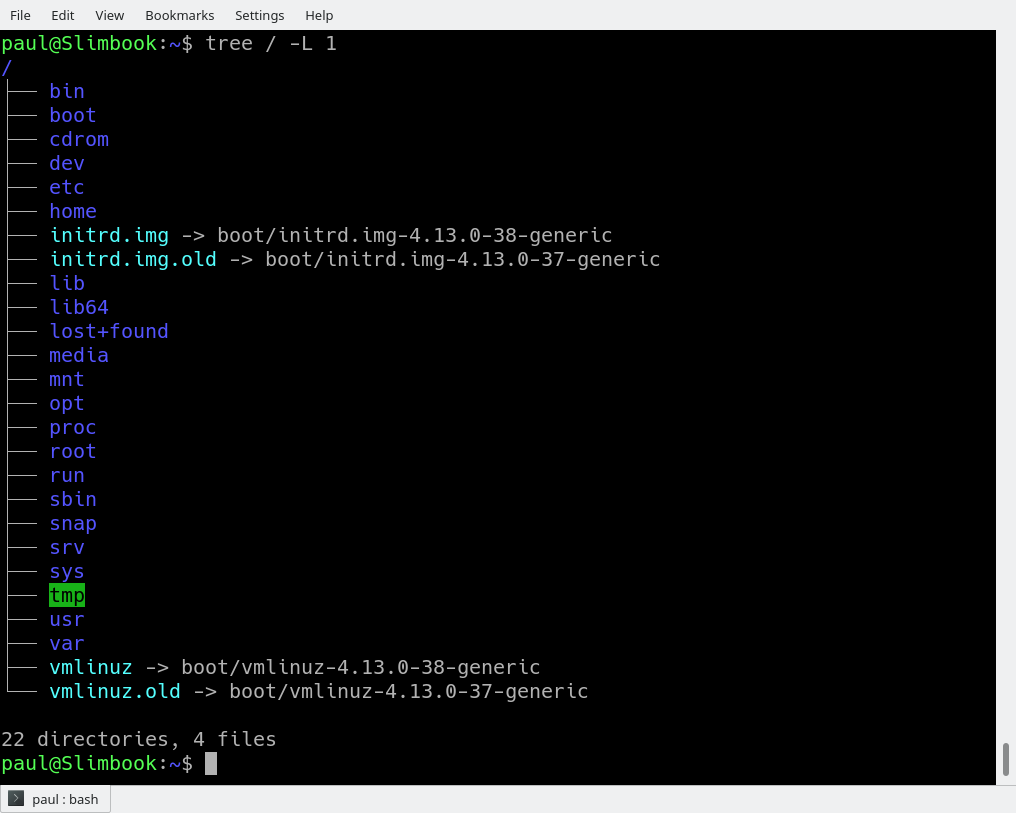
The instruction above can be translated as “show me only the 1st Level of the directory tree starting at / (root)“. The -Loption tells tree how many levels down you want to see.
Most Linux distributions will show you the same or a very similar layout to what you can see in the image above. This means that even if you feel confused now, master this, and you will have a handle on most, if not all, Linux installations in the whole wide world.
To get you started on the road to mastery, let’s look at what each directory is used for. While we go through each, you can peek at their contents using ls.
Directories
From top to bottom, the directories you are seeing are as follows.
/bin
/bin is the directory that contains binaries, that is, some of the applications and programs you can run. You will find the ls program mentioned above in this directory, as well as other basic tools for making and removing files and directories, moving them around, and so on. There are more bin directories in other parts of the file system tree, but we’ll be talking about those in a minute.
/boot
The /boot directory contains files required for starting your system. Do I have to say this? Okay, I’ll say it: DO NOT TOUCH!. If you mess up one of the files in here, you may not be able to run your Linux and it is a pain to repair. On the other hand, don’t worry too much about destroying your system by accident: you have to have superuser privileges to do that.
/dev
/dev contains device files. Many of these are generated at boot time or even on the fly. For example, if you plug in a new webcam or a USB pendrive into your machine, a new device entry will automagically pop up here.
/etc
/etc is the directory where names start to get confusing. /etc gets its name from the earliest Unixes and it was literally “et cetera” because it was the dumping ground for system files administrators were not sure where else to put.
Nowadays, it would be more appropriate to say that etc stands for “Everything to configure,” as it contains most, if not all system-wide configuration files. For example, the files that contain the name of your system, the users and their passwords, the names of machines on your network and when and where the partitions on your hard disks should be mounted are all in here. Again, if you are new to Linux, it may be best if you don’t touch too much in here until you have a better understanding of how things work.
/home
/home is where you will find your users’ personal directories. In my case, under /home there are two directories: /home/paul, which contains all my stuff; and /home/guest, in case anybody needs to borrow my computer.
/lib
/lib is where libraries live. Libraries are files containing code that your applications can use. They contain snippets of code that applications use to draw windows on your desktop, control peripherals, or send files to your hard disk.
There are more lib directories scattered around the file system, but this one, the one hanging directly off of / is special in that, among other things, it contains the all-important kernel modules. The kernel modules are drivers that make things like your video card, sound card, WiFi, printer, and so on, work.
/media
The /media directory is where external storage will be automatically mounted when you plug it in and try to access it. As opposed to most of the other items on this list, /media does not hail back to 1970s, mainly because inserting and detecting storage (pendrives, USB hard disks, SD cards, external SSDs, etc) on the fly, while a computer is running, is a relatively new thing.
/mnt
The /mnt directory, however, is a bit of remnant from days gone by. This is where you would manually mount storage devices or partitions. It is not used very often nowadays.
/opt
The /opt directory is often where software you compile (that is, you build yourself from source code and do not install from your distribution repositories) sometimes lands. Applications will end up in the /opt/bin directory and libraries in the /opt/lib directory.
A slight digression: another place where applications and libraries end up in is /usr/local, When software gets installed here, there will also be /usr/local/bin and /usr/local/lib directories. What determines which software goes where is how the developers have configured the files that control the compilation and installation process.
/proc
/proc, like /dev is a virtual directory. It contains information about your computer, such as information about your CPU and the kernel your Linux system is running. As with /dev, the files and directories are generated when your computer starts, or on the fly, as your system is running and things change.
/root
/root is the home directory of the superuser (also known as the “Administrator”) of the system. It is separate from the rest of the users’ home directories BECAUSE YOU ARE NOT MEANT TO TOUCH IT. Keep your own stuff in you own directories, people.
/run
/run is another new directory. System processes use it to store temporary data for their own nefarious reasons. This is another one of those DO NOT TOUCH folders.
/sbin
/sbin is similar to /bin, but it contains applications that only the superuser (hence the initial s) will need. You can use these applications with the sudo command that temporarily concedes you superuser powers on many distributions. /sbin typically contains tools that can install stuff, delete stuff and format stuff. As you can imagine, some of these instructions are lethal if you use them improperly, so handle with care.
/usr
The /usr directory was where users’ home directories were originally kept back in the early days of UNIX. However, now /home is where users kept their stuff as we saw above. These days, /usr contains a mish-mash of directories which in turn contain applications, libraries, documentation, wallpapers, icons and a long list of other stuff that need to be shared by applications and services.
You will also find bin, sbin and lib directories in /usr. What is the difference with their root-hanging cousins? Not much nowadays. Originally, the /bin directory (hanging off of root) would contain very basic commands, like ls, mv and rm; the kind of commands that would come pre-installed in all UNIX/Linux installations, the bare minimum to run and maintain a system. /usr/bin on the other hand would contain stuff the users would install and run to use the system as a work station, things like word processors, web browsers, and other apps.
But many modern Linux distributions just put everything into /usr/bin and have /bin point to /usr/bin just in case erasing it completely would break something. So, while Debian, Ubuntu and Mint still keep /bin and /usr/bin (and /sbin and /usr/sbin) separate; others, like Arch and its derivatives just have one “real” directory for binaries, /usr/bin, and the rest or *bins are “fake” directories that point to /usr/bin.
/srv
The /srv directory contains data for servers. If you are running a web server from your Linux box, your HTML files for your sites would go into /srv/http (or /srv/www). If you were running an FTP server, your files would go into /srv/ftp.
/sys
/sys is another virtual directory like /proc and /dev and also contains information from devices connected to your computer.
In some cases you can also manipulate those devices. I can, for example, change the brightness of the screen of my laptop by modifying the value stored in the /sys/devices/pci0000:00/0000:00:02.0/drm/card1/card1-eDP-1/intel_backlight/brightness file (on your machine you will probably have a different file). But to do that you have to become superuser. The reason for that is, as with so many other virtual directories, messing with the contents and files in /sys can be dangerous and you can trash your system. DO NOT TOUCH until you are sure you know what you are doing.
/tmp
/tmp contains temporary files, usually placed there by applications that you are running. The files and directories often (not always) contain data that an application doesn’t need right now, but may need later on.
You can also use /tmp to store your own temporary files — /tmp is one of the few directories hanging off / that you can actually interact with without becoming superuser.
/var
/var was originally given its name because its contents was deemed variable, in that it changed frequently. Today it is a bit of a misnomer because there are many other directories that also contain data that changes frequently, especially the virtual directories we saw above.
Be that as it may, /var contains things like logs in the /var/log subdirectories. Logs are files that register events that happen on the system. If something fails in the kernel, it will be logged in a file in /var/log; if someone tries to break into your computer from outside, your firewall will also log the attempt here. It also contains spools for tasks. These “tasks” can be the jobs you send to a shared printer when you have to wait because another user is printing a long document, or mail that is waiting to be delivered to users on the system.
Your system may have some more directories we haven’t mentioned above. In the screenshot, for example, there is a /snap directory. That’s because the shot was captured on an Ubuntu system. Ubuntu has recently incorporated snap packages as a way of distributing software. The /snap directory contains all the files and the software installed from snaps.
Digging Deeper
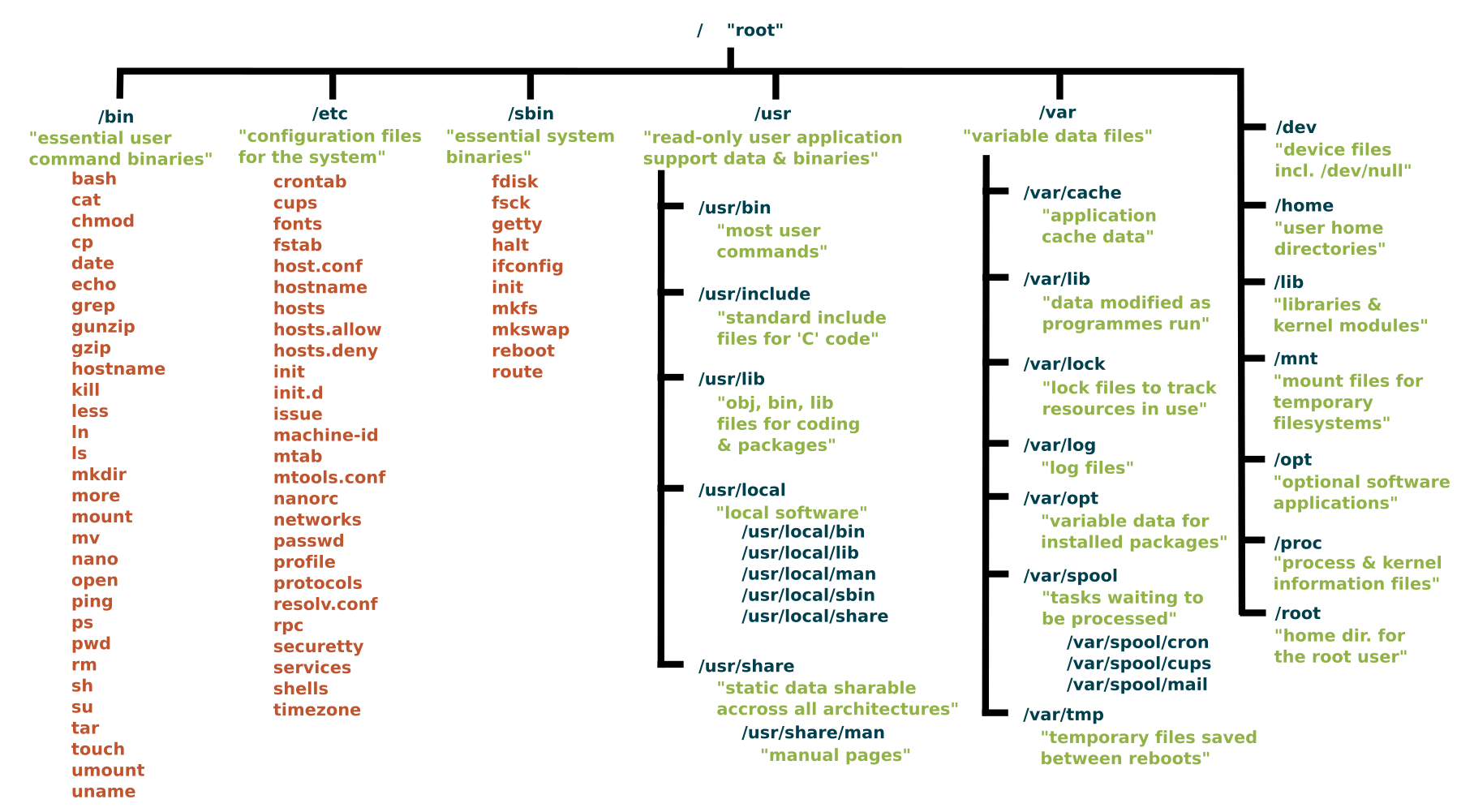
That is the root directory covered, but many of the subdirectories lead to their own set of files and subdirectories. Figure 2 gives you an overall idea of what the basic file system tree looks like (the image is kindly supplied under a CC By-SA license by Paul Gardner) and Wikipedia has a break down with a summary of what each directory is used for.
Figure 2: Standard Unix filesystem hierarchy.
To explore the filesystem yourself, use the cd command:
cd
will take you to the directory of your choice (cd stands for change directory.
If you get confused,
pwd
will always tell you where you (pwd stands for print working directory). Also,
cd
with no options or parameters, will take you back to your own home directory, where things are safe and cosy.
Finally,
cd ..
will take you up one level, getting you one level closer to the / root directory. If you are in /usr/share/wallpapers and run cd .., you will move up to /usr/share.
To see what a directory contains, use
ls
or simply
ls
to list the contents of the directory you are in right now.
And, of course, you always have tree to get an overview of what lays within a directory. Try it on /usr/share — there is a lot of interesting stuff in there.
Conclusion
Although there are minor differences between Linux distributions, the layout for their filesystems are mercifully similar. So much so that you could say: once you know one, you know them all. And the best way to know the filesystem is to explore it. So go forth with tree, ls, and cd into uncharted territory.
You cannot damage your filesystem just by looking at it, so move from one directory to another and take a look around. Soon you’ll discover that the Linux filesystem and how it is laid out really makes a lot of sense, and you will intuitively know where to find apps, documentation, and other resources.
Learn more about Linux through the free “Introduction to Linux” course from The Linux Foundation and edX.
Moxa announced a line of rugged, compact “UC 2100” IoT gateways that run 10-year available Moxa Industrial Linux and optional ThingsPro Gateway middleware on a Cortex-A8 SoC.
Moxa announced the UC-2100 Series industrial IoT gateways along with its new UC 3100 and UC 5100 Series, but it offered details only on the UC-2100. All three series will offer ruggedization features, compact footprints, and on some models, 4G LTE support. They all run Moxa Industrial Linux and optional ThingsPro Gateway data acquisition software on Arm-based SoCs.
Based on Debian 9 and a Linux 4.4 kernel, the new Moxa Industrial Linux (MIL) is a “high-performance, industrial-grade Linux distribution” that features a container-based virtual-machine-like middleware abstraction layer between the OS and applications,” says Moxa. Multiple isolated systems can run on a single control host “so that system integrators and engineers can easily change the behavior of an application without worrying about software compatibility,” says the company.