
Home Blog Page 396

How to Encrypt Files From Within a File Manager

The Linux desktop and server enjoys a remarkable level of security. That doesn’t mean, however, you should simply rest easy. You should always consider that your data is always a quick hack away from being compromised. That being said, you might want to employ various tools for encryption, such as GnuPG, which lets you encrypt and decrypt files and much more. One problem with GnuPG is that some users don’t want to mess with the command line. If that’s the case, you can turn to a desktop file manager. Many Linux desktops include the ability to easily encrypt or decrypt files, and if that capability is not built in, it’s easy to add.

I will walk you through the process of encrypting and decrypting a file from within three popular Linux file managers:

  • Nautilus (aka GNOME Files)

  • Dolphin

  • Thunar

Installing GnuPG

Before we get into the how to of this, we have to ensure your system includes the necessary base component… GnuPG. Most distributions ship with GnuPG included. On the off chance you use a distribution that doesn’t ship with GnuPG, here’s how to install it:

  • Ubuntu-based distribution: sudo apt install gnupg

  • Fedora-based distribution: sudo yum install gnupg

  • openSUSE: sudo zypper in gnupg

  • Arch-based distribution: sudo pacman -S gnupg

Whether you’ve just now installed GnuPG or it was installed by default, you will have to create a GPG key for this to work. Each desktop uses a different GUI tool for this (or may not even include a GUI tool for the task), so let’s create that key from the command line. Open up your terminal window and issue the following command:

gpg --gen-key

You will then be asked to answer the following questions. Unless you have good reason, you can accept the defaults:

  • What kind of key do you want?

  • What key size do you want?

  • Key is valid for?

Once you’ve answered these questions, type y to indicate the answers are correct. Next you’ll need to supply the following information:

  • Real name.

  • Email address.

  • Comment.

Complete the above and then, when prompted, type O (for Okay). You will then be required to type a passphrase for the new key. Once the system has collected enough entropy (you’ll need to do some work on the desktop so this can happen), your key will have been created and you’re ready to go.

Let’s see how to encrypt/decrypt files from within the file managers.

Nautilus

We start with the default GNOME file manager because it is the easiest. Nautilus requires no extra installation or extra work to encrypt/decrypt files from within it’s well-designed interface. Once you have your gpg key created, you can open up the file manager, navigate to the directory housing the file to be encrypted, right-click the file in question, and select Encrypt from the menu (Figure 1).
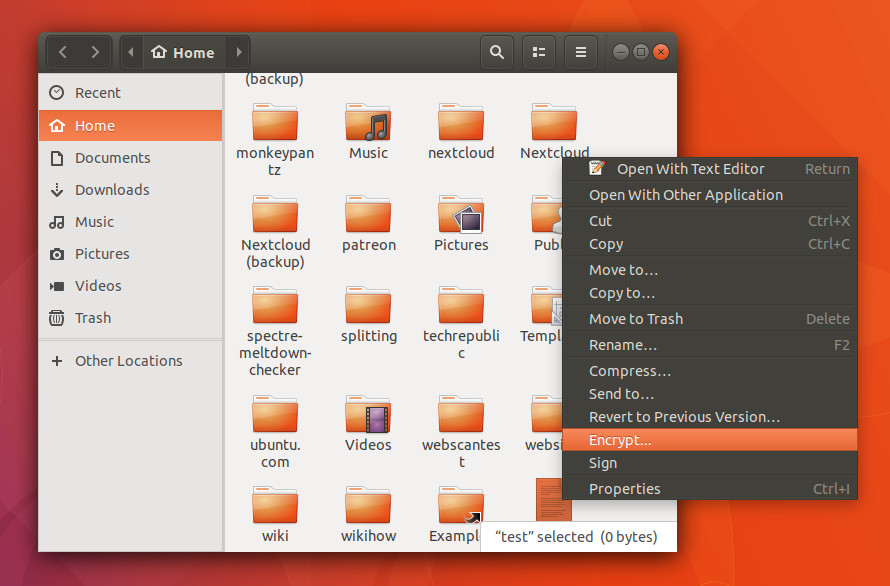
Figure 1: Encrypting a file from within Nautilus.

You will be asked to select a recipient (or list of recipients — Figure 2). NOTE: Recipients will be those users whose public keys you have imported. Select the necessary keys and then select your key (email address) from the Sign message as drop-down.
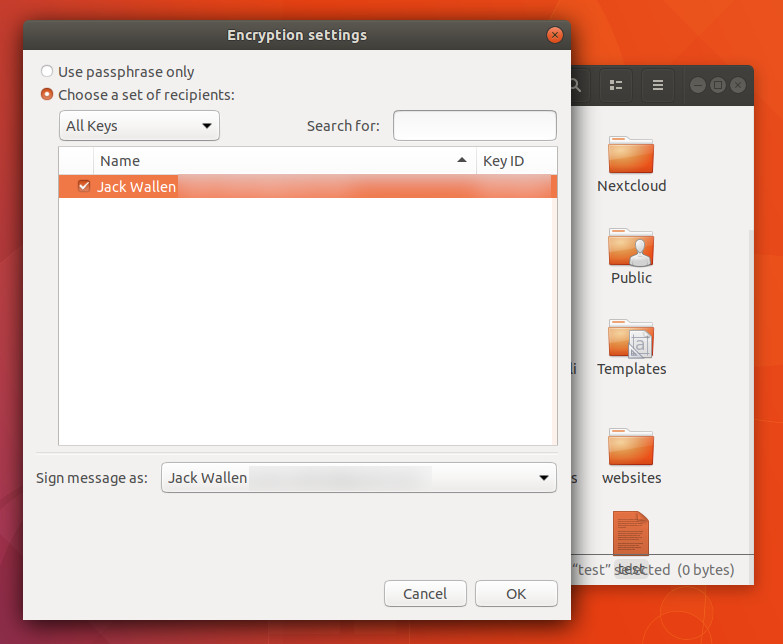
Figure 2: Selecting recipients and a signer.

Notice you can also opt to encrypt the file with only a passphrase. This is important if the file will remain on your local machine (more on this later). Once you’ve set up the encryption, click OK and (when prompted) type the passphrase for your key. The file will be encrypted (now ending in .gpg) and saved in the working directory. You can now send that encrypted file to the recipients you selected during the encryption process.

Say someone (who has your public key) has sent you an encrypted file. Save that file, open the file manager, navigate to the directory housing that file, right-click the encrypted file, select Open With Decrypt File, give the file a new name (without the .gpg extension), and click Save. When prompted, type your gpg key passphrase and the file will be decrypted and ready to use.

Dolphin

On the KDE front, there’s a package that must be installed in order to encrypt/decrypt from with the Dolphin file manager. Log into your KDE desktop, open the terminal window, and issue the following command (I’m demonstrating with Neon. If your distribution isn’t Ubuntu-based, you’ll have to alter the command accordingly):

sudo apt install kgpg

Once that installs, logout and log back into the KDE desktop. You can open up Dolphin and right-click a file to be encrypted. Since this is the first time you’ve used kgpg, you’ll have to walk through a quick setup wizard (which self-explanatory). When you’ve completed the wizard, you can go back to that file, right-click it (Figure 3), and select Encrypt File.
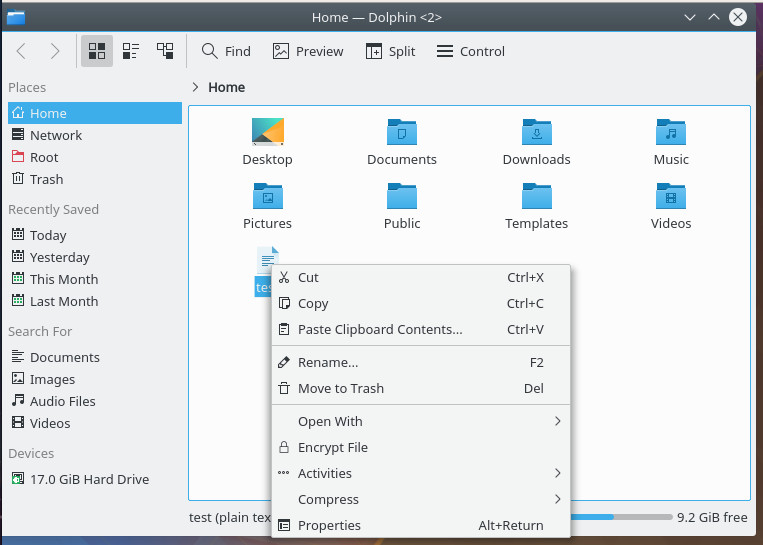
Figure 3: Encrypting a file within Dolphin.

You’ll be prompted to select the key to use for encryption (Figure 4). Make your selection and click OK. The file will encrypt and you’re ready to send it to the recipient.

Note: With KDE’s Dolphin file manager, you cannot encrypt with a passphrase only.
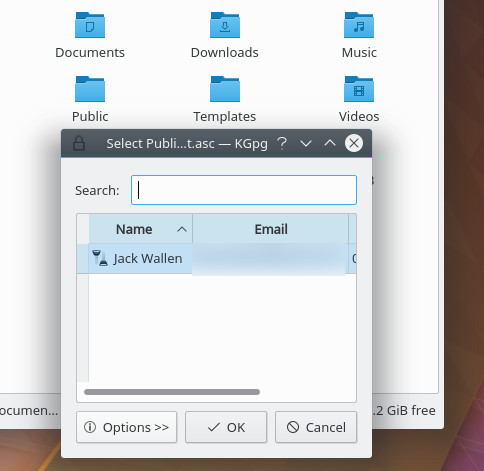
Figure 4: Selecting your recipients for encryption.

If you receive an encrypted file from a user who has your public key (or you have a file you’ve encrypted yourself), open up Dolphin, navigate to the file in question, double-click the file, give the file a new name, type the encryption passphrase, and click OK. You can now read your newly decrypted file. If you’ve encrypted the file with your own key, you won’t be prompted to type the passphrase (as it has already been stored).

Thunar

The Thunar file manager is a bit trickier. There aren’t any extra packages to install; instead, you need to create new custom action for Encrypt. Once you’ve done this, you’ll have the ability to do this from within the file manager.

To create the custom actions, open up the Thunar file manager and click Edit > Configure Custom Actions. In the resulting window, click the + button (Figure 5) and enter the following for an Encrypt action:

Name: Encrypt

Description: File Encryption

Command: gnome-terminal -x gpg –encrypt –recipient %f

Click OK to save this action.
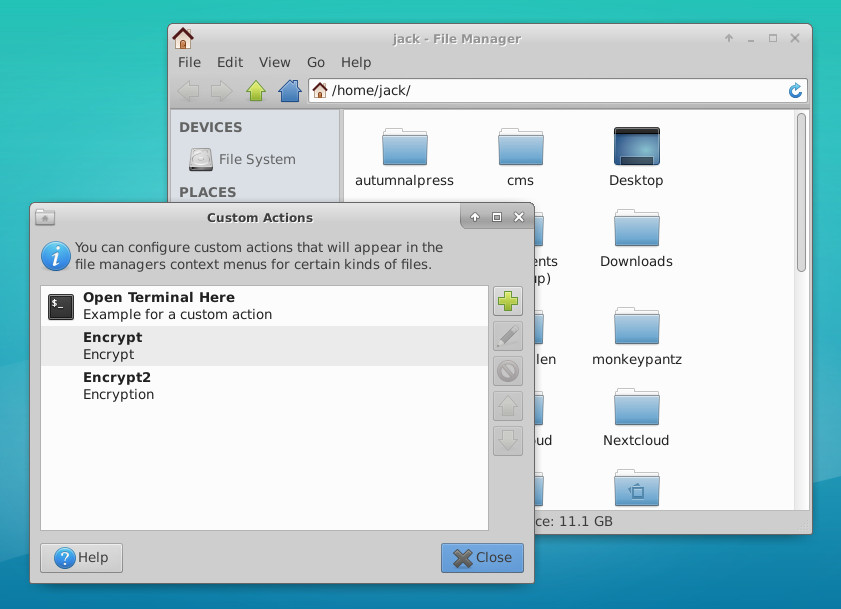
Figure 5: Creating an custom action within Thunar.

NOTE: If gnome-terminal isn’t your default terminal, substitute the command to open your default terminal in.

You can also create an action that encrypts with a passphrase only (not a key). To do this, the details for the action would be:

Name: Encrypt Passphrase

Description: Encrypt with Passphrase only

Command: gnome-terminal -x gpg -c %f

You don’t need to create a custom action for the decryption process, as Thunar already knows what to do with an encrypted file. To decrypt a file, simply right-click it (within Thunar), select Open With Decrypt File, give the decrypted file a name, and (when/if prompted) type the encryption passphrase. Viola, your encrypted file has been decrypted and is ready to use.

One caveat

Do note: If you encrypt your own files, using your own keys, you won’t need to enter an encryption passphrase to decrypt them (because your public keys are stored). If, however, you receive files from others (who have your public key) you will be required to enter your passphrase. If you’re wanting to store your own encrypted files, instead of encrypting them with a key, encrypt them with a passphrase only. This is possible with Nautilus and Thunar (but not KDE). By opting for passphrase encryption (over key encryption), when you go to decrypt the file, it will always prompt you for the passphrase.

Other file managers

There are plenty of other file managers out there, some of them can work with encryption, some cannot. Chances are, you’re using one of these three tools, so the ability to add encryption/decryption to the contextual menu is not only possible, it’s pretty easy. Give this a try and see if it doesn’t make the process of encryption and decryption much easier.


Learn more about Linux through the free “Introduction to Linux” course from The Linux Foundation and edX.

Linux Beats Windows To Become The Most Popular Development Platform: Stack Overflow Survey 2018

Every year, Stack Overflow conducts its developer survey and shares its results with the public for analysis. Expanding its reach, this year over 100,000 developers took part in the 30-minute survey and told how they learn new technologies, which tools they use to get their work done, and what they look for while hunting some job.

The most popular development platform

If you look at this year’s data, you’ll notice that 48.3% developers responded with Linux as the platform they have done development work for this year. It was followed by Windows Desktop and Server with 35.4%.

Read more at Fossbytes

Container Isolation Gone Wrong

One of the main advantages of embracing containers is “lightweight virtualization.” Since each container is just a thin layer around the containerized processes, the user gains enormous efficiencies, for example by increasing the container density per host, or by spinning containers up and down at a very fast pace.

However, as the troubleshooting story in the article will show, this lightweight virtualization comes at the cost of sharing the underlying kernel among all containers, and in some circumstances, this can lead to surprising and undesirable effects that container users typically don’t think about.

This troubleshooting tale is rather involved. I’ve started from the basics and worked up to the more complex material in the hope that readers at all levels can get value out of it.

Read more at DZone

ONAP Set to Speed Standards, Network Automation

This article was sponsored by Huawei and written by Linux.com.

The 2018 Open Networking Summit (ONS) is almost here. We spoke to Bill Ren, Vice President Network Industry & Ecosystem Development at Huawei recently to glean some insights on ONAP since Huawei is a founding member and top contributor to this project.

“SDN/NFV solutions have been in the market for many years but we did not see massive deployment due to lack of working standards and automation,” Bill said.

Bill Ren, VP, Network Industry & Ecosystem Development, Huawei Technologies Co.,Ltd.

“We believe open source will help produce de facto standards faster. We need to bring automation and intelligence into networking, we need a full end to end automation platform and that is why ONAP is particularly important for networking.”

Here is what Bill had to say about the ONAP’s growing role in open networking.

Linux.com: How does adopting ONAP as a standard help all operators and vendors to innovate?

Bill: ONAP can help to set up a common framework for all operators as an onboarding resource, or to design and deploy service, manage and control the network, collect data from networks, and manage policy. Adopting ONAP as a standard means that operators can focus on service innovation rather than on the software platform itself. And, vendors can focus on innovation as ONAP removes the difficulty of OSS integration and brings an open unified marketplace for all vendors.

Linux.com: Huawei leads five of 28 ONAP projects, including SO, VNF SDK, Modeling, Integration and ONAP CLI. Why did Huawei choose those projects? What benefits do you see in those projects?

Bill: Huawei treats open source as a strategic tool to build a healthy telecom industry, and we set up a dedicated management team for networking open source projects like ONAP. We chose to lead some of these projects because they are key elements in building a healthy ecosystem. Take modeling for example. Modeling aims to build common information model for network resource and service across the whole industry. This will result in simple and quick resource onboarding and OSS/BSS integration. VNF SDK aims to build common VNF packaging and marketplace. Integration aims to support multi-cloud and multi-vendor environments. SO is the core component in ONAP that links other components so that they work together.

Huawei also chose to lead these key projects because we, as an end-to-end telecom solution leader, have the necessary resources, expertise and experience to significantly contribute. For example, we can involve our global expertise in SDOs for modelling project. And we can involve our key customer to discuss use case, requirements and POC/trials. Huawei believes an open healthy ecosystem will enlarge the total market and ultimately benefit Huawei’s business.

Linux.com: What benefits do you see in being involved in the ONAP community?

Bill: We learned a lot. ONAP brings really good architecture for network automation and this will benefit our related products. ONAP brings operator and vendor together and this will help us to understand requirements much better. ONAP will even bring a chance to try some new business model in certain area like service or cloudification. I believe we will see more and more benefits over time. I believe we will see more and more benefits over time.

Linux.com: Your keynote at Open Networking Summit is “Make Infrastructure Relevant to a Better Future.” Explain that please. What has Huawei done along these lines and how well is it working?

Bill: Yes. Building an open ecosystem and accelerating operational transformation is our industry strategy. Infrastructure operators need operational transformation to be more deeply relevant to a better digital intelligent society. And open source is the strategy tool for that. My keynote at ONS will address this point.

Basically, we believe all partners in our industry, including SDOs and open source projects, operators and vendors can work together to build an open and intent-driven cloud-friendly network to empower the digital life and vertical digitalization. I am happy to see that most network related open source projects are now merged into Linux Foundation Networking (LFN) umbrella and SDOs like MEF/TMF are cooperating with LFN. I would say it moves on the right direction.

Linux.com: What are your thoughts on the Linux Foundation Networking umbrella overall?

Bill: I look forward to LFN speeding the building of the open source networking ecosystem, and Telco operation transformation. I would like to see LFN work out a clear technical vision, flexible full stack architecture, cross-domain common models, harmonized SDO cooperation and faster production and field trials. I recommend LFN set up a strong Technical Advisory Committee (TAC) team, unified use case committee, and unified verification programs. I believe our industry has found a better way to work together, and I look forward to another quick change and successful year for our industry.

Sign up to get the latest updates on ONS NA 2018!

Introducing Agones: Open Source, Multiplayer, Dedicated Game-Server Hosting Built on Kubernetes

It’s no surprise that game server scaling is usually done by proprietary software—most orchestration and scaling systems simply aren’t built for this kind of workload.


Many of the popular fast-paced online multiplayer games such as competitive FPSs, MMOs and MOBAs require a dedicated game server—a full simulation of the game world—for players to connect to as they play within it. This dedicated game server is usually hosted somewhere on the internet to facilitate synchronizing the state of the game between players, but also to be the arbiter of truth for each client playing the game, which also has the benefit of safeguarding against players cheating.


Dedicated game servers are stateful applications that retain the full game simulation in memory. But unlike other stateful applications, such as databases, they have a short lifetime. Rather than running for months or years, a dedicated game server runs for a few minutes or hours.


Dedicated game servers also need a direct connection to a running game server process’ hosting IP and port, rather than relying on load balancers. 

Read more at Google Blog

How to Build Something ‘Useful’ With a Raspberry Pi

In honor of Pi Day, Chaim Gartenberg and I cooked up a tiny little Raspberry Pi project for yesterday’s episode of Circuit Breaker Live.

We started with a simple concept: a button that says “Why?” when you press it, in honor of our favorite podcast. So we knew we’d need a button, some sound files, a little bit of Python code, and, of course, a Raspberry Pi.

A new Pi is $35, but we found an old Raspberry Pi 2 in my desk drawer, which was up to the task. (Newer Pis have built-in Wi-Fi and faster processors, but for our simple button project we didn’t need internet or extra horsepower.)

Read more at The Verge

Lessons Learned from Growing an Open Source Project Too Fast

Are you managing an open source project or considering launching one? If so, it may come as a surprise that one of the challenges you can face is rapid growth. Matt Butcher, Principal Software Development Engineer at Microsoft, addressed this issue in a presentation at Open Source Summit North America. His talk covered everything from teamwork to the importance of knowing your goals and sticking to them.

Butcher described a case study involving Kubernetes Helm, a package system for Kubernetes. Helm arose from a company team-building hackathon, with an original team of three people giving birth to it. Within 18 months, the project had hundreds of contributors and thousands of active users.

Read more at The Linux Foundation

Developers Love Trendy New Languages but Earn More with Functional Programming

Developer Q&A site Stack Overflow performs an annual survey to find out more about the programmer community, and the latest set of results has just been published.

JavaScript remains the most widely used programming language among professional developers, making that six years at the top for the lingua franca of Web development. Other Web tech including HTML (#2 in the ranking), CSS (#3), and PHP (#9). Business-oriented languages were also in wide use, with SQL at #4, Java at #5, and C# at #8. Shell scripting made a surprising showing at #6 (having not shown up at all in past years, which suggests that the questions have changed year-to-year), Python appeared at #7, and systems programming stalwart C++ rounded out the top 10.

Read more at Ars Technica

Top 10 Reasons to Attend Open Networking Summit NA

In just 2 weeks, you could be one of 2,000 architects, developers, and thought leaders from over 300 companies coming together to drive the future of networking integration, acceleration and deployment.

Top 10 Reasons to Attend

1. Visionary Keynotes Speakers: Thought leaders from Alibaba, Amazon Web Services, Amdocs, AT&T, Google, Huawei, Intel, Orange, Red Hat, Ticketmaster, Uber and more will deliver talks on the future of networking.

2. Networking Demos: LF Networking will showcase 8 community-driven demos (OPNFV, OpenDaylight, OpenvSwitch, ONAP, and DPDK) in the technology showcase. Additional demos will be featured at the Open Networking Foundation booth, the Acumos Project booth, the Cloud Native Computing Foundation booth, and across sponsor booths. Additional demos will be on-hand Tuesday and Wednesday as part of SOSR.

Read more at The Linux Foundation

Inside the Distros: A Year in Linux Development

Linux will turn 30 in three years. We look at how far the major Linux distributions – or distros – have come over the past year and what they might be able to bring in the future

If the collective roadmap progressions of the major open source distributions (distros) throughout 2017 show anything, it is the importance of applying automation intelligence and cloud network orchestration to the total stack of functions that go towards making up an enterprise-grade Linux operating system (OS).  

The big brands in enterprise Linux include Canonical with its Ubuntu OS, Red Hat with its Red Hat Enterprise Linux (RHEL), and SuSE with SuSE Linux Enterprise Server (SLES). Other growing names spanning the free and open source category include Linux Mint, CentOS, Fedora, Mandriva, ReactOS, Solus and Chrome OS from Google.

Read more at Computer Weekly