Home Blog Page 449

Moving API Security Testing into Dev/QA

Discussing API security and why we should care is a little bit like talking about eating our vegetables. We all know that eating our vegetables is good for our health, but how many of us actually do it? Application security is a little bit like that. It is essential for the health of our applications and our businesses, but striving for it is not nearly as interesting as building cool new application features. But we only have to look at recent news headlines to understand how important it is.

Traditionally, validating an application or API for security has been done at the end of the development process. This is inherently problematic, though. It’s usually too late in the process for discovered errors to be fixed: it may be too close to the release date to fix the problems, or the team might have moved on to other projects, or the architecture of the application might be inherently insecure.

In addition, services and applications today are released more often than ever, often releasing up to multiple times a day. This fast release cadence makes the traditional approach untenable.

Enter…Continuous Integration

To solve this problem, we will turn to a solution that the industry has been using to tackle software quality problems with accelerated release cycles – continuous integration. Continuous integration produces builds whenever new code is checked in, and validates the new code by running static analysis and unit tests for each build. If teams are sophisticated, they might even be creating and running automated functional tests using CI (perhaps not for every build, since functional tests typically take a long time to run, but at least at specified intervals like once a day).

We can apply this same solution to automated security testing for our APIs by bringing penetration testing into our CI workflows. This will ensure that we test for security vulnerabilities sooner, and it will give us security regression tests that can catch new problems as soon as they are introduced. But we will need to be smart about it, since penetration testing is expensive and can take a long time to run. We must do it in a way that is scalable and sustainable.

Start with Functional Tests

I am assuming that our teams are already writing and running automated functional tests for our APIs. (If we are not doing this, we need to start here and are not ready to consider automating our security testing.) If we are running automated functional tests for our APIs, then as part of our normal development and QA processes, we can identify a subset of those functional tests to use as security tests. We will prepare and run this subset as security tests.

Let me describe how this works using Parasoft SOAtest and its integration with Burp Suite, a popular penetration testing tool. To start, let’s assume we have a SOAtest scenario with 1 setup test that cleans the database, and 3 tests that make 3 different API calls.  We want to perform penetration testing for each of the 3 APIs that are being called in the scenario:

Picture1

We will first prepare the scenario for security by adding a Burp Suite Analysis tool to each of the tests in the scenario, as shown below:

Picture2

We will then execute this scenario using SOAtest.  As each test executes, SOAtest will make the API call defined in the test and capture the request and response traffic. The Burp Suite Analysis Tool on each test will pass the traffic data to a separate running instance of the Burp Suite application, which will perform penetration testing on the API based on the API parameters it observes in the traffic data, using its own heuristics. The Burp Suite Analysis Tool will then take any errors found by Burp Suite and report them as errors within SOAtest, associated with the test that accessed the API. SOAtest results can then be further reported into DTP, Parasoft’s reporting and analytics dashboard, for additional reporting capabilities. See below for a representation of how this works:

blog_diagram-1.png

Repurposing functional tests for use as security tests gives the following benefits:

  1. Since we are already writing functional tests, we can reuse work that has already been done, saving time and effort.

  2. To execute certain APIs, we might have to do some setup, like prepping the database or calling other APIs. If we start with functional tests that already work, this setup is already done.

  3. Typically, a penetration testing tool will report that a certain API call has a vulnerability, but it doesn’t give any context about the use case and/or requirement to which it is connected. Since we are using SOAtest to execute the test cases, the security vulnerabilities are reported in the context of a use case. When scenarios have been associated with requirements, we now can get additional business context about the impact of the security errors to the application. 

  4. We have a test scenario that we can use to easily reproduce the error or to validate that it has been fixed.

Preparing Functional Tests for Use as Security Tests

There are a few things to consider when repurposing functional tests for use as penetration tests:

  1. We should maintain our functional test scenarios separately from our security test scenarios, and run them from separate test jobs. The main reason for this is that adding penetration testing to existing functional tests will likely serve to destabilize the functional tests. We need to select which functional test scenarios should be turned into automated security tests, and then make copies of the functional tests that will be maintained as separate security tests.

  2. We need to be selective in which tests we choose, since penetration testing is expensive; we need to maximize the attack surface of the API that is covered while minimizing the number of tests. We should consider the following:

    • Penetration testing tools analyze request/response traffic to understand which parameters in the request are available to be tested. We need to select functional tests that exercise all the parameters in each API, to ensure that every input to the API gets analyzed.
    • The number of scenarios needs to be manageable, so that the security test run is short enough to run at least once a day.
    • Within each scenario, we need to decide which API calls should be penetration tested. The same API may be referenced from multiple scenarios, and we don’t want to duplicate penetration testing on an API that is being tested in a different scenario. The Burp Suite Analysis Tool should only get added to the appropriate tests for the API(s) to be penetration tested.
  3. Our functional test scenarios may have setup or teardown sections for initialization or cleanup. These typically don’t need to be penetration tested.

  4. If the functional test has any parameterization, we should remove it. Penetration testing tools don’t need multiple sets of values for the same parameters to know what to test, and sending different sets of values could just lead to making the test runs go longer due to duplicated testing.

  5. API functional tests will usually have assertions that validate the response from the service. When used as security tests, these assertions can fail, but will be noisy when reviewing the results, since in this context we only care about the security vulnerabilities that were found. We should remove all assertions. In my previous example, this would mean removing the JSON Assertor from Test 3.

  6. Some API calls add data to the database. When using a penetration testing tool against such APIs, the database can get bloated with information due to the number of attacks that the penetration testing tool directs at the API. In some cases, this can cause unexpected side effects. On one of our development teams, we discovered a performance issue in the application when a particular API added lots of data due to the penetration test attacks. The application performance became so bad that it prevented the automated security test run from finishing in a reasonable amount of time. We had to exclude the security tests for that API from our automated run until we had fixed the problem.

Maintaining a Stable Test Environment

We need to consider whether to run our functional and security tests within the same test environment or a different one. Resetting the environment between the functional and security test runs, or using a separate environment, promotes better test stability but is usually not necessary. We can often reuse the same environment, but when we do, we should run the functional tests first and the security tests last, since the security tests can destabilize the environment for the functional tests. When we use different environments, we need to make sure that we configure the original functional test scenarios with variables so that it is easy to point the tests at different endpoints for different environments. SOAtest supports this using environment variables.

Our APIs may also depend on other APIs outside our control. We can consider using service virtualization to isolate our environment so we don’t depend on those external systems. This will help to stabilize our tests while at the same time preventing unintended consequences to the external systems due to our penetration testing efforts.

In Conclusion…

We can ensure better quality in our APIs by moving security testing into development and QA as part of an automated process. We can leverage our existing API functional tests to create automated security tests, which will allow us to discover and fix security errors earlier in the process. And hopefully this will help us not become one of the next big headlines in the news…

My colleague Mark Lambert and I recently led a webinar that included a demonstration of how this works with Parasoft SOAtest and Burp Suite. If you’re interested in learning more, you can view the demo from the webinar recording below:

https://embedwistia-a.akamaihd.net/deliveries/fd2de867e9c57eb2e7be051d6ec993a02edcd087.jpg?image_play_button_size=2x&image_crop_resized=960x540&image_play_button=1&image_play_button_color=006db0e0

This article was originally published at Parasoft.
From Consumers to Contributors: The Evolution of Open Source in the Enterprise

Open source technologies are now an increasingly common sight in enterprise software stacks, with organisations using them to stand up their customer-facing and line-of-business applications, and power their infrastructure. Despite the best efforts of commercial software suppliers to position open source software as insecure, unreliable and ill-suited for enterprise use, large companies are using it avoid lock-in, drive down costs and speed up their software developments cycles.

In the light of these benefits, it is hoped enterprises will not only see fit to consume open source software, but contribute code of their own back to the communities that created it for myriad reasons.

First of all, the creativity and health of all open source communities rests heavily on having an engaged user base, that regularly contributes code and user feedback to the community to inform the next iteration of the product.

Without steady and reliable input from contributors, the output of the community as a whole – both from a product quality and quantity perspective – may be compromised.

Read more at ComputerWeekly

Security Jobs Are Hot: Get Trained and Get Noticed

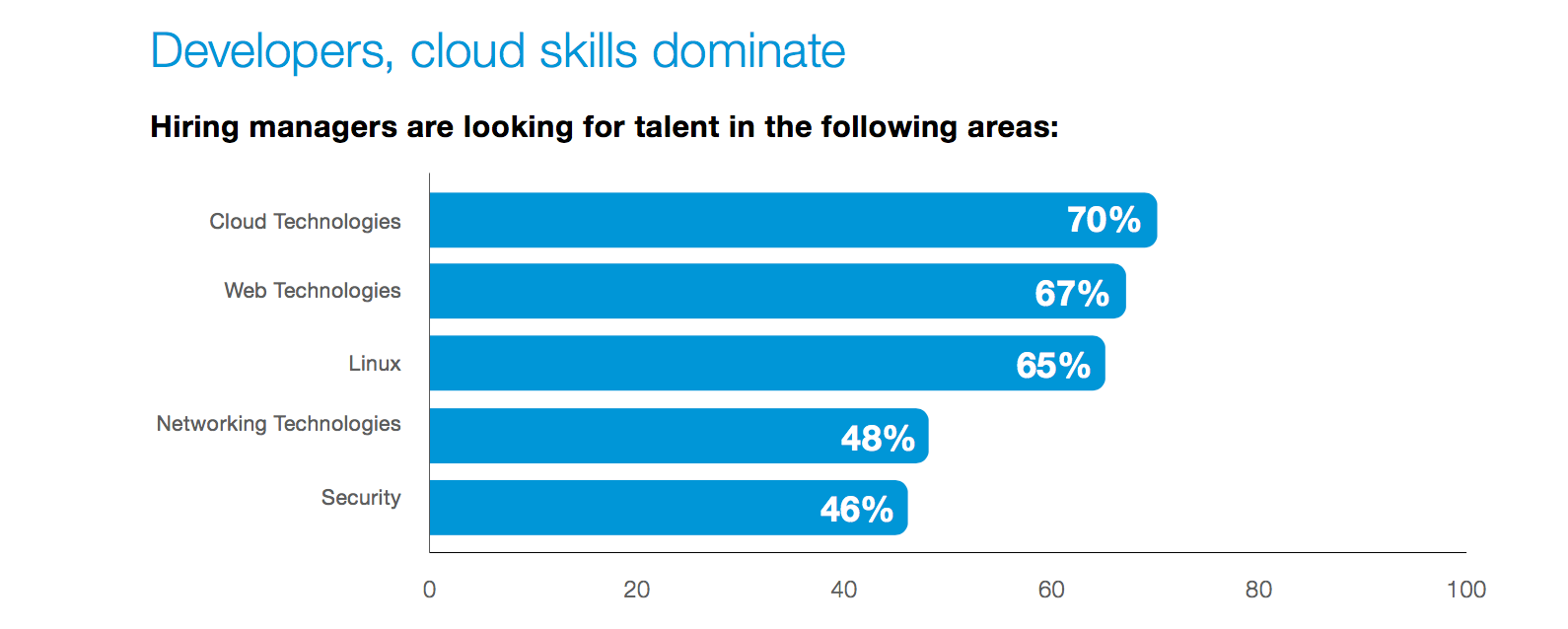
The demand for security professionals is real. On Dice.com, 15 percent of the more than 75K jobs are security positions. “Every year in the U.S., 40,000 jobs for information security analysts go unfilled, and employers are struggling to fill 200,000 other cyber-security related roles, according to cyber security data tool CyberSeek” (Forbes). We know that there is a fast-increasing need for security specialists, but that the interest level is low.

Security is the place to be

In my experience, few students coming out of college are interested in roles in security; so many people see security as niche. Entry-level tech pros are interested in business analyst or system analyst roles, because of a belief that if you want to learn and apply core IT concepts, you have to stick to analyst roles or those closer to product development. That’s simply not the case.

In fact, if you’re interested in getting in front of your business leaders, security is the place to be – as a security professional, you have to understand the business end-to-end; you have to look at the big picture to give your company the advantage.

Be fearless

Analyst and security roles are not all that different. Companies continue to merge engineering and security roles out of necessity. Businesses are moving faster than ever with infrastructure and code being deployed through automation, which increases the importance of security being a part of all tech pros day to day lives. In our Open Source Jobs Report with The Linux Foundation, 42 percent of hiring managers said professionals with security experience are in high demand for the future.

There has never been a more exciting time to be in security. If you stay up-to-date with tech news, you’ll see that a huge number of stories are related to security – data breaches, system failures and fraud. The security teams are working in ever-changing, fast-paced environments. A real challenge lies is in the proactive side of security, finding, and eliminating vulnerabilities while maintaining or even improving the end-user experience.  

Growth is imminent

Of any aspect of tech, security is the one that will continue to grow with the cloud. Businesses are moving more and more to the cloud and that’s exposing more security vulnerabilities than organizations are used to. As the cloud matures, security becomes increasingly important.           

Regulations are also growing – Personally Identifiable Information (PII) is getting broader all the time. Many companies are finding that they must invest in security to stay in compliance and avoid being in the headlines. Companies are beginning to budget more and more for security tooling and staffing due to the risk of heavy fines, reputational damage, and, to be honest, executive job security.  

Training and support

Even if you don’t choose a security-specific role, you’re bound to find yourself needing to code securely, and if you don’t have the skills to do that, you’ll start fighting an uphill battle. There are certainly ways to learn on-the-job if your company offers that option, that’s encouraged but I recommend a combination of training, mentorship and constant practice. Without using your security skills, you’ll lose them fast with how quickly the complexity of malicious attacks evolve.

My recommendation for those seeking security roles is to find the people in your organization that are the strongest in engineering, development, or architecture areas – interface with them and other teams, do hands-on work, and be sure to keep the big-picture in mind. Be an asset to your organization that stands out – someone that can securely code and also consider strategy and overall infrastructure health.

The end game

More and more companies are investing in security and trying to fill open roles in their tech teams. If you’re interested in management, security is the place to be. Executive leadership wants to know that their company is playing by the rules, that their data is secure, and that they’re safe from breaches and loss.

Security that is implemented wisely and with strategy in mind will get noticed. Security is paramount for executives and consumers alike – I’d encourage anyone interested in security to train up and contribute.

Download the full 2017 Open Source Jobs Report now.

Why and How to Set an Open Source Strategy

Open source projects are generally started as a way to scratch one’s itch — and frankly that’s one of its greatest attributes. Getting code down provides a tangible method to express an idea, showcase a need, and solve a problem. It avoids over thinking and getting a project stuck in analysis-paralysis, letting the project pragmatically solve the problem at hand.

Next, a project starts to scale up and gets many varied users and contributions, with plenty of opinions along the way. That leads to the next big challenge  how does a project start to build a strategic vision? In this article, I’ll describe how to walk through, measure, and define strategies collaboratively, in a community.

Read more at The Linux Foundation

​Linux Totally Dominates Supercomputers

Linux rules supercomputing. This day has been coming since 1998, when Linux first appeared on the TOP500 Supercomputer list. Today it finally happened: All 500 of the world’s fastest supercomputers are running Linux.

The last two non-Linux systems, a pair of Chinese IBM POWER computers running AIX, dropped off the November 2017 TOP500 Supercomputer list. …

When the first Top500 supercomputer list was compiled in June 1993, Linux was barely more than a toy. It hadn’t even adopted Tux as its mascot yet. It didn’t take long for Linux to start its march on supercomputing.

Read more at ZDNet

How to Monitor the SRE Golden Signals

Site Reliability Engineering (SRE) and related concepts are very popular lately, in part due to the famous Google SRE book and others talking about the “Golden Signals” that you should be monitoring to keep your systems fast and reliable as they scale.

Everyone seems to agree these signals are important, but how do you actually monitor them? No one seems to talk much about this.

These signals are much harder to get than traditional CPU or RAM monitoring, as each service and resource has different metrics, definitions, and especially tools required. …

This series of articles will walk through the signals and practical methods for a number of common services. First, we’ll talk briefly about the signals themselves, then a bit about how you can use them in your monitoring system.

Read more at Dev.to

Three Steps to Blend Cloud and Edge Computing on IoT

For years, companies have relied on systems that compute and control from a relatively central location. Even cloud-based systems rely on a single set of software components that churn through data, gather results and serve them back.

The internet of things changes that dynamic. Suddenly, thousands of devices are sharing data, talking to other systems and offering control to thousands of endpoints.

As these networks evolve, they encounter new problems made possible by now-popular computing trends. Thanks to big data and smarter networks (through mesh networking, IoT and low-power networks and computing), the older systems cannot handle the influx of information they helped create.

The answer to these problems is a blend of cloud storage and edge computing. To take advantage of both technologies, however, IT professionals must understand how they operate.

Read more at TechTarget

How to Install Firefox Quantum in Linux

Finally, Firefox 57 was officially released for all major OS e.g. Linux (32/64 bit), Mac OSX, Windows and Android. The binary package are now available for download for Linux (POSIX) systems, grab desired one and enjoy the browsing with new features added to it.

What’s new in Firefox 57

The major new release comes with the following features:

  • A new design look thanks to a new theme, a new Firefox logo and new ‘New Tab‘ page.
  • A multi-core Rendering Engine that’s GPU efficient.
  • New Add-ons designed for the modern web.
  • Faster page load time with less RAM (according to Mozilla developers it should load pages 2 times faster).
  • Efficient memory management.

New Firefox has also added a lots of new interesting features to Android as well. So, don’t wait, just grab the latest Firefox for android from Google Play Store and have fun.

Read more at Tecmint

3 Open Source Alternatives to ArcGIS Desktop

Looking to create a great looking map or perform analysis on geospatial data? Look no further than these open source desktop GIS tools.

If you’ve ever worked with geographic data on the desktop, chances are that you used Esri’s ArcGIS application in at least part of your work. ArcGIS is an incredibly powerful tool, but unfortunately, it’s a proprietary product that is designed for Windows. Linux and Mac users are out of luck unless they want to run ArcGIS in a virtualized environment, and even then, they’re still using a closed source product that can be very expensive to license. While their flagship product is closed source, I would be remiss not to note that Esri has made numerous contributions to the open source community.

Fortunately, GIS users have a few choices for using open source tools to design maps and work with spatial data that can be obtained under free and open source licenses and which run on a variety of different non-Windows operating systems. Let’s take a look at some of the options.

Read more at OpenSource.com

Finding Files with mlocate: Part 2

In the previous article, we discussed some ways to find a specific file out of the thousands that may be present on your filesystems and introduced the locate tool for the job. Here we explain how the important updatedb tool can help.

Well Situated

Incidentally, you might get a little perplexed if trying to look up the manuals for updatedb and the locate command. Even though it’s actually the mlocate command and the binary is /usr/bin/updatedb on my filesystem, you probably want to use varying versions of the following man commands to find what you’re looking for:

# man locate


# man updatedb


# man updatedb.conf

Let’s look at the important updatedb command in a little more detail now. It’s worth mentioning that, after installing the locate utility, you will need to initialize your file-list database before doing anything else. You have to do this as the “root” user in order to reach all the relevant areas of your filesystems or the locate command will complain. Initialize or update your database file, whenever you like, with this command:

# updatedb

Obviously, the first time this command is run it may take a little while to complete, but when I’ve installed the locate command afresh I’ve almost always been pleasantly surprised at how quickly it finishes. After a hop, a skip, and a jump, you can immediately query your file database. However, let’s wait a moment before doing that.

We’re dutifully informed by its manual that the database created as a result of running updatedb resides at the following location: /var/lib/mlocate/mlocate.db.

If you want to change how updatedb is run, then you need to affect it with your config file — a reminder that it should live here: /etc/updatedb.conf. Listing 1 shows the contents of it on my system:

PRUNE_BIND_MOUNTS = "yes"

PRUNEFS = "9p afs anon_inodefs auto autofs bdev binfmt_misc cgroup cifs coda configfs 
cpuset debugfs devpts ecryptfs exofs fuse fusectl gfs gfs2 hugetlbfs inotifyfs iso9660 
jffs2 lustre mqueue ncpfs nfs nfs4 nfsd pipefs proc ramfs rootfs rpc_pipefs securityfs 
selinuxfs sfs sockfs sysfs tmpfs ubifs udf usbfs"

PRUNENAMES = ".git .hg .svn"

PRUNEPATHS = "/afs /media /net /sfs /tmp /udev /var/cache/ccache /var/spool/cups 
/var/spool/squid /var/tmp"

Listing 1: The innards of the file /etc/updatedb.conf which affects how our database is created.

The first thing that my eye is drawn to is the PRUNENAMES section. As you can see by stringing together a list of directory names, delimited with spaces, you can suitably ignore them. One caveat is that only directory names can be skipped, and you can’t use wildcards. As we can see, all of the otherwise-hidden files in a Git repository (the .git directory might be an example of putting this option to good use.

If you need to be more specific then, again using spaces to separate your entries, you can instruct the locate command to ignore certain paths. Imagine for example that you’re generating a whole host of temporary files overnight which are only valid for one day. You’re aware that this is a special directory of sorts which employs a familiar naming convention for its thousands of files. It would take the locate command a relatively long time to process the subtle changes every night adding unnecessary stress to your system. The solution is of course to simply add it to your faithful “ignore” list.

Well Appointed

As seen in Listing 2, the file /etc/mtab offers not just a list of the more familiar filesystems such as /dev/sda1 but also a number of others that you may not immediately remember.

/dev/sda1 /boot ext4 rw,noexec,nosuid,nodev 0 0

proc /proc proc rw 0 0

sysfs /sys sysfs rw 0 0

devpts /dev/pts devpts rw,gid=5,mode=620 0 0

/tmp /var/tmp none rw,noexec,nosuid,nodev,bind 0 0

none /proc/sys/fs/binfmt_misc binfmt_misc rw 0 0

Listing 2: A mashed up example of the innards of the file /etc/mtab.

Some of the filesystems shown in Listing 2 contain ephemeral content and indeed content that belongs to pseudo-filesystems, so it is clearly important to ignore their files — if for no other reason than because of the stress added to your system during each overnight update.

In Listing 1, the PRUNEFS option takes care of this and ditches those not suitable (for most cases). There are a few different filesystems to consider as you can see:

PRUNEFS = "9p afs anon_inodefs auto autofs bdev binfmt_misc cgroup cifs coda configfs 
cpuset debugfs devpts ecryptfs exofs fuse fusectl gfs gfs2 hugetlbfs inotifyfs iso9660 jffs2 
lustre mqueue ncpfs nfs nfs4 nfsd pipefs proc ramfs rootfs rpc_pipefs securityfs selinuxfs 
sfs sockfs sysfs tmpfs ubifs udf usbfs"

The updatedb.conf manual succinctly informs us of the following information in relation to the PRUNE_BIND_MOUNTS option:

“If PRUNE_BIND_MOUNTS is 1 or yes, bind mounts are not scanned by updatedb(8).  All file systems mounted in the subtree of a bind mount are skipped as well, even if they are not bind mounts.  As an exception, bind mounts of a directory on itself are not skipped.”

Assuming that makes sense, before moving onto some locate command examples, you should note one thing. Excluding some versions of the updatedb command, it can also be told to ignore certain “non-directory files.” However, this does not always apply, so don’t blindly copy and paste config between versions if you use such an option.

In Need of Modernization

As mentioned earlier, there are times when finding a specific file needs to be so quick that it’s at your fingertips before you’ve consciously recalled the command. This is the irrefutable beauty of the locate command.

And, if you’ve ever sat in front of a horrendously slow Windows machine watching the hard disk light flash manically as if it were suffering a conniption due to the indexing service running, then I can assure you that the performance that you’ll receive from the updatedb command will be a welcome relief.

You should bear in mind, that unlike with the find command, there’s no need to remember the base paths of where your file might be residing. By that I mean that all of your (hopefully) relevant filesystems are immediately accessed with one simple command and that remembering paths is almost a thing of the past.

In its most simple form, the locate command looks like this:

# locate chrisbinnie.pdf

There’s also no need to escape hidden files that start with a dot or indeed expand a search with an asterisk:

# locate .bash

Listing 3 shows us what has been returned, in an instant, from the many partitions the clever locate command has scanned previously.

/etc/bash_completion.d/yum.bash

/etc/skel/.bash_logout

/etc/skel/.bash_profile

/etc/skel/.bashrc

/home/chrisbinnie/.bash_history

/home/chrisbinnie/.bash_logout

/home/chrisbinnie/.bash_profile

/home/chrisbinnie/.bashrc

/usr/share/doc/git-1.5.1/contrib/completion/git-completion.bash

/usr/share/doc/util-linux-ng-2.16.1/getopt-parse.bash

/usr/share/doc/util-linux-ng-2.16.1/getopt-test.bash

Listing 3: The search results from running the command: “locate .bash”

I’m suspicious that the following usage has altered slightly, from back in the day when the slocate command was more popular or possibly the original locate command, but you can receive different results by adding an asterisk to that query as so:

# locate .bash*

In Listing 4, you can see the difference from Listing 3. Thankfully, the results make more sense now that we can see them together. In this case, the addition of the asterisk is asking the locate command to return files beginning with .bash as opposed to all files containing that string of characters.

/etc/skel/.bash_logout

/etc/skel/.bash_profile

/etc/skel/.bashrc

/home/d609288/.bash_history

/home/d609288/.bash_logout

/home/d609288/.bash_profile

/home/d609288/.bashrc

Listing 4: The search results from running the command: “locate .bash*” with the addition of an asterisk.

Stay tuned for next time when we learn more about the amazing simplicity of using the locate command on a day-to-day basis.

Learn more about essential sysadmin skills: Download the Future Proof Your SysAdmin Career ebook now.

Chris Binnie’s latest book, Linux Server Security: Hack and Defend, shows how hackers launch sophisticated attacks to compromise servers, steal data, and crack complex passwords, so you can learn how to defend against these attacks. In the book, he also talks you through making your servers invisible, performing penetration testing, and mitigating unwelcome attacks. You can find out more about DevSecOps and Linux security via his website (http://www.devsecops.cc).