Home Blog Page 478

How To Deal With A DDoS Attack

You’ve got an irregularly high amount of traffic coming into your server. So much, in fact, that it’s slowing down your server and other clients are timing out trying to access it. Looks like you’re under a DDoS attack. DDoS, or distributed denial of service, is a specific way to attack and destabilize a server, by flooding it with traffic from one or more sources.

On a Linux server, you can identify the multiple connections flooding your server using the netstat utility.

$ netstat -ntu | awk '{print $5}' | cut -d: -f1 | sort | uniq -c | sort -nr | head -3

There are generally two kinds of DDoS attacks. The first kind floods your inbound network connection, which interferece with valid clients trying to connect. The other kind is when the attacks targets a specific service, like your email server, which eventually either stalls from increased server load, or starts rejecting all incoming requests completely. Usually, DDoS attack are deployed through botnets – a large amount of independent computers and servers that have been compromised and made to operate together to flood target networks. 

When you’re under an attack like this, it’s difficult – if not impossible – to connect to your server remotely. Instead, use reserve connections such as IPMI/KVM. You can analyze the traffic and where it’s coming from using tshark, tcpdump, or iftop.

Most hosting providers usually just add the infected servers to a “blackhole” where they just drop all incoming packets, while insisting that you add DDoS protection services such as CloudFlare, Akamai or something comparable. It’s a good idea to have these services ready ahead of time, as well as contacting your hosting provider to discuss DDoS protection. 

A common preventative tactic, is to use proxy or CDN servers to hide your actual IP address from the public. You can configure your server to accept requests to your IP address only from other trusted addresses, having the rest of your traffic going through the proxies. This serves a dual purpose of also protecting you against threats that try to circumvent your proxy.

You can use utilities like Uptime, W, or PS to check for cases when it’s just a single process that’s being targeted. 

Checking log files is a good move, as they could often contain traces of the servers the attacks are coming from, their subnets, and User-Agents used to make requests to these servers. Though, it’s important to use separate utilities to parce the log files, such as Head, Tail, Grep or Less, since opening an entire log file at once can further stall your already system. 

For instance, if you have a Nginx based web server that’s receiving a large amount of requests with the string WordPress appearing within the user-agent, you can block all of these requests with just one line of script

if ($http_user_agent ~ WordPress) { return 444; }

You can do the same using iptables, ipset or Fail2ban

# iptables -A INPUT -p tcp --dport 80 -m string --algo bm --string "WordPress" -j DROP

For users that are less experienced using tools like IPTables, this might be a bit complex. If you’re running a Nginx server, you can use the ngx_http_limit_req_module module (convenient name, I know) that will allow you to restrict the amount of requests per second your server will handle from specific IP addresses. 

Attacks like this can also exploit vulnerabilities that can arise when software is configured improperly, for instance when it comes to things like DNS and NTP amplification. Reinstalling and reconfiguring said software would be very pertinent in that case, making sure to get the latest patches and being extra careful during the course of setup. In some cases, vulnerabilities arise when software and services go out of use, but continue to run; allowing extraneous access paths to your system. Always remembering to stop and remove unused software and services is just as important to prevent and stop attacks.

Hopefully, this article was helpful. As always, catch us on Facebook and Twitter for future articles, product updates, or if you have any questions for us! 

-Until next time!
Future Proof Your SysAdmin Career: Communication and Collaboration

Today’s system administrators are wise to arm themselves with specialized technical skillsets, but sysadmins interact with people at least as much as they deal with systems, software, and security. Strong communication capabilities, problem solving, teamwork, and leadership skills are therefore not to be underestimated.

future proof ebook

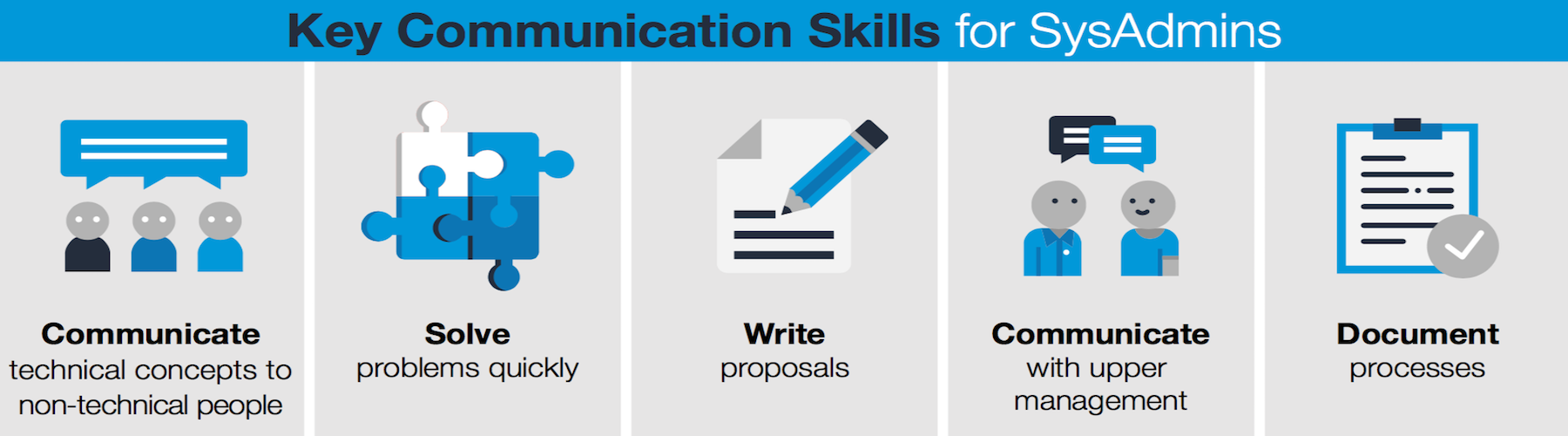
In fact, a previous article emphasized the fact that across all levels of a system administrator’s career, these skills are key.

  • Communicate technical concepts to non-technical people

  • Solve problems quickly

  • Write proposals

  • Communicate with upper management

  • Document processes

Not all people are equally proficient in these areas. In fact, as Lynn Taylor, a national workplace expert, noted in speaking with Forbes: “Having good people radar is harder to teach than technical skills, but is a requisite.”

Effective communication

The good news is that solid training options are available to help you improve communications and people skills, including options specifically focused on IT and technical personnel. According to Allan Hoffman, an expert on tech jobs, taking a seminar or course is a good first choice for workers such as sysadmins who want to improve communications skills. “To excel as a technical professional, you need to learn how to communicate your ideas and work effectively with others,” he writes.

Global Knowledge offers a course called “Customer Communication Skills for IT Professionals,” with curriculum completed in two days. The class covers such topics as clearly communicating technical concepts to non-technical users, active listening, and conflict management strategies. Downloadable course details are available here.

The American Management Association offers a similar course, according to Hoffman. It has a three-day “Communication and Interpersonal Skills: A Seminar for Technical Professionals” course that has received good notices.

In “How Can Sysadmins Foster Better Employee Communication” Tim Mullahy notes that too much reliance on jargon can undermine a sysadmin’s communication effectiveness. “When discussing the details of a system update or scheduled downtime with non-IT employees, avoid using highly technical language,” he advises.

“Jargon could make you sound like you know what you’re talking about, but it can also teeter on the edge of talking down to people,” writes Fathom’s Caroline Bogart. “If someone doesn’t understand what you’re saying, they’re not going to feel very intelligent.”

Project management

Many of today’s sysadmins are directly involved with supporting the rollout and maintenance of cloud platforms and other complex projects. And, sysadmins with strong project management and collaboration skills are needed to help lead such efforts.

Project management for sysadmins is covered in the Sysadmin Casts series of podcasts. The basic methodology laid out in this podcast series has been used by sysadmins to coordinate complex, multi-month projects.

Many sysadmins also use specific project management and collaboration tools. Trello is an example of a popular collaboration-focused tool, and you can find others here. LibrePlan is a free, web-based project management application that sysadmins can leverage, and it is available in mobile versions.

In the final installment of our series, we’ll look at other open source ways to broaden your skills and examine the connection between open source experience and improved employment outcomes.

Learn more about essential sysadmin skills: Download the Future Proof Your SysAdmin Career ebook now.

Read more:

Future Proof Your SysAdmin Career: An Introduction to Essential Skills 

Future Proof Your SysAdmin Career: New Networking Essentials

Future Proof Your SysAdmin Career: Locking Down Security

Future Proof Your SysAdmin Career: Looking to the Cloud

Future Proof Your SysAdmin Career: Configuration and Automation

Future Proof Your SysAdmin Career: Embracing DevOps

Future Proof Your SysAdmin Career: Getting Certified

Future Proof Your SysAdmin Career: Communication and Collaboration

Future Proof Your SysAdmin Career: Advancing with Open Source


Two Open Source Licensing Questions: The AGPL and Facebook

In many settings, open source licensing today is considered a solved problem. Not only has the Open Source Initiative (OSI) largely contained the long feared issue of license proliferation, the industry has essentially consolidated around a few reasonably well understood models.

Copyleft licenses such as the GPL, which require users who would distribute the software to demonstrate reciprocity by making available their changes under the same license (hence the usage of reciprocal to refer to these licenses) exist at one end of the spectrum. So-called permissive licenses, which include the Apache, BSD and MIT licenses, and generally ask very little of users of the code, are at the opposite end. In between are MPL-style licenses, which more selectively apply copyleft-style reciprocity requirements.

Read more at RedMonk

Demand for Open Source Skills on the Rise

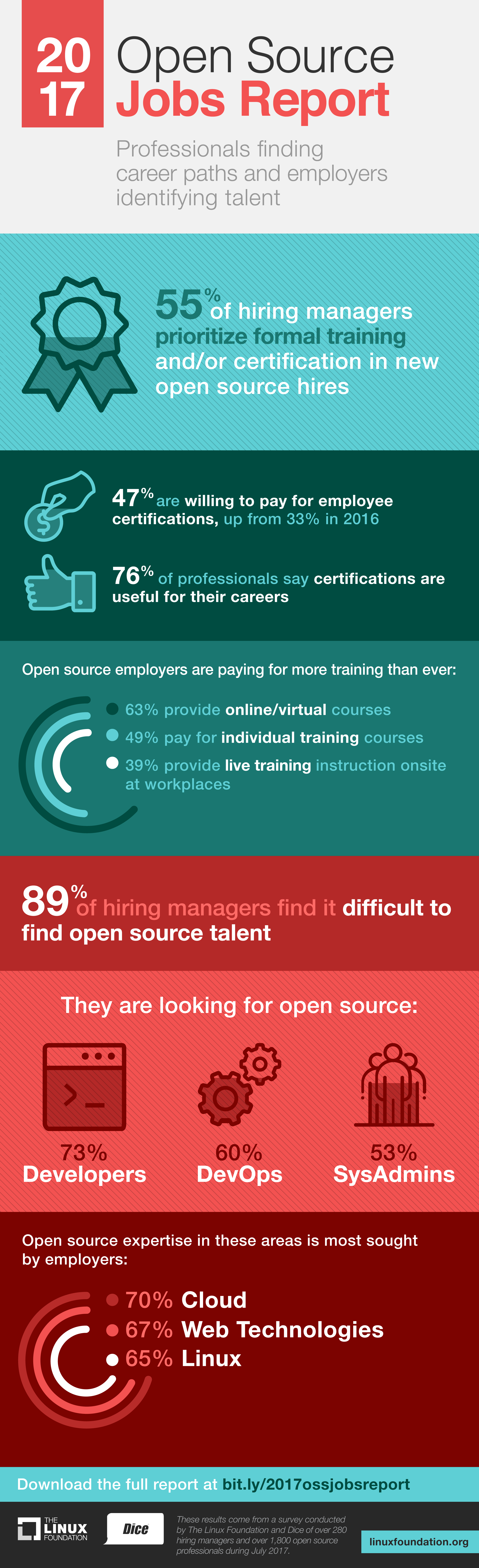
Interest in hiring open source workers is on the rise, with 60 percent of companies surveyed looking for full-time hires, compared with 53 percent last year, according to the 2017 Open Source Jobs Report.

Hiring managers from 280 global businesses, along with 1,800 open source professionals participated in the July study by The Linux Foundation and tech career firm Dice.

That’s good news if you have open source skills; indeed, 86 percent of professionals say open source has advanced their careers. The not-so-good news is 89 percent of hiring managers are finding it difficult to find this type of talent, which is in line with last year’s finding of 87 percent. The specific areas hiring managers say open source talent is in short supply are developers (73 percent), DevOps (60 percent) and SysAdmins (53 percent).

It’s no wonder then that 67 percent of managers are eyeing these hires more than other areas of business in the next six months. Fifty-eight percent say they will hire more open source professionals in that timeframe with expertise in cloud (70 percent), web technologies (67 percent) and Linux (65 percent).

Because of the challenges hiring open source professionals, 47 percent of employers say they are willing to pay for employees’ certifications, which is up from 33 percent in 2016. Meanwhile, 55 percent of hiring managers are making formal training a priority and seeking certification in new open source hires.

Training Opportunities

Additional training and certification are being offered by 33 percent of manager respondents who say these are incentives to retain employees, which is up from 26 percent last year. Among the ways training is being provided: 63 percent of respondents say they offer online/virtual courses, while 49 percent pay for individual training, and 39 percent provide live training instruction onsite.

Most hiring managers surveyed (73 percent) say developers are the main position they are looking to fill. They also need DevOps Engineers (60 percent) and Systems Administrators (53 percent).

Cloud technology such as OpenStack and Cloud Foundry ranked as the most sought-after area of expertise among 70 percent of employers, up from 66 percent last year. Web technologies was next, with 67 percent of hiring managers citing a need for that

knowledge, compared with 62 percent last year. Demand for Linux talent remains strong, with 65 percent of hiring managers looking for those skills, down slightly from 71 percent in 2016.

The technologies with the greatest influence over hiring decisions are cloud (62 percent), application platforms (56 percent) and Big Data (53 percent).

This year, cloud/virtualization was cited as the most desirable open source skill among 60 percent of hiring managers, followed by application development (59 percent) and DevOps (57 percent).

Open source professionals weigh in

Open source professional respondents rank five skills closely in demand:

  • Cloud (47 percent)

  • Application development (44 percent)

  • Big Data (43 percent)

  • DevOps (42 percent)

  • Security (42 percent)

Additionally, 77 percent of professional respondents say the ability to architect solutions based on open source is the top most valuable skill in their job, followed by 66 percent who say experience with open source development tools and 65 percent who cite knowledge of new tools.

Cloud technologies skills will be the most important skill to have in 2018, according to 69 percent of open source professional respondents, followed by big data/analytics (57 percent); containers (56 percent) and security (55 percent).

In the coming weeks, we’ll be looking at individual skills in more detail, examining specific hiring needs and training opportunities.

You can download the complete 2017 Open Source Jobs Report now.

This Week in Numbers: New Monitoring Methods for Kubernetes

Our new report, The State of the Kubernetes Ecosystem reports on a survey of 470 container users, 62 percent of which were at least in the initial production phase for the Kubernetes open source container orchestration engine. After further screening, we were able to get detailed information from 208 people about the storage and monitoring technologies they use with Kubernetes.

Prometheus is by far the most cited tool among our survey respondents for monitoring Kubernetes clusters. Heapster, however, has also gained significant adoption among our group. Traditional monitoring vendors are not faring as well, although usage levels for their tools appear to increase when they are being integrated into a larger, custom monitoring platform.

Read more at The New Stack

Linux Commands for Managing, Partitioning, Troubleshooting

Managing Linux disks and the file systems that reside on them is something of an art – from initial setup to monitoring performance.

How much do you need to know about disks to successfully manage a Linux system? What commands do what? How do you make good decisions about partitioning? What kind of troubleshooting tools are available? What kind of problems might you run into? This article covers a lot of territory – from looking into the basics of a Linux file systems to sampling some very useful commands.

Disk technology

In the beginning days of Unix and later Linux, disks were physically large, but very small in terms of storage capacity. A 300 megabyte disk in the mid-90’s was the size of a shoebox. Today, you can get multi-terrabyte disks that are the size of a slice of toast.

Read more at NetworkWorld

Open Container Initiative Reaches ‘Great Milestone,’ Says Red Hat Chief Technologist

After two years of work, the Open Container Initiative launched Version 1.0 for container runtime and image specifications in July. OCI’s foundation, formed by a number of container industry leaders, was tasked with the mission to create specifications that would support container portability across different operating systems and platforms. Red Hat Inc.’s chief technologist likes the specifications that he’s seen so far.

“We had some initial code associated with those specifications as part of the OCI project and expectations that we’d get further adoptions from other parts of the ecosystem, and we’re seeing the evidence of that happening today,” said Chris Wright (pictured), vice president and chief technologist, Office of Technology, at Red Hat. “It’s a great milestone.”

Read more at SiliconAngle

Seven Things about Linux You May Not Have Known

One of the coolest parts about using Linux is the knowledge you gain over time. Each day, you’re likely to come across a new utility or maybe just an unfamiliar flag that does something helpful. These bits and pieces aren’t always life-changing, but they are the building blocks for expertise.

Even experts don’t know that all, though. No matter how much experience you might have, there is always more to learn, so we’ve put together this list of seven things about Linux you may not have known.

There is an interactive mode for command history

You’re probably familiar with history, which reads your bash history to stdoutin a handy numbered list. However, if you find yourself searching for a specific URL in a sea of `curl` commands, this list isn’t always easy to read.

As an alternative, Linux comes with an interactive reverse search that helps you to avoid the headache. You can activate it with ctrl+r. This enables an interactive prompt that will search backwards through your bash history for a string you provide. You can cycle back through older commands by pressing ctrl+r again or cycle forward using ctrl+s.

Read more at OpenSourceForU

This Week in Open Source News: Open Source Summit 2017 Roundup

Open Source Summit North America was this past week and some of our favorite writers and journalists were onsite reporting live about this event. Below you’ll find a special edition of the Linux.com news digest from Sean Michael Kerner, SiliconANGLE, and Steven J. Vaughan-Nichols!

Sean Michael Kerner:

SiliconANGLE:

Steven J. Vaughan-Nichols/ZDNet:

Lyft and Uber on Stage Together at Open Source Summit in L.A.

The Cloud Native Computing Foundation has seen tremendous growth since it was founded in mid-2015. As a Linux Foundation project, it has grown from 22 member companies at its start to 118 today — a 5X growth rate. And its members now include Alibaba, AWS, Google, IBM, Microsoft, and — as of this week — Oracle.

“This is the first time in the history of open source where we have the top (six) cloud providers in the world sitting at the same foundation table, driving cloud-native forward,” said Chris Aniszczyk, Chief Operating Officer of CNCF.

CNCF was seeded with the Kubernetes project, donated by Google, and quickly added nine more projects including Prometheus, OpenTracing, Fluentd, Linkerd, gRPC, CoreDNS, containerd, rkt, and CNI.

Read more at The Linux Foundation