UML (Unified Modeling Language)6 is the de facto standard for representing object-oriented designs. It does a fine job of recording designs, but it has a severe problem: its diagrams don’t convey what humans need to know, making them hard to understand. This is why most software developers use UML only when forced to.1
For example, the UML diagrams in figures 1 and 2 portray the embedded software in a fax machine. While these diagrams are attractive, they don’t even tell you which objects control which others. Which object is the topmost controller over this fax machine? You don’t know. Which object(s) control the Modem object? You don’t know.
FCC Chairman Ajit Pai has announced his intention to gut net neutrality. His goal is clear: to overturn the 2015 order and create an Internet that’s more centralized. The FCC will vote to move his proposal forward on May 18 — just 10 days from today.
Net neutrality is about more than packets and data — it’s about upholding free speech, competition, innovation and user choice. To be clear:
Net neutrality is fundamental to free speech. Without net neutrality, big companies could censor your voice and make it harder to speak up online. Net neutrality has been called the “First Amendment of the Internet.”
Net neutrality is fundamental to competition. Without net neutrality, big Internet service providers can choose which services and content load quickly, and which move at a glacial pace. That means the big guys can afford to buy their way in, while the little guys are muscled out.
This week in open source and Linux news, EdgeX Foundry is picking up attention among “cloud players,” recently published study finds many security issues in OSS & more! Keep reading, stay in the know.
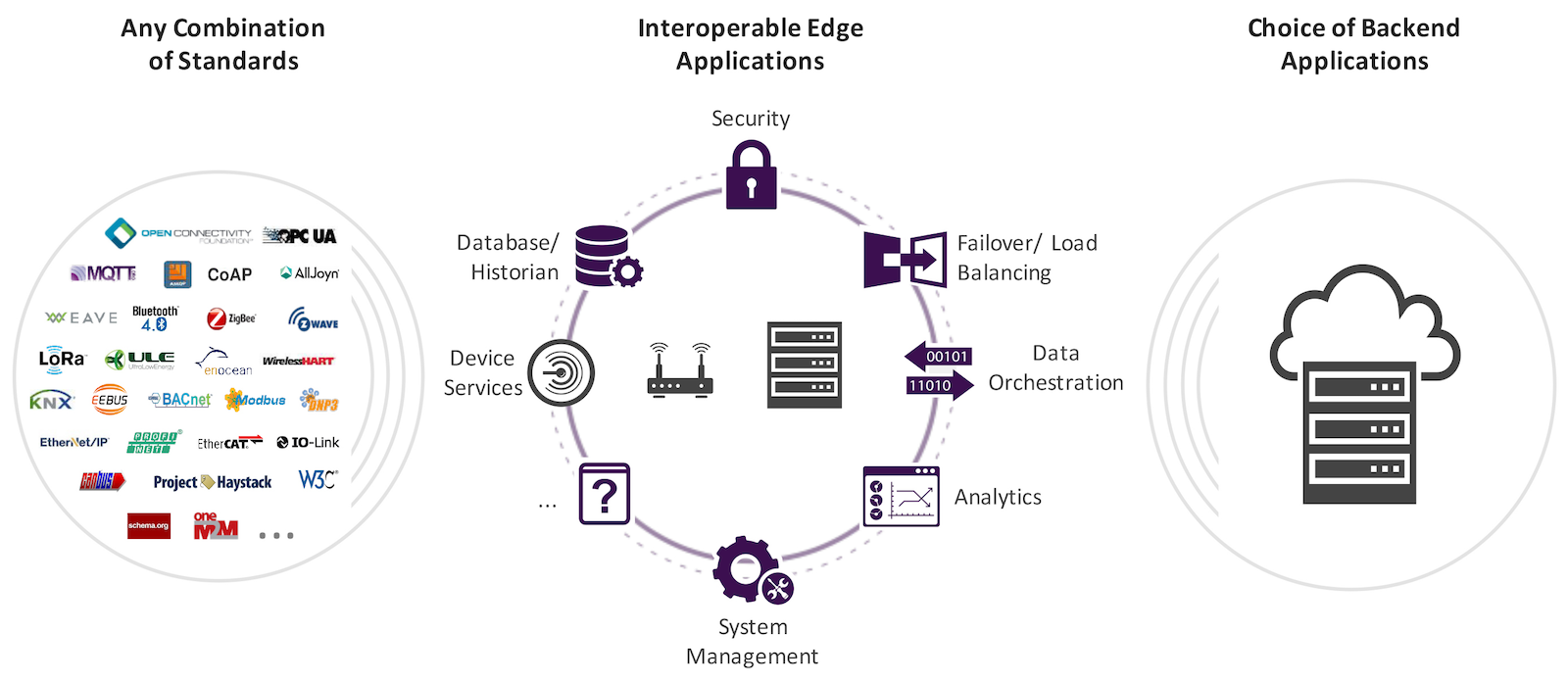
1) Cloud players are getting serious about Edge Computing and efforts like EdgeX Foundry are a “step in the right direction.”
3) New research comparing acceptance rates of contributions from men and women in an OSS community finds women’s contributions accepted more often than men’s — except when gender is identifiable.
Chance are, you have a database or two, running on one or more Linux systems, that has become crucial to your business or job. If you happen to be a Linux administrator, the likelihood of those databases being of the MySQL sort is pretty high. With such a priority placed on information, what are you doing to ensure those databases are backed up? You could be running bare metal backups (which is always smart). But what if you need to have a separate, automated backup of your databases? If that sounds like your situation, you only need turn to Backupninja.
Backupninja is a very handy tool that allows for coordinated system backups by simply adding simple configuration files into the /etc/backup.d/ directory. Backupninja can work with:
MySQL
maildir
Makecd
PostgreSQL
rdiff
rsync
I want to demonstrate to you how easy it is to install Backupninja and configure an automated MySQL database backup. I’ll be demonstrating this process on a Ubuntu 16.04 Server platform, but know that the software can be installed from source or from Git. It should be noted that Backupninja has not been updated for some time now; however, the tool works exactly as expected (even on the latest releases of your favorite distribution).
With that said, let’s get Backupninja up and running on Ubuntu.
Installation
The installation of Backupninja, on Ubuntu (and other Debian-based distributions), is very simple. Open up a terminal window and issue the following commands:
You could also run sudo apt-get upgradebefore running the installation command. I tend to like upgrading a system before installing. However, if your machine is a production server, and you tend to schedule upgrades, hold off on that command. The installation command for Backupninja will install a few dependencies, including:
bsd-mailx
dialog
liblockfile-bin
liblockfile1
postfix
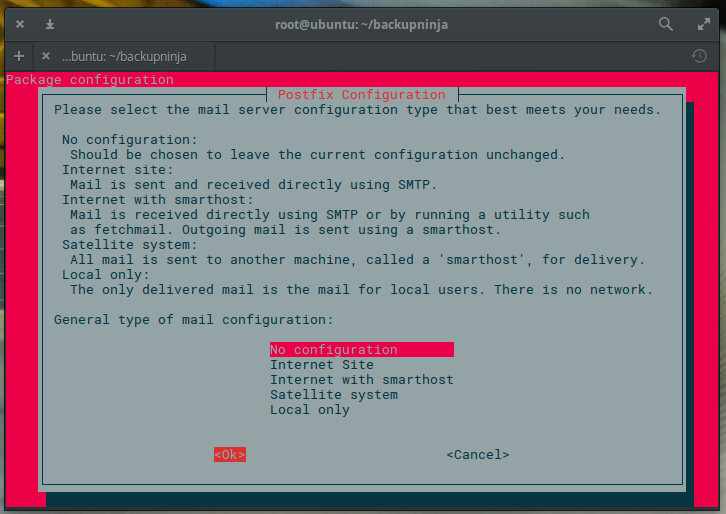
Allow those dependencies; otherwise, the installation will fail. During the installation you will be required to select the mail server configuration type. This is for the delivery of Backupninja reports. If you don’t want this server to function as an SMTP server, select either No configuration or Local only, when prompted (Figure 1).
Figure 1: The configuration of Postfix during installation.
With the software installed, you’re ready to configure.
Configuring Backupninja
Remember, earlier, when I mentioned all you had to do was drop a configuration file into the/etc/backup.d directory? That seems to imply you would have to manually create that configuration file. You don’t. Backupninja includes a very handy setup wizard that will walk you through the configuration of your automated backup.
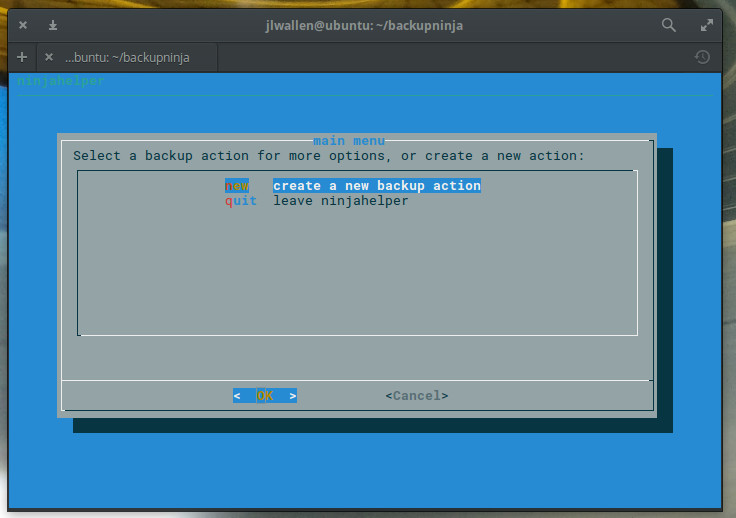
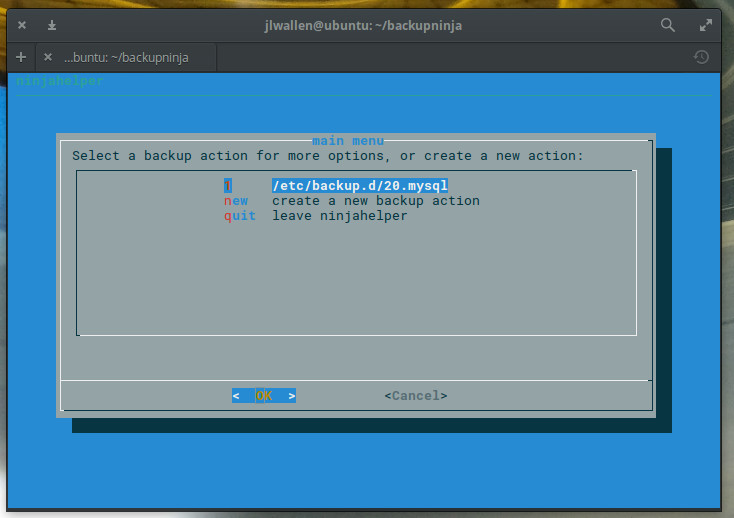
To start the Backupninja wizard, issue the command sudo ninjahelper. The wizard is an ncurses tool that will ask you a few simple questions. The first question (Figure 2), is straightforward; select new and tab down to OK. Hit Enter on your keyboard and you’re ready to configure your backup.
Figure 2: Creating a new backup action.
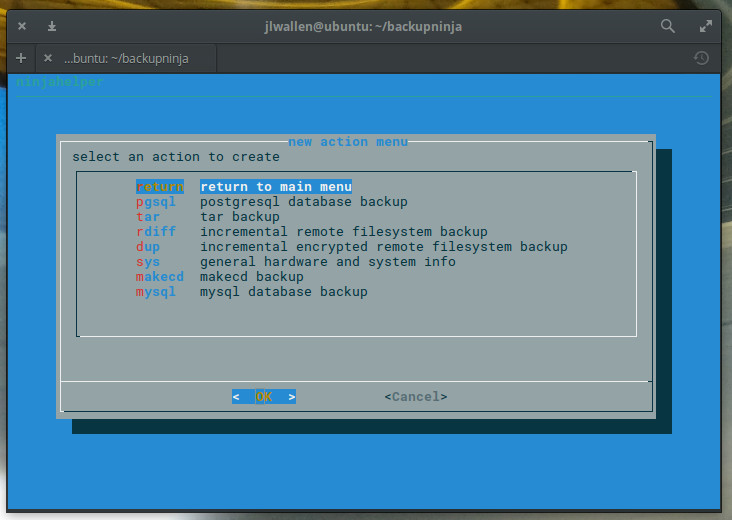
Since we’re going to be backing up MySQL database(s), select mysql in the next window (Figure 3), tab down to OK, and hit Enter on your keyboard.
Figure 3: Select mysql to backup your databases.
In the next window, enter the directory that will store the backups. By default, these will be in /var/backups/mysql. You can place these backups anywhere on your system (even an externally attached drive). Type the full path to house the backups, tab down to OK, and hit Enter on your keyboard.
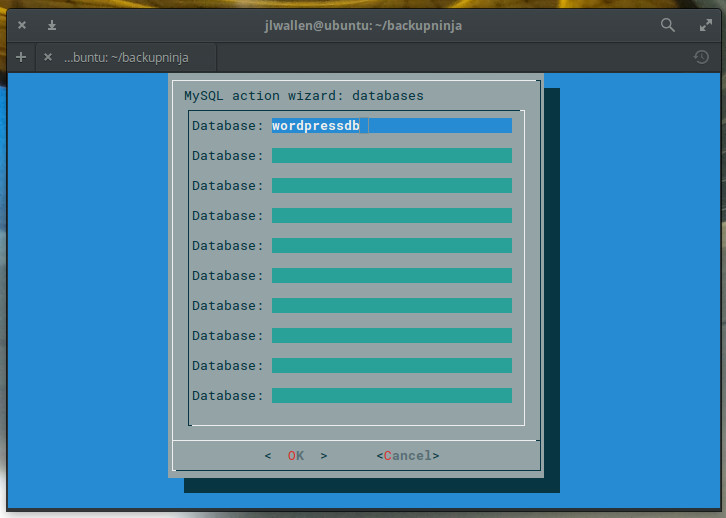
Now you have to decide if you want to backup all of your databases or choose individual databases. This is important. If you have multiple large databases, your best bet is to create backup jobs for individual databases. If your databases aren’t all that large (or you only have one database to backup), select Yes and hit Enter on your keyboard. If you choose to backup individual databases, you will have to enter the names of each database to be backed up in the next screen (Figure 4).
Figure 4: Backing up individual databases.
Once you’ve typed out all the names of the databases to be backed up, tab down to OK and hit Enter on your keyboard.
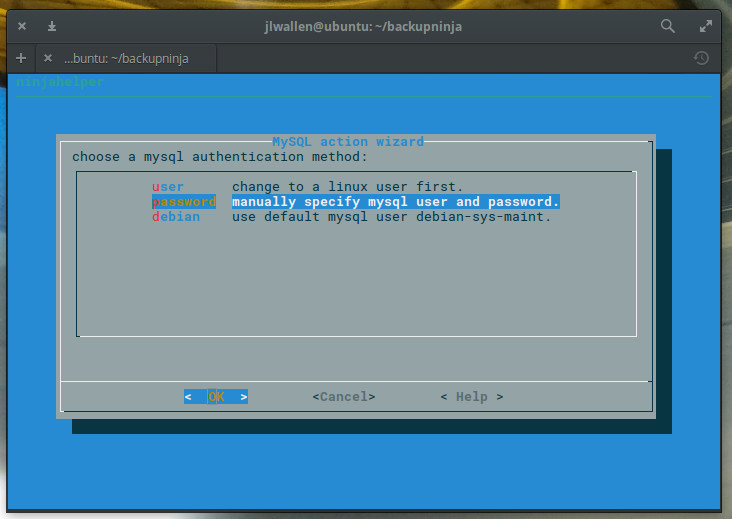
The next window requires you to select a MySQL authentication method (Figure 5). The simplest method is password. Select that, tab down to OK, and hit Enter on your keyboard.
Figure 5: Selecting an authentication method for your database backup.
In the resulting window, enter your MySQL admin password, tab down to OK, and hit Enter. You will have to verify the password in the same manner.
Now you can select one of three options for your backup:
sqldump – Create the backup using mysqldump
hotcopy – Create the backup using mysqlhotcopy
compress – Compress the backup files
I would suggest enabling both sqldump and compress (especially if you’re databases are large). Select those two options by using the cursor keys to highlight the option and tapping the spacebar to enable. Tab down to OK and hit Enter on your keyboard.
Finally, you must select an action for the backup. By default, backupninja will assign a number to the backup you are creating (lowest executed first). If you already have a backup in place, it will select the next number (e.g., 10, 20, 30, 40, etc.) and apply it to the backup. Select the default (Figure 6), tab down to OK, and hit Enter on your keyboard (this action serves to save your backup).
Figure 6: Saving your backup.
Your backup is saved and will begin running.
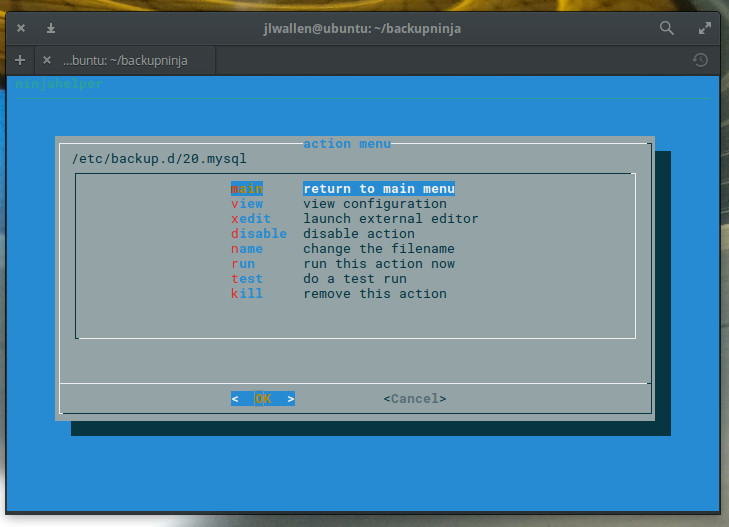
In the next window, you can opt to return to the main menu or view/edit/run/test/disable the configuration of the backup you just created. To make sure the backup you created is good to go, select either test or run (Figure 7) and await the results.
Figure 7: Your backup is ready to run or test.
Quick and easy database backups
You’d be hard pressed to find an easier way to setup an automated database backup than with Backupninja. Yes, you could always script a more flexible backup; but if you don’t want to bother with manually creating a Bash script/cron job to handle this task, Backupninja is an outstanding alternative.
Learn more about Linux through the free “Introduction to Linux” course from The Linux Foundation and edX.
Ours is a world enamored with the possibilities unlocked by technological advances. And if we ever update our organizational thinking to account for those advances, we might actually follow through on those possibilities.
That issue is at the forefront of Joe Beda’s mind these days. Beda is the co-founder of Heptio, a company that makes tools for developers interested in bringing containers into their development environment. He’s worked at large companies (he helped create Kubernetes and Google Cloud Engine at the search giant) and small (Heptio is up for Startup of the Year at Thursday’s GeekWire Awards), and understands why so many companies struggle with the shift to cloud computing.
Perpetrators are shifting to more specific targets. This means companies must strengthen their defenses, and these strategies can help.
Ransomware can be a highly lucrative system for extracting money from a customer. Victims are faced with an unpleasant choice: either pay the ransom or lose access to the encrypted files forever. Until now, ransomware has appeared to be opportunistic and driven through random phishing campaigns. These campaigns often, but not always, rely on large numbers of emails that are harvested without a singular focus on a company or individual.
As ransomware perpetrators continue to hone their skills, we’re seeing a shift to more specific targets.
Network function virtualization (NFV) is clearly on the rise, with an increasing number of production deployments across carriers worldwide. Operators are looking to create nimble, software-led topologies that can deliver services on-demand and reduce operational costs. From a data center performance standpoint, there’s a problem: Traditional IT virtualization approaches that have worked for cloud and enterprise data centers can’t cost-effectively support the I/O-centric and latency-sensitive workloads that carriers require.
NFV, as the name suggests, involves abstracting the underlying hardware from specific network functionalities. Where a stack was once a siloed on proprietary piece of hardware, virtual functions are created in software and can be run on x86 servers in a data center. Workloads can be shifted around as needed and network resources are spun up on-demand by whatever workload is asking for it. This fluid, just-in-time approach to provisioning services has significant upside in the carrier world, where over-provisioned pools of resources have always been the norm, and where hardware-tied infrastructure has historically made “service agility” an oxymoron. But there’s a bugbear ruining this rosy future-view: data center performance concerns.
We are happy to introduce you to Minishift, providing a better user experience than our original Atomic Developer Bundle (ADB). We have shifted our development effort from ADB to Minishift, both to improve user experience, and to address the issues caused by depending on Vagrant. We’ll explain this more in a later blog post.
Minishift is a CLI tool that helps you run OpenShift locally by running a single-node cluster inside a VM. You can try out OpenShift or develop with it, day-to-day, on your local host.
A team of scientists from eastern China has built the first form of quantum computer that they say is faster than one of the early generation of conventional computers developed in the 1940s.
The researchers at the University of Science and Technology of China at Hefei in Anhui province built the machine as part of efforts to develop and highlight the future use of quantum computers.
The devices make use of the way particles interact at a subatomic level to make calculations rather than conventional computers which use electronic gates, switches and binary code.
There has been some public discussion in the last week regarding the decision by Open Source Security Inc. and the creators of the Grsecurity® patches for the Linux kernel to cease making these patches freely available to users who are not paid subscribers to their service. While we at the Core Infrastructure Initiative (CII) would have preferred them to keep these patches freely available, the decision is absolutely theirs to make.
From the point of view of the CII, we would much rather have security capabilities such as those offered by Grsecurity® in the main upstream kernel rather than available as a patch that needs to be applied by the user. That said, we fully understand that there is a lot of work involved in upstreaming extensive patches such as these and we will not criticise the Grsecurity® team for not doing so. Instead we will continue to support work to make the kernel as secure as possible.
CII exists to support work improving the security of critical open source components. In a Linux system a flaw in the kernel can open up the opportunity for security problems in any or all the components – so it is in some sense the most critical component we have. Unsurprisingly, we have always been keen to support work that will make this more secure and plan to do even more going forward.
Over the past few years the CII has been funding the Kernel Self Protection Project, the aim of which is to ensure that the kernel fails safely rather than just running safely. Many of the threads of this project were ported from the GPL-licensed code created by the PaX and Grsecurity® teams while others were inspired by some of their design work. This is exactly the way that open source development can both nurture and spread innovation. Below is a list of some of the kernel security projects that the CII has supported.
One of the larger kernel security projects that the CII has supported was the work performed by Emese Renfy on the plugin infrastructure for gcc. This architecture enables security improvements to be delivered in a modular way and Emese also worked on the constify, latent_entropy, structleak and initify plugins.
Constify automatically applies const to structures which consist of function pointer members.
The Latent Entropy plugin mitigates the problem of the kernel having too little entropy during and after boot for generating crypto keys. This plugin mixes random values into the latent_entropy global variable in functions marked by the __latent_entropy attribute. The value of this global variable is added to the kernel entropy pool to increase the entropy.
The Structleak plugin zero-initializes any structures that containing a __user attribute. This can prevent some classes of information exposures. For example, the exposure of siginfo in CVE-2013-2141 would have been blocked by this plugin.
Initify extends the kernel mechanism to free up code and data memory that is only used during kernel or module initialization. This plugin will teach the compiler to find more such code and data that can be freed after initialization, thereby reducing memory usage. It also moves string constants used in initialization into their own sections so they can also be freed.
Another, current project that the CII is supporting is the work by David Windsor on HARDENED_ATOMIC and HARDENED_USERCOPY.
HARDENED_ATOMIC is a kernel self-protection mechanism that greatly helps with the prevention of use-after-free bugs. It is based off of work done by Kees Cook and the PaX Team. David has been adding new data types for reference counts and statistics so that these do not need to use the main atomic_t type.
The overall hardened usercopy feature is extensive, and has many sub-components. The main part David is working on is called slab cache whitelisting. Basically, hardened usercopy adds checks into the Linux kernel to make sure that whenever data is copied to/from userspace, buffer overflows do not occur. It does this by verifying the size of the source and destination buffers, the location of these buffers in memory, and other checks.
One of the ways that it does this is to, by default, deny copying from kernel slabs, unless they are explicitly marked as being allowed to be copied. Slabs are areas of memory that hold frequently used kernel objects. These objects, by virtue of being frequently used, are allocated/freed many times. Rather than calling the kernel allocator each time it needs a new object, it rather just takes one from a slab. Rather than freeing these objects, it returns them to the appropriate slab. Hardened usercopy, by default, will deny copying objects obtained from slabs. The work David is doing is to add the ability to mark slabs as being “copyable.” This is called “whitelisting” a slab.
We also have two new projects starting, where we are working with a senior member of the kernel security team mentoring a younger developer. The first of these projects is under Julia Lawall, who is based at the Université Pierre-et-Marie-Curie in Paris and who is mentoring Bhumika Goyal, an Indian student who will travel to Paris for the three months of the project. Bhumika will be working on ‘constification’ – systematically ensuring that those values that should not change are defined as constants.
The second project is under Peter Senna Tschudin, who is based in Switzerland and is mentoring Gustavo Silva, from Mexico, who will be working on the issues found by running the Coverity static analysis tool over the kernel. Running a tool like Coverity over a very large body of code like the Linux kernel will produce a very large number of results. Many of these results may be false positives and many of the others will be very similar to each other. Peter and Gustavo intend to use the Semantic Patch Language (SmPL) to write patches which can be used to fix whole classes of issue detected by Coverity in order to more rapidly work through the long list. The goal here is to get the kernel source to a state where the static analysis scan yields very few warnings, which in turn means that as new code is added which causes a warning it will more prominently stand out, which will make the results of future analysis much more valuable.
The Kernel Self Protection Project keeps a list of projects that they believe would be beneficial to the security of the kernel. The team has been working through this list and if you are interested in helping to make the Linux kernel more secure then we encourage you to get involved. Sign up to the mailing lists, get involved in the discussions and if you are up for it then write some code. If you have specific security projects that you want to work on and you need some support in order to be able to do so then do get in touch with the CII. Supporting this sort of work is our job and we are standing by for your call!