DevOps implementation is currently “all over the map,” said Jeff Sussna, founder and principal of Ingineering.IT and author of Designing Delivery: Rethinking IT in the Digital Service Economy. “There are some companies that we see at the enterprise DevOps conferences that are all in and making really comprehensive progress. In general though, the majority of companies I see are sort of grappling with it bit by bit, still trying to understand what it is and how to do it.”
Research shows that positive results — including faster deployments, fewer service problems, and more employee loyalty — await those who get it right.
Here are five common challenges enterprises encounter on their DevOps journeys, to help prepare you to tackle any difficulties that may arise.
An ingress makes it easy to route traffic entering a Kubernetes cluster through a load balancer like NGINX. Beyond basic load balancing and TLS termination, an ingress can have rules for routing to different backends based on paths. The NGINX ingress controller also allows more advanced configurations such as URL rewrites.
In this post, we’ll use ingress rules and URL rewrites to route traffic between two versions of a REST API. Each version is deployed as a service (api-version1 and api-version2). We will route traffic with path /api/v1 to api-version1, and /api/v2 to api-version2.
The sample application
We’ll be using a super simple ASP.NET Core application. Here’s the Configure() method in Startup.cs:
In the past 10 years, the best-performing artificial-intelligence systems — such as the speech recognizers on smartphones or Google’s latest automatic translator — have resulted from a technique called “deep learning.”
Deep learning is in fact a new name for an approach to artificial intelligence called neural networks, which have been going in and out of fashion for more than 70 years. Neural networks were first proposed in 1944 by Warren McCullough and Walter Pitts, two University of Chicago researchers who moved to MIT in 1952 as founding members of what’s sometimes called the first cognitive science department.
Neural nets were a major area of research in both neuroscience and computer science until 1969, when, according to computer science lore, they were killed off by the MIT mathematicians Marvin Minsky and Seymour Papert, who a year later would become co-directors of the new MIT Artificial Intelligence Laboratory.
Every great computer security team has a synergistic collection of skilled professionals who work well together to meet common goals. The team may debate a solution, but once a decision is made, everyone works hard to execute with no hard feelings. Good teams expect constant change and disruption. They know whatever it is they are trying to accomplish will likely be harder than anticipated.
When I encounter successful teams, distinct roles emerge among the group. Different organizations require different mixes of players, but these archetypes pop up again and again.
The world has reached a key moment in the history of the way we work. We have entered a new business environment, dictated by rapid changing technological variables that create an entirely new economic landscape. Exponential growth of our interconnected world forces us to see the world anew. The 21st century asks for a different mindset now the rules of the game have fundamentally changed.
In this game it is not anymore relevant to optimize an organization’s efficiency based on a stable set of known variables. Instead, there’s a strong need to adapt as fast as possible to increasingly complex working conditions. Efficiency has to make place for engagement and adaptability. The organizations that know how to fully engage their employees and those who are natives in this information-rich, densely interconnected world of the 21st century are the ones that thrive.
NodeSource primes its enterprise-oriented NSolid Node.js distro for Docker containers.
NodeSource is releasing a distribution of its enterprise-level, commercially supported NSolid Node.js runtime that works with Docker-friendly Alpine Linux. NSolid for Alpine Linux is intended to work with Alpine’s small footprint and security capabilities, said Joe McCann, NodeSource CEO.
RESTful services have been popular for quite some time now. They are widely-used, primarily for improved performance, ease of use and maintenance. Swagger is a popular API for documenting your RESTful Web APIs. You need some way to document your RESTful services to know the endpoints and the different data models used in the request and response payloads. This article presents a discussion on how we can use Swagger to document our Web APIs easily.
What is Swagger? Why is it needed?
Swagger is a framework that can be used for describing and visualizing your RESTful APIs. Swagger provides a simple, yet powerful, way to represent your RESTful APIs so that the developers using those APIs can understand the endpoints and the request and response payloads in a much better way. The success of your API largely depends on proper documentation as proper documentation helps the developers understand ways to consume your API better. Here’s exactly where Swagger comes to the rescue.
As part of its goal to cultivate more diverse thoughts and opinions in open source, the April Women in Open Source webinar will discuss why publishing your own research, technical work and industry commentary is a smart move for your career and incredibly beneficial to the industry at large.
In this webinar, learn how to get started, good topics to write about and how to contribute to magazines, journals and new publishing platforms like Medium. “Why and How To Publish Your Work and Opinions” will be held Thursday, April 27, 2017, at 9 a.m. Pacific Time.
Designed to share both inspirational ideas and practical tips the community can immediately put into action, the webinar will provide examples of women in open source who have successfully published their technical work and viewpoints, as well as identify influential publications to target. So mark your calendars!
Register today for this free webinar, brought to you by Women in Open Source.
As the community manager and an editor for Opensource.com, Rikki helps grow and oversee a community of moderators, contributors, and participants. Opensource.com attracts more than 1 million pageviews each month, with articles contributed by the open source community and community moderators.
Libby oversees content strategy for The Linux Foundation, including Linux.com and its newsletter, managing a team of freelance writers and editors. In addition, she writes and edits content for the site.
For news on future Women in Open Source events and initiatives, join the Women in Open Source email list and Slack channel. Please send a request to join via email to sconway@linuxfoundation.org.
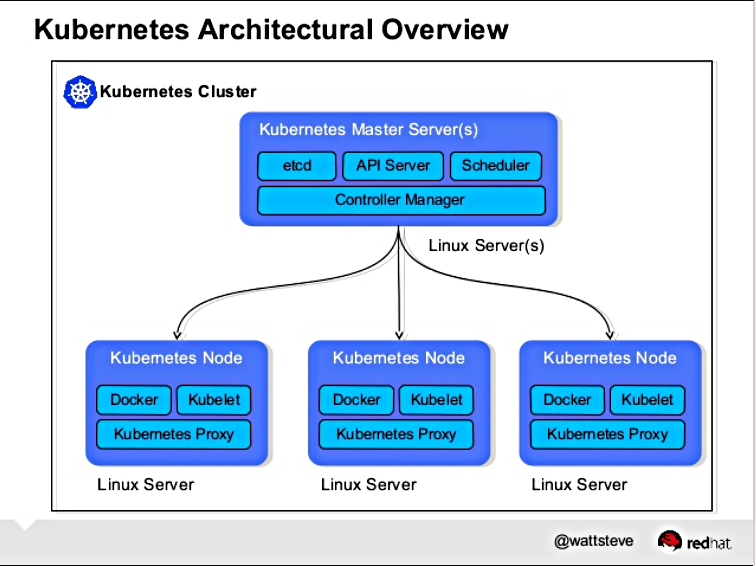
In our first three installments in this series, we learned what Kubernetes is, why it’s a good choice for your datacenter, and how it was descended from the secret Google Borg project. Now we’re going to learn what makes up a Kubernetes cluster.
A Kubernetes cluster is made of a master node and a set of worker nodes. In a production environment these run in a distributed setup on multiple nodes. For testing purposes, all the components can run on the same node (physical or virtual) by using minikube.
Kubernetes has six main components that form a functioning cluster:
API server
Scheduler
Controller manager
kubelet
kube-proxy
etcd
Each of these components can run as standard Linux processes, or they can run as Docker containers.
Figure 1: Kubernetes Architectural Overview (by Steve Watt, Red Hat).
The Master Node
The master node runs the API server, the scheduler, and the controller manager. For example, on one of the Kubernetes master nodes that we started on a CoreOS instance, we see the following systemd unit files:
core@master ~ $ systemctl -a | grep kube
kube-apiserver.service          loaded active  running Kubernetes API Server
kube-controller-manager.service loaded active  running Kubernetes Controller Manager
kube-scheduler.service          loaded active  running Kubernetes Scheduler
The API server exposes a highly-configurable REST interface to all of the Kubernetes resources.
The Scheduler’s main responsibility is to place the containers on the node in the cluster according to various policies, metrics, and resource requirements. It is also configurable via command line flags.
Finally, the Controller Manager is responsible for reconciling the state of the cluster with the desired state, as specified via the API. In effect, it is a control loop that performs actions based on the observed state of the cluster and the desired state.
The master node supports a multi-master highly-available setup. The schedulers and controller managers can elect a leader, while the API servers can be fronted by a load-balancer.
Worker Nodes
All the worker nodes run the kubelet, kube-proxy, and the Docker engine.
The kubelet interacts with the underlying Docker engine to bring up containers as needed. The kube-proxy is in charge of managing network connectivity to the containers.
core@node-1 ~ $ systemctl -a | grep kube
kube-kubelet.service loaded active running Kubernetes Kubelet
kube-proxy.service   loaded active running Kubernetes Proxy

core@node-1 ~ $ systemctl -a | grep docker
docker.service loaded active running Docker Application Container Engine
docker.socket  loaded active running Docker Socket for the API
As a side note, you can also run an alternative to the Docker engine, rkt by CoreOS. It is likely that Kubernetes will support additional container runtimes in the future.
Next week we’ll learn about networking, and maintaining a persistency layer with etcd.
Serverless computing and Docker are fast turning into seatmates. Where you find one, you’ll find the other.
Case in point: Hyper.sh, a container hosting service that uses custom hypervisor technology to run containers on bare metal, has introduced Func, a Docker-centric spin on serverless computing.