“Container orchestrators need community-driven container runtimes,” reads a formal statement from CNCF Executive Director Dan Kohn Wednesday, “and we are excited to have containerd which is used today by everyone running Docker. Becoming a part of CNCF unlocks new opportunities for broader collaboration within the ecosystem.”
This week in open source and Linux news, Cloud Foundry releases its new certification program for developers, Google creates a new home-base for its open source initiatives, and more! Read on to stay in the open source loop!
1) Cloud Foundry launches “the world’s largest cloud-native developer certification initiative.”
3) Hyperledger Executive Director Brian Behlendorf talks about the “possibilities blockchain offers for transparent, efficient and quickly executed transactions” in this interview.
Most modern Linux distributions enjoy standard repositories that include most of the software you’ll need to successfully run your Linux server or desktop. Should a package come up missing, more than likely you’ll find a repository you can add, so that the installation can be managed with the built-in package manager. This should be considered a best practice. Why? Because it’s important for the integrity of the platform to ensure the package manager is aware of installed software. When that is the case, packages can easily be updated (to fix vulnerabilities and the like). Another reason to install from repositories is that dependencies are easily met. When installing from source, you can sometimes find yourself trapped in a convoluted dependency nightmare.
Fortunately, repositories have become so inclusive, that it is rare you will ever need to install a package by any other means. However, you may find, on occasion, a reason to install from source. Reasons could include:
A package that is not found in any repository
A package developed in-house
You need to install a package with custom dependencies or options
When you do have to install from source, there are certain things you will need to know. Let’s walk through the process of installing Audacity from source on Ubuntu 16.10 (with the help of build-dep). Although this can be easily installed from repositories, it serves as a fine illustration for installing from source.
First things first
Installing from source used to be very common and also quite simple. You would download the source file, unpack it (with either zip or tar), change into the newly created directory, and then issue the commands:
./configuremakemake install
That still works for applications built with autoconf/automake. As long as your distribution met the necessary dependencies (which were almost always outlined in a README file within the source), the package would install and could be used. Although some source installations are still that simple, things are now a bit more complicated.
Another glitch in the modern system is that Ubuntu doesn’t ship with all the necessary tools to build from source. To solve that issue, you must first install autoconf with the command:
sudo apt-get install autoconf
Depending upon which version of Ubuntu you installed, you may even have to install the build-essential and build-dep packages (which includes the gcc/g++ compilers and libraries as well as a few other necessary utilities). These two packages can be installed with the command:
sudo apt-get install build-essential build-dep
For the likes of Fedora, a similar installation would be:
sudo yum install yum-utils
The above command would install the yum-builddep package.
Installing from source with build-dep
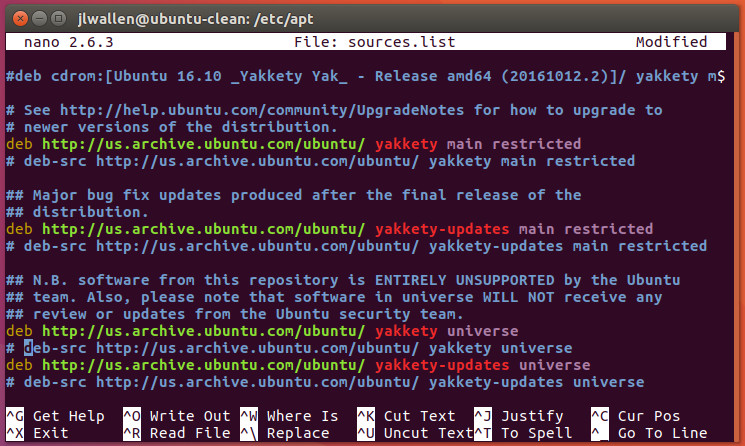
One way to install from source, but avoid the dependency nightmare, is to first work with the build-dep tool. Say you want to install audacity using build-dep; the first thing you must do is uncomment the deb-src listings in /etc/apt/sources.list. Open that file in your favorite editor and then uncomment out the two deb-src listings, by removing the leading # characters (Figure 1).
Figure 1: Configuring apt so it can use build-dep.
Save and close that file. Now run sudo apt-get update to update apt. Once that is done, you’re ready to build Audacity from source. Here’s what you must do. The first step is to use apt to install the necessary dependencies for Audacity. This is taken care of with the command:
sudo apt-get build-dep audacity
Allow that command to finish. The next step is to download the source package with the command:
sudo apt-get source audacity
In your current working directory, you should see a new directory called audacity-XXX (where XXX is the release number). Change into that directory. At this point, you can now issue the old tried and true:
./configuremakesudo make install
Audacity should now be installed and ready to use.
If the installation fails, you might have to revert to using the dpkg tool like so:
sudo dpkg-buildpackage -b -uc -us
The options above are as follows:
b – build binary
uc – do not sign the .changes file
us – do not sign the source package
Why might a source package fail to install? Beyond not having all of the necessary dependencies, the answer very well might lie in the ./configurecommand.
The magic of configure
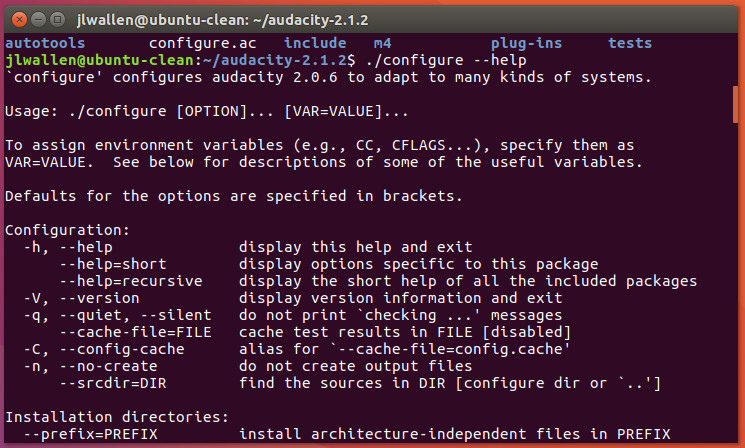
That configurecommand does have some magic hidden within. Most often you can run the ./configure command without any arguments. However, there are times you might want (or be required) to issue the command such that it configures the software to meet certain needs. Fortunately, themake tool can help us here. If you issue the command ./configure –help (from within the application source directory you’ve downloaded), you will be presented with a list of configuration options that can be used (Figure 2), specific to that package.
Figure 2: Options available for the source installation of Audacity.
These options can sometimes mean the difference between an application installing or not. Every application you attempt to install will display different options for the ./configure command, so make sure to issue ./configure –help before issuing./config. Possible configuration options include:
–prefix=PREFIX(install architecture-independent files in a non-standard location such as –prefix=/opt)
–build=BUILD (configure for a specific system architecture)
–host=HOST (the architecture of the system you want the file to run on, so you can compile the application on one machine and run it on another)
–disable-FEATURE (this allows you to disable specific features of an application)
–enable-FEATURE (this allows you to enable specific features of an application)
–with-PACKAGE=yes (use a specific PACKAGE)
–without-PACKAGE (do not use a specific PACKAGE)
As I mentioned, every software to be installed will offer different configuration options. Once you’ve decided on your options, you would then run the ./configurecommand (with all options). Once the configure script completes, follow it up with make and then make install to complete the installation.
Using Git
Let’s walk through another example, this time with the help of Git. As Ubuntu doesn’t ship with Git installed, we’ll first have to install it with the command:
sudo apt-get install git
Once this is installed, let’s pull down the source for the Clementine audio player with the command:
With the source downloaded, change into the newly added directory with the command cd Clementine. At this point, run the following commands to build the player from source:
cd bincmake ..make -j8sudo make install
That’s it. You should now have a working install of Clementine (so long as you’ve met the necessary dependencies). If the installation complains about dependencies, you can scan back through the output to find out what all needs to be installed. In the case of Clementine, you could always pick up the dependencies with the command:
sudo apt-get build-dep clementine
And there you go
That, my friends, is your introduction to installing from source. You might now not only have a better understanding as to how such an installation is handled, but why so many opt to bypass installing from source, and go straight to their distribution’s package manager. Dependency nightmares and a lack of consistency in steps helps to make the likes of apt, dpkg, yum, zypper, and dnfall the more appealing.
Yes, installing from source offers far more flexibility, but that flexibility comes at the price of simplicity.
Learn more about Linux through the free “Introduction to Linux” course from The Linux Foundation and edX.
This article is paid for by Huawei, a Platinum-level sponsor of Open Networking Summit, to be held April 3-6, and was written by Linux.com.
While the networking community is getting ready for Open Networking Summit 2017, we spoke to Bill Ren, Vice President of Huawei Network, Industry & Ecosystem Development, to discuss the role of openness in what Huawei calls the “All-Cloud Network.”
Bill Ren, Vice President of Huawei Network, Industry & Ecosystem Development
As companies grapple with digital transformation across all industries, Huawei advocates full cloudification to build efficient networks and agile competitiveness. “All-Cloud” Strategy involves a full reconstruction of network infrastructure, including equipment, network, services, and operations — and it will be built on openness.
“The future cloud network presents huge market potential. Full-gear and close collaboration from all industry parties is needed to build an industry ecosystem with positive impact and eventually, enable a successful rollout of the cloud network,” said Ren.
Indeed, in this big data and cloud age, collaboration and integration are the keystones of success.
That’s no secret to Huawei which is already heavily invested in pushing to shape cloud network-related standards, contributing on research results. The company is a founding Platinum member and major contributor to the OPNFV community, a Platinum member of The Linux Foundation, a Gold member of OpenStack and Cloud Foundry, and a founding member of ONOS.
“We fully participate in setting up SDN technical standards, as well as lead in setting up northbound interface / security / optical transmission and other standards.”
Here is what Ren had to say on how all that comes together to shape the future of the industry.
Linux.com: Why is cloud-network ecosystem so important to becoming and remaining competitive?
Ren: Currently, the whole industry is at a critical time of digital transformation. New technologies keep emerging, a flawless experience has become a requirement for end users, and an open and all-connected world has arrived. One can expect that the future will be a society that has thorough cross-industry integration and collaboration, which will need comprehensive network capacity.
Linux.com: Everyone agrees that innovation is crucial in the industry, but few are certain what that might look like. How does the future network differ from the networks that exist now?
Ren: In the past 20+ years, the world has built trillions of network assets. In order to maximize the value of these networks, to face the multiple challenges of intelligent society, and equip the network with the ability to build up the next one-trillion new business territory, the future network will have several features.
Linux.com: And what are those features? Or, at least some of them?
Ren: There are four main features: agility , intelligence, efficiency, and openness. By agility I mean the network must have the capability for quick integration of new services and new features, delivering a ROADS experiences and drastically reducing time-to-market (TTM).
By intelligence, I mean flexible and intelligent resource management, including fully automated planning, provisioning, resource allocation, and O&M to support thousands or even millions of service instances.
By efficiency, we mean better resource pooling. The industry must move away from closed silos, or the “chimney network model,” so that there is more sharing of resources and more ease in integration.
The fourth, of course, is openness. There must be more cooperation and participation by more industry partners to rapidly mature these technologies and to build larger pools of resources.
Open Networking Summit April 3-6 in Santa Clara, CA features over 75 sessions, workshops, and free training! Get in-depth training on up-and-coming technologies including AR/VR/IoT, orchestration, containers, and more.
Linux.com readers can register now with code LINUXRD5 for 5% off the attendee registration. Register now!
This article was sponsored by Huawei, a leading global information and communications technology (ICT) solutions provider. Our aim is to enrich life and improve efficiency through a better connected world, acting as a responsible corporate citizen, innovative enabler for the information society, and collaborative contributor to the industry. Driven by customer-centric innovation and open partnerships, Huawei has established an end-to-end ICT solutions portfolio that gives customers competitive advantages in telecom and enterprise networks, devices and cloud computing. For more information, please visit Huawei online at http://www.twitter.com/Huawei.
When containerization was young, one of its early principles was the ideal of immutable infrastructure,the ability to build a support structure for a container that was flexible enough to meet the container’s needs during its lifespan, which may be short, but remained a fixed asset throughout that duration.
It spoke to a possible, complete outmoding of one of IT’s most critical functions — configuration management — and a skill upon which enterprises dearly depend upon today. While the leading vendors in the space began discussing evolutionary adaptations, the practitioners in the space rallied together, forming a kind of global support group to keep hope alive through the evolutionary maelstrom.
“As an instrument for selecting at random, I have found nothing superior to dice,” wrote statistician Francis Galton in an 1890 issue of Nature. “When they are shaken and tossed in a basket, they hurtle so variously against one another and against the ribs of the basket-work that they tumble wildly about, and their positions at the outset afford no perceptible clue to what they will be even after a single good shake and toss.”
How can we generate a uniform sequence of random numbers? The randomness so beautifully and abundantly generated by nature has not always been easy to extract and quantify. The oldest known dice (4-sided) were discovered in a 24th century B.C. tomb in the Middle East.
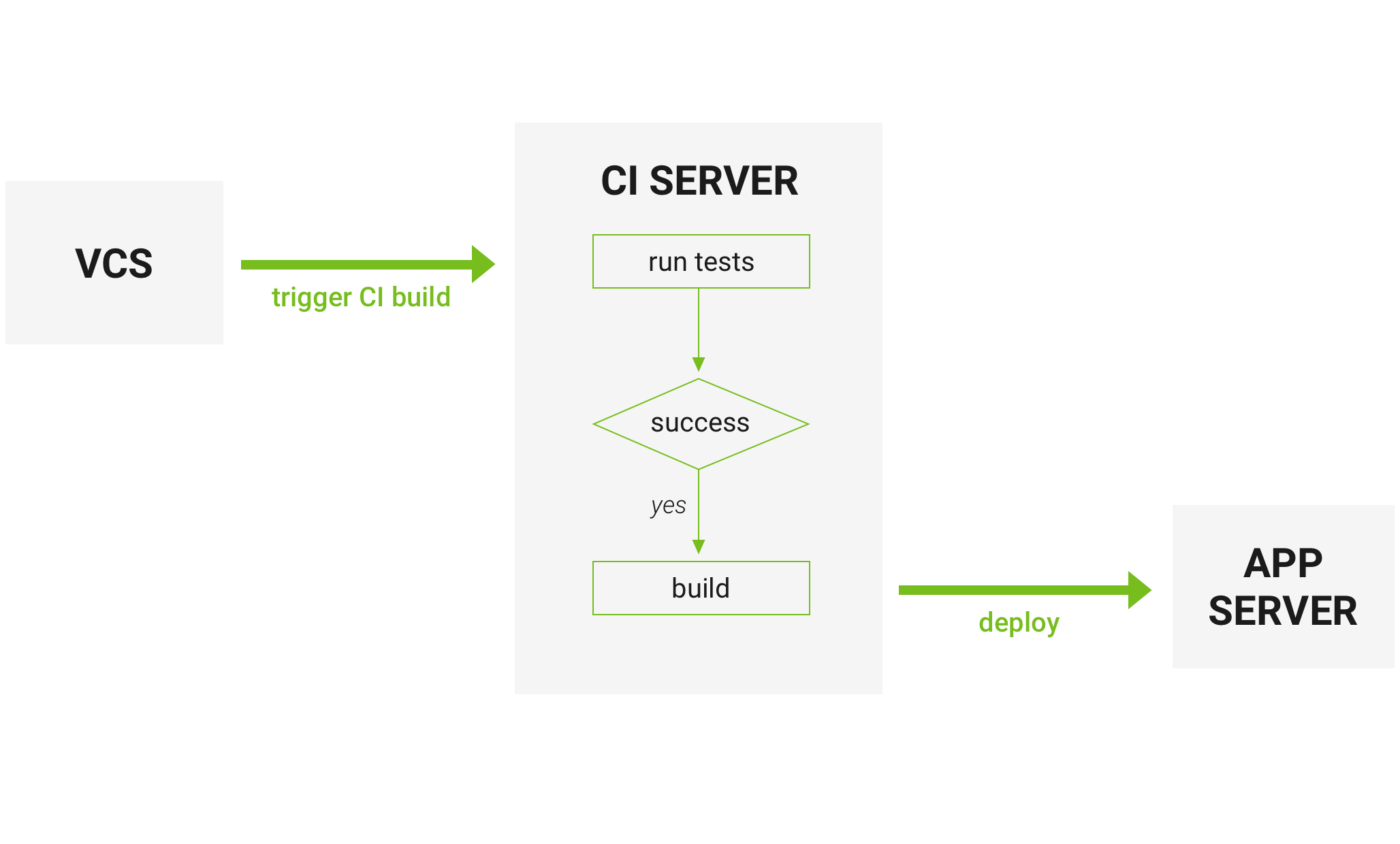
Continuous Integration (CI) is a software development practice that is based on a frequent integration of the code into a shared repository. Each check-in is then verified by an automated build.
The main goal of continuous integration is to identify the problems that may occur during the development process earlier and more easily. If you integrate regularly — there is much less to check while looking for errors. That results in less time spent for debugging and more time for adding features. There is also an option to set up inspection of the code style, cyclomatic complexity (low complexity makes the testing process more simple) and other checks. That helps to minimize the efforts of the person responsible for the code review, saves time, and improves the quality of the code
How it works
Developers check the code locally on their computers
When completed — they commit changes to the repository
Repository sends a request (webhook) to CI system
CI server runs job (tests, coverage, check syntax and others)
CI server releases saved artifacts for testing
If the build or tests fail, the CI server alerts the team
The team fixes the issue
CircleCI vs Travis CI vs Jenkins
Now, when the process of continuous integration is clear (I hope so) we can move to the comparison of some of the most popular CI platforms nowadays. Each of those has its pros and cons. Let’s start with CircleCI.
CircleCI
Features :
CircleCI is a cloud-based system — no dedicated server required, and you do not need to administrate it. However, it also offers an on-prem solution that allows you to run it in your private cloud or data center.
It has a free plan even for a business account
Rest API — you have an access to projects, build and artifacts The result of the build is going to be an artifact or the group of artifacts. Artifacts could be a compiled application or executable files (e.g. android APK) or metadata (e.g. information about the tests`success)
CircleCI caches requirements installation. It checks 3rd party dependencies instead of constant installations of the environments needed
You can trigger SSH mode to access container and make your own investigation (in case of any problems appear)
That’s a complete out of a box solution that needs minimal configurationadjustments
CircleCI is compatible with:
Python, Node.js, Ruby, Java, Go, etc
Ubuntu (12.04, 14.04), Mac OS X (paid accounts)
Github, Bitbucket
AWS, Azure, Heroku, Docker, dedicated server
Jira, HipChat, Slack
CircleCI Pros:
Fast start
CircleCI has a free plan for enterprise projects
It’s easy and fast to start
Lightweight, easily readable YAML config
You do not need any dedicated server to run CircleCI
CircleCI Cons:
CircleCI supports only 2 versions of Ubuntu for free (12.04 и 14.04) and MacOS as a paid part
Despite the fact CircleCI do work with and run on all languages tt supports only the following programming languages “out of the box”:
Go (Golang), Haskell, Java, PHP, Python, Ruby/Rails, Scala
Some problems may appear in case you would like to make customizations: you may need some 3rd party software to make those adjustments
Also, while being a cloud-based system is a plus from one side, it can also stop supporting any software, and you won’t be able to prevent that
Travis CI
Travis CI and CircleCI are almost the same
Both of them:
Have YAML file as a config
Are cloud-based
Have support of Docker to run tests
What does TravisCI offer that CircleCI doesn’t?
Option to run tests on Linux and Mac OS X at same time
Build matrix is a tool that gives an opportunity to run tests with different versions of language and packages. You may customize it in different ways. For example, fails of some environments can trigger notifications but don’t fail all the build ( that’s helpful for development versions of packages)
TOX
In case you prefer any other CI platform — there is always an option to create a Build Matrix by using Tox.
Tox is a generic virtualenv management and test command line tool. You may install it by using pip install tox or easy_install tox command.
Travis CI Pros:
Build matrix out of the box
Fast start
Lightweight YAML config
Free plan for open-sourced projects
No dedicated server required
Travis CI Cons:
Price is higher compared to CircleCI, no free enterprise plan
Customization (for some stuff you’ll need 3rd parties)
Jenkins
Features:
Jenkins is a self-contained Java-based program, ready to run out-of-the-box, with packages for Windows, Mac OS X and other Unix-like operating systems
With hundreds of plugins in the Update Center, Jenkins integrates with practically every tool in the continuous integration and continuous delivery toolchain
Jenkins can be extended via its plugin architecture, providing nearly infinite possibilities for what Jenkins can do
Jenkins Pipeline. That’s a suite of plugins which supports implementing and integrating continuous delivery pipelines into Jenkins. Pipeline provides an extensible set of tools for modeling simple-to-complex delivery pipelines “as code” via the Pipeline DSL
Allows you to launch builds with various conditions.
You can run Jenkins with Libvirt, Kubernetes, Docker, and others.
Rest API – have access to Controlling the amount of data you fetch, Fetch/Update config.xml, Delete a job, Retrieving all builds, Fetch/Update job description, Perform a build, Disable/Enable a job
Jenkins Pros:
Price (it’s free)
Customization
Plugins system
Full control of the system
Jenkins Cons:
Dedicated server (or several servers) are required. That results in additional expenses. For the server itself, DevOps, etc…
Time needed for configuration / customization
Conclusion
What CI system to chose? That depends on your needs and the way you are planning to use it.
CircleCI is recommended for small projects, where the main goal is to start the integration as fast as possible.
Travis CI is recommended for cases when you are working on the open-source projects, that should be tested in different environments.
Jenkins is recommended for the big projects, where you need a lot of customizations that can be done by usage of various plugins. You may change almost everything here, still this process may take a while. If you are planning the quickest start with the CI system Jenkins might not be your choice.
Docker containers turned four years old this month. If you were paying attention to Docker in its early days, you know that the Docker ecosystem today looks nothing like it did then. Here’s how the Docker world has evolved since Docker’s launch in 2013.
Docker’s debuted generated a splash among developers — you can hear them oohing and aahing in this demonstration of Docker at the PyCon event in 2013 — but its commercial importance at the time of Docker’s launch was unclear. Back then, Docker was just an implementation of LXC, a Linux containerization technology that had already been around for years. LXC was an interesting platform, but few people in 2013 thought of it as the building block for deployment infrastructure that could replace virtual machines.
Web workloads are changing. Performance metrics and tooling need to adapt. Limiting the amount of JS proportionally to what’s visible on the screen is a good strategy.
In the last 10 years, an incredible amount of resources went into speeding up peak performance of JavaScript engines. This was mostly driven by peak performance benchmarks like SunSpider and Octane and shifted a lot of focus toward the sophisticated optimizing compilers found in modern JavaScript engines like Crankshaft in Chrome.
This drove JavaScript peak performance to incredible heights in the last two years, but at the same time, we neglected other aspects of performance like page load time, and we noticed that it became ever more difficult for developers to stay on the fine line of great performance. In addition to that, despite all of these resources dedicated to performance, the user experience on the web seemed to get worse over time — especially page load time on low-end devices.
Attackers have targeted developers present on GitHub since January with an information-stealing program called Dimnie.
The attacks started in January and consisted of malicious emails specifically crafted to attract the attention of developers, such as requests for help with development projects and offers of payment for custom programming jobs. The emails had .gz attachments that contained Word documents with malicious macro code attached. If allowed to execute, the macro code executed a PowerShell script that reached out to a remote server and downloaded a malware program known as Dimnie.