Home Blog Page 583

Amid Shortages in Apache Spark Skillsets, Training Options Proliferate

The open source Big Data scene is red hot, but organizations are now dealing with shortages in people with relevant deployment and management expertise. There are simply not enough skilled workers to go around, especially when it comes to one of the hottest technologies of all: Apache Spark.

According to Dice, the most in-demand technology skills are in Big Data, with Spark at the top of the list. Although the need for these skills has increased in the past few years, employers are still challenged to find qualified candidates. The Taneja Group recently reported similar findings in a global survey sponsored by Cloudera of nearly 7,000 technical and managerial-level professionals working in Big Data. The survey found that nearly half of the respondents see the Big Data skills gap as the most significant challenge to deploying Spark, and one-third named complexity in learning Spark as a barrier to adoption.

According to the Taneja Group report: “Barriers to adoption [of Spark] and challenges remain, and are largely attributed to the Big Data skills gap and the ability to consume relevant training in a variety of formats (online, in-person, conference or tradeshow).”

However, the good news is that Spark training options are spreading out, and some of the best options are free or available at low cost. MapR, which focuses on Hadoop as well as Spark, offers numerous Spark training options, and Cloudera also has an expanded Spark training curriculum. For more information about Cloudera’s courses on Spark and to register for a class, you can visit university.cloudera.com. Meanwhile, you can get a preview of MapR’s Spark Essentials course here.

How is a typical course structured? In MapR’s Spark Essentials course, in the first part of the course, students use Spark’s interactive shell to load and inspect data. The course describes the various modes for launching a Spark application, and students go on to build and launch a standalone Spark application. MapR notes that the concepts are taught using scenarios that form the basis of hands-on labs.

Cloudera University offers both instructor-led courses and on-demand training options. The courses are focused not just on Spark but on other tools in the Spark ecosystem, including Apache Impala, Apache Kudu, Apache Kafka, and Apache Hive. There is high demand for people with skills spanning across these data-centric, Apache-stewarded projects.

“Cloudera University has established itself as a valuable resource for preparing data professionals across every industry. We’ve seen throughout the years that organizations which invest in training up front drive deeper results from their big data initiatives and move more quickly from proof of concept into full production environments,” said Mark Morrissey, senior director, Education Programs at Cloudera. “The skills gap continues to be the biggest hurdle in our industry.”

There are other Spark training options that come along with technology bundles based on Spark. For example, Databricks, which is the company founded by the same team that created Apache Spark, has announced its Databricks Community Edition (DCE), a free version of a just-in-time data platform built on top of Spark. It comes with access to free, online courses that can arm you with top-notch Spark skills. With the Databricks Community Edition, users have access to 6GB clusters as well as a cluster manager and a notebook environment to prototype simple applications.

Databricks also offers a diversified set of Spark training options, including an option where an organization can have Databricks’ trainers teach workers in their own workplace environments. Databricks’ classes are structured to minimize time requirements, too. For example, it offers an Apache Spark Programming course that can be completed in three days.

Demand for people with Spark skills will only increase, and that will be partially driven by the huge investments that powerful companies are making. Leaders at IBM have called Spark “the most important new open source project in a decade” and is investing hundreds of millions of dollars in Spark-related initiatives.  The bottom line is that a little Spark education can go a long way.

Learn more about Spark at Apache: Big Data, which gathers developers, operators, and users working in Big Data for education, collaboration, and more. Check out the conference schedule and register now!


10 (Mostly) Easy Linux Distros for Newbies

A fresh look at some of the more popular Linux distros (plus one non-Linux OS), and an impression of their ease of use.

Linux has a bad rap as a daily driver – the programs aren’t written to run on Linux, it’s tricky to install stuff, and so on. But it might surprise people who think along those lines to learn that plenty of the distributions out there are actually quite simple to use. Here’s our latest appreciation of the desktop Linux landscape.

Read more at InfoWorld

Teaching Children to Code

Chris Ward looks at how-to tools to help teach children one of the most essential skills of the modern age, how to code.

A lot of projects aimed at children focus on visual learning, such as teaching concepts with draggable, interlinking blocks for creating visual applications like games and animations.

Scratch

Scratch from MIT was one of the earliest contenders, using simple verbs and characters to describe programming concepts. For example, ‘repeat’ is a loop, or ‘move’ and ‘play’ describe actions characters can take.

Read more at DZone

Three Challenges for the Web, According to its Inventor

Today marks 28 years since I submitted my original proposal for the world wide web. I imagined the web as an open platform that would allow everyone, everywhere to share information, access opportunities and collaborate across geographic and cultural boundaries. In many ways, the web has lived up to this vision, though it has been a recurring battle to keep it open. But over the past 12 months, I’ve become increasingly worried about three new trends, which I believe we must tackle in order for the web to fulfill its true potential as a tool which serves all of humanity.

1)   We’ve lost control of our personal data

The current business model for many websites offers free content in exchange for personal data. Many of us agree to this – albeit often by accepting long and confusing terms and conditions documents – but fundamentally we do not mind some information being collected in exchange for free services. 

Read more at WorldWideWeb Foundation

Danish Shipping Company Uses Blockchain in IBM Partnership

IBM and Danish shipping giant Maersk are using blockchain technology to digitise transactions in the global shipping industry. It is a huge market, with about 90% of the world’s trade carried by sea.

The blockchain product that IBM and Maersk are developing could help to track and manage the paper trail of millions of shipping containers end to end. It will increase transparency and improve secure data sharing between trading partners.

The companies’ blockchain effort is based on Hyperledger Fabric, part of the Linux Foundation’s open source Hyperledger Project, and is scheduled to be ready for production in late 2017.

Read more at ComputerWeekly

Dockerizing LEMP Stack with Docker-Compose on Ubuntu

Docker-Compose is a command line tool for defining and managing multi-container docker applications. Compose is a python script, it can be installed with the pip command easily (pip is the command to install Python software from the python package repository). With compose, we can run multiple docker containers with a single command. It allows you to create a container as a service, great for your development, testing and staging environment.

In this tutorial, I will guide you step-by-step to use docker-compose to create a LEMP Stack environment (LEMP = Linux – Nginx – MySQL – PHP). We will run all components in different Docker containers, we set up a Nginx container, PHP container, PHPMyAdmin container, and a MySQL/MariaDB container.

Read more at HowtoForge

Orchestrate CockroachDB with Kubernetes

This page shows you how to orchestrate the deployment and management of an insecure 3-node CockroachDB cluster with Kubernetes, using the beta StatefulSet feature.

Running a stateful application such as CockroachDB on Kubernetes requires using some of Kubernetes’ more complex features at a beta level of support. There are easier ways to run CockroachDB on Kubernetes for testing purposes, but the method presented here is destined to become a production deployment once Kubernetes matures sufficiently.

Deploying an insecure cluster is not recommended for data in production. We’ll update this page after improving the process to deploy secure clusters.

Read more at Cockroach Labs

How to Install Elastic Stack on Ubuntu 16.04

Elasticsearch is an open source search engine based on Lucene, developed in java. It provides a distributed and multitenant full-text search engine with an HTTP Dashboard web-interface (Kibana) and JSON documents scheme. Elasticsearch is a scalable search engine that can be used to search for all types of documents, including log file. Elasticsearch is the heart of the ‘Elastic Stack’ or ELK Stack.

Logstash is an open source tool for managing system events and logs. It provides real-time pipelining to collect data. Logstash will collect the log or data, convert all data into JSON documents, and store them in Elasticsearch.

Kibana is a data visualization interface for Elasticsearch. Kibana provides a pretty dashboard (web interfaces), it allows you to manage and visualize all data from Elasticsearch on your own. It’s not just beautiful, but also powerful.

In this tutorial, I will show you how to install and configure Elastic Stack on a single Ubuntu 16.04 server for monitoring server logs and how to install ‘Elastic beats’ on client PCs with Ubuntu 16.04 and CentOS 7 operating system.

Read more at HowtoForge

Testing Simple Scripts in a Docker Container

This guide is intended to be a quick guide for first time Docker users, detailing how to spin up a container to run simple tests in. This is definitely not meant to be an exhaustive article by any means! There’s tons of documentation for Docker online, which can be a little daunting, so this is just meant to be a super short walk-through of some really basic commands.


For the SRE part of the Holberton School curriculum, we’re required to write several Bash scripts that essentially provision a fresh Ubuntu 14.04 Docker container with a custom-configured installation of Nginx. The scripts are checked by an automated system that spins up a container, runs our script inside of it, and grades us based on the expected result. So obviously, the best way to check our work is to spin up a container ourselves and run the script!


First, let’s run a new container with `docker run`, using sudo to run as root. Docker will need root permissions to run and do magical container things. There’s a lot of arguments to the docker run command, so I’ll break them down real fast:

  • -t: Creates a psuedo-TTY for the container.
  • -d: Detaches the container to start. This leaves the container running in the background, and allows you to execute additional commands, or use docker attach to reattach to the container.
  • –name: Assigns the container a name. By default, containers are assigned a unique ID, and a randomly generated name. Assigning it a name can make life a little easier, but it isn’t necessary.
  • -p: Publishes a port. The syntax is a little tricky at first. Here we use 127.0.0.1:80:80, and this binds the port 80 on the container to port 80 on 127.0.0.1, the local machine. This means the port will be published to the host, but not the rest of the world. If we used -p 8080:80, this would bind container port 8080 to 80 to your external IP address, and you’d be able to get there from outside the localhost (if there’s no firewall, etc. blocking access). We can also use -p 8080, which would bind port 8080 on the container to a random port on the host, or specify a range of hosts. Check the docker-run man page for more!

Then, we run `docker ps`. The output shows us any currently running containers, and gives us the id, name, and command the container is running.


Before we can do anything else, we need to copy our script into the Docker container. Luckily, this is easy.


Running `docker cp` allows us to copy a file from the local host to the container, or vice-versa. The syntax is `docker cp <source> <destination>`, and to specify the location in the container, you simply use `container-name:location`. So here, `docker cp nginx_setup.sh testing:/` will copy the file nginx_setup.sh in the current host folder to the root directory of the container named testing.
Now, let’s get inside the container, and see if our script actually works. We’ll do this with `docker exec`.

If you haven’t guessed, `docker exec` executes a command inside a currently running container. There are two flags being used, similar to the ones I used for `docker run`:

  • -i: Interactive. Keeps STDIN open even when not attached.
  • -t: Allocates a false TTY, just like run.

So `docker exec -it 43a0 /bin/bash` executes /bin/bash inside the container 43a0. As you can see from the output of `docker ps`, that’s the start of the container ID of the container we named testing. We can use either the ID or name to refer to specific containers.


So now that we’re in a Bash shell, let’s check out our script.

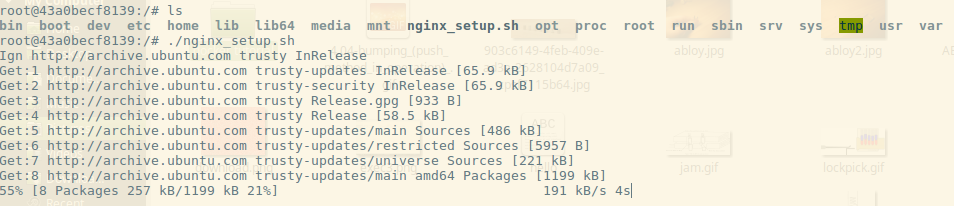
Running ls in the root directory, we can see the script I copied over, nginx_setup.sh. It’s just a simple script to run `apt-get update`, install a few packages (including Nginx), and set up a Nginx web server. Here we can see all I have to do is execute it like normal, and the script starts going. By default, when we execute /bin/bash in the container, we’re starting as root, so no need for `sudo`.
Once the script finishes, let’s check the output! The whole reason we’re doing this, right?

I run `service nginx status`, and I can see that my script was at least partially successful. The Nginx service is running. I check the /etc/nginx/nginx.conf file and see that my script successfully set the configuration for me. But that doesn’t prove that we have a running web server. I’ve left Nginx running on the standard port, 80, the same one we published with -p when we initially ran the container. So let’s pop out of the server and see if we can use curl to check if the container is running.

We exit out, and I run `docker ps` to show you two things. The container is still running, and as a reminder, it shows you that port 80 is published to 127.0.0.1:80. So let’s see if we can curl our container.

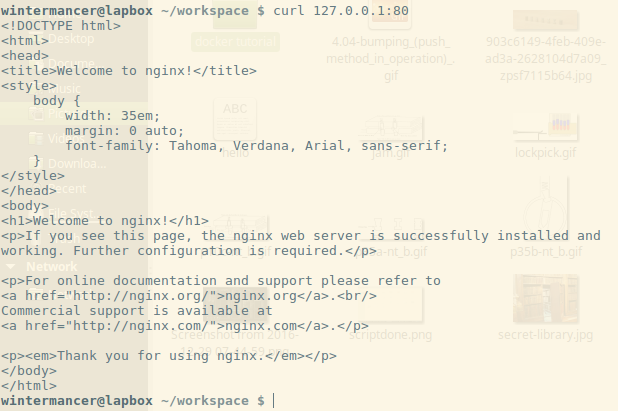
I run curl, and lo-and-behold, the default Nginx landing page! Mission accomplished, my script works. Now, I’m done with this Docker container, so I’m going to use `docker rm` to shut it down.

Since the container is still running, I have to use the -f flag to ‘force’ its removal. -f simply sends SIGKILL to the container. After we run it, the container is spun back down, and we’re done testing.

In closing, I hope this draws some attention to how easy it can be to use Docker for simple testing, once you understand the lay of the land. Docker Training has some great resources with free self-paced online courses that can help expand your knowledge a little further, and the Docker community is full of helpful folks!

Tim Britton is a full-stack software engineering student at Holberton School and a wannabe Docker evangelist! You can follow him on Twitter or on Github.

OPNFV Shows It’s Ready for Complex Deployments With First ETSI Plugtests

OPNFV, an integrated open platform for facilitating network functions virtualization (NFV) deployments, recently had a chance to participate in the first ETSI NFV Plugtests, held Jan. 23 to Feb. 3 in Madrid, Spain. Designed to perform interoperability testing among different telco vendors and open source providers, the event brought together a diverse group of industry representatives—including those from several open source organizations—ready to get their hands dirty and dive into interoperability testing. Participation in these types of test sessions, particularly in conjunction with others organizational players in the ecosystem (in this case, ETSI), shows that via greater interoperability, OPNFV is ready for complex deployments that ultimately bring the industry closer to a truly plug-and-play, end-to-end virtual network.

Representatives from OPNFV member organizations Ericsson and Intel were on-site to conduct a series of tests leveraging OPNFV as an NFV platform under different deployment scenarios.  Combined, both groups executed 32 successful, approved tests with OPNFV in just under 10 days –an incredible feat! (For a test session report to be “approved,” it needed to be performed by a Management and Orchestration (MANO) provider with a VNF on a particular VIM & NFVi. All three parties—the MANO, VNF and VIM & NFVI providers—needed to approve the report to merit successful completion.)  

The OPNFV project itself, as well as Ericsson and Intel, are very pleased with outcome, which speaks to the value of the OPNFV community’s efforts in the broader NFV landscape. Participation in the ETSI Plugtests (as well as OPNFV’s own Plugfests) is a great starting point to broaden OPNFV’s testing scope and capabilities across the industry, learning new lessons each time.

While the teams were able to accomplish a great deal during the event, there is still much to be done. For example, there were additional tests focused on specific hardware capabilities that the team was not able to execute due to incompatibilities of the virtualized system, as well as a failed attempt to run an additional OPNFV service function chaining (SFC) deployment but did not have the time. In the future, a longer pre-testing phase should allow more time to prepare the proper configuration, any needed workarounds, and have additional discussions with supporting vendors.  

All in all, it was a successful 10 days and the OPNFV technical community is happy with what was accomplished. This has been a great achievement for the OPNFV project since it demonstrates maturity of the OPNFV platform, which is now ready for complex deployments. Moreover, it is a clear demonstration that open source Management and Orchestration (MANO) projects are ready to integrate with OPNFV. Additionally, Ericsson was approached by several VNF providers who asked for help with side testing—a testament to a streamlined process.

More details on the OPNFV test sessions that took place during the ESTI Plugtests are outlined on the OPNFV blog.

If you would like to get involved in OPNFV, or join open source NFV testing efforts in general, visit https://www.opnfv.org/community/get-involved.