Google’s gRPC protocol was originally developed to speed up data transfer between microservices, proving faster and more efficient than passing around data encoded in JSON.
Yesterday the Cloud Native Computing Foundation (CNCF), which oversees the development of Kubernetes, announced it would also become the home for gRPC’s development.
IBM announced today that it was updating its Quantum Experience cloud with a new API that it hopes will increase the abilities of researchers and other interested parties to build more sophisticated applications with its experimental quantum computing system.
Last May, IBM opened up its 5 qubit computer in its NY state labs to the public in the form of a cloud service. The hope was that by providing interested parties with a working quantum computing model, it would help advance the technology, which remains very much in the preliminary stage of development.
Periodically new devices and technology coming out and it’s important to keep our Linux system kernel up-to-date if we want to get the most of out it. Moreover, updating system kernel will ease us to take advantage of new kernel fuctions and also it helps us to protect ourselves from vulnerabilities that have been found in earlier versions.
Ready to update your kernel on Ubuntu 16.04 or one of their derivatives such as Debian and Linux Mint? If so, keep reading!
Step 1: Check Installed Kernel Version
To find the current version of installed kernel on our system we can do:
Federal agencies are required by law to justify their proposals before codifying them into active laws. And for good reason: changes in tax policy, for example, can affect the entire economy. However, “justification” typically comes in the form of estimates based on numbers crunched deep within the sunless bowels of places such as the Office of Tax Analysis. There, nameless bureaucrats calculate outcomes using undisclosed statistical models based on assumptions that the rest of us, including the lawmakers writing these laws, do not get to see.
Thanks to the Open Source Policy Center, however, the citizens of this great nation may now get a glimpse into the data, and the methods used to derive and analyze that data, that drive public policy and the creation of new laws. In short, this DC-based nonprofit organization seeks to let a little open source sunshine into the black box of government data modeling.
The Hyperledger project, a cross-industry open source blockchain group led by the Linux Foundation, plans to release its first production-ready distributed ledger code base by the end of the month, as projects involving the nascent technology begin to mature.
Hyperledger Fabric is a type of blockchain designed be used as a foundation to build distributed applications. The team of software developers involved in the project is finalizing the first version of Fabric that could be used by large businesses to build applications and plans to release by the end of March, according to the blog post.
“Our hope is that it is code that people can put into serious production,” Brian Behlendorf, Hyperledger’s executive director, told Reuters.
Costello: I know the point, but where does it point to?!?
Abbott: What compiler are you running?
Costello: Don’t act surprised, my name’s not compiler, and I’m walking, not running. Do I look like I’m in a hurry?
It’s too bad Abbott and Costello aren’t alive today. I’m sure they would do a worthy update of the “Who’s On First” skit that would put mine to shame.
We don’t have Abbott and Costello to entertain us anymore. But that’s alright. We programmers are a pretty fun bunch, and computers have a way of keeping us entertained.
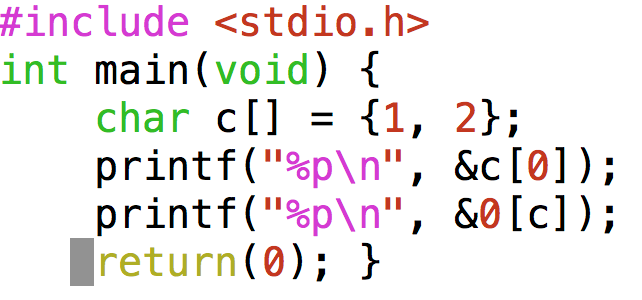
As a programmer, you might consider the question, “What’s the point?” to be out of scope. But a slightly different question that definitely is relevant to a C programmer is “What does that pointer point to?” Let’s consider an example:
If you are accustomed to looking at C code, you might notice something strange. The first printf statement seems normal enough. It prints out the memory address of the first element of a 2 element array of chars. But what does the next printf statement do??? How many elements are there in an array called 0??? 0isn’t a declared variable, and variables can’t have a number as the first character of their name, anyway. What is this code going to do? Will it even compile? And if it does, what will the output be? Let’s toss it at the compiler and see what happens …
OK, but what is the output upon execution? Before we get to that …
How to look Smart Without Answering the Question
When your friend asks you a question about some obscure corner of the C language, answer the question with another question, like so: “What compiler will you use to compile this code you speak of? I need to know what compiler you’re using to give a definitive answer.” This retort should give you some breathing room if you’re not up to speed on C arcana.
Little Do They Know …
… that you are persistent, and you actually *will* install a different C compiler so that you can be the coder in-the-know. What compiler to install? Well gcc and clangare the two most commonly used compilers, and should be for a while (from a 2017 vantage point). So, having already seen gcc pass our example code, let’s see what clang v.3.8.0has to say about our strange syntax:
Small print says: clang passed code without complaint!
clang doesn’t seem to mind this strange script either. What do these compilers know that we don’t?
What We’ve Covered So Far:
We cooked up a script with some strange syntax (here), specifically this fragment from the 5th line: &0[c] It seems to be asking the C compiler to reference an array that doesn’t have a permissable variable name. The array index inside the square brackets is a pointerc, which points to a location in the upper reaches of memory space on my typical PC laptop running a 64 bit operating system. We know that by using the ampersand, like so: &0[c] we will get not the value stored at 0[c] but the memory location of 0[c].
Here is the output (as compiled by gcc v.4.8.4, on a 64bit linux system):
&c[0] == & 0[c] !!!
What Does This Output Tell Us?
The salient point is that we printed out the location of an array element of two different arrays using:&a[0] and of &0[a]. What we see above when we examine the output of our script is that the two memory locations are one and the same. Why should this be? Here is the conclusion that I am forced to reach: I could have typed any number for an array name, and as long as it meets this condition:
Lowest Available Memory Location ≤ Memory Location associated with Array Variable Name ≤ Highest Memory Location.
Further, the number associated with the variable name (such as a) can be replaced by a simple numeric value (such as 0). Is it wise to hard code a numeric memory location instead of letting C determine where in memory to store your variables? Generally, no. But is it possible? Yes, the evidence is right here, and it even works on two different compilers.
And this gets me what?
By experimenting with code, we gain insight into the inner workings of the C language, as implemented by the compiler. And we are one step closer to the most sublime art: creating and comprehending obfuscated code!
Thanks to my classmate Julija Lee who wrote and tested code for this blog post!
Also, extra credit to you if you modify and test the example script. What happens if the pointer points to something other than a char?
Check out my github account here, and follow me on twitter!
As more and more people rely on their cellphones for conducting all kinds of business, mobile app development will only continue to increase in importance. Although they share quite a few similarities with desktop applications, mobile apps present their own set of challenges and particularities. Therefore, a programmer that wishes to find gainful employment in the current market will need to harness and develop the skills that are in-demand at the present time. When it comes to mobile app development on Linux-based platforms, these skills include:
1. Java
Far and away the most commonly used programming language when it comes to mobile applications,Java is mainly used to build native Android programs. There are numerous different frameworks, but learning how to work with them invariably starts with having a good understanding of Java in general. What’s more, Java is known for its stability and security, two features that make it an especially attractive proposition in the enterprise sector.
2. Android SDK
As the most popular Linux-based platform, Android rivals iOS when it comes to the sheer breadth and diversity of its apps. In order to get in on the game, you’ll need to learn your way aroundAndroid SDK. Among other things, this software development kit includes sample projects, development tools and the required libraries to get you started on building Android applications from scratch.
3. Titanium SDK
If you already have a good understanding of Java and HTML,Titanium will be a great tool for furthering your mobile development goals. It can help you build native cross-platform apps using Javascript that are easy to code and can run on a vast array of devices. What’s more, Appcelerator licenses Titanium for free under the Apache 2 license for both personal and commercial use in order to encourage developers to create things without worrying about the cost.
4. Apache Cordova
Formerly known as PhoneGap,Apache Cordova is a mobile application development framework that enables developers to build apps using CSS3, HTML5 and Javascript instead of relying on platform-specific APIs. This results in hybrid applications, which are neither truly native nor web-based. Installing Cordova on Linux is a fairly straightforward process, with additional tools like Apache Ant only serving to increase the functionality of the framework.
5. Node.js
Node.js is an open-source Javascript runtime environment that is widelypopular for developing web applications. However, it has proven its use in the mobile world through its employment of Google’s V8 JavaScript engine, which is Android-compatible. If properly utilized, Node allows programmers to use the same platform fordeveloping both server and mobile apps, thereby greatly speeding up development times in the process.
That concludes our quick rundown of the top skills that any aspiring mobile app developer for Linux should be familiar with. Keep in mind that the aforementioned technologies are just a starter pack, and that there are plenty of other skills that will need to be honed as you progress in your career. After all, in programming as in life, education never really stops, and you should always seek to better yourself at every step of the way.
This week in open source news, CNCF adds gRPC to list of existing projects, making it the sixth, and other stories. Keep reading to stay on top of your news this week!
1) The Linux Foundation’s Cloud Native Computing Foundation (CNCF) announced it’s adding gRPC open source protocol to list of projects.
4) CentOS developer/maintainer announces “availability of an important Linux kernel security update for all users of the CentOS 5 operating system series.”
5) Johns Hopkins Cryptographer and Computer Scientist Matthew Green explains he’s happy to see any code come out of Google’s Gmail encryption work, but that it’s “hardly the email-encrypting plugin Google promised.”
Anyone familiar with Linux likely has some knowledge of the Raspberry Pi. That may not necessarily equate to having experienced one of the greatest embedded platforms on the planet.
If you’re unfamiliar with the Pi, let me introduce you. The tagline for the Raspberry Pi is Teach, learn, and make with Raspberry Pi. The Pi is a series of single board computers (developed by the Raspberry Pi Foundation) to promote the teaching of basic computer science. Thing is, the small-form factor device became incredibly popular beyond the educational environment. People around the globe embraced these boards and, with the help of embedded Linux, began to invent. To that end, as of September, 2016, more than 10 million Raspberry Pi boards have been sold.
To go along with this extraordinary phenomenon, the Raspberry Pi Foundation created an official OS to be used with their hardware. Derived from Debian, Raspbian is officially provided by the Foundation and can easily be installed on a Raspberry Pi board with the help of NOOBS. And now, Raspberry Pi boards can be booted with a completely refreshed desktop called PIXEL.
And guess what? You can experience that same platform on your desktop.
PIXEL stands for Pi Improved Xwindows Environment, Lightweight. On the desktop, PIXEL is only available as a live image, but for anyone without one of the Raspberry Pi boards, wanting to experience the new Pi environment on, this is definitely worth carrying around on a bootable USB flash drive. Why? Not only are you getting a full-blown, Pi-flavored desktop operating system, you will also find some interesting programming tools installed by default. That’s right, tools like BlueJ Java IDE, Geany Programmer’s Editor, Greenfoot Java IDE, Python 2/3 (IDLE), Scratch, Sense HAT Emulator, and Sonic Pi. These developer tools can be found, along with LibreOffice, the Chromium Web Browser, Claws Mail, and several other productive tools are found on a platform aimed at bringing a little Pi to the desktop.
Let’s download and run PIXEL.
Running PIXEL
Before we continue on, you must remember that PIXEL for the desktop is still very much a prototype. You will run into problems. The most current available release of PIXEL is to be used via NOOBS on the Raspberry Pi and is far more stable than what you’ll find for the desktop. However, if you still want to give PIXEL a spin on the desktop, you’ll have to settle for the image from December 2016 (found here). Of course, if you have a Raspberry Pi available, and you want to use PIXEL with NOOBS, you can download that image file here. But, because we’re talking about the desktop version, we’ll be sticking with the ISO.
Even with the release being just a few months old, it would behoove you to immediately run an upgrade, once the desktop has booted. However, in order to do this, you must be running PIXEL with persistence enabled (more on that in a bit). If you do not run with persistence enabled, the sudo apt-get upgrade orsudo apt-get dist-upgradecommands will fail due to a lack of space.
With that said, let’s get PIXEL up and running.
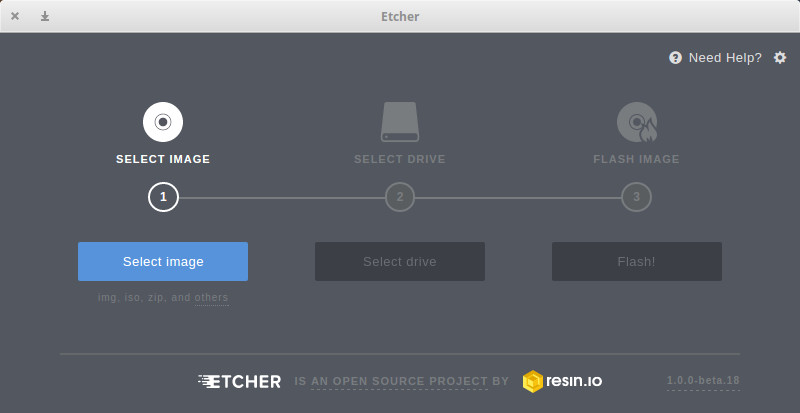
The first thing to do is download the latest ISO image. Once you have that image saved to your drive, you can get PIXEL up and running by either creating a VirtualBox VM or by creating a bootable USB flash drive with the PIXEL image. Let me walk you through creating a bootable flash drive with the help of Etcher. You’ll find this flashing tool to be one of the easiest to use on the market. Here’s what you do:
Open a terminal window and change into the directory housing the new download
Extract the file with the command unzip Etcher-XXX-linux-YYY.zip (Where XXX is the release number and YYY is the architecture)
Start the software with the command ./Etcher-XXX-linux-YYY.AppImage(Where XXX is the release number and YYY is the architecture)
In the resultant window, click the Select image button (Figure 1)
Navigate and select the downloaded PIXEL ISO in the file selector
If you haven’t inserted your flash drive, do so now
Click Select drive
Navigate and select your USB flash drive in the pop-up window
Click Flash!
When prompted, type your admin password and hit Enter on your keyboard
Allow the flashing process to complete
Figure 1: Creating a bootable flash drive with Etcher.
Writing the bootable USB flash drive does take some time, so find something else to do while the process occurs.
When the drive is written, eject it from your file manager (if necessary), insert it into the machine that will run PIXEL, and boot. NOTE: If your machine doesn’t boot from the USB drive, you may have to enter the BIOS and set it up so that it can boot from a USB drive.
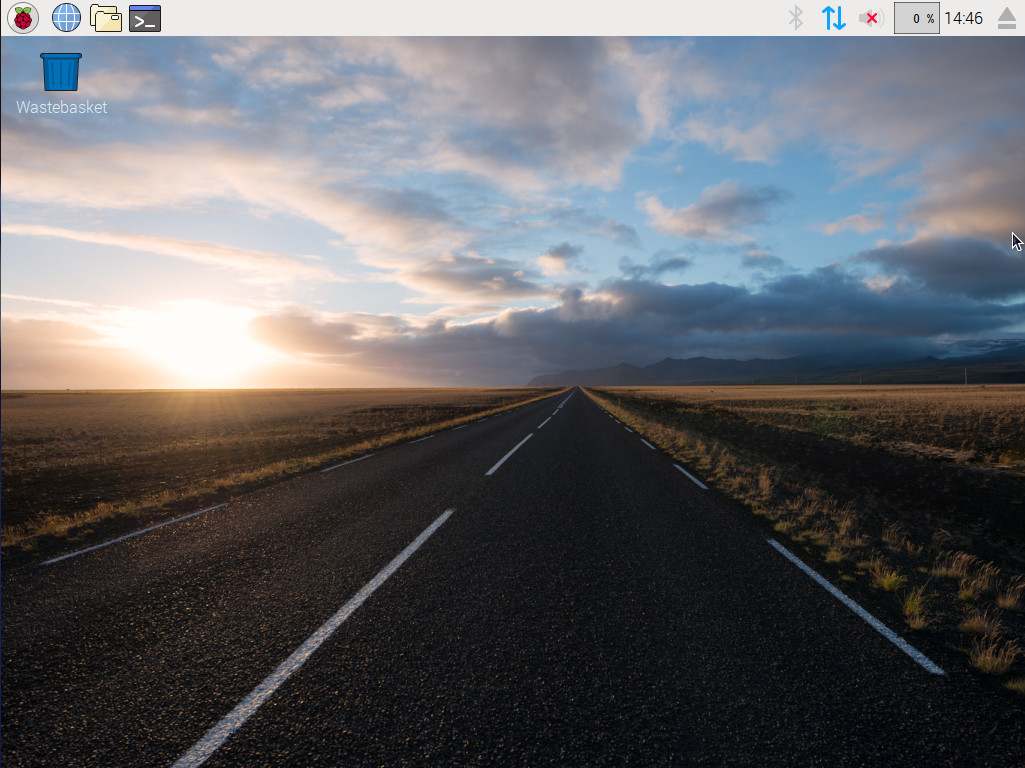
I opted to go the VirtualBox VM route. All that is necessary to get PIXEL up and running here is to create the Virtual Machine, start the VM, when prompted select the PIXEL ISO for your image, and allow PIXEL to boot. Once booted, you’ll find yourself on the very user-friendly PIXEL desktop (Figure 2).
Figure 2: The PIXEL desktop, ready to serve.
Note that running PIXEL in a virtual machine will not allow for you to make use of the persistence feature.
Speaking of which…
Persistence
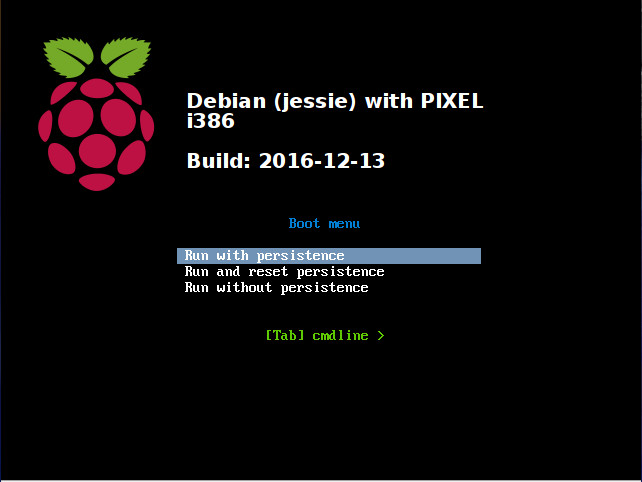
If you would like to be able to save work from session to session, you must be running PIXEL from a USB flash drive and have persistence enabled. To enable persistence you must hit Escape at the PIXEL splash screen and then (once the boot menu appears), select Run with persistence — Figure 3). This allows PIXEL to make use of any free space on the USB drive to save any changes made or files created. With persistence enabled, you can boot PIXEL from session to session, knowing your work will remain.
Figure 3: Enabling persistence at boot.
Should you want to clear and reset persistence, you can reboot, hit Escape, and select Run and reset persistence.
Using PIXEL
You’ve now reached the point where everything should become incredibly simple. You have a Desktop with a top panel that contains an Applications menu, quick launchers, and a system tray. There are no surprises at this point; PIXEL is very easy to use. Click on the Raspberry main menu to see what all the desktop has in store for you.
It’s not a perfect desktop, but it works and does so quite well. And best of all, you’ve just experienced the flavor of Raspberry on your desktop.
Learn more about Linux through the free “Introduction to Linux” course from The Linux Foundation and edX.
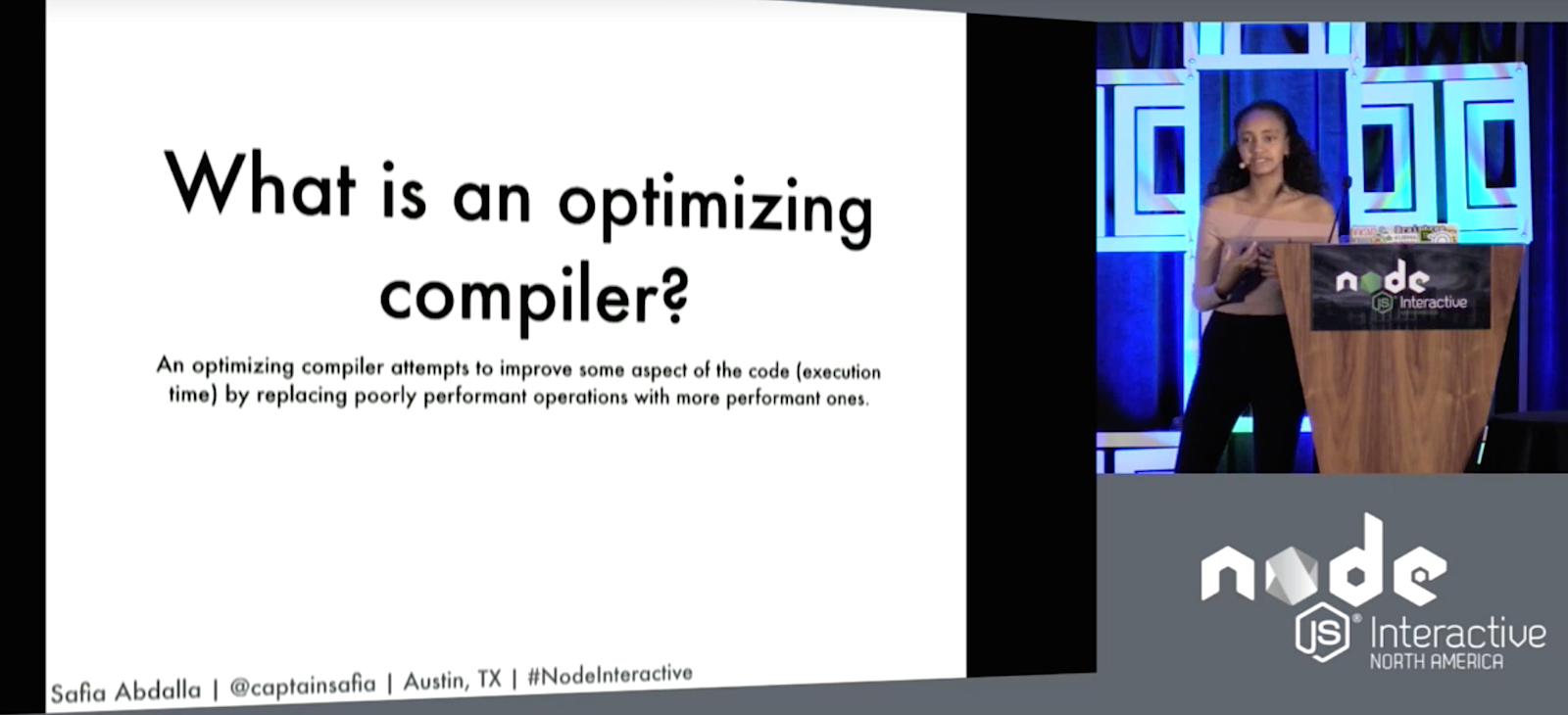
Safia Abdalla is an open source developer and a maintainer on a project called nteract, but her pet topic is compilers. And, in her talk at Node.js Interactive, Abdalla explained the inner workings of the V8 compiler and how it can optimize the code it gets fed. Although Abdalla specifically focused on what goes on in the V8 compiler, she noted that there are many similarities to other compilers.
Crankshaft (vs. Full Codegen)
Crankshaft is the optimizing compiler in the JavaScript V8 engine (which is used by Node). When you run code in Node, it passes through the Crankshaft compiler — unless you tell it not to with:
node --crankshaft=false
Most readers will be familiar with the concept of compiler — that is, a program that converts source code into executable bytecode. However, there is a subset of compilers, called Optimizing Compilersthat have a more specific role. Crankshaft is an optimizing compiler.
An optimizing compiler, explains Abdalla, is “one that more intelligently looks at the code it’s translating to try and improve some aspects of the code.” It does this by replacing poorly performant operations with performant ones. This often entails trying to reduce execution time by reducing the number of instructions the machine needs to run.
V8 also contains a non-optimizing compiler, called Full Codegen. All the code passes through Codegen and is compiled (and this is important as Abdalla shows later), but only code that is susceptible of being optimized gets passed onto Crankshaft.
The Full Codegen compiler is faster compiling than Crankshaft, because it does not have to search for ways of optimizing any code. However, the code it produces is generally slower. It also produces machine language code directly from what is called the abstract syntax tree (AST), while the Crankshaft compiler takes several intermediate steps between AST and machine language.
How does Crankshaft work?
The first step is to parse the code. “Parsing” in this context, says Abdalla, is the process of converting the source code into an AST. Both the Full Codegen and Crankshaft execute this parsing. The parsed code is never stored in memory. Every time the compiler needs the AST for a certain chunk of code, it needs to call the parser again to get it.
The keywords and phrases of your code are parsed into a parse tree, which is then converted into an AST — a tree-data structure in which the roots and parent nodes are operators, and the children nodes are operands.
Once you have the AST, the compiler builds the Hydrogen representation, a higher level intermediary data structure. The hydrogen representation needs some information about the variable definition in the program, things like their type and scope, to be able to perform some optimizations.
As it’s building the representation, Crankshaft already starts to incorporate some optimizations into the code. Although there are many possible strategies to optimize code, Abdalla focuses on function inlining — the killing off dead code and common subexpression elimination. Function inlining consists of substituting the call to a function for the code the function would have executed. This is done because calling functions takes up a lot of operations at the stack level. As optimizing is all about reducing the number of operations executed, function inlining often makes a lot of sense. However, as Abdalla points out, this cannot be done in all cases. Using function inlining for recursive functions, for example, would be an especially bad idea.
The killing off dead of code happens after the Hydrogen representation has been constructed, and it is used to eliminate code that in the representation has no effect. These fragments of code can be introduced during the construction of the Hydrogen representation or could have been in the original code.
Related to the above, another optimization is the common subexpression elimination (or CSE). This process substitutes expressions within the Hydrogen representation with similar expressions which were encountered previously by the compiler. Basically, it is a way of de-duplicating code.
Once the Hydrogen representation has been optimized, it is translated into aLithium representation. The code expressions in the Lithium representation are platform dependent, that is, the instructions are dependent on the processor of the underlying machine running the code.
The low level representation is finally translated into native code that the machine can run. Often, code in the Lithium representation can be directly translated to machine code.
But that’s not all…
Abdalla points out that, after attempting all the optimizations, Crankshaft’s job is not always done. Sometimes code will require de-optimizing. As Abdalla explains, Crankshaft “makes some optimistic assumptions about the types of data it will get in certain code blocks and it optimizes specifically for those types.” However, sometimes those assumptions may be invalidated when the code is actually run, and Crankshaft may have to backpedal and use the unoptimized version of the code generated by the Full Codegen compiler.
If you’re interested in speaking at or attending Node.js Interactive North America 2017 – happening October 4-6 in Vancouver, Canada – please subscribe to the Node.js community newsletter to keep abreast of dates and deadlines.