Apparently, the xRAN Foundation is a new standards group that was formed in late 2016. Deutsche Telekom, a founding member, is hosting a press event at Mobile World Congress next week to introduce the group and explain its mission. Other initial members of xRAN include AT&T, SK Telecom, and Intel.
GCC has a rich set of features designed to help detect many kinds of programming errors. Of particular interest are those that corrupt the memory of a running program and, in some cases, makes it vulnerable to security threats. Since 2006, GCC has provided a solution to detect and prevent a subset of buffer overflows in C and C++ programs. Although it is based on compiler technology, it’s best known under the name Fortify Source derived from the synonymous GNU C Library macro that controls the feature: _FORTIFY_SOURCE. GCC has changed and improved considerably since its 4.1 release in 2006, and with its ability to detect these sorts of errors. GCC 7, in particular, contains a number of enhancements that help detect several new kinds of programming errors in this area. This article provides a brief overview of these new features. For a comprehensive list of all major improvements in GCC 7, please see GCC 7 Changes document.
There are cloud firewalls and there are cloud firewalls. While the underlying technology may be the same, there really are two types of products and use cases: One aims to protect the organization’s network and users, while the other protects cloud infrastructure and servers. Let’s contemplate the differences.
Cloud-based firewalls come in two delicious flavors: vanilla and strawberry. Both flavors are software that checks incoming and outgoing packets to filter against access policies and block malicious traffic. Yet they are also quite different. Think of them as two essential network security tools: Both are designed to protect you, your network, and your real and virtual assets, but in different contexts.
Learn how to work from anywhere and keep your data, identity, and sanity. DOWNLOAD NOW
If your systems administrators are remote workers, you may wish to establish a set of guidelines to help ensure that their workstations pass core security requirements. This will help reduce the risk that they become attack vectors against the rest of your IT infrastructure.
In this new blog series, we’ll lay out a set of baseline recommendations for Linux workstation security to help systems administrators avoid the most glaring security errors without introducing too much inconvenience. These are the same guidelines our own 100 percent remote team uses every day to access and manage the IT infrastructure for dozens of The Linux Foundation projects including Linux, Hyperledger, Kubernetes, and others.
Even if your systems administrators are not remote workers, chances are that they perform a lot of their work either from a portable laptop in a work environment, or set up their home systems to access the work infrastructure for after-hours/emergency support. In either case, you can adapt these recommendations to suit your environment.
You may read through this series and think it is way too paranoid, while someone else may think this barely scratches the surface. Security is just like driving on the highway — anyone going slower than you is an idiot, while anyone driving faster than you is a crazy person. These guidelines are merely a basic set of core safety rules that is neither exhaustive, nor a replacement for experience, vigilance, and common sense.
We’ll start with how to choose the right hardware, then discuss pre- and post- operating system installation guidelines, how to choose the best Linux distro, and a range of other best practices for working securely from anywhere on your Linux workstation. You can also download the entire set of recommendations as a handy guide and checklist.
Choosing the right hardware
We do not mandate that our admins use a specific vendor or a specific model, so this article will address core considerations when choosing a work system. Here are three things to consider:
- System supports SecureBoot (ESSENTIAL)
– System has no firewire, thunderbolt or ExpressCard ports (NICE-to-HAVE)
– System has a TPM chip (NICE-to-HAVE)
SecureBoot
Despite its controversial nature, SecureBoot offers prevention against many attacks targeting workstations (Rootkits, “Evil Maid,” etc.), without introducing too much extra hassle. It will not stop a truly dedicated attacker, plus there is a pretty high degree of certainty that state security agencies have ways to defeat it (probably by design), but having SecureBoot is better than having nothing at all.
Alternatively, you may set up Anti Evil Maid which offers a more wholesome protection against the type of attacks that SecureBoot is supposed to prevent, but it will require more effort to set up and maintain.
Firewire, Thunderbolt, and ExpressCard ports
Firewire is a standard that, by design, allows any connecting device full direct memory access to your system (see Wikipedia). Thunderbolt and ExpressCard are guilty of the same, though some later implementations of Thunderbolt attempt to limit the scope of memory access. It is best if the system you are getting has none of these ports, but it is not critical, as they usually can be turned off via UEFI or disabled in the kernel itself.
TPM Chip
Trusted Platform Module (TPM) is a crypto chip bundled with the motherboard separately from the core processor, which can be used for additional platform security (such as to store full-disk encryption keys), but is not normally used for day-to-day workstation operation. At best, this is a nice-to-have, unless you have a specific need to use TPM for your workstation security.
Now that we’ve discussed some basic hardware requirements for a secure Linux workstation, it’s time to consider your pre-boot environment. In the next post we’ll lay out a set of recommendations for your workstation before you even start with OS installation.
Whether you work from home, log in for after-hours emergency support, or simply prefer to work from a laptop in your office, you can use “A SysAdmin’s Essential Guide to Linux Workstation Security” to do it securely. Download the free ebook and checklist now!
Is customer data safe on your website? When consumers provide credit card information or personal details, is the link between your site and their device secure — or open to prying eyes?
Providing security is a necessity if your business sells products or services online. Your potential customers are wary about the prevalence of fraud and identity theft, and the FBI even advises people not to send credit card information electronically until they ensure the transaction is secure.
To protect your customers’ data, you will need an SSL certificate. SSL or “secure sockets layer” technology encrypts all communication between web browsers and website servers. Many users are now familiar with the small green “lock” symbol that appears in their browser address bar when a site is protected by SSL and uses the “https” rather than plain-text “http” protocol. For consumers and businesses alike, SSL provides a sense of security — but many companies aren’t sure how to make the leap from standard links to secure layers.
Below is a link to a guide that will help you set up the SSL certificate that your website needs to keep you customer’s data safe.
There are many compelling reasons to use Open Source Software (OSS), all of which add up to a competitive advantage for the organization.
Using OSS:
Speeds delivery of software and hardware solutions
Saves money
Provides flexibility
Helps companies stay on the leading edge of technology development
This is the second part of our ongoing series of articles that explains the basics of open source for business advantage and how to achieve it through the discipline of professional open source management.
Last week, we started by defining “Open Source” in common terms — the first step for any organization that wants to realize, and optimize, the advantages of using open source software (OSS) in their products or services. In the next few articles, we will provide more details about each of the ways OSS adds up to a business advantage for organizations that use and contribute to open source. First, we’ll discuss why many organizations use OSS to speed up the delivery of software and hardware solutions.
How does OSS speed up development?
Open Source Software has proven instrumental in speeding software development cycles. One of the most striking examples is in the mobile device market, where we see major new products being released in six-month cycles. Open Source is essential to rapid, evolutionary, incremental delivery…
So how does OSS speed up development?
● Faster, easier acquisition processes– there are no purchase orders, contracts, or SOW negotiations.
● Quicker deployments– Unlike commercial installation, configuration, and implementation cycles, which are often long and cumbersome, Open Source comes from a download-and-go culture.
● Rapid evolution and innovation – with community-driven features, instead of revenue-driven management.
● Higher quality – Because it is subjected to broad community testing. Mature OSS quality met or exceeded expectations 92 percent of the time, according to a recent Forrester Research study.
● Ease of customization – through access to source code, a collaborative community, interfaces, and tools.
● Evolutionary delivery – means OSS is usually up and running in hours, instead of weeks or months.
In other organizations, cost savings are the most important factor. While some organizations choose OSS for the flexibility it affords or the desire to stay at the leading edge of development. Next week, we will provide more details about each of these reasons for using OSS.
One of the common criticisms of open source in general, especially when it comes to open cloud platforms such as OpenStack and ownCloud, is lack of truly top-notch documentation and training resources. The criticism is partly deserved, but there are some free documentation resources that benefit from lots of contributors.
Community documentation and training contributors really can make a difference. In fact, in a recent interview, ClusterHQ’s Mohit Bhatnagar said: “Documentation is a classic example of where crowdsourcing wins. You just can’t beat the enthusiasm of hobbyist developers fixing a set of documentation resources because they are passionate about the topic.”
There are actually many ongoing, crowdsourced projects for producing free open source-related documentation, such as FLOSS Manuals, and there are good guides to open source cloud platforms all around the Internet.
Here are some of the very best free guides to popular, open cloud-centric tools, ranging from OpenStack to ownCloud:
Intro to the Open Cloud. The Linux Foundation’s 2016 report “Guide to the Open Cloud” is a good place to start. The report covers significantly established projects like OpenStack, Docker, and Ceph, and rapid up-and-comers such as Kubernetes. It’s especially useful if you are planning a cloud deployment and want to leverage open source tools.
The Linux Foundation is also collaborating with edX tooffer an online course titled, LFS152x, which provides a comprehensive introduction to OpenStack. The course includes seven chapters, and a quiz at the end of each chapter. There is a final exam, and here is the great news: the complete course is available at no cost.
Meanwhile, you can investigate the Open Datacenter Group’s work on cloud usage modelshere. It is especially intended to “help guide enterprise IT consumers in their cloud service acquisition decisions.”
OpenStack Basics. For getting up to speed with OpenStack, you may want to take a look at what the OpenStack Foundation’s OpenStack Training Marketplace offers. It has surprisingly easy-to-follow and rich tutorials on the OpenStack platform. If you’re totally new to the OpenStack cloud platform, look into some of the introductory classes.
The Training Marketplace is specifically designed to make it easier to discover training courses offered by providers in the OpenStack community. The OpenStack Foundation has made available a series of instructor-led online training guides, and can also help you become a certified administrator. Also, Opensource.com has some excellent coverage of OpenStack tutorials, foundhere.
In addition, you can find a number of other options for OpenStack training from vendors focused on it. You can learn more about what Mirantis offers at:https://training.mirantis.com. Meanwhile, Red Hat offers numerous options here.
The FLOSS Manuals ownCloud Guide. FLOSS Manuals’guide to ownCloud is completely free, and a good starting point if you’re looking to roll your own cloud. Before diving into it, you may want to gain some familiarity with what ownCloud is. It’s used by many individuals as a personal cloud platform. The FLOSS Manuals guide is aimed to be a complement to the existing ownCloud documentation. There are many good tutorials available for running ownCloud on Linux. Linux User & Developer has a good onehere. Meanwhile, ownCloud’s founder has launched a new cloud platform, based on ownCloud, called Nextcloud. You can find a tutorial for getting going with it here.
Managing and Hosting Online Video in the Cloud. More and more cloud deployments need to include intelligent ways to host video content, and Floss Manuals’ guide to hosting video can provide much help. The guide focuses on approaches and tools to host, showcase and “aggregate” video content, and also makes specific technology recommendations.
Arch Linux is a Linux-based operating system that is designed for i689 and 86-64 computers. Its unique package manager is responsible for providing updates to the latest software applications using “pacman” with complete tracking. Pacman is the package manager that is used to install, update, and remove the software packages. It is designed entirely for free and open-source software, along with the support from the Linux community.
Arch Linux is also popular for having a comprehensive documentation in form of the community wiki known as ArchWiki. This Linux operating system is based on binary packages that are targeted for i832, 64-bit, and 32-bit systems and optimized for the best performance on the modern hardware systems.
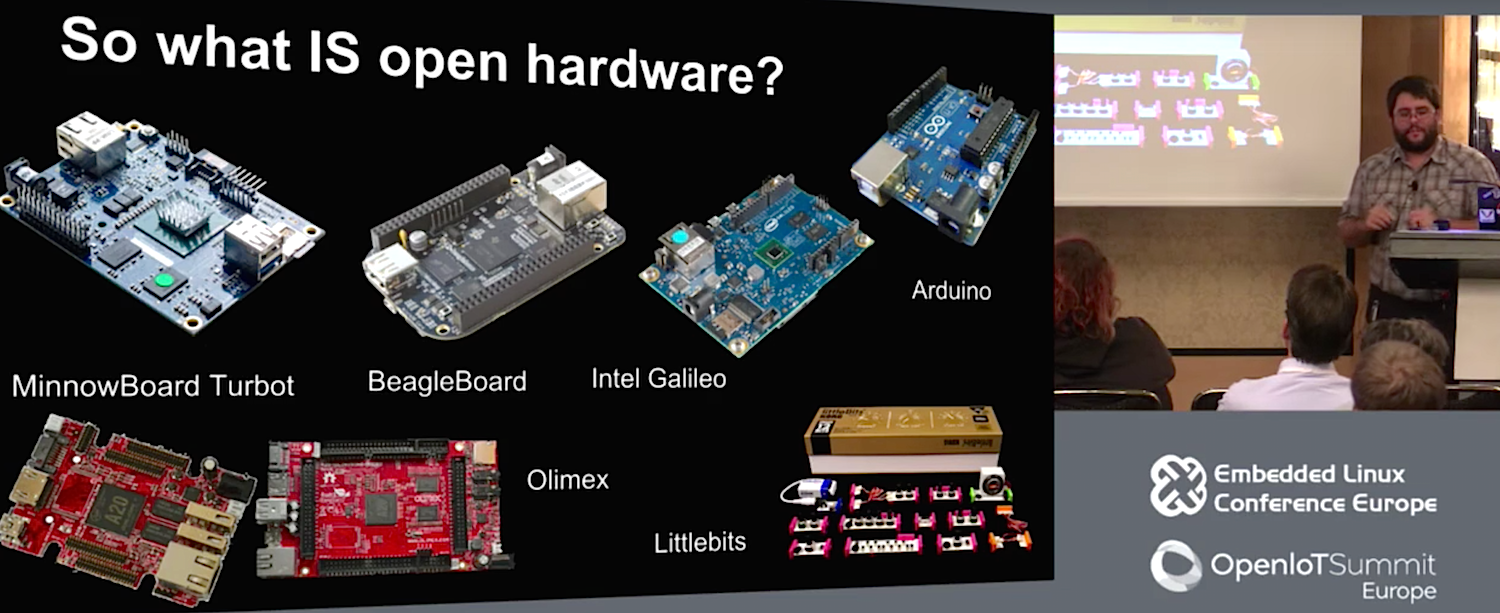
When you mention open source hardware, people typically think about community-backed hacker boards. However, the open hardware movement is growing on many fronts, including medical devices, rocketry and satellites, 3D printers, cameras, VR gear, and even laptops and servers. At the Embedded Linux Conference Europe in October, John “Warthog” Hawley, Intel’s evangelist for the MinnowBoard SBC, surveyed the key open hardware trends he saw in 2016. The full video, “Survey of Open Hardware 2016,” can be seen below.
Hawley prefers the strict open hardware interpretation offered by the Open Source Hardware Association (OSHA). The key statement is: “Open source hardware is hardware whose design is made publicly available so that anyone can study, modify, distribute, make, and sell the design or hardware based on that design.”
Hawley reported that at the Open Hardware Summit held in Portland, Oregon, OSHA had revealed a certification program for open source hardware. Formally announced on November 7, the plan calls for OSHA to issue unique IDs for each piece of registered hardware, including a country code and an ID number.
By OSHA’s definition, some popular community-backed SBCs such as the Raspberry Pi do not qualify as open source, said Hawley. “You can get some schematics for the Raspberry Pi, but you can’t get the Gerber files or remix it for your own purposes,” he said.
Boards that do qualify, he said, include Linux-ready, open spec SBCs like the Intel Galileo and LittleBits CloudBit on the low end and the BeagleBone, Olimex’s OlinuXino, and ADI’s Intel backed MinnowBoard Turbot on the high end. Many other community-backed Linux hacker SBCs, but certainly not all, would also appear to fit the definition.
Arduino boards, many of which now include a Linux-driven component, also qualify. Hawley reported on the breaking news at the time that the two dueling Arduino camps had pledged to reunite. The reunited Arduino will be unveiled at the Arduino Day conference on April 1.
Leading the way in opening up Linux SBCs in 2016 was The Next Thing’s $9 Chip SBC, which raised over $2 million on Kickstarter. said Hawley. The growing use of Kickstarter to launch open-spec hardware was another key 2016 trend, he added.
Calling the Chip developers “the poster children for open source hardware,” Hawley said that The Next Thing releases everything you would need to build your own Chip variant. This includes source code, Gerbers, schematics, and BOM.
“With the Chip, they’ve pioneered new techniques to reduce the cost of hardware,” said Hawley. “For example, they’ve got eMMC, but no eMMC hardware controller. The controller functions are done by software in the CPU.”
While ELCE was in session, The Next Thing unveiled a $16, open-spec computer-on-module version of the Chip called the Chip Pro. It also launched a partially open source system-in-package (SiP) version of the Cortex-A8 Allwinner R8 SoC use on the Chip and Chip Pro called the GR8. For a fully open source SoC, many vendors are turning to the RISC-V project, which may well end up on Hawley’s list of open hardware trends for 2017.
Needed: Easier open source PCB design tools
If you attempt to build your own SBCs rather than do what most hobbyist hackers do — write apps and customize the boards with add-ons — you will discover the rewards of “solving your own itches,” said Hawley. He noted, however, that it’s easier to delete a feature from a design than to add one.
The process of building your own board is challenged by the lack of easy, open source PCB design and layout tools. With lower end, two-layer PCBs, you can turn to the open source KiCad, but higher end boards with PCI-Express and differential pair routing usually require expensive professional tools, said Hawley.
KiCad’s workflow and UI are still difficult, but improving, said Hawley, echoing the thoughts of Grant Likely in an ELC 2016 North America session on embedded Linux. “A lot of entities are working to improve KiCad, such as CERN, which is adding differential pair, push-pull routing,” said Hawley.
On the 10-layer MinnowBoard, the only way to get at files beyond Gerbers is to work with high-end tools like OrCAD, said Hawley. “Eagle probably couldn’t handle it well, and porting it to KiCad would be a bit of a nightmare because it doesn’t handle that kind of complexity very well,” he added.
Autodesk’s proprietary Eagle tools are friendlier and more affordable than many, such as the high-end Altium, said Hawley. The BeagleBone Black now supports Eagle for a 4- or 6-layer board, he added.
An audience member related that Olimex was beginning to add KiCad support to its OlinuXino SBCs. Olimex also recently announced an open source Teres I laptop.
Open source hardware beyond SBCs
Open source hardware adoption and creation is accelerating, and not only in the SBC market, said Hawley. He reported on several presentations at the Open Hardware Summit, especially in the field of medical devices. Open spec medical gear is finally taking off, despite the challenge of extensive regulation and certification that can add years to product development, said Hawley.
One Open Hardware Summit presentation demonstrated an under-$100 open hardware device that surgeons can use to practice suturing techniques. You stick your finger into the device to learn how to apply just the right amount of pressure to sutures.
There was also a presentation about HACKberry’s dual-licensed, 3D printable prosthetic hand. This relatively affordable solution is particularly helpful for kids who typically go through several expensive prosthetic models as they grow. “It’s a modular system so you can replace the hookup with a slightly bigger one, and you can more easily customize it,” said Hawley.
Also at the Summit, the Portland State Aerospace Society talked about open source rocketry and satellites, and the U.S. National Park Service discussed its rapid adoption of open source hardware. “The Park Service is choosing open source hardware because it lowers the cost of putting together demos and interactive exhibits, and lets them more easily share designs with other parks and museums,” said Hawley.
Perhaps the biggest open hardware announcement of 2016 came from the server world, said Hawley. In March, Google joined Facebook’s Open Compute Project (OCP), a consortium of companies including Microsoft, that is developing standardized, open source equipment such as switches and servers.
“OCP is designing open hardware to cut down on costs, power usage, and thermal usage in data centers,” said Hawley. “They cut out the unnecessary parts of servers — I once saw a server with a sound card on it — so when they sit idle they won’t vampire power. Idling systems also generate heat, so you have to spend more on cooling.” Facebook and Google have each released other open source hardware devices, including Google’s Cardboard VR and Facebook’s Surround3603D-360 video capture system.
Hawley said he tries to convince manufacturers to open source their hardware designs, or at the very least, open up the designs once end of life is at hand. “Instead of abandoning products, they should chuck them over the fence into open source,” he said. Not only is this friendlier to users and developers, but it enables the open source community to update the products for security. “Otherwise they make a great platform for DDOS attacks.”
Watch the complete presentation below:
Embedded Linux Conference + OpenIoT Summit North America will be held on February 21 – 23, 2017 in Portland, Oregon. Check out over 130 sessions on the Linux kernel, embedded development & systems, and the latest on the open Internet of Things.
Linux.com readers can register now with the discount code, LINUXRD5, for 5% off the attendee registration price. Register now>>
We’ve noted in the past that two Linux Foundationopen source projects seemed to be working on similar things: The Open-O project and open source ECOMP. Today, the Linux Foundation announced that the two groups are merging.
The new name for the combined group is the Open Network Automation Platform (ONAP). The goal of ONAP is to enable end users to design, orchestrate, manage, and automate network services and virtual functions. It was only logical for these two groups to merge. They were doing many of the same things, and they were both hosted by the Linux Foundation. What’s fascinating is that the new group brings AT&T together with two major Chinese mobile operators.