Home Blog Page 599

Linux Security Fundamentals Part 5: Introduction to tcpdump and wireshark

Start exploring Linux Security Fundamentals by downloading the free sample chapter today. DOWNLOAD NOW

In this exercise, we learn about two of the most useful tools for troubleshooting networks. These tools will show what is happening as network traffic is transmitted and received. The tools are tcpdump and wireshark.

These are passive tools; they simply listen to all traffic exposed to the system by the networking infrastructure.

A fair amount of network traffic is broadcasted to all the devices that are connected to the networking gear. Much of the traffic is simply ignored by the individual systems because the traffic’s destination does not match the system’s address. The tools tcpdump and wireshark can “see”  all of the traffic on the connection and display the traffic in a format that can be analyzed.

tcpdump is a command-line, low-level tool that is generally available as part of a Linux distribution’s default package installation. tcpdump has a filtering capability as described in the pcap-filter man page; both tcpdump and wireshark use the pcap libraries to capture and decipher traffic data.

tcpdump lacks a graphical component as well as the ability to analyze the traffic it captures. For this reason, it is typically used to capture network traffic during an interesting session and then the resulting capture files are copied to a workstation for analysis using the wireshark utility.

Packet capture also requires placing the network interfaces into promiscuous mode, which requires root permissions.

Set up your system

Access to The Linux Foundation’s lab environment is only possible for those enrolled in the course. However, we’ve created a standalone lab for this tutorial series to run on any single machine or virtual machine which does not need the lab setup to be completed. The commands will be altered to comply with the standalone environment.  

To make this lab exercise standalone, let’s add a couple of IP aliases to the default adapter.

To add a temporary IP alias, determine the default adapter:

$ sudo ip a | grep "inet "

The result should be similar to:

   inet 127.0.0.1/8 scope host lo

   inet 192.168.0.16/24 brd 192.168.0.255 scope global dynamic enp0s3

   inet 192.168.122.1/24 brd 192.168.122.255 scope global virbr0

This system shows several adapters: the “lo” is the loopback device, “enp0s3” is the adapter with the address assigned by the DHCP server and is the default adapter. The “virbr0” adapter is a network bridge adapter used by the hypervisor, we will not use this one.  

To add IP aliases on adapter enp0s3:

$ sudo ip addr add 192.168.52.101 dev enp0s3

Then add the following to /etc/hosts:

192.168.52.101 main

This /etc/hosts entry should be removed after the exercise is completed.

On our testing system the commands looked like:

Setup.png

Start the exercise

Open a terminal and run the command:

$ sudo tcpdump -D

Notice that the “adapters” are shown by device name not by IP address. We will be using the adapter we added the extra IP addresses to. In the case of our test system “enp0s3” would be the logical choice. However, because we have a single system with IP aliases we will use the interface “any” for our monitoring. If you had several interfaces you could select traffic monitoring from any specific interface.  Below is the output from our test system.

tcpdump-D.png

$ sudo tcpdump -i any 

This will print a brief summary of each packet that the system sees on the interface, regardless of whether it is intended for the system “main”. Leave the process running and open a second terminal. In this second terminal, run ping, first pinging “main” and then pinging the broadcast address,(this is the same network as your adapter but with a host number of ”255”, something like 192.168.56.255.

$ ping -c4 main

$ ping -c4 -b  192.168.56.255

There may be extra packets displayed that are not related to our purpose. As an example, the command “ping -c4 www.google.com“ will generate traffice on the interface we are listening to “-i any”.  We can add a pcap filter to our tcpdump command to ignore packets that are not related to our subnet. The command would be:

$sudo tcpdump -i any net 192.168.52.0/24 

The tcpdump output from the “ping -c2 main” as captured by our test system is listed below:

ping-host.png

The tcpdump output from the “ping -c2 -b 192.168.52.255” as captured by our test system is listed below:

ping-broadcast.png

Notice that our system can see the broadcast ping coming in but there is no reply, this is because of a system tunable.  Broadcast pings could be used as a denial of service attack so are disabled by default.

Next, explore the pcap-filter and tcpdump man pages. We are going to construct a tcpdump command that captures HTTP traffic on our interface and save that traffic to a file.

Run the following commands:

For Fedora, RHEL, CentOS systems:

$ sudo yum install httpd elinks 

$ sudo systemctl start httpd

For Ubuntu and Debian systems:

$ sudo apt-get install apache2 elinks

$ sudo systemctl start apache2

For all distributions, create a test file:

$ sudo su -c ‘echo "test page" > /var/www/html/test.html’

Note: If your system has the “firewalld” service running you may need to open some ports.

To test if firewalld is running:

$ sudo systemctl status firewalld 

To open the http port:

$ sudo -i  

# firewall-cmd --zone=public --add-port=80/tcp --permanent

# firewall-cmd --reload

Start tcpdump listening for traffic on port 80:

$ sudo tcpdump -i any port 80

We could be more specific and say:

$ sudo tcpdump -i amy port 80 and host main 

Now let’s generate some HTTP traffic to test, first with a http get of a missing page then a good page:

$ elinks -dump http://main/no-file.html

$ elinks -dump http://main/file.html

Observe the output of tcpdump then terminate tcpdump command with a “ctl-c”

tcpdump-404.png

Analyze with wireshark

First lets create some information to analyse, on one terminal session:

$ sudo tcpdump -i any port 80 -w http-dump.pcap 

And on another terminal session issue the following commands:

Generates a “404 not found” error:

$ elinks -dump http://main/no-file.html

Should return the text of the file we created earlier:

$ elinks -dump http://main/file.html

Terminate the http://main/no-file.html tcpdump command and verify the file “http-dump.pcap exists and has bytes in it.

Next, we will analyze the captured data with wireshark. Verify wireshark is installed:

$ sudo  which wireshark

If the previous command fails, you will have to install the utility.

On RHEL-based systems:

$ sudo yum install wireshark wireshark-gnome

Or Debian based systems:

$ sudo apt-get install wireshark-gtk wireshark-qt 

You can launch it by running /usr/sbin/wireshark or finding it the application menus on your desktop, e.g., under Applications -> Internet menu, you may find the Wireshark Network Analyzer. If wireshark is launched from the GUI, go to the File -> Open dialog and browse to the capture file created above. Or launch wireshark with the capture file from the command line:

wireshark  http-dump.pcap

wireshark-404.png

Explore the wireshark output.  Wireshark can be run in an interactive mode without the requirement of tcpdump, but requires a GUI. A text version of wireshark exists called “tshark”. The process of capturing with tcpdump and analysing with wireshark, possibly on a different machine is handy for production type systems without GUI or console access.

Cleanup

Please remember to remove the entries from /etc/hosts. A reboot will remove the network alias we added.

Stay one step ahead of malicious hackers with The Linux Foundation’s Linux Security Fundamentals course. Download a sample chapter today!

Read the other articles in the series:

Linux Security Threats: The 7 Classes of Attackers

Linux Security Threats: Attack Sources and Types of Attacks

Linux Security Fundamentals Part 3: Risk Assessment / Trade-offs and Business Considerations

Linux Security Fundamentals: Estimating the Cost of a Cyber Attack
Linux Security Fundamentals Part 6: Introduction to nmap

Open Source Networking: Disruptive Innovation Ready for Prime Time

Innovations are much more interesting than inventions.  The “laser” is a classic invention and “FedEx” is a classic innovation.  Successful innovation disrupts entire industries and ecosystems as we’ve seen with Uber, AirBnB, and Amazon to name just a few.   The entire global telecommunication industry is at the dawn of a new era of innovation.  Innovations should be the rising tide in which everybody wins except what’s referred to as “laggards.”   Who are the laggards going to be in this new era of open communications?  You don’t want to be one.

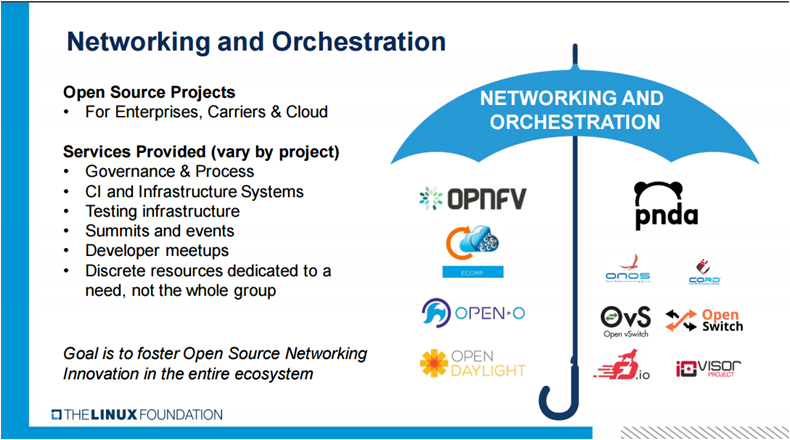
At the SDXCentral webinar titled “Open Source Networking and Orchestration: From Proof of Concept to Production” Arpit Joshipura, The Linux Foundation’s general manager of Networking and Orchestration started off by noting The Linux Foundation “is creating the greatest shared technology investment in history” and that The Linux Foundation is the leader in building open source ecosystems “that accelerate open technology development and commercial adoption.”  He then introduced The Linux Foundation networking and orchestration umbrella shown in Figure 1 illustrating the scope and breadth of the organization’s open source networking initiatives.  The goal of this organization is to “Foster Open Source Networking innovation in the entire ecosystem.”   

Joshipura then stated that we are entering into the third phase of open networking and orchestration. Phase 1 was the disaggregation of network components and was characterized by trials and proofs-of-concept (POC).  Phase two introduced production-ready components and was characterized by initial deployments.  This new third phase is production-ready, end-to-end solutions with harmonization being the key difference. This supports the webinar’s  theme, “From Proof of Concept to Production.”  The key message being that open networking is now ready to move out of the lab and beyond field trials to real production networks.  It ensures the technology in question can work in real end-to-end deployment scenarios.  Joshipura noted that The Linux Foundation is in the best position to “make this happen.” due to its umbrella of projects and the services it provides to them. You can watch the full webinar replay for free from SDxCentral.

Toward SDN harmonization

Joshipura then provided a history of open networking illustrating how far the industry has come from the days of a single vendor providing a closed, albeit complete, solution of hardware, software, and services.  It started with the advent of Open Flow which separated the networking elements’ control plane from the data plane.   Today, it’s the complete disaggregation of the hardware, software, and services layers.  Open source networking and orchestration has brought innovation-driven disruption to the entire ecosystem.   

With this new “horizontal stack” a number of key issues arise.  First, what is the proper way to “break, separate and disaggregate” network elements such as a switch? Second, once separated how do the new components talk to each other internally? And the third is how do these components talk externally?  He then noted what’s needed is collaboration between open source, open standards and open vendors to lead this disruption.  This collaboration is already in full swing as there are a number of open source initiatives at each layer of this horizontal stack.  

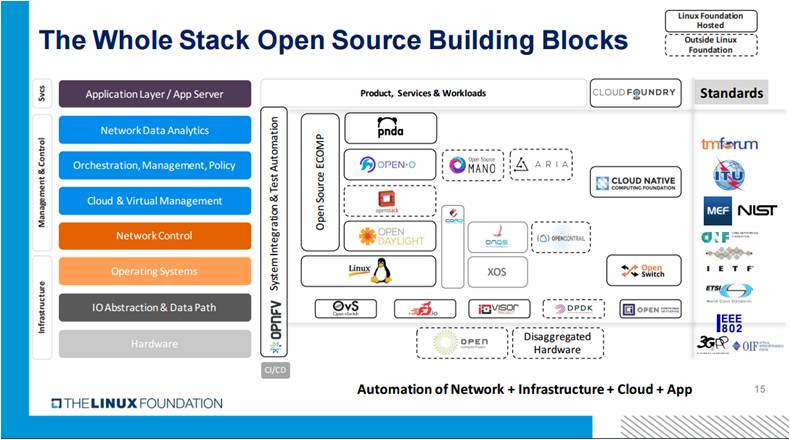
He then introduced the new Linux Foundation Open Source Framework and Architecture. He called this The Whole Stack Open Source Building Blocks.  This is shown in the figure below.  With this disaggregation and multiple options  at every level of  integration, end-to-end testing and thus harmonization become critical success factors.  While this new model gives enterprises and service providers choices at each layer it also adds integration complexities.  This is the area that Joshipura highlighted where The Linux Foundation is in position to facilitate this innovation and disruption.

Open Source Building Blocks

A number of current Linux Foundation projects were highlighted with an emphasis on the vibrancy of the communities and the maturity of the solution. OpenDaylight, Open-O, OPNFV, and the newer ECOMP were used as examples. In a glimpse of the future, Joshipura stated, “the network is automated, what next?”  He noted the importance of expanding the realm of Networking and Orchestration to include more cloud-centric projects such as Cloud Foundry and Cloud Native Computing Foundation.

Joshipura then switched the discussion to the upcoming Open Networking Summit (ONS).  The emphasis  at this year’s event is “bigger, better, more inclusive and targeted” and the theme of this year’s event is: “Open Networking: Harmonize, Harness and Consume.”  This reaffirms his earlier statements that it’s time to move beyond testing and proofs-of-concept to real production deployments. He noted that this year’s summit will be different.  It will have more business and architectural topics and will have only “visionary keynotes” with an emphasis on moving to production network deployments. He noted that there are three focused areas: Enterprise, Carriers and Cloud.  Although it appeared that for now, cloud and enterprises are grouped together.

It’s clear from this presentation that The Linux Foundation and its Open Source Networking and Orchestration portfolio of projects is driving real innovation in the networking ecosystem. Successful and impactful innovations take time as the disruptive forces ripple throughout the ecosystem.  The Linux Foundation is taking on the complex task of coordinating multiple open source initiatives with the goal to eliminate barriers to adoption. Providing end-to-end testing and harmonization will reduce many deployment barriers and accelerate the time required for production deployments.  Those interested in the future of open source networking should attend ONS 2017.  No one wants to be a “laggard.”

Learn more about networking and orchestration at The Linux Foundation in a free, on-demand webinar from SDxCentral and The Linux Foundation. Watch now!​

Mesos Is to the Datacenter as the Kernel Is to Linux

Necessity is the mother of invention. We needed our datacenters to be more automated, so we invented tools like Puppet and Chef. We needed easier application deployment, so we invented Docker. Of course it didn’t stop there. Ben Hindman, the founder and chief architect of Mesosphere, co-created Apache Mesos. In his keynote at MesosCon Asia 2016, Hindman relates how failures and elasticity led to the development of Mesos.

Hindman observes that the natural course of progress is solving old problems, and that creates new problems. Or perhaps a better way to think of it is new solutions create new opportunities. “As we fix some problems,” says Hindman, “We’re able to take on a new class of problems. So now, as devs, we said, “Hey. The machines that were running my Docker container or my app have failed. Can you figure out how to run this on different machines?” Or they said, “Hey, I’ve got a bunch more users right now, can you run my container on a whole bunch of different machines? Can you just scale it up with the click of a button?” So these two new problems–failures and elasticity–drove us to things like Mesos and Marathon.”

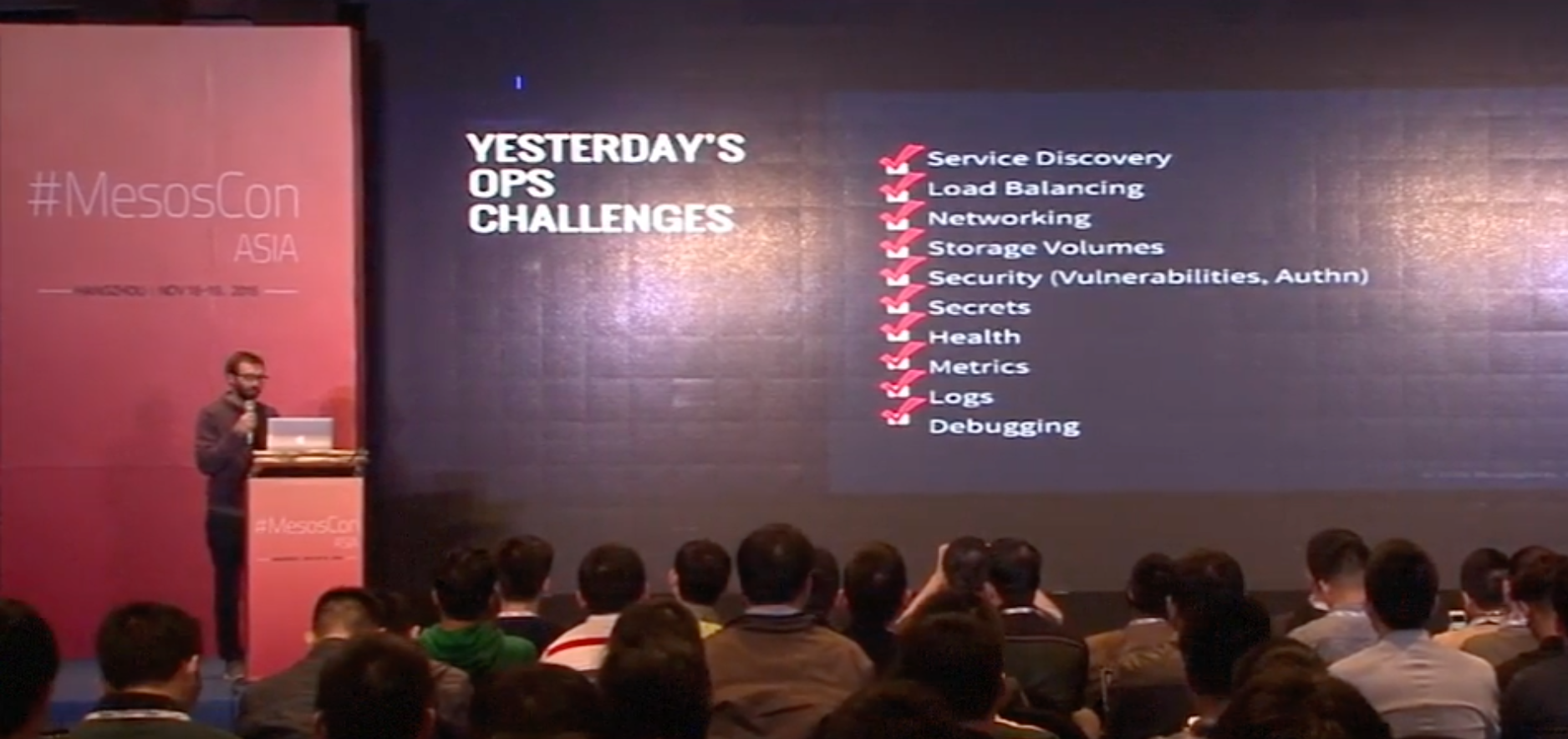
So then we have our checklists. Everyone has checklists, don’t they? We’re solving challenges and building new things. Hindman says, “You’ve got to figure out service discovery. You’ve got to figure out load balancing. You’ve got to figure out networking. You’ve got to figure out how you’re going to do storage volumes, security, secrets, health, metrics, logs, debugging, so forth and so on. Most organizations, they start here. They start with Mesos and Marathon and then what they find is over time, they need to start solving these other components, which are not core aspects of Mesos and Marathon themselves, for their own businesses.”

So the checklist grows, and items are checked off, and what we have is not just Mesos but a full-blown ecosystem, and then the core components of this ecosystem are bundled together as DC/OS, the datacenter operating system. DC/OS is a distributed operating system based on the Apache Mesos distributed systems kernel, and it manages your datacenter as though it were a single machine. “It’s this idea that Mesos,” says Hindman, “as this core component in the system really acts more like a kernel to the data center operating system in the same way that Linux is the kernel to CentOS or Ubuntu or Debian.”

Of course, this is not a stopping point because there is never a stopping point, and Hindman’s team is developing a DC/OS software development kit (SDK) to support the development of even more sophisticated distributed systems.

Watch the full keynote (below) to learn where Mesos and DC/OS are going, and how to be a part of their amazing progress.

Interested in speaking at MesosCon Asia on June 21 – 22? Submit your proposal by March 25, 2017. Submit now>>
Not interested in speaking but want to attend? Linux.com readers can register now with the discount code, LINUXRD5, for 5% off the attendee registration price. Register now to save over $125!

Intent-Based Security Gains Momentum at RSA

It isn’t a buzzphrase on par with “artificial intelligence” yet, but intent-based security has been gathering steam, as evidenced at this week’s RSA Conference.

Startups such as Illumio, Twistlock, and vArmour have staked their plans on intent-based security, and at least one established player, Fortinet, is steering its portfolio in that direction. 

What they’re talking about is the same concept of “intent” that’s being applied in software-defined networking (SDN) circles. Also known as the declarative model, intent is a way to simplify and automate network operations. It lets operators use normal language to tell the network what they want, leaving the network devices to configure themselves accordingly.

Read more at SDxCentral

KEYNOTE Mesos + DCOS, Not Mesos versus DCOS

Ben Hindman, the founder and chief architect of Mesosphere, explains how his team is developing a DC/OS software development kit (SDK) to support the development of sophisticated distributed systems.

Why is IoT Popular? Because of Open Source, Big Data, Security and SDN

If you think the IoT is a new thing, think again. The term Internet of Things has been around since the late 1990s. Devices other than computers and phones have been connecting to the Internet for decades. Neither the concept nor the substance of the IoT is very novel.

Yet it has been only in the past couple of years that the IoT has become such a big deal. Why?

A large part of the answer is that the IoT is based on, complements or extends other highly influential technological trends that shape the way we compute today. Those trends include:

Read more at The VAR Guy

Of Pies and Platforms: Platform-as-a-Service vs. Containers-as-a-Service

I’m often asked about the difference between using a platform as a service (PaaS) vs. a containers-as-a-service (CaaS) approach to developing cloud applications. When does it makes sense to choose one or the other? One way to describe the difference and how it affects your development time and resources is to look at it like the process of baking a pie.

You’ve got to have a great crust to have a great pie — but what actually differentiates a pie is its filling. Still, you might like making pie crust and prefer to do it yourself. If you have the time, you’ll bust out your “Joy of Cooking,” mix the dough, roll it out and cut it to size.

Read more at The New Stack

An Introduction to the Linux Boot and Startup Processes

Understanding the Linux boot and startup processes is important to being able to both configure Linux and to resolving startup issues. This article presents an overview of the bootup sequence using the GRUB2 bootloader and the startup sequence as performed by the systemd initialization system.

In reality, there are two sequences of events that are required to boot a Linux computer and make it usable: boot and startup. The boot sequence starts when the computer is turned on, and is completed when the kernel is initialized and systemd is launched. The startup process then takes over and finishes the task of getting the Linux computer into an operational state.

Read more at OpenSource.com

How to Install and Configure FTP Server in Ubuntu

FTP (File Transfer Protocol) is a relatively old and most used standard network protocol used for uploading/downloading files between two computers over a network. However, FTP by its original insecure, because it transmits data together with user credentials (username and password) without encryption.

Warning: If you planning to use FTP, consider configuring FTP connection with SSL/TLS (will cover in next article). Otherwise, it’s always better to use secure FTP such as SFTP.
Read more at Tecmint

How to create your own Linux Distribution with Yocto on Ubuntu

In this article, our focus is the creation of a minimal Linux distribution using the Yocto project on the Ubuntu platform. The Yocto project is very famous in the embedded Linux world because of its flexibility and ease of use.  The purpose of the Yocto project is to create a Linux distro for manufacturers of embedded hardware and software. A new minimal Linux distro will be created for qemu as the (qemu is a basic software emulator) target machine and we will run it in qemu. 

Read more at HowtoForge