If you think the IoT is a new thing, think again. The term Internet of Things has been around since the late 1990s. Devices other than computers and phones have been connecting to the Internet for decades. Neither the concept nor the substance of the IoT is very novel.
Yet it has been only in the past couple of years that the IoT has become such a big deal. Why?
A large part of the answer is that the IoT is based on, complements or extends other highly influential technological trends that shape the way we compute today. Those trends include:
I’m often asked about the difference between using a platform as a service (PaaS) vs. a containers-as-a-service (CaaS) approach to developing cloud applications. When does it makes sense to choose one or the other? One way to describe the difference and how it affects your development time and resources is to look at it like the process of baking a pie.
You’ve got to have a great crust to have a great pie — but what actually differentiates a pie is its filling. Still, you might like making pie crust and prefer to do it yourself. If you have the time, you’ll bust out your “Joy of Cooking,” mix the dough, roll it out and cut it to size.
Understanding the Linux boot and startup processes is important to being able to both configure Linux and to resolving startup issues. This article presents an overview of the bootup sequence using the GRUB2 bootloader and the startup sequence as performed by the systemd initialization system.
In reality, there are two sequences of events that are required to boot a Linux computer and make it usable: boot and startup. The boot sequence starts when the computer is turned on, and is completed when the kernel is initialized and systemd is launched. The startup process then takes over and finishes the task of getting the Linux computer into an operational state.
FTP (File Transfer Protocol) is a relatively old and most used standard network protocol used for uploading/downloading files between two computers over a network. However, FTP by its original insecure, because it transmits data together with user credentials (username and password) without encryption.
Warning: If you planning to use FTP, consider configuring FTP connection with SSL/TLS (will cover in next article). Otherwise, it’s always better to use secure FTP such as SFTP.
Read more at Tecmint
In this article, our focus is the creation of a minimal Linux distribution using the Yocto project on the Ubuntu platform. The Yocto project is very famous in the embedded Linux world because of its flexibility and ease of use. The purpose of the Yocto project is to create a Linux distro for manufacturers of embedded hardware and software. A new minimal Linux distro will be created for qemu as the (qemu is a basic software emulator) target machine and we will run it in qemu.
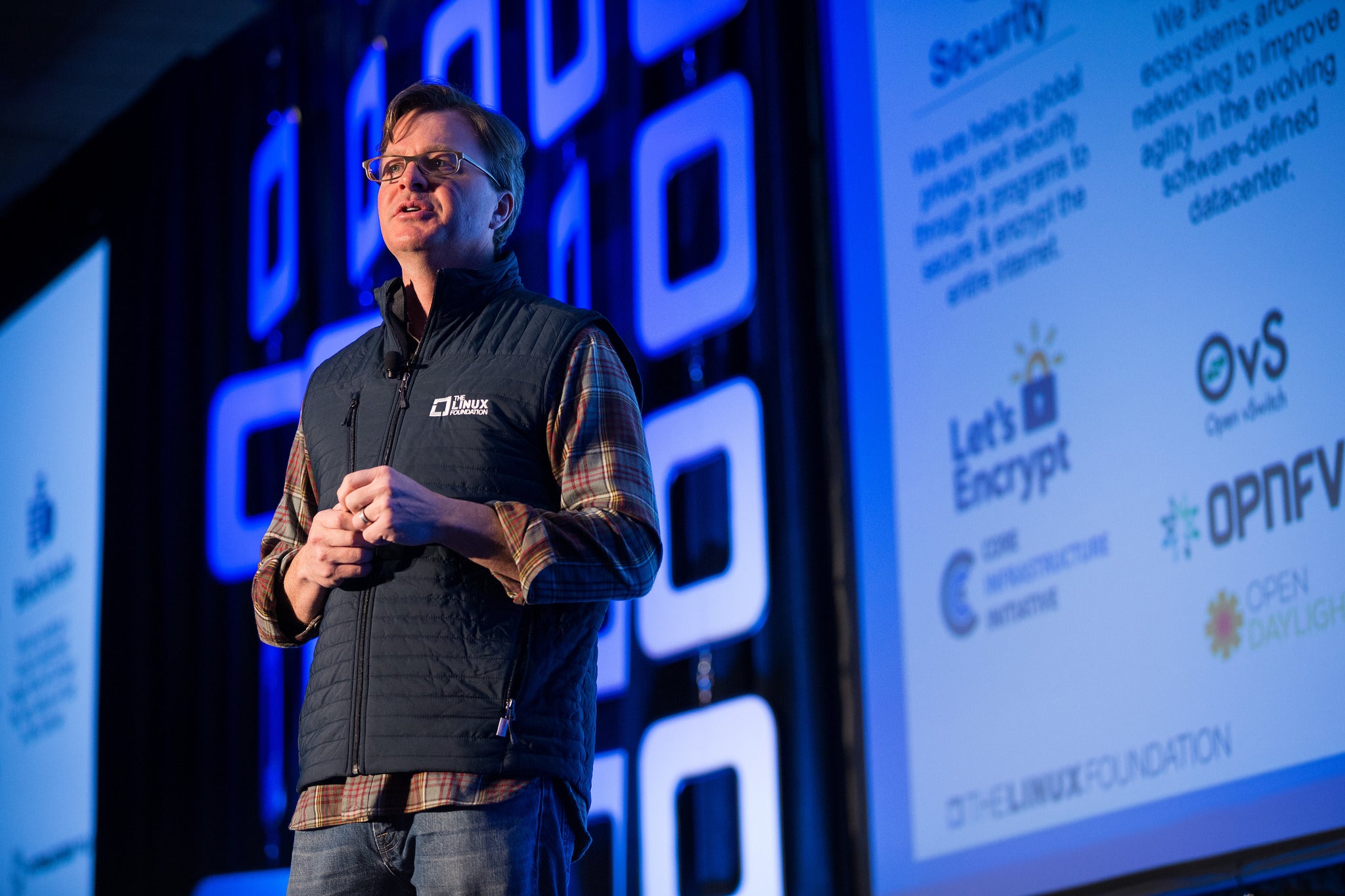
The breadth of the The Linux Foundation (affectionately known as The LF) is often overlooked due to its eponymous name. However, what may not be apparent to the layman is that The LF is providing a true foundation for the next generation of Internet infrastructure by cultivating the biggest shared technology investment in history. The LF is so much more than Linux. Our work encompasses projects from security and IoT, to networking and cloud computing, and beyond.
One blockbuster example, Hyperledger, celebrates its one-year anniversary this month. This is the open source blockchain project on which a new ecosystem of projects and products will be built that reinvents commercial transactions on the Internet. Hyperledger is helping redefine the financial industry to reduce fraud and improve security through a blockchain shared ledger.
Let’s Encrypt is another LF project that’s bringing a level of security to the Internet that was previously out of reach by offering a free and open automated certificate authority. Furthermore, our Core Infrastructure Initiative provides a collaborative effort for key infrastructure that’s used throughout the network but needed more resources to be developed and maintained effectively. CII helps provide support for OpenSSH, OpenSSL and NTP (the Network Time Protocol that is used for updating virtually every server on the Internet).
With Cloud Foundry and Node.js, we are working to help enable digital transformation of IT infrastructure by providing frameworks for delivering cloud applications that scale and thrive under an open source development model. Increasingly, Linux Foundation projects are addressing needs throughout the application stack. Cloud Foundry, a container-based application platform, provides a way for developers to deploy applications while abstracting away some of the complexities of the underlying infrastructure. In essence they help application developers deploy cloud-native applications. Node.js is providing a massively scalable Javascript framework that makes it much easier to build server-side applications for the cloud.
The Cloud Native Computing Foundation (CNCF), an LF project that supports the key projects needed to build and scale modern distributed systems, has just acquired the rights to the Rethink DB source code. The project was licensed under the GNU Affero General Public License, Version 3 (AGPLv3), a strong copyleft license, which limited the willingness of some companies to use and contribute to the software. CNCF paid $25,000 to purchase the RethinkDB copyright and assets and has re-licensed the software under the ASLv2, one of the most popular permissive software licenses, which enables anyone to use the software for any purpose without complicated requirements. (See related blog post “Why CNCF Recommends ASLv2”.) RethinkDB joins CNCF’s solid stable of software built for the cloud including fluentd(data collection), Prometheus(monitoring), Kubernetes(container orchestration), and others.
And with the massive adoption of container technology (e.g. Docker, rkt) The Linux Foundation is providing an open governance structure for containers under the Open Container Initiative (OCI.) The OCI currently offers two specifications: the Runtime Specification (runtime-spec) and the Image Specification (image-spec). Such specs make it possible for companies to safely stake their products and services on container technologies by providing certainty that their applications can run across platforms. This is the foundation of a new container ecosystem.
Open Source Foundations Beyond Code
It wasn’t so long ago that we declared Linux to be the operating system of the cloud. Now a whole host of new cloud technologies are being built on that model of open source development (and run on top of Linux.) The Linux Foundation is not only providing the foundations for developing the code base of these technologies, but also the other mechanisms needed to foster collaboration, learning, and development.
We have launched a number of training courses, both free and paid, for those operators and developers learning to sharpen their skills. For example, we provide a free Introduction to Cloud Infrastructure Technologies course through edX. We have also created a Kubernetes Fundamentals course to help users validate and gain the skills needed to take advantage of what is becoming the most widely deployed container orchestration tool. We also fill the needs for skills training in open source software that we aren’t directly involved in, such as our OpenStack course that helps users prepare for the OpenStack certification.
Finally, our commitment to open source provides users the tools they need to appropriately consume, develop, and learn about open source. Our Open Source Summit events have multiple technology tracks, including cloud computing. And our CloudNativeCon and Kubecon series of events are the de facto place to learn about Kubernetes and how to build and use cloud native applications. We produce the events where users, developers and solution providers can come together to learn and collaborate on open cloud technologies.
In the end, what we are seeing is that technology is increasingly becoming open source and companies that originally develop software to scratch their own itch are finding much broader applications of those efforts. Savvy companies are taking their open source projects and mustering industry support around them. Pivotal did so with Cloud Foundry, Google’s done this with Kubernetes, and Joyent with Node.js.
The LF is a shepherd for valuable technologies that may need extra help to find success, such as RethinkDB, and we have stepped in to provide support around a project that was not prospering under a single entity. That support has to encompass a diverse ecosystem of users, developers, and solution providers which all collaborate to solve problems and improve the usability of these projects.
Through open collaboration we are creating a new generation of Internet infrastructure that will itself provide the foundation for companies and ecosystems to thrive well into the future.
Learn more about The Linux Foundation projects. Watch Jim Zemlin’s keynote talk at Open Source Leadership Summit 2017. Watch now!
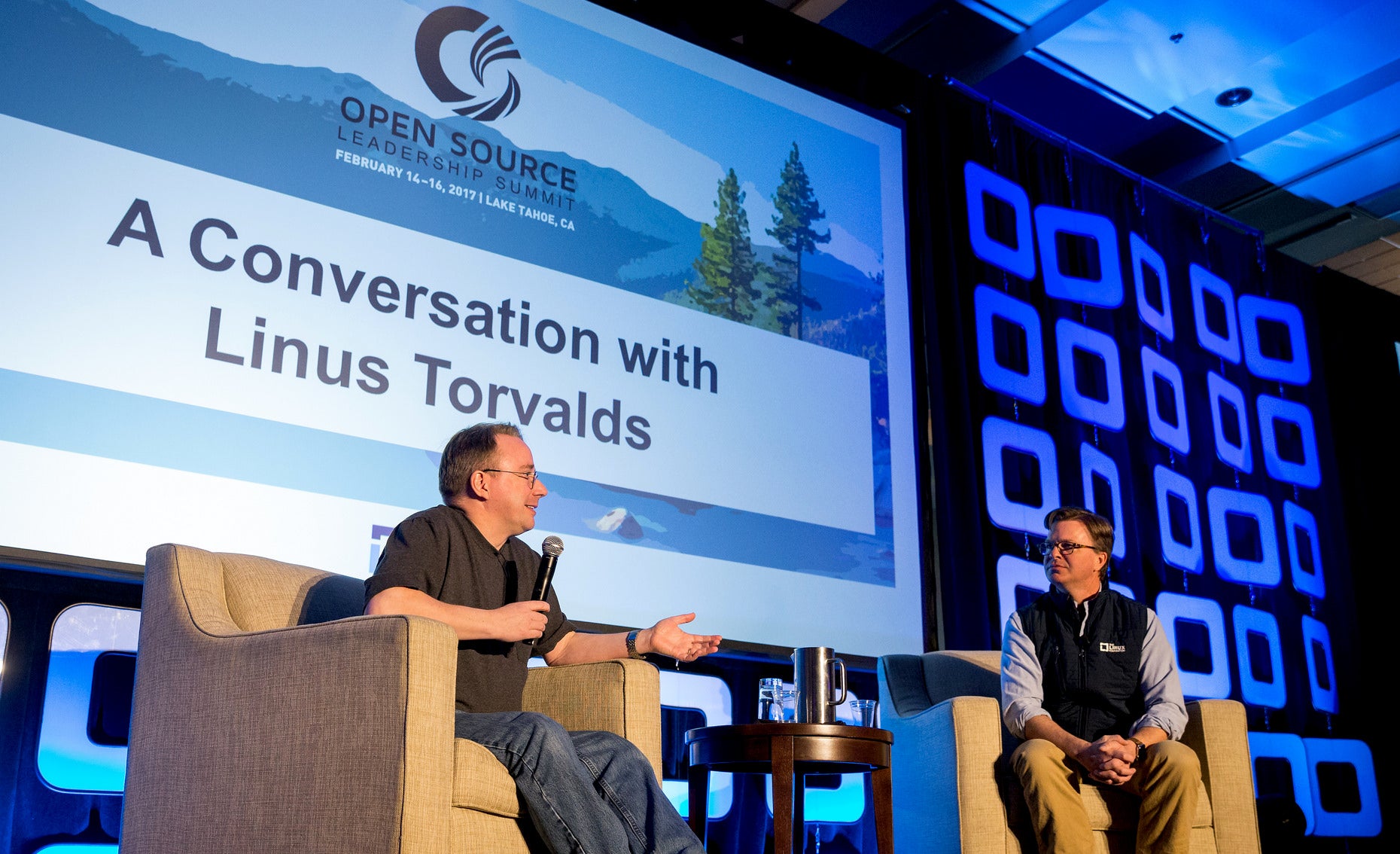
Linux creator Linus Torvalds took the stage at Open Source Leadership Summit this week to share some of his secrets to success in building one of the world’s largest and most successful open source projects.
After 25 years of development, the Linux kernel last year reached more than 22 million lines of code with more than 5,000 developers from about 500 companies contributing, according to the 2016 Linux Kernel Development Report.
Getting to that point was a matter of evolution through trial and error, not “intelligent design,” Torvalds told Linux Foundation Executive Director Jim Zemlin, who interviewed him on stage. Kernel developers have built a network of trust within the community that allows for short development cycles and fast iteration as work happens in parallel.
“We have a very strong network and that’s why we can have 1,000 people involved in development,” Torvalds said. “You have a lot of people who have ideas of where things need to go and then you have a marketplace where you can try them out.”
After 25 years of trial and error, the project and the process have evolved to create the software that runs 98 percent of the world’s supercomputers, 75 percent of cloud-enabled enterprises, and most of the global financial markets. Linus created and leads the project, but its success is the result of the entire community’s work.
“I’m a huge believer in the 99 percent perspiration, 1 percent inspiration thing,” Torvalds said.
“The innovation this industry talks about so much is bullshit. Anybody can innovate. Screw that, it’s meaningless,” he said. “99 percent of it is: Get the work done.”
Regular expressions are a powerful means for pattern matching and string parsing that can be applied in so many instances. With this incredible tool you can:
Validate text input
Search (and replace) text within a file
Batch rename files
Undertake incredibly powerful searches for files
Interact with servers like Apache
Test for patterns within strings
And so much more
The thing about regular expressions is that they are confusing. To the new Linux user, regular expressions may as well be another language (which they sort of are anyway). Considering the power this tool offers, it is something that every system administrator should learn. Although it may take quite some to master regular expressions, it will be time very well spent.
I want to introduce you to regular expressions, assuming you are starting at square zero. In other words, this is focused specifically on beginners. If you have yet to dive into regular expressions or have barely a rudimentary understanding, you will benefit from these words.
With that said, let’s begin.
What makes up regular expressions
There are two types of characters to be found in regular expressions:
literal characters
metacharacters
Literal characters are standard characters that make up your strings. Every character in this sentence is a literal character. You could use a regular expression to search for each literal character in that string.
Metacharacters are a different beast altogether; they are what give regular expressions their power. With metacharacters, you can do much more than searching for a single character. Metacharacters allow you to search for combinations of strings and much more. The list of regular expression metacharacters is:
Indicates the next character is either a special character, a literal, a backreference, or an octal escape
^ Indicates the beginning of an input string
$ Indicates the end of the an input string
* Indicates the preceding subexpression is to be matched zero or more times
+ Indicates the preceding subexpression is to be matched one or more times
? Indicates the preceding subexpression is to be matched zero or one time
{n} Match exactly n times (Where n is a non-negative integer)
{n,} Match at least n times (Where n is a non-negative integer)
{n,m} Match at least n and at most m times (Where m and n are non-negative integers and n <= m)
. Matches any single character except “n”
[xyz] Match any one of the enclosed characters
x|y Match either x or y
[^xyz] Match any character not enclosed
[a-z] Matches any character in the specified range.
[^a-z] Matches any character not in the specified range
b Matches a word boundary (the position between a word and a space)
B Matches a nonword boundary (example: ‘uxB’ matches the ‘ux’ in “tuxedo” but not the ‘ux’ in “Linux”
d Matches a digit character
D Matches a non-digit character
f Matches a form-feed character
n Matches a newline character
r Matches a carriage return character
s Matches any whitespace character (including space, tab, form-feed, etc.)
S Matches any non-whitespace character
t Matches a tab character
v Matches a vertical tab character
w Matches any word character including underscore
W Matches any non-word character
un Matches n, where n is a Unicode character expressed as four hexadecimal digits (such as, u0026 for the ampersand symbol)
How do you use metacharacters? Simple. Say you want to match the string 1+2=3. Although 1+2=3 is a valid regular expression, if you attempted to search for that string without metacharacters, the match would fail. Instead, you would have to make use of the backslash character, like so:
1+2=3
Why are we only using the backslash before the + and not the =? Go back to the list of metacharacters, and you’ll see that + is listed and = is not. The + metacharacter indicates the preceding is to be matched one or more times, so 1+2 would mean 1 is repeated two more times, as in 111. If we were to go without the in that string, it wouldn’t match 1+2=3, it would match 111=2 in 123+111=234.
A few easy examples
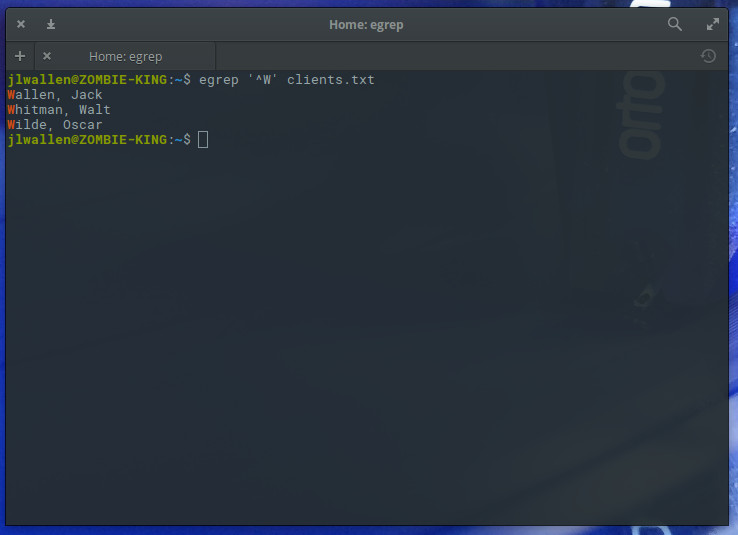
Two other very useful metacharacters are the ^ (indicates the beginning of an input string) and $ (indicates the end of an input string). Say, for example, you wanted to search a lengthy file of client names for all clients whose last name starts with W (assuming all names are listed last name, first name in the file). You could use regular expressions with the egrep command like so:
egrep ‘^W’ clients.txt
The resulting command would list out all clients whose last name started with “W” (Figure 1).
Figure 1: An easy way to locate specific search strings with regular expressions.
What if we want to run that same search, only this time we want to (for whatever reason) list out all clients whose first name ends with “n”. With regular expressions we can do that like so:
egrep ‘n$’ clients.txt
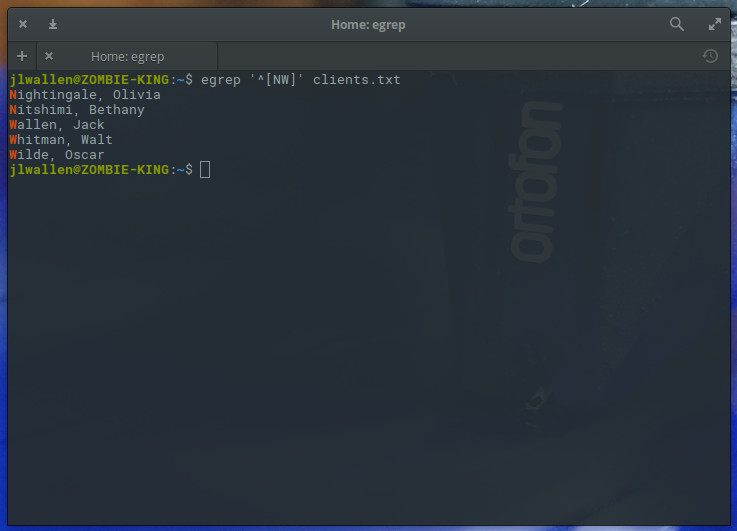
Naturally, this will only work if the first name is the last string of characters on each line. If you wanted to list out all clients whose last name started with either “N” or “W”, you could make use of the metacharacters ^ and [ ] like so:
egrep ‘^[NW]’ clients.txt
The above command would list out all clients whose last name started with either “N” or “W” (Figure 2).
Figure 2: Finding clients whose last name starts with “W” is simple.
What if, however, you wanted to list out clients whose first and/or last name contained either “N” or “W” (since this is case sensitive, we assume a capital letter will begin a client name)? That’s simple; we add the “|” metacharacter (along with the “^” metacharacter), which would contain the search to first characters, like so:
egrep ‘^[N|W]’ clients.txt
We could also remove the ^ metacharacter and run the command like so:
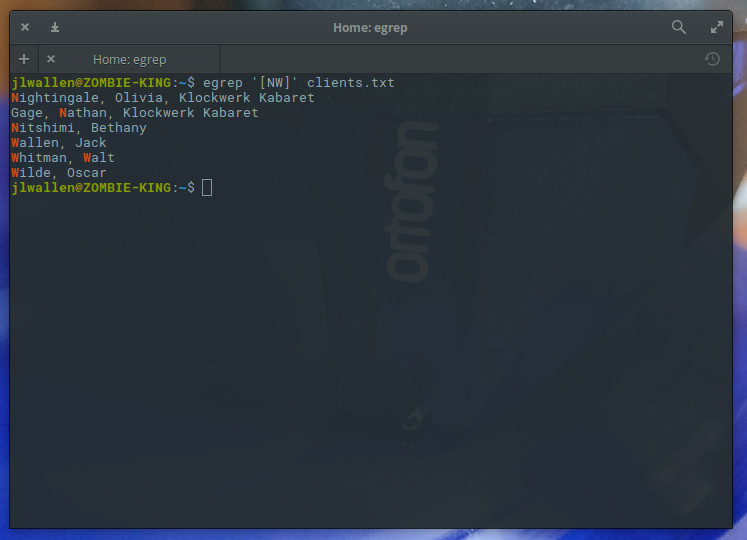
egrep ‘[NW]’ clients.txt
The resulting output would list all names containing either “N” or “W” (Figure 3), not limiting the search to initial characters within a string.
Figure 3: Remove the ^ and the output is more inclusive.
You could use a similar command to search for any characters within a name (such as egrep ‘[en]’ clients.txt), which would list out all strings that contained either letter “e” or “n”.
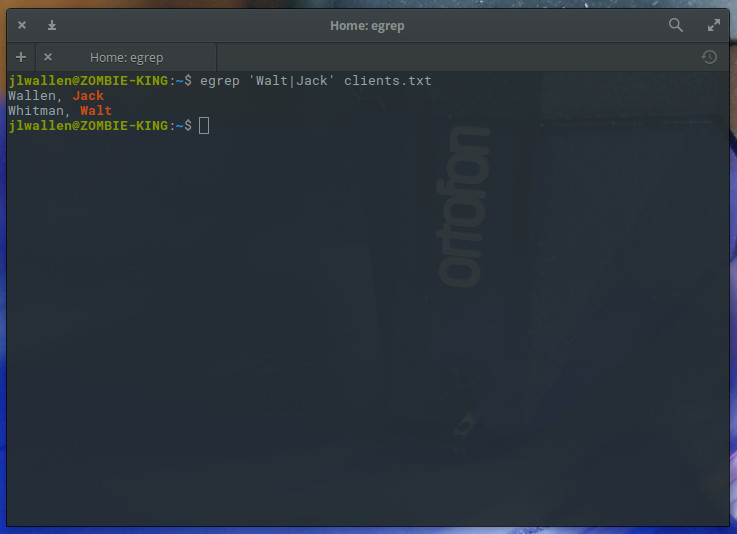
What if, however, you wanted to match all entries that included the first name Jack and the first name Walt? You could do that as well with the help of the the “|” metacharacter (which matches x or y. The following regular expression illustrates its usage:
egrep ‘Walt|Jack’ clients.txt
The output of the command should be exactly as you expected (Figure 4).
Figure 4: Searching for different first names, thanks to regular expressions.
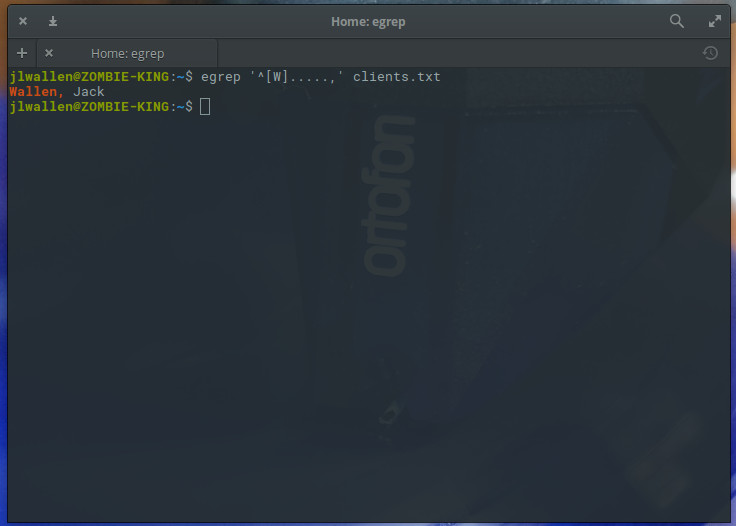
One final example will illustrate how you can use regular expressions to search for strings of a specific length. This is done with what is called a character set. Say (for whatever reason) you want to search the client listing for entries that start with the letter W and are only six characters long. For that you would use the “.” metacharacter like so:
egrep ‘^[W].....,’ clients.txt
Because all names in our clients.txt file are followed by a “,”, we can do this easily and the results will display only those names that are six characters in length and begin with the letter “W” (Figure 5).
Figure 5: Getting very specific with your regular expression searches.
So much more to learn
You have only now scratched the surface of regular expressions. For more information on this amazing tool, check out the regex(3) and regex(7) man pages. Regular expressions are definitely one element of Linux administration you are going to want to master. Take the time to further educate yourself with this tool and you’ll have considerable power at your fingertips.
Learn more about Linux through the free “Introduction to Linux” course from The Linux Foundation and edX.
This week in Linux and open source news, John Shewchuk explains why training programs like that of The Linux Foundation are key to educating enterprise teams, many announcements from Open Source Leadership Summit in Lake Tahoe, and more! Keep reading to stay OSS-informed!
1) Journalist John Shewchuk explains that The Linux Foundation’s training courses are an excellent way for businesses to avoid blindly leaping into the open source movement.
3) “Renesas has joined the Civil Infrastructure Platform (CIP) project, which provides a base layer for industrial-grade open-source software for civil infrastructure.”
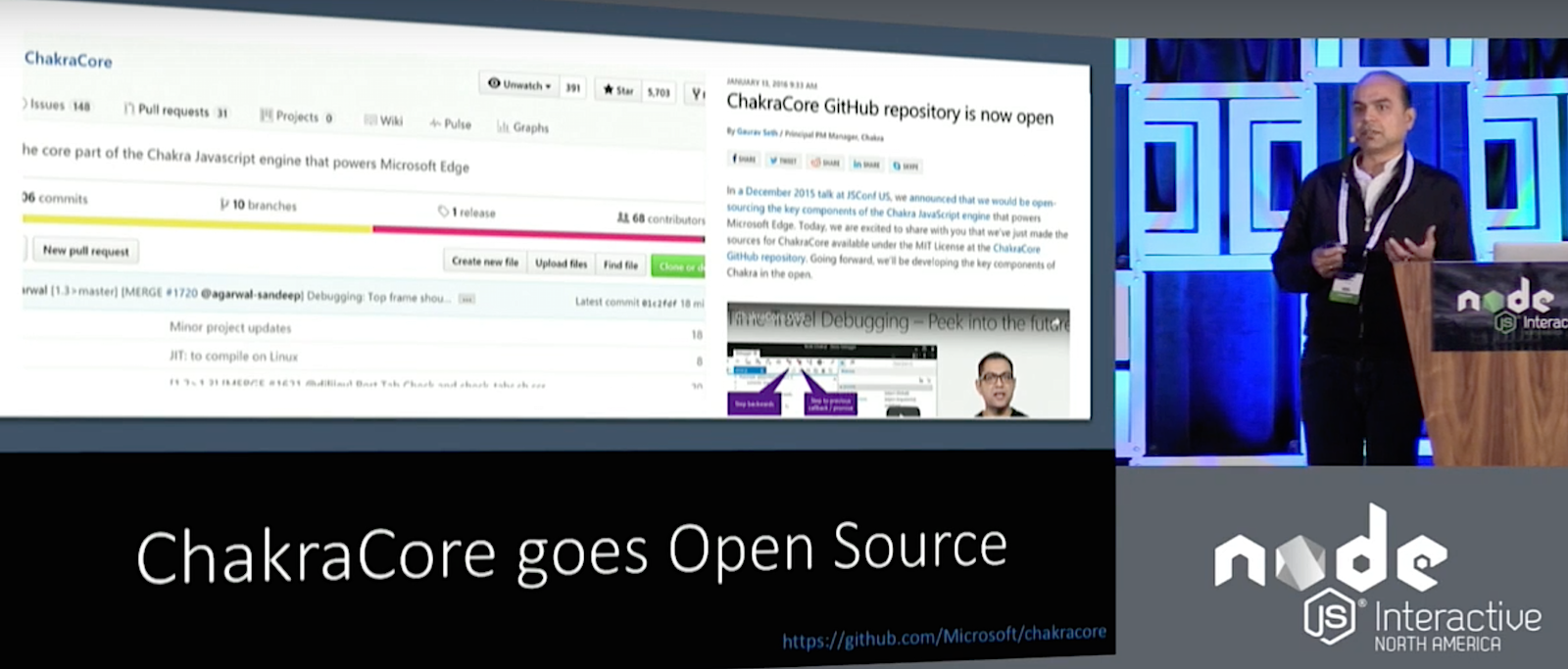
ChakraCore is the Core part of Microsoft Edge’s JavaScript Engine as used in Windows 10. It’s a standalone JavaScript engine in its own right but does not include bindings and the API for Windows because this is provided by a larger framework, Chakra. Arunesh Chandra, Senior Program Manager at Microsoft, introduced ChakraCore and how it fits into the larger Node ecosystem at Node.js Interactive.
ChakraCore is open source, distributed under the MIT license (it’s source code is available on GitHub) and, to a certain degree cross-platform, as it works on Windows, Linux, and MacOS, although only as an interpreter on the latter two for now. That said, Chandra’s team plan to provide JIT and High Performance Garbage Collection with ChakraCore on all three platforms soon.
Yet Another JavaScript Engine
One of the reasons that led Microsoft to develop ChakraCore is that, although Node.js runs almost everywhere, on x86, x64, and ARMv7, it did not run on ARM Thumb-2. This architecture is important for Microsoft because Thumb-2 instruction set is one of the main targets of Windows 10 IoT. Node ChakraCore brings Node.js to ARM Thumb-2.
To make Node.js run using ChakraCore, the team created a shim that binds with the V8 API and sits on the ChakraCore engine. In this scenario, ChakraCore serves all the calls, similar to how Mozilla’s SpiderMonkey does in SpiderNode.
After submitting a pull request to Node.js, ChakraCore has now been accepted into the project, albeit in a separate repo, and Node ChakraCore binaries are now available at Node’s nightly download site.
Time-Travel Debugging
Chandra’s team have partnered with Microsoft Research to push the state of art in Node.js diagnostics, and one of the ways of doing that is bringing Time-Travel Debugging to Node.js ChakraCore. Time-Travel Debugging allows you not only to trace execution of your code forwards — as you run your program step by step from beginning to end — but also backwards, moving back in the state of your application to help you locate bugs after the application fails.
Time-Travel Debugging is already available as beta on Windows on VSCode and as a preview for Mac and Linux.
In other news, perfomance-wise, ChakraCore works well on Microsoft Edge, but it still needs work on other platforms, such as Chrome and Firefox.
NAPI / VM-Neutrality
Another thing Chandra’s team is working on is NAPI. The aim of having VM_Neutrality for Node is that it would allow Node.js to become a ubiquitous application platform, one that allows applications to run on any device and for any workload.
Chandra points out there is a trend in which different organizations fork Node to optimize it for specific scenarios. Samsung has iotjs, Microsoft has ChakraCore, Mozilla has SpiderNode. VM Neutrality developers envision creating an infrastructure for VM owners and authors to plug in their VMs in the existing ecosystem without having to fork Node.
Another layer of abstraction is the ABI Stable Node (or Node.js APi or NAPI). NAPI comes about because of the current issues with native modules. Native modules used to break when there was an upgrade to Node.js. Although modern native modules are protected thanks to the NAN project, they still need to be recompiled each time you switch Node.js version.
That is where NAPI comes in. NAPI is a layer between the Native Module and JavaScript Engine that aims to provide ABI compatibility guarantees across different versions of Node and Node VMs. It allows enabled native modules to work across different versions and flavors of Node.js without the need for recompilations.
In his demo, Chandra showed how using an app that depended on native modules didn’t break and the modules themselves didn’t need to be recompiled when he ran the app on different versions of Node and even when he switched engines to ChakraCore.
The Road Ahead
Although Chandra showed working demos of all the technologies he mentioned in his presentation, he admitted that, in many cases, they were still in early stages of development. His team is working on stabilizing all ChakraCore’s features and porting the new debugging tools to all platforms.
If you are interested in speaking or attending Node.js Interactive North America 2017 – happening in Vancouver, Canada next fall – please subscribe to the Node.js community newsletter to keep abreast with dates and time.