Home Blog Page 598

Linux Kernel 4.10 Released — Happy Anniversary!

Kernel 4.10 has the honor of being christened the “Anniversary Edition” by Linus Torvalds. I’m guessing this is because of the recent 25th anniversary of the release of Linux 0.01. Admittedly, it is a bit late for that (the anniversary was back in September); however, Linus had not named any of the recent releases for the occasion, opting instead for naming them after several deranged animals.

Although everybody was expecting Linus to release the final version of 4.10 on February 12th, he ended postponing it until the 19th because, with travel coming up, he preferred not to open the merge window for 4.11 while he was on the road.

Be that as it may, 4.10 — which is now deemed stable enough to go forth into your distribution — comes with the usual load of drivers for CPUs (especially ARM) and GPUs. Especially interesting is the introduction of gVirt, or GPU Virtualization feature. Currently for Intel integrated GPUs only (Broadwell or newer), it allows one GPU to be safely shared among multiple virtual machines and the host, so all of them will support better graphical output. If you want to enjoy this feature, you will probably have to modify your VM configuration so that it uses the Intel drivers.

A slightly lesser addition in the GPU department is that Nouveau now includes a driver for the LED that lights up the logo on high end Nvidia cards. Whee.

Linus was expecting this to be a rather small release, especially after the humongous 4.9, but, no; as it turns out, 4.10 has also been pretty big, with over 13,000 commits — not including merges. Another area that has been improved is the back buffered writebacks. What the developers have done is add a throttling mechanism which stops writes to slow block devices (i.e., a hard disk or a USB stick) from making your machine sluggish or even causing it to seize up.

Other things to look forward to in 4.10

  • HID for Microsoft Surface 3 and 4. Which means external HID-compliant USB devices such as mice and keyboards will now work.

  • Lots of drivers for TV tuners, webcams and video cameras have found their way into this kernel. Boxes like the Cinergy S2 and sticks like the EVOLVEO XtraTV are now supported.

  • What else? Well, more ARM devices of course! The Nexus 5 and 6 are now both supported, as well as two Android TV boxes, the A1 and A95X by Nexbox. A popular Raspberry Pi competitor, the PINE64, is also now supported (no more hacked Android 3.x kernels for you), as is the Renesas “R-Car Starter Kit Pro,” a low-cost automotive board.

  • The perf c2c tool adds cacheline contentions analysis, useful for tracking down performance problems when several cores try to access and modify the same bit of memory at the same time. Perf also gets detailed history of scheduling events.

For a full list of changes, some in depth explanations, as well as links to the commits, take a look at this entry on kernel newbies website.

The Companies That Support Linux and Open Source: Mender.io

IoT is largely transitioning from hype to implementation with the growth of smart and connected devices spanning across all industries including building automation, energy, healthcare and manufacturing. The automotive industry has given some of the most tangible examples of both the promise and risk of IoT, with Tesla’s ability to deploy over-the-air software updates a prime example of forward-thinking efficiency. On the other side, the Jeep Cherokee hack in July 2015 displayed the urgent need for security to be a top priority for embedded devices as several security lapses made it vulnerable and gave hackers the ability to remotely control the vehicle. One of the security lapses included the firmware update of the head unit (V850) not having the proper authenticity checks.

The growing number of embedded Linux devices coming online can impact the life and health of people, communities, and nations. And given the upward trajectory of security breaches coinciding with the increasing number of connected devices, the team at Mender decided to address this growing need.

Mender is an open source project to make it easier to deploy over-the-air (OTA) software updates for connected Linux devices (Internet of Things). Mender is end-to-end, providing both the backend management server for campaign management for controlled rollouts of software updates and the client on the device that checks for available updates. Both backend and client are licensed under the Apache License, Version 2.0.

Mender recently became a corporate member of the Linux Foundation. Here, we sit down with their team to learn more about their goals and open source commitment.

Linux.com: What does Mender do?

Thomas Ryd, CEO of Mender: our mission is to secure the world’s connected devices. Our team is focusing the project to be an accessible and inexpensive approach to securing their connected devices. Our goal is to build a comprehensive security solution that is not only inexpensive to use, but easy to implement and use. That will naturally drive Mender to be the de facto standard for securing connected Linux devices.

Eystein Stenberg, CTO of Mender: our first application is an over-the-air software updater for embedded Linux and our first production-ready version will focus on an atomic, dual file system approach to ensure robustness — in case of a failed update due to power failure or poor network connectivity, the device will automatically roll back to the previous working state.

Linux.com: How and why is open source important to Mender?

Ralph Nguyen, Head of Community Development: When we initially ventured into this problem, there were very little OTA solutions that were end-to-end open source. There were limits to some end-to-end vendors for their backend, while others were simply incomplete and didn’t have either a backend or client. There are many proprietary software products targeting the automotive industry, but none provided the level of openness we anticipated. And most of the embedded Linux folks we’ve spoken to implemented a homegrown updater. It was quite common that they had a strong distaste for maintaining it! This was a recurring theme that sealed our initial direction with OTA updates.

And the accessibility of our project for embedded Linux developers is important from a larger perspective: security is a major, tangible threat given recent events such as the Mirai botnet DDoS attack and developers shouldn’t be faced with vendor lock-in to address these very real challenges.

Linux.com: Why did Mender join the Linux Foundation?

Ryd: The Linux Foundation supports a diverse and inclusive ecosystem of technologies and is helping to fix the internet’s most critical security problems. We felt it was only natural to join and become a member to solidify our commitment to open source. We hope it will be an arena for learning and collaboration for the Mender project.

Linux.com: What are some of the benefits of collaborative development for such projects and how does such collaboration benefit Mender’s customers or users?

Nguyen: Our team has a background in open source, and we get that the more eyes there are, the security and quality of the code will increase accordingly. A permissive open source license such as ours encourages a thriving open source community which in turn provides a healthy peer review mechanism that closed source or other restrictive licenses simply cannot compete with. We anticipate the Mender project will improve vastly from a thriving, collaborative community which we hope to encourage and support properly.

Linux.com: What interesting or innovative trends are you witnessing and what role does Linux or open source play in them?

Stenberg: The core mechanisms required for almost any IoT deployment, for example within smart home, smart city, smart energy grids, agriculture, manufacturing, and transportation, is to collect data from sensor networks, analyze the data in the cloud and then manage systems based upon it.

A simple use case from the home automation industry is to open your home from your smartphone. It typically requires the states of the locks in your home to be published to the cloud (data collection), the cloud to visualize the overall state to your smartphone, open or locked (analyze) and give you the ability to change the overall state (manage).

The capabilities of the IoT devices vary, it can be a very heterogeneous environment, but they can generally be split into 1) low-energy sensors that run a small RTOS (Real Time Operating System) firmware of tens or hundreds of kilobytes and 2) local gateways that aggregate, control and monitor these sensors, as well as provide internet connectivity.

Linux plays a large and increasingly important role in the more intelligent IoT devices, such as these local gateways. Historically, the majority of device vendors developed their own proprietary operating systems for these devices, but this is changing due to the increasing software complexity. For example, developing a bluetooth or TCP/IP stack, web server or cryptographic toolkit does not add any differentiation to a product, while it does add significant cost. This is an area where the promise of open source collaboration is working very well, as even competitors are coming together to design and implement the best solution for the community.

Cost and scale are two important keywords for the IoT. Embedded development has historically required a lot of customizations and consulting, but in the future we will see off-the-shelf products with very large deployments, both in terms of hardware and software.

Linux.com: Anything else important or upcoming that you’d like to share?

Ryd: We have been working on Mender for two years and it has been a market-driven approach. Our team has engaged with over a hundred embedded Linux developers in various capacities, including many many user tests to ensure we were building a comprehensive solution to address software updates for IoT. What has become clear is the state of the union is downright scary. There have and will forever be bugs in software. Shipping connected products that can impact people’s lives and health not having a secure and reliable way to update software should soon be a thing of the past.

Linux Security Fundamentals Part 5: Introduction to tcpdump and wireshark

Start exploring Linux Security Fundamentals by downloading the free sample chapter today. DOWNLOAD NOW

In this exercise, we learn about two of the most useful tools for troubleshooting networks. These tools will show what is happening as network traffic is transmitted and received. The tools are tcpdump and wireshark.

These are passive tools; they simply listen to all traffic exposed to the system by the networking infrastructure.

A fair amount of network traffic is broadcasted to all the devices that are connected to the networking gear. Much of the traffic is simply ignored by the individual systems because the traffic’s destination does not match the system’s address. The tools tcpdump and wireshark can “see”  all of the traffic on the connection and display the traffic in a format that can be analyzed.

tcpdump is a command-line, low-level tool that is generally available as part of a Linux distribution’s default package installation. tcpdump has a filtering capability as described in the pcap-filter man page; both tcpdump and wireshark use the pcap libraries to capture and decipher traffic data.

tcpdump lacks a graphical component as well as the ability to analyze the traffic it captures. For this reason, it is typically used to capture network traffic during an interesting session and then the resulting capture files are copied to a workstation for analysis using the wireshark utility.

Packet capture also requires placing the network interfaces into promiscuous mode, which requires root permissions.

Set up your system

Access to The Linux Foundation’s lab environment is only possible for those enrolled in the course. However, we’ve created a standalone lab for this tutorial series to run on any single machine or virtual machine which does not need the lab setup to be completed. The commands will be altered to comply with the standalone environment.  

To make this lab exercise standalone, let’s add a couple of IP aliases to the default adapter.

To add a temporary IP alias, determine the default adapter:

$ sudo ip a | grep "inet "

The result should be similar to:

   inet 127.0.0.1/8 scope host lo

   inet 192.168.0.16/24 brd 192.168.0.255 scope global dynamic enp0s3

   inet 192.168.122.1/24 brd 192.168.122.255 scope global virbr0

This system shows several adapters: the “lo” is the loopback device, “enp0s3” is the adapter with the address assigned by the DHCP server and is the default adapter. The “virbr0” adapter is a network bridge adapter used by the hypervisor, we will not use this one.  

To add IP aliases on adapter enp0s3:

$ sudo ip addr add 192.168.52.101 dev enp0s3

Then add the following to /etc/hosts:

192.168.52.101 main

This /etc/hosts entry should be removed after the exercise is completed.

On our testing system the commands looked like:

Setup.png

Start the exercise

Open a terminal and run the command:

$ sudo tcpdump -D

Notice that the “adapters” are shown by device name not by IP address. We will be using the adapter we added the extra IP addresses to. In the case of our test system “enp0s3” would be the logical choice. However, because we have a single system with IP aliases we will use the interface “any” for our monitoring. If you had several interfaces you could select traffic monitoring from any specific interface.  Below is the output from our test system.

tcpdump-D.png

$ sudo tcpdump -i any 

This will print a brief summary of each packet that the system sees on the interface, regardless of whether it is intended for the system “main”. Leave the process running and open a second terminal. In this second terminal, run ping, first pinging “main” and then pinging the broadcast address,(this is the same network as your adapter but with a host number of ”255”, something like 192.168.56.255.

$ ping -c4 main

$ ping -c4 -b  192.168.56.255

There may be extra packets displayed that are not related to our purpose. As an example, the command “ping -c4 www.google.com“ will generate traffice on the interface we are listening to “-i any”.  We can add a pcap filter to our tcpdump command to ignore packets that are not related to our subnet. The command would be:

$sudo tcpdump -i any net 192.168.52.0/24 

The tcpdump output from the “ping -c2 main” as captured by our test system is listed below:

ping-host.png

The tcpdump output from the “ping -c2 -b 192.168.52.255” as captured by our test system is listed below:

ping-broadcast.png

Notice that our system can see the broadcast ping coming in but there is no reply, this is because of a system tunable.  Broadcast pings could be used as a denial of service attack so are disabled by default.

Next, explore the pcap-filter and tcpdump man pages. We are going to construct a tcpdump command that captures HTTP traffic on our interface and save that traffic to a file.

Run the following commands:

For Fedora, RHEL, CentOS systems:

$ sudo yum install httpd elinks 

$ sudo systemctl start httpd

For Ubuntu and Debian systems:

$ sudo apt-get install apache2 elinks

$ sudo systemctl start apache2

For all distributions, create a test file:

$ sudo su -c ‘echo "test page" > /var/www/html/test.html’

Note: If your system has the “firewalld” service running you may need to open some ports.

To test if firewalld is running:

$ sudo systemctl status firewalld 

To open the http port:

$ sudo -i  

# firewall-cmd --zone=public --add-port=80/tcp --permanent

# firewall-cmd --reload

Start tcpdump listening for traffic on port 80:

$ sudo tcpdump -i any port 80

We could be more specific and say:

$ sudo tcpdump -i amy port 80 and host main 

Now let’s generate some HTTP traffic to test, first with a http get of a missing page then a good page:

$ elinks -dump http://main/no-file.html

$ elinks -dump http://main/file.html

Observe the output of tcpdump then terminate tcpdump command with a “ctl-c”

tcpdump-404.png

Analyze with wireshark

First lets create some information to analyse, on one terminal session:

$ sudo tcpdump -i any port 80 -w http-dump.pcap 

And on another terminal session issue the following commands:

Generates a “404 not found” error:

$ elinks -dump http://main/no-file.html

Should return the text of the file we created earlier:

$ elinks -dump http://main/file.html

Terminate the http://main/no-file.html tcpdump command and verify the file “http-dump.pcap exists and has bytes in it.

Next, we will analyze the captured data with wireshark. Verify wireshark is installed:

$ sudo  which wireshark

If the previous command fails, you will have to install the utility.

On RHEL-based systems:

$ sudo yum install wireshark wireshark-gnome

Or Debian based systems:

$ sudo apt-get install wireshark-gtk wireshark-qt 

You can launch it by running /usr/sbin/wireshark or finding it the application menus on your desktop, e.g., under Applications -> Internet menu, you may find the Wireshark Network Analyzer. If wireshark is launched from the GUI, go to the File -> Open dialog and browse to the capture file created above. Or launch wireshark with the capture file from the command line:

wireshark  http-dump.pcap

wireshark-404.png

Explore the wireshark output.  Wireshark can be run in an interactive mode without the requirement of tcpdump, but requires a GUI. A text version of wireshark exists called “tshark”. The process of capturing with tcpdump and analysing with wireshark, possibly on a different machine is handy for production type systems without GUI or console access.

Cleanup

Please remember to remove the entries from /etc/hosts. A reboot will remove the network alias we added.

Stay one step ahead of malicious hackers with The Linux Foundation’s Linux Security Fundamentals course. Download a sample chapter today!

Read the other articles in the series:

Linux Security Threats: The 7 Classes of Attackers

Linux Security Threats: Attack Sources and Types of Attacks

Linux Security Fundamentals Part 3: Risk Assessment / Trade-offs and Business Considerations

Linux Security Fundamentals: Estimating the Cost of a Cyber Attack

Linux Security Fundamentals Part 6: Introduction to nmap

Open Source Networking: Disruptive Innovation Ready for Prime Time

Innovations are much more interesting than inventions.  The “laser” is a classic invention and “FedEx” is a classic innovation.  Successful innovation disrupts entire industries and ecosystems as we’ve seen with Uber, AirBnB, and Amazon to name just a few.   The entire global telecommunication industry is at the dawn of a new era of innovation.  Innovations should be the rising tide in which everybody wins except what’s referred to as “laggards.”   Who are the laggards going to be in this new era of open communications?  You don’t want to be one.

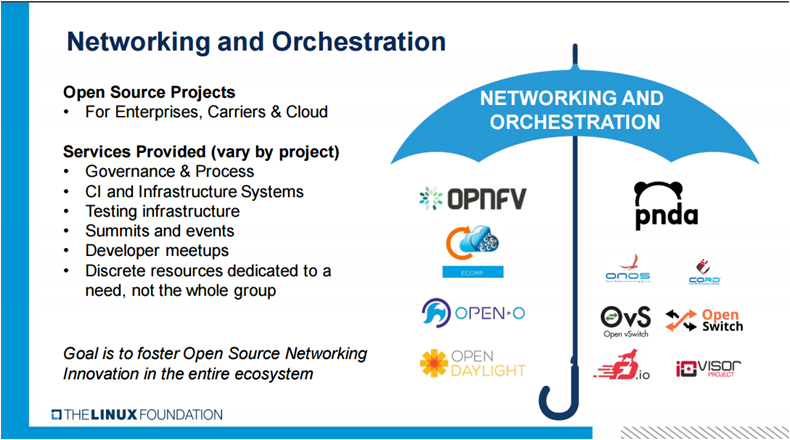
At the SDXCentral webinar titled “Open Source Networking and Orchestration: From Proof of Concept to Production” Arpit Joshipura, The Linux Foundation’s general manager of Networking and Orchestration started off by noting The Linux Foundation “is creating the greatest shared technology investment in history” and that The Linux Foundation is the leader in building open source ecosystems “that accelerate open technology development and commercial adoption.”  He then introduced The Linux Foundation networking and orchestration umbrella shown in Figure 1 illustrating the scope and breadth of the organization’s open source networking initiatives.  The goal of this organization is to “Foster Open Source Networking innovation in the entire ecosystem.”   

Joshipura then stated that we are entering into the third phase of open networking and orchestration. Phase 1 was the disaggregation of network components and was characterized by trials and proofs-of-concept (POC).  Phase two introduced production-ready components and was characterized by initial deployments.  This new third phase is production-ready, end-to-end solutions with harmonization being the key difference. This supports the webinar’s  theme, “From Proof of Concept to Production.”  The key message being that open networking is now ready to move out of the lab and beyond field trials to real production networks.  It ensures the technology in question can work in real end-to-end deployment scenarios.  Joshipura noted that The Linux Foundation is in the best position to “make this happen.” due to its umbrella of projects and the services it provides to them. You can watch the full webinar replay for free from SDxCentral.

Toward SDN harmonization

Joshipura then provided a history of open networking illustrating how far the industry has come from the days of a single vendor providing a closed, albeit complete, solution of hardware, software, and services.  It started with the advent of Open Flow which separated the networking elements’ control plane from the data plane.   Today, it’s the complete disaggregation of the hardware, software, and services layers.  Open source networking and orchestration has brought innovation-driven disruption to the entire ecosystem.   

With this new “horizontal stack” a number of key issues arise.  First, what is the proper way to “break, separate and disaggregate” network elements such as a switch? Second, once separated how do the new components talk to each other internally? And the third is how do these components talk externally?  He then noted what’s needed is collaboration between open source, open standards and open vendors to lead this disruption.  This collaboration is already in full swing as there are a number of open source initiatives at each layer of this horizontal stack.  

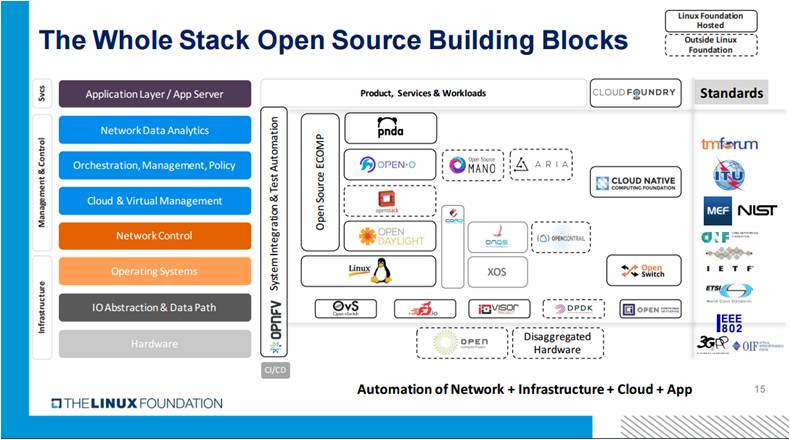
He then introduced the new Linux Foundation Open Source Framework and Architecture. He called this The Whole Stack Open Source Building Blocks.  This is shown in the figure below.  With this disaggregation and multiple options  at every level of  integration, end-to-end testing and thus harmonization become critical success factors.  While this new model gives enterprises and service providers choices at each layer it also adds integration complexities.  This is the area that Joshipura highlighted where The Linux Foundation is in position to facilitate this innovation and disruption.

Open Source Building Blocks

A number of current Linux Foundation projects were highlighted with an emphasis on the vibrancy of the communities and the maturity of the solution. OpenDaylight, Open-O, OPNFV, and the newer ECOMP were used as examples. In a glimpse of the future, Joshipura stated, “the network is automated, what next?”  He noted the importance of expanding the realm of Networking and Orchestration to include more cloud-centric projects such as Cloud Foundry and Cloud Native Computing Foundation.

Joshipura then switched the discussion to the upcoming Open Networking Summit (ONS).  The emphasis  at this year’s event is “bigger, better, more inclusive and targeted” and the theme of this year’s event is: “Open Networking: Harmonize, Harness and Consume.”  This reaffirms his earlier statements that it’s time to move beyond testing and proofs-of-concept to real production deployments. He noted that this year’s summit will be different.  It will have more business and architectural topics and will have only “visionary keynotes” with an emphasis on moving to production network deployments. He noted that there are three focused areas: Enterprise, Carriers and Cloud.  Although it appeared that for now, cloud and enterprises are grouped together.

It’s clear from this presentation that The Linux Foundation and its Open Source Networking and Orchestration portfolio of projects is driving real innovation in the networking ecosystem. Successful and impactful innovations take time as the disruptive forces ripple throughout the ecosystem.  The Linux Foundation is taking on the complex task of coordinating multiple open source initiatives with the goal to eliminate barriers to adoption. Providing end-to-end testing and harmonization will reduce many deployment barriers and accelerate the time required for production deployments.  Those interested in the future of open source networking should attend ONS 2017.  No one wants to be a “laggard.”

Learn more about networking and orchestration at The Linux Foundation in a free, on-demand webinar from SDxCentral and The Linux Foundation. Watch now!

Mesos Is to the Datacenter as the Kernel Is to Linux

Necessity is the mother of invention. We needed our datacenters to be more automated, so we invented tools like Puppet and Chef. We needed easier application deployment, so we invented Docker. Of course it didn’t stop there. Ben Hindman, the founder and chief architect of Mesosphere, co-created Apache Mesos. In his keynote at MesosCon Asia 2016, Hindman relates how failures and elasticity led to the development of Mesos.

Hindman observes that the natural course of progress is solving old problems, and that creates new problems. Or perhaps a better way to think of it is new solutions create new opportunities. “As we fix some problems,” says Hindman, “We’re able to take on a new class of problems. So now, as devs, we said, “Hey. The machines that were running my Docker container or my app have failed. Can you figure out how to run this on different machines?” Or they said, “Hey, I’ve got a bunch more users right now, can you run my container on a whole bunch of different machines? Can you just scale it up with the click of a button?” So these two new problems–failures and elasticity–drove us to things like Mesos and Marathon.”

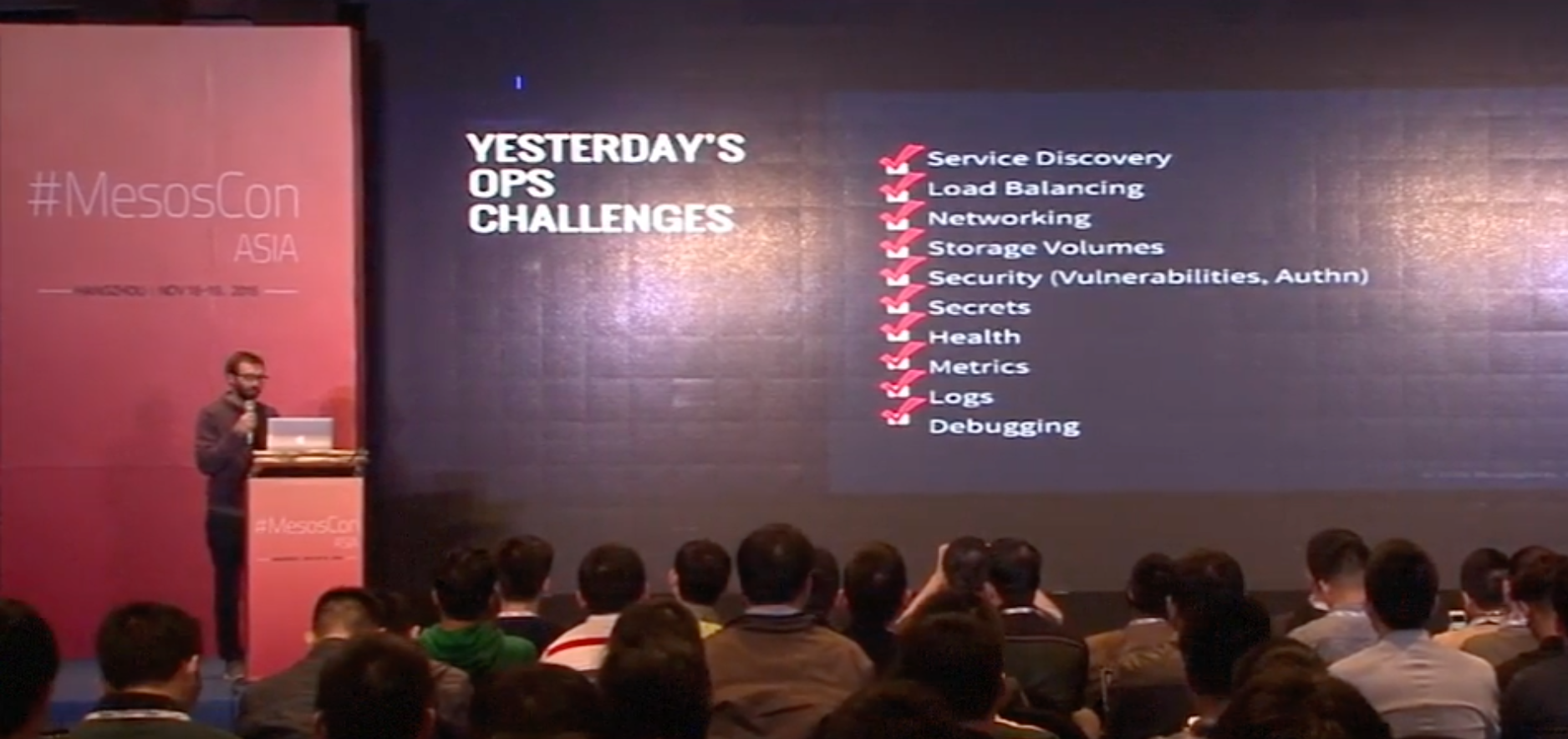
So then we have our checklists. Everyone has checklists, don’t they? We’re solving challenges and building new things. Hindman says, “You’ve got to figure out service discovery. You’ve got to figure out load balancing. You’ve got to figure out networking. You’ve got to figure out how you’re going to do storage volumes, security, secrets, health, metrics, logs, debugging, so forth and so on. Most organizations, they start here. They start with Mesos and Marathon and then what they find is over time, they need to start solving these other components, which are not core aspects of Mesos and Marathon themselves, for their own businesses.”

So the checklist grows, and items are checked off, and what we have is not just Mesos but a full-blown ecosystem, and then the core components of this ecosystem are bundled together as DC/OS, the datacenter operating system. DC/OS is a distributed operating system based on the Apache Mesos distributed systems kernel, and it manages your datacenter as though it were a single machine. “It’s this idea that Mesos,” says Hindman, “as this core component in the system really acts more like a kernel to the data center operating system in the same way that Linux is the kernel to CentOS or Ubuntu or Debian.”

Of course, this is not a stopping point because there is never a stopping point, and Hindman’s team is developing a DC/OS software development kit (SDK) to support the development of even more sophisticated distributed systems.

Watch the full keynote (below) to learn where Mesos and DC/OS are going, and how to be a part of their amazing progress.

Interested in speaking at MesosCon Asia on June 21 – 22? Submit your proposal by March 25, 2017. Submit now>>
Not interested in speaking but want to attend? Linux.com readers can register now with the discount code, LINUXRD5, for 5% off the attendee registration price. Register now to save over $125!

Intent-Based Security Gains Momentum at RSA

It isn’t a buzzphrase on par with “artificial intelligence” yet, but intent-based security has been gathering steam, as evidenced at this week’s RSA Conference.

Startups such as IllumioTwistlock, and vArmour have staked their plans on intent-based security, and at least one established player, Fortinet, is steering its portfolio in that direction. 

What they’re talking about is the same concept of “intent” that’s being applied in software-defined networking (SDN) circles. Also known as the declarative model, intent is a way to simplify and automate network operations. It lets operators use normal language to tell the network what they want, leaving the network devices to configure themselves accordingly.

Read more at SDxCentral

KEYNOTE Mesos + DCOS, Not Mesos versus DCOS

Ben Hindman, the founder and chief architect of Mesosphere, explains how his team is developing a DC/OS software development kit (SDK) to support the development of sophisticated distributed systems.

Why is IoT Popular? Because of Open Source, Big Data, Security and SDN

If you think the IoT is a new thing, think again. The term Internet of Things has been around since the late 1990s. Devices other than computers and phones have been connecting to the Internet for decades. Neither the concept nor the substance of the IoT is very novel.

Yet it has been only in the past couple of years that the IoT has become such a big deal. Why?

A large part of the answer is that the IoT is based on, complements or extends other highly influential technological trends that shape the way we compute today. Those trends include:

Read more at The VAR Guy

Of Pies and Platforms: Platform-as-a-Service vs. Containers-as-a-Service

I’m often asked about the difference between using a platform as a service (PaaS) vs. a containers-as-a-service (CaaS) approach to developing cloud applications. When does it makes sense to choose one or the other? One way to describe the difference and how it affects your development time and resources is to look at it like the process of baking a pie.

You’ve got to have a great crust to have a great pie — but what actually differentiates a pie is its filling. Still, you might like making pie crust and prefer to do it yourself. If you have the time, you’ll bust out your “Joy of Cooking,” mix the dough, roll it out and cut it to size.

Read more at The New Stack

An Introduction to the Linux Boot and Startup Processes

Understanding the Linux boot and startup processes is important to being able to both configure Linux and to resolving startup issues. This article presents an overview of the bootup sequence using the GRUB2 bootloader and the startup sequence as performed by the systemd initialization system.

In reality, there are two sequences of events that are required to boot a Linux computer and make it usable: boot and startup. The boot sequence starts when the computer is turned on, and is completed when the kernel is initialized and systemd is launched. The startup process then takes over and finishes the task of getting the Linux computer into an operational state.

Read more at OpenSource.com