
Paweł Wieczorek describes how he and his colleagues at the Samsung R&D Institute Poland developed an Automated Testing Laboratory to streamline testing of Tizen Common on community-backed SBCs at ELC.
The following is adapted from Open Source Compliance in the Enterprise by Ibrahim Haddad, PhD.
An open source management program provides a structure around all aspects of open source software. This includes a strategy and processes around software selection, approval, use, distribution, audit, inventory, training, community engagement, and public communication.
This series of articles will provide a high-level overview of the various elements in an open source management program, survey the challenges in establishing a new open source license compliance program, and provide advice on how to overcome those challenges.
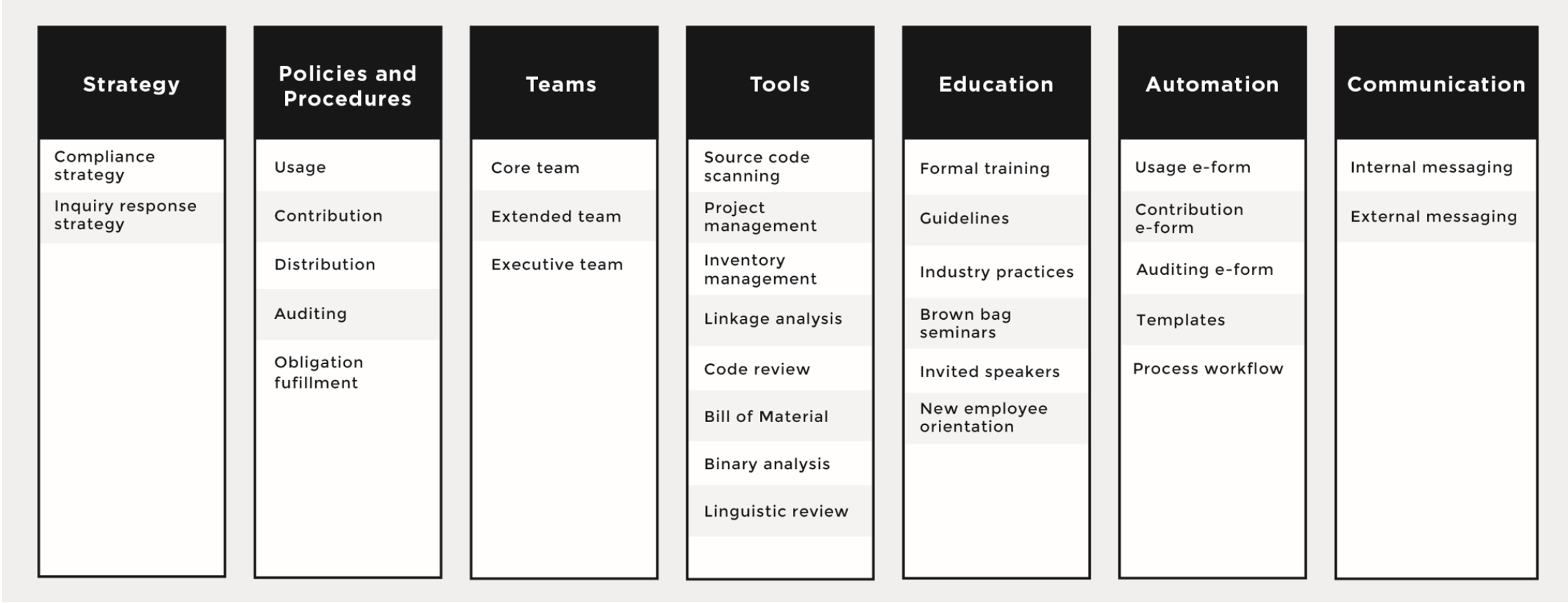
We’ll begin with an overview of open source strategy and processes, two of the seven core elements needed in a successful open source compliance program, seen in the figure above.
The open source compliance strategy drives the business-based consensus on the main aspects of the policy and process implementation. If you do not start with that high-level consensus, driving agreement on the details of the policy and on investments in the process tends to be very hard, if not impossible.
The strategy establishes what must be done to ensure compliance and offers a governing set of principles for how personnel interact with open source software. It includes a formal process for the approval, acquisition, and use of open source, and a method for releasing software that contains open source or that’s licensed under an open source license.
The inquiry response strategy establishes what must be done when the company’s compliance efforts are challenged. Several companies have received negative publicity — and some were formally challenged — because they ignored requests to provide additional compliance information, did not know how to handle compliance inquires, lacked or had a poor open source compliance program, or simply refused to cooperate with the inquirer. None of these approaches is fruitful or beneficial to any of the parties involved.
Therefore, companies should have a process in place to deal with incoming inquiries, acknowledge their receipt, inform the inquirer that they will be looking into it, and provide a realistic date for follow-up.
An open source compliance policy is a set of rules that govern the management of open source software (both use of and contribution to). Processes are detailed specifications as to how a company will implement these rules on a daily basis.
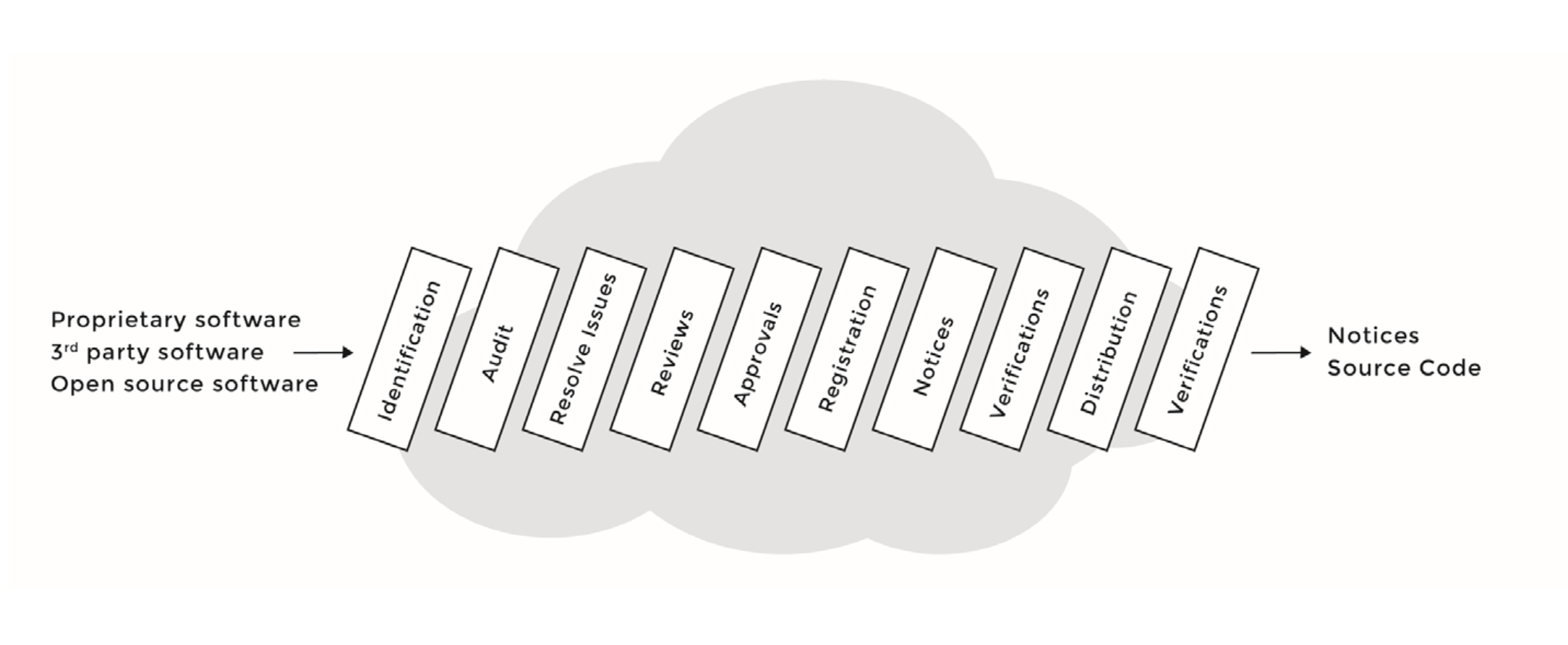
Compliance policies and processes govern the various aspects of using, contributing, auditing, and distribution of open source software. See the figure below for a sample compliance process, with the various steps each software component will go through as part of the due diligence.
Next week, we’ll cover two more key elements to an open source management program: staffing a compliance team and the tools they use to automate and audit open source code.

Read the first article in this series:
An Introduction to Open Source Compliance in the Enterprise
Read the next articles in this series:
The 7 Elements of an Open Source Management Program: Teams and Tools
How and Why to do Open Source Compliance Training at Your Company
Basic Rules to Streamline Open Source Compliance For Software Development
Demand is increasing for embedded software projects to support a variety of Linux hacker boards — and that requires time consuming hardware testing to prove that your software works reliably. Fortunately, you can integrate test automation tools into your software development process to streamline the task, as explained by release engineer Paweł Wieczorek at last October’s Embedded Linux Conference Europe.
In the talk, Wieczorek described how he and his colleagues at the Samsung R&D Institute Poland developed an Automated Testing Laboratory to streamline testing of Tizen Common on community-backed SBCs. Their test lab automates and integrates processes performed primarily in the open source Jenkins automation server and Open Build Service (OBS) binary package build and distribution service. The solution is applicable to many other Linux software platforms beyond Tizen.
“For most developers, once a patch is merged to the Git repository, the work is done, but from the release engineer’s point of view, the journey has just begun,” said Wieczorek. “In our process, once the change is merged, the integrator must create a submit request — a simple tag linked to an object in Git. The tag is then read from the Gerrit event stream and passed to Jenkins, which orders a rebuild of a corresponding package in OBS. Then OBS contributes the package and all of its dependencies, and a new image is created so it can be tested, and then accepted or rejected in the next release.”
The test lab runs Tizen on multiple instances of the Linux-driven, community-backed MinnowBoard Turbot, Odroid-U3+, and 96Boards compatible HiKey SBCs. Although the process was partially automated, certain steps still required daily human interaction by the release engineer.
“When build failures occur, release engineers need to investigate the possible causes,” said Wieczorek. “They need to check whether new images introduce any regressions, such as undocumented changes in the API, or if there are changes in connectivity. These tasks are time consuming and monotonous, and yet require precision and focus.”
The process was especially tedious because Jenkins and OBS are not designed to interoperate easily. The release engineer was required to download multiple images for the target devices from the main Tizen server, and then flash all the targets and run the tests. To avoid this repetitive process, “we considered testing less frequently, or maybe only for major releases, or maybe run simpler tests,” said Wieczorek. “But we decided those steps would violate our principles.”
The only solution was to further automate the system, and that required modifications to the software, communications infrastructure, and hardware. In software, the key problem was that “OBS lacks an event mechanism in its default installation, and enabling one requires considerable configuration,” said Wieczorek. “Also, the naming conventions are designed to be easily readable by humans, so these needed to be parsed. For scheduling and queueing of tasks, “we experimented with some lighter alternatives like Task Spooler or Buildbot, but decided to stick with what we knew: Jenkins.”
The second challenge was to establish reliable automated communications with all devices in the testing farm. Wieczorek considered OpenSSH and serial console, but found they both had drawbacks. “OpenSSH depends on network services, and we would like to detect network connectivity before we try to communicate with an actual device,” said Wieczorek. “Serial console is much less flexible, and offers a lower rate of data transfer.”
Instead, the team turned to the Tizen SDK’s Smart Development Bridge (SDB) device management tool, which “combines the best of both worlds,” said Wieczorek. “It depends on a single service and it’s flexible like SSH, and provides us with decent file transfer rates.”
To automate the creation and maintenance of the test servers, the test team found that their simple Testlab-handbook for newcomers, based on the Python Sphinx tool, was not enough. “The pace of the changes was too high for maintaining a separate handbook so we decided to maintain a Git repository with configuration for our Testlab-host,” said Wieczorek.
To accomplish this, they chose the Ansible Python configuration management tool. The team also implemented a system to share and publish test results on Tizen.org wikis, based on MediaWiki. Here, they used MediaWiki’s Pywikibot tool, which automates editing and information gathering.
The biggest challenge was on the hardware side: automating the delivery of Tizen images onto target devices. “Most of the boards required different procedures, most of which were architecture specific,” said Wieczorek. “They were designed for a single device per host, not a build farm, and there were often conflicts if too many devices were connected.”
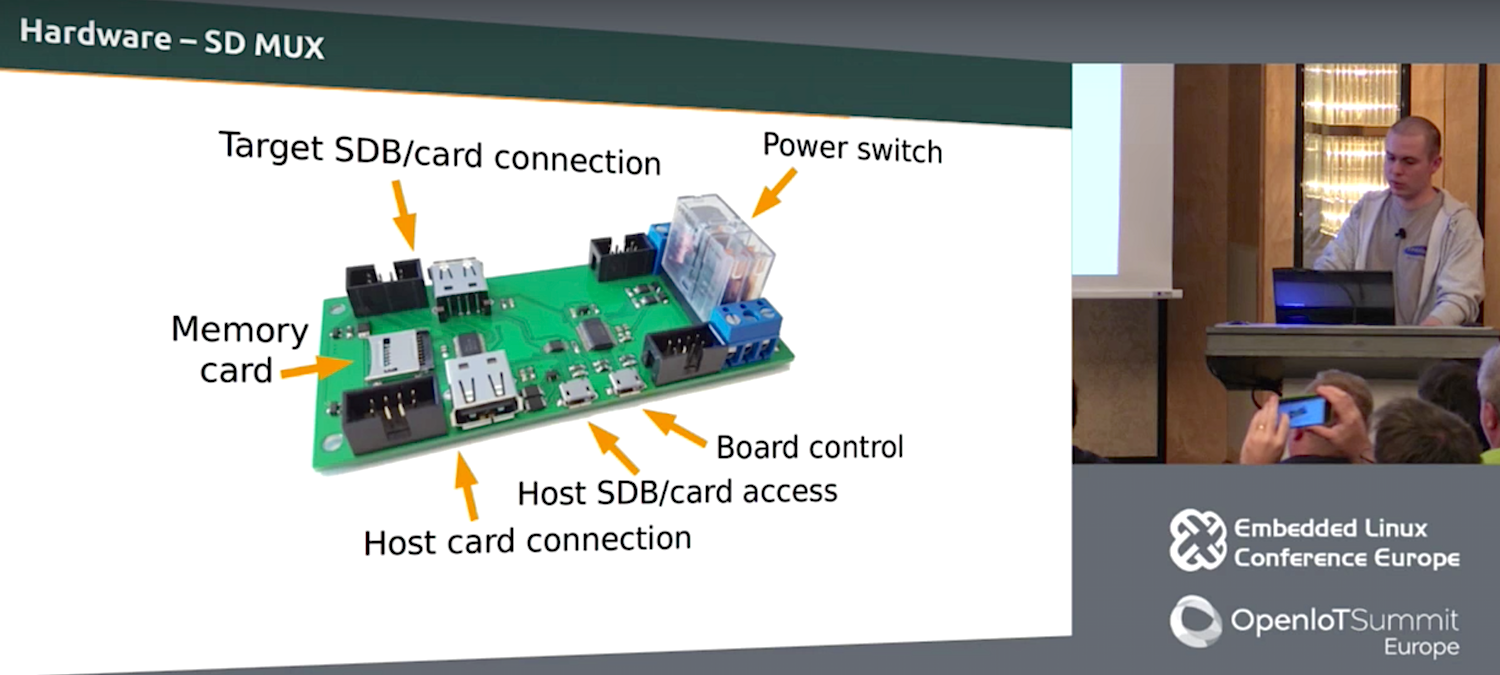
The solution was to exploit the one common denominator on all the SBCs: bootable microSD cards. Wieczorek’s team custom designed a microSD card demultiplexer board that provides access between the testing host and the device. The board includes a power switch, as well as “ports for board control and connections for controlling the target device and the corresponding slots on the host.” The test farm comprises multiple device nodes, each of which consists of six multiplexer boards and several USB hubs.
The Tizen team published the schematics for the boards and connectors and posted them with sources on the Tizen.org Git repository. Meanwhile, there are plans to monitor changes between tested images in a more detailed way and to enable the retrieval of partial information from failed test runs. Other plans call for improved resource management and a distributed setup scheme so testing won’t be bound to a single location.
In summing up, Wieczorek offered a few basic recommendations. “First, there’s no need to reinvent the wheel,” he said. “All the building blocks are already there — they just need configuration. Second, consider designing custom hardware to simplify tasks. Finally, remember that automation pays off in the long term.”
Watch the complete presentation below:
Embedded Linux Conference + OpenIoT Summit North America will be held on February 21-23, 2017 in Portland, Oregon. Check out over 130 sessions on the Linux kernel, embedded development & systems, and the latest on the open Internet of Things.
Linux.com readers can register now with the discount code, LINUXRD5, for 5% off the attendee registration price. Register now>>
Arch Linux is called the simple Linux because it eschews the layers of abstraction and “helper” apps that come with so many Linux distributions. It as close to vanilla Linux as a packaged distribution can get.
Consequently, you need to be more comfortable with do-it-yourself than with most modern distributions, and more comfortable with the command line and editing text files. I would rather take 10 seconds to edit a text configuration file than spend all kinds of time wading through graphical configuration menus. You know what would make me like graphical configurations more? Batch operations. Sometimes I like to change more than one thing at a time. No, really, it’s true.
But I digress. Arch’s being simpler means more work for you. Installation is a lengthy manual process, and you’ll have a lot of post-installation chores such as creating a non-root user, setting up networking, configuring software repositories, configuring mountpoints, and installing whatever software you want. The main reason I see for using Arch is to have more control over your Linux system than other distros give you. You can use Arch for anything you want, just like any other Linux: server, laptop, desktop. I had Arch on an ancient Thinkpad that was left behind by modern Linux distributions.
Arch is a rolling release, so updating your installation regularly keeps it current. It has its own dependency-resolving package manager, pacman. Arch’s standout features are the superb documentation, stellar maintenance, and stability.
Arch does not try to be all things to all users. The maintainers are phasing out the i686 version by November 2017 and supporting only x86_64, so anyone who needs a 32-bit Linux won’t be able to use Arch. The installer doesn’t include ready-made multimedia functionality, wireless drivers, Java, or Adobe Flash. These are all available post-installation. The Arch team does not support ARM devices, but the Arch Linux ARM project does.
The Arch installation image is a live bootable image. After you download it, refer to the installation page for complete instructions. Installing it to your hard disk is a manual process: you will manually partition your drive, install the base system, create /etc/fstab, set your locale and time zone, hostname, and configure networking.
When the live image starts, you’ll be looking at a root Zsh prompt. If you have wired Ethernet, then you’ll automatically have networking, with DHCP enabled. If you have a wireless networking interface, then you’ll have to configure networking manually. Fortunately, Arch provides a thorough document on how to do this; hang on to the installation guide because it links to numerous howtos.
Press Shift+Page Up/Page Down to page up and down your console screen.
Partitioning is a bit of a bugaboo, so I’ll walk through a simple partitioning scheme using gdisk. You may use fdisk for the old-fashioned MS-DOS partitioning, or the newfangled GUID Partition Table, GPT. I prefer GPT because you can have as many partitions as you want, numbered sequentially and are not limited to four primary partitions.
These commands create a new partition table on /dev/sda (be sure to use your own hard disk designation!), a 1MB BIOS boot partition that is required if you use the GRUB bootloader, a root partition, and a swap partition.
# gdisk /dev/sda
Command (? for help): o
This option deletes all partitions and creates a new protective MBR.
Proceed? (Y/N): y

Command (? for help): n
Partition number (1-128, default 1): 1
First sector (34-26580030, default = 2048) or {+-size KMGTP}: 2048
Last sector (2048-26580030, default = 26580030) or {+-size KMGTP}: +1M
Current type is 'Linux filesystem'
Hex code or GUID (L to show codes, Enter = 8300): ef02
Changed type of partition to 'BIOS boot partition'

Command (? for help): n
Partition number (2-128, default 2): 2
First sector (34-26580030, default = 4096) or {+-size KMGTP}: 4096
Last sector (4096-26580030, default = 26580030) or {+-size KMGTP}: +10G
Current type is 'Linux filesystem'
Hex code or GUID (L to show codes, Enter = 8300):
Changed type of partition to 'Linux filesystem'

Command (? for help): n
Partition number (3-128, default 3): 3
First sector (34-26580030, default = 20975616) or {+-size KMGTP}:
Last sector (20975616-26580030, default = 26580030) or {+-size KMGTP}:
Hex code or GUID (L to show codes, Enter = 8300): 8200
Changed type of partition to 'Linux swap'

Command (? for help): w

Final checks complete. About to write GPT data. THIS WILL OVERWRITE EXISTING
PARTITIONS!!

Do you want to proceed? (Y/N): y
OK; writing new GUID partition table (GPT) to /dev/sda.
The operation has completed successfully.
Then you must create your filesystem. In my example only /dev/sda2 needs this, which I create with mkfs.ext4 /dev/sda2.
You do not mount the BIOS boot partition, but you need to mount your other filesystems. Check out the swap howto to set up your swap partition correctly.
If you followed all the steps correctly, you will reboot to a nice new Arch Linux system. If you didn’t, then you will get an exercise in debugging.
Assuming your nice new Arch system boots, which it should, log in as root using the password you created during installation, and your reward is a plain shell prompt. I ran du -sh / on my test system to see how much disk space it used immediately after installation. It showed 1.1 GB. free revealed memory usage of 41K. Kilobytes, friends, remember what those are? Of course, the more additional software you install the more system resources it will use.
You should create at least one non-root user, especially if you will log in remotely to your Arch system or install a graphical desktop.
So, what the heck do you do now? Why, all sorts of things. You can install and run servers; it’s a lean installation at 1.1 gigabytes so if you are cruft-averse, you won’t have much to remove. You could install SSH for secure remote logins. You can install a graphical desktop. Let’s take a quick look at pacman, the dependency-resolving package manager.
Search for packages to install:
$ pacman -Ss [name]
Install a package:
# pacman -S [packagename]
Update your repositories and upgrade the whole system:
# pacman -Syu
Remove a package and retain dependencies:
# pacman -R [packagename]
Remove a package and dependencies if they not required by other packages:
# pacman -Rs [packagename]
List files installed by package:
# pacman -Ql [packagename]
What package installed this file?
$ pacman -Qo /path/to/file
I like Arch as a nice clean distro that sometimes vexes me by making me do more work than I want to, that stays relatively free of cruft, and I especially like it for headless servers. Give it a try; see the installation page to get started, and see Installation steps for Arch Linux guests for instructions on running it in VirtualBox.
Learn more about Linux through the free “Introduction to Linux” course from The Linux Foundation and edX.

Throughout 2016, software-defined networking (SDN) rapidly evolved, and numerous players in the open source and cloud computing arenas are now helping it gain momentum. In conjunction with that trend, OpenContrail, a popular SDN platform used with the OpenStack cloud computing platform, is emerging as an essential tool around which many administrators will have to develop skillsets.
Just as administrators and developers have ramped up their skillsets surrounding essential tools like Ceph in the OpenStack ecosystem, they will need to embrace OpenContrail, which is fully open source and stewarded by the Apache Software Foundation.
With all of this in mind, Mirantis, one of the most active companies on the OpenStack scene, has announced commercial support for and contributions to OpenContrail. “With the addition of OpenContrail, Mirantis becomes a one-stop support shop for the entire stack of popular open source technologies used in conjunction with OpenStack, including Ceph for storage, OpenStack/KVM for compute and OpenContrail or Neutron for SDN,” the company noted.
According to a Mirantis announcement, “OpenContrail is an Apache 2.0-licensed project that is built using standards-based protocols and provides all the necessary components for network virtualization–SDN controller, virtual router, analytics engine, and published northbound APIs. It has an extensive REST API to configure and gather operational and analytics data from the system. Built for scale, OpenContrail can act as a fundamental network platform for cloud infrastructure.”
The news follows Mirantis’ acquisition of TCP Cloud, a company specializing in managed services for OpenStack, OpenContrail, and Kubernetes. Mirantis will use TCP Cloud’s technology for continuous delivery of cloud infrastructure to manage the OpenContrail control plane, which will run in Docker containers. As a part of the effort, Mirantis has also been contributing to OpenContrail.
Many contributors behind OpenContrail are working closely with Mirantis, and they have especially taken note of the support programs that Mirantis will offer.
“OpenContrail is an essential project within the OpenStack community, and Mirantis is smart to containerize and commercially support it. The work our team is doing will make it easy to scale and update OpenContrail and perform seamless rolling upgrades alongside the rest of Mirantis OpenStack,” said Jakub Pavlik, Mirantis’ director of engineering and OpenContrail Advisory Board member. “Commercial support will also enable Mirantis to make the project compatible with a variety of switches, giving customers more choice in their hardware and software,” he said.
In addition to commercial support for OpenContrail, we are very likely to see Mirantis serve up educational offerings for cloud administrators and developers who want to learn how to leverage it. Mirantis is already well-known for its OpenStack training curriculum and has wrapped Ceph into its training.
In 2016, the SDN category rapidly evolved, and it also became meaningful to many organizations with OpenStack deployments. IDC published a study of the SDN market recently and predicted a 53.9 percent CAGR from 2014 through 2020, at which point the market will be valued at $12.5 billion. In addition, the Technology Trends 2016 report ranked SDN as one of the best technology investments that organizations can make.
“Cloud computing and the 3rd Platform have driven the need for SDN, which will represent a market worth more than $12.5 billion in 2020. Not surprisingly, the value of SDN will accrue increasingly to network-virtualization software and to SDN applications, including virtualized network and security services. Large enterprises are now realizing the value of SDN in the datacenter, but ultimately, they will also recognize its applicability across the WAN to branch offices and to the campus network,” said Rohit Mehra, Vice President of Network Infrastructure at IDC.
Meanwhile, The Linux Foundation recently announced the release of its 2016 report “Guide to the Open Cloud: Current Trends and Open Source Projects.” This third annual report provides a comprehensive look at the state of open cloud computing, and includes a section on SDN.
The Linux Foundation also offers Software Defined Networking Fundamentals (LFS265), a self-paced, online course on SDN, and functions as the steward of the Open Daylight project, another important open source SDN platform that is quickly gaining momentum.
Open Networking Summit, to be held April 3-6 in Santa Clara, CA, brings enterprises, carriers, and cloud service providers together to share insights, highlight innovation and discuss the future of the community. Register Now >>