When we describe a typical operating system kernel on a typical machine (be it physical or virtual), we are normally talking about a distinct piece of software which runs in a separate processor mode (kernel mode) and address space from the rest of the software running on that machine. This operating system kernel generally provides critical low-level functions which are leveraged by the other software installed on the box. The kernel is generally a generic piece of code which is trivially tailored (if at all) to the application software stack it is supporting on the machine. This generic kernel normally provides a wide range of rich functions, many of which may be unneeded by the particular applications it is being asked to support.
In fact, if you look at the total software stack on most machines today, it is often difficult to figure out just what application will be run on that machine. You are likely to find a wide swath of hundreds, if not thousands, of low-level utilities, plus multiple databases, a web server or two, and a number of specialized application programs. The machine may actually be charged with running a single applica- tion, or it may be intended to run dozens simultaneously. Careful analysis of the startup scripts will yield hints as to the final solution set which will be run on the machine, but it is far from certain, as a suitably privileged user may elect to invoke any of a number of applications present on the box.
In Linux (and Unix in general), there is a SuperUser named root. The root user can do anything and everything, and thus doing daily work as the root can be very dangerous. You could type a command incorrectly and destroy the server.
By default, the root account password is locked in Ubuntu. This means that you cannot login as root directly or use the su command to become the root user. However, since the root account physically exists it is still possible to run programs with root-level privileges. This is where sudo comes in – it allows authorized users to run certain programs as root without having to know the root password.
In this quick tutorial, you will learn how to create a sudo user on Ubuntu for security reasons and to run a permitted user to run a command as the superuser (root user)
In December, Versa sponsored an independent survey conducted by Dimensional Research of 308 network professionals across five continents at organizations with 1,000-plus employees. The goal of the research was to capture how companies manage and secure their networks across branch locations. The research also investigated expected benefits and challenges of a software-defined wide area networking (SD-WAN). What the research revealed was that companies are struggling to manage and secure the WAN, especially at branch locations. Nearly all participants stated that maintaining security policies, network devices, and complexity due to cloud and mobile applications are the most difficult aspects of managing the WAN.
This project implements a very common access control device. The LTPS is equipped with Tibbit #08 (clock/data and Wiegand interface). It gets card codes from an external RFID card reader. The project lets you save user names and their ID codes into the database, as well as verify the cards you read against the records of the database. When you read a card which ID code matches any ID code from the database, the terminal “grants access” (the blue LED turns on). If this ID code has no match in the database, the terminal “denies access” (the red LED turns on).
This simple project demonstrates all main techniques that are important to building access control solutions with LTPS.
Some other distinctive features of this project:
The project utilizes a full-featured embedded SQLite SQL database engine.
The web interface shows card reader events in a real time.
The app utilizes the sqlite3 module as a permanent event and cardholder data store. The module is a serverless, self-contained SQL database engine which does not need any other software to be installed on the device.*
* The module is written in C++. A precompiled version will be installed from Tibbo’s GitHub during the app installation. If you want to install the module from NPM, you should also install build-essential on the device.
With each passing year, the Linux desktop ecosystem shifts and morphs from one darling to the next. Although it’s sometimes challenging to tell, from month to month, which desktop will reign as the fan favorite, there are always signs that a particular desktop is going to rise in market share.
Three trends I always examine are evolution, usability, and modernity. I prefer my desktops to have evolved along with the needs of current trends and users, to be easily used, and have a modern design aesthetic. Bonus points are generally awarded for a high range of flexibility.
Currently, the Linux desktop environment is dominated by Cinnamon, Xfce, GNOME, and Ubuntu Unity. Of those four, I believe only one will see a sharp rise in market share in 2017. Which one? Let’s dive in and see which five desktops, I think will climb the rank and file.
KDE Plasma
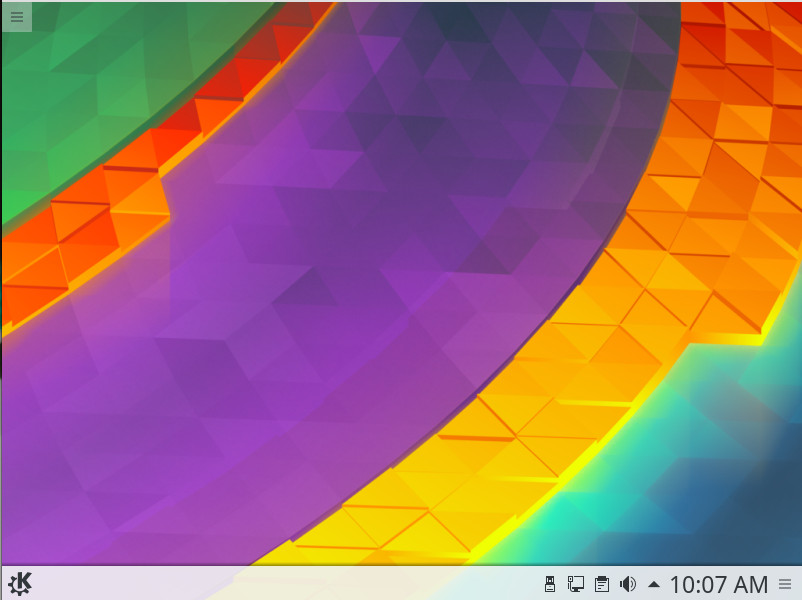
For the longest time I ignored KDE, thinking it too unstable, too clunky, and too tied to the old-school desktop metaphor. With the advent of Plasma 5 (and distributions like Neon) all bets were off. With each new iteration of KDE (Figure 1), the desktop improves in every possible area. It’s not only an elegant improvement over the old Start button/taskbar metaphor, it’s become incredibly stable and the responsiveness has improved dramatically.
Figure 1: The latest KDE is as beautiful as it is solid.
One of the reasons why I believe KDE will rise in popularity this year is that the developers get the needs of the user. They’ve held onto the old ways, all the while managing to evolve that same take on the desktop in such a way as to make it look and feel modern. From the eyes of the typical end user, KDE is perfect amalgam of what they need (ease of use) vs. what they want (something easy on the eyes).
If you want to install KDE, it can be easily done. For example, on a Ubuntu 16.04 desktop, open up a terminal window and issue the following commands:
Note: During the installation, you’ll be prompted to select a display manager. Make sure to select lightdm for this, and you’ll be good to go.
The installation will take some time; in the end, you’ll wind up with a perfectly functioning KDE desktop.
Pantheon Desktop
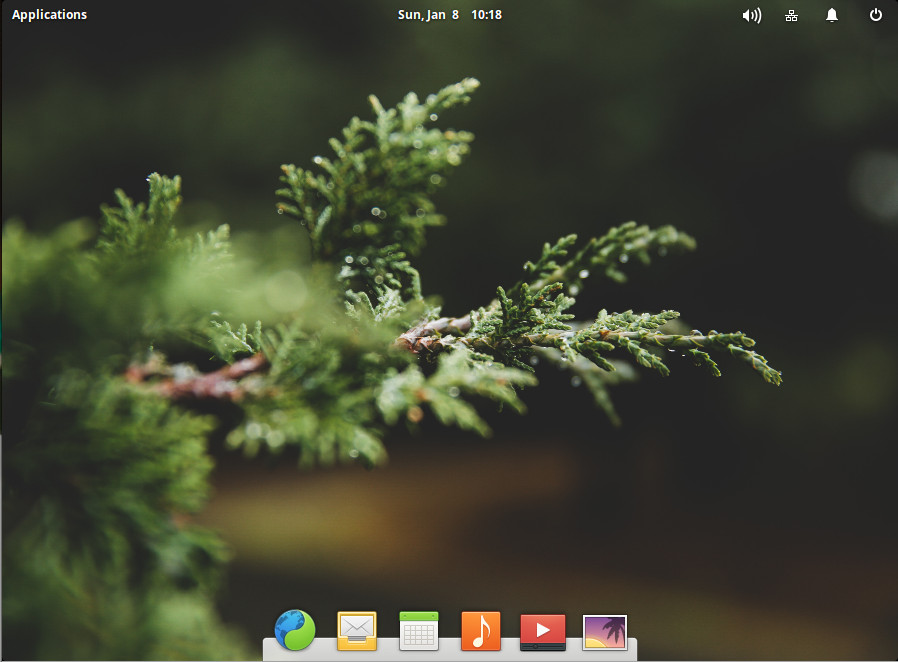
Pantheon happens to be the desktop environment for my daily driver, Elementary OS. Not only is this desktop a thing of elegant simplicity, it is incredibly easy to use (on a level even the Mac desktop couldn’t achieve). The Pantheon desktop does a great job of getting out of your way while you work (and looks great doing so). With plenty of configuration options, you can make Pantheon look and feel exactly how you like (with a few limitations—such as with the Applications menu being locked down and the now-defunct Super Wingpanel). Even with these slight limitations, Pantheon is as solid and easy to use as any desktop you will ever experience.
But why will this particular take on the desktop experience see an expanded user base in 2017? The answer to that is simple: Elementary OS Loki. The combination of the rock solid Ubuntu platform with a clean (almost minimal) desktop makes for a winning combination any level of user could take advantage of. Pantheon is the desktop environment that could easily win over new users like no other Linux interface.
If you’d like to try Pantheon (without installing Elementary), it’s possible. To install on Ubuntu 16.04, open up a terminal and issue the following commands:
Logout, select Pantheon, and log back in (Figure 2).
Figure 2: Pantheon running on top of Ubuntu 16.04.
Enlightenment
When I think of the Enlightenment desktop environment, I am reminded of some of my first steps with the Linux desktop. The first time I logged into Enlightenment, I thought I was working with something incredibly special. It was the single most configurable desktop interface I’d ever used and could be made to look exactly how I wanted it.
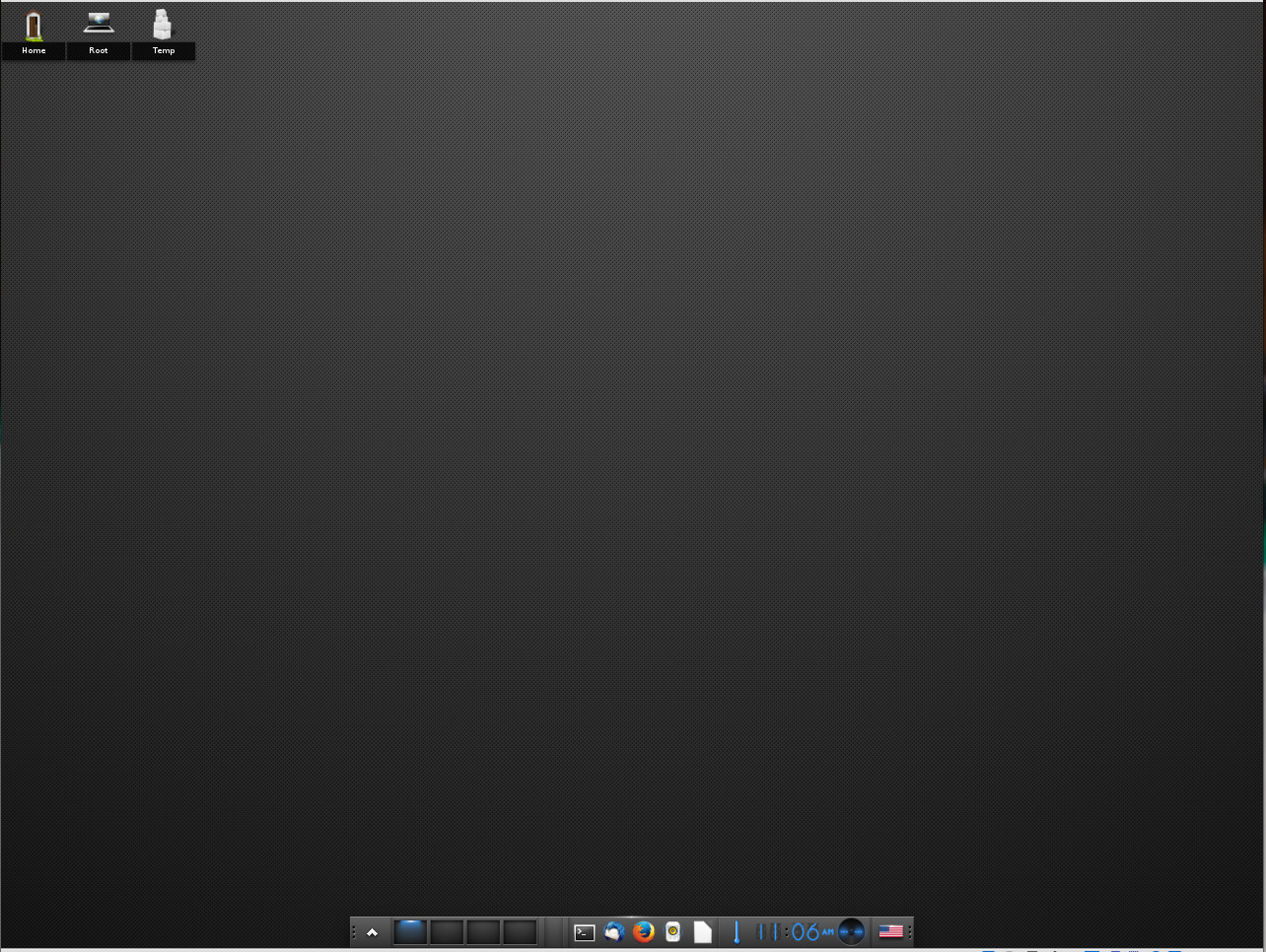
Since then, Enlightenment seemed to fade into the background. However, it is currently undergoing a transition to Wayland, which should mean big things for this unique desktop (even more compositing effects with smoother transitions, etc.). I believe it will be that migration to Wayland that will give Enlightenment a boost in popularity. Considering it is already a full-featured desktop environment (Figure 3) that runs lightning fast and offers some of the coolest window animations, once it makes the transition to the next-gen compositor…look out!
Figure 3: The default Enlightenment desktop.
If you want to kick the Enlightenment tires, it is fairly simple to install. On a Ubuntu 16.04 machine, open up a terminal window and issue the following commands:
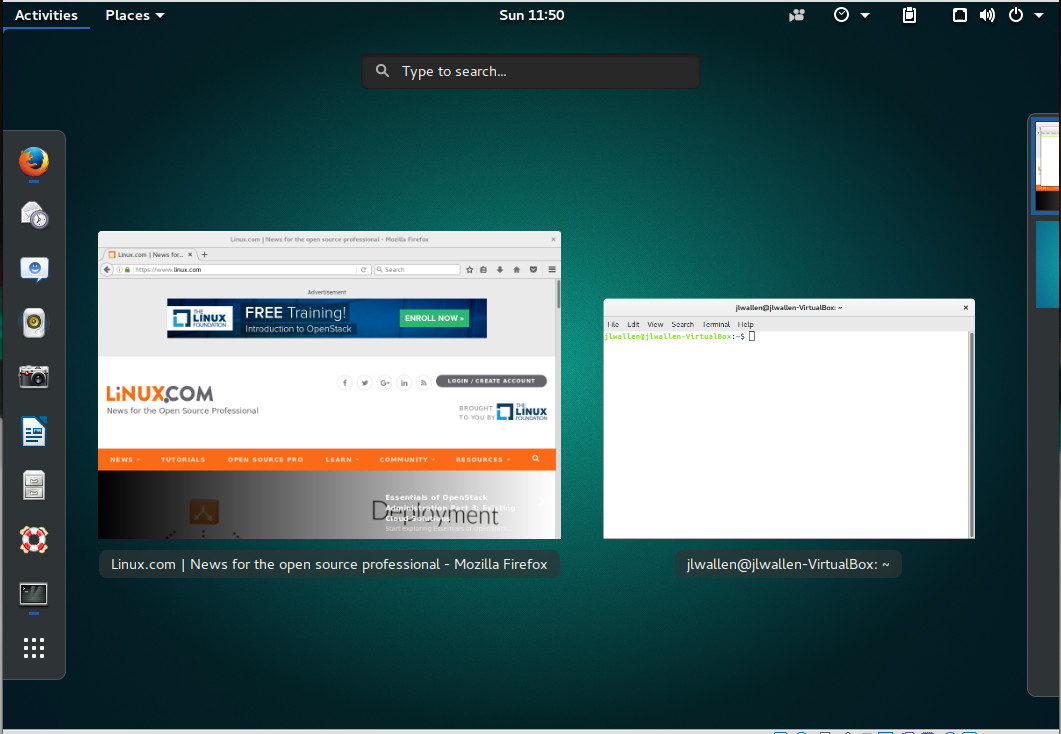
GNOME went through a brief period (after evolving from 2.x to 3.x) where the general consensus was that the developers had made a massive mistake in leaving behind the look and feel of the previous iteration. That was then, this is now. The current release of GNOME is not your parents’ GNOME 3; it’s incredibly fast, stable, and user-friendly (Figure 4). This is especially true for any touch-centric hardware. However, don’t think you have to upgrade your monitor to a touch-enabled device, as even standard hardware can get the most out of this particular desktop.
Figure 4: The GNOME desktop running on Ubuntu 16.04.
How can a desktop that has already been around for some time start gaining market share? I believe the key lies in Ubuntu migrating from Unity 7 to 8. With that change there will be major hiccups to be had and people will turn to the likes of Ubuntu GNOME—a distribution that should be considered a best in breed.
If you want to give the latest version of GNOME a try (3.22), on Ubuntu 16.04 issue the following commands:
During the installation, make sure to select lightdm as your default display manager. Once installed, logout, select GNOME, and login to experience what GNOME has to offer.
Budgie Desktop
The Budgie Desktop is the flagship of the Solus project. Budgie was written from scratch, but tightly integrates with the GNOME stack. With this particular desktop, users will feel perfectly at home (especially if they’ve worked with the Chrome OS platform).
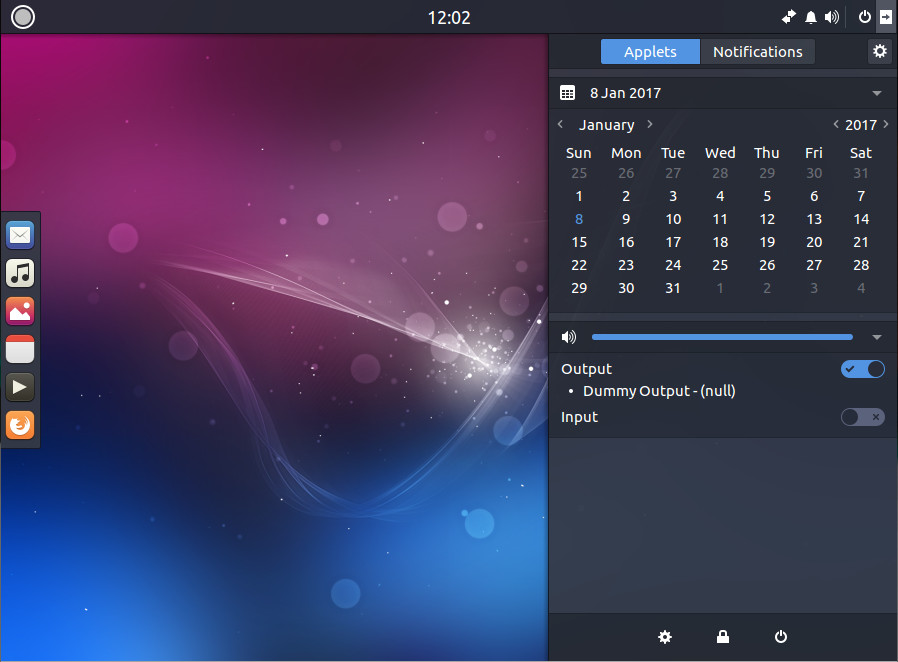
Budgie has come a long way fast (more so than any desktop I can think of). I remember when I first used the environment, it was fairly basic. Now, it includes a really handy dock, and a slide-out panel called Raven (Figure 5), that gives the user:
Easy access to calendar information, sound volume, media player controls, and more (via Widgets view).
The simple means to manage incoming application and system notifications (via Notifications view)
Quick access to Budgie customizations
Figure 5: Raven in action on Budgie.
Budgie will see a rise in usage by way of the Solus distribution—a great project with a solid community.
If you want to experience Budgie, you can either install the Solus distribution, or you can install it on an existing Ubuntu platform with the following commands:
Once installed, logout, select Budgie, and log back in.
The choice is yours
There are so many desktop environments available to the Linux platform; which one you use is up to you. However, if you’re looking for a desktop environment that might well enjoy significant rise in popularity during 2017, look no further than any of the above. Each has something special to offer and should help make your Linux experience even better.
This week in open source news, a study from Black Duck suggests the potential for open source malware is set to skyrocket in 2017, longtime undetected Mac malware exposed, and more! Read our digest for the recent stories you need to hear:
1) The Linux Foundation and Amdocs are partnering up to accelerate adoption of the open source Enhanced Control, Orchestration, Management and Policy (ECOMP) platform from AT&T.
5) “Starting today we are accepting applications from open source projects who would like to serve as mentor organizations for enthusiastic student developers,” says Google.
Alan Ho’s presentation at Node.js Interactive centered on serverless — a technology he has been working on since he founded InstaOps (acquired by Apigee, which was then acquired by Google) a few years ago.
What is Serverless?
In Ho’s own words, “Serverless computing is the code execution model that the cloud provider abstracts the complexity of managing individual servers.” This basically means the provider worries about the servers. You just run your code on them.
Right off the bat, there is already the advantage of not having to bother with managing servers and load balancers. According to Ho, serverless is also more cost effective — more about this later.
Ho, who now works on serverless for Google, also describes serverless computing as “the stack re-imagined,” in the sense that the networking/communication is done by an API gateway or PubSub mechanism. The compute is done by a FaaS (Function as a service — which is a place where you deploy code and the provider will execute it); and your storage is done by a BaaS (Backend as a Service).
The FaaS is different from containers and VM technologies because you send it code, not a VM. In more traditional frameworks, you would send a VM image that executes the code. In FaaS you only send the code.
There are several gotchas to using FaaS, however. First, you don’t have access to the file system. This allows the provider to pack more tenants and preserve security. It also allows for a faster boot up of the containers, as well as reduces costs. But, as a developer, you won’t be able to read configuration from files any more, the memory cache can’t spill over to disk, and you can’t use your own monitoring and logging tools, you have to rely on the tools supplied by the provider.
Likewise, a BaaS is usually multi-tenant (i.e., cheaper) and frees you from having to run the clusters yourself. BaaS usually involves database services that run NoSQL. The problem with them is you have a limited ability to configure the index, and you don’t have the configuration flexibility provided by, say, Elasticsearch or Cassandra.
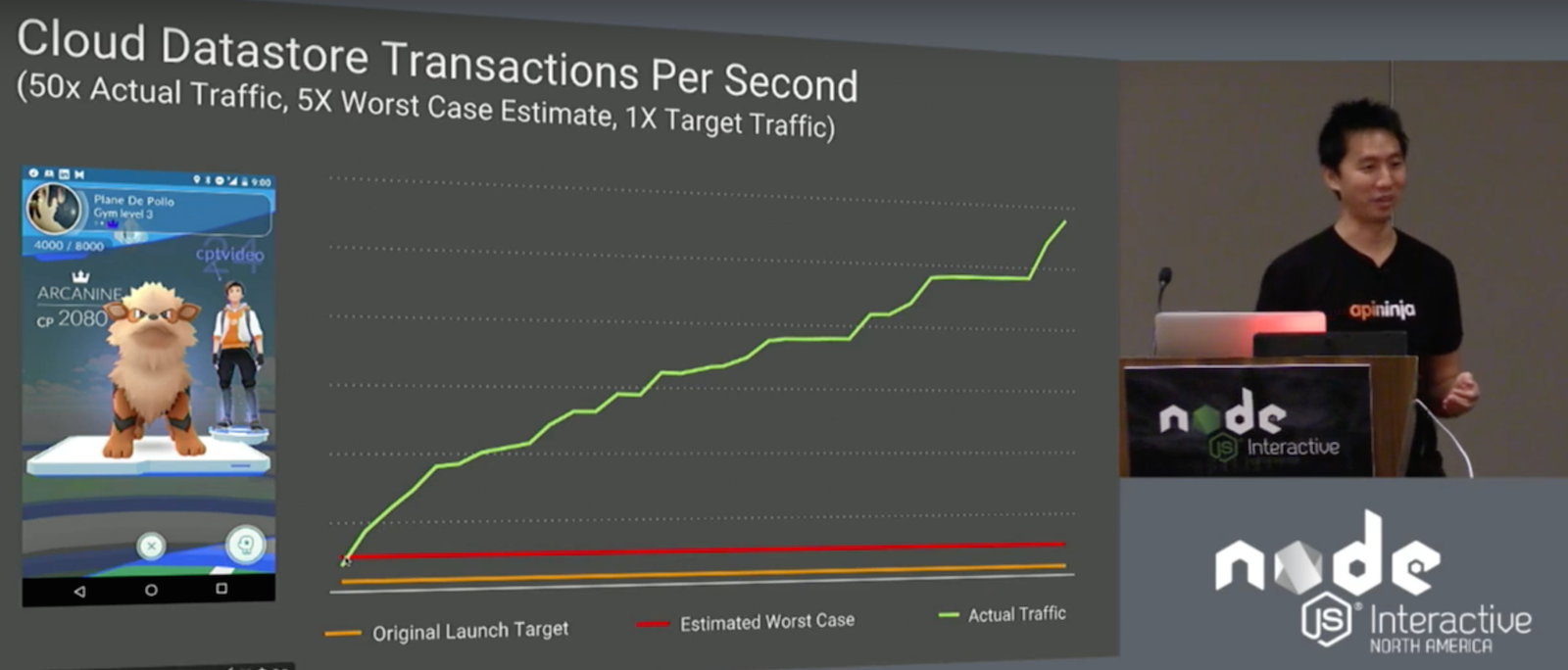
On the flip side, serverless scales really well. Ho mentioned Pokemon Go as an example. The creators gave Google Cloud an original target and worst case scenario. However, when it was deployed, traffic shot up to 50 times the original launch target. The creators of Pokemon Go blew through their worst case scenario in 12 hours. Fortunately, serverless systems were able to handle the deluge.
Benefits
Probably the most palpable advantage of serverless is its low cost. Because you don’t manage the servers yourself, there are savings in administration costs. The providers also share resources across a lot of customers, making them cheaper. Theoretically, the savings are then pushed down to the customer.
Serverless also implies less Ops. If, for example, you have Cassandra clusters running hundreds of microservices, you will ideally need a separate database for each service. Managing hundreds of databases individually is very resource expensive.
Serverless also presents a simpler programming model, thus saving in development time. Ho demonstrated an natural language-based support chat bot that he developed and deployed in four hours.
Conclusion
Serverless computing is not for everything. Its limitations exclude it from services that require control over the underlying operating system, the file system, or even customized deployments of Node.js. Ho also does not recommend it for deployments that will move massive amounts of traffic.
However, if none of the above is necessary, the simplified coding model, the speed at which appliances can be deployed, and the cost effectiveness of serverless make it an excellent platform for online applications that may need to scale.
Watch the complete presentation below:
If you are interested in speaking or attending Node.js Interactive North America 2017 – happening in Vancouver, Canada next fall – please subscribe to the Node.js community newsletter to keep abreast with dates and time.
If you’ve been following the work we’re doing around open source at Rogue Wave Software, you’ve probably heard us say that open source software (OSS) has “crossed the chasm” or is “eating the enterprise.” Although the open source enterprise landscape is still truly nascent, there is no question that open source development principles and the products themselves have “won.” That begs the question: “Now what do we do?”
You’re leveraging free software, perhaps even without knowing it! Your developers are seeking out open source libraries to meet your business demands before writing the code themselves. You’re using an open source application server, middleware solution, or operating system instead of an expensive and locked-in commercial alternative. You’ve shortened your development cycles, you’re releasing things faster, and you’ve gained a competitive edge by embracing community developed solutions in your enterprise.
All is well with the universe, right? Not quite. Seeking new solutions and well-adopted software from open communities is often the easy part of implementation. The real challenge begins once those applications become part of your critical infrastructure. Supporting all of this software that you did not build yourself and do not own is a full-time business! Quite literally, in our case.
So, as a business that’s made the decision to adopt open software, what options do you have for supporting your infrastructure? Support generally boils down to a few specific categories: self-support, community support, and commercial support.
We’ll go into more detail about supporting and maintaining Open Source Software in your organization in our free webinar with The Linux Foundation, to be held Thursday, February 2, 2017 at 10 a.m. Pacific time. But here is a good overview of your options.
Self-support
Many businesses choose to rely on their internal IT teams and staff to support the open source products that they deploy. The benefits of a model are relatively obvious. You can leverage your existing resources, or hire specialists, to maintain the products internally. Where necessary, you can find educational material to sharpen their skills, and designate code owners who are responsible for the various open source code that you’ve implemented. Ideally, these owners will be responsible for:
Keeping ahead of new updates and functionality
Being vigilant and proactive about security notifications
Vetting software internally against business processes to ensure relevance
Interacting with communities to request features and report bugs
Shepherding product knowledge to stakeholders
Although many businesses feel that self-support is all that’s necessary, a recent analysis of a large sampling of real-world support tickets handled by the Rogue Wave Open Source Support team revealed that 80 percent of the problems encountered by our customers were due to either environmental issues or misconfiguration of products. That means that the IT staff supporting these applications did not fully understand the way that the deployed solutions would interact with other systems and/or hardware in real life, or that they didn’t have a complete understanding of the best way to configure these applications.
It truly isn’t their fault! As much as we love and advocate free software and the communities that support those initiatives, owning an open source implementation will be met with immediate challenges:
Poor documentation
Slow response from communities
Lack of POCs relevant to your domain
So, despite the benefits on paper for self-support, this model is generally just not enough to get the reliability you expect out of your critical systems.
Community support
The community is your greatest resource when it comes to embracing open source, but, like most things in software, there’s a protocol. There are right ways and wrong ways of interfacing with these communities.
The most successful businesses who rely primarily on community support live by the following practices:
Remember that these are volunteer developers in many cases, and you aren’t paying for their support – be patient and courteous
When it comes to open source, there is a currency, and that currency is participation – consider donating your own resources to support the project
There are lots of ways to support a project – code, documentation, donations, evangelism – and communities tend to reciprocate accordingly
Submit clear, concise, and comprehensive bug reports and/or feature requests, one-liners tend to linger for months or even years in bug trackers
At the end of the day, as great as these communities and people are, they are not your employees and they aren’t invested directly in the work that you are doing. You can glean incredible knowledge and forge valuable relationships with committers, maintainers, and curators, but if you’re looking for a guaranteed service level agreement and true risk mitigation, your best option will be to go to a commercial support provider.
Commercial support
Here we have many options. There are companies who provide “enterprise” editions of the community software that they maintain, and those editions often come with options for SLA-based support and training. We also have organizations like Linux Foundation and Rogue Wave, who can help you build the support infrastructure you need internally, or provide that support team for you. Though these options aren’t free, when juxtaposed to the license costs associated with supporting a sophisticated commercial infrastructure, or the hiring costs associated with building and maintaining an internal support team, the ROI is generally substantial.
The benefits of using a proprietary enterprise and/or third-party commercial support provider cover all aspects of ownership, including:
Redundancy in skillsets and available resources
Guaranteed SLAs governing response and resolution time
Access to niche expertise and thought leadership
Proactive guidance such as patching and vulnerability awareness
Reliable, expedient advice and guidance
Interaction with experts who have vetted the products in dozens of environments for multiple business use cases
By selecting the right commercial provider as an architectural partner in your development endeavors surrounding open source, you can obtain both the freedom and flexibility gained from adopting free software, and the peace of mind that comes with commercial-grade enterprise support.
Conclusion
Free, community-driven software is the way of the future, but in this ever-changing landscape it is increasingly important to ensure that your business is equipped to thrive and compete in this new world. Many models are available to you, and the right choice is going to vary depending on your business needs. It should be noted that these options are not mutually exclusive. You may find, for instance, that your business is best served by utilizing various degrees of each option above. Whatever you decide, the best way to squeeze the most benefit out of the open source revolution is to ensure your business adopts a strong, strategic model for support, and utilizes it to the most optimal degree possible.
Learn more about Supporting and Maintaining Open Source Software in Your Organization by joining a free webinar from The Linux Foundation and Rogue Wave Software on Thursday, February 2, 2017 at 10:00am Pacific Time. Register >>
You can expand the functionality of the prev app if you add a hardware button control. Pressing the button will also toggle the state of the GPIO line (LED, relay,…) which is reflected in the LED state displayed in the browser window.
What you need
Besides the hardware used in the prev app you will also need:
Docker-style containers are so hot they’ve broken the scale ETR uses to measure CIO intent to purchase enterprise technology, registering “the strongest buying intention score ever recorded in [its] six-year history.”
While that data is more than a year old, more recent analyses peg Docker adoption up by a factor of 2.6 in 2016 over 2015, yielding a market worth $762 million in 2016, projected to bloat to $2.7 billion by 2020, according to 451 Research.