Home Blog Page 622

Serverless Computing Is the Stack Reimagined

Alan Ho’s presentation at Node.js Interactive centered on serverless — a technology he has been working on since he founded InstaOps (acquired by Apigee, which was then acquired by Google) a few years ago.

What is Serverless?

In Ho’s own words, “Serverless computing is the code execution model that the cloud provider abstracts the complexity of managing individual servers.” This basically means the provider worries about the servers. You just run your code on them.

Right off the bat, there is already the advantage of not having to bother with managing servers and load balancers. According to Ho, serverless is also more cost effective — more about this later.

Ho, who now works on serverless for Google, also describes serverless computing as “the stack re-imagined,” in the sense that the networking/communication is done by an API gateway or PubSub mechanism. The compute is done by a FaaS (Function as a service — which is a place where you deploy code and the provider will execute it); and your storage is done by a BaaS (Backend as a Service).

The FaaS is different from containers and VM technologies because you send it code, not a VM. In more traditional frameworks, you would send a VM image that executes the code. In FaaS you only send the code.

There are several gotchas to using FaaS, however. First, you don’t have access to the file system. This allows the provider to pack more tenants and preserve security. It also allows for a faster boot up of the containers, as well as reduces costs. But, as a developer, you won’t be able to read configuration from files any more, the memory cache can’t spill over to disk, and you can’t use your own monitoring and logging tools, you have to rely on the tools supplied by the provider.

Likewise, a BaaS is usually multi-tenant (i.e., cheaper) and frees you from having to run the clusters yourself. BaaS usually involves database services that run NoSQL. The problem with them is you have a limited ability to configure the index, and you don’t have the configuration flexibility provided by, say, Elasticsearch or Cassandra.

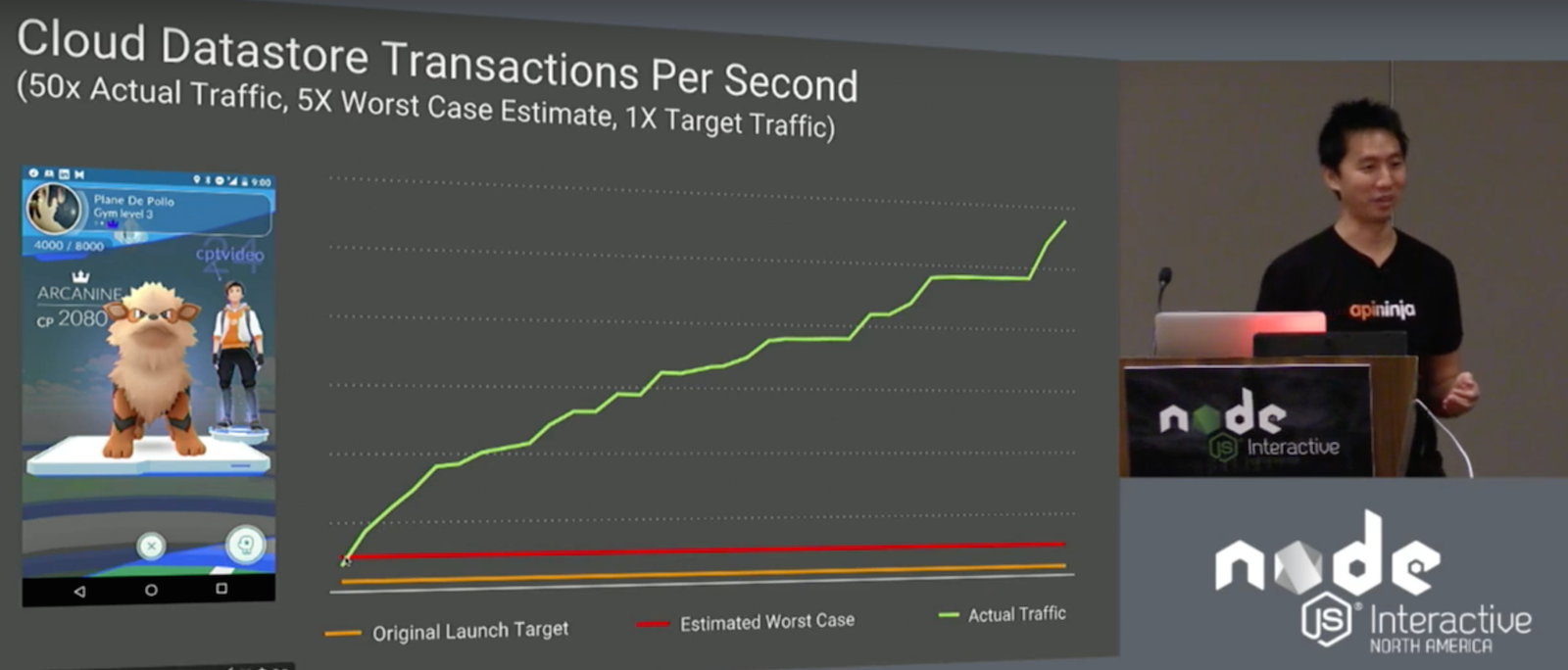
On the flip side, serverless scales really well. Ho mentioned Pokemon Go as an example. The creators gave Google Cloud an original target and worst case scenario. However, when it was deployed, traffic shot up to 50 times the original launch target. The creators of Pokemon Go blew through their worst case scenario in 12 hours. Fortunately, serverless systems were able to handle the deluge.

Benefits

Probably the most palpable advantage of serverless is its low cost. Because you don’t manage the servers yourself, there are savings in administration costs. The providers also share resources across a lot of customers, making them cheaper. Theoretically, the savings are then pushed down to the customer.

Serverless also implies less Ops. If, for example, you have Cassandra clusters running hundreds of microservices, you will ideally need a separate database for each service. Managing hundreds of databases individually is very resource expensive.

Serverless also presents a simpler programming model, thus saving in development time. Ho demonstrated an natural language-based support chat bot that he developed and deployed in four hours.

Conclusion

Serverless computing is not for everything. Its limitations exclude it from services that require control over the underlying operating system, the file system, or even customized deployments of Node.js. Ho also does not recommend it for deployments that will move massive amounts of traffic.

However, if none of the above is necessary, the simplified coding model, the speed at which appliances can be deployed, and the cost effectiveness of serverless make it an excellent platform for online applications that may need to scale.

Watch the complete presentation below:

If you are interested in speaking or attending Node.js Interactive North America 2017 – happening in Vancouver, Canada next fall – please subscribe to the Node.js community newsletter to keep abreast with dates and time.

Options for Open Source Software Support

If you’ve been following the work we’re doing around open source at Rogue Wave Software, you’ve probably heard us say that open source software (OSS) has “crossed the chasm” or is “eating the enterprise.”  Although the open source enterprise landscape is still truly nascent, there is no question that open source development principles and the products themselves have “won.”  That begs the question: “Now what do we do?”

You’re leveraging free software, perhaps even without knowing it!  Your developers are seeking out open source libraries to meet your business demands before writing the code themselves.  You’re using an open source application server, middleware solution, or operating system instead of an expensive and locked-in commercial alternative.  You’ve shortened your development cycles, you’re releasing things faster, and you’ve gained a competitive edge by embracing community developed solutions in your enterprise.

All is well with the universe, right?  Not quite. Seeking new solutions and well-adopted software from open communities is often the easy part of implementation. The real challenge begins once those applications become part of your critical infrastructure. Supporting all of this software that you did not build yourself and do not own is a full-time business! Quite literally, in our case.  

So, as a business that’s made the decision to adopt open software, what options do you have for supporting your infrastructure?  Support generally boils down to a few specific categories: self-support, community support, and commercial support.  

We’ll go into more detail about supporting and maintaining Open Source Software in your organization in our free webinar with The Linux Foundation, to be held Thursday, February 2, 2017 at 10 a.m. Pacific time. But here is a good overview of your options.

Self-support

Many businesses choose to rely on their internal IT teams and staff to support the open source products that they deploy.  The benefits of a model are relatively obvious. You can leverage your existing resources, or hire specialists, to maintain the products internally.  Where necessary, you can find educational material to sharpen their skills, and designate code owners who are responsible for the various open source code that you’ve implemented.  Ideally, these owners will be responsible for:

  • Keeping ahead of new updates and functionality

  • Being vigilant and proactive about security notifications

  • Vetting software internally against business processes to ensure relevance

  • Interacting with communities to request features and report bugs

  • Shepherding product knowledge to stakeholders

Although many businesses feel that self-support is all that’s necessary, a recent analysis of a large sampling of real-world support tickets handled by the Rogue Wave Open Source Support team revealed that 80 percent of the problems encountered by our customers were due to either environmental issues or misconfiguration of products.  That means that the IT staff supporting these applications did not fully understand the way that the deployed solutions would interact with other systems and/or hardware in real life, or that they didn’t have a complete understanding of the best way to configure these applications.

It truly isn’t their fault!  As much as we love and advocate free software and the communities that support those initiatives, owning an open source implementation will be met with immediate challenges:

  • Poor documentation

  • Slow response from communities

  • Lack of POCs relevant to your domain

So, despite the benefits on paper for self-support, this model is generally just not enough to get the reliability you expect out of your critical systems.

Community support

The community is your greatest resource when it comes to embracing open source, but, like most things in software, there’s a protocol.  There are right ways and wrong ways of interfacing with these communities.

The most successful businesses who rely primarily on community support live by the following practices:

  • Remember that these are volunteer developers in many cases, and you aren’t paying for their support – be patient and courteous

  • When it comes to open source, there is a currency, and that currency is participation – consider donating your own resources to support the project

  • There are lots of ways to support a project – code, documentation, donations, evangelism –  and communities tend to reciprocate accordingly

  • Submit clear, concise, and comprehensive bug reports and/or feature requests, one-liners tend to linger for months or even years in bug trackers

At the end of the day, as great as these communities and people are, they are not your employees and they aren’t invested directly in the work that you are doing.  You can glean incredible knowledge and forge valuable relationships with committers, maintainers, and curators, but if you’re looking for a guaranteed service level agreement and true risk mitigation, your best option will be to go to a commercial support provider.

Commercial support

Here we have many options.  There are companies who provide “enterprise” editions of the community software that they maintain, and those editions often come with options for SLA-based support and training.  We also have organizations like Linux Foundation and Rogue Wave, who can help you build the support infrastructure you need internally, or provide that support team for you.  Though these options aren’t free, when juxtaposed to the license costs associated with supporting a sophisticated commercial infrastructure, or the hiring costs associated with building and maintaining an internal support team, the ROI is generally substantial.

The benefits of using a proprietary enterprise and/or third-party commercial support provider cover all aspects of ownership, including:

  • Redundancy in skillsets and available resources

  • Guaranteed SLAs governing response and resolution time

  • Access to niche expertise and thought leadership

  • Proactive guidance such as patching and vulnerability awareness

  • Reliable, expedient advice and guidance

  • Interaction with experts who have vetted the products in dozens of environments for multiple business use cases

By selecting the right commercial provider as an architectural partner in your development endeavors surrounding open source, you can obtain both the freedom and flexibility gained from adopting free software, and the peace of mind that comes with commercial-grade enterprise support.

Conclusion

Free, community-driven software is the way of the future, but in this ever-changing landscape it is increasingly important to ensure that your business is equipped to thrive and compete in this new world.  Many models are available to you, and the right choice is going to vary depending on your business needs.  It should be noted that these options are not mutually exclusive.  You may find, for instance, that your business is best served by utilizing various degrees of each option above.  Whatever you decide, the best way to squeeze the most benefit out of the open source revolution is to ensure your business adopts a strong, strategic model for support, and utilizes it to the most optimal degree possible.

Learn more about Supporting and Maintaining Open Source Software in Your Organization by joining a free webinar from The Linux Foundation and Rogue Wave Software on Thursday, February 2, 2017 at 10:00am Pacific Time. Register >>

Two-way Control with Web and Button

About the Application

You can expand the functionality of the prev app if you add a hardware button control. Pressing the button will also toggle the state of the GPIO line (LED, relay,…) which is reflected in the LED state displayed in the browser window.

What you need

Besides the hardware used in the prev app you will also need:

​​Proposed Tibbit configuration (click to enlarge)

GitHub Repository

Name: tps-gpio-tutorials

Repository page: https://github.com/tibbotech/tps-gpio-tutorials

Clone URL: https://github.com/tibbotech/tps-gpio-tutorials.git

Updated At: Mon Oct 10 2016

Node.js Application

Add the following code to server.js:

server.

...

var button = gpio.init("S11A");

var wasButtonPressed = false;

button.setDirection('input');

setInterval(function(){
    // If button is just released...
    if(button.getValue() === 1 && wasButtonPressed === true){
        wasButtonPressed = false;

        // ...reads the LED state...
        var ledState = led.getValue();

        //...inverses it...
        if(ledState === 1){
            ledState = 0
        }else{
            ledState = 1;
        }

        //...writes...
        led.setValue(ledState);

        //...and submits to the web app if connected
        if(clients !== undefined){
            clients.emit('tps:state:changed', ledState);
        }
    }else if(button.getValue() === 0){
        // If button is pressed
        wasButtonPressed = true;
    }
},100);

...


Who’s Cashing in on Containers? Look to the Cloud

Docker-style containers are so hot they’ve broken the scale ETR uses to measure CIO intent to purchase enterprise technology, registering “the strongest buying intention score ever recorded in [its] six-year history.”

While that data is more than a year old, more recent analyses peg Docker adoption up by a factor of 2.6 in 2016 over 2015, yielding a market worth $762 million in 2016, projected to bloat to $2.7 billion by 2020, according to 451 Research.

Read more at InfoWorld

How to get started with a VPN in Linux

The most popular way to circumvent censorship is with a VPN (Virtual Private Network).

 As the name suggests, a virtual network allows you to connect to another server and establish an encrypted tunnel between it and your internet-capable device. 

Read more at Tech Radar

Linux Is Part of the IoT Security Problem, Dev Tells Linux Conference

The Mirai botnet? Just the “tip of the iceberg” is how security bods at this week’s linux.conf.au see the Internet of Things.

Presenting to the Security and Privacy miniconf at linux.conf.au, embedded systems developer and consultant Christopher Biggs pointed out that Mirai’s focus on building a big DDoS cannon drew attention away from the other risks posed by insecure cameras and digital video recorders.

IoT offers a full suite of risks, he said: a perpetrator could just as easily use badly-secured cameras or recorders to stalk a victim, or download videos for blackmail. There’s a huge potential for mass data collection by someone driving around “sniffing for vulnerable devices”, and there’s plenty of scope for unauthorised control.

Read more at The Register

Google Chromecast To the Rescue

In order to be suitable for business class use, particularly in regards to replacing outdated, clumsy, and prone-to-failure business presentation methods, a product must be versatile. This product must be secure. Most importantly, this product must be sized conveniently for the frequent traveling the average businessman endures. To the surprise of, perhaps everyone, this could be where Google’s Chromecast comes in.

What was previously thought only as a consumer streaming device, capable only of streaming Netflix, HBO, YouTube or your favorite MLB, NBA, or various sporting events, the Google Chromcast, which can be purchased for a very competitive $35, is capable of much more.

The Chromcast, weighing in at 1.2 Oz, built in a circular shape reminiscent of a puck, can fit into virtual any laptop bag, carry-on, or luggage has the ability to stream any web page accessible via Google’s Chrome browser to any screen or monitor with an HDMI input. That’s big. Huge, in fact.

Why is this such a big deal? It’s the ease-of-use. It’s Google’s dedication to seamless functionality. It’s the difference between a ten (or more) minute delay due to technical difficulties brought on by convoluted projector settings and a knock out of a presentation with near zero delay between screen and laptop throughout. The Chromecast discovers your Wi-Fi network, and once connected to your chosen device, be it a laptop, tablet, or phone, everything is ready to go.

Beyond the ease-of-use, it wouldn’t take one long to conceptualize what’s possible by simply streaming Chrome browser tabs. There is countless web apps available tailor-made for business use. Go-To-Meeting (gotomeeting.com), for instance, makes hosting meetings with remote employees easier than ever, or, if everyone is in the room, Creately, will ensure that your business plans are brilliantly visualized, with the ability to access cloud-stored flowcharts that your entire team can access and corroborate notes on.

Of course, the benefits don’t end with streaming Chrome tabs, as there is a selection of Google’s business wise apps, including Google’s Docs, and Slides apps; respectively, these two apps are entirely cloud based, and more and more comparable to their competing Microsoft Word apps as time goes on.

For all the business teams out there, looking for ways to everyone in the room to contribute to a conference, you may be excited to find out that anyone in the room with Chromecast installed on their PC or mobile devices can share their screen, as well. A simple click or touch of the casting button in the app will immediately place what is on their screen into the visual conversation. This could be especially useful for anything ranging from note sharing to swapping to an entirely different presentation within the blink of an eye.

There has to be a catch, right? With all of these fantastic business features at your fingertips, all just by inserting a simple HDMI dongle, foregoing countless cables in the process, there has to be some reason why there aren’t more business users raving about Google and their Chromecast, and as sad as it is to declare, there are a few choice issues holding the Chromecast back from being a true business class product.

For starters, as ready as the Chromecast is for presentation primetime, it is prone to infrequent, and sometimes frequent, slowdowns when the Chromecast is on a network with many connected users. This can be remedied by Chromecast’s guest mode, allowing each user to connect via their own networks, if available (a big if, indeed).

Unfortunately, those won’t be the only network roadblocks that will occur, a much bigger issue will be the Chromecast’s willingness to connect to your highly sensitive corporate network to begin with. The Chromecast makes itself known to any network via specific ports, meaning it requires a network which is somewhat open, for instance, your average home connection. As we all know, corporate connections are not, and cannot function in this manner. So, unless one has access to opening network ports, similar to how Cisco instructs with their equipment, your Chromecast business plans may just be on hold until Google provides a solution.

However, if at all able to leap through those network related pitfalls, the Google Chromecast could very well be exactly what you and your business partners are looking for. Broadband for business has many benefits and you don’t have to use them all, but when it comes to presentation solutions, for as reasonably priced, or as adequately sized for travel, there really are no options quite as well suited for the job.

If you don’t know how to stream content from a Linux system to Chromecast, Swapnil wrote a great article for you.

How To Install Webmin on Ubuntu 16.04

install web min

In this tutorial we will show you how to install and configuration Webmin on Ubuntu 16.04. For those of you who didn’t know, Webmin is a free control Panel for managing VPS. Webmin is a web based interface which is used to manage VPS web hosting server. With the help of webmin you can setup user account, apache, dns and file sharing and other actions. Webmin very suitable for beginners who do not know much about the unix or linux command line.

This article assumes you have at least basic knowledge of linux, know how to use the shell, and most importantly, you host your site on your own VPS. The installation is quite simple and assumes you are running in the root account, if not you may need to add ‘sudo’ to the commands to get root privileges. I will show you through the step by step installation Webmin on a Ubuntu 16.04 LTS (Xenial Xerus) server.

Read more at idroot

LED Control From the Web Browser

About the Application

  • This is a simple application which enables the control of a GPIO line via a web browser. To toggle the line HIGH/LOW, click on a rectangle. This app can be used to control a relay Tibbit, a LED Tibbit, or some other “output” Tibbit.

  • The app utilizes a popular socket.io library to facilitate a connection without interruption between the TPS and the browser, as well as the AngularJS V1.x.x front-end framework that makes the development of single-page applications simple. ​

​What you need

Hardware

*Feel free to replace the Tibbits with other output ones

Onboard Software

  • Node.js V6.x.x (pre-installed during production) ​

GitHub Repository

Name: tps-gpio-tutorials

Repository page: https://github.com/tibbotech/tps-gpio-tutorials

Clone URL: https://github.com/tibbotech/tps-gpio-tutorials.git

Updated At: Mon Oct 10 2016

Node.js Application

  • Socket.io and Express and are used to support the web interface functionality

  • The code for web interface connectivity, LED manipulation, and the HTTP server providing web client files is located in the server.js file

  • Web client files are served from the /public folder ​

Installation and Configuration

​

git clone https://github.com/tibbotech/tps-gpio-tutorials
cd tps-gpio-tutorials
npm install .
cd one-led
  • Launch the app:
node server

server.js

Comments in the code explain how it works

// Requires HTTP as WebSocket server modules
const express = require("express");
const app = express();
const http = require('http').Server(app);
const io = require('socket.io')(http);
const gpio = require("@tibbo-tps/gpio");

// Serves static assets from the 'public' folder
app.use("/", express.static('public'));

const led = gpio.init("S15A");

if(led.getDirection() === "input"){
    led.setDirection('output');
    led.setValue(1);
}

// Listens to the incoming WebSocket connection
var clients = io.on('connection', function(socket){
    // When the connection is established
    console.log('USER CONNECTED');

    // Reads I/O line state..
    // ..and broadcasts it to all the connected clients
    var value = led.getValue();

    clients.emit('tps:state:changed', value);

    // When any of the connected clients require a change of the line state
    socket.on('web:state:changed', function(value){
        // Changes the line state...
        led.setValue(value);

        //.. and broadcasts it to all the clients
        clients.emit('tps:state:changed', value);
    });

    socket.on('disconnect', function(){
        console.log('USER DISCONNECTED');
    });
});

// Runs HTTP server on :3000 port
http.listen(3000,function(){
    console.log("LISTENING");
});

Web client

index.html

Comments in the code explain how it works:

<html lang="en">
    <head>
        <meta charset="UTF-8">
        <title>Title</title>
        <script type="text/javascript" src="https://cdnjs.cloudflare.com/ajax/libs/socket.io/1.4.8/socket.io.min.js"></script>
        <script type="text/javascript" src="https://cdnjs.cloudflare.com/ajax/libs/angular.js/1.5.0/angular.min.js"></script>
        <script type="text/javascript" src="client.js"></script>
        <link href="main.css" rel="stylesheet" type="text/css"/>
    </head>
    <body ng-app="leds"> <!-- The ng-app directive bootstraps your Angular application -->

    <!-- The ng-controller directive attaches controller to a view -->
    <!-- The ng-hide directive hides DOM element depending on the 'locked' varibale -->
    <svg version="1.1" xmlns="http://www.w3.org/2000/svg" x="0px" y="0px" width="110px" height="110px" xml:space="preserve"
                ng-controller="ledsController"
                ng-hide="locked">

                <!-- The ng-class directive changes class of the DOM element depending on the 'state' variable -->
        <!-- The ng-click directive evokes the function on click by DOM element -->
                <g transform="translate(5,5)" class="led-icon">
                    <rect width="100" height="100" class="frame"></rect>
                    <rect x="10" y="10" width="80" height="80"
                        class="led"
                        ng-class="(state ? 'on' : 'off')"
                        ng-click="switch()">
                    </rect>
                </g>
            </svg>
    </body>
</html>

client.js

Comments in the code explain how it works:

angular.module('leds', [])
    .controller('ledsController', function($scope) {
        var socket = io(); //

        $scope.locked = true; // Disables the view by default

        socket.on('connect', function () { // On connection established
            $scope.locked = false; // Enables the view
            $scope.$apply(); // Re-renders the view
        });

        socket.on('disconnect', function () { // Hides everything on disconnect
            $scope.locked = true;
            $scope.$apply();
        });

        socket.on('tps:state:changed', function (value) { // Catches the 'tps:state:changed' event
            $scope.state = value == 0;
            $scope.$apply();
        });

        $scope.switch = function() { // Sends the inversed value of the 'state' variable
            console.log($scope.state ? 1 : 0);
            socket.emit('web:state:changed', $scope.state ? 1 : 0);
        }
    });


Long-Term Maintenance, or How to (Mis-)Manage Embedded Systems for 10+ Years


In this presentation, kernel hacker Jan Lübbe will explain why apparently reasonable approaches to long-term maintenance fail and how to establish a sustainable workflow instead.