

Home Blog Page 625

How to Keep Hackers out of Your Linux Machine Part 2: Three More Easy Security Tips

In part 1 of this series, I shared two easy ways to prevent hackers from eating your Linux machine. Here are three more tips from my recent Linux Foundation webinar where I shared more tactics, tools and methods hackers use to invade your space. Watch the entire webinar on-demand for free.

Easy Linux Security Tip #3

Sudo.

Sudo is really, really important. I realize this is just really basic stuff but these basic things make my life as a hacker so much more difficult. If you don’t have it configured, configure it.

Also, all your users must use their password. Don’t all “sudo all” with no password. That doesn’t do anything other than make my life easy when I have a user that has “sudo all” with no password. If I can “sudo <blah>” and hit you without having to authenticate again and I have your SSH key with no passphrase, that makes it pretty easy to get around. I now have root on your machine.

Keep the timeout low. We like to hijack sessions, and if you have a user that has Sudo and the timeout is three hours and I hijack your session, then you’ve given me a free pass again even though you require a password.

I recommend a timeout of about 10 minutes, or even 5 minutes. They’ll enter their password over and over again but if you keep the timeout low, then you reduce your attack surface.

Also limit the available commands and don’t allow shell access with sudo. Most default distributions right now will allow you to do “sudo bash” and get a root shell, which is great if you are doing massive amounts of admin tasks. However, most users should have a limited amount of commands that they need to actually run. The more you limit them, the smaller your attack surface. If you give me shell access I am going to be able to do all kinds of stuff.

Easy Linux Security Tip #4

Limit running services.

Firewalls are great. Your perimeter firewall is awesome. There are several manufacturers out there that do a fantastic job when the traffic comes across your network. But what about the people on the inside?

Are you using a host-based firewall or host-based intrusion detection system? If so, configure it right. How do you know if something goes wrong that you are still protected?

The answer is to limit the services that are currently running. Don’t run mySQL on a machine that doesn’t need it. If you have a distribution that installs a full LAMP stack by default and you’re not running anything on top of it, then uninstall it. Disable those services and don’t start them.

And make sure users don’t have default credentials. Make sure that those contents are configured securely. If you are running Tomcat, you are not allowed to upload your own applets. Make sure they don’t run as root. If I am able to run an applet, I don’t want to be able to run an applet as root and give myself access. The more you can restrict the amount of things that people can do the better off it is going to be.

Easy Linux Security Tip #5

Watch your logs.

Look at them. Seriously. Watch your logs. We ran into an issue six months ago where one of our customers wasn’t looking at their logs and they have been owned for a very, very long time. Had they been watching it, they would have been able to tell that their machines have been compromised and their whole network was wide open. I do this at home. I have a regimen every morning. I get up, I check my email. I go through my logs, and it takes me 15 minutes but it tells me a wealth of information about what’s going on.

Just this morning, I had three systems fail in the cabinet and I had to go and reboot them, and I have no idea why but I could tell in my logs that they weren’t responding. They were lab systems. I really don’t care about them but other people do.

Centralizing your logging via Syslog or Splunk or any of those logging consolidation tools is fantastic. It is better than keeping them local. My favorite thing to do is to edit your logs so you don’t know that I have been there. If I can do that then you have no clue. It’s much more difficult for me to modify a central set of logs than a local set.

Just like your significant other, bring them flowers, aka, disk space. Make sure you have plenty of disk space available for logging. Going into a read-only file system is not a good thing.

Also, know what’s abnormal. It’s such a difficult thing to do but in the long run it is going to pay dividends. You’ll know what’s going on and when something’s wrong. Be sure you know that.

In the third and final blog post, I’ll answer some of the excellent security questions asked during the webinar. Watch the entire free webinar on-demand now.

Mike Guthrie works for the Department of Energy doing Red Team engagements and penetration testing.

The Age of the Unikernel: 10 Open Source Projects to Know

When it comes to operating systems, container technologies, and unikernels, the trend toward tiny continues. What is a unikernel? It is essentially a pared-down operating system (the unikernel) that can pair with an application into a unikernel application, typically running within a virtual machine. They are sometimes called library operating systems because they include libraries that enable applications to use hardware and network protocols in combination with a set of policies for access control and isolation of the network layer.

Containers often come to mind when discussion turns to cloud computing and Linux, but unikernels are doing transformative things, too. Neither containers nor unikernels are brand new. There were unikernel-like systems in the 1990s such as Exokernel, but today popular unikernels include MirageOS and OSv. Unikernel applications can be used independently and deployed across heterogeneous environments. They can facilitate specialized and isolated services and have become widely used for developing applications within a microservices architecture.

As an example of how unikernels are attracting attention, consider the fact that Docker purchased Cambridge-based Unikernel Systems, and has been working with unikernels in numerous scenarios.

Unikernels, like container technologies, strip away non-essentials and thus they have a very positive impact on application stability and availability, as well as security. They are also attracting many of the top, most creative developers on the open source scene.

The Linux Foundation recently announced the release of its 2016 report Guide to the Open Cloud: Current Trends and Open Source Projects. This third annual report provides a comprehensive look at the state of open cloud computing and includes a section on unikernels. You can download the report now. It aggregates and analyzes research, illustrating how trends in containers, unikernels, and more are reshaping cloud computing. The report provides descriptions and links to categorized projects central to today’s open cloud environment.

In this series of articles, we are looking at the projects mentioned in the guide, by category, providing extra insights on how the overall category is evolving. Below, you’ll find a list of several important unikernels and the impact that they are having, along with links to their GitHub repositories, all gathered from the Guide to the Open Cloud:

CLICKOS

ClickOS is NEC’s high-performance, virtualized software middlebox platform for network function virtualization (NFV) built on top of MiniOS/ MirageOS. ClickOS on GitHub

CLIVE

Clive is an operating system written in Go and designed to work in distributed and cloud computing environments.

HALVM

The Haskell Lightweight Virtual Machine (HaLVM) is a port of the Glasgow Haskell Compiler toolsuite that enables developers to write high-level, lightweight virtual machines that can run directly on the Xen hypervisor. HaLVM on GitHub

INCLUDEOS

IncludeOS is a unikernel operating system for C++ services running in the cloud. It provides a bootloader, standard libraries and the build- and deployment system on which to run services. Test in VirtualBox or QEMU, and deploy services on OpenStack. IncludeOS on GitHub

LING

Ling is an Erlang platform for building super-scalable clouds that runs directly on top of the Xen hypervisor. It runs on only three external libraries — no OpenSSL — and the filesystem is read-only to remove the majority of attack vectors. Ling on GitHub

MIRAGEOS

MirageOS is a library operating system incubating under the Xen Project at The Linux Foundation. It uses the OCaml language to construct unikernels for secure, high-performance network applications across a variety of cloud computing and mobile platforms. Code can be developed on a normal OS such as Linux or MacOS X, and then compiled into a fully-standalone, specialised unikernel that runs under the Xen hypervisor. MirageOS on GitHub

OSV

OSv is the open source operating system from Cloudius Systems designed for the cloud. It supports applications written in Java, Ruby (via JRuby), JavaScript (via Rhino and Nashorn), Scala, and others. And it runs on the VMware, VirtualBox, KVM, and Xen hypervisors. OSv on GitHub

RUMPRUN

Rumprun is a production-ready unikernel that uses the drivers offered by rump kernels, adds a libc and an application environment on top, and provides a toolchain with which to build existing POSIX-y applications as Rumprun unikernels. It works on KVM and Xen hypervisors and on bare metal and supports applications written in C, C++, Erlang, Go, Java, Javascript (Node.js), Python, Ruby, Rust, and more. Rumprun on GitHub

RUNTIME.JS

Runtime.js is an open source library operating system (unikernel) for the cloud that runs JavaScript, can be bundled up with an application and deployed as a lightweight and immutable VM image. It’s built on V8 JavaScript engine and uses event-driven and non- blocking I/O model inspired by Node.js. KVM is the only supported hypervisor. Runtime.js on GitHub

UNIK

Unik is EMC’s tool for compiling application sources into unikernels (lightweight bootable disk images) rather than binaries. It allows applications to be deployed securely and with minimal footprint across a variety of cloud providers, embedded devices (IoT), as well as a developer laptop or workstation. It supports multiple unikernel types, processor architectures, hypervisors and orchestration tools including Cloud Foundry, Docker, and Kubernetes. Unik on GitHub

Learn more about trends in open source cloud computing and see the full list of the top open source cloud computing projects. Download The Linux Foundation’s Guide to the Open Cloud report today!

Google Ventures into Public Key Encryption

Google’s Key Transparency project offers a model of a public lookup service for encryption keys.

Google announced an early prototype of Key Transparency, its latest open source effort to ensure simpler, safer, and secure communications for everyone. The project’s goal is to make it easier for applications services to share and discover public keys for users, but it will be a while before it’s ready for prime time.


Read more at InfoWorld

OpenStack Swift: Scalable and Durable Object Storage

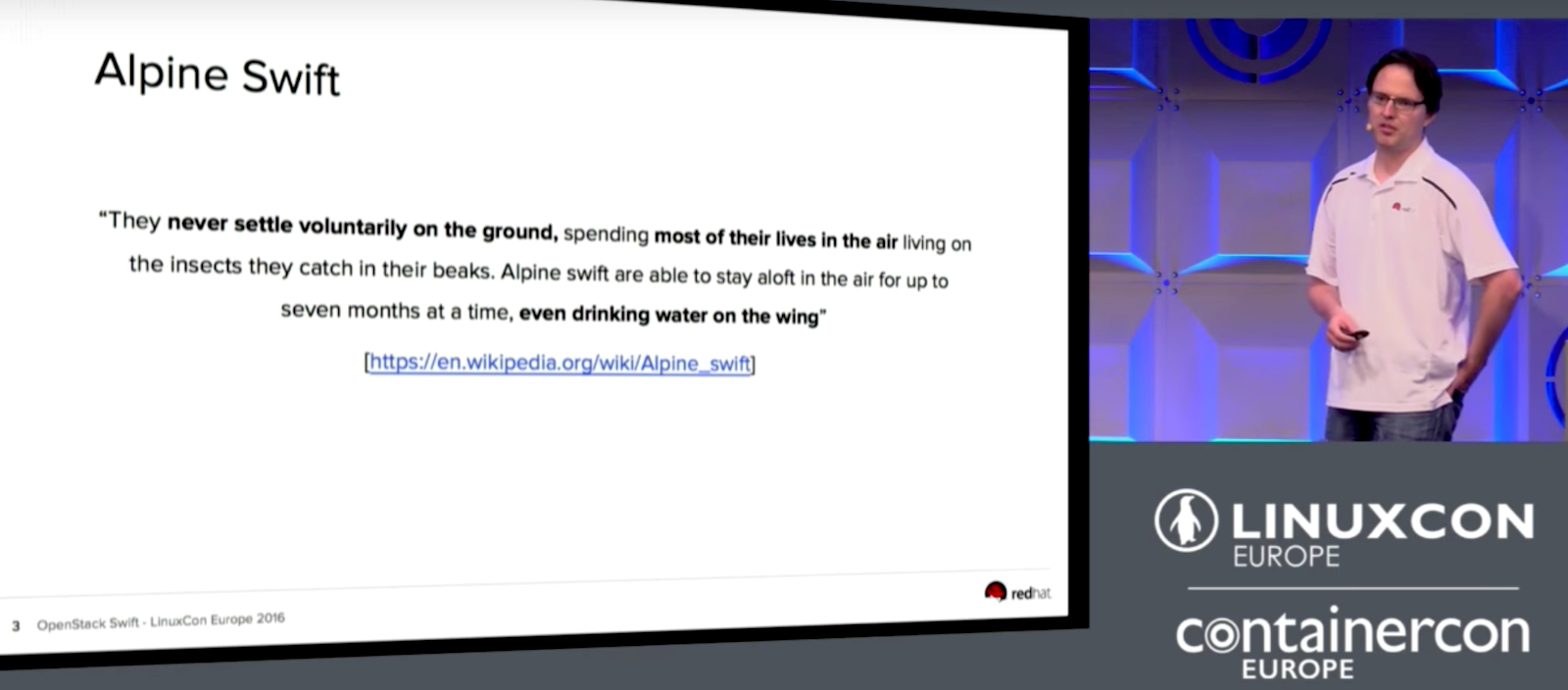
The goal of OpenStack Swift is modeled after Alpine swift birds that can stay in the air for months at a time without coming down. These birds even eat and drink while flying. Not unlike the birds, OpenStack Swift is designed for maximum uptime to be able to serve data to your users all the time without stopping, even if parts of your cluster are down. With Swift, you should still be able to store new data and even to upgrade your cluster in production without downtime. 

In his LinuxCon Europe talk, Christian Schwede from Red Hat talked about how Swift is deployed at large enterprise companies with many of these deployments operating on a scale of multiple petabytes. The biggest one is at Rackspace, the original founders of the project, where they are running more than a 100 petabyte system with the second biggest one at OVH, a French hosting provider.

Swift’s highly available, durable, and scalable object storage provides the ability to retrieve existing data and store new data even when part of your cluster fails by replicating your data across a variety of servers, zones, and regions to help you distribute your data to different disks, servers, power supplies, buildings, data centers, and geographical areas. There are also several checks in place to help make sure that the data is properly stored and hasn’t disappeared or degraded over time. Schwede mentioned that one method is via the checksum that was computed by Swift and stored along with your object. If one object isn’t valid, it can return a replica so that only a good object is returned. When it finds a bad copy, Swift provides the ability to replace it with a valid replicated object.

While Swift provides the tools to manage your data replication, you still need an operator to help Swift decide where to store your data and when to create new copies. Schwede provided this example: if a storage node goes missing, Swift doesn’t know if this is routine maintenance where the node will re-appear in a few minutes or a disaster that caused total loss of the node. However, Swift still keeps everything balanced and running as smoothly as possible until it has instructions for how to handle the issue.

Schwede went on to talk about the Swift proxy server, which is the gateway to your cluster and how your users access it. The proxy server has built-in middleware for things like container sync, bulk operations, authentication, large objects, and more. However, if there are any missing features, you can also write your own. The last part of Schwede’s talk includes a demo of how to get started using Swift along with a few dos and don’ts for using it.

Watch the full video of this talk for more details and the demo!

Interested in speaking at Open Source Summit North America on September 11 – 13? Submit your proposal by May 6, 2017. Submit now>>
Not interested in speaking but want to attend? Linux.com readers can register now with the discount code, LINUXRD5, for 5% off the all-access attendee registration price. Register now to save over $300!

OpenStack Swift by Christian Schwede, Red Hat

In his LinuxCon Europe talk, Christian Schwede from Red Hat talked about how Swift is deployed at large enterprise companies with many of these deployments operating on a scale of multiple petabytes.

Mobile Edge Computing Creates ‘Tiny Data Centers’ at the Edge

One key element of 5G is likely to be Mobile Edge Computing (MEC), an emerging standard that extends virtualized infrastructure into the radio access network (RAN). ETSI has created a separate working group for it — the ETSI MEC ISG — with about 80 companies involved. 

“MEC uses a lot of NFV infrastructure to create a small cloud at the edge,” says Saguna CEO Lior Fite. Saguna has created its own product, the Open-RAN MEC and is involved with ETSI MEC ISG. Fite says the ETSI group is creating a set of APIs to define “a tiny data center at the edge.”

Saguna’s own MEC technology comprises two main components. The first is a multi-access compute element, and the second is a management element.

Read more at SDx Central

Google Infrastructure Security Design Overview

This document gives an overview of how security is designed into Google’s technical infrastructure. This global scale infrastructure is designed to provide security through the entire information processing lifecycle at Google. This infrastructure provides secure deployment of services, secure storage of data with end user privacy safeguards, secure communications between services, secure and private communication with customers over the internet, and safe operation by administrators.

Google uses this infrastructure to build its internet services, including both consumer services such as Search, Gmail, and Photos, and enterprise services such as G Suite and Google Cloud Platform.

Read more at Google Cloud Platform

Exploring OpenStack’s Trove DBaaS Cloud Service

DBaaS moves the database service to the cloud, promising a new database instance at the click of a mouse.

You can install databases such as MySQL, PostgreSQL, or even MongoDB very quickly thanks to package management, but the installation is not even half the battle. A functioning database also needs user accounts and several configuration steps for better performance and security.

This need for additional configuration poses challenges in cloud environments. You can always manually install a virtual machine in traditional settings, but cloud users want to generate an entire virtual environment from a template. Manual intervention is difficult or sometimes even impossible.

Read more at ADMIN Magazine

‘You are Not Expected to Understand This’: An Explainer on Unix’s Most Notorious Code Comment

The phrase “You are Not Expected to Understand This” is probably the most famous comment in the history of Unix.

And last month, at the Systems We Love conference in San Francisco, systems researcher Arun Thomas explained to an audience exactly what it was that they weren’t supposed to understand.

Computer science teacher Ozan Onay, who was in the audience, called it “one of my favorite talks of the day,” writing on his blog that “Nothing should be a black box, even when Dennis Ritchie says it’s ok!”

Read more at The New Stack

7 Awesome Open Source Web Performance Software For Linux

Web performance is nothing but the speed in which web pages are downloaded and displayed on the user’s web browser. Faster website speeds have been shown to increase sales or increase visitor loyalty including user satisfaction. Particularly useful for those use slow internet connections or on mobile phones/tablets.

In short, one can increase the time it takes for pages to render using multi-layered cache and asynchronous communication with server-side components. In this post, I will list my favorite open source software based TCP/HTTP load balancer and proxying solution for web performance under a Linux operating system.

Read more: nixCraft