Once you get familiar to using the Linux terminal, you wish to do everything on your system by simply typing commands including sending emails and one of the important aspects of sending emails is attachments.
Especially for Sysadmins, can attach a backup file, log file/system operation report or any related information, and send it to a remote machine or workmate.
In this post, we will learn ways of sending an email with attachment from the Linux terminal. Importantly, there are several command line email clients for Linux that you can use to process emails with simple features.
This presentation by kernel developer Mark Rutland at Embedded Linux Conference will cover hardening features available in the mainline Linux kernel, what they protect against, and their limitations.
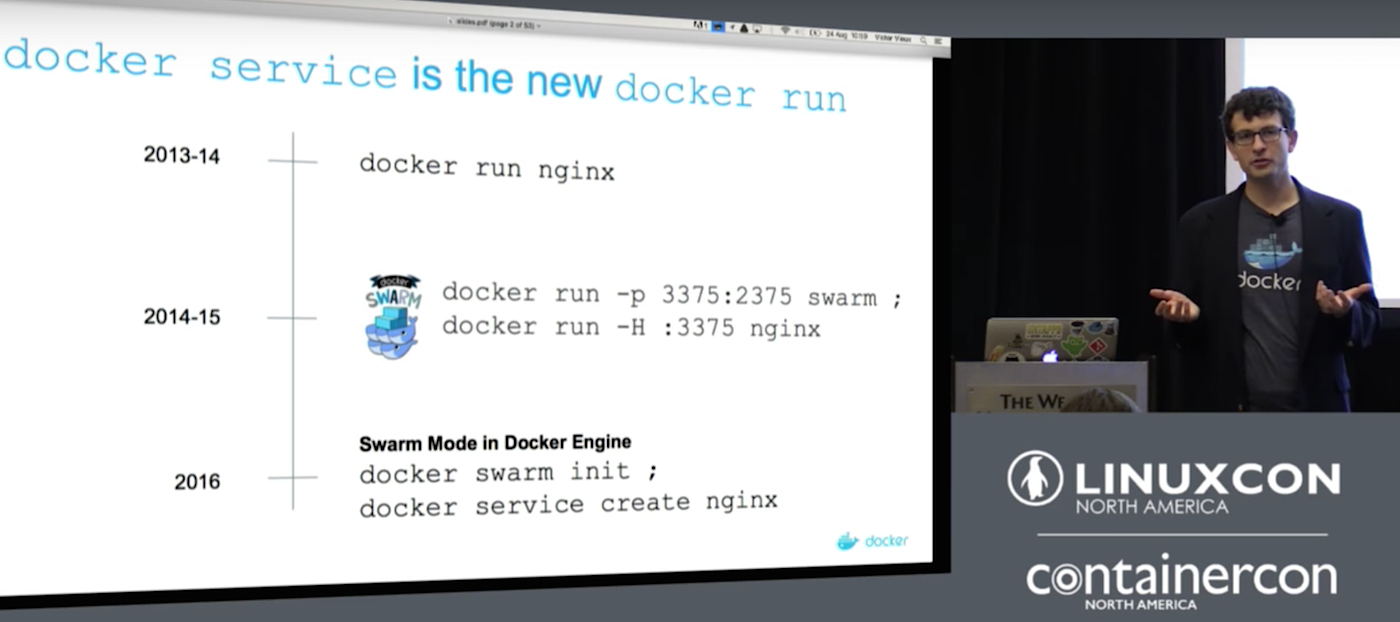
In this presentation, Mike Goelzer will describe how Docker Clustering is evolving and what it means for developers and ops who need to orchestrate multi-container Applications. You will also see a live demo of Docker clustering and how it can be used to deploy and manage a microservice-style.
This week in open source and Linux news, The Linux Foundation’s Open Source Summit is dubbed a must-attend by Jono Bacon, Linux 4.9 is a “mammoth” release, and more! Read up on your open source news with the digest below!
1) Jono Bacon shares which 2017 open source events he will be attending in the new year, including The Linux Foundation’s newly named Open Source Summit.
5) “It’s free – like a puppy,” said Scott Gregory, deputy director of the Office of Digital Innovation for the State of California’s Department of Technology (CDT)
Have you ever wanted a combination of Arch Linux and KDE but always seemed to get stumped at the Arch Linux portion of the combination? If that’s you, your days of being left out in the Arch Linux/KDE cold are over. Why? Bluestar Linux.
This new(ish) kid on the block allows you to enjoy Arch Linux without having to jump through all the usual hoops of setting the distribution up manually, plus it offers a rather unique take on KDE, one that had me instantly nodding my head in agreement with their layout. In fact, what Bluestar did with KDE makes so much sense, it has me wondering why this isn’t the default layout of the “K” Desktop Environment (more on this in a bit).
The necessary specs
If you plan on running Bluestar Linux, the only specs you really need to be concerned about are the following:
Minimum of 6.5GB free hard space
Minimum of 1GB of working RAM
The RAM requirements seem a bit high, but this is really a KDE recommendation. If you glance at the KDE system requirements, you see the Bluestar minimum makes sense.
Hard drive capacity Minimum 4 GB Recommended 10 GB
NOTE: After a failed install on VirtualBox, having given 8GB to the hard drive and 2GB of RAM, I upped the system to 16GB of space and 3GB of RAM, and the installation succeeded. So these aren’t your grandfather’s Linux requirements.
First look
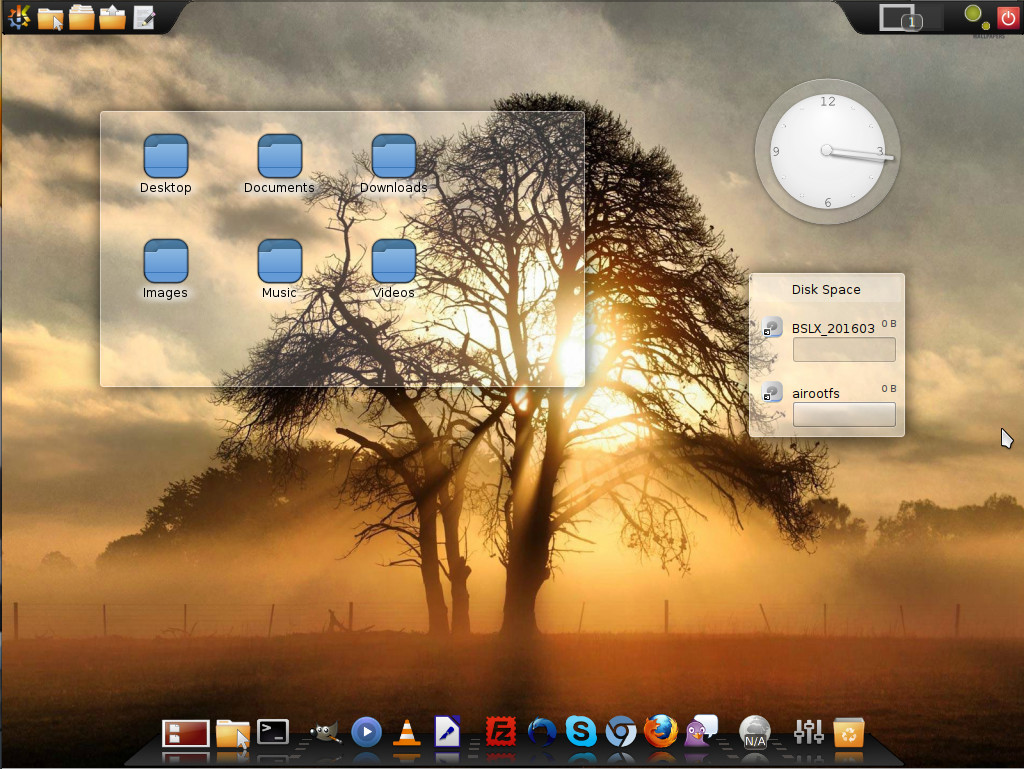
When you first boot up the live Bluestar image, what will immediately strike you is the layout of the KDE desktop (Figure 1).
Figure 1: The default Bluestar Linux take on KDE.
Instead of the usual bottom panel, the Bluestar desktop opts for a dock at the bottom of the screen and an upper panel. The dock is fairly a straightforward implementation of Cairo dock. The upper panel is a very nicely designed take on the standard KDE panel that is split into three parts. The first section of the panel resides in the upper left corner of the desktop, where you’ll find the applications menu, three different folder shortcuts (one for ~/, one for shortcuts, and one for stack…where you can drag and drop items for quick access).
The second section of the panel resides in the center of the top edge of your screen and is set to autohide. Hover your cursor over this area to reveal the hidden section that contains a few handy widgets and the system tray/notification area (Figure 2).
Figure 2: The hidden Bluestar system tray/notification area.
The items in the autohide section of the panel include (from left to right):
Clock
Virtual keyboard widget
Calculator widget
System load widget
Language selector
Clipboard
Networking widget
Notification area
Finally, the third section of the upper panel is dedicated to the pager, another system load widget, and the logout/shutdown button.
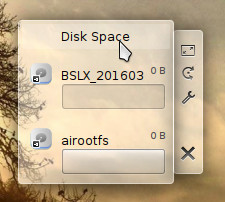
On the desktop proper, you’ll find three default widgets: A folder widget, a clock widget, and a disk space widget. These widgets are locked but can be removed by right-clicking one of them and selecting Default Desktop Options > Unlock Widgets. Once you’ve unlocked the widgets, you can then hover your mouse over one of the widgets to reveal the hidden bar that allows you to move, resize, customize, and delete each (Figure 3).
Figure 3: Unlocking the widgets gains you access to their settings and ability to delete them.
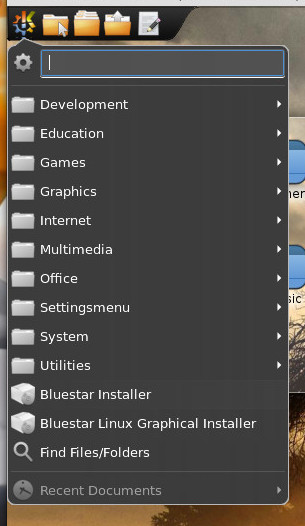
Finally, click on the Applications menu to reveal everything installed on your desktop. You’ll be surprised at how much is included. This isn’t your bare-bones distribution. Within Bluestar, you’ll find all the productivity tools you need (including KOrganizer, LibreOffice, Okular, Sieve Editor), Development tools (including GHex, KAppTemplate, KUIViewer, Qt Assistant, QT Designer), Graphics apps (including GIMP, Gwenview, and KolourPaint), more Internet tools than you thought you might need (including Akregator, Avahi SSH Server Browser, Blogilo, Chromium, Cloud Storage Manager, Dropbox, FileZilla, Firefox, KGet, MEGASync, Pidgin, and QTransmission), multimedia tools to please just about anyone (including AMZ Downloader, Amarok, Dragon Player, GNOME Alsa Mixer, JuK, Kdenlive, KsCD, SMPlayer, SMTube, VLC), and a very large collection of utilities (such as Ark, Caffeine, ClipIt, Disks, Filelight, Galculator, Jovie, KGpg, Kate, SuperKaramba, and Sweeper).
Another nice touch found in Bluestar is all the codecs you’ll need to play your favorite media formats. As well, streaming sites (such as Youtube and Netflix) work out of the box.
Installation
The first thing you must do is download the Bluestar ISO. Once you boot up the live disk, click on the Application menu and then select Bluestar Linux Graphical Installer (Figure 4). This will walk you through the fairly easy installation wizard.
Figure 4: Installing Bluestar starts in the Applications menu.
The installation of Bluestar Linux is a breath of fresh air for those who have wanted to give Arch Linux a try but had no desire to struggle through the challenge of setting up the system manually. Installing Bluestar is about as standard as installing any modern Linux distribution.
Post install
Once you’ve installed Bluestar Linux, you’ll be dealing with the pacman package management system. This means you’ll need to get up to speed with a few basics. First off, because this is a rolling release distribution, you’ll want to make sure your package databases are in sync. Do this by opening up Konsole (from Applications > System) and issuing the command sudo pacman -Sy. Type your sudo password, hit Enter, and your databases will sync.
Next, I recommend optimizing your pacman databases. Do this with the command sudo pacman-optimize && sync.
Finally, we’ll update the installed packages with the command sudo pacman -Su.
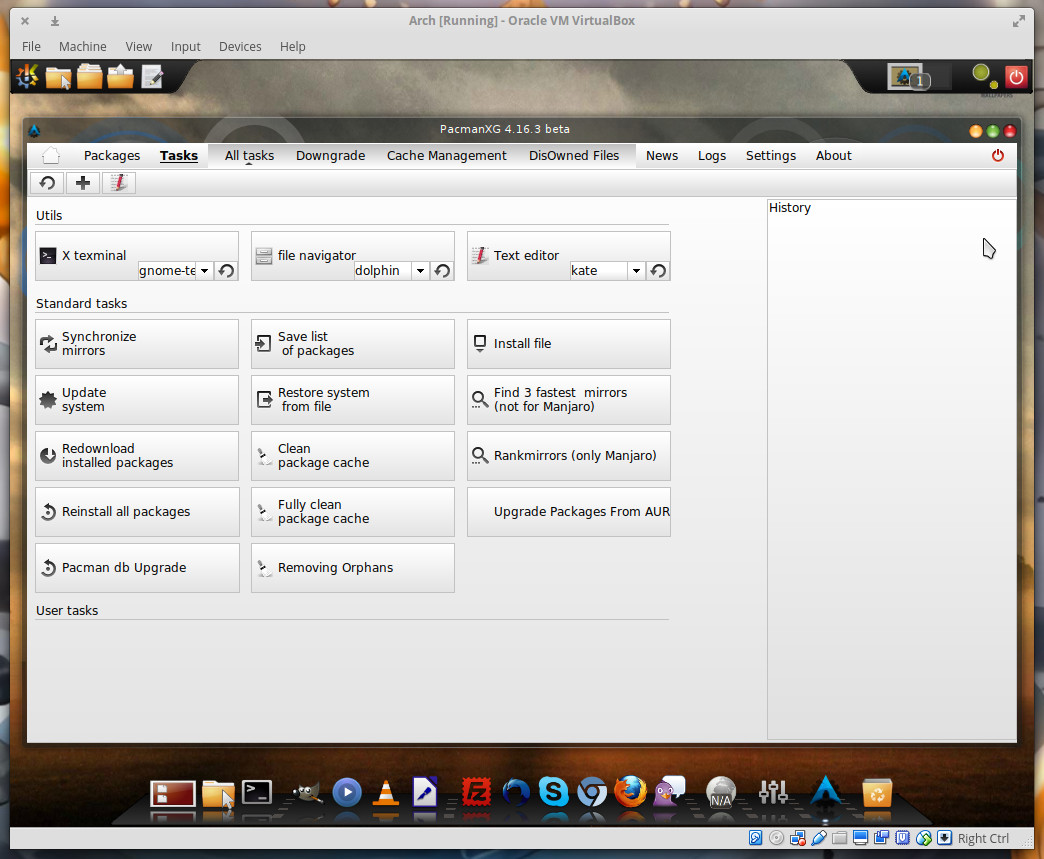
If you’re not a fan of the command line (which you should be if you’re running Arch Linux), you can always opt for the GUI front-end for pacman, PacmanXG. This is an incredibly powerful graphical tool that allows you to take on all the tasks associated with pacman (Figure 5).
Figure 5: The pacman front end, PacmanXG, in action.
Once all your packages are updated, you are ready to start playing around with Bluestar’s take on the KDE desktop and enjoying your Arch Linux-powered distribution.
Arch Linux the way it should be
I’ve played around with Arch Linux enough to recognize that Bluestar Linux has done something quite wonderful…made Arch accessible to anyone. This isn’t a distribution of Linux that you will struggle to get up to speed with. Bluestar is as user-friendly a take on Arch Linux as you will find. If you’ve been wanting to dive into the Arch waters, now is the time and Bluestar is your best bet.
Why is this going to be an interesting talk and why should you care? asks Mike Goelzer of Docker in his LinuxCon North America presentation. The answer is that simple, robust, integrated container orchestration is key to successful containers management, and Goelzer believes that the native Docker orchestration, called Swarm, is the best orchestration. Goelzer gives a high-level overview of Swarm, and his colleague Victor Vieux goes into detail on the internals.
Let’s back up a little bit and review what orchestration is. You’re probably familiar with container clusters. Docker calls these swarms, and they’re all the same thing. Container orchestration is a distributed platform that operates independently of your infrastructure, and that stays online through hardware and software failures. Container orchestration manages complex multi-container applications on multiple machines. Goelzer says, “There are a lot of orchestration systems out there today, and I think that each one reflects different angles on orchestration, differing views about what’s important and what’s not. The philosophy that we have approached Docker orchestration with is one in which we focused a lot on ease of use, and providing modern orchestration features that you really need to run a real production system.”
Orchestration should provide features like “Declarative desired state for applications, strongly consistent internal store, a raft store, load balancing, service discovery, security; basically we’ve provided these features but we’ve tried to expose them in a really simple way.”
Swarm Setup
Goelzer shows how easy it is to install and run Docker Swarm. “It’s a separate set of binaries that you install on top of Docker. You install Docker on your machines and then you install these additional binaries which come in the form of containers. It makes many Docker hosts appear like a single Docker host. It’s sort of a proxy system. One host fronts many hosts and the result is that you have that one host that appears to have very large amount of resources, large amount of CPUs, large amount of RAM.”
The current Swarm release has a lot of new features, including better scalability, a simplified command set, and health checks. It is 100% backwards-compatible with older Swarm releases. Goelzer leads us through a demonstration that shows how fast and easy it is to create a new swarm: “The first thing you do is “Docker swarm init”. Now you’ve got a swarm of one machine that is functioning as a cluster manager. To join additional machines to that swarm, you’re going to do “Docker swarm join”. “Docker swarm join” simply is a command that you run on a second Docker host, you point it back to the first using the IP address of the first machine, and now you’ve got a two-machine cluster. You can keep doing “Docker swarm join” on as many hosts as you want.”
Goelzer goes on to demonstrate how to set up Docker services on your new swarm; launching containers, connecting them, performing functions such as load-balancing, and automatic failover. Then Vieux presents more detailed insights into Swarm internals, so that by the end of this presentation (below) you’re well on your way to knowing how to run Swarm on your own systems.
I’m Lucas Käldström from Finland. I speak Swedish as my mother tongue in the same manner as 300,000 others in my country do. I just turned 17 and am attending my second year in general upper secondary school. In my spare time, I play soccer, program, go to the gym and read a good book.
I’ve always been interested in Math, and am quite good at it as well. So when I was about 13, I started to become interested in programming. I found it interesting because I could command the computer to do nearly anything. I’ve always loved creating things and it was fascinating to see that every change you make can make a difference in a good way. I started creating small programs with VB.NET and C# and about a year later switched to Node.js and web programming (HTML, CSS and JS). At this point I started to feel the power of open source and what it could do. Also, I made myself a Github account in order to be ready if I found a project to contribute to.
In the beginning of May 2015, I first noticed Kubernetes. I got so excited that I could use something Google has designed free of charge! Unfortunately, I did not have any normal Linux hardware I could use at the time. However, I had two Raspberry Pis that I had been tinkering with a little bit. My Bash skills were practically non-existent and most of the time I was scared of typing something into the command line; however, I realized that Raspberry Pi in fact is the ultimate tool to use when teaching Kubernetes to someone with little cloud computing experience as the cluster becomes really practical. You literally get the “hands-on” experience that is so valuable. This later became the main theme for a 163-page master’s thesis paper Martin Jensen and Kasper Nissen wrote. Likewise,Ray Tsang has been travelling a lot with his Raspberry Pi cluster as well, but now I am getting ahead of myself.
After a lot of hacking in May, I got Kubernetes running on my Raspberry Pi, but it was quite pointless as Docker on ARM had a bug that made it impossible to run any containers via Kubernetes. I continued to improve my scripts during the summer, while not playing soccer or doing something else, like swimming! In August of 2015, I tried the same programming with the v1.0.1 Kubernetes release, and I got it working! That was a truly amazing feeling. I quickly started to expand the context to make it more generic, reproducible and faster. In mid-September, I had it working well, and noticed that a Glasgow University group had done the same thing; both of us working beside each other without knowing the other one.
I knew my work could help others, so I quickly published the source I had to the world; it was the right thing to do. I wanted to help more people run, test and learn from a Kubernetes cluster running on small Raspberry Pis… as well as other devices. This project is known as Kubernetes on ARM. After that, I continued to make lots of improvements on it, with feedback from others suddenly! One of the best moments was when someone reported the first issue and showed interest in helping to improve the project. I was part of the open source community!
I wanted to make my work even more widespread and bring it to the core. And so I did. In November-December I started making myself more familiar with the source code, the contributing process, etc.
On December 14, 2015, I got my first Pull Request merged. What a great feeling! I admit it was really small (a removal of 6 chars from a Makefile), but it was a big step personally to realize that the Kubernetes maintainers wanted my contributions. From January-March, I focused on getting the Kubernetes source code to cross-compile ARM binaries and release them automatically. Kubernetes v1.2.0 was the first release that shipped with “official” Google-built ARM binaries.
I then started to focus on getting an official deployment method multiarch-ready. I chose docker-multinode. The result of that work made Kubernetes v1.3.0 ship ARM and ARM 64-bit binaries and corresponding hyperkube images, which made it possible to run a cluster on different architectures with the same documented commands.
In April 2016, I was added to the Kubernetes organization. I couldn’t believe it! I was one out of about 170 at the time. One week later, I became a Kubernetes Maintainer, with a big M! It was totally crazy! I was 16 and got write permission to several repositories! But with great permissions comes great responsibility, and I always have been looking to the projects’ best when reviewing something for instance. In fact, maintainership should be a very important but boring task.
That same month, I noticed that a project called minikube was added to the Kubernetes organization. The repo was empty, just a markdown file, nothing more. I noticed Dan Lorenc started committing to the repo and I thought it would be cool to improve my Go skills by starting a project from scratch, so I started working with him. I became a maintainer for minikube as well, and am still the 6th-highest contributor to that project by commits.
I continued to contribute to Kubernetes during the summer and I worked on minikube until release v0.5.0 was out. Then I switched focus to improving the Kubernetes deployment experience. sig-cluster-lifecycle added me to their group and it turned out to be a great fit for me and my interests. Subsequent Kubernetes work includes:
Wrote a proposal (a design goal) for Kubernetes about how multi-platform clusters should be supported, set up and managed. It got merged in August and is one of the guidelines for how Kubernetes should be improved.
Making Kubernetes easier to install in the sig-cluster-lifecycle group. We have made a tool called kubeadm that makes the setup process much easier than before. This is a crucial effort in my opinion, since right now it is hard for new users to know what deployment solution to use and how they relate to each other. kubeadm will be a building block all higher-level (turn-key) deployment tools can use. This way we are hoping we can somewhat standardize and simplify the Kubernetes deployment story. I’ve also written a document about what we’d like to do in time for v1.6, please check it out if you’re interested.
All in all, I’ve learned a lot thanks to being able to contribute to Kubernetes. And it has been a lot of fun to be able to actually make a difference, which now has led to that I have more than 150 commits to the Kubernetes organization in total. My Kubernetes journey started with a Raspberry Pi, and we don’t know how it ends.
One thing to remember is that I’ve never taken any computing or programming classes. This has been my spare-time hobby. I’ve learned practically everything I can just by doing and participating in the community, which really shows us the power of the internet combined with the will to create something and make a difference.
I am not monetarily paid for my work on the Kubernetes project, but I have gained knowledge, experience, better English communication skills, respect, trust and so on. That is worth more than money right now. Also, I got about five full-time job opportunities during the summer from large worldwide companies without even asking for a job or listing myself as job-searching.
What I’ve really enjoyed while coding on Github is my partial anonymity. My full name has always been there, my email, my location, etc., but I haven’t written that I’m just 17 (or 16 at the time), so people on Github haven’t judged me for being a minor or for not having been to University or for the fact that I’ve never taken a computing class or worked for a big tech company. The community has accepted me for who I am, and respected me.
That’s the power of open source in my opinion. Regardless of who you are when you’re away from the keyboard, you are allowed to join the party and have fun with others like-minded and make a difference together. Diversity is the true strength of open source, and I think diversity scholarships like the one the Cloud Native Computing Foundation provided me to attend CloudNativeCon/KubeCon 2016 in Seattle are a powerful way to make the community even stronger. Thanks!
While the fight against government-mandated software backdoors raged for most of 2016—including the showdown between Apple and the FBI over the San Bernardino shooter’s iPhone, and the UK’s new Investigatory Powers Act, which gives the government the power to demand UK companies backdoor their software to enable mass surveillance—the Core Infrastructure Initiative (CII) has been quietly working to prevent an even more insidious form of backdoor: malicious code inserted during the software build process without a developer’s knowledge or consent.
Such attacks are by no means theoretical. Documents from Snowden’s trove make clear that intelligence agencies are actively working to compromise the software build process on individual developer’s computers. The CIA created a bogus version of XCode, the software used by developers to package applications for Apple devices. Such attacks have been difficult to detect—until now.
Led by the Debian Project, other Linux distros and software projects, including the Tor Browserand Bitcoin, are also working to make their build processes more trustworthy, …
Grasping the nuances of hardware supply chains and their management is straightforward—you essentially are tracking moving boxes. Managing something as esoteric as resources for building software with a variety of contributions made by the open source community is more amorphic.
When thinking about open source platforms and supply chains, I thought of the supply chain as a single process, taking existing open source components and producing a single result, namely a product. Since then, I’ve begun to realize that supply chain management defines much of the open source ecosystems today. That is, those who know how to manage and influence the supply chain have a competitive advantage over those who don’t do it as well, or even grasp what it is.
MariaDB has released into general availability ColumnStore 1.0, a storage engine allows users to run analytics and transactional processes simultaneously with a single front end on the MariaDB 10.1 database.
ColumnStore is a fork of InnoDB database engine, the default storage engine for MySQL. Despite the popularity of SQL alternatives, the company notes that every OLTP (online transaction processing) and analytics solution has been building a SQL layer.