I’m pleased to announce the release of the Xen Project Hypervisor 4.8. As always, we focused on improving code quality, security hardening as well as enabling new features. One area of interest and particular focus is new feature support for ARM servers. Over the last few months, we’ve seen a surge of patches from various ARM vendors that have collaborated on a wide range of updates from new drivers to architecture to security.
We are also pleased to announce that Julien Grall will be the next release manager for Xen Project Hypervisor 4.9. Julien has been an active developer for the past few years, making significant code contributions to advance Xen on ARM. He is a software virtualization engineer at ARM and co-maintainer of Xen on ARM with Stefano Stabellini.
IBM’s Bluemix Continuous Delivery offers reusable workflows for devops, with familiar services like GitHub and Slack as part of the plan.
With Bluemix, IBM set out to create a cloud environment rich with tools that developers could then harness to their benefit. Next step for IBM: Make it easy to string together and use those tools in common workflows, without reinventing the wheel with each new project.
That’s the idea behind IBM Bluemix Continuous Delivery, which provides devops teams with end-to-end, preconfigured toolchains for many common tasks, as well as the ability to create new toolchains for future development needs.
The following is an adapted excerpt from chapter six of The Open Schoolhouse: Building a Technology Program to Transform Learning and Empower Students, a new book written by Charlie Reisinger, Technology Director for Penn Manor School District in Lancaster County, Pennsylvania. In the book, Reisinger recounts more than 16 years of Linux and open source education success stories.
Penn Manor schools saved over a million dollars by trading proprietary software for open source counterparts with its student laptop program. The budget is only part of the story. As Linux moved out of the server room and onto thousands of student laptops, a new learning community emerged.
By August 2013, Penn Manor High School’s official Student Help Desk program was online. It was an independent study course. There were no course prerequisites—everyone with the curiosity and desire to learn was welcome. There was no formal curriculum. Students would learn alongside the district technology team, and together we would figure out what we needed when we needed it. There were no exams; this was a results-only learning environment, not an academic exercise.
Five seniors represented the core help desk. Andrew Lobos, Ben Thomas, and Nick Joniec were there, as well as their mutual friend, Collin Enders. The four friends formed the nucleus of the inaugural help desk team and served as mentors to incoming students new to technology support. Benjamin Moore, a student with little IT background beyond the motivation to learn more about computers, was the fifth apprentice. Ben Moore’s first love was theater production, but he decided on a whim that the Student Help Desk would be interesting. He thought computers were cool and wanted to learn to code.
Between the five students’ schedules, I had help desk coverage from the start of school until the ending bell. Apprentices reported to the help desk room just like they would to any other course on their schedule. All similarity to a traditional math or science class ended once they entered the room. The help desk was a serious operation, and our first deadline was looming. In less than two weeks, a pilot group of 90 high school students would receive laptops running Linux and open source software exclusively. We needed the apprentices to help us prepare for the pilot program, and for the full 1700 student one-to-one laptop program launch in January 2014.
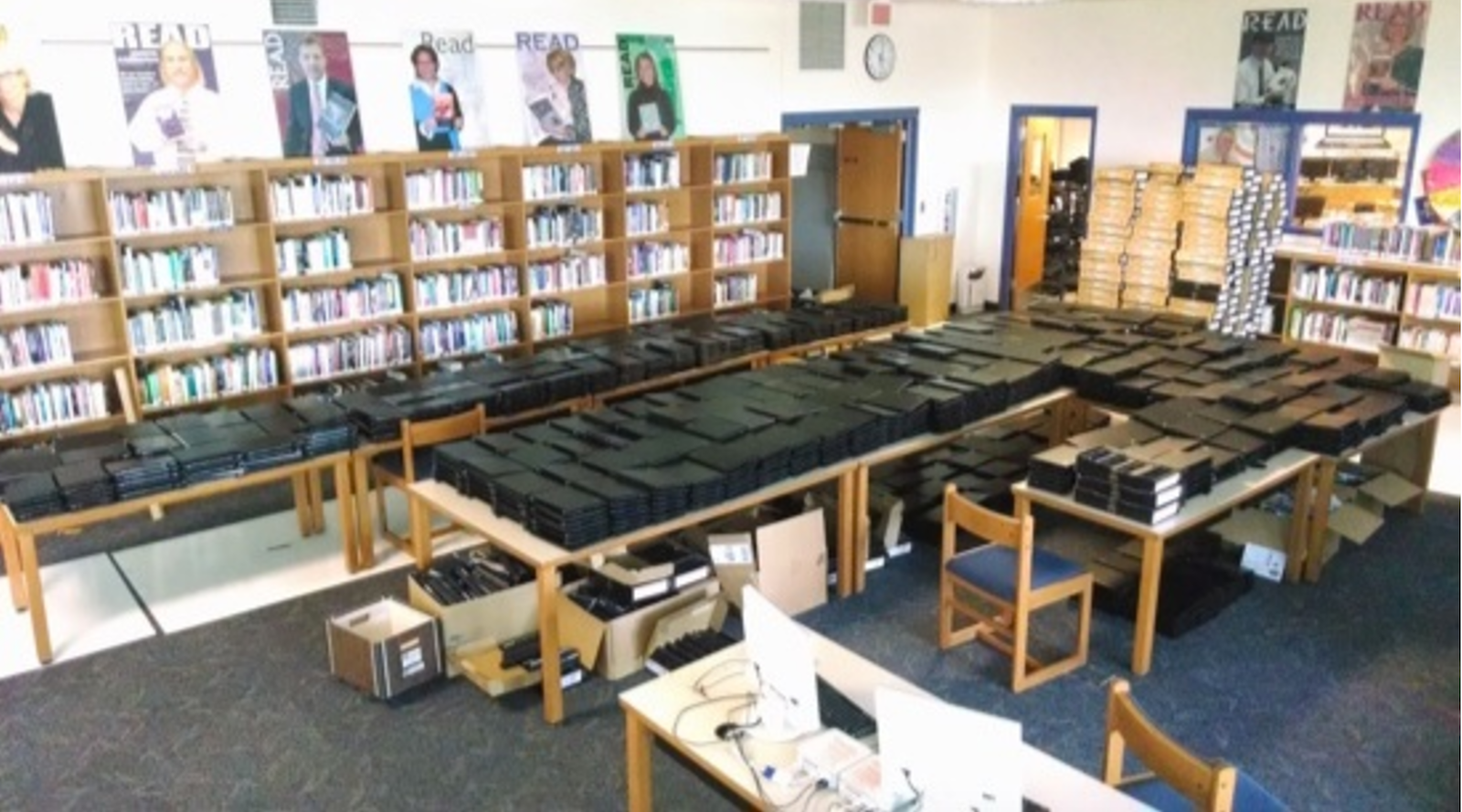
The help desk classroom, Room 358, was crowded with a wagonload of sinuous network cables, power adapters, carry cases, mice, USB drives, and towers of boxes filled with demo laptops waiting patiently for the chance to greet their new student owners.
To better supervise the students’ activities, Penn Manor Technician, Alex Lagunas, relocated his desk from the high school technology office to the Student Help Desk room. With no physical separation between the student and the staff spaces, the apprentices couldn’t evade oversight. But Alex wasn’t there to bark orders to minions. His role was that of a team leader and co-worker. He directed day-to-day support activities and mentored the young team on everything from repairs to programming tricks. Together, as teacher and apprentice, the entire affair resembled an 18th-century French atelier—except with less painting, and more programming.
It would soon become difficult to discern the line between staff technician and student apprentice. Support roles overlapped and visitors received equal assistance from the apprentices and IT staff. As this community evolved, the student apprentices became even more passionate and energetic. They loved the work and felt a deep commitment to the mission and purpose of the laptop project. As the weeks progressed, any lingering fears that students couldn’t make this happen evaporated.
The student team was tight-knit, and remarkably good at self-organizing. Each student apprentice found an individual role. Collin and Nick were quick to tackle logistics and organizational tasks. Andrew and Ben Thomas preferred writing code. And the core quartet took it upon themselves to welcome and help Ben Moore.
Project-based learning? Check. Everything the student apprentices created was part of an authentic technology project. Challenge-based learning? Absolutely. We had four months to do something Penn Manor High School had never done. How about 20 percent time? Certainly. Innovation was encouraged 100 percent of the time. Hour of code? Plural. Our apprentices were about to log hundreds of hours of programming time.
We had created a paradise for student hackers.
During the first year of the high school one-to-one Linux laptop program, the student apprentices created three important software programs. The first was the Fast Linux Deployment Toolkit (FLDT), a software imaging system Andrew created after he and fellow apprentices grew frustrated by limitations with FOG. The second project was a student laptop and inventory tracking and ticket system. The third, a URL-sharing program called PaperPlane, was born from a staff idea that turned into a student challenge.
Other projects were less practical and much more playful. Collin’s favorite funny memory about the help desk was a mischievous prank—“trolling” Ben. “I worked with Andrew to secretly install a program on his laptop. Once every hour, a Cron job triggered the machine to speak out loud the phrase ‘I’m watching you!’ He had no idea what was going on. That was fun to watch.”
Thinking about Ben Thomas’ laptop inexplicably blurting “I’m watching you!” in the middle of a quiet class still makes me break from the role of serious school official and laugh out loud like a schoolboy. The whimsical caper invokes the genuine spirit of hacking and reminds me that schools shouldn’t be glum factories of curriculum and testing. When you let students go, when you trust them, you change their world.
I recently had the chance to go to Velocity Conf in Amsterdam, which one might describe as a DevOps conference. I love going to conferences of all types, restricting the self to discipline specific events is counter intuitive to me, as each discipline involved in building and supporting something isn’t isolated. Even if some organisations try and keep it that way, reality barges its way in. Gotta speak to each other some day.
So, I was in an awesome city, anticipating an enlightening few days. Velocity is big. I sometimes forget how big business some conferences are, most testing events I attend are usually in the hundreds of attendees. With big conferences comes the trappings of big business. For my part, I swapped product and testability ideas with Datadog, Pager Duty and others for swag. My going rate for consultancy appears to be tshirts, stickers, and hats.
For almost three months, Internet-of-things botnets built by software called Mirai have been a driving force behind a new breed of attacks so powerful they threaten the Internet as we know it. Now, a new botnet is emerging that could soon magnify or even rival that threat.
The as-yet unnamed botnet was first detected on November 23, the day before the US Thanksgiving holiday. For exactly 8.5 hours, it delivered a non-stop stream of junk traffic to undisclosed targets, according to this post published Friday by content delivery network CloudFlare. Every day for the next six days at roughly the same time, the same network pumped out an almost identical barrage, which is aimed at a small number of targets mostly on the US West Coast. More recently, the attacks have run for 24 hours at a time.
Your organization has been practicing DevOps for some time. These seven practices will help you determine if you’ve been doing so in the right way.
We have been talking a lot about DevOps and the cultural shift that it focuses on. Let’s assume that you are practicing DevOps in your organization. These seven signs should give you an idea about whether what you are doing is right.
1. You Deploy Frequently and Automatically With Rapid Release Cycles
The software development process has come a long way since from the SDLC model and has been evolving rapidly. Every software-powered organization in the world is aiming to deliver the software and features faster to its audience and considering the competition, this is a must. Hence, deploying frequently with rapid release cycles is one point to be noted here to be Agile.
2. You Have Tools and Platforms for CI and CD
DevOps is not any set of tools; it’s a cultural shift that embraces agile methodologies. However, to practice DevOps, you need a certain set of tools: Continuous Integration tools, deployment tools, testing tools, version controlling tools, etc.
3. You Leverage Containers and Have Microservices Architecture
Microservices make things faster since a large monolithic software piece is fragmented into several pieces, making it less complex and causing no dependency if any microservice goes off. Containerization is what we call when it comes to Docker containers. his is where microservices are packaged with their own environments and supporting factors.
4. You Have Operations, Sys Admins, and Developers Working Together
The objective of DevOps is to remove the confusion and collision between Dev and Ops, DevOps should make sure Operations and Developers line of activities are flowing smooth without any friction.
5. You Have a Continuous Feedback Loop System
Since your developers are committing code frequently and rapidly, you need to have a feedback system in place if you are practicing DevOps to know to know what went wrong. It should be communicated instantly through notifications with tools like Victor Ops, Pager Duty, etc.
This feedback system will help address the issues caused instantly and try to mitigate them as soon as possible.
6. You Have Constant Communication Between Teams
Constant communication is one of the best qualities of an amazing team. Clear and constant communication brings visibility and will let you know who is doing what and what’s going on between the teams in an organization. Slack is one tool that’s taking this very seriously by enabling teams to collaborate and constantly communicate with each other.
7. You Have a Perfect Metrics Table to See if the Results Are Visible
It’s not just setting up a culture and making people follow it. You need to have proper metrics in place to see if you are making the progress in the right direction. Have a proper set of goals and metrics attached to each goal to know the results. If things seem to divert, it’s time to make changes again. Know what you are doing and have supporting results to prove it.
And to practice DevOps, you need to have some supporting tools and hope you are using them.
Conclusion :
Practicing DevOps is the need of the hour to be competitive in the software industry. This will surely boost the productivity and improves your learning curve, also removes repetitive and mundane tasks in an organization making your product deliverables faster to the market getting a healthy feedback loop that can help you understand your mistakes and correct them as early as possible.
As 2016 comes to a close, Microsoft is keeping SQL Server users busy with fresh announcements and new releases. SQL Server on Linux, now in public preview, brings together Microsoft and Linux in a way that would have been unimaginable until recently. SearchSQLServer talked with SQL Server expert Joey D’Antoni, principal consultant at Denny Cherry & Associates Consulting, about what these big announcements say about Microsoft and what to expect from SQL Server going forward.
Microsoft plans to add Enterprise Edition features to Standard Edition in SQL Server 2016 Service Pack 1. What do you think motivated this decision? Joey D’Antoni: Mainly … the software vendors — I think they wanted to drive adoption on some of the features that make SQL Server different from Postgres or MySQL, and where you’re not just using cable. So, I think by encouraging software vendors to take advantage of these features, they better hook in with them.
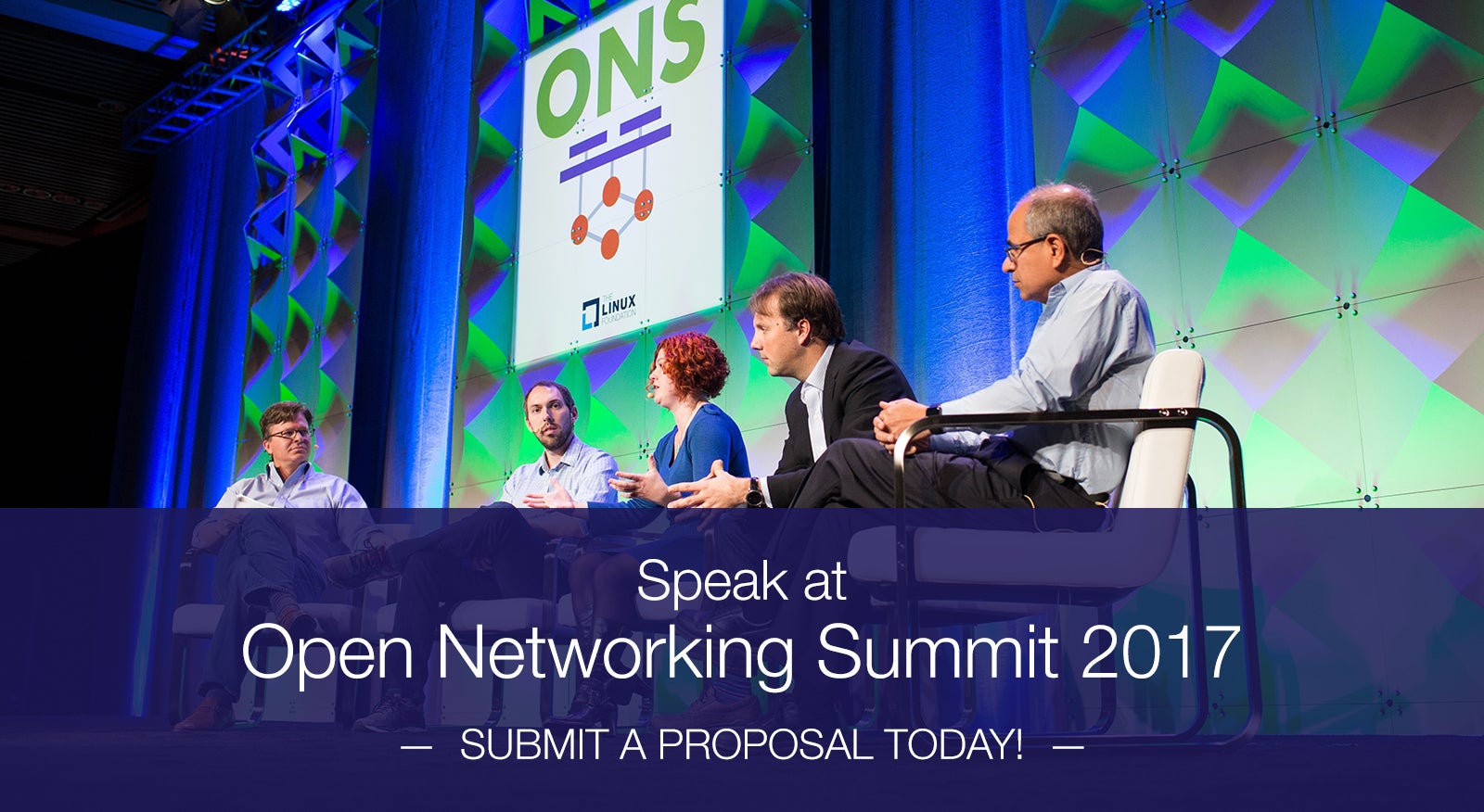
Help shape the future of open networking! The Linux Foundation is now seeking business and technical leaders to speak at Open Networking Summit 2017.
On April 3-6 in Santa Clara, CA, ONS will gather more than 2,000 executives, developers and network architects to discuss innovations in networking and orchestration. It is the only event that brings together the business and technical leaders across carriers and cloud service providers, vendors, start-ups and investors, and open source and open standards projects in software-defined networking (SDN) and network functions virtualization (NFV).
Submit a talk to speak in one of our five new tracks for 2017 and share your vision and expertise. The deadline for submissions is Jan. 21, 2017.
The theme this year is “Open Networking: Harmonize, Harness and Consume.” Tracks and suggested topics include:
General Interest Track
State of Union on Open Source Projects (Technical updates and latest roadmaps)
Programmable Open Hardware including Silicon & White Boxes + Open Forwarding Innovations/Interfaces
Security in a Software Defined World
Enterprise DevOps/Technical Track
Software Defined Data Center Learnings including networking interactions with Software Defined Storage
Cloud Networking, End to End Solution Stacks – Hypervisor Based
Container Networking
Enterprise Business/Architecture Track
ROI on Use Cases
Automation – network and beyond Analytics
NFV for Enterprise (vPE
Carriers DevOps/Technical Track
NFV use Cases – VNFs
Scale & Performance of VNFs
Next Gen Orchestration OSS/BSS & FCAPS models
Carriers Business/Architecture Track
SDN/NFV learnings
ROI on Use Cases
Architecture Learnings from Cloud
See the full list of potential topics on the ONS website.
Not interested in speaking but want to attend? Linux.com readers can register now with the discount code, LINUXRD5, for 5% off the attendee registration price. Register by February 19 to save over $850.
In previous years, we have distinguished between open source cloud and others. But as cloud technologies have evolved it’s evident that any cloud without open source would be the equivalent of an automobile without an engine.
In 2006, we distinguished heavily between public and private cloud and open source and closed. Today the conversation has evolved into one cloud fabric of which open source has become an integral part.
Perhaps what has most notably changed is that the initial cloud conversations about capex (capital expenditures) versus opex (operating expenditures) and the actual costs to deploy the cloud are now taking into account the advantages of improved agility and customization. Where open source has traditionally sparked interest because of its free nature (as in no acquisition cost) it’s now being lauded for the much harder to measure but much greater benefits of faster speed to value.
We also see an improved return on investment for those companies that participate in open source rather than only consume open source. They need to and are investing in the future direction of the open technology they rely upon actively rather than only being passive and opportunistic.
Industry standards and participation are needed
It would be easy, then, to say that open source has won the cloud. Game over. But along with openness in software, there is an overwhelming need for openness across cloud architectures. And while emerging technologies and trends such as containers have done a lot to improve interoperability among components and ensure application portability, much work remains to ensure the trend toward openness and standardization continues.
To this end, foundations such as the Cloud Foundry Foundation, Cloud Native Computing Foundation (CNCF) and Open Container Initiative (OCI) at The Linux Foundation are actively bringing in new open source projects and engaging member companies to create industry standards for new cloud-native technologies. The goal is to help improve interoperability and create a stable base for container operations on which companies can safely build commercial dependencies.
When work happens in the open, companies that participate are better able to compete in rapidly changing markets and the entire industry benefits from the increased innovation. That also means companies that do not use and participate in open source cloud projects will fall behind. By harnessing the power of shared R&D companies that participate in open source benefit from:
• Improved code quality
• Increased security with the ability to find and fix vulnerabilities
• Visibility into every layer of the infrastructure
• Code access in order to add features and influence the direction of the technology
• Insurance against lock-in through portability to other platforms
• Lower cost through shared development
• And more.
No single company could develop the technologies on this list on their own. Without open source collaboration, the open cloud we know today would not exist.
We urge companies that rely on cloud computing, and the open source technologies that comprise the cloud, to become familiar with and contribute to the projects and communities behind them.
Contributing knowledge and code to open source projects not only helps companies meet their business objectives, but it creates thriving communities that keep projects strong and relevant over time, advances the technology, and benefits the entire open source cloud ecosystem.
We’ve all been the victim of a dropped mobile phone call and know how frustrating it can be. However, virtualized networks provide network operators with powerful tools to detect and recover from network disruptions, or “faults,” that can drop calls for thousands of subscribers simultaneously. The Open Platform for Network Functions Virtualization (OPNFV) project together with OpenStack have developed features in software that add resiliency to mobile networks and enable them to recover from network and other outages.
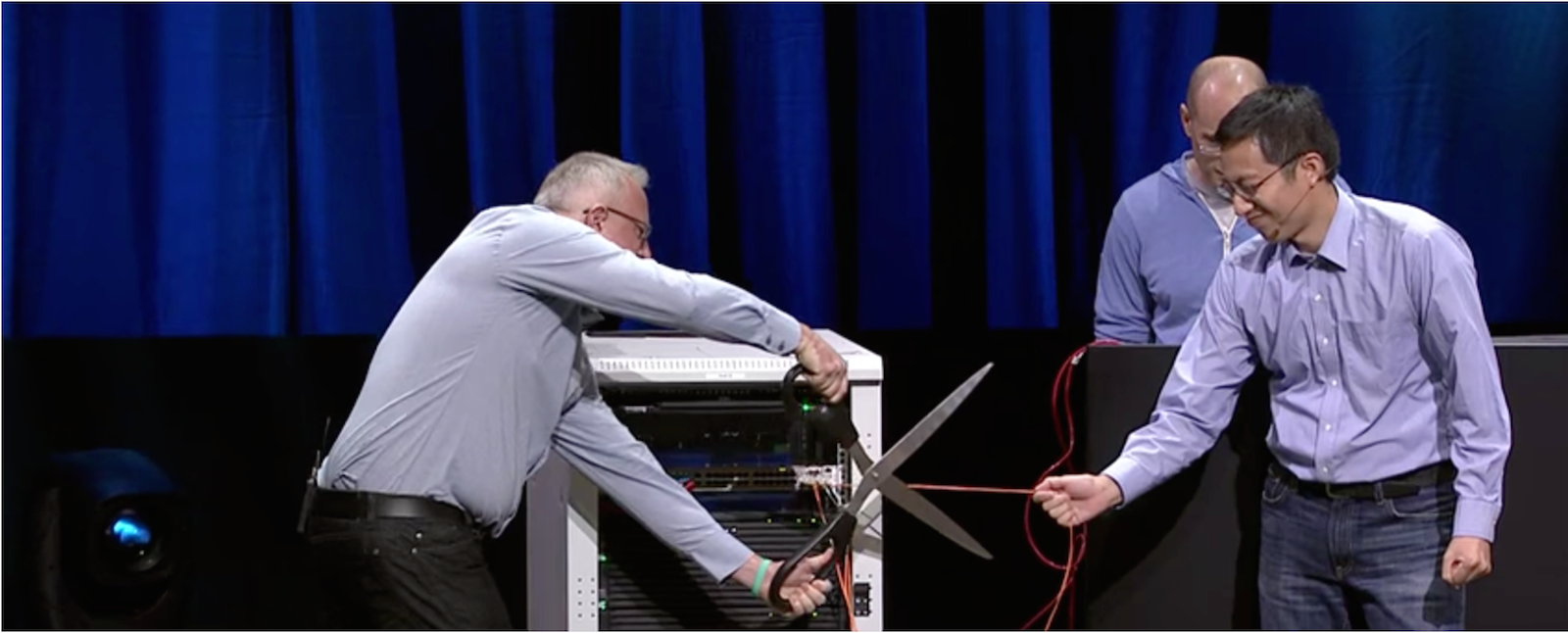
At the recent OpenStack Summit in Barcelona, both groups demonstrated how new technologies in NFV can help minimize network disruptions. During the keynotes, technical leads from the OPNFV Doctor Project and OpenStack Vitrage project conducted a phone call using a 4G mobile system running on top of OpenStack. The mobile call continued without disruption even after a dramatic cutting of network cables. (You can watch the short demo in its entirety below.)
To get the skinny on how the technology works and what it took to pull off such a compelling demo, we sat down with folks involved with OPNFV, OpenStack and the Doctor project, including Ifat Afek (System Architect at Nokia Cloudband), Carlos Goncalves (Software Specialist at NEC), Ryota Mibu (Assistant Manager at NEC), and Ildiko Vancsa (Ecosystem Technical Lead at OpenStack Foundation).
OPNFV: Can you give an overview of the demo you did at OpenStack Summit?
OPNFV/OpenStack demo team: We performed two live mobile calls from stage and both were interrupted. The first call dropped when Mark Collier (COO at OpenStack Foundation) removed two cables from the servers powering the mobile system for the calls. After this failed call, Ryota Mibu enabled the OPNFV Doctor features and the teams made another call. During the second call, Mark cut the network cables with giant scissors, but this time the call continued without disruption.
The demo leverages OpenStack as the base for a 4G mobile system equipped with the functionality to perform a smooth failover in case of faults in the system (in a process called “Fault Management”). OpenStack laid the foundation for the cloud-based mobile platform and OPNFV—via the Doctor Fault Management project—filled the existing feature gaps and provided system integration. While we successfully showed how OpenStack operates in an NFV/Telecom environment, the demo was also an example of the fruitful collaboration between the OpenStack and OPNFV communities as development of the new features and additions were driven through Doctor “upstream” into OpenStack.
OPNFV: Can you talk a little more about fault management and why it’s important?
Demo team: There is no system without faults, errors, and failures, even in the cloud. Fault management is a component that allows operations teams to monitor, detect, isolate and automate the recovery of faults. With an efficient fault management system, countermeasures can negate the effects of any deployment faults, avoiding bad user experiences or violation of service-level agreements (SLAs).
To put this in perspective, think about the impact to network services during natural disasters or other emergencies. According to areport by NTT DOCOMO, the largest mobile phone operator in Japan, thousands of antennas and other infrastructure equipment went out of service as a result of the magnitude 9.0 earthquake and tsunami in March of 2011. The consequences, as we all know, were devastating. Millions of mobile subscribers were disconnected from the cellular network, unable to make emergency calls or check in with loved ones.
Service continuity of virtualized platforms has to be equally addressed. The features enabled by OPNFV and OpenStack add value toward helping operators quickly recover from small to large-scale faults, ultimately keeping our societies connected in times of need.
OPNFV: How can organizations implement Doctor’s Fault Management solution in their networks?
Demo team: While not standalone software that can be downloaded and installed directly, the core Doctor framework relies on OpenStack components. Any organization deploying recent versions of OpenStack (from Liberty onward) will have Doctor-prescribed enhancements already available out-of-the-box with little to no configuration. In other words, Doctor is now a part of OpenStack.
Extensive documentation covering requirements, use cases, gap analysis, architecture, design decisions, configuration and user guides are available. Head to OPNFV.orgto theOPNFV Colorado 2.0 Doctor documentation pagefor details.
OPNFV: Are there other use cases for Doctor that go beyond telecom? Will it work with other types of networks?
Demo team: Yes, definitely! There are a number of interesting cloud and enterprise applications that can use the framework; for example, those with time constraints, e.g. in the area of multimedia and real-time applications (for faster replacement of a video cache associated with peak user times). The OpenStack-powered fault management framework will be useful for anyone operating within contracted SLAs.
Individually developed features can also be used beyond fault management scenarios. For example, event alarms can be leveraged for quicker triggering of administrative actions. Without this feature, events (or “faults”) can only be retrieved by periodically polling data from a database. In fact before Doctor, the time required to detect and recover from a fault was a few minutes. With Doctor, the time to recovery is less than one second!
OPNFV: What’s next for the Doctor project? Are there other cool implementations we can expect to see in 2017?
Demo team: We certainly hope so, but it will be hard to top our Barcelona demo! As a project and a part of a larger community, maintenance and continuous improvements to the functionality of fault monitoring, notification and handling are needed and planned for in OpenStack. And as integrators, the community needs rich monitoring functions that can be supported by the broader OpenStack/OPNFV ecosystem.
Recently, new open source communities have surfaced that aim to develop higher-layer network function management and orchestration systems. OPNFV has been supportive of these activities, and a plan to integrate them in the platform is on the horizon. That said, we may see Doctor joining additional collaborative efforts at some point.
OPNFV: Most importantly: How did Mark get those giant scissors through airport security?
Demo team: Mark made all of us sign a nondisclosure agreement that prevents us from sharing any details! (It was either that or he would sabotage the demo…)
For more details, please visit OPNFV and OpenStack NFV on the web or follow @opnfv on Twitter.