

Home Blog Page 652

Parrot Security Could Be Your Next Security Tool

Network and security administrators rely heavily on their tools. Without the right tools, that brilliant mind can only do so much. But what tools are the best for the job of forensics or testing? As you probably know, the list of such tools is extensive and often times it’s a matter of experimentation, review, and guesswork.

That’s where the likes Parrot Security come in. Parrot Security is a complete distribution, based on Debian Jessie core, which includes software for cryptography, cloud, anonymity, digital forensics, programming. The software list alone should be enough to have security and network admins rushing to download a copy.

  • Anonymous mode start

  • I2P

  • Two Cents Crypto

  • ZuluCrypt

  • EtherApe

  • Ettercap

  • King Phisher

  • Tor Browser

  • TorChat

  • Wireshark

  • XHydra

  • Zenmap

  • debmod builder

  • Parrot Cloud Controller

  • Spectrum Tool

And that’s just from the standard menu entries. Dive into the Parrot submenu (Figure 1) and you’ll find an astonishing array of tools.
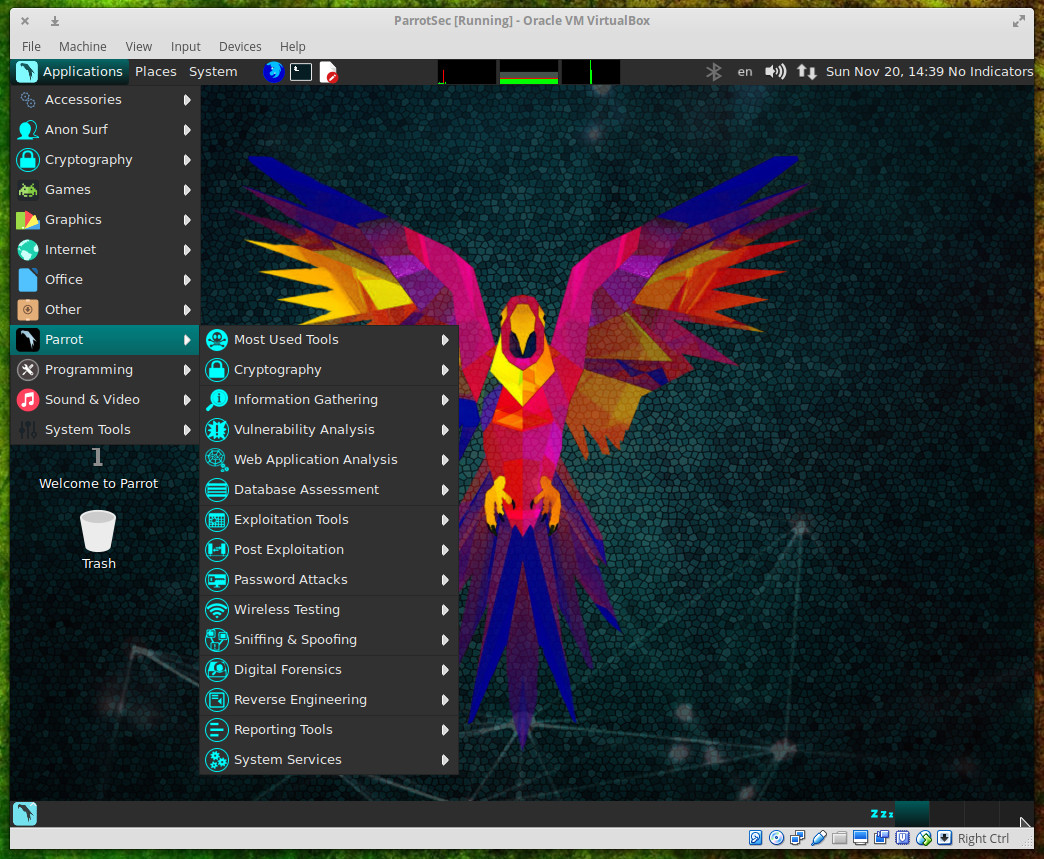
Figure 1: The Parrot submenu of the main menu.

Parrot as distribution

Beyond the testing, auditing, and programming tools, what you’ll find in the Parrot distribution is a rock solid system. Parrot is based on Debian 9 and includes a custom hardened Linux 4.6 kernel. This is a rolling release upgrade distribution that uses the MATE desktop and the Lightdm display manager…all presented with custom icons and wallpapers. It’s pretty and it’s powerful.

The system requirements for Parrot are:

  • CPU: x86 with at least 700Mhz

  • Architecture: i386, amd64 (x86-64bit), 486 (legacy x86), armel, and armhf

  • RAM: At least 256MB for i386 and 320MB for amd64. 512MB recommended

  • GPU: No graphic acceleration required

  • HDD: ~16GB required for installation

  • BOOT: Legacy bios preferred

Parrot can be run as either a live distribution or installed on a standard desktop. When you first fire up the image, you will see a boot screen unlike any you’ve ever seen (Figure 2).
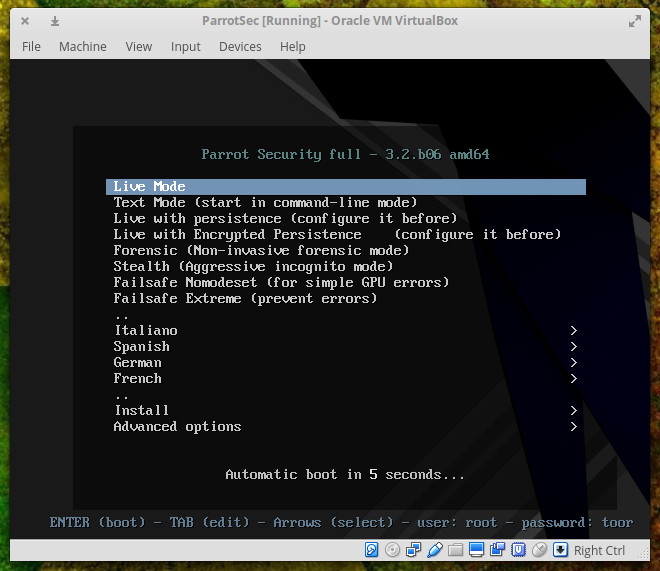
Figure 2: The Parrot Security boot screen.

From the boot screen, you can start Parrot as either a live instance, run it in text mode, run it live with persistence (any configurations you make will be saved), Live with encrypted persistence (so your configuration options cannot be viewed by others), a non-invasive forensics mode, an aggressively anonymous mode, or a failsafe mode. You can also install directly from the boot menu.

If you run Parrot as a live instance, you can then install the distribution to your hard drive by going to Applications > System Tools > Install Parrot Security OS.

One of the issues I discovered is, out of the box, the screen will lock after five minutes. It took me a while to discover that the default live credentials are root/toor. Before discovering those credentials, I had to unset the screen locking (otherwise I was having to constantly reboot after five minutes of inactivity).

The installation of Parrot can hiccup out of the gate. After using Parrot as a live instance, I went to install, only to discover the kernel had upgraded from 4.6.0 to 4.7. The Parrot installer can only be used if the kernel versions of the live system and the installer are the same. The best way to successfully install Parrot Sec is to go directly to Install from the boot menu. This will ensure your kernels match. You can run the standard installer (an NCURSES installer) or a GTK installer (GUI). Either installer will work like a charm and installation is fairly fast. NOTE: Installing Parrot Security on as a VirtualBox instance failed every time, so your best bet is to either run the distribution live or install it on a standalone system.

Once installed, you’re ready to take advantage of the Parrot Platform.

One really nice feature of Parrot Sec is the anonymous mode. While running either a live session or from a fully installed sesion, go to Applications > Anon Surf > anonymous mode start. Once in anonymous mode, Parrot Security will automatically route all of your traffic through TOR (including your DNS requests so to prevent DNS leaks).

I ran a quick test of the anonymous mode. Before starting the mode, I ran a ping on google.com to see standard results. Afters starting up the anonymous mode, I ran the same ping to see very different output (Figure 3).
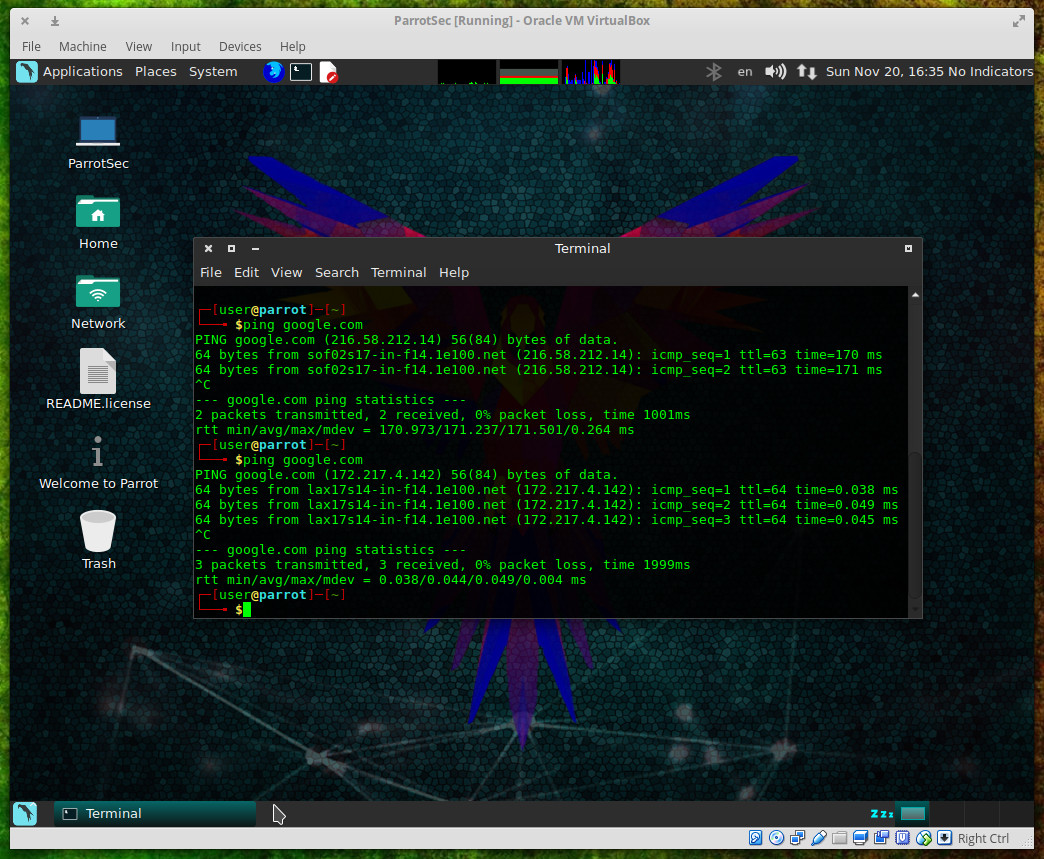
Figure 3: The difference between a ping with Anonymous mode off and then on.

Parrot as testing platform

As a testing platform, Parrot excels beyond any normal expectations. All you have to do is venture into Applications > Parrot and you’ll immediately see how capable a testing platform you have in Parrot Security. This distribution comes with nearly every tool you could possibly need to test your network and systems. It is from this menu that you can tackle serious work: Information gathering with DNS analysis, IDS/IPS Identification, Live Host Identification, OSINT/Route/SMB/SMTP/SNMP/SSL analysis; Vulnerability analysis with Cisco Tools, Fuzzing Tools, OpenVAS Scanner, Stress Testing, VoIP Tools; Web Application Analysis with CMS & Framework Identification, IPv6 Tools, Web Application Proxies, Web Crawlers & Directory Bruteforce, Web Vulnerability Scanners.

Each tool in the Parrot menu is a full-blown application, ready to use. Take a look into Applications > Parrot > Exploitation Tools and you’ll see an impressive list of applications including the likes of armitage (Figure 4 — a scriptable collaboration tool for Metasploit that visualizes targets, recommends exploits, and exposes the advanced post-exploitation features in the framework).
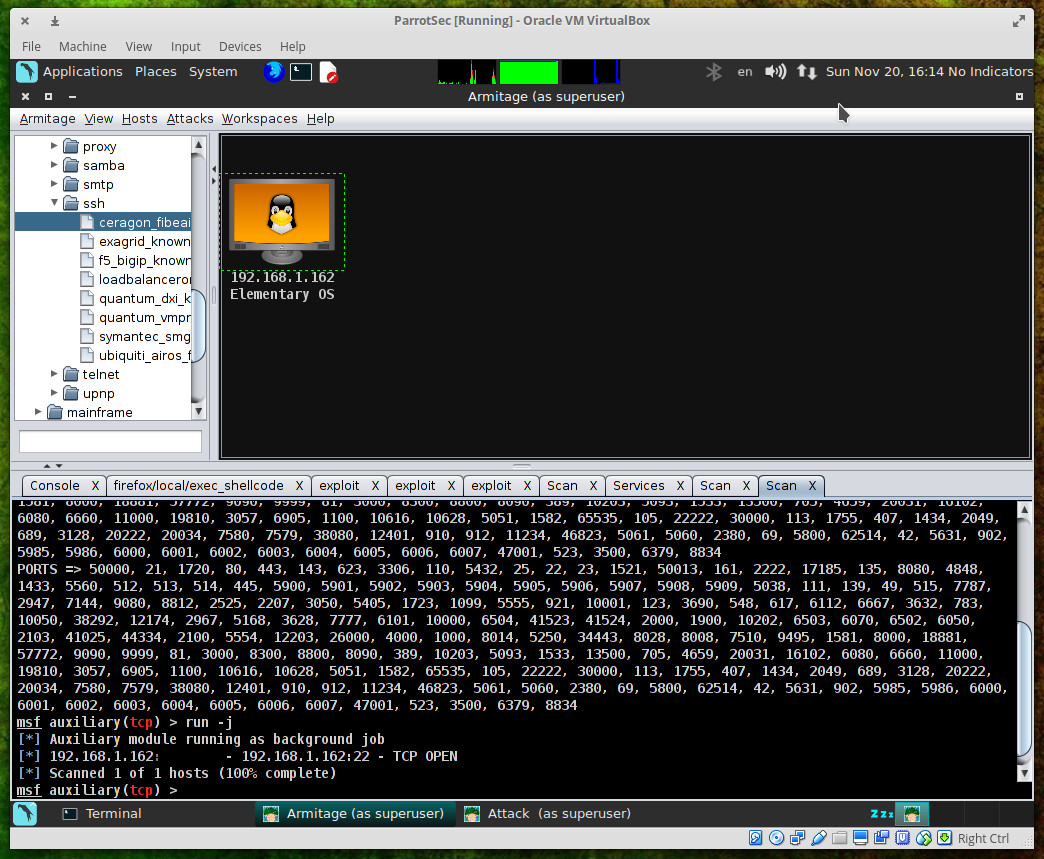
Figure 4: Scanning a host with armitage.

Parrot as programming platform

But don’t think Parrot Security is a distribution designed solely for those who want to audit the security of their network and systems. This Debian-based distro packs plenty of programming punch as well. You’ll find interpreters and compilers for the most popular languages. Programming tools include:

  • Arduino IDE

  • Atom

  • Ferret

  • Geany

  • GNU Emacs 24

  • GRC

  • Ipython

  • PyCrust

  • Qt Creator

  • SQLite database browser

  • USBprog

  • XRCed

Beyond that, programmers will find one of the handiest tricks to ever grace their desktops. If you right-click a blank spot on the desktop and click Create Document > prog, you’ll see that you can create documents from a number of programming-centric templates (such as, assembly, Bash-sh, C, C++, header, Java, ObjC, Perl, etc. — Figure 5).
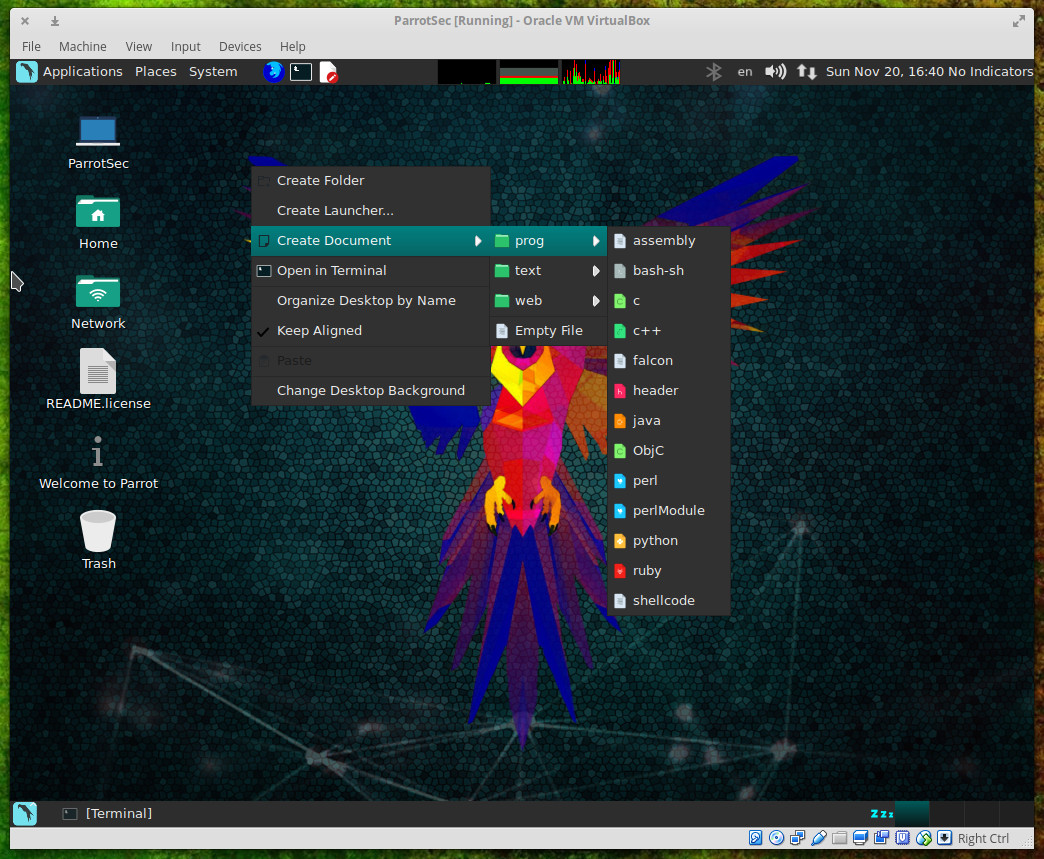
Figure 5: Creating a new document from one of the programming templates is simple.

This will create a file with the necessary extension, for the language you want work with, on your desktop. Right-click that file and then click Open With and then select your tool of choice. The template you choose will include some basic elements necessary for that language.

This is what you’ve been waiting for

If you’ve grown frustrated with your testing platform of choice letting you down, you cannot go wrong with Parrot Security. It’s only been around since 2013, but it’s made some remarkable strides in those short three years. Spin up an instance of this testing/programming-centric distribution and see if it isn’t exactly what you’ve been waiting for.

Advance your career with Linux security skills. Check out the Linux Security Fundamentals course from The Linux Foundation.

10 Great Moments from Linux Foundation 2016 Events

This year, more than 20,000 tech professionals gathered at 150 Linux Foundation events worldwide to learn and share open source technologies and best practices. Held in 46 cities across 14 countries — from the U.S. and Canada, to Germany, Spain, China and Japan — Linux Foundation events are where the creators, maintainers and practitioners of the world’s most important open source projects meet.

As 2016 comes to a close, we have taken a look back at some of the highlights from this year’s events and compiled 10 great moments into a photo gallery, including the 25th anniversary of Linux Gala, the first Kids Day at LinuxCon, and Cory Doctorow speaking on FLOSS. Please share your favorite moments with us in the comments!

Thanks to all of the speakers, attendees, sponsors, and staff who made 2016 the best year yet for The Linux Foundation’s open source events. We look forward to seeing you all again in 2017.

You can see the complete 2017 event schedule now. 


Monitoring Software: The Market Lines Are Blurry

Who is the market leader in IT monitoring? You won’t find the answer to that question in this article.

With a wide range of functionality being offered for multiple audiences, our priority is to provide clarity about who wants what. The New Stack is seeing two contradictory patterns. Many companies are trying to create a full stack of monitoring services, but there is also a desire to have a composable infrastructure.

We believe these trends will continue. The lines between infrastructure and application monitoring will continue to blur, but task-specific tools will gain prominence. Perhaps the biggest factor in how these changes unfold is the job roles of the people using the monitoring software.

Read more at The New Stack

Atlassian: “DevOps Is the New Normal”

“DevOps isn’t any single person’s job — it’s everyone’s job.” What does DevOps mean for Atlassian and what shapes the company culture? How do departments support DevOps and what are the usual DevOps aspects that aren’t part of the company values? We invited Ian Buchanan, Developer Advocate, Integration Specialist for Atlassian’s DevOps Ecosystem to weigh in on Atlassian’s road to DevOps and to debunk some of the myths surrounding this movement.

Read more at JaxEnter

Blue-Green Deployments for Serverless Powered Applications on AWS

First described by Martin Fowler back in 2010, blue-green deployment is a release technique that reduces downtime and risk by running two identical production environments called Blue and Green.

Fast-forwarding to 2013, Danilo Sato from ThoughtWorks published on their blog a very insightful article that describes how to implement blue-green deployments using AWS. We, at Mitoc Group, are working primarily with serverless computing from AWS, and today we’d like to share our experience using blue-green deployment process for serverless powered applications.

Read more at Mitoc Group

What’s New in OpenStack in 2016: A Look at the Newton Release

OpenStack is on a six-month release cycle, with each release given a code name starting with consecutive letters of the alphabet. On October 7th, OpenStack Newton was released. Let’s look at a few highlights from OpenStack’s 2016 Newton release.

In addition to the usual enormous number of incremental improvements, the Newton release focused on ease of deployment and usability improvements, as well as improved container-management tools. It also added the Tacker project, for deploying and managing virtual network functions (NFV) on OpenStack.

Read more at OpenSource.com

Hadoop Introduction – A Comprehensive Guide for Beginners

This tutorial provides thorough introduction of Hadoop. The tutorial covers what is Hadoop, what is the need of Hadoop, why hadoop is most popular, Hadoop Architecture, data flow, Hadoop daemons, different flavours, introduction of Hadoop componenets like hdfs, MapReduce, Yarn, etc.

Hadoop is an open source tool from the ASF – Apache Software Foundation. Open source project means it is freely available and even its source code can be changed as per the requirements. If certain functionality does not fulfill your requirement, you can change it according to your need. Most of Hadoop code is written by Yahoo, IBM, Facebook, Cloudera.

Read more at Data Flair

Writing Your Own Ingest Processor for Elasticsearch

With Elasticsearch 5.0, a new feature called the ingest node was introduced. To quote the official documentation:

You can use ingest node to pre-process documents before the actual indexing takes place. This pre-processing happens by an ingest node that intercepts bulk and index requests, applies the transformations, and then passes the documents back to the index or bulk APIs.

So, by defining a pipeline you can configure the way a document should be transformed before it is being indexed. There are a fair share of processors already shipped with Elasticsearch, but it is also very easy to roll your own.

This blog post will show how to write an ingest processor that extracts URLs from a field and stores them in an array. This array could be used to pre-fetch this data, spider it, or to simply display the URLs connected with a text field in your application.

Read more at DZone

httpstat – A Curl Statistics Tool to Check Website Performance

httpstat is a Python script that reflects curl statistics in a fascinating and well-defined way, it is a single file which is compatible with Python 3 and requires no additional software (dependencies) to be installed on a users system.

It is fundamentally a wrapper of cURL tool, means that you can use several valid cURL options after a URL(s), excluding the options -w, -D, -o, -s, and -S, which are already employed by httpstat.

Read the complete article at Tecmint

An Introduction to Open Source Compliance in the Enterprise

The following is adapted from Open Source Compliance in the Enterprise by Ibrahim Haddad, PhD.

Open source has expanded not only from an idealistic movement led by individuals around software and intellectual property but from one where organizations (e.g., governments, companies, and universities) realize that open source is a key part of their IT strategy and want to participate in its development.  Early success in Linux and other open source technologies has spread to all areas of technology.

More traditional organizations are also taking notice and making open source software a priority and using the software for strategic advantage in their operations.

Use of open source in enterprise IT has roughly doubled since 2010, according to the North Bridge and Black Duck 2016 Future of Open Source Survey:

• 67 percent of surveyed companies encourage developers to engage in and contribute to open source projects.

• 65 percent of companies are contributing to open source projects.

• One in three companies have a full-time resource dedicated to open source projects.

• 59 percent of respondents participate in open source projects to gain competitive edge.

As a result, organizations are looking for guidance on how best to participate appropriately in open source communities and to do so in a legal and responsible way. Participants want to share their code and IP, and they need a trusted neutral home for IP assets (trademark, copyright, patents). They also need a framework to pool resources (financial, technical, etc.).

Open source participants need expertise to train them on how to collaborate with their competitors in an effective manner. To that end, The Linux Foundation has published the Open Source Compliance in the Enterprise e-book geared to creating a common understanding on the best ways to create shared value and innovation while adhering to the spirit and legal particulars of open source licensing.

Open source initiatives and projects provide companies and other organizations with a vehicle to accelerate innovation through collaboration with the hundreds and sometimes thousands of communities that represent the developers of the open source software. However, there are important responsibilities accompanying the benefits of teaming with the open source community: Companies must ensure compliance to the obligations that accompany open source licenses.

The 4 Objectives of Open Source Compliance

Open source compliance is the process by which users, integrators, and developers of open source software observe copyright notices and satisfy license obligations for their open source software components. A well-designed open source compliance process should simultaneously ensure compliance with the terms of open source licenses and also help companies protect their own intellectual property and that of third-party suppliers from unintended disclosure and/or other consequences.

Open source compliance helps achieve four main objectives:

• Comply with open source licensing obligations.

• Facilitate effective use of open source in commercial products.

• Comply with third-party software supplier contractual obligations.

• Protect proprietary IP.

In this blog series, we’ll explore the entire process of open source compliance, including a high-level overview of the topic, detailed information on how to establish an open source management program at your organization, and an overview of relevant roles.

In part 2, we’ll cover how software development models have changed and discuss the role of open source compliance under the new multi-source development model.

Read the other articles in the series:

An Introduction to Open Source Compliance in the Enterprise

Open Compliance in the Enterprise: Why Have an Open Source Compliance Program?

Open Source Compliance in the Enterprise: Benefits and Risks

3 Common Open Source IP Compliance Failures and How to Avoid Them

4 Common Open Source License Compliance Failures and How to Avoid Them

Top Lessons For Open Source Pros From License Compliance Failures

The 7 Elements of an Open Source Management Program: Strategy and Process

Download the free e-book, Open Source Compliance in the Enterprise, for a complete guide to creating compliance processes and policies for your organization.