The 48th edition of the TOP500 list saw China and United States pacing each other for supercomputing supremacy. Both nations now claim 171 systems apiece in the latest rankings, accounting for two-thirds of the list. However, China has maintained its dominance at the top of the list with the same number 1 and 2 systems from six months ago: Sunway TaihuLight, at 93 petaflops, and Tianhe-2, at 34 petaflops. This latest edition of the TOP500 was announced Monday, November 14, at the SC16 conference in Salt Lake City, Utah.
After US and China, Germany claims the most systems with 32, followed by Japan with 27, France with 20, and the UK with 17.
Today, November 13, 2016, Linus Torvalds announced the release and general availability of the fifth RC (Release Candidate) version of the upcoming and highly anticipated Linux 4.9 kernel series.
Linux kernel 4.9 could be the next LTS (Long Term Support) branch, and it promises to be the greatest kernel release ever, bringing support for some older AMD Radeon GPUs in the AMDGPU driver, and lots of other improvements. Right now, earlier adopters can get their hands on Linux kernel 4.9 RC5, which looks like it’s a much smaller than RC4.
“Things have definitely gotten smaller, so a normal release schedule (with rc7 being the last one) is still looking possible despite the large size of 4.9,” said Linus Torvalds in today’s announcement. “But let’s see how things work out over the next couple of weeks. In the meantime, there’s a lot of normal fixes in here, and we just need more testing…”
It’s about time we show NTP some love. This handy protocol has been around for quite a long while and is essential for synchronizing clocks across your network.
It’s 2016 (almost 2017); why is the time off on your system clocks? It became apparent to me that there are some folks out there that do not realize their clocks are off for a reason. My Twitter buddy Julia Evans recently made a graphic about distributed systems that mentioned clock issues and it made me really sad…
If you are not familiar with how to solve this distributed systems problem, allow me to introduce you to Network Time Protocol (NTP).
So far, containers have been used mostly to develop or deploy apps to servers—specifically, x86 servers. But containers have a future beyond the data center, too. From internet of things (IoT) devices, to ARM servers, to desktop computers, containers also hold promise.
It’s obvious enough why containers are valuable within the data center. They provide a portable, lightweight mode of deploying applications to servers.
However, servers account for only one part of the software market. There is a good chance that, sooner or later, containers will expand to other types of devices and deployment scenarios.
Docker Beyond the Data Center
In fact, they already are. Here are some examples of Docker taking on other types of environments or use cases:
It’s now apparent to most savvy IT professionals that microservices enabled by containers need to be joined at the proverbial hip to the ability to create microsegments using network virtualization (NV) software. Just how that’s going to happen is still a matter of debate.
Quite a while ago, we had published a post that showcased four examples of how Linux users can utilize their terminal to perform simple daily tasks and fulfill common everyday use needs. Of course, the use case possibilities for the Linux terminal are nearly endless, so were naturally back for a second part containing more practical examples.
Send Email on the Linux Shell
Sending emails is something that we all do one way or another on a daily basis, but did you know that you can do it via the terminal? Doing that is actually very simple and all that you’ll need to have installed is the “mailutils” package. If you’re using Ubuntu, open the terminal and ….
To understand how the Internet became a medium for social life, you have to widen your view beyond networking technology and peer into the makeshift laboratories of microcomputer hobbyists of the 1970s and 1980s. That’s where many of the technical structures and cultural practices that we now recognize as social media were first developed by amateurs tinkering in their free time to build systems for computer-mediated collaboration and communication.
For years before the Internet became accessible to the general public, these pioneering computer enthusiasts chatted and exchanged files with one another using homespun “bulletin-board systems” or BBSs, which later linked a more diverse group of people and covered a wider range of interests and communities. These BBS operators blazed trails that would later be paved over in the construction of today’s information superhighway. So it takes some digging to reveal what came before.
In this short article, we will walk newbies through the various simple ways of checking system timezone in Linux. Time management on a Linux machine especially a production server is always an important aspect of system administration.
There are a number of time management utilities available on Linux such as date and timedatectlcommands to get the current timezone of system and synchronize with a remote NTP server to enable an automatic and more accurate system time handling.
In March of this year, the Obama administration created a draft for Federal Source Code policy to support improved access to custom software code. After soliciting comments from public, the administration announced the Federal Source Code policy in August.
One of the core features of the policy was the adoption of an open source development model:
This policy also establishes a pilot program that requires agencies, when commissioning new custom software, to release at least 20 percent of new custom-developed code as Open Source Software (OSS) for three years, and collect additional data concerning new custom software to inform metrics to gauge the performance of this pilot.
In an interview with ADMIN magazine, Brian Behlendorf, one of the pioneers of Apache web server and Executive Director of the Hyperledger Project at The Linux Foundation, said that any code developed with taxpayers’ money should be developed as open source.
The White House opens its doors
This month, the Obama administration delivered on their promises and launched www.code.gov, which hosts open source software being used and developed by the federal government.
Tony Scott, the US Chief Information Officer, wrote in a blog post, “We’re excited about today’s launch, and envision Code.gov becoming yet another creative platform that gives citizens the ability to participate in making government services more effective, accessible, and transparent. We also envision it becoming a useful resource for State and local governments and developers looking to tap into the Government’s code to build similar services, foster new connections with their users, and help us continue to realize the President’s vision for a 21st Century digital government.”
The news received accolades from the open source community. Mike Pittenger, VP of security strategy at open source security company, Black Duck, is among those industry leaders that praise these efforts.
“The federal government spends hundreds of millions of dollars on software development. If agencies are able to use applications built by or for other agencies, development costs are minimized and supporting those applications is simplified, while delivering needed functionality faster,” Pittenger said.
There are many reasons why the US government chose to embrace the open source development model. Lower costs, greater efficiency, improved security and transparency, and more access to developer talent are just some of the reasons companies choose open source software. The government will likely see these same benefits.
When asked about the possible reasons behind this move, Pittenger said, “The obvious reasons are to reduce costs of building and maintaining applications across agencies. In any business, a goal is to minimize the number of components required. In manufacturing, this may result in standardizing the size and type of fastener used to build a product. In software, this means standardizing on the open source component (and version) being used across applications.”
While not arguing for the “given enough eyeballs, all bugs are shallow” theory, Pittenger said that security eyes are undoubtedly useful and are the source of virtually all open source vulnerability disclosures in the National Vulnerability Database (NVD). It would be beneficial for the government to institute a bug bounty program and encourage responsible disclosure.
Pittenger also added that beyond access to the source code, this policy will also bring more transparency. “Understanding what is being ‘custom built’ can shed light on inside deals where commercial solutions may already exist. Bulgaria takes this a step further than the US in that all contracts for custom software will be available online for public review,” he said.
It will also drive innovation as cross-pollination of talent from different government agencies and external developers will create a massive talent pool. Open source enables collaboration between bright people working for different companies or agencies.
Some caveats
So far, the government is emphasizing the release of at least 20 percent of its custom code as open source. That may not be enough from the perspective of an open source community, but Pittenger argues that “20 percent is a good start. We need to balance the benefits from open sourcing code with the risks associated with vulnerabilities. Keep in mind that outsourced code may have been written by the lowest-cost bidder. For example, we don’t know if any secure development practices were followed, such as threat modeling, security design reviews, or static analysis. We also don’t know whether the contractors building the software closely tracked the open source they used in the code for known vulnerabilities. My advice would be to risk-rank the applications covered by these policies, and start by open sourcing the least critical. I would argue strongly against releasing code that manages sensitive taxpayer information or code for defense and intelligence agencies.”
All said and done, this is a good start, and we hope that the federal government will remain committed to its open source promises.
For the longest time, KDE mostly vanished from the radar of most Linux users and media alike. Why? For many, the evolution to a more modern metaphor for the desktop (such as Ubuntu Unity, or GNOME 3) took precedence over the old taskbar/start menu style. For others, KDE went through a period where the desktop simply wasn’t stable. The evolution from KDE 3 to KDE 4 was a bumpy transition that knocked a lot of users off the bandwagon and onto smoother rides.
And then came the transition from KDE 4 to KDE 5. Little changed, but the faithful few users KDE enjoyed did see a much more reliable desktop come to fruition. Unfortunately, the timing didn’t work out, and KDE continued its existence relegated to the shadows of Unity, GNOME 3, Mate, Cinnamon, and Elementary.
To recover a bit of that lost ground, the KDE developers opted to fork Ubuntu into KDE Neon. The launch of Neon didn’t quite go as planned (and the initial release wasn’t exactly stable). Since then, however, the project has managed to pull off something quite intriguing. KDE Neon takes the stability of Ubuntu 16.04 and applies a cutting-edge release of the KDE desktop to create an absolutely beautiful experience, that could easily appease those looking for the best of both worlds. That sentiment applies to many levels:
Users who want both a solid underlying platform and a cutting-edge desktop
Users who want a modern looking/feeling desktop that still adheres to the old-school metaphor
Users who want a desktop that is simple yet allows for them to make it more complex when/if needed
That is what KDE Neon achieves, and it does so quite well.
There are two different flavors of KDE Neon: A User edition and a Developer edition. The difference is simple, the Developer edition includes numerous developer toolkits and frameworks for, you guessed it, development. The Developer edition also builds on KDE software before it’s been released to the general public (whereas the User edition only offers software that has been tested and proved stable enough for general consumption).
Both of these editions are 64-bit only and are very rapidly developed. It is also important to understand that KDE Neon isn’t exactly a rolling distribution. Although the KDE part of the puzzle will always be the latest greatest offering, the underlying platform will stick with the stable foundation of the most recent Ubuntu LTS.
There’s quite a lot to like about this release and only a few tiny hiccups to overcome. Let’s first take a look at what Neon nails out of the box.
The good
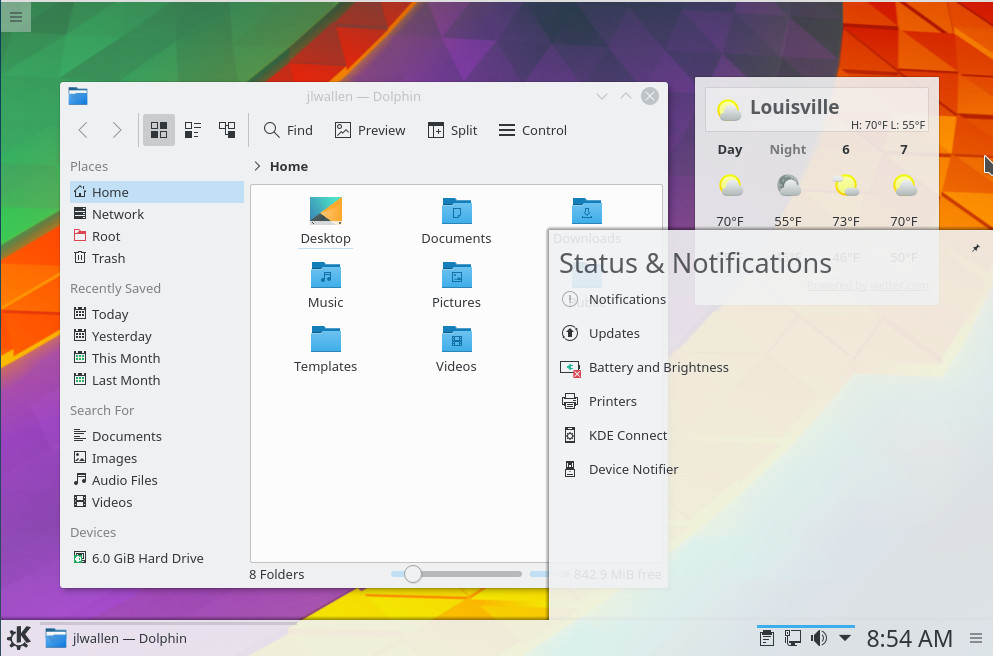
Let’s set aside the pedantry and dig into the heart of the issue. What good does Neon offer? Plenty. From the start, it’s beautiful. Some may not dig the flat-look themes that are all the rage now, but KDE Neon does this to perfection (Figure 1). I’d go so far as to say that this iteration of KDE has created the most beautiful flat theme to be found on any desktop.
Figure 1: The KDE Neon desktop displaying the file manager, a weather applet, and notifications.
Of course, a desktop isn’t a beauty contest. Above all else, it must function and function well. KDE Neon does this, in spectacular fashion. If you’re accustomed to the KDE 4 of old, you will be surprised at how fast and stable Neon is. In fact, the Plasma desktop brought about by Neon rivals my desktop of choice (Elementary OS) in both speed and stability. This is quite remarkable (considering how doggedly slow KDE had become).
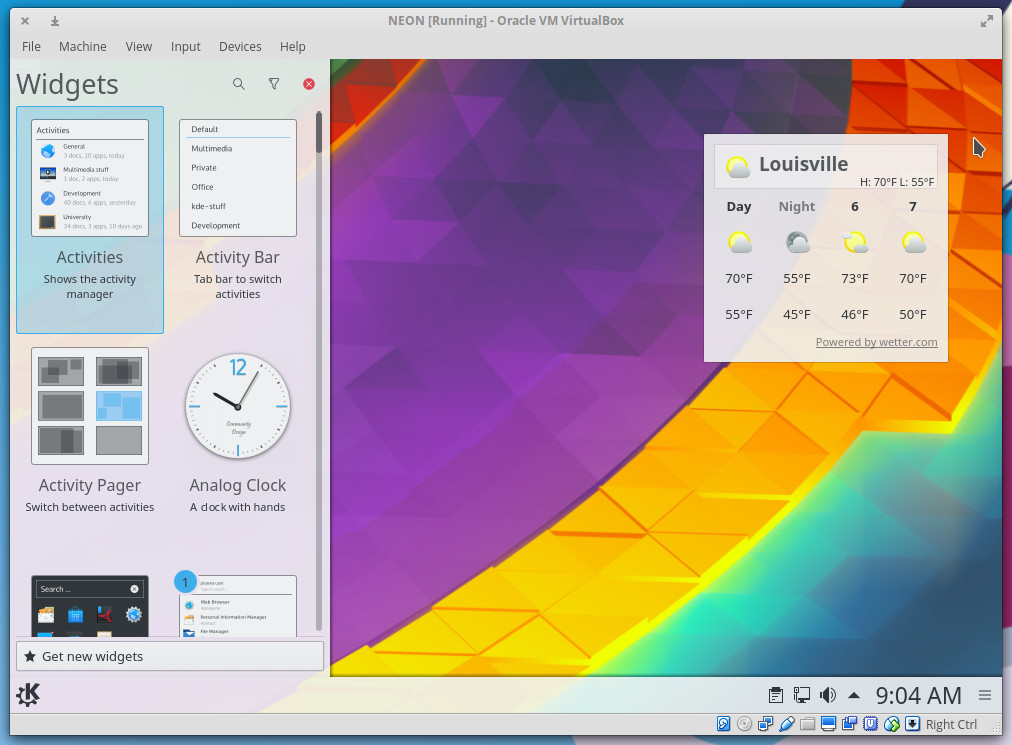
Another much-improved element is the widgets. I will say that I’ve never been a huge fan of desktop widgets. But, I know a number of users who depend upon them. For the longest time, KDE Widgets were an unstable mess. KDE Neon has finally managed to make them work and work well. Adding a widget is as simple as clicking the menu in the desktop upper left corner and clicking Add Widgets. The Widgets sidebar will open (Figure 2), where you can select the widget you want.
Figure 2: Adding a new widget to the KDE desktop.
The KDE Neon menu is fairly straightforward, but it’s clean and amazingly easy to understand. This will be a big breath of fresh air to anyone who finds many Linux desktop menus to be a bit convoluted or less than user-friendly.
Speaking of ease of use: Adding launchers to the panel can be done easily from within the menu. Simply find the launcher you want, right-click it, and select Add to Panel. Removing a launcher from the panel, on the other hand, isn’t quite as intuitive. To remove a launcher, follow these steps:
Right-click on a blank spot on the panel
Select Panel Settings
Hover the cursor over the launcher to be removed
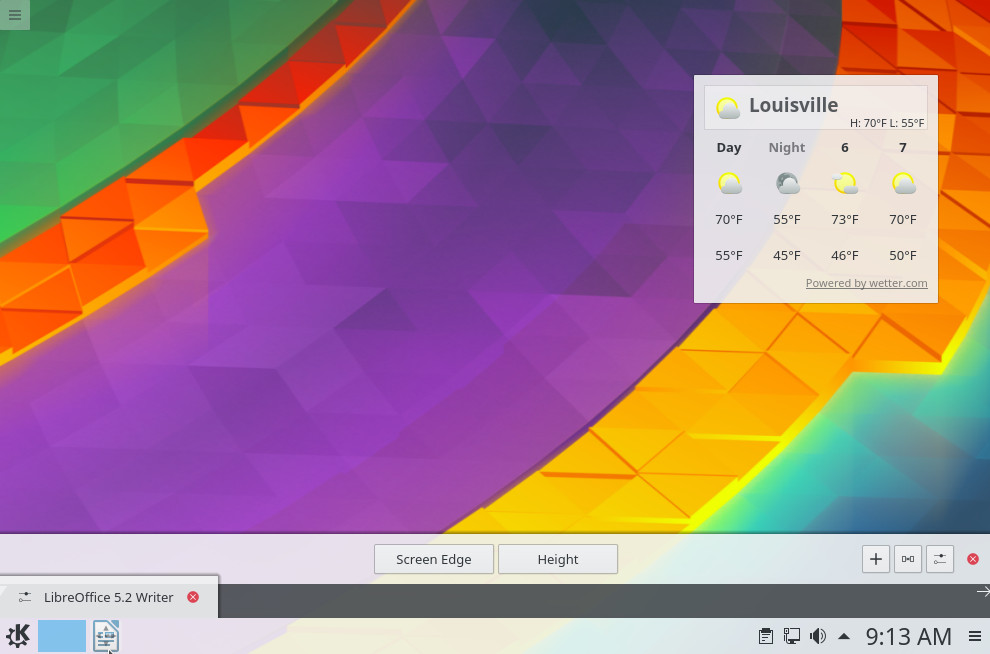
Click on the associated red x to remove the launcher (Figure 3)
When finished click anywhere on the desktop to dismiss the Panel SettingsFigure 3: Removing a launcher from the KDE panel.
The not so good
If I had to pick a nit from KDE Neon, it would be this: The lack of an office suite (such as LibreOffice) is a glaring hole. In fact, when you open up the Applications Menu, you’ll find it rather spartan. Of course, that’s an easy fix. Open up the K Menu go to Applications > System > Software Center, search for LibreOffice, and install.
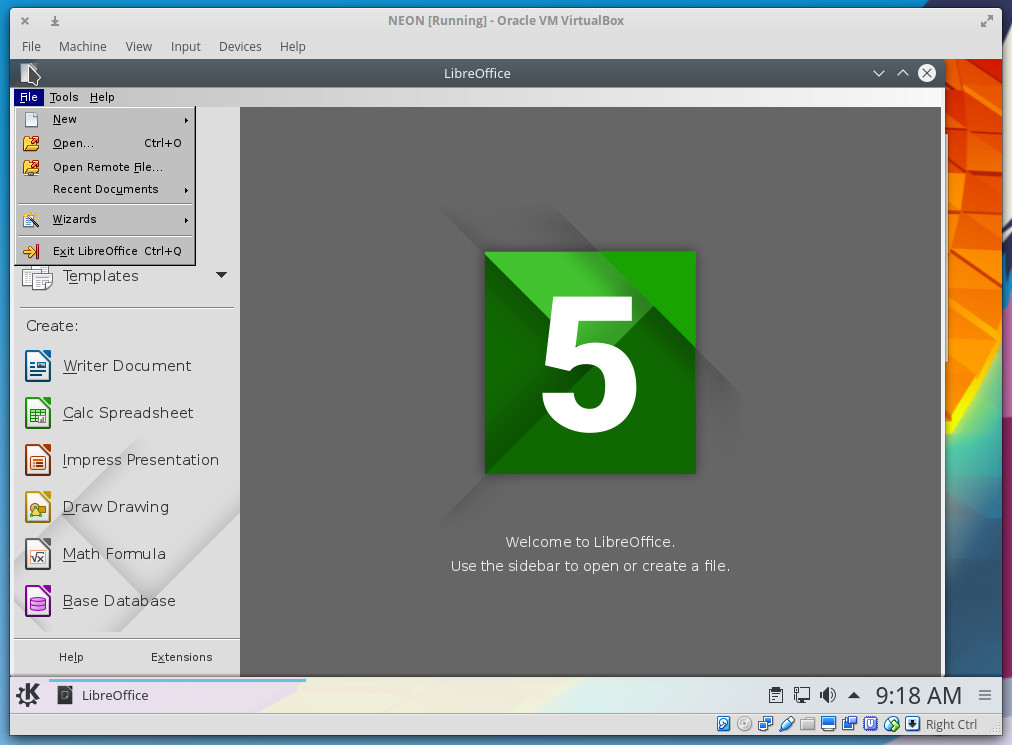
Hold up. Don’t do that. If you install LibreOffice from the Software Center, you’ll not only be installing an out-of-date version of LibreOffice, you’ll also be installing a version that clings to the old GTK Menu system, so it’ll look really bad on that lovely desktop (Figure 4).
Figure 4: This version of LibreOffice is an eyesore on the KDE Neon desktop.
Instead, go to the official LibreOffice site and download the 64-bit DEB package. Once it has downloaded, follow these steps:
Open up Konsole
Change into the Downloads directory with the command cd ~/Downloads
Extract the package with the command tar xvzf LibreOffice_XXX_x86-64_deb.tar.gz (where XXX is the release number)
Change into the DEB directory with the command cd LibreOffice_XXX_x86-64_deb/DEBS(where XXX is the release number)
Install the packages with the commandsudo dpkg -i *.deb
When prompted, type your sudo password and allow the installation to complete
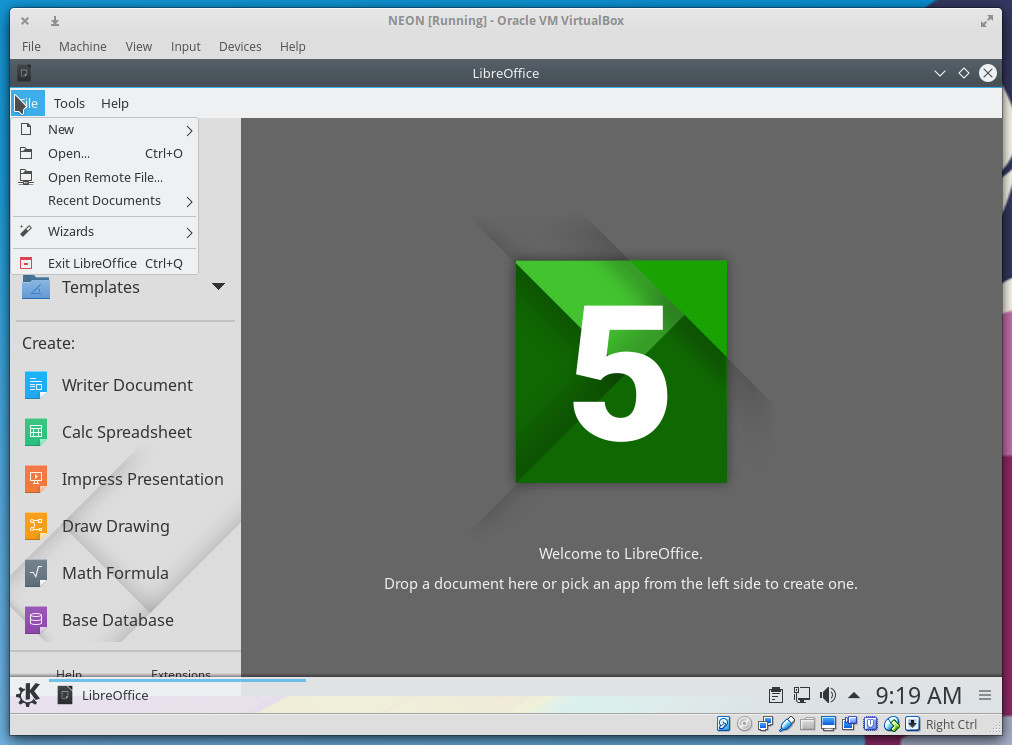
Once the installation has completed, open up LibreOffice, and you’ll find the latest release that also happens to better fit the theme of the desktop (Figure 5).
Figure 5: A more proper version of LibreOffice installed.
A solid choice
Beyond that glaring omission, KDE Neon is as solid and beautiful as any desktop on the market and should not be overlooked as your daily driver solution. Download it, install it, and see if it doesn’t wind up your desktop of choice.
Learn more about Linux with the free, self-paced Introduction to Linux course from The Linux Foundation.