
Jilayne Lovejoy, Principal Open Source Counsel at ARM talks about collaboration beyond code with the OpenChain project at LinuxCon Europe.

Container systems are becoming easier to install, but setting up and managing production container platforms can still be challenging. In his presentation at CloudNativeCon in Seattle, Michael Friis, Product Manager at Docker, will explain what it takes to install and maintain container platforms on public clouds and describe some important considerations for choosing load balancers, logging, and storage solutions. Here, Friis gives us a preview of his talk and shares some recommended practices.
Linux.com: What capabilities or features are unique to Docker for AWS and/or Docker for Azure?
Michael Friis: The objective of Docker for AWS and Azure is to provide a very easy/simple way to provision and configure fully featured swarms of Docker Engine in a native experience for that target IaaS provider. Docker for AWS and Azure use the respective infrastructure installers (Cloudformation and ARM) to build simple installation experiences, and integrate with/deploy with underlying infrastructure features like load balancing and scaling in a way that feels natural and native to Azure and AWS operators.
Linux.com: Who should be using Docker for AWS and Docker for Azure, and why?
Michael: Anyone that would like to try out Docker 1.12 and built-in orchestration (aka swarm-mode) can get a working setup in minutes with Docker for AWS and Docker for Azure. Docker for AWS and Docker for Azure are still in beta, but they’re already great for trial and prototype Docker deployments on IaaS.
Linux.com: What makes setting up a production container system or PoC challenging?
Michael: There are a few items to consider when setting up a production container environment:
Getting security right: Networking and firewalls, configuring certificates and encryption
Understanding the idiosyncrasies of your selected underlying infrastructure, and mapping those the desired end result in the container environment.
Understanding how clustering software is bootstrapped, and what ancillary software is required for the environment (like K/V-stores)
Linux.com: What are a few of the best practices for installing and maintaining easy-to-use container platforms on public clouds?
Keep track of the dependencies you take on the underlying infrastructure! Taking advantage of unique and differentiating features of a particular IaaS is great, but do so in a way that doesn’t compromise portability. Docker is a great way to help achieve this.
Make sure your setup is automated and scriptable. Even if you have just one production cluster, you’ll want to setup test and staging environments to try out upgrades and similar operational tasks. Make plans for upgrades: Both of the operating system (choose a minimal one with less software, and keep the complexity in container images that are much easier to upgrade), of the clustering system and of the containerized apps.
Registration for this event is sold out, but you can still watch the keynotes via livestream and catch the session recordings on CNCF’s YouTube channel. Sign up for the livestream now.
This week in Linux and open source news, Facebook announces new networking hardware technology, The Linux Foundation’s board expands with three new additions, and more! Get up to speed on the latest headlines with this weekly digest:

Facebook Just Created Some Fancy New Networking Technology– Fortune
2) The Linux Foundation welcomes Erica Brescia (Bitnami,) Jeff Garzik (Bloq,) and Nithya A. Ruff (Western Digital) to board of directors
The Linux Foundation Adds Three New Members to Board of Directors– EconoTimes
3) Amazon Web Services “is becoming more open to private and hybrid cloud scenarios.”
AWS Reveals On-Premises Linux Test Environment– Computer Business Review
4) Ubuntu Core 16 for IoT features Linux self-patching.
Ubuntu Core Snaps Door Shut on Linux’s New Dirty COWs– The Register
5) New Linux Foundation course on edX focuses on “three basic principles of DevOps.”
Linux Foundation Launches Online DevOps Course in Move to Increase Experience– RCR Wireless News

Linux depends upon administrative user permission. Without the elevated permission of root, many commands could not be run. For distributions, such as Red Hat, gaining root permissions means changing to the root user with the command su. Other distributions, such as Ubuntu Linux, opt for a different route. That route is sudo. By taking advantage of the sudo system, an administrator gains far more control over who can do what on a system. An added benefit of using the sudo command is that all sudo incidents are logged (Red Hat-based systems log to /var/log/secure whereas Debian-based systems log to /var/log/auth.log).
Say, for example, you want to give certain users permission to use a certain command, without having to enter their sudo password. With sudo you can do that. You can also join users into groups, to make controlling who can do what much easier.
Now that I have your interest piqued, how do you manage/configure sudo on your Linux machine? The answer is simple…sudoers. In the file /etc/sudoers, you’ll find everything you need to wrestle control over sudo.
Taking on the /etc/sudoers file must be done with care. You should never open that file with a standard text editor (such as nano or vi). Instead, use the built-in visudo tool. This tool will parse the file to see if there are any problems. Once you’ve made changes to the file, you can even run the command sudo visudo -c to run a second automatic parse of the file. Should visudo find issues, fix them immediately before closing your terminal (otherwise, you can wind up locked out of all command that require sudo (trust me, I did this once…it’s no fun)
It is also important to understand:
The sudo binary is setuid root, which means that when any user runs a command through sudo, they are instantly granted root permissions. Because of this, you must take extra precaution when working with the /etc/sudoers file; otherwise, you could find your system at serious risk.
The sudo command reads the sudoers file in top-to-bottom order. In other words, the last line in /etc/sudoers will overwrite previous conflicts with the setup. Because of this, you should always enter your new lines at the bottom of each /etc/sudoers section.
The sudo command includes a number of defaults that can be set within /etc/sudoers. To find a listing of these defaults, issue the command sudo -L.
Now that you clearly understand the importance of editing /etc/sudoers with visudo, let’s take a look and see what you can do.
There are a few sections of the sudoers file you need to know about:
Defaults: These are the default variables for sudo (remember, sudo -L is your friend)
Alias: You can create aliases for host, user, and commands
User privilege: This is where you specify user privilege
Groups: This is where you define groups
You may be surprised to find out the default sudoers file is only 31 lines long (at least in Ubuntu 16.10). It’s not overly complicated, nor is it much of a challenge to understand. However, understanding the breakdown of user privilege lines is very important. The structure of these lines is:
user host=(accounts) commands
The breakdown of this line is:
user: The account for which the privilege will be associated
host: The system from which the account is able to run these sudo commands (sudoers can be shared across systems)
accounts: The other accounts on the machine for which the user running sudo can act
commands: The commands the user can run as sudo
If you issue the command sudo visudo, the default /etc/sudoers file will open. In that file, there will only be one line under user privilege. That line is:
root ALL=(ALL:ALL) ALL
According to our breakdown, that command means the root user from all hosts from any account can run all commands.
Before we get into adding user permission entries to sudoers, it is important to understand how aliases work. Sudoers aliases come in the form of:
User_Alias — specifies a group of users by username
Runas_Alias — specifies a group of users by UID
Host_Alias — specifies a list of hostnames
Cmnd_Alias — specifies a list of commands and directories
A typical alias looks like:
User_Alias USERS = bethany, jamal, morgan, josh
The above alias would include bethany, jamal, morgan, and josh with the alias named USERS. You can also include groups with aliases, such as:
User_Alias ADMINS = %admin
The percent sign indicates to sudo that admin is a system group. To include netgroups, you would prefix the group name with the + symbol. You can also exclude users from an alias by prefixing their name with the ! symbol. Say, for instance, you want to create an alias for restricted users, based on previous aliases. Say users bethany, jamal, morgan, josh, and jonathan are all members of the ADMINS alias, and you want to create an alias for WEBMASTER that does not include the user jonathan. Instead of entering every user, to be included, you could add the admin group and then exclude jonathan like so:
User_Alias WEBMASTER = ADMINS, !johnathan
That’s how aliases work.
Remember, to edit the /etc/sudoers file, we do so with the command sudo visudo.
Our example will be to enable certain users to shutdown the system without having to enter a password. To do this, we will first create a User_Alias for ADMINS. Under the User alias section, add the line:
User_Alias ADMINS = usernames
Where usernames is the list of names to be included with the alias.
Next we create a Cmnd_Alias for the shutdown commands. Under the Cmnd alias section, enter this line:
Cmnd_Alias SHUTDOWN = /sbin/poweroff, /sbin/halt, /sbin/reboot
Finally, under the User privilege section (below the default entry of ALL=(ALL:ALL) ALL), enter the following:
ADMINS ALL=(ALL) NOPASSWD: SHUTDOWN
Save the file and then (for added assurance that everything is okay), issue the command sudo visudo -c. You should see the same output as shown in Figure 1.
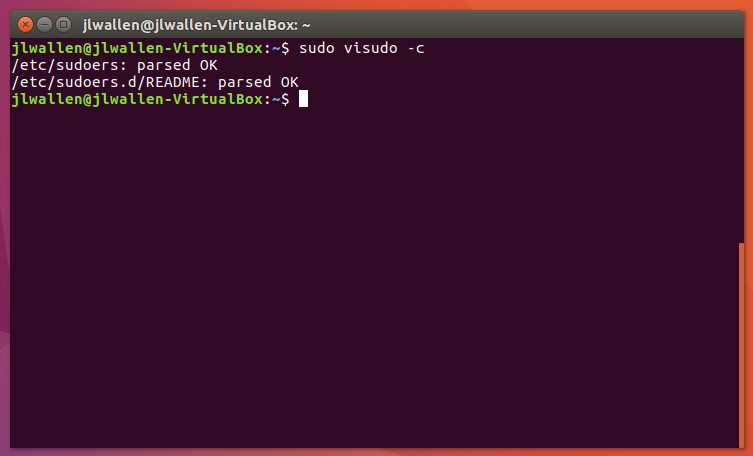
To test the new sudoers entry, you’ll need to logout and log back in. Once you’ve done that, open up a terminal window and issue the command shutdown -h now as one of the users listed in the user alias ADMINS. Your system should shut down without prompting for a password.
Obviously, with regards to security, this isn’t the greatest example. However, it does perfectly illustrate how powerful sudoers can be. You will certainly want to tailor your sudoers file to meet your admin needs on every level. Most likely, you won’t create an entry that would allow just any user to shutdown the system without entering a password. However, with a keen eye toward security, you can make sudoers work well for you.
Advance your career in system administration! Check out the Essentials of System Administration course from The Linux Foundation.

During LinuxCon North America in Toronto, The Linux Foundation organized a women’s networking lunch that included more than 100 women from different walks of life. What’s most exciting about this event was that instead of having one speaker, or a panel of speakers delivering speeches, each attendee was allowed to introduce herself, which turned all those 100 attendees into speakers and audiences.

Charanya holds a Masters degree in Computer Science from SUNY at Buffalo and a Bachelors in Computer Science & Engineering from Anna University, India. Charanya started off as a Research Assistant at SUNY at Buffalo, working on the Android platform where they built PhoneLab — a large scale smartphone testbed. They deployed about 1000 smartphones across the campus and built an experimentation framework for academicians to create and run experiments on this testbed.
Charanya moved to San Francisco in 2013 and began working on web application development on Ruby on Rails at a startup. At that company, they built a product to help small-medium businesses have a stronger presence on social media. That’s when she joined Women Who Code — a nonprofit organization focused on helping women excel in their careers in the tech industry. Currently, she is a core team member at Women Who Code, where she commits code to open source projects and advises on product direction. She also recently gave a talk at #WWConnect 2016 on the pros and cons of working in a startup versus a large company.
Charanya is also involved with building the internal cloud platform at Twitter. The stack consists of distributed back-end services written in Scala and Python and user interfaces powered by ReactJS. They recently launched a product called Chargeback — a system that provides visibility and accountability for infrastructure utilization and compute cost. This product enabled Twitter to reduce inefficiencies around resource utilization and improve overall efficiency of Twitter’s infrastructure. Charanya gave a tech talk at ContainerCon/LinuxCon 2016 on this very topic.
Personally, Charanya enjoys building apps on iOS and has participated along with several other women and won several hackathons. One such hackathon is #ChimeHack, which focuses on connecting the tech community to issue experts and non profits to create mobile app solutions to support girls and women. They won for building a trick or treat app, which UNICEF later used, she said.
A huge gender gap exists in the tech world; however, companies and organizations are now consciously trying to address the issue. Charanya said that in her experience working in this industry, there are two key problems. One is unconscious bias. There is an inherent bias to associate women with jobs other than engineering. Thus, when it comes to hiring a woman or promoting a woman, there is more scrutiny than when hiring or promoting a man. Unfortunately, these biases also influence daily interactions between co-workers, which may lead to a toxic workplace. The second issue is lack of support for work/life balance.
“Many times, women decide to quit their jobs in technology sector to pursue better work/life balance (for example, when you become a parent). Sadly, not all organizations have favorable policies,” she said.
Tech conferences are great place for people to meet new people and friends. However, it can be hard to find and connect with other women.
“Technology events are very important irrespective of gender. It is not just about the talk. It is about the connections you make, the exposure you get, and being out there to inspire and motivate yourself and others,” Charanya said.
Additionally, a lot of conferences are at the initial phase of increasing the diversity of their participants. Woman-focused networking events make a lot of difference for the participants. Google IO has been doing Women TechMaker dinners for all the women participants for the past few years, and the connections made through such events go way past the conference itself.
Want to get started with a career in technology? Check out the Introduction to Linux, Open Source Development, and Git course from The Linux Foundation and EdX.

The Apache Calcite data management framework contains many pieces of a typical database management system but omits others, such as storage of data and algorithms to process data. In his talk at the upcoming Apache: Big Data conference in Seville, Spain, Atri Sharma, a Software Engineer for Azure Data Lake at Microsoft, will talk about developing applications using Apache Calcite‘s advanced query planning capabilities. We spoke with Sharma to learn more about Calcite and how existing applications can take advantage of its functionality.

Linux.com: Can you provide some background on Apache Calcite? What does it do?
Atri Sharma: Calcite is a framework that is the basis of many database kernels. Calcite empowers you to build your custom database functionality and use the required resources from Calcite. For example, Hive uses Calcite for cost-based query optimization, Drill and Kylin use Calcite for SQL parsing and optimization, and Apex uses Calcite for streaming SQL.
Linux.com: What are some features that make Apache Calcite different from other frameworks?
Atri: Calcite is unique in the sense that it allows you to build your own data platform. Calcite does not manage your data directly but rather allows you to use Calcite’s libraries to define your own components. For eg, instead of providing a generic query optimizer, it allows defining custom query optimizers using the Planners available in Calcite.
Linux.com: Apache Calcite itself does not store or process data. How does that affect application development?
Atri: Calcite is a dependency in the kernel of your database. It is targeted for data management platforms that wish to extend their functionalities without writing a lot of functionality from scratch.
Linux.com: Who should be using it? Can you give some examples?
Atri: Any data management platform looking to extend their functionalities should use Calcite. We are the foundation of your next high-performance database!
Specifically, I think the biggest examples would be Hive using Calcite for query optimization and Flink for parsing and streaming SQL processing. Hive and Flink are full-fledged data management engines, and they use Calcite for highly specialized purposes. This is a good case study for applications of Calcite to further strengthen the core of a data management platform.
Linux.com: What are some new features that you’re looking forward to?
Atri: Streaming SQL enhancements are something I am very excited about. These features are exciting because they will enable users of Calcite to develop real-time streaming applications much faster, and the strength and capabilities of these applications will be manifold. Streaming applications are the new de facto, and the strength to have query optimization in streaming SQL will be very useful for a large crowd. Also, there is discussion ongoing about temporal tables, so watch out for more!
Hear from leading open source technologists from Cloudera, Hortonworks, Uber, Red Hat, and more at Apache: Big Data and ApacheCon Europe on November 14-18 in Seville, Spain. Register Now >>