Home Blog Page 692

New Linux Kernel 4.8 — Plus a Kernel-Killing Bug

After nearly exactly two months, Linus Torvalds released kernel 4.8 into the wild on Sunday, October 2nd. Torvalds dubbed 4.8 Psychotic Stoned Sheep, probably inspired by the news that a flock of woolly ruminants ate some abandoned cannabis and, high as kites, run amok in rural Wales, striking terror into the hearts of the locals.

This has been one of the larger releases, with many patches being sent in before the first release candidate was published. However, Torvalds attributes many of the changes to the switch to a new documentation format — instead of using the DocBook, documentation must now be submitted in the Sphinx doc format.

But, apart from the shift in documentation formats, there are, of course, a slew of changes to look forward to in this release. And, although Torvalds repeatedly insisted that there was “nothing very scary” in most of his release candidate updates, some of the changes were pretty big.

Take, for example, the new improvements to open source video card drivers: AMD GPUs can now be overclocked using the free AMDGPU driver, and the kernel now supports mode-setting for the new Nvidia Pascal cards via the free Nouveau driver.

Another big change in kernel 4.8 is support for Raspberry Pi 3’s BCM2835 SoC. Up until now, Linux kernels had to be patched to work on the latest version of the Raspberry Pi. Debian did the patching themselves, hence Raspbian. Now, with support integrated natively into the Linux kernel, any distribution can be made to run on the Pi with rather easily, heavy graphic interfaces notwithstanding.

Maybe a less noticeable change, but that has real-world implications for end users, is the integration of FQ/codel with the mac80211 internal software queues. This may sound very esoteric, but it is the first step to solving a serious WiFi shortcoming that has dogged Linux wireless networks for years.

Known as the ath9k crypto fq bug, the issue is a side effect of the design of the 802.11 protocol and affects most Atheros-based network cards. What happens is this: If a transmitting “station” on the wireless network is slow, say running at 1 Mbps, while the rest transmit at 10 Mbps, the speed on all the network will gradually degrade and slow down to the speed (or lack thereof) of the slowest station. The integration of the FQ/codel with the mac80211 internal software queues is the way forward to finally resolving this problem.

Kernel Killing Bug

… At least that is what should have happened. But on the October 4, Torvalds sent a message to the kernel mailing list warning of a “kernel killing” bug in code submitted by Andrew Morton. Morton was trying to squash a minor bug, but his solution was apparently worse than the issue it was trying to solve. What made the problem catastrophic is that Morton submitted the patch including the dreaded BUG_ON() debugging function. The BUG_ON() function is triggered when something really bad happens in your code and it shuts down the process. Unfortunately, in this case, it also kills the kernel, forcing the machine to reboot.

Torvalds was annoyed with Morton, telling him to “please stop taking those kinds of patches!” However, he was also annoyed with the way the debugging mechanism itself, making him wonder if it was not worth removing “the idiotic BUG_ON() concept once and for all.“

The distros that decide to run with the 4.8 kernel should only do so once the defective code is patched. And, at the moment of writing, Johannes Weiner is already working on the solution.

Also new in 4.8:

Michael Larabel at Phoronix has an extensive breakdown of all that’s new in 4.8.
A Guide to Building Trust in Teams and Organizations

My travels globally have given me a feeling for how best to work in many different contexts—like Latin America, West Africa, North Africa, and Southeast Asia, to name a few. And I’ve found that I can more easily adapt my work style in these countries if I focus on something that plays a role in all of them: trust….

I’ve found a way to measure trust, studied trust building, and developed a strategy for cultivating trust that’s worked for me over the years. I think it could work well in open organizations, where building trust is critical. Let me explain.

Read more at OpenSource.com

Introducing InfraKit, An Open Source Toolkit For Creating And Managing Declarative, Self-Healing Infrastructure

Docker’s mission is to build tools of mass innovation, starting with a programmable layer for the Internet that enables developers and IT operations teams to build and run distributed applications. As part of this mission, we have always endeavored to contribute software plumbing toolkits back to the community, following the UNIX philosophy of building small loosely coupled tools that are created to simply do one thing well. As Docker adoption has grown from 0 to 6 billion pulls, we have worked to address the needs of a growing and diverse set of distributed systems users. This work has led to the creation of many infrastructure plumbing components that have been contributed back to the community.

Read more at Docker blog

HPE, Dell & Cisco Lead Cloud Infrastructure Sales

In the second quarter of this year, Hewlett Packard Enterprise (HPE) topped all vendors in cloud IT infrastructure, followed by Dell, Cisco, and EMC, according to an IDC study.

Fifth place was a five-way tie between Lenovo, NetApp, IBM, Huawei, and Inspur. IDC declares a statistical tie when there is less than a one percent difference in revenue among two or more vendors.

Read more at SDx Central

Cockpit – A Powerful Tool to Monitor and Administer Multiple Linux Servers Using a Web Browser

Cockpit is an easy-to-use, lightweight and simple yet powerful remote manager for GNU/Linux servers, it’s an interactive server administration user interface that offers a live Linux session via a web browser.

It can run on several Linux distributions including Debian, Ubuntu, Fedora, CentOS, RHEL, Arch Linuxamong others.

[[ This is a content summary only. Visit my website for full links, other content, and more! ]]

Read complete article

Google Open-Sources Cartographer 3D Mapping Library

Google today said that it’s open-sourced Cartographer, a library for mapping movement in space in both 2D and 3D. the technology works with the open source Robot Operating System (ROS), which makes the software easier to deploy in software systems for robots, self-driving cars, and drones.

Cartographer is an implementation of simultaneous localization and mapping, better known by its acronym SLAM.

Read more at Venture Beat

How DevOps Can Improve Security and Compliance

One of our recent Continuous Discussion (#c9d9) podcast episodes focused on best practices around the tenets of DevOps and Security.

Our expert panel included: Andreas Wittig, author of “Amazon Web Services in Action” and software engineer, speaker, teacher and consultant; Dave Bechberger, a senior architect and developer at Expero; J. Paul Reed, an internationally recognized speaker on DevOps, release engineering, and operations complexity; Martin Cron, principal engineer at WiserCare;Sukhbir Dhillon, founder of Addteq; and our very own Anders Wallgren and Sam Fell.

During the episode, we discussed how DevOps can help secure your code, environments and processes, as well as how it can help improve visibility and compliance.

Read the full article here.

Open Source Pros Confident in Europe Job Market

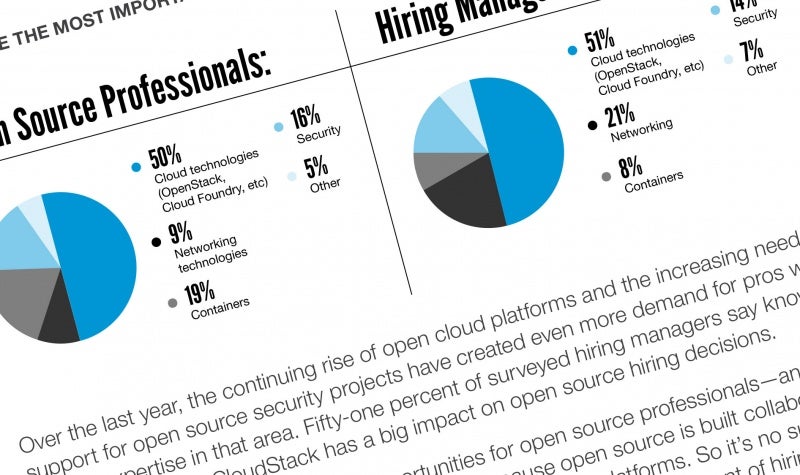
Open source careers may be even more in demand and rewarding in Europe than the rest of the world, according to new data from the 2016 Open Source Jobs Report released today by The Linux Foundation and Dice. European open source pros are more confident in the job market, get more incentives from employers, and more calls from recruiters than their counterparts worldwide, according to the data.

The full report, released earlier this year, analyzed trends for open source careers and the motivations of professionals in the industry. Now, the data have been broken down to focus specifically on responses from more than 1,000 open source professionals in Europe, and how they compare to respondents from around the world.

“European technology professionals, government organizations and corporations have long embraced open source,” said Jim Zemlin, executive director at The Linux Foundation, in a press release. “The impressive levels of adoption of and respect for open source clearly have translated into more demand for qualified open source professionals, providing strong opportunities for developers, DevOps professionals, and others.”

Europeans are more confident than their global counterparts in the open source job market, according to the data. Sixty percent of open source pros in Europe believe it would be fairly or very easy to find a new position this year, as opposed to only 50 percent elsewhere in the world.

Employers in Europe are also offering more incentives to hold onto staff. Forty percent of European open source professionals report that in the past year they have received a raise, 27 percent report improved work-life balance, and 24 percent report more flexible schedules. This compares to 31 percent globally reporting raises, and 20 percent globally reporting either a better work-life balance or more flexible work schedules. Overall, only 26 percent of Europeans stated their employer had offered them no new incentives this year, compared to 33 percent globally.

And recruiters are more active in seeking open source talent in Europe. 50 percent of Europeans reported receiving more than 10 calls from recruiters in the six months prior to the survey, while only 22 percent of respondents worldwide reported that many calls. While worldwide 27 percent of respondents received no calls from recruiters, only five percent of Europeans said the same.

Application development and DevOps skills are in high demand in Europe, similar to the rest of the world. Only in Europe, app development was in higher demand with 23 percent of European open source professionals reporting it as the most in-demand skill, compared with 11 percent of professionals elsewhere.  DevOps was the highest in-demand skill worldwide, at 13 percent, but second among Europeans at 12 percent.

Regardless of where they live in the world, however, all open source professionals said they enjoy working on interesting projects more than anything. Thirty-four percent in Europe, compared with 31 percent globally, agreed this was the best thing about their jobs. However, while respondents around the world said the next best things were working with cutting-edge technology (18 percent) and collaboration with a global community (17 percent), European professionals selected job opportunities second at 17 percent, followed by both cutting-edge technologies and collaboration tied at 16 percent each. Five percent of European respondents said money and perks were the best part of their job, more than double the two percent who chose this response worldwide.

For more information about the worldwide open source jobs market, download the free 2016 Open Source Jobs Report.


Tips for Evaluating a Company’s Open Source Culture

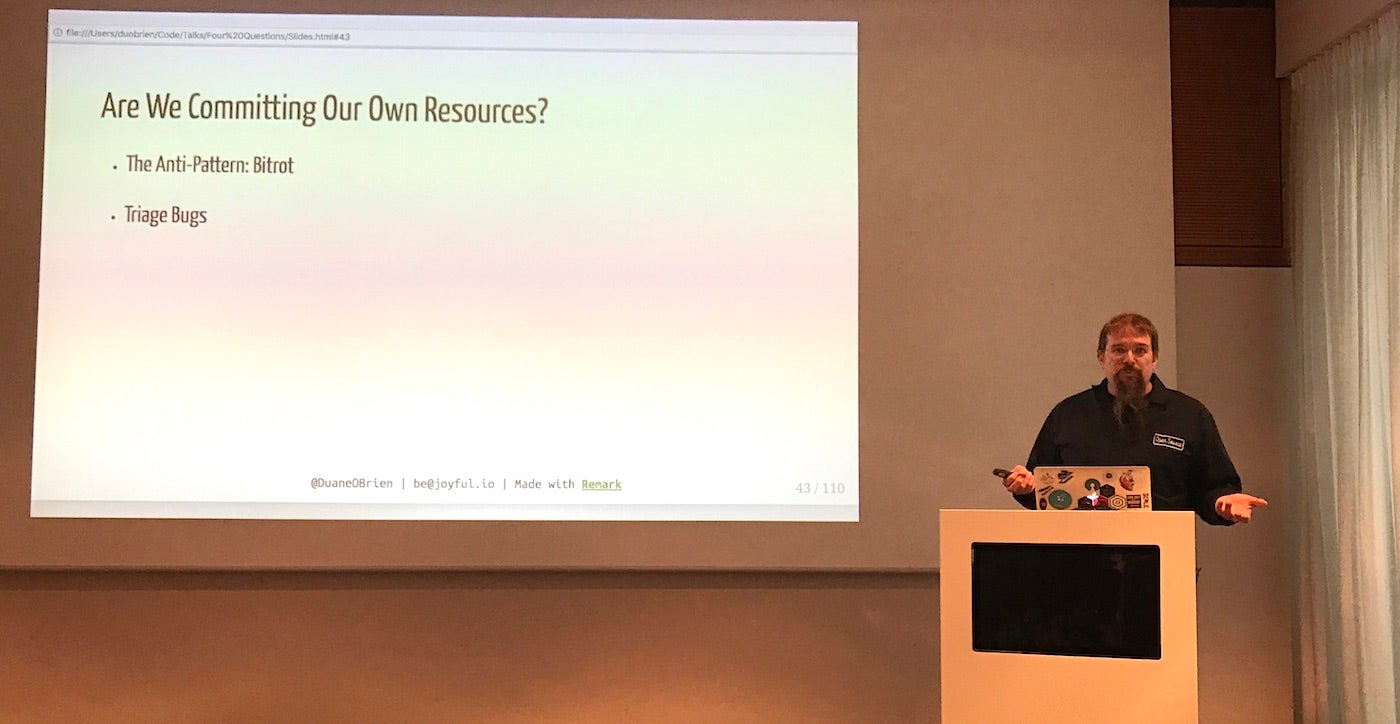
There are four essential questions a company should ask before it decides to create an open source project, according to Duane O’Brien, open source programs evangelist at PayPal.

  • Who cares?

  • Are we still using it?

  • Are we committing our own resources?

  • Can we develop it all in the open?

This framework, developed by O’Brien’s boss Danese Cooper, is useful in vetting internal software for release as open source projects.

In a nutshell, a company shouldn’t open source software that no one else cares about, that they themselves are not using, that they will not commit developer resources to maintaining, or that they continue to develop in secret without community inclusion. (You can see more details and the rationale behind each question in his blog post on OpenSource.com earlier this year.)

“If no one contributes it becomes unmaintained abandonware – a pollutant in the open source ecosystem,” O’Brien said in his talk on the four questions at LinuxCon Europe yesterday.

But what if the answers to these questions are consistently “no?” This is itself a litmus test for a company’s open source knowledge and culture.  

“Use these questions as pointers about what’s going on in the company,” O’Brien said.

1. Who cares?

“If you’re consistently getting: “no one cares,” it’s a good indicator that your technical community isn’t very well connected to the industry,” O’Brien said.  Open source advocates within a company should consider engaging in programs that encourage engineers to join communities and technical discussions. Some examples are:

  • start publishing a podcast

  • start publishing blog posts

  • encourage employees to attend meetups and talks

  • provide travel stipends for employees to attend conferences

  • bring outside experts in to give talks.

2. Are we still using it?

If a company only open sources projects they’re not using anymore, that’s bad corporate practice, O’Brien said. It damages that company’s reputation in the open source community.  

Instead, he recommends looking for what has replaced that defunct code and consider that as an open source contribution.

“Look for exciting things and mine them for open source projects,” he said.

3. Are we committing our own resources?

“If we aren’t committing resources, we’re probably pushing employees and engineers too hard,” O’Brien said. “They should never be asked to maintain open source projects on their own time.”

If a company never commits resources to open source, “it’s also probable that managers don’t understand what a healthy relationship with the open source community looks like,” he said.

More management training on the importance of open source software and how to best use it strategically may be beneficial.

4. Can we develop it all in the open?

And if code cannot be released publicly because developers don’t want anyone else to see it, you may have code quality issues. Or if they’re not willing to engage with the community, which is required to develop in the open, “then there are probably culture issues,” O’Brien said.

These issues can be addressed through employee training and improved code review processes.

Regardless of a company’s answers to the four questions, one of the best things they can do is share what they’ve learned with other developers and companies. It’s good source material for blog posts, white papers, and talks: what you tried, why it didn’t work, and what you’d do next time.

“So the people who come after us can see where we went wrong previously,” he said, and the entire industry can move forward.

So You Think You Know Linux User Management

Sure, managing users and groups on a Linux system is Linux 101. Not even that, it’s Linux pre-school. But maybe this roundup of tips and tricks will show you something useful you didn’t already know.

View UID, GID, Group

The id command shows a user’s UID, GID, and group assignments:


$ id carla
uid=1000(carla) gid=1000(carla) groups=1000(carla),
4(adm),24(cdrom),27(sudo),30(dip),46(plugdev),
113(lpadmin),128(sambashare),999(docker)

Use the -u flag to show only the UID, -g for GID only, and -gn to display the user’s primary group name.

Find All User Files

Use the find command to list all files belonging to a user. This example searches only /home, and records the results in a text file. You might want to search the entire filesystem, especially when you’re listing the files of a user that you are planning to remove from the system:


# find /home -uid 1001 | tee 1001-files.txt

You may search by -gid as well, to find files per group ownership.

Transfer File Ownership

You can transfer ownership of all the files belonging to one user to another user, perhaps a system user that you created especially for this purpose. This example changes ownership of all the files in a user’s home directory:


# chown -R newuser:newuser /home/username

The sure way to find and change ownership on all of a user’s files is to use find again, and search your entire filesystem. This may take a long time:


# find / -uid 1003 -exec chown -v 1010:1010 {} ;

You may use the user and group name if you prefer: chown -v newuser:newuser.

You may perform this same operation by -gid as well.

Adding and Removing Users

There is a lot of cruft in the Linux user management commands, and so we have useradd, userdel, usermod, groupadd, groupdel, groupmod, adduser, and addgroup.

adduser and addgroup exist on Debian and Debian derivatives such as Ubuntu. adduser and addgroup are Perl wrappers for useradd and groupadd. adduser walks you through a wizard for creating a new user. adduser and addgroup get their default settings from /etc/adduser.conf.

adduser is on Red Hat/CentOS/Fedora, but it is only a symlink to useradd, so it behaves like useradd.

useradd, userdel, usermod, groupadd, groupdel, and groupmod are present on all Linux distributions. Defaults for useradd are in /etc/default/useradd, or view them with useradd -D.

There is a funny quirk with useradd. Back in the olden days, it defaulted to putting all users into the same group, users (100), which meant that all users’ files were visible to all users. Then Red Hat created the “User Private Group” modification, which put every user into their own personal group, and nobody else could access their files without permission. There were raging flamewars over which way was the right way. Ah, the good old days, when the smallest change guaranteed months of fighting.

I’m sure you know all this, but let’s review adding and removing users anyway. adduser walks you through all the steps:


# adduser newbie
Adding user `newbie' ...
Adding new group `newbie' (1009) ...
Adding new user `newbie' (1007) with group `newbie' ...
Creating home directory `/home/newbie' ...
Copying files from `/etc/skel' ...
Enter new UNIX password: 
Retype new UNIX password: 
passwd: password updated successfully
Changing the user information for newbie
Enter the new value, or press ENTER for the default
        Full Name []: newbie user
        Room Number []: 
        Work Phone []: 
        Home Phone []: 
        Other []: 
Is the information correct? [Y/n]

/etc/skel is a nice little convenience; just put any files you want copied into all new users’ home directories in it.

useradd makes you do more:


# useradd -m -s /bin/bash -c User_Six,,,, user6

That creates the user’s home directory, assigns a login shell, and uses the comment field for the full name. This is how it looks in /etc/passwd:


user6:x:1010:1012:User_Six,,,,:/home/user6:/bin/bash

The commas are optional, and distros differ: Ubuntu uses four commas, and CentOS 7 doesn’t use any. The commas separate the GECOS fields. GECOS is a holdover from the very olden days and stands for “General Electric Comprehensive Operating System.” You can see what each field is for in the adduser output, though you can use them for anything you want.

deluser has several useful options for removing users. You can delete the user without deleting their files:


# deluser user7

Or remove all files on the system that belong to them:


# deluser user7 --remove-all-files

Backup the files in their home directory to /$user.tar.bz2:


# deluser user7 --backup

Or use --backup-to to select your backup directory.

userdel has an additional useful option, and that is --selinux-user to remove the user’s SELinux mappings.

Find and Slay User Processes

When you remove a user from your system, you should look for any stray processes they may have left behind:


$ ps U 1010

Or search by username:


$ ps U username

Then kill their leftover processes in the usual way, # kill [process number]. Or try the slay command, which finds and kills all processes belonging to a user, saving you the trouble of hunting down all of them. Use the -clean option to make clean shutdowns:


# slay -clean username
slay: Whoa, I have the power supreme.

slay has four modes, which you set in /etc/slay_mode: nice, normal, mean, and butthead.

Please refer to the fine man pages for these commands to learn about all of their options; yes, the man pages, because consulting the authoritative reference is a lot faster than testing bad answers from a Web search.

Advance your career in Linux System Administration. Check out the Essentials of System Administration course from The Linux Foundation.