Longtime users of the venerable Emacs editor can now use it with a sleek new skin that emphasizes consistency and ergonomics.
A new distribution of the Emacs editor, called Spacemacs, repackages the classic developer’s tool in a new skin for greater usefulness to a new generation of programmers.
Emacs is one of the oldest text editors in existence. Its most popular variant (now 31 years old) is GNU Emacs, originally developed by Free Software Foundation president Richard Stallman. The editor’s enduring popularity comes from its extensibility and programmability courtesy of the built-in Emacs Lisp scripting language — and from the culture of tooling that’s sprung up as a result. Extensions for Emacs (and, thus, Spacemacs) provide everything from integration with GitHub to Slack chat windows.
Java continues to evolve despite having been around for 20 years. If you’re looking for the bleeding edge, Java might not be your best bet. However, if you’re an existing Java developer, no need to worry about your marketability.
There has been a lot of talk lately about Java’s decline. In this article, I’ll clarify and sort things out. Java has been through some turmoil, such as the stewardship transfer from Sun to Oracle, the JCP process concerns and serious security issues. The recent concerns are mostly about Java falling behind in the innovation race. Let’s examine Java from multiple angles to get a good sense of where things are.
It may sound counterproductive from an Automation specialist to reveal the limitations of his job, but I have seen a wide range of inefficiencies, and many failed attempt to fix them.
To be clear from the outset, I do think technology and automation are a mandatory milestone in a company’s DevOps journey, but they are no more than tools or enabler to achieve something bigger: help delivering the business value people expect when you mention that term: DevOps.
If you’re familiar with the CALMS model, you know that Automation is only one of the 5 pillars for DevOps.
The others, Culture, Lean, Metrics and Sharing are equally important, and a good reminder that it’s not only about technology. The problem with those is that it’s a bit harder to action them directly, it requires some knowledge, analysis, thinking and… iterations!
ETSI touts that OSM can natively support VIMs from VMware and OpenStack and can also support various software-defined networking (SDN) controllers. It can also create a plug-in framework to improve platform maintenance and extensions.
This post is the final part of a 4-part series on monitoring Elasticsearch performance. Part 1 provides an overview of Elasticsearch and its key performance metrics, Part 2 explains how to collect these metrics, and Part 3 describes how to monitor Elasticsearch with Datadog.
Like a car, Elasticsearch was designed to allow its users to get up and running quickly, without having to understand all of its inner workings. However, it’s only a matter of time before you run into engine trouble here or there. This article will walk through five common Elasticsearch challenges, and how to deal with them.
In this article we will show how to create a database (also known as a schema), tables (with data types), and explain how to perform Data Manipulation Language (DML) operations with data on aMySQL / MariaDB server.
It is assumed that you have previously 1) installed the necessary packages on your Linux system, and2) executed mysql_secure_installation to improve the database server’s security. If not, follow below guides to install MySQL/MariaDB server.
[[ This is a content summary only. Visit my website for full links, other content, and more! ]]
When it comes to infrastructure for your open source project, you are never done, said Amye Scavarda, Gluster Community Lead at Red Hat, and Nigel Babu, Gluster CI/Automation Engineer at Red Hat. One theme during their LinuxCon Europe talk, “Making More Open: Creating Open Source Infrastructure for Your Open Source Project,” is that you can get closer to being done, but there is no such thing as “done” when it comes to infrastructure. Momentum is important – things are always moving, changing, and evolving. The work never ends as you figure out what can be left behind, what should be upgraded and how you can move into the future to incorporate new technologies.
Amye and Nigel talked about how when you start an open source project, you tend to focus on shipping and releasing your code. You don’t necessarily worry too much about how you got there and what you did to get it shipped. In the early days of Gluster, almost everyone had root access to the build machine, since it was only a few people working closely together. Fast forward a few years now that Red Hat has acquired Gluster, and there are many people across a wide variety of time zones working on the project. How to manage communication across a large, growing open source project became a big challenge.
When Nigel first started working on the project, he talked to many people to find the pain points and prioritized his time to work on the issues that were causing the most pain for others. He also had quite a few thoughts about, “How is this even working? It looks like it shouldn’t work.” In some cases, there was no real access control, and people were using some shared accounts. While this may be fine for a small team, it can go horribly wrong as the project continues to grow. In the early days of Gluster, there were plenty of firefighters working to solve immediate issues based on tribal knowledge, but there was very little documentation, which was making it hard to debug problems for new project members. It also created a culture of too many quick fixes, like restarting services regularly, instead of understanding why they failed and fixing the root cause. Rather than just talking to someone about each issue, they are encouraging people to file a bug, instead. With bug reports, you’ll be able to see the patterns and track issues over time.
Amye talked about the “Church of the Shaven Yak” where there is so much to do, but sometimes little progress being made. You pick a piece of the yak to shave every day, and you continue to make good progress, but while you are shaving one piece of the yak, the hair is growing back in another area. Nigel compares this to a marathon where you continue to run, but sometimes those miles seem to pass more slowly, and you don’t feel like you are making progress.
Much of this sounds a bit critical, but Amye stressed that you should be careful not to be too hard on the people who came before you. You should remember that the people working in the project when it was smaller were working in a different environment. They made the choices that seemed right for the project at the time, and the people who come into the project later when the project has continued to evolve probably won’t like the way you did some things. You will meet resistance because you are shaking up people’s worlds, and introducing new things and new processes, but sometimes you need to shake things up as your project grows and evolves.
I have this book — a Spanish edition of Stephen Coffin’s seminal manual, Unix System V Release 4: The Complete Reference. You can open it on any of its 700+ pages and bet your bottom dollar that the commands on the page will work in a modern-day Linux. Well, except where teletypes and tape storage are involved.
Said like that, you may think the *NIX command line hasn’t changed a lot since the early 1990s. This is not entirely true.
Take for instance the moreutils collection. You can install it on most distros with your regular package manager. On Ubuntu and Ubuntu-based distros, do
sudo apt install moreutils
On Debian, the following will do the trick:
suapt-get install moreutils
On Fedora, you can do:
yum install moreutils
OpenSUSE requires one more step of adding a specific repository, or you could simply visit openSUSE’s online package search and use the 1 Click Installservice.
Shiny new tools
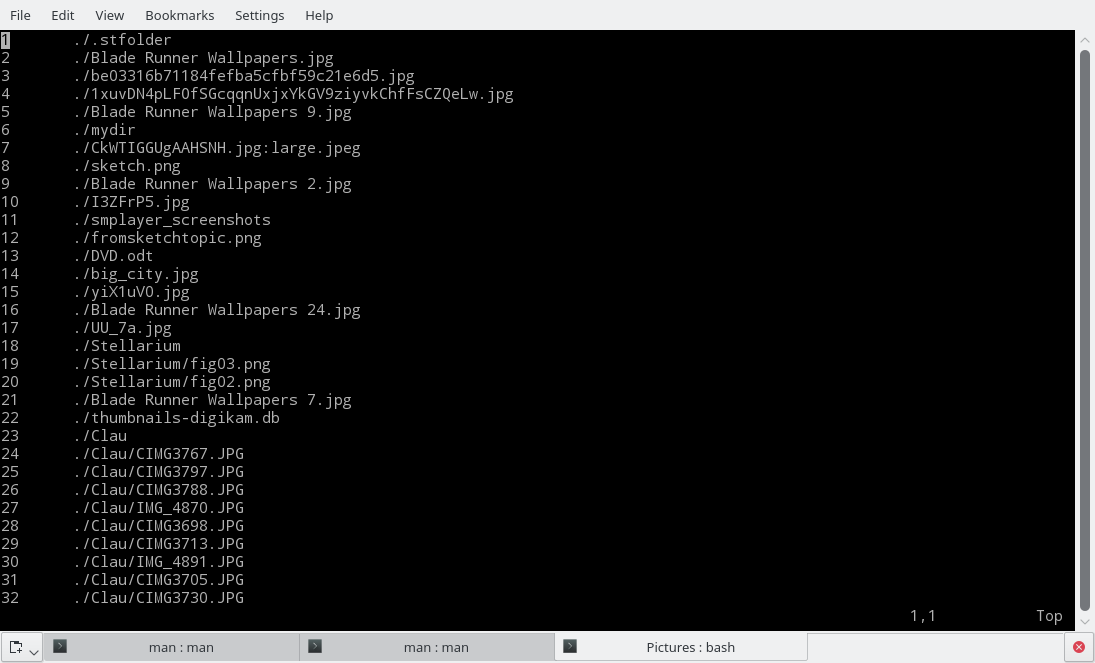
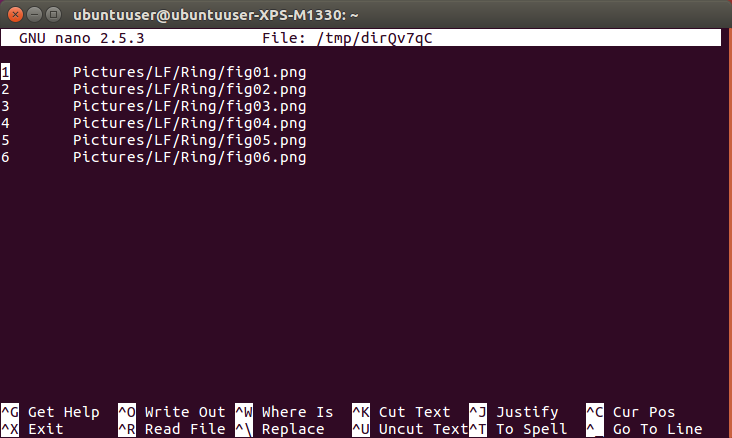
Moreutils provides you with a set of new tools that are not part of the standard Linux set but probably should be. For example, vidir provides an editor interface for modifying files and directories. Despite its name, vidir uses the default command-line editor, so if you have vi(m), sure, it will show a vim interface (Figure 1); but if you have nano or emacs configured, it’ll show nano or emacs interface (Figure 2).
Figure 1: The vidir utility will show the interface of your default shell editor, be it vi(m)…
Figure 2: …or nano, or something else entirely.
You can edit whole directories with:
vidir directoryname
Or just a subset of files with, for example:
find Pictures -iname "*.png" | vidir -
Notice the “-“. This tells vidir to take its input from a pipe.
You use your regular key combinations to modify your directories and files. If you’re using a vi-like interface, press ito modify directory and file names; press d[number]d to delete files or directories — note that vidir has a security feature built in, which won’t let you erase non-empty directories; press u to undo changes, and so on.
Soaking it all up: Sponge
According to its manpage, sponge reads standard input and writes it out to the specified file. Unlike a shell redirect, sponge soaks up all its input before writing the output file.
Now, that’s useful. To appreciate how much, try this: Create a plain-text file containing the names of the knights of the round table, or the days of the week, or whatever. Basically any file with a list of items *not* in alphabetical order:
ArthurLancelotGawainGeraintPercivalBors the YoungerLamorakKayGarethBedivereGaherisGalahadTristan
Save it as knights.txt.
If you wanted to sort the names alphabetically, what would you do? You’d probably try something like this:
you would start overwriting the file before you had finished reading from it, ruining it in the process. So, you need to mess around with that intermediate file,knights_sorted.txt. And you still have that original, unsorted file hanging around, too, which you now have to erase before renaming the sorted file, hence the long unwieldy chain of instructions. With sponge, however, you can do this:
sort knights.txt | sponge knight.txt
Check it out: no intermediate file!
cat knightsArthur Bedivere Bors the Younger Gaheris Galahad Gareth Gawain Geraint Kay Lamorak Lancelot Percival Tristan
Thanks to sponge, you can grab the content from a text file, do all the chained processes on it using things like sort, unique, sed, grep, and tr. Sponge will soak it all up, wait until all the lines have been processed, and then wring it all out to the same file, all in one blast.
Talking of soaking, let’s discuss pee. Despite its name, pee has *nothing* to do with bodily fluids. In fact, the name is a combination of pipe (as in the way you pass the output from one command onto another in *NIX systems) and tee (as in the tee *NIX command line instruction).
While tee re-routes the output from a command to files (cat knights.txt | tee k1 k2 k3 creates files k1, k2, and k3containing the content cat‘ed from knights.txt), pee pipes the output into a list of commands:
In the example above, using the output from the original and unorderedknights.txt, you pipe it first to sortto get an ordered list; then to wc (word count), which, with the -loption, returns the number of lines (13); and finally to grep, which then uses a simple regular expression pattern to print out only the lines that start with a capital “G“.
Pipe dream
Getting back to editors but staying with pipes that push stuff hither and thither, you must try vipe. Again, this is a twist on your default shell editor. Plunk it into your chain of piped commands and it will open up with the output from the prior instructions. For example:
will show all the outputs we saw in the previous example in a (in my case) vi-like editor. You can now edit the output to your heart’s content, removing, adding, and modifying lines. When you’re done, save and quit, and your edited output will be passed on to the next command in the chain.
Pretty cool, no?
Moreutils has more…
Moreutils comes with many more goodies. The combineutility merges the lines from two files using Boolean operations; ts adds a handy, human readable timestamp to each line taken from an input;ifdata makes extracting data from a network interface supereasy — very useful for scripting, and so on. Check out the project’s web page and the man pages for each command to see how they all work.
Although it is true you could emulate many of the behaviors of these new commands with a bit of command-line fu, tools like sponge, pee, and vipe just make working on the shell easier and more of a pleasure.
The Moreutilspackage is always evolving, and new stuff gets added from time to time. I, for one, am excited to see what gets included next.
The schism between two Arduino companies (that we covered in March 2015) has apparently been settled. The poster child for the open hardware movement is now under one company “Arduino Holding” and a new not-for-profit Arduino Foundation has been started. “Massimo Banzi, Co-Founder of Arduino LLC, commented, ‘Today is one of the best days in Arduino history. This allows us to start a new course for Arduino made of constructive dialogue and disruptive innovation in the education, Makers and IoT fields….”
I have been meaning to write this post for a long time, but one thing or another has gotten in the way. It’s important to me to provide an accurate history, definition, and proper usage of the Pets vs Cattle meme so that everyone can understand why it was successful and how it’s still vital as a tool for driving understanding of cloud. The meme has taken off because it helped created an understanding of the “old way” vs. the “new way” of doing things. That’s great, but the value of the meme becomes muddied when misused. We can all agree there’s enough muddy terminology and phraseology already, such as “cloud,” “hybrid,” and “DevOps”. So this post aims to set the record straight and assure a canonical history that everyone can reference and use.