Home Blog Page 692

How DevOps Can Improve Security and Compliance

One of our recent Continuous Discussion (#c9d9) podcast episodes focused on best practices around the tenets of DevOps and Security.

Our expert panel included: Andreas Wittig, author of “Amazon Web Services in Action” and software engineer, speaker, teacher and consultant; Dave Bechberger, a senior architect and developer at Expero; J. Paul Reed, an internationally recognized speaker on DevOps, release engineering, and operations complexity; Martin Cron, principal engineer at WiserCare;Sukhbir Dhillon, founder of Addteq; and our very own Anders Wallgren and Sam Fell.

During the episode, we discussed how DevOps can help secure your code, environments and processes, as well as how it can help improve visibility and compliance.

Read the full article here.

Open Source Pros Confident in Europe Job Market

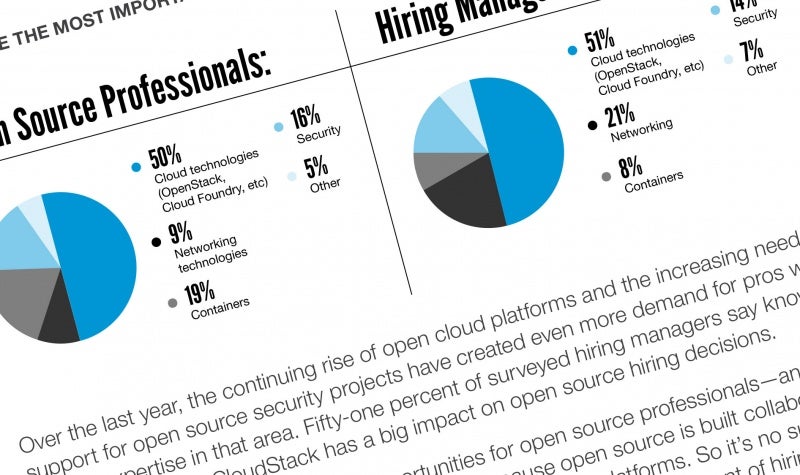
Open source careers may be even more in demand and rewarding in Europe than the rest of the world, according to new data from the 2016 Open Source Jobs Report released today by The Linux Foundation and Dice. European open source pros are more confident in the job market, get more incentives from employers, and more calls from recruiters than their counterparts worldwide, according to the data.

The full report, released earlier this year, analyzed trends for open source careers and the motivations of professionals in the industry. Now, the data have been broken down to focus specifically on responses from more than 1,000 open source professionals in Europe, and how they compare to respondents from around the world.

“European technology professionals, government organizations and corporations have long embraced open source,” said Jim Zemlin, executive director at The Linux Foundation, in a press release. “The impressive levels of adoption of and respect for open source clearly have translated into more demand for qualified open source professionals, providing strong opportunities for developers, DevOps professionals, and others.”

Europeans are more confident than their global counterparts in the open source job market, according to the data. Sixty percent of open source pros in Europe believe it would be fairly or very easy to find a new position this year, as opposed to only 50 percent elsewhere in the world.

Employers in Europe are also offering more incentives to hold onto staff. Forty percent of European open source professionals report that in the past year they have received a raise, 27 percent report improved work-life balance, and 24 percent report more flexible schedules. This compares to 31 percent globally reporting raises, and 20 percent globally reporting either a better work-life balance or more flexible work schedules. Overall, only 26 percent of Europeans stated their employer had offered them no new incentives this year, compared to 33 percent globally.

And recruiters are more active in seeking open source talent in Europe. 50 percent of Europeans reported receiving more than 10 calls from recruiters in the six months prior to the survey, while only 22 percent of respondents worldwide reported that many calls. While worldwide 27 percent of respondents received no calls from recruiters, only five percent of Europeans said the same.

Application development and DevOps skills are in high demand in Europe, similar to the rest of the world. Only in Europe, app development was in higher demand with 23 percent of European open source professionals reporting it as the most in-demand skill, compared with 11 percent of professionals elsewhere.  DevOps was the highest in-demand skill worldwide, at 13 percent, but second among Europeans at 12 percent.

Regardless of where they live in the world, however, all open source professionals said they enjoy working on interesting projects more than anything. Thirty-four percent in Europe, compared with 31 percent globally, agreed this was the best thing about their jobs. However, while respondents around the world said the next best things were working with cutting-edge technology (18 percent) and collaboration with a global community (17 percent), European professionals selected job opportunities second at 17 percent, followed by both cutting-edge technologies and collaboration tied at 16 percent each. Five percent of European respondents said money and perks were the best part of their job, more than double the two percent who chose this response worldwide.

For more information about the worldwide open source jobs market, download the free 2016 Open Source Jobs Report.


Tips for Evaluating a Company’s Open Source Culture

There are four essential questions a company should ask before it decides to create an open source project, according to Duane O’Brien, open source programs evangelist at PayPal.

  • Who cares?

  • Are we still using it?

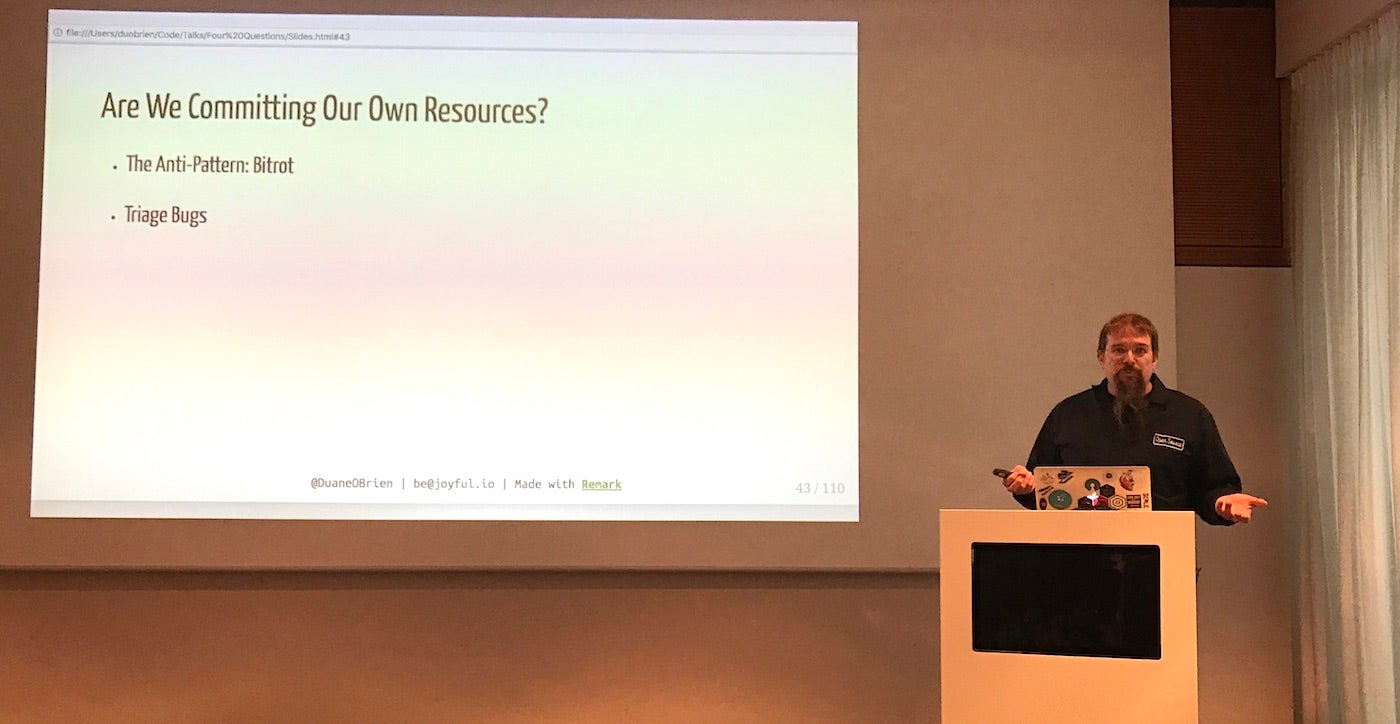
  • Are we committing our own resources?

  • Can we develop it all in the open?

This framework, developed by O’Brien’s boss Danese Cooper, is useful in vetting internal software for release as open source projects.

In a nutshell, a company shouldn’t open source software that no one else cares about, that they themselves are not using, that they will not commit developer resources to maintaining, or that they continue to develop in secret without community inclusion. (You can see more details and the rationale behind each question in his blog post on OpenSource.com earlier this year.)

“If no one contributes it becomes unmaintained abandonware – a pollutant in the open source ecosystem,” O’Brien said in his talk on the four questions at LinuxCon Europe yesterday.

But what if the answers to these questions are consistently “no?” This is itself a litmus test for a company’s open source knowledge and culture.  

“Use these questions as pointers about what’s going on in the company,” O’Brien said.

1. Who cares?

“If you’re consistently getting: “no one cares,” it’s a good indicator that your technical community isn’t very well connected to the industry,” O’Brien said.  Open source advocates within a company should consider engaging in programs that encourage engineers to join communities and technical discussions. Some examples are:

  • start publishing a podcast

  • start publishing blog posts

  • encourage employees to attend meetups and talks

  • provide travel stipends for employees to attend conferences

  • bring outside experts in to give talks.

2. Are we still using it?

If a company only open sources projects they’re not using anymore, that’s bad corporate practice, O’Brien said. It damages that company’s reputation in the open source community.  

Instead, he recommends looking for what has replaced that defunct code and consider that as an open source contribution.

“Look for exciting things and mine them for open source projects,” he said.

3. Are we committing our own resources?

“If we aren’t committing resources, we’re probably pushing employees and engineers too hard,” O’Brien said. “They should never be asked to maintain open source projects on their own time.”

If a company never commits resources to open source, “it’s also probable that managers don’t understand what a healthy relationship with the open source community looks like,” he said.

More management training on the importance of open source software and how to best use it strategically may be beneficial.

4. Can we develop it all in the open?

And if code cannot be released publicly because developers don’t want anyone else to see it, you may have code quality issues. Or if they’re not willing to engage with the community, which is required to develop in the open, “then there are probably culture issues,” O’Brien said.

These issues can be addressed through employee training and improved code review processes.

Regardless of a company’s answers to the four questions, one of the best things they can do is share what they’ve learned with other developers and companies. It’s good source material for blog posts, white papers, and talks: what you tried, why it didn’t work, and what you’d do next time.

“So the people who come after us can see where we went wrong previously,” he said, and the entire industry can move forward.

So You Think You Know Linux User Management

Sure, managing users and groups on a Linux system is Linux 101. Not even that, it’s Linux pre-school. But maybe this roundup of tips and tricks will show you something useful you didn’t already know.

View UID, GID, Group

The id command shows a user’s UID, GID, and group assignments:


$ id carla
uid=1000(carla) gid=1000(carla) groups=1000(carla),
4(adm),24(cdrom),27(sudo),30(dip),46(plugdev),
113(lpadmin),128(sambashare),999(docker)

Use the -u flag to show only the UID, -g for GID only, and -gn to display the user’s primary group name.

Find All User Files

Use the find command to list all files belonging to a user. This example searches only /home, and records the results in a text file. You might want to search the entire filesystem, especially when you’re listing the files of a user that you are planning to remove from the system:


# find /home -uid 1001 | tee 1001-files.txt

You may search by -gid as well, to find files per group ownership.

Transfer File Ownership

You can transfer ownership of all the files belonging to one user to another user, perhaps a system user that you created especially for this purpose. This example changes ownership of all the files in a user’s home directory:


# chown -R newuser:newuser /home/username

The sure way to find and change ownership on all of a user’s files is to use find again, and search your entire filesystem. This may take a long time:


# find / -uid 1003 -exec chown -v 1010:1010 {} ;

You may use the user and group name if you prefer: chown -v newuser:newuser.

You may perform this same operation by -gid as well.

Adding and Removing Users

There is a lot of cruft in the Linux user management commands, and so we have useradd, userdel, usermod, groupadd, groupdel, groupmod, adduser, and addgroup.

adduser and addgroup exist on Debian and Debian derivatives such as Ubuntu. adduser and addgroup are Perl wrappers for useradd and groupadd. adduser walks you through a wizard for creating a new user. adduser and addgroup get their default settings from /etc/adduser.conf.

adduser is on Red Hat/CentOS/Fedora, but it is only a symlink to useradd, so it behaves like useradd.

useradd, userdel, usermod, groupadd, groupdel, and groupmod are present on all Linux distributions. Defaults for useradd are in /etc/default/useradd, or view them with useradd -D.

There is a funny quirk with useradd. Back in the olden days, it defaulted to putting all users into the same group, users (100), which meant that all users’ files were visible to all users. Then Red Hat created the “User Private Group” modification, which put every user into their own personal group, and nobody else could access their files without permission. There were raging flamewars over which way was the right way. Ah, the good old days, when the smallest change guaranteed months of fighting.

I’m sure you know all this, but let’s review adding and removing users anyway. adduser walks you through all the steps:


# adduser newbie
Adding user `newbie' ...
Adding new group `newbie' (1009) ...
Adding new user `newbie' (1007) with group `newbie' ...
Creating home directory `/home/newbie' ...
Copying files from `/etc/skel' ...
Enter new UNIX password: 
Retype new UNIX password: 
passwd: password updated successfully
Changing the user information for newbie
Enter the new value, or press ENTER for the default
        Full Name []: newbie user
        Room Number []: 
        Work Phone []: 
        Home Phone []: 
        Other []: 
Is the information correct? [Y/n]

/etc/skel is a nice little convenience; just put any files you want copied into all new users’ home directories in it.

useradd makes you do more:


# useradd -m -s /bin/bash -c User_Six,,,, user6

That creates the user’s home directory, assigns a login shell, and uses the comment field for the full name. This is how it looks in /etc/passwd:


user6:x:1010:1012:User_Six,,,,:/home/user6:/bin/bash

The commas are optional, and distros differ: Ubuntu uses four commas, and CentOS 7 doesn’t use any. The commas separate the GECOS fields. GECOS is a holdover from the very olden days and stands for “General Electric Comprehensive Operating System.” You can see what each field is for in the adduser output, though you can use them for anything you want.

deluser has several useful options for removing users. You can delete the user without deleting their files:


# deluser user7

Or remove all files on the system that belong to them:


# deluser user7 --remove-all-files

Backup the files in their home directory to /$user.tar.bz2:


# deluser user7 --backup

Or use --backup-to to select your backup directory.

userdel has an additional useful option, and that is --selinux-user to remove the user’s SELinux mappings.

Find and Slay User Processes

When you remove a user from your system, you should look for any stray processes they may have left behind:


$ ps U 1010

Or search by username:


$ ps U username

Then kill their leftover processes in the usual way, # kill [process number]. Or try the slay command, which finds and kills all processes belonging to a user, saving you the trouble of hunting down all of them. Use the -clean option to make clean shutdowns:


# slay -clean username
slay: Whoa, I have the power supreme.

slay has four modes, which you set in /etc/slay_mode: nice, normal, mean, and butthead.

Please refer to the fine man pages for these commands to learn about all of their options; yes, the man pages, because consulting the authoritative reference is a lot faster than testing bad answers from a Web search.

Advance your career in Linux System Administration. Check out the Essentials of System Administration course from The Linux Foundation.

Classic Emacs Editor Gets a New-School Makeover

Longtime users of the venerable Emacs editor can now use it with a sleek new skin that emphasizes consistency and ergonomics.

A new distribution of the Emacs editor, called Spacemacs, repackages the classic developer’s tool in a new skin for greater usefulness to a new generation of programmers.

Emacs is one of the oldest text editors in existence. Its most popular variant (now 31 years old) is GNU Emacs, originally developed by Free Software Foundation president Richard Stallman. The editor’s enduring popularity comes from its extensibility and programmability courtesy of the built-in Emacs Lisp scripting language — and from the culture of tooling that’s sprung up as a result. Extensions for Emacs (and, thus, Spacemacs) provide everything from integration with GitHub to Slack chat windows.

Read more at InfoWorld

The Evolution of Java Development

Java continues to evolve despite having been around for 20 years. If you’re looking for the bleeding edge, Java might not be your best bet. However, if you’re an existing Java developer, no need to worry about your marketability. 

There has been a lot of talk lately about Java’s decline. In this article, I’ll clarify and sort things out. Java has been through some turmoil, such as the stewardship transfer from Sun to Oracle, the JCP process concerns and serious security issues. The recent concerns are mostly about Java falling behind in the innovation race. Let’s examine Java from multiple angles to get a good sense of where things are.

Read complete article

Automation Is Not DevOps

It may sound counterproductive from an Automation specialist to reveal the limitations of his job, but I have seen a wide range of inefficiencies, and many failed attempt to fix them.

To be clear from the outset, I do think technology and automation are a mandatory milestone in a company’s DevOps journey, but they are no more than tools or enabler to achieve something bigger: help delivering the business value people expect when you mention that term: DevOps.

If you’re familiar with the CALMS model, you know that Automation is only one of the 5 pillars for DevOps.

The others, Culture, Lean, Metrics and Sharing are equally important, and a good reminder that it’s not only about technology. The problem with those is that it’s a bit harder to action them directly, it requires some knowledge, analysis, thinking and… iterations!

Read more at The DevOps Collective

ETSI Releases Its Open Source MANO Software Stack

ETSI’s Open Source MANO (OSM) group today announced Release ONE, the first code out of the NFV management and orchestration (MANO) project.

ETSI touts that OSM can natively support VIMs from VMware and OpenStack and can also support various software-defined networking (SDN) controllers. It can also create a plug-in framework to improve platform maintenance and extensions.

Read more at SDx Central

How to Solve 5 Elasticsearch Performance and Scaling Problems

This post is the final part of a 4-part series on monitoring Elasticsearch performance. Part 1 provides an overview of Elasticsearch and its key performance metrics, Part 2 explains how to collect these metrics, and Part 3 describes how to monitor Elasticsearch with Datadog.

Like a car, Elasticsearch was designed to allow its users to get up and running quickly, without having to understand all of its inner workings. However, it’s only a matter of time before you run into engine trouble here or there. This article will walk through five common Elasticsearch challenges, and how to deal with them.

Read more at Datadog

Learn MySQL / MariaDB for Beginners – Part 1

In this article we will show how to create a database (also known as a schema), tables (with data types), and explain how to perform Data Manipulation Language (DML) operations with data on aMySQL / MariaDB server.

It is assumed that you have previously 1) installed the necessary packages on your Linux system, and2) executed mysql_secure_installation to improve the database server’s security. If not, follow below guides to install MySQL/MariaDB server.

[[ This is a content summary only. Visit my website for full links, other content, and more! ]]