This latest release continues the river theme but is sensibly named Colorado: It has other advantages as well, namely support for key features such as security, IPv6, service function chaining (SFC) testing, virtual private networks and more.
In addition, Colorado is laying some key groundwork for what lies ahead as the industry comes to terms with the MANO (management and network orchestration) dilemma, says Heather Kirksey, Open Platform for NFV Project Inc. ‘s executive director.
Regardless of the level at which you’re doing your programming, security is going to get in the way. No amount of application abstraction or modern development process seems capable of shielding developers from the barriers raised by security. It’s pretty hard not to hate security when it doesn’t seem to add any intrinsic value, and often gets in the way of providing a delightful user experience. To top it off products can get hacked anyway, in spite of any and all work you do to make your products secure.
I’m one of the operators of Wonderland, Jimdo’s in-house PaaS for microservices.
Two weeks ago, on September 5, I did something embarrassing at work.
We were debugging a broken deployment of our central API service. This API is nothing less than the entry point for managing all container-based services running on our platform, including most of our own system services (by virtue of dogfooding).
In an attempt to fix the problem we were experiencing — our API service failed to scale to a certain number of replicas — I deleted what I believed to be a duplicate instance of the corresponding ECS service in the AWS Management Console…
Microsegmentation, a method to create secure, virtual connections in software-defined data centers (SDDCs), has already emerged as one of the primary reasons to embrace network virtualization (NV). But some vendors believe that East-West encryption of traffic inside the data center could be the next stop in data-center security.
For example, VMware says it is looking at encrypting East-West traffic inside the data center, adding another layer ofsecurity to the SDDC. Why is that important? Today, most firewalls operate on the perimeter of the data center – either guarding or encrypting data leaving the data center for the WAN. And some security products may encrypt data at rest inside the data center. But encrypting the traffic in motion between servers inside the data center – known in the business as the East-West traffic – is not something that’s typically done.
Earliest mentions of the term “bitcoin” in patent titles and abstracts date back to around 2009, while the term “blockchain” begins to appear in patent titles from around 2011. As of June 22, 2016, there were 492 published patent families directed to the theme of blockchain and 192 relating to bitcoin.
Patent applications filed over the last year and a half would not be visible in these statistics, and it is expected that significant numbers of new patent applications connected to these themes have been filed in that period. The numbers we are seeing likely represent the tip of the iceberg.
It’s tricky to say exactly who’s filing these patents, but, anecdotally, the early-stage business community is out-innovating the incumbent banking organizations by some measure, and are likely to be responsible for much of this innovation.
Even in a time when significant Internet speeds are available throughout the globe, every effort to optimize website load times is welcome with open arms.
In this article, we will discuss a method to increase transfer speeds by reducing the file sizes through compression. This approach brings an extra benefit in that it also reduces the amount of bandwidth used in the process, and makes it cheaper for the website owner who pays for it.
To accomplish the goal stated in the above paragraph, we will use Nginx and its built-in gzip module in this article.
[[ This is a content summary only. Visit my website for full links, other content, and more! ]]
Bridget Kromhout can be found traveling and speaking at conferences on a variety of DevOps topics. She is a global core organizer for devopsdays and is on the program committee for Velocity in addition to organizing local tech meetups in Minneapolis. She is a Principal Technologist for Cloud Foundry at Pivotal and a host of the Arrested DevOps podcast.
Linux.com: Why are so many organizations embracing DevOps?
Bridget Kromhout is a Principal Technologist at Pivotal and core organizer for devopsdays.
Bridget Kromhout: Turns out software is a competitive advantage. As traditional enterprises consider the very real possibility of being “disrupted” (whatever that means in their context), they look for inspiration to the practices of high-performing organizations.
Linux.com: Why are individuals interested in participating?
Bridget: Shiny new tools are a typical draw because résumé-driven development is totally a thing. Once in this space, though, many of us find that better collaboration makes for a happier work life.
Linux.com: What’s the primary advantage of DevOps?
Bridget: DevOps offers the ability to collaborate across teams to reach the organization’s goals. Removing barriers allows for swift reaction to changing circumstances.
Linux.com: What is the overwhelming hurdle?
Bridget: Change is hard. The future may be here, but it’s not evenly distributed. Organizational fiefdoms, long-term contracts, and the classic fear-uncertainty-doubt combo all mean that a DevOps transformation is definitely going to be an ongoing journey, not a ticky box on this quarter’s to-dos.
Linux.com: What advice would you give to people who want to get started in DevOps?
Bridget: I’ve written extensively on this topic, but the short version is: join your local community. There’s probably a meetup or a devopsdays near you, and the DevOps community is replete with people who want to help and share.
This week in open source and Linux news, a new OpenStack course from The Linux Foundation and edX is offered, GitHub’s CEO sets user goals, and more! Keep on top of the latest Linux and OSS headlines with this weekly digest!
1) The Linux Foundation and edX offering a free OpenStack course.
One thing a Linux sysadmin must know how to do is recover from a change gone bad. It happens. You install, upgrade, or configure a system or service and things immediately go wrong. What do you do? If you’ve made a copy of the configuration file, you’re okay. If the software didn’t install too many dependencies (which could have, in turn, caused a systemic issue), then you can simply uninstall. But, there are times when you will want to be able to easily roll back those changes.
If you happen to be employing the Btrfs filesystem, this isn’t a problem. With Btrfs, you have access to an amazingly handy tool called Snapper that allows the taking of snapshots and rolling back to those snapshots (in the event of an issue). Snapper is a command-line program designed for filesystem snapshot management that allows you to create, delete, and compare snapshots as well as undo changes made between snapshots.
In this tutorial, I will walk you through the process of rolling back changes with Snapper, and I’ll be using the latest release of openSUSE Leap. It should also be noted that openSUSE and SUSE both offer a YaST plugin for Snapper that makes this process even easier. Before you venture into the land of the GUI, it’s always best to understand the underlying command first.
First steps
My test bed was a fresh install of openSUSE Leap. Because this was a fresh install, no Snapper configurations were available. You could open the YaST tool, go to Miscellaneous > Snapper and YaST would error out. To fix this, all you have to do is run a system upgrade with zypper. So, the command zypper upgrade would not only upgrade the system, it would create a Snapper configuration for /. You could also do this manually with the command:
snapper -c root create-config /
The above command creates a new configuration file, named “root” for the root directory (/). Configurations are crucial to Snapper; so much so that, without them, you’ll get nowhere. Fortunately, having a root config is all you need for basic usage of Snapper.
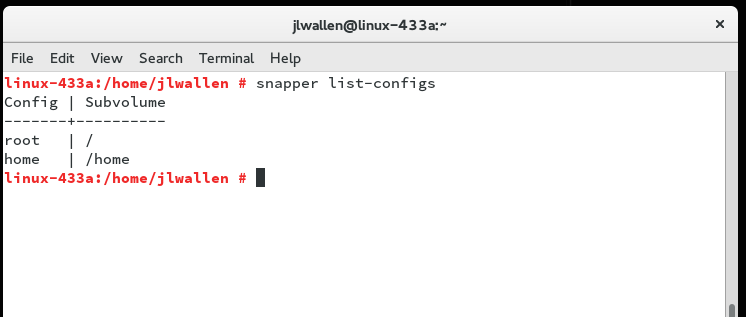
If you issue the command snapper list-configs, you’ll now see there is at least one configuration listed (Figure 1).
Figure 1: The root configuration is what we manually created.
If you issue the command snapper-list, snapper will reply by listing all of the currently saved snapshots. If this is a fresh install, chances are there aren’t many… or any. Let’s create one.
Creating a snapshot
Suppose you’re about to install Apache and you want to first take a snapshot of the system before you install the web server. Everything on the server is running great and you’ve yet to install Apache. Let’s take a snapshot. Here’s the command you’d use:
snapper create --type pre --print-number --description "Before LAMP install"
Let’s break that command down.
snapper: That’s the command. Simple.
create: This tells Snapper you are going to create a new snapshot.
–type pre: This tells Snapper you’re creating a snapshot prior to changes being made.
–print-number: This instructs Snapper to print out the number associated with this snapshot (you will need this when creating the related post snapshot). This number is important.
–description: This is the human-readable description of the snapshot (very important in helping you discern which snapshots are associated with specific changes or periods).
Now that you have the pre snapshot created, do whatever it is you need to do to the server (for our example, installing Apache). Once that task is complete, you have to then create an associated post snapshot. You see, for every important change on your server, you’ll want to create a preand post snapshot (pre before you make a change, post after you make the change). That is how you can then roll back the changes.
To create the post snapshot, you’d issue the following command:
snapper create --type post --pre-number X --description "After the Apache install"
Where X is the number printed out when thepretype snapshot was created.
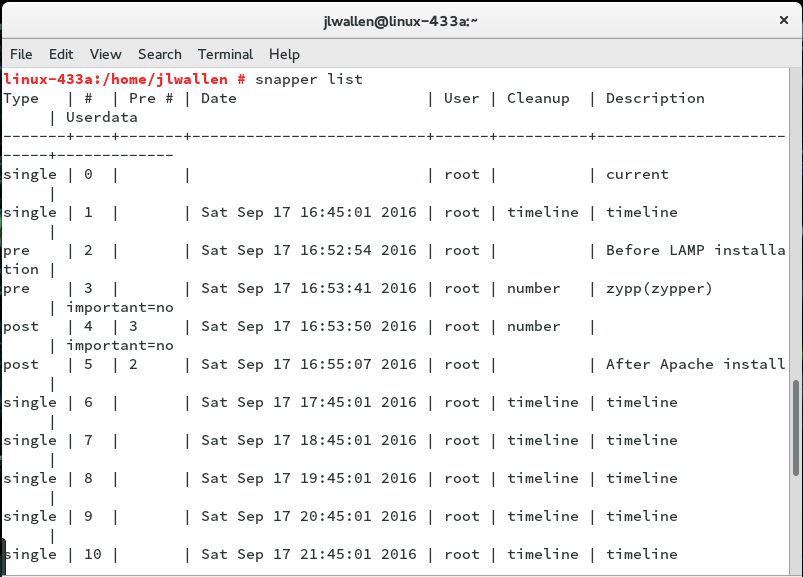
Remember, in creating the pre snapshot, Snapper will print out the ID number associated with the first snapshot… that is what you’ll use for –pre-number variable. Issue the command snapper list and you will see the pre and post snapshts listed (Figure 2).Figure 2: My pre snapshot ID is 2 and my post snapshot ID is 5.
Checking changes
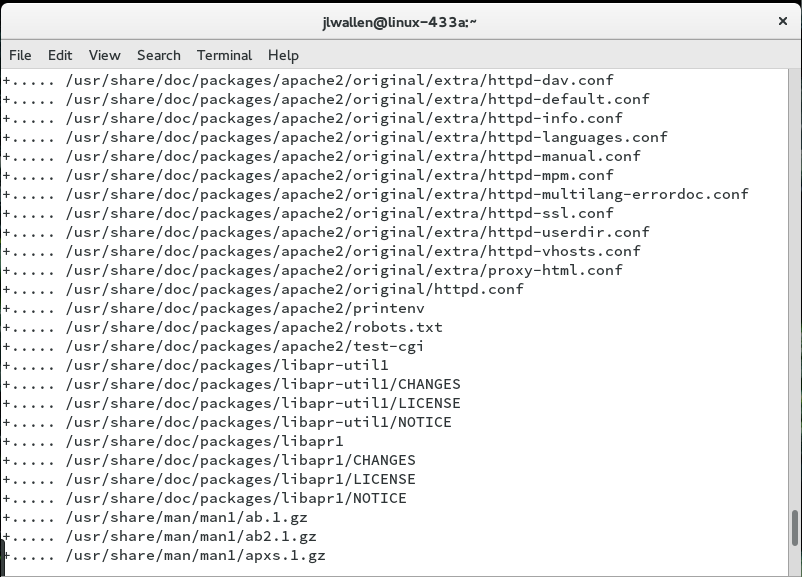
This is where things start to get really handy. You can instruct Snapper to list out all changes made to the system between snapshots. So we have a pre ID of 2 and a post ID of 5. What alterations have been made? Issue the command snapper status 2..5and the output will list every change (Figure 3).
Figure 3: Changes made after Apache was installed are all listed.
In the far left of each line, you’ll notice a + symbol which means whatever follows was added. A c would indicate change and a – would indicate a deletion.
You can also run a diffon a specific file. Suppose you notice a c for the line /etc/sysconfig/apache2 and you want to know how that file was changed. You can issue the command:
snapper diff 2..5 /etc/sysconfig/apache2
Thediff command will then run on the /etc/sysconfig/apache2file, comparing it between pre and post Apache install. You can also run snapper diff 2..5 without a file name to get a diffof every change made.
Undoing changes
With the help of diff, you’ve managed to figure out where the problem lies and need to undo that change. This is actually really simple. Let’s say, for the sake of example, the problem lies in the /etc/sysconfig/apache2file. To roll back to the pre state, you would issue the command:
snapper -v undochange 2..5 /etc/sysconfig/apache2
The above command would revert the /etc/sysconfig/apache2 file from the postsnapshot state to the pre snapshot state (in this case, before Apache was installed).
It’s really that simple. Even without making use of the YaST Snapper plugin, you’ve rolled back changes using nothing but the command line.
Pure power
With Snapper, you have pure power at your fingertips. With just a few quick commands you can take snapshots, compare snapshots, and rollback changes from one snapshot to another. Once you’ve mastered the Snapper command, make sure to take a look at the YaST Snapper plugin; you’ll find it offers the same power, in an easier to use GUI form.
To learn more about Snapper, issue the command man snapperand behold the sum total power that tool has to offer.