Home Blog Page 704

2016 LiFT Scholarship Winner Ksenija Stanojevic: Learning Linux Driver Development

Ksenija Stanojevic first became acquainted with the Linux kernel community after being accepted for an Outreachy internship. She was one of 14 aspiring IT professionals to receive a 2016 Linux Foundation Training (LiFT) scholarship, announced last month.   

After experimenting a bit with the kernel, Ksenija quickly began submitting patches, specifically working on splitting an existing input/output driver to better support a multi-function device (MFD). She is looking forward to learning more about device drivers, and eventually writing her own drivers.

Ksenija Stanojevic, is a 2016 LiFT Scholarship winner in the Linux Kernel Guru category.
Linux.com: How did you learn Linux?

Ksenija Stanojevic: A few years ago I decided to try Linux and it was surprisingly easy to install and use. Since I started with Ubuntu there were already lots of tutorials online for beginners. Initially I was interested in learning about the Linux kernel but using Linux led me to discovery of new tools such as vim, git, and bash shell.

I started experimenting with the kernel over a year ago when I wrote a simple hello module and loaded it into the kernel. After that I started making simple fixes using scripts such as checkpatch.pl and submitting patches. My confidence grew and eventually I joined the Eudyptula challenge to deepen my knowledge and I started making even bigger changes to the kernel tree. After being accepted into the Outreachy program, I had the opportunity to learn more about driver development and also got to work on embedded ARM devices running the Linux operating system.

Linux.com: How did you get involved in the kernel development community and how are you contributing?

Ksenija: My first interaction with the Linux kernel development community was over a year ago, when I decided to apply for an Outreachy internship. In a short period of time I became familiar with sending patches and using vim and git, tools that were previously foreign to me.

During the internship I worked on splitting the existing I/O driver into MFD with adc and touchscreen parts (patchwork: https://patchwork.kernel.org/project/linux-input/list/?submitter=130571). This was very exciting because I got to work on embedded hardware and test my patches. Also I contributed to the y2038 project led by Arnd Bergmann, preventing the crash in year 2038 on certain 32-bit systems.

I learned a lot by working with the community, especially from comments made by other developers, which are usually very detailed. Every time a patch got accepted I felt happy and driven to continue contributing. I want to learn more about device drivers and make more valuable contributions, and maybe eventually write my own driver. You can see my accepted patches.

Linux.com: Why do you want to be a kernel developer?

Ksenija: I love the idea of making code that will make certain functionality of hardware work and that gives me a sense of accomplishment. That also pushes me to have a deeper understanding of the underlying hardware and I like the challenge of using a wide variety of skills and components.

Linux.com: What is your dream job and how will the LiFT scholarship help you achieve that?

Ksenija: I am currently seeking a full-time position as a linux kernel developer, preferably in open source. This scholarship will directly help me achieve my goals. Apart from giving more job opportunities it will allow me to work in a field that I love and am passionate about.

I want to be a more valuable contributor to the Linux kernel open source community and eventually a reviewer. I believe that hands-on contributing is one of the most effective ways to learn, because it allows interaction with more knowledgeable developers while giving back to the community. This Training Scholarship could help me get closer to that goal. I’m very hard-working, passionate and curious and also make the most of opportunities presented to me.


Interested in learning more about starting your IT career with Linux? Check out our free ebook “A Brief Guide To Starting Your IT Career In Linux.”
Download Now


This Week in Open Source News: GitHub Speaks to Tech Industry Shifts, Hyperledger’s Growth Shows Growing Importance of Blockchain, & More

This week in Linux and OSS news, GitHub CEO shares thoughts on tech industry’s heavyweights shifting to Linux, National Law Review spotlights Hyperledger, and more! Read on to get caught up on this week’s top Linux and open source headlines.

GitHub CEO Chris Wanstrath speaks about how tech industry heavyweights are “no longer opposed to open source software” and why.
1) “Big companies are now embracing open source. If more companies are turning to software, they are going to need someplace to store all that code. Enter GitHub…”

GitHub CEO Talks About How Microsoft and Apple Are Changing– Fortune

2) NLR provides an overview of blockchain and its importance, including The Linux Foundation’s Hyperledger Project.

Beyond Bitcoin: The Potential of Distributed Ledger Technology (Part 1) – The National Law Review

3) Orange to be the first network operator to test AT&T’s ECOMP network management and orchestration platform.

Orange First to Test AT&T’s ECOMP– Light Reading

4) “Microsoft has been focused on open sourcing software for at least a decade, but it has rapidly increased this work in recent years.”

Microsoft Really Does Love Linux– The Verge

5) Vim 8 has been released. 

Classic Unix/Linux Editor Vim Gets First Update in Years– ZDNet

10 GNOME Shell Extensions You Should Be Using

When GNOME Shell (aka GNOME 3) dropped into the world of Linux, many criticized it for not being flexible enough. The new-look GNOME was seen as a step backward in productivity and efficiency. GNOME however had a few tricks up its sleeve to silence such naysayers. One such trick is GNOME Shell Extensions, which bring some much-needed configuration options to the GNOME 3 desktop environment. Offering everything from aesthetics to actual productivity, there’s a GNOME Shell Extension to fill whatever void you see in the latest version of GNOME.

But where to start? Right here. I’m going to list 10 GNOME Shell Extensions that you should already be using to help make your desktop experience more efficient, productive, and enjoyable.

Without further ado, let’s extend that desktop.

Dash To Dock

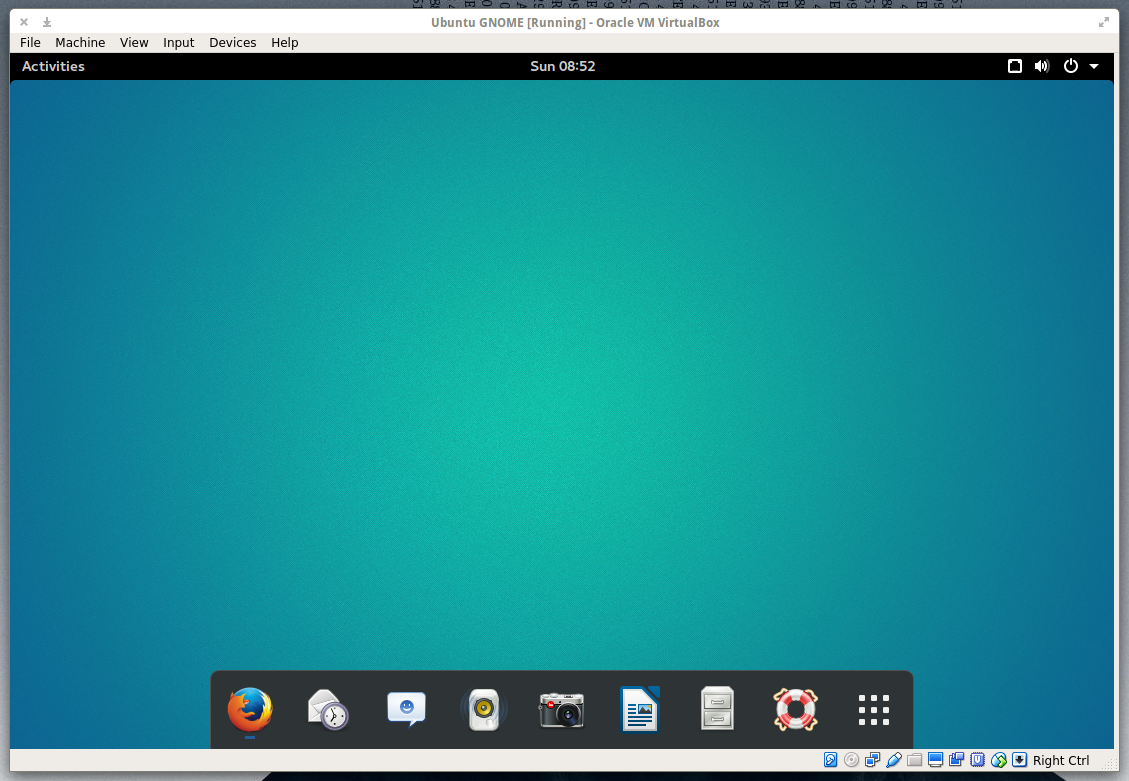
If one of the issues keeping you from being productive on GNOME 3 is the Dash, and you miss the idea of having a panel or a dock, just install Dash To Dock and all of your Dash favorites will appear on a quickly accessed dock (Figure 1). You can place Dash To Dock on the left or right side or on the bottom of your screen and even enable auto-hide. To get to the Dash To Dock settings, right-click the nine-square grid icon (the Show Applications button).

Figure 1: Dash To Dock is a quick fix for those that prefer quick access to applications.

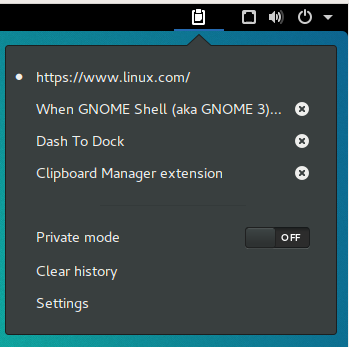
Figure 2: An extension to make any hard core fan of copy/paste happy.

Clipboard Indicator

For you consider yourself a clipboard power user, you’ll want this extension.

Once installed, Clipboard Indicator sets up home on the top panel and offers up a history of things you’ve copied to the clipboard. If you want to make use of an entry from your history, simply click on the indicator, and then click on the copied text you want to use (Figure 2). Go to the application to copy the text to and hit Ctrl+v and the text will appear.

Drop Down Terminal

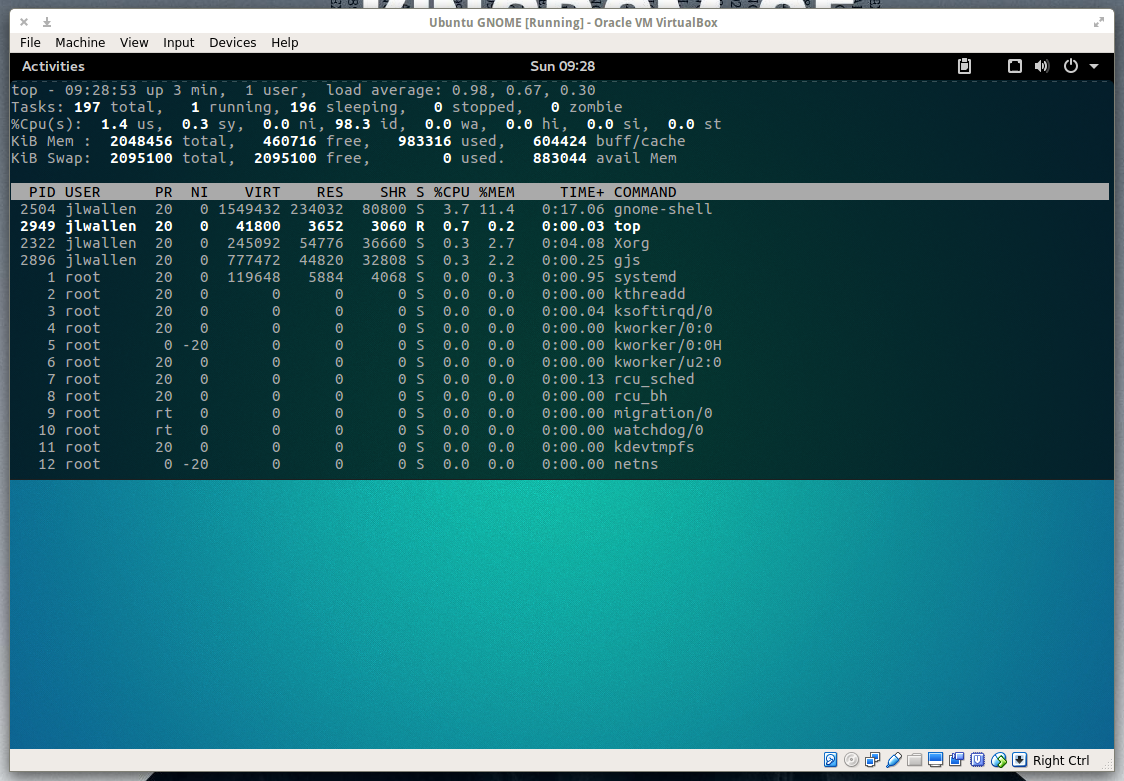
If you’re one to need a terminal at the ready, you’ve probably used the likes of Guake or Yakuake. If you’re using GNOME Shell, you don’t have to bother installing either of those tools, because there’s a simple GNOME Shell Extension that’ll do the trick perfectly. Drop Down Terminal offers a quick toggle terminal that can drop down from the top (Figure 3) or rise up from the bottom. Either way, your terminal experience will be far more efficient.

Figure 3: Drop Down Terminal running the top command.

Coverflow Alt-Tab

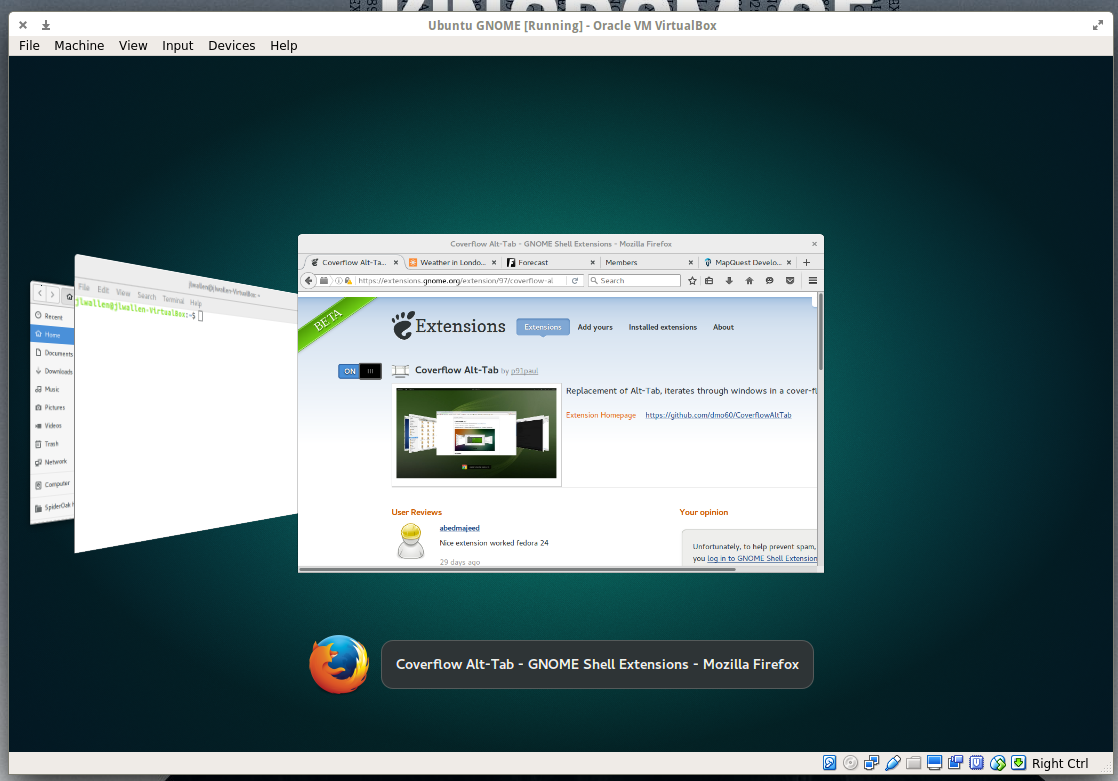
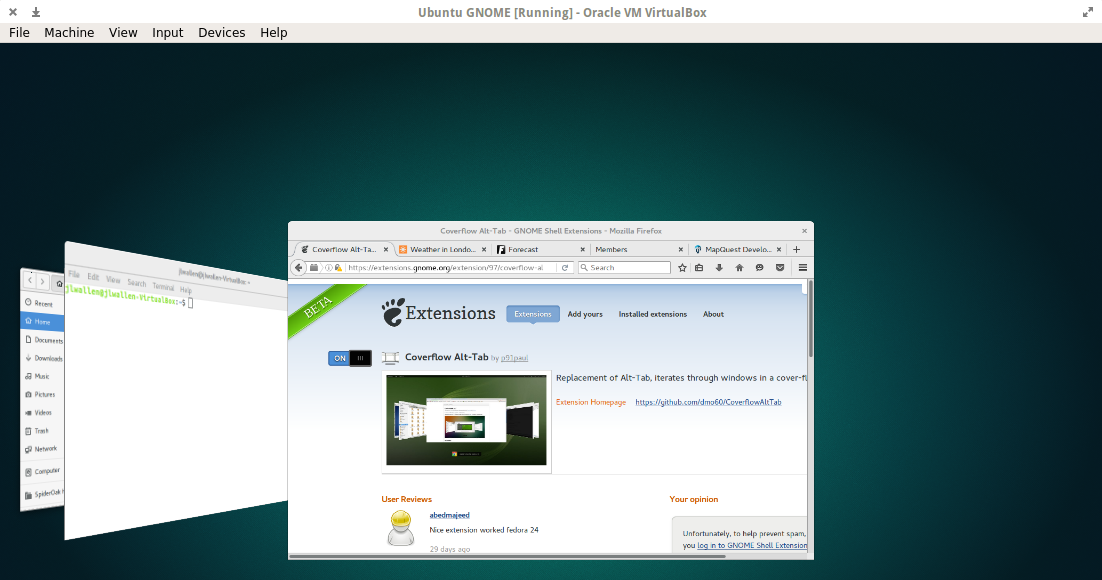
Although this extension may only seem to play on your aesthetic taste, it actually does make for a much more efficient means of scrolling through your open windows. If you press Alt+Tab, the extension will display open windows in a coverflow style (Figure 4).

Figure 4: Coverflow does make all of your open apps easier to scroll through.

Figure 5: Gain quick access to your most recently opened items.

Figure 6: Click a location and your default file manager will open to reveal the mount point or folder.
Recent Items

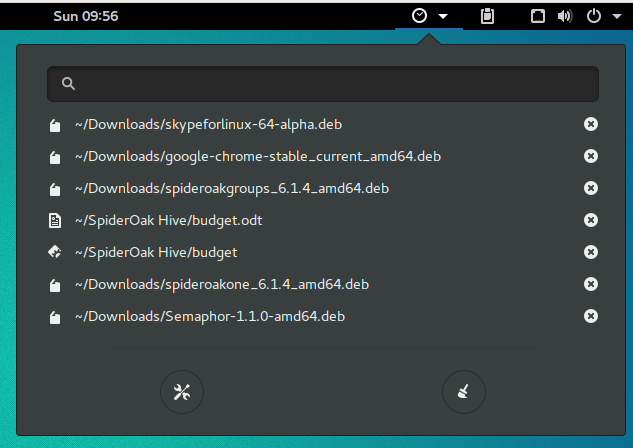
If you like to have quick access to files you’ve recently worked on, Recent Items is the extension you need. This extension will add a convenient button to your GNOME panel that you can click to reveal the most recent files you’ve worked with (Figure 5). Click on the listing you want to re-open and it will open in the associated application. Quick and easy.

Places Status Indicator

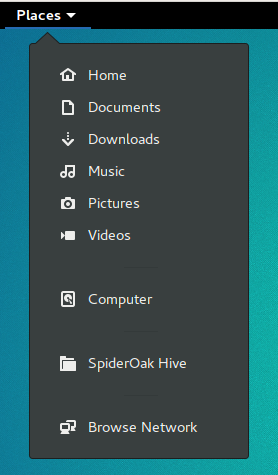
If you want a quick drop-down indicator that will give you immediate access to your various mount points on your drive (Figure 6), Places Status Indicator is the way to go. This extension makes it incredibly convenient to access Home, Pictures, Videos, Documents, Downloads, Music, Computer, any associated cloud drives, and your network.

Easy Screen Cast

If you’ve ever needed the ability to easily capture a video/audio screencast of your GNOME desktop, look no further than this amazing extension. There’s no need to install anything beyond Easy Screen Cast… it’s all there.

Figure 7: Easy Screen Cast is the simplest way to capture video of your desktop.

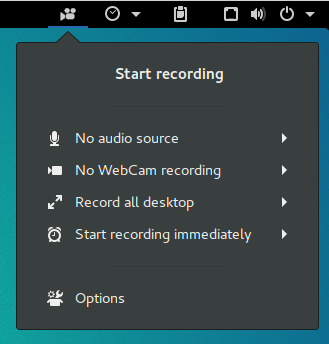
You can even change the video file container to MP4, WebM, Mkv, or Ogg. With Easy Screen Cast, all you have to do is click the camera icon in the panel and click Start Recording (Figure 7). When you’re done, click the icon and then click Stop Recording.

Dynamic Top Bar

As a user of Elementary OS, I have to say that having the ability to make the top bar transparent in GNOME 3 gives me the feeling of being home. This is another extension focused solely on aesthetics, but for anyone that doesn’t like seeing the top panel all the time, this is the way to go.

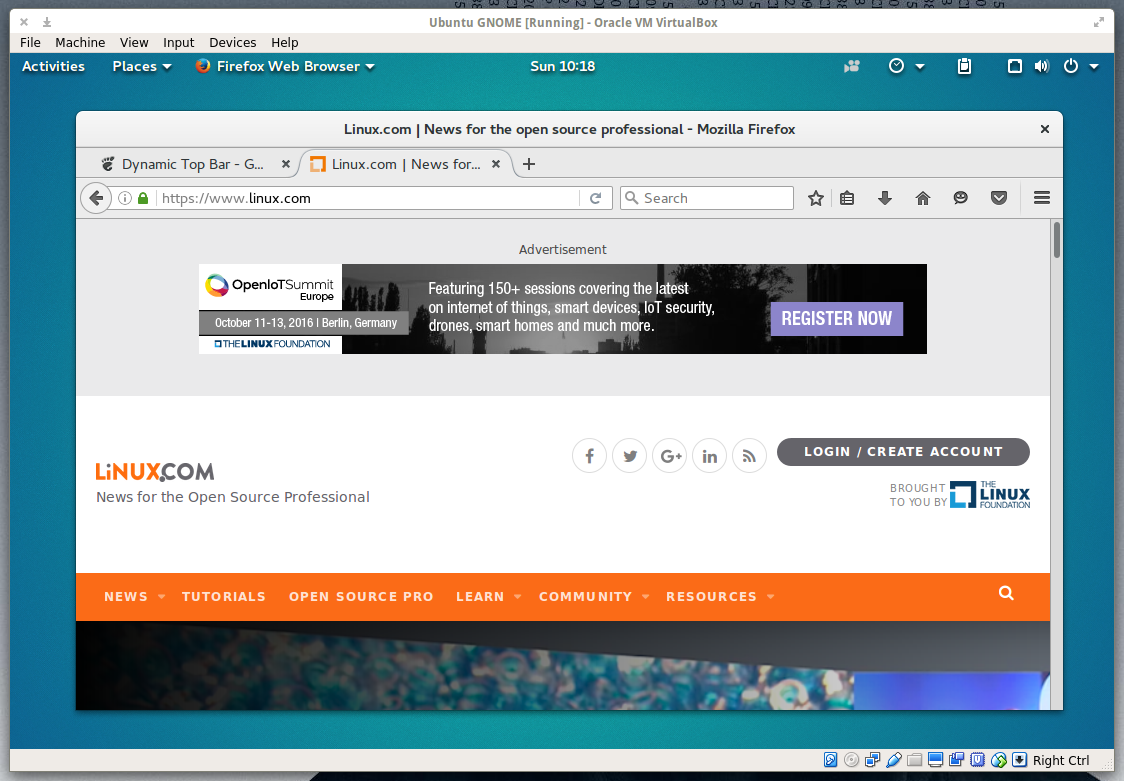
With Dynamic Top Bar, the top panel is only transparent when there isn’t a maximized window (Figure 8). As soon as you maximize a window, the top bar will return to its usual solid look.

Figure 8: Dynamic Top Bar gives your GNOME desktop a cleaner look.

Top Panel Workspace Scroll

Since I’ve been using Linux, I’ve found one of the most efficient things about the desktop is the ability to use workspaces. Used to be, there was always a quick access icon to switch between your various workspaces. Now, it’s not always so efficient. Top Panel Workspace Scroll fixes that. Once installed, all you have to do is move your cursor to the top panel and scroll through your workspaces (with your mouse scroll wheel or two finger scroll with a touchpad). There is no icon or indicator to let you know which workspace you are using; it’s just there and it works.

Wikipedia Search Provider

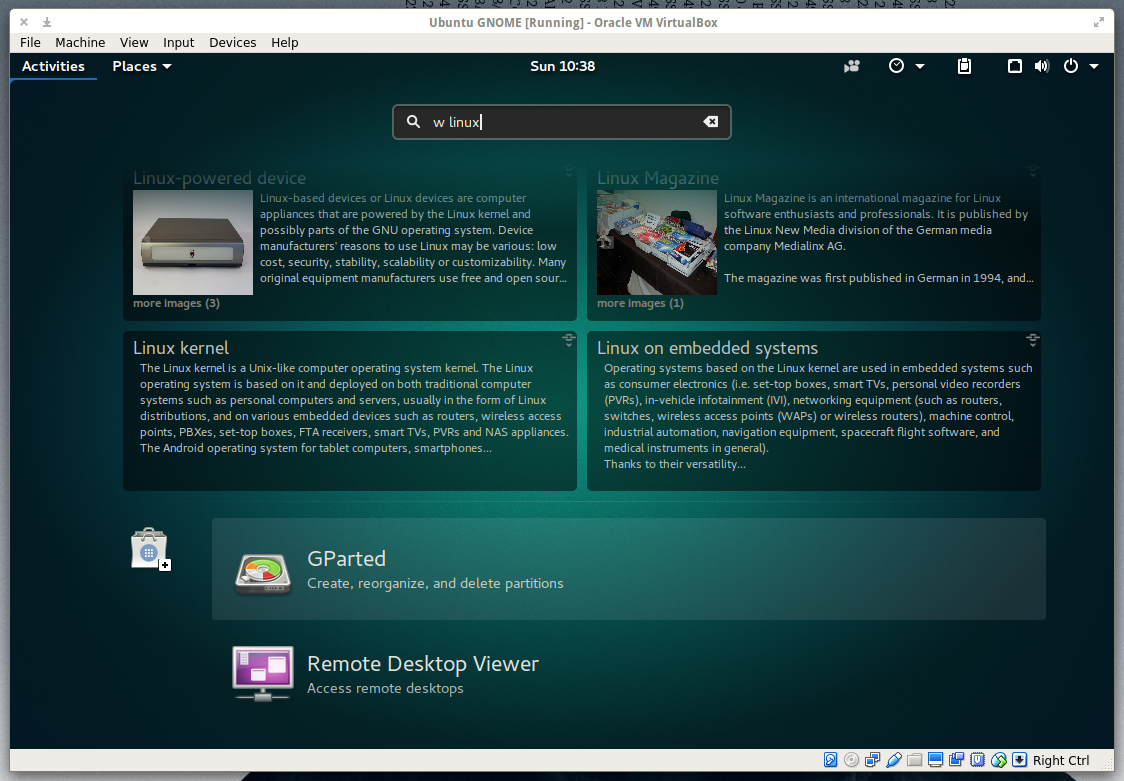
If you’re like me and you do a lot of searching within Wikipedia, you need this extension. Once installed, click on the Activities button and then type w SEARCHSTRING where SEARCHSTRING is the item you want to search for. For example, to search Wikipedia for linux, click on the Activities button, and then type w linux in the search box to reveal results from Wikipedia (Figure 9).

Figure 9: Click on an entry and it will open your default browser to that page.

Keep searching… You’ll find more

You’ll find a massive collection of other handy GNOME Shell Extensions available. As you search, do use caution as you will also run into a few that are no longer in development. Look out for comments saying “Needs to be upgraded…” and avoid installing those extensions. GNOME Shell extensions certainly go a long way to make GNOME far more efficient, user-friendly, and sometimes just better to look at.

What GNOME Shell Extensions have you found that you can’t work without?

Node.js: Building Better Technology and a More Diverse Community

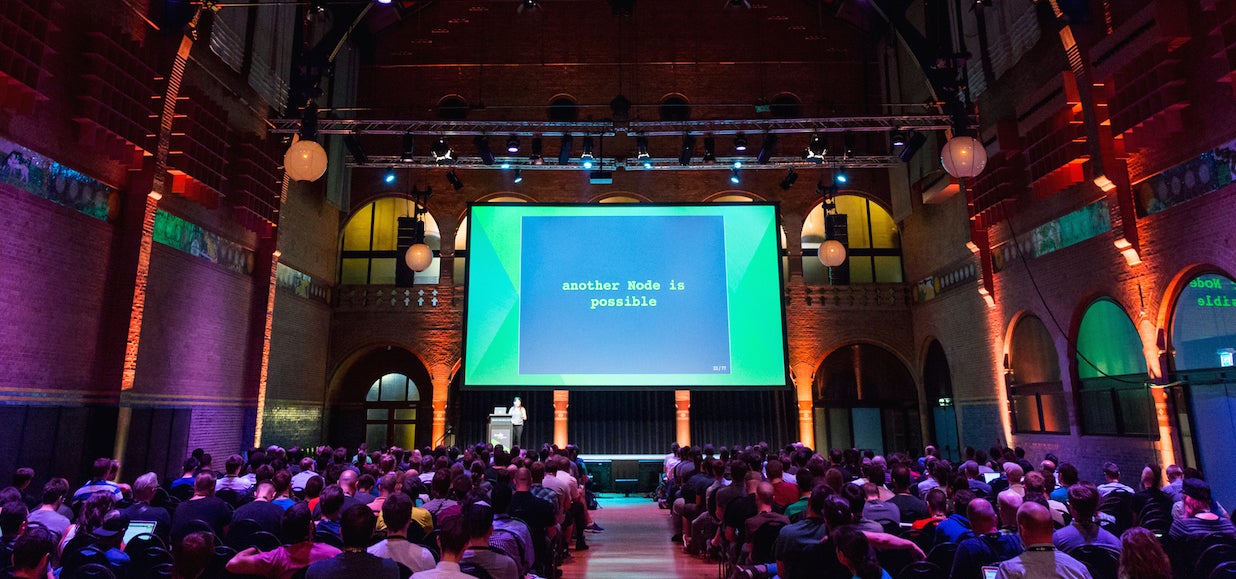
Almost exactly one year ago Node.js released version 4, the first release after the re-unification of the io.js and Node.js codebases, Mikeal Rogers, Node.js Community Manager, reminded attendees at the Node.js Interactive conference in Amsterdam on Thursday. Since then, the project has become the fastest growing open source community in the world, effectively doubling active members every year. Now, there are 87 committers working on the core repository alone, and more than 400 modules are published every day.

Rogers reflected on why Node.js, a Linux Foundation project, is so successful. Apart from running on all kinds of environments, from cloud, to desktop, to mobile, to IoT, he concluded that “Node lowers the barrier for all environments.” He pointed out how Cordova makes programming for all mobile platforms easy, how Electron eases the development of apps for any desktop, and how NodeBots is leading the way in development for robotics and micro-controlled devices.

State of the Node Union

James Snell, Technical Lead at IBM, furthered this message of growth in his “Core State of the Union” keynote. When Snell got involved with Node in January 2015, the team of core developers had actually shrunk down to 14 contributors after the io.js fork in December 2014.

Today, more than a thousand individuals contribute in total — with 476 members in the Node.js organization on GitHub, 103 related GitHub repositories, and 92 teams. However, the number of overall major commits has not grown proportionally to the number of contributors. This is not a bad thing, according to Snell. Instead of adding new functionality, most developers have focused on stabilizing the core, making transitioning from one version to the next a much easier process than with earlier releases.

Another task involves adapting all major commits to as many architectures as possible. Important changes to the core are tested on everything, from all major flavors of Linux (including Raspbian), to Windows, MacOS X, and FreeBSD, plus several dockerized and virtual systems. This means that whatever you are running Node.js on, the core team will probably test that changes will not break your setup.

As for ongoing work, Snell said the team were working hard to improve standards compliance in Node. Developers are on track to fully comply with the HTTP 1.1 specifications and are making headway in complying with HTTP/2. Efforts are also underway to implement support for ES6 (ECMAScript version 6), but this is happening more slowly, he said.

The Event Loop, Untangled

Bert Belder, a Node.js core developer and founder of StrongLoop, wanted to help the audience understand how the all-important event loop worked. Despite being one of the most critical components of the Node.js architecture, Belder explained that the event loop is very poorly understood and that most graphical interpretations trying to explain it are plain wrong.

In his rather technical talk, Belder described how the Event Loop doesn’t actually branch out to carry out tasks but delegates their execution to workers. Callbacks and parsing the results from tasks are handled by the so-called “unicorn process.” As callbacks are declared, a counter is increased by 1 in the unicorn process. As callback functions finish, a 1 is subtracted from the counter, and, when it reaches zero, the loop exits and the program finishes.

Promoting Diversity

Focusing more on the human side of things, both Ashley Williams and Tracy Hinds described the need to promote inclusiveness and diversity within the Node.js community.

Ashley Williams is the founder of NodeTogether, a work group that travels the world teaching Node.js to people that may not be included in the mainstream community of Node.js developers. In five-hour sessions, Williams and the NodeTogether mentors teach students to create a practical and working web app that they can deploy online. She explained that by creating a safe space devoid of prejudice, where all participants come from diverse backgrounds, NodeTogether has managed to create stable communities of Node developers within underrepresented groups, made up of mentors and students that continued working beyond the sessions.

Node.js Education Community Manager Tracy Hinds then explained the efforts being carried out by Node.js’s own Inclusivity Program. Hinds posited that Node.js’s lack of diversity may stem from a tyranny of structurelessness, arguing that the community had grown organically, concerned mainly with technological matters and disregarding inclusiveness. This, she said, is a mistake, because diversity has proven to have a long-term positive impact on communities and projects.

Hinds thinks that “to improve we have to take fault” and implement explicit and proactive strategies to promote inclusiveness. The inclusivity work group is, for example, promoting more diverse panels and lineups of speakers at conferences and encouraging the inclusion of underrepresented groups. They are also aiming to improve online communication and establishing a code of conduct and moderation for the Node IRC and GitHub. The work group has also set up a board to field complaints about inappropriate interactions. Finally, they are setting measurable goals to gauge the effectiveness of these strategies.

The aim, ultimately, is to make Node.js a first-class technology and to build a first-class community to go with it.

Want to learn Node.js? See our tutorial on how to get started writing web applications with Node.js.

How NV Can Increase IT Agility

As organizations of all sizes seek to transform themselves into digital businesses, the need for an agile IT infrastructure becomes ever more acute. Network virtualization (NV) can increase IT agility, according to emerging case studies and user feedback.

Here’s an example of one of the challenges in IT agility: A virtual machine (VM) can be provisioned in a matter of minutes. But the networking resources required to support that VM still often require weeks to provision. At a time when many IT organizations are trying to maintain control over application workloads that are being moved into public clouds (which are simpler to provision), lack of network flexibility has become a pressing issue for IT leaders.

Read more at SDx Central

Microsoft Has The Most Open Source Contributors on GitHub

GitHub has published The state of the Octoverse 2016, a very interesting report that offers an insight into how its 14 million users leveraged the hugely popular repository this year. Among them is a list of organizations with the most open source contributors, most popular coding languages, most used emoji reactions, new user interactions and much more.

The list of organizations with the most open source contributions is particularly interesting, because it shows Microsoft leading the pack with over 16,000 users. The software giant is followed by Facebook and Docker, with Google only coming in fifth place.

…The state of the Octoverse 2016 reveals that JavaScript is, by far, the most popular language used by GitHub users, followed by Java and Python. C++ is in sixth place, C# is in eight, and Objective C comes in 12th place. 

Read more at BetaNews

Building Bridges with DevOps

Five Questions for Katherine Daniels: Thoughts on adopting DevOps effectively, the importance of empathy, and new essential skills for today’s ops professionals.

Katherine is co-author, along with Jennifer Davis, of O’Reilly Media’s Effective DevOps, and is presenting on the topic of “Building bridges with DevOps” at Velocity New York in September. We recently sat down to discuss what it’s like when an organization adopts DevOps, and how that transition can be improved. Here are some highlights from our conversation.

You’ve written extensively on DevOps—including the book Effective DevOps with Jennifer Davis. What do organizations usually get wrong when “going DevOps”?

One of the big issues I’ve seen is organizations that look to “DevOps” as a solution without a clear understanding of what problems they are trying to solve. 

Read more at O’Reilly 

Monitoring Docker Containers with Elasticsearch and cAdvisor

If you’re running a Swarm Mode cluster or even a single Docker engine, you’ll end up asking this question:

How do I keep track of all that’s happening?

The answer is “not easily.”

You need a few things to have a complete overview of stuff like:

  1. Number and status of containers
  2. If, where, and when a container has been moved to another node
  3. Number of containers on a given node
  4. Traffic peaks at a given time…

Read more at Codeship

Putting Linux on your Chromebook Is Easier Than You Think (and Totally Worth It!)

You’ve may have seen chatter on the internet about installing Linux on your Chromebook. Plenty of longtime Chrome OS users are doing it, and it allows the use of programs like GIMP (a Photoshop replacement), or Darktable, (a Lightroom alternative) as well as plenty of programs for video and audio editing. It’s a way to use your Chromebook for the few power-user features you might need. It’s also completely free and easier than you think.

Let’s walk through an easy setup that keeps Chrome OS and is able to run Ubuntu with the Xfce desktop and any applications you might need. You’ll be able to run both operating systems at once with a shared Downloads folder, a shared clipboard and web links opening in the Chrome browser you’re already familiar with. You can even run them side by side in a split window.

Read more at Android Central

20 Questions Security Leaders Need To Ask About Analytics

It would be an understatement to say that the security world tends to be full of hype and noise.  At times, it seems like vendors virtually xerox each other’s marketing materials. Everyone uses the same words, phrases, jargon, and buzzwords. This is a complicated phenomenon and there are many reasons why this is the case.

The more important issue is why security leaders find ourselves in this state. How can we make sense of all the noise, cut through all the hype, and make the informed decisions that will improve the security of our respective organizations? One answer is by making precise, targeted, and incisive inquiries at the outset. Let’s start with a game of 20 questions. Our first technology focus: analytics.

Read more at DarkReading