Home Blog Page 750

ChaletOS: A Linux for Those Who Miss Windows 7

For many, the computer interface has always followed the same formula:

  • Start Menu

  • Panel

  • System tray

  • Desktop icons

With those simple elements, people have happily interfaced with their hardware and done their jobs for a very long time. For those working within the world of Windows, the best take on that formula was (in many an opinion) Windows 7. So, it should come as no surprise that some Linux distributions have adopted that formula to create a desktop with which users would feel a sense of immediate connection. Some Linux takes on that metaphor have failed and some have reached a modicum of success. But none have managed to pull off what ChaletOS has.

Don’t get me wrong, under the all-too familiar looking desktop (Figure 1), ChaletOS is still Linux. But the execution of the design cannot be mistaken.
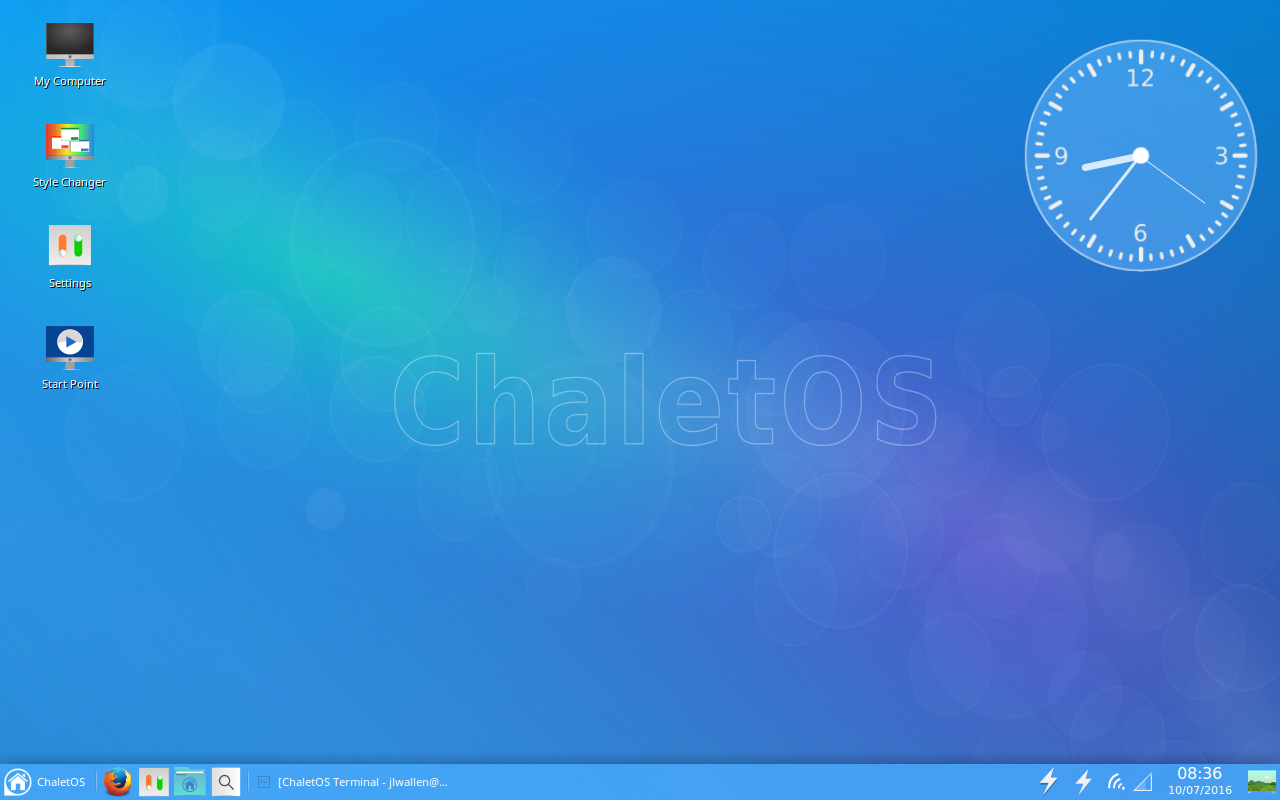
Figure 1: The ChaletOS default desktop should be very familiar.

Before you can get “under the hood,” however, it’s hard to not see exactly what developer Dejan Petrovic was shooting for with ChaletOS.
He succeeded.

What makes this so “Windows-y”

The first thing you should know is that ChaletOS is based on Xubuntu—which indicates the look and feel was achieved via Xfce. Added to this desktop were a number of tweaks focused on giving the user the ability to alter and refine the style, as well as the inclusion of Conky. Included with this Xfce-volution is what Petrovic calls the Style Changer. The ChaletOS Style Changer is an elegant solution for tweaking the look and feel. With it, you can easily change the theme of both Xfce and Conky (Figure 2).
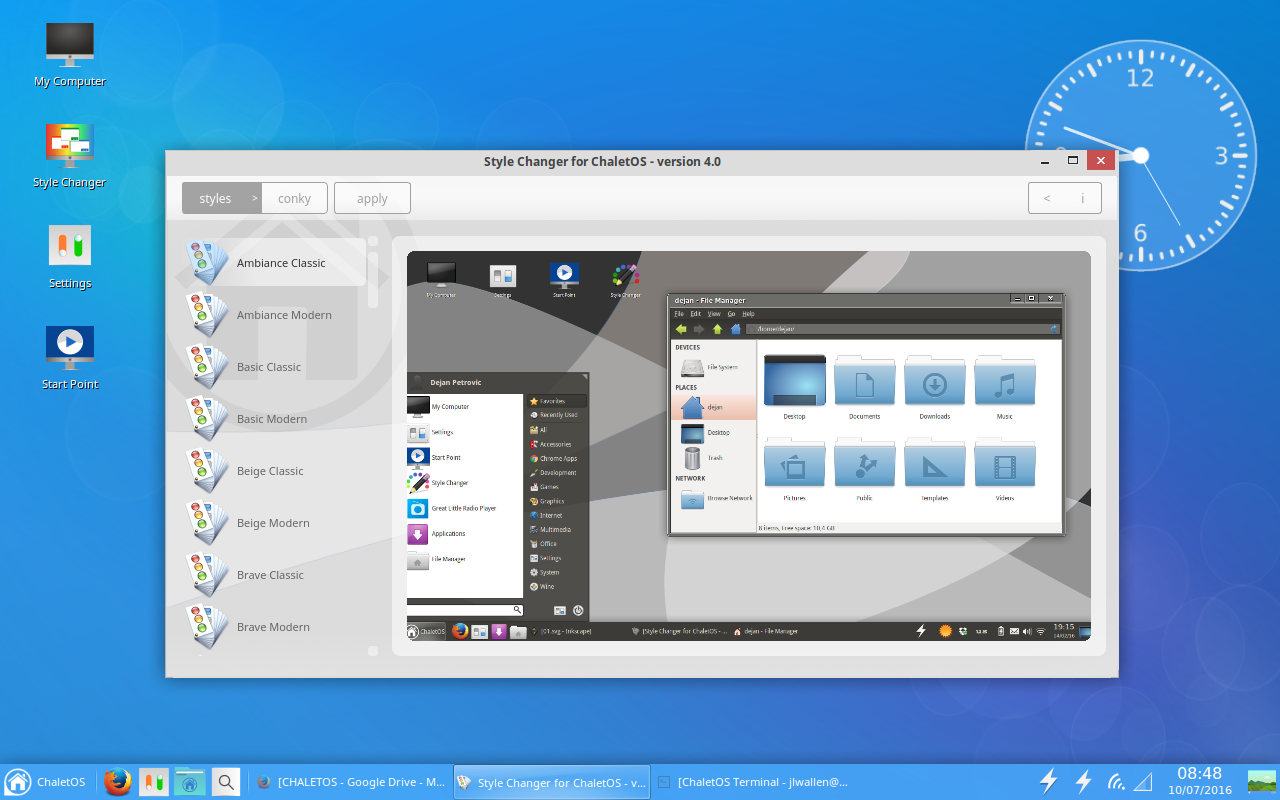
Figure 2: The Chalet Style Changer.

No, the Style Changer isn’t on par with the likes of Ubuntu Tweak, but when you glance at the ChaletOS Settings manager, you have everything you need to tweak the platform to perfectly meet your needs.

Click on the ChaletOS Start Menu, and you’ll see yet another familiar landscape (Figure 3).
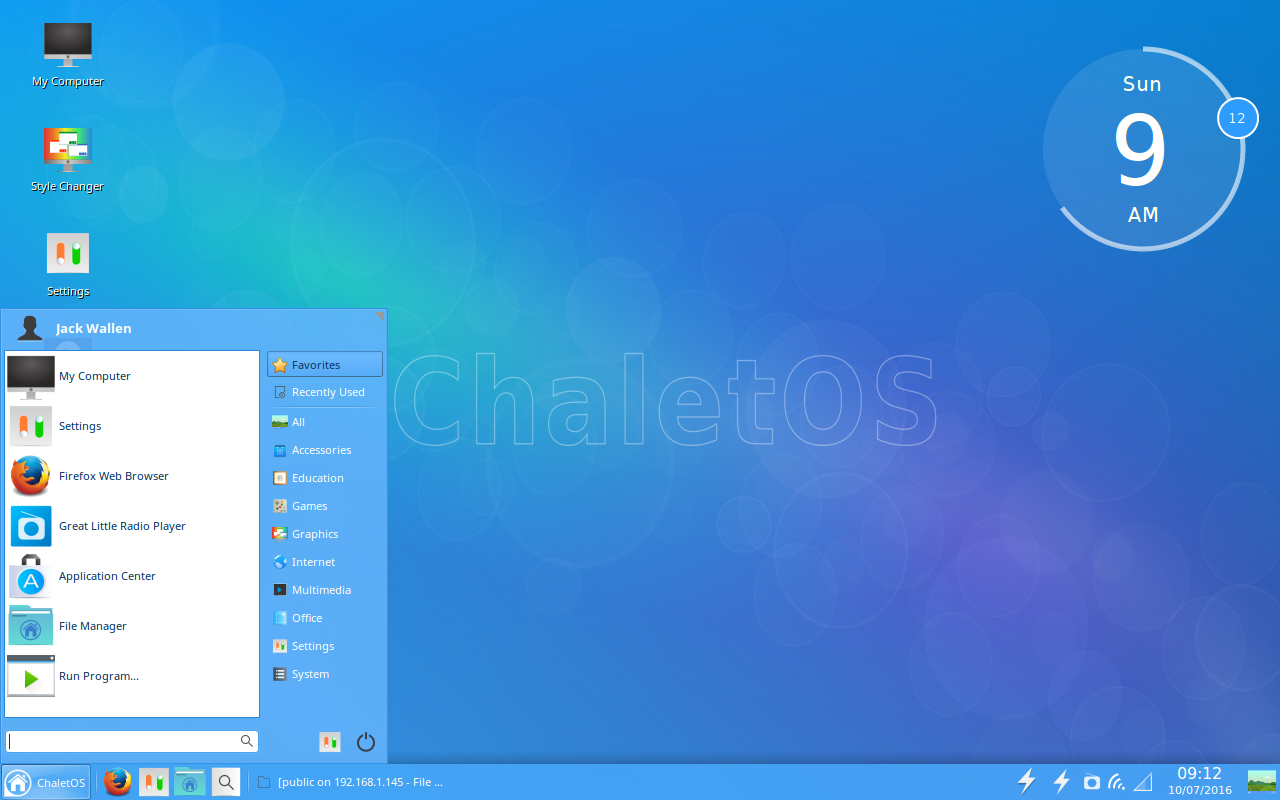
Figure 3: The ChaletOS Menu.

Within the Menu, you’ll find all the standards:

  • Favorites

  • Recently Used

  • App/configuration categories

  • Quick access to Log Out/Shutdown/Reboot

  • Quick access to Settings

  • Search

The Start Point

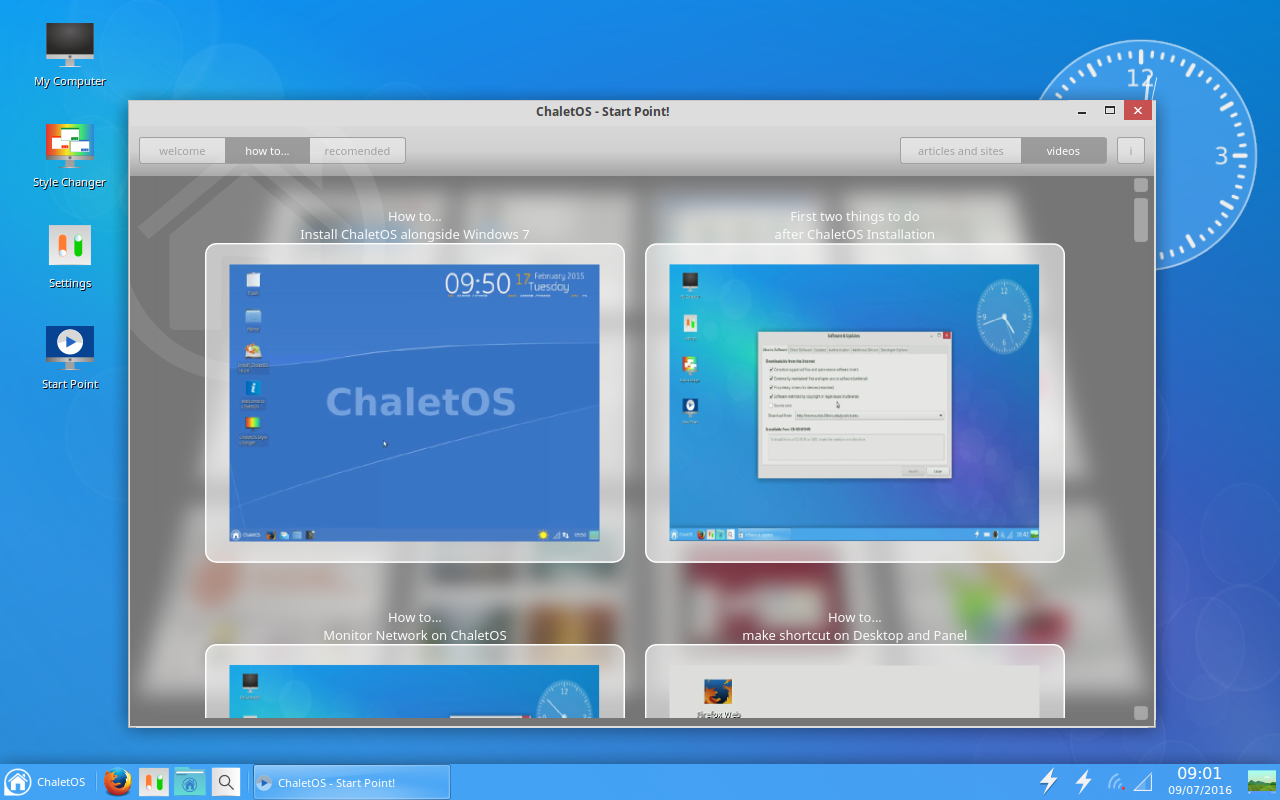
I recently wrote about another very user friendly Linux distribution—Linux Lite (see my post “Linux Lite 3: The Ideal Platform for Old Hardware and New Users”). Although I wouldn’t say ChaletOS knocks Linux Lite from its new-found perch atop the “best of” throne, it comes close. One reason I believe ChaletOS to be a solid distribution for new users (besides its ultra-familiar interface) is the Start Point app. Open this app and you’ll see a world of possibility (Figure 4).
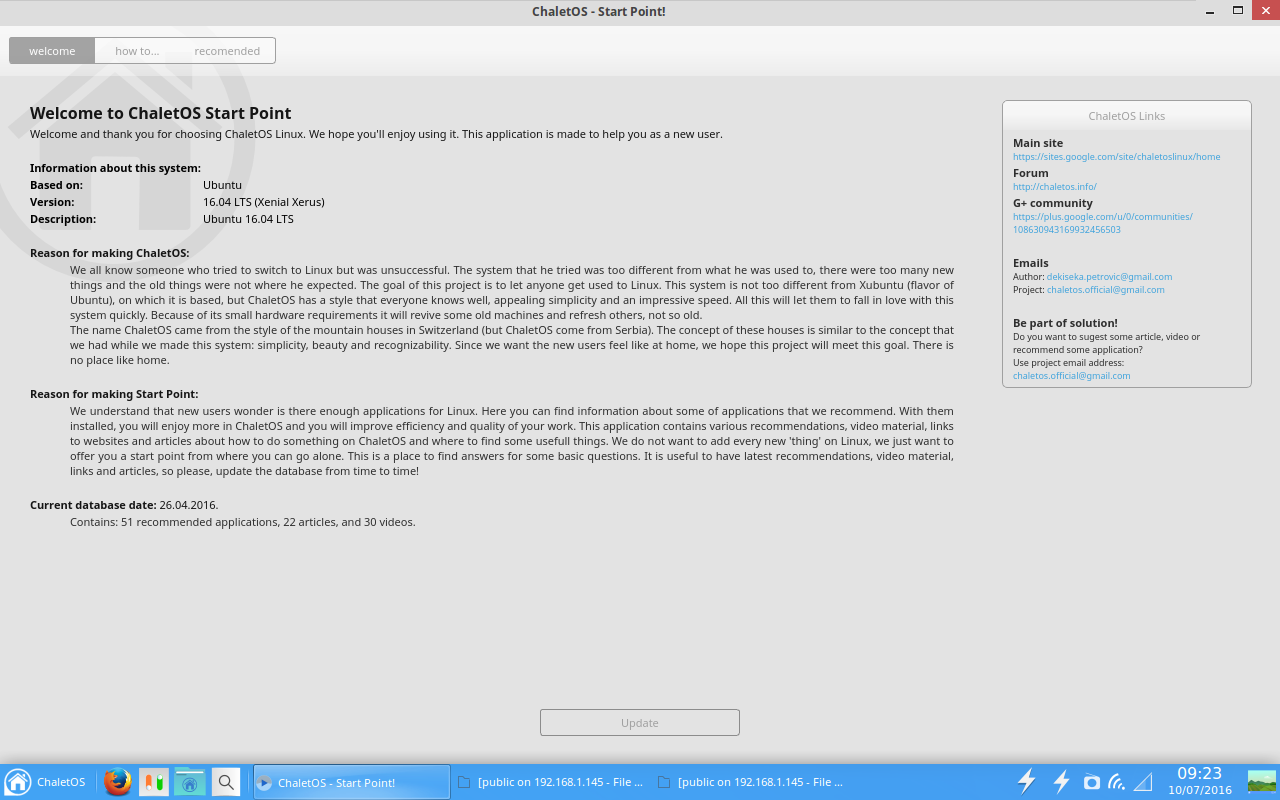
Figure 4: The ChaletOS Start Point ready to serve.

From Start Point, you can update your system with the click of a button. You can click on the How To tab and find ChaletOS-specific how to videos and articles or click on the Recommended tab and find videos about software that can be installed on ChaletOS.

I’ve been thrilled to find more distributions including apps like ChaletOS’s Start Point. Any distribution that plans to focus on new users should consider these help centers a must-have. ChaletOS’s Start Point would be a great reference for any developer hoping to snag a piece of the new user pie.

The caveats

So far so good, eh? At first blush, ChaletOS looks and feels like a distribution that will make a lot of noise in the Linux landscape—as it should (it’s a fine platform). That doesn’t mean it’s perfect. I will say, however, the imperfections will seriously depend on the level of user we’re talking about. Let me explain.

For the new user, ChaletOS should only suffer from a bare minimum of issues. The only glaring issue I found is that, out of the box, there is no office suite installed. I usually expect to see LibreOffice or (if I’m dealing with a minimal distribution) AbiWord. Instead, what I found in the “Office” menu was a listing of applications that wouldn’t suit the needs of any user level:

  • A PDF viewer

  • A dictionary

  • An ebook viewer

That’s it. In order to work with office documents, you’d either have to sign into your Google or your Office365 account or install an office suite. For users familiar with installing applications on Linux, that won’t cause the slightest hiccup. New users, however, will have to know to visit the Application Center and then search for LibreOffice. Sounds easy, right? I’ve worked with users for whom that process isn’t exactly second nature. To that end, I would highly recommend, to the developers of ChaletOS, that LibreOffice be included in the default installation. The less new users have to do out of the box, the better.

The next caveat jumps up a user level or two. Most Linux users I know like to be able to really tweak their desktops. Although ChaletOS has an outstanding tool for selecting from a number of styles, adding new styles to the system isn’t at all intuitive. In fact, it took a bit of digging to locate where the Conky themes are stored in ChaletOS. Open up a terminal window (press [Ctrl]+[t]) and then issue the following command:

cd /opt/extras.ubuntu.com/chaletosstylechanger/conky

Now issue the ls command and you’ll see all the included Conky styles. I attempted to add a few  new Conky themes into that directory, but the attempt failed. And considering there’s no clear way to add Conky themes from within the Style Changer, your best bet is to install the Conky Manager app (outlined here “How to Install and Configure Conky”). Once the Conky Manager app was installed, the downloaded Conky themes were simple to apply.

Naturally, the new user isn’t going to dive deep into the muck and mire of Conky and will (most likely) stick with the few included themes. But, it would be nice to have the ability to easily install a few new themes out of the box.

The final verdict

Although I happen to be a fan of the new world desktop order of GNOME, Unity, and elementary OS Freya, I cannot help but feel a sense of great respect for what ChaletOS is not only striving for, but achieving. Dejan Petrovic has created a desktop that not only works well with lesser powered hardware, but with lesser “powered” users. Anyone that knows Windows 7, would be instantly at home with ChaletOS. It’s easy to use, easy on the eyes, and easy on the system resources.

Operators Are Migrating From NFV MANO Trials to Reality

Some operators are progressing from network functions virtualization (NFV) management and orchestration (MANO) trials to the launching of commercial services, according to a new report from Current Analysis.

While some of those commercial services are at the virtualized infrastructure manager (VIM) levels of orchestration, some are at the virtual network function manager (VNFM) level and even the NFV orchestrator level, the analyst firm says. This is happening even though ETSI hasn’t released final MANO specifications.

Read more at SDx Central

This Automaker Just Joined IBM and Google as a Patron of Open-Source Software

The move reflects the growing importance of software to cars. While not as momentous as its introduction of the Prius in 1997—the first mass-produced hybrid vehicle—Toyota Motor Corp quietly took another bold, industry-leading step toward technological innovation last month.

The world’s largest automaker ponied up a one-time fee—believed to be $20 million—and became the eighth full member of a consortium that most people do not associate with the auto industry at all. 

It’s called the Open Invention Network, and its other members are Google, IBM, Red Hat, NEC, Philips, Sony, and SUSE (a unit of Britain’s Micro Focus). …Formed in 2005, OIN’s mission is to protect and encourage the collaborative development and use of open-source software, like the Linux operating system, which can be freely copied, altered, and distributed, and which no one person or company owns. OIN pursues a variety of strategies aimed at protecting the users and developers of such software against the threat of patent suits by proprietary software manufacturers, like Microsoft and Apple. Such suits, if successful, could deny users the freedoms that make open-source software desirable.

Read more at Fortune

Get the Look of KDE Plasma 5 on Your GNOME Desktop

Plasma 5 breathed a new look and feel in to the KDE desktop using a crisp new theme called ‘Breeze’ and now you get it on GNOME. 

The airy aesthetics have won Plasma 5 an army of admirers, and helped to cement the new visual impression of the  KDE desktop experience redux.

But what if you’re not using KDE? Well, you don’t have to miss out.

gnome breeze gtk theme

GNOME-Breeze is a GTK+ theme designed to mimic KDE’s Breeze. It requires GTK+ 3.16 or later, plus the Pixmap/Pixbuf theme engine for GTK2. Some Linux distributions, including Arch, have the theme ready and waiting to install.

This post, Get the Look of KDE Plasma 5 on Your GNOME Desktop, was written by Joey-Elijah Sneddon and first appeared on OMG! Ubuntu!.

The Emerging Containers as a Service Marketplace

While many developers are enthusiastic about the way containers can speed up deployments, administrators and operators may be a bit more wary, given the considerable amount of retooling that their internal systems may need to go through to support container-based pipelines.

Which is why the emerging Containers as a Service (CaaS) approach may prove popular to both camps.

CaaS changes the dynamic for how containers are perceived by operations teams that must otherwise build-out platforms that manage complex environments. At scale, containers bring with them the need for new tooling, services and platforms. And for most businesses, the expertise is missing to manage complex, scaled-out platforms built on container-based clusters.

Read more at The New Stack


OpenVPN – Secure your Server Administration with Multiplatform VPN Connection

OpenVPN is a full-featured SSL VPN which implements the OSI layer 2 or 3 secure network extension by using the industry standard SSL/TLS protocol. For this tutorial, we are going to use a Debian or Ubuntu server. You can use any server you already have in production.

Read the full article

Automotive Grade Linux Releases 2.0 Spec Amid Growing Support

The Linux Foundation’s Automotive Grade Linux (AGL) project, which is developing a “Linux-based, open platform for the connected car,” announced the release of the second version of its Unified Code Base (UCB) distribution for in-vehicle infotainment (IVI). The latest version adds features like audio routing, rear seat display support, the beginnings of an app platform, and new development boards including the DragonBoard, Wandboard, and Raspberry Pi.

AGL’s Yocto Project derived UCB distro, which is also based in part on the GENIVI and Tizen automotive specs, was first released in January. UCB 1.0 followed an experimental AGL stack in 2014 and an AGL Requirements Specification in June, 2015.

UCB is scheduled for a 3.0 release in early 2017, at which point some automotive manufacturers will finally use it in production cars. Most of the IVI software will be based on UCB, but carmakers can also differentiate with their own features.

New features in UCB 2.0, which will be available for download by the end of the week, include:

  • Rear seat display and video playback — supports simultaneous playback on front and rear displays

  • Audio routing and mixing — based on GENIVI and Tizen audio management, prioritization, and layering

  • Application framework — controls and manages installation, launch, and update of applications, and adds security by assigning resources only to approved apps

  • ConnMan network management — ConnMan daemon based scheme for pairing multiple Bluetooth devices and switching data connections between Bluetooth and WiFi

  • Vehicle bus messaging — rewritten with built-in security to prevent unwanted intrusions and stop rogue apps from communicating with vehicle bus

  • New build environment faster server that lets developers specify what goes into the build, and submit custom jobs

  • New test infrastructure enables connect connectivity to a hardware board over the Internet to perform testing

  • New hardware support — NXP Sabre Automotive, Wandboard, Qualcomm DragonBoard, TI Vayu EVM, and Raspberry Pi, adding to previous support for Renesas R-CAR M2 PORTER and R-CAR E2 Silk, Intel boards like the MinnowBoard MAX, and the QEMU x86 64-bit emulator

AGL UCB 2.0 is being demonstrated at the Automotive Linux Summit on July 13-14 in Tokyo. The demo includes rear seat display, video playback, AM/FM radio, wheel input device, navigation, HVAC control, media player and browser, and settings and home screen functionality.

AGL Membership Expands

AGL seems to be eclipsing GENIVI as the leading open Linux car platform. More than 30 new companies have joined AGL in the past year, bringing the membership to more than 70.

The January release of UCB 1.0 was accompanied by the announcement of new members including Ford, Subaru, Mazda, and Mitsubishi Motors. Pre-existing members include Toyota, Nissan, and Jaguar Land Rover, which already offers an AGL-inspired IVI system. The addition of Ford, a longtime Windows Automotive partner, was a particularly significant coup, and the sign-on of automotive IVI component vendors like Harman, Panasonic, and Pioneer was also key.

In recent months, Hyundai has joined, along with dozens of technology companies. These include chipmakers like TI, MediaTek, and Qualcomm, which has launched an automotive-focused, Linux-ready Snapdragon 820a SoC and Connected Car Reference Platform. Previous semiconductor members included Renesas and Nvidia, which has a Linux-compatible Drive PX smart car system based on its Tegra SoCs.

Joining an organization doesn’t equate with a commitment to use its spec. Yet, the AGL has garnered promises to implement UCB from Toyota, as well as chipmaker Renesas and IVI equipment manufacturers like Aisin AW, DENSO, Fujitsu Ten, Harman, Panasonic, and Pioneer.

IVI’s Long Road

IVI systems started appearing in luxury cars about a decade ago around the time of the first iPhone and Android phones, and the oldest Linux-oriented organization focused on IVI — the GENIVI Alliance — was founded more than seven years ago. Yet IVI systems, which combine touch-enabled navigation and infotainment features, and in many cases the communications, safety, and security features provided by AGL’s UCB, are still far from universal.

An IHS report from late December projected that sales of automotive displays of 7.0-plus inches will reach only 33.5 million units in 2021, or less than half of the roughly 82.9 million cars sold globally in 2015.The IVI tide is rising faster, however, as the sales will grow at a rate of nearly 10 percent.

The relatively slow uptake compared to smartphones is due to the conservative nature of the automotive business, which is based largely on the necessary concern for safety. This continues to be a concern as IVI is integrated with advanced driver assistance systems (ADAS) systems and self-driving cars.

There’s still plenty of time for new contenders to take on leading platforms like QNX and Windows Embedded Automotive. Most of the newcomers run on Linux or the Linux-based Android, with projects based on AGL, GENIVI, or other Linux platforms such as Intel’s In-Vehicle Solutions or the new Qt Automotive Embedded. The Qt Company is an AGL member, and says it will provide backends for AGL, GENIVI, and QNX. Intel’s Wind River subsidiary is also a member.

Android-based IVI systems include Mitsubishi’s FlexConnect.IVI, Renault’s R-Link, and Parrot’s after-market Android IVI solutions. There continue to be rumors that mobile/IVI integration stacks like Google’s Android Auto and Apple’s CarPlay will turn into full-fledged IVI and telematics platforms.

The automotive business now has sufficient experience with IVI to realize the benefits of a universal open platform. They understand the complications and costs involved with keeping up with increasingly sophisticated, fast-changing technology. Like most other automotive platforms, UCB will support “instrument cluster, heads up display, telematics, and autonomous driving in the future,” says AGL.

“The automotive industry is starting to embrace an open innovation mindset, and OEMs and suppliers are realizing that collaboration and joint development benefit the entire industry,” stated Dan Cauchy, General Manager of Automotive at The Linux Foundation. “The AGL UCB provides the industry with a single, shared platform that will ultimately reduce fragmentation, improve time-to- market and reduce the cost of software development for everyone.”

“The latest version of the AGL UCB distribution marks a significant step toward building a developer ecosystem around the platform,” stated Masashige Mizuyama, CTO, Infotainment Business, Panasonic. “The new platform enables developers to build and test one application that can be supported by multiple OEMs, instead of having to build multiple applications with the same function.”


Xen Project Release Strengthens Security and Pushes New Use Cases

Xen Project technology supports more than 10 million users and is a staple in some of the largest clouds in production today, including Amazon Web Service, Tencent, and Alibaba’s Aliyun. Recently, the project announced the arrival of Xen Project Hypervisor 4.7. This new release focuses on improving code quality, security hardening and features, and support for the latest hardware. It is also the first release of the project’s fixed-term June – December release cycles. The fixed-term release cycles provide more predictability making it easier for consumers of Xen to plan ahead.  

We recently sat down with the Xen Project chairperson, Lars Kurth, to talk about some of the key features of the release and the future of Xen Project technology. Lars will be discussing this topic and more during Xen Project’s Developer Summit in Toronto, CA from August 25-26 — the conference is directly after LinuxCon North America.

Q: What was the focus on this release?

Lars Kurth: There were five areas that we focused on for this release (full details are in our blog). In summary, we focused on security features, migration support, performance and workloads, support for new hardware features, and drivers and devices (Linux, FreeBSD and other).

Security is consistently something that we focus on in all of our releases. There are a lot of people that rely on Xen Project technology and security is our top concern in any release as well as how we organize our process around security disclosures.

Q: What was the biggest feature coming out of this release?

Lars: The biggest feature for us is live patching, which is a technology that enables re-boot free deployment for security patches to minimize disruption and downtime during security upgrades for cloud admins. It essentially eliminates all cloud reboots, making cloud providers and their users much more safe. It also eliminates a lot of headaches for system and DevOps admins of the world.

Q: Xen is often associated with the cloud, but are there additional use cases that you see growing around this technology, if so why?

Lars: We are seeing a lot of growth in terms of contributions, as well as many different use cases emerging, including automotive, aviation, embedded scenarios, security, and also IoT. In addition, we continue to grow within the public cloud sector and traditional server virtualization.

On the security front, for example, a number of vendors such as A1Logic, Bitdefender, Star Lab and Zentific have released or are working on new Xen Project-based security solutions. In addition, the security focused and Xen-based OpenXT project has started to work more closely with the Xen Project community.

Long-time contributors to the Xen Project, such as DornerWorks – a premier provider of electronic engineering services for the aerospace, medical, automotive, and industrial markets – have expanded their scope and are now providing support for the Xen Xilinx Zynq Distribution targeting embedded use-cases. We have also seen an increasing number of POCs and demos of automotive solutions, which include Xen as a virtualization solution.

Growth in these sectors is largely due to the Xen Project’s flexibility, extensibility, customisability and a clear lead when it comes to security-related technologies. Over the last year, we have also seen contributions increase from developers with strong security and embedded backgrounds. In fact, this totaled nearly 17 percent of the overall contributions in this release cycle, up from 9 percent in the previous release.

Q: How did you address these uses cases in this latest release?

Lars: We introduced the ability to remove core Xen Project Hypervisor features at compile via KCONFIG. This creates a more lightweight hypervisor and eliminates extra attack surfaces that are beneficial in security-first environments and microservice architectures. Users will still be able to get the core hypervisor functions, but they won’t receive all the drivers, schedulers, components or features that might not fit their use case.

Essentially it gives people an “a la carte” feature set. They can decide what they need for compliance, safety or performance reasons.

Q: Were there any new contributors for this release that surprised you?

Lars: We had three new companies contributing to the project: Star Lab, Bosch and Netflix. I met engineers from Star Lab for the first time at the 2015 Developer Summit less than a year ago, and helped introduce them to the Project’s culture. In that short period of time, Doug Goldstein from Star Lab has moved into the top five contributors and top 10 code reviewers for the Project.

I was surprised about Netflix’s contributions; I didn’t even know the company used Xen. Netflix improved and secured the VPMU feature, which is incredibly useful for system tuning and performance monitoring. Bosch Car Multimedia GmbH added some new ARM functionality. In addition, we have seen quite a bit of Xen related development in upstream and downstream projects such as Linux, FreeBSD, NetBSD, OpenBSD, QEMU and Libvirt.  

Q: What’s next for Xen Project? Where do you think the technology is heading in the future and why?

Lars: In the last three releases, we introduced several major new features such as PVH, COLO, new schedulers, VMI, Live Patching, Graphics Virtualization, etc. and significant re-work of existing features such as Migration and the Xen Security Modules (XSM). Looking at trends within the community, I expect that stepwise evolution of large new features to continue.

Some new capabilities, such as restartable Dom0’s, and additional techniques to provide more isolation and security, are also likely to appear. In addition, it looks likely that we will see some GPU virtualization capabilities for GPUs that target the ARM ecosystem, although it is not yet clear whether these will be available as open source. I also expect that both Intel and ARM hardware features will be closely tracked.

Some areas, such as new schedulers, XSM, PVH and Live Patching, will see significant efforts to harden and improve existing functionality. The goal is to ensure their swift adoption in commercial products and Linux and BSD distributions. Some features, which are not enabled by default are likely to become part of the Xen Project Hypervisor’s default configuration.

Free Tools for Driving an Open Source Project to Success

Increasingly, as open source technology becomes more pervasive, tech and DevOps workers are choosing to or being asked to build out and oversee their own open source projects. From Google, to Netflix to Facebook, companies are also releasing their open source creations to the community.

Have you considered launching an open source project or are you in the process of doing so? Doing it successfully and rallying community support can be more complicated than you think, but a little up-front footwork and homework can help things go smoothly. Beyond that, some planning can also keep you and your organization out of legal trouble. Issues pertaining to licensing, distribution, support options and even branding require thinking ahead if you want your project to flourish. Here are some of the very best free resources to pay attention to if you’re launching or overseeing an open source project.

Standards and Licensing

The Open Source Definition is where every project leader should start when it comes to how open source projects should be distributed, and what actually qualifies as open source. It’s also good to review Open Standards requirements.

Another top decision to weigh is what kind of license your project should have. The Software Freedom Law Center (SFLC) has a set of very good online resources on how open source licenses and copyrights work, and much more. And, don’t miss the good advice at Choosealicense.com. Legal issues are smart to anticipate up front. The SFLC authors are attorneys who were part of creating popular open source licenses. It’s also an excellent idea to keep up with current and archived editions of the International Free and Open Source Software Law Review.

For another simple discussion of license types for open source projects, and which license will work best for your project, try FOSS License Wars. The discussion is broken up into chapters that you can skim as you see fit, and the information is solid. The Free Software Foundation has a good primer. And of course, you can visit GitHub to review the many projects housed there, which types of licenses they have, how their communities work, and more. Should your project reside there?

One more note on licenses: If you’re leveraging existing open source code or components, Hewlett-Packard’s free application Fossology is designed to analyze the source code for any project and report accurately on which licenses are being used.

Best Practices

How can you showcase the fact that your open source project follows best practices and is secure? The Core Infrastructure Initiative (CII) Badge Program is a free program that is good to know about on this front. Its Best Practices Badge is a symbol of open source secure development maturity. Projects having a CII badge showcase the project’s commitment to security, and The Linux Foundation is the steward of this program.

Note that The Linux Foundation also has a collection of very useful free resources pertaining to open source compliance topics. For example, Publishing Source Code for FOSS Compliance: Lightweight Process and Checklists and Generic FOSS Policy can align your project’s development with best practices and policies.

Do you anticipate that your open source project may benefit from some funding, perhaps to build out community resources? If so, take note of the Mozilla Open Source Support Program (MOSS) – a funding awards program specifically focused on supporting open source and free software. Especially if your project upholds Mozilla’s values regarding openness, you can have a good shot at becoming a Mozilla “Mission Partner.”

Red Hat has an internally developed tool that could make a difference for your project. The company has announced the release of a community version of the Open Decision Framework, which consists of the company’s collection of its own best practices for making decisions and leading projects. Red Hat, of course, has a time-tested track record at advancing open source projects, so this framework is worth consideration. According to the company, the new community edition framework is directly related to how the company has advanced its open source projects. By making its Open Decision Framework freely available, Red Hat wants to enable project leaders to learn from the experiences of Red Hatters and contribute their own findings back to the community.

Are you interested in looking into open source projects similar to yours or perhaps projects that share libraries and components with yours? If so, Google and GitHub have produced a new open dataset on Google BigQuery, a low cost analytics data warehouse service in the cloud, so that anyone can get data-driven insights based on more than 2.8 million open source GitHub repositories. For example, if you are using an open source library, you can quickly find every open source project on GitHub that’s using it. You can also evaluate whether you might improve your APIs based on what other users are doing with similar tools.

Finally, note that a startup company called Snyk, has a very unique focus on helping developers keep open source code secure. It has recently come out of beta with tools that help developers monitor and secure vulnerabilities and dependencies in open source code in real time. You can find out more about Snyk’s offerings here.

These resources should help you and those you work with advance your open source project successfully, legally and securely.

AT&T Open Sources ECOMP to Linux Foundation, Hopes to Make it Industry’s Standard for SDN

AT&T today announced it will release its Enhanced Control, Orchestration, Management and Policy (ECOMP) platform to the wider telecom industry as an open source offering managed by the Linux Foundation. The goal, the company said, is to make ECOMP the telecom industry’s standard automation platform for managing virtual network functions and other software-centric network capabilities.

According to AT&T’s John Donovan, that’s exactly what appears to be on the horizon. “We want to build a community — where people contribute to the code base and advance the platform. And, we want this to help align the global industry,” Donovan said in an AT&T release.

Read more at Fierce Telecom