I see a lot of confusion around velocity in new-to-agile teams. Too many people treat velocity as an acceleration measurement. That is, they expect velocity to increase to some large number, as a stable state.
Velocity is a rate of change coupled with direction. When managers think they can measure a team with velocity, they confuse velocity with acceleration.
As I enter a highway, I have a higher rate of acceleration. As I continue to drive, I achieve a stable state: I get into a lane and maintain a constant speed. (Well, with any luck.) I stay stable with respect to the road (my direction). My velocity stays the same—especially if I use my cruise control. With a reasonable velocity—that might change a little with traffic—I can get to my destination.
Few would claim that the year-old fork and legal dispute between rival Arduino camps is healthy for the open source hardware community. Yet, so far, the platform remains strong, despite growing competition from open source Linux SBCs like the Raspberry Pi. In large part, this is due to the rising interest in Internet of Things (IoT) devices, which dovetails nicely with the low-power, gadget-oriented MCU-based platform.
In recent weeks, both Arduino camps have launched several innovative Arduino boards, all of them featuring onboard WiFi. Several of these run Linux while also enabling full Arduino compatibility. So far, the majority of Arduino users appears to have followed Arduino LLC, operating at Arduino.cc. However, because of a legal ruling, Arduino LLC must sell all Arduino boards outside the United States under the Genuino label, giving rival Arduino Srl a global advantage.
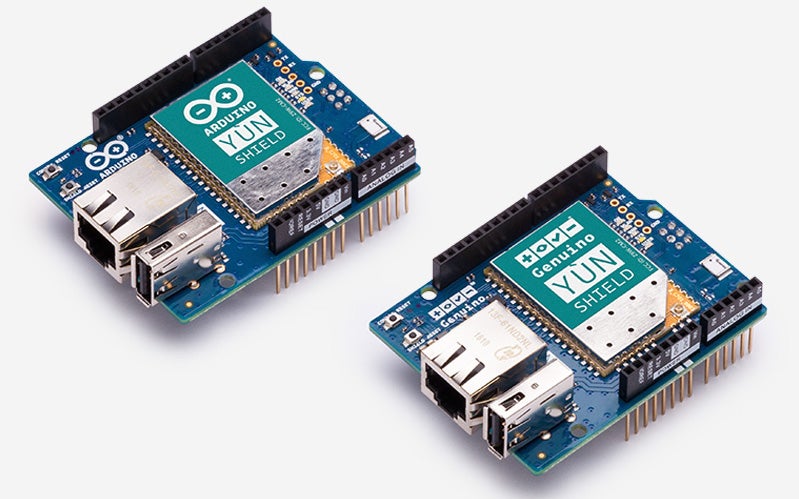
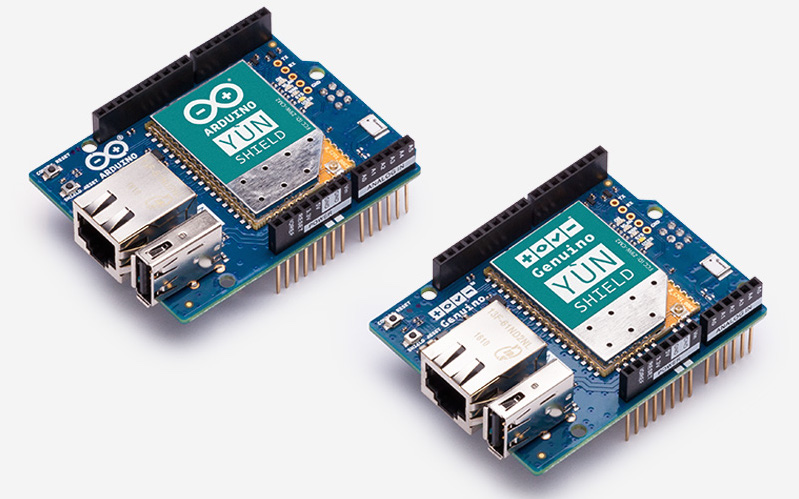
Arduino and Genuino Yún Shields.
Arduino Srl (Arduino.org), was formerly the Smart Projects manufacturing unit of Arduino. The company split off as a separate enterprise over a year ago, and the two entities are now engaged in legal battles. (As Hackaday recently illuminated, Arduino itself is a sort of fork, as it is based on the open source Wiring project.)
One of the central questions about the future of Arduino is to what extent this MCU-based platform should embrace Linux, which has spread quickly in Arduino-like, open-spec hacker boards like the Raspberry Pi. Before the split back in 2013, the project had experimented with a hybrid Linux/Arduino Arduino Yún, which runs the lightweight OpenWrt Linux on a MIPS-based Qualcomm Atheros AR9331 WiFi SoC. The thinking was that to be fully connected with the Internet via WiFi, you really need embedded Linux on board.
The Yún, which continues to be sold by both Arduino entities, never approached the sales of mainstream Arduinos like the Uno or Leonardo, and the promised, Linux-ready Arduino TRE never reached market. This apparent false start for Linux/Arduino hybrids was not surprising since developers who wanted Linux with Arduino could increasingly get both from an increasing number of more powerful, Linux-based hacker boards that add Arduino shield and/or Arduino IDE compatibility.
In recent months, however, Linux/Arduino hybrids sold under the Arduino label have made a comeback. Here’s a look at the latest announcements:
Arduino LLC: A Tiny Zero Follow-On and a Yún Shield
In April, Arduino LLC announced a WiFi-ready update to the Arduino Zero that offers WiFi without the Linux. The Arduino MKR1000 (Genuino MKR1000 outside the US) keeps the same $35 price as the Uno, but with a smaller, 2.2 by 1.0-inch footprint, a new cryptographic chip, and LiPo charging. The IoT-focused MKR1000 enables WiFi via an Atmel ATSAMW25H18 module.
The MKR1000 is backed up by a new Arduino IoT community website within Arduino.cc, as well as the announcement of a beta-level Arduino Create development environment that incorporates a web-based code editor. There’s also an alpha-stage Arduino Cloud platform that uses MQTT to aggregate data from WiFi- and crypto-enabled devices like the MKR1000.
This month, Arduino LLC unveiled a Linux-driven, WiFi-equipped Arduino Yún Shield. Like the Yún, the $50 shield runs OpenWrt on an Atheros AR9331 WiFi SoC, in this case via a surface-mounted 8devices Carambola 2 module. The Yún Shield, which is further equipped with an Ethernet port and a USB port, lets you upload Arduino sketches to any shield-ready Arduino board.
Arduino Srl: WiFi, With and Without the Linux
Like Arduino LLC, Arduino Srl has made a big push for onboard WiFi using both Linux and MCU-driven solutions. Last year, the company launched the Arduino Yún Mini, which like the Yún, runs the OpenWrt-based Linino on an AR9331 SoC. It followed up more recently with the more powerful, $99 Arduino Tian, which runs Linino on a MIPS-based 560MHz Qualcomm AR9432 WiFi SoC. The Tian also offers Bluetooth EDR/BLE 4.0, as well as a SAMD21 32-bit Cortex M0+ MCU.
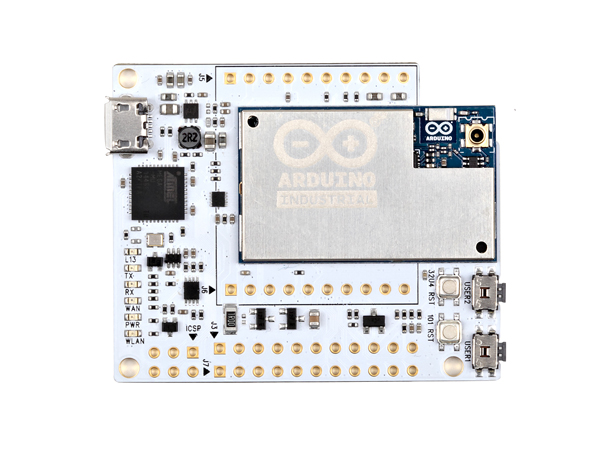
Arduino Industrial 101
This week, in conjunction with the Maker Faire Bay Area, Arduino Srl announced an Arduino Industrial 101 SBC, which offers Arduino compatibility via a 16MHz ATmega32u4 MPU. The SBC features Dog Hunter’s WiFi-enabled Chiwawa LGA module, which incorporates an Atheros AR9331 running Linino. Like the Yún Shield, the Chiwawa is also available separately to bring Linux-driven WiFi to any Arduino board, in this case via a Chiwawa Collar evaluation board.
Arduino Srl also announced two other WiFi-ready boards that do not run Linux. The Arduino Uno WiFi is a straight-up Uno clone that adds Espressif’s ESP8266 WiFi Module, based on a Tensilica Xtensa LX3 chip. The Arduino-compatible ESP8266, has attracted a thriving open source community.
This week, Arduino Srl will unveil a wireless-studded Arduino Primo. Nordic Semiconductor has already tipped the board as a design win for its nRF52 wireless SoC.
With the help of the nRF52, the Primo not only provides WiFi, but also Bluetooth Low Energy, NFC, and IR technologies. With Linux nowhere in sight, the nRF52 can achieve some pretty savvy, Linux-like wireless functionality, claims Nordic. For example, it can act as a TCP/IP Internet client and server over WiFi, and it enables NFC secure authentication and touch-to-pair. More experienced developers can develop IPv6-based Bluetooth LE applications.
LEDE Forks OpenWrt
Although neither Arduino camp has come up with a clear strategy regarding Linux, they’re keeping it in the mix. Meanwhile, a recent fork of the lightweight OpenWrt distribution, the only Linux that can effectively run on Arduinos, is adding to the uncertainty.
The router-focused OpenWrt project, which had previously inspired the peaceful spinoff of the Linino project, is now in the midst of a civil war. Earlier this month, several core developers announced a new Linux Embedded Development Environment (LEDE) project, which is billed as both a “reboot” and “spinoff” of OpenWrt.
As with the LibreELEC fork of the Kodi-based OpenELEC media player project, the split appears to be primarily about governance rather than technology. LEDE is mostly be concerned about improving transparency, inclusiveness, and timeliness. Yet, it’s possible a more substantial technological fork could emerge, as well.
As the network functions virtualization (NFV) revolution comes to service provider and cloud communities, there are some concerns about this new technology. One of the major questions is how to design enough performance in NFV to keep pace in high-subscriber, mission-critical environments.
Can NFV live up to the performance expectations of the most demanding networks, including global service providers? There is evidence that there is more work to do to transform this IT technology – but some key technology tools are emerging to put enough performance in NFV to perform for the most demanding applications, including communications.
NFV Advantages
The advantage of NFV is that it can deliver network functionality via software running on industry-standard, commercial off-the-shelf (COTS) hardware. Any number of software services can be deployed on this generic hardware, which can assure interoperability and flexibility.
San Francisco startup MapD has released a database system, ParallelDB, built to run on GPUs (graphics processing units), which can be used to explore multi-billion row datasets quickly in milliseconds, according to the company.
The idea of using GPUs for database work may initially seem unusual, but after you think about it for a bit, you start to wonder why no one has commercialized the idea before.
“Imagine an SQL query. Or any kind of relational operator, doing the same thing over every row of data. That lends itself really well to the vector model of GPUs,” said Todd Mostak, founder, and CEO of MapD.
As containers from Docker and other vendors grow in popularity, so does the need for enterprise-ready data storage solutions that work well with containers. Here’s an overview of the challenges on this front, and how developers are solving them.
You may be wondering why data storage for containers is an issue at all. After all, in our era of scale-out storage, automatic failover and redundant arrays, figuring out ways to store and protect data is not usually difficult.
There are many reasons often cited for why continuous integration is necessary, but none are so important, so essential, as trust.
Let me elucidate; veteran developer Robert “Uncle Bob” Martin says that one of the core failings in modern software development is the breakdown in trust between developers and the rest of the business — a breakdown in trust caused by software developers promising deadlines they can’t deliver on.
Everything starts out fine, with management asking the developers for the amount of time it will take to implement a feature. The developers provide an answer, and management takes them at their word.
Inevitably, one of two situations results: the deadline goes by yet the feature isn’t finished, or the feature is implemented on time, but it’s either faulty, creates new bugs, or both.
One of the things that has surprised me over the years is how infrequently people take advantage of custom code metrics. I say this not from the perspective of a geek with esoteric interest in a subject, wishing other people would share my interest. Rather, I say this from the perspective of a business man, making money, and wondering why I seem to have little competition.
As I’ve mentioned before, a segment of my consulting practice involves strategic code assessments that serve organizations in a number of ways. When I do this, the absolute most important differentiator is my ability to tailor metrics to the client and specific codebases on the fly. Anyone can walk in, install a tool, and say, “yep, your cyclomatic complexity in this class is too high, as evidenced by this tool I installed saying ‘your cyclomatic complexity in this class is too high.’” Not just anyone can come in and identify client-specific idiosyncrasies and back those findings with tangible data.
More vulnerable than virtual machines? In fact, containers have some security advantages.
Developers love containers. They’re easy to use and fast to start. You can run a lot of them on even simple hardware. Startup overhead has always been a bane of development and testing, and this overhead only increases with microservices architectures. If a developer needs a half dozen services, he might easily waste a day or two with setup — configuring hardware, running installers, fighting incompatibilities.
With containers, that collapses to minutes or seconds and can be run on one development workstation. The readily available repositories of useful container images multiply developer productivity, much like open source does, but without the trouble of doing a build. Operations teams have been slower to adopt containers. One reason is that many applications they must support aren’t yet containerized. Another reason is a reluctance to move away from VMs.
When we talk of performance in computing, we refer to the relationship between our resources and the tasks that they allows us to complete in a given period of time. In a day of…
[[ This is a content summary only. Visit my website for full links, other content, and more! ]]
This tutorial describes the installation of a clustered web, email, database and DNS server to be used for redundancy, high availability and load balancing on Debian 8 with the ISPConfig 3 control panel. MySQL Master/Master replication will be used to replicate the MySQL client databases between the servers, Unison will be used to Sync the /var/www (websites) and the Mails will be synced with Dovecot.