SAP has released a beta version of its Hana Cloud Platform for Cloud Foundry.
The software giant yesterday released a Cloud Foundry beta service that works on the Pivotal-inspired open-source cloud. Coming with the beta is support for Java, Node.js, HTML5, MongoDB, Redis, PostgresSQL and RabbitMQ.
SAP said this would let developers build apps and services using the combination of Cloud Foundry and SAP’s HANA Cloud Platform.
GigaSpaces, a company that offers a data scalability platform, has created some MANO software named Cloudify, and the code is being used by Open-O, OPNFV, and AT&T. The code has also spawned an open source MANO group dubbed Aria. Cloudify is open-sourced software, and its scope includes provisioning, configuring, and monitoring.
In this write-up we’ll look at a Node.js prototype for finding stock of the Raspberry PI Zero from three major outlets in the UK.
I wrote the code and deployed it to an Ubuntu VM in Azure within a single evening of hacking. Docker and the docker-compose tool made the deployment and update process extremely quick.
Remember linking?
If you’ve already been through the Hands-On Docker tutorial then you will have experience linking Docker containers on the command line. Linking a Node hit counter to a Redis server on the command line may look like this:
Nova-Docker driver is installed on Compute node which is supposed to run two Java EE Servers as light weight Nova-Docker Containers (instances) having floating IPs on two different external vlan enabled subnets (10.10.10.0/24; 10.10.50.0/24). General Setup RDO Mitaka ML2&OVS&VLAN 3 Nodes. VLAN tenant’s segregation for RDO lansdcape was selected to avoid DVR configuration Controller && Compute Cluster.
Details here Setup Docker Hypervisor on Multi Node DVR Cluster RDO Mitaka
Thus Controller/Network RDO Mitaka Node has to have external networks of VLAN type with predefined vlan tags. Straight forward packstack deployment doesn’t allow to achieve desired network configuration. External network provider of vlan type appears to be required. Also I have to notice that Docker Hypervisor running on Compute Node
requires all deployment nodes set SELINUX to PERMISSIVE MODE.
The Hyperledger Project, the developer of blockchain software that’s backed by IBM, Wells Fargo & Co. and other titans of technology and finance, has a new leader.
The group has hired Brian Behlendorf, 43, as executive director, according to a statement Thursday. He was a key developer of Apache, the software that powers much of the web, and alsoworked for the World Economic Forum and President Barack Obama’s administration.
The consortium is promoting blockchain, the ledger software that makes bitcoin possible, as a way to reshape how business transactions are recorded.
PLUMgrid INC, which provides tools for OpenStack cloud providers, has been participating in the open source community since the company was founded in 2011. It started working with the Linux kernel community to create a distributed, programmable data plane and contributed to eBPF (extended Berkeley Packet Filter), a key component in building networks that are agile, fast and secure. eBPF has been upstreamed since Linux kernel version 3.16.
Despite this considerable open source experience, however, when PLUMgrid engineers and managers began to consider initiating a formal open source IO Visor project in 2014, they weren’t quite sure where to begin.
“We didn’t know how to form a collaborative project,” says Wendy Cartee, VP, Marketing & Project Management, PLUMgrid. “We weren’t sure about the governance, how the different committees required to properly run the community would come together. So there were a lot of unknowns for us.”
In 2015, the company turned to The Linux Foundation to help start IO Visor, a Linux Foundation Collaborative Project working on a set of open source IO and networking components which can be combined to build IO Modules for use in networking, security, tracing and other application functions in a datacenter. Their work is contributing to the rapid advancement and innovation in evolving areas including cloud computing, the Internet of Things (IoT), Software-Defined Networking (SDN) and Network Function Virtualization (NFV).
The Path to IO Visor
In the past, PLUMgrid’s open source participation happened naturally because their products are aimed at OpenStack environments, Cartee said.
PLUMgrid helps service providers and enterprises operationalize their OpenStack cloud virtual networks and SDN (Software Defined Networking) deployments with products such as
Open Networking Suite (ONS) and CloudApex, its companion monitoring platform.
Currently, PLUMgrid has deployed over 70 OpenStack-based clouds providing Communications as a Service (CaaS), Platform as a Service (PaaS), E-Commerce, Media and Entertainment Cloud, for companies around the world.
In 2012 a group of PLUMgrid developers got involved in the Linux kernel community developing virtualization for I/O.
“They were driven by the appeal of dynamic IO modules that could be loaded and unloaded at runtime — very compelling for virtualized environments,” Cartee said.
Their involvement in the Linux kernel community and success in developing key technologies through that participation, led the company to discuss forming a community around IO Visor in early 2015, Cartee says.
“I have followed Linux for at least 10 years, and I was aware of The Linux Foundation for a long time,” says Cartee. “But it wasn’t until we saw this community interested in the kernel development aspects that we looked at officially reaching out to The Linux Foundation and explored the possibility of forming a community.”
More developers, actual working code
By involving The Linux Foundation in formalizing the IO Visor project, PLUMgrid has been able to help coordinate all the work that is being developed by different companies in this space and raise awareness among developers to evangelize the mission and the goals of the project, Cartee said.
“Previously, activity was pretty much ad hoc, there weren’t any formal discussions,” says Cartee. “There were a lot of contributions but it was a little more challenging to get more companies and communities to come together and talk about ideas, and prioritize use cases, talk about how various use cases can fit together, and talk about how other collaborative projects can come together and solve a much bigger problem. Formalizing the project really helped us advance the entire solution from that perspective.”
Being part of a collaborative project that resulted in seeing ideas turn into actual working code was particularly gratifying, Cartee adds. “I think it’s a new experience for most of us, who are used to the standards bodies of the past.”
Now a Gold member of The Linux Foundation and a Silver founding member of OpenDaylight, PLUMgrid has learned how best to leverage the Foundation’s pool of experience, including how to engage with developers and provide the tools they need in order to continue to innovate and drive contributions to the project.
“For us it has been an extremely positive experience. We are able to run much more quickly than if we hadn’t formed a collaborative project,” Cartee said. “There’s a much broader set of companies now becoming aware of the IO Visor project and who want to be part of contributing to it.”
Apprenda today announced that it now offers a commercial distribution of Kubernetes, the well-known tool for deploying and managing containerized applications. Along with the new product, Apprenda will also offer enterprise support subscriptions to companies running Kubernetes.
Additionally, Apprenda announced the acquisition of Kismatic, which provides production support for Docker and Kubernetes. According to the announcement, this acquisition will accelerate Apprenda’s vision of “powering the transition to cloud-native applications and enabling developers to build software quickly and reliably.”
“We’re clearly in the midst of a cloud revolution. Every company is becoming a software company, and many of their new software projects — whether they be cloud, IoT, or mobile — are cloud-native microservices,” said Sinclair Schuller, CEO of Apprenda.
This announcement follows Apprenda’s recent actions to ramp up its open source involvement, including joining the Cloud Native Computing Foundation (CNCF) and open sourcing several plugins for its cloud platform. Patrick Reilly, CEO and founder of Kismatic, is a governing board member of the CNCF and will lead Apprenda’s Kubernetes strategy as the company’s new CTO.
“With our Kismatic offering, we’ll be directly involved in and contributing to the [CNCF] project. In fact, we’ve already started leading efforts related to building Windows support into Kubernetes. The project allows us to take our Windows and enterprise expertise and advance Kubernetes along those dimensions through direct contribution,” Schuller said.
Schuller went on to say that the main advantage of being part of CNCF lies in “giving vendors and end users a common forum to jointly shape the expectations and standards associated with Kubernetes. This common ground ensures that everyone can safely voice their needs and concerns and be heard.”
Founded in July 2015 by 22 member organizations, including CoreOS, Docker, Google, Twitter, and others, CNCF is a Linux Foundation collaborative project that aims to create and drive the adoption of a new set of common container technologies to improve the overall developer experience, pave the way for faster code reuse, improve machine efficiency, reduce costs, and increase the overall agility and maintainability of applications.
The Linux Foundation announced in March that Google would transfer IP for its open source Kubernetes project to the CNCF, laying the foundation for a new commercial ecosystem around the project.
If you cycle the clock back to 2010, when Rackspace and NASA announced an effort to create a sophisticated cloud computing infrastructure that could compete with proprietary offerings, it would have been hard to forecast how successful the OpenStack platform would become. OpenStack has won over countless companies that aredeploying it and backing it, and it hasits own foundation. What’s more, with some studies showing the majority of private cloud deployments are on OpenStack, OpenStack certification is now an extremely hot commodity in the job market.
The value of certification is driven by shortages in the number of skilled OpenStack professionals. CEB, a company focused on best practices in technology, recently provided Forbes with the results ofa database diveon cloud computing hiring trends. It found that there are still shortages in expertise surrounding many cloud computing platforms, and it also called out a strong job market for professionals who have skills. In fact, $124,300 was the median advertised salary for cloud computing professionals in 2016, according to the database.
Gartner and countless other research groups have also called out the shortage in OpenStack-skilled workers. Additionally, as open cloud platforms are proliferating, there is a growing need for people with skills that complement cloud computing knowledge, such as security and networking skills.
Over the last year, the continuing rise of open cloud platforms and the increasing need for support for open source security projects have created much demand for pros with special expertise in these areas. According to The Linux Foundation’s2016 Open Source Jobs Report, 51 percent of surveyed hiring managers say knowledge of OpenStack and CloudStack has a big impact on open source hiring decisions, followed by security experience (14 percent) and container skills (8 percent).
Are you looking to pick up valuable OpenStack certification? If so, you have several good options, and costs are minimal. Here are top, proven OpenStack certification options to consider.
Look Into Foundation Help
At the recent OpenStack Summit in Austin, TX, The OpenStack Foundation announced the availability of a Certified OpenStack Administrator (COA) exam. Developed in partnership with The Linux Foundation, the exam is performance-based and available anytime, anywhere. It enables professionals to demonstrate their OpenStack skills and helps employers gain confidence that new hires are ready to work.
The Linux Foundation offers an OpenStack Administration Fundamentals course, which serves as preparation for the certification. The course is available bundled with the COA exam, enabling students to learn the skills they need to work as an OpenStack administrator and get the certification to prove it. The most unique feature of the course is that it provides each learner with a live OpenStack lab environment that can be rebooted at any time (to reduce the pain of troubleshooting what went wrong). Customers have access to the course and the lab environment for a full 12 months after purchase.
Like the exam, the course is available anytime, anywhere. It is online and self-paced — definitely worth looking into.
The Red Hat Path to the Cloud
Red Hat continues to be very focused on OpenStack, and has a certification option that is also worth considering. The company hasannounced a new cloud management certification for Red Hat Enterprise Linux OpenStack Platform as part of the Red Hat OpenStack Cloud Infrastructure Partner Network.
Red Hat has been working closely with cloud and network management solution providers, including iBMC and HP. As members of the Red Hat OpenStack Cloud Infrastructure Partner Network, these companies are supporting Red Hat’s platform certification process.
Radhesh Balakrishnan, Red Hat’s general manager of virtualization and OpenStack said: “As OpenStack is becoming a core element of the enterprise cloud strategy for many customers, Red Hat Enterprise Linux OpenStack Platform is architected and backed by the broadest partner ecosystem to be the preferred platform. The growth and maturity of the ecosystem reflects the evolution of the product moving from addressing infrastructure-centric alignment to help with early deployments to now be well-managed, to be part of enterprise hybrid cloud implementations.”
Mirantis Stays Agnostic
Mirantis has built a name for keeping its certification training vendor-agnostic, and the company teaches OpenStack across the most popular distributions, hypervisors, storage back ends, and network topologies.
The company offers the following courses:OpenStack Fundamentals (OS50), a one-day course for business professionals;OpenStack Bootcamp I (OS100), which trains IT professionals to operate, configure, and administer an OpenStack environment; andOpenStack Bootcamp II (OS200), which provides training on the manual deployment of OpenStack. Earlier this year, Mirantis also launchedVirtual Training, a synchronized, instructor-led online OpenStack professional training option.
“Training is often a leading indicator to a technology’s impact. In 2015 OpenStack advanced beyond early adopters, and we saw an uptick in individuals and businesses scrambling to develop OpenStack skills,”saidMirantis Head of OpenStack Training Services, Lee Xie. “Students choose Mirantis Training because our courses cover vanilla OpenStack, equipping them with true technical understanding of what it’s like to deploy and operate OpenStack in the real world.”
The official name of the Mirantis certification isMirantis’ Certification for OpenStack (MCA-100). “I found the MCA-100 exam compared favorably to rigorous certifications like VCP and CISSP,” said Ramiro Salas, a technology specialist at VMware who completed his MCA-100 certification. “The technological independence that Mirantis professes is accurately reflected on the exam and I highly recommend the course.”
To find even more OpenStack training opportunities, you can visit theOpenStack Marketplace, which aggregates many notable educational providers.
In 2015, PLUMgrid turned to The Linux Foundation to help start IO Visor, a Linux Foundation Collaborative Project, which developed a set of open source IO and networking components used to build IO Modules for use in networking, security, tracing and other application functions in a datacenter.
“We have been really blessed in being able to leverage the pool of expertise from The Linux Foundation,” says Wendy Cartee, VP of Marketing & Project Management at PLUMgrid. “We learned so much from everyone in the community and [The Linux] Foundation in terms of actively engaging with the developers.”
These days more people than ever feel compelled to get their e-mail fixed super-swiftly if it ever fails. When used several times a day, every day of the year, some of us feel truly bereft when e-mail isn’t available to us. There’s even recognised medical conditions relating to those who obsessively check their e-mails, forcing cognitive failures (whatever they may be) as they do so.
Clearly it’s important to set up your Mail Servers robustly in order to avoid a barrage of complaints from your users; even if an issue is caused by something out of your remit, upstream, as opposed to locally. This tutorial covers how to set up a Postfix mail server and test it.
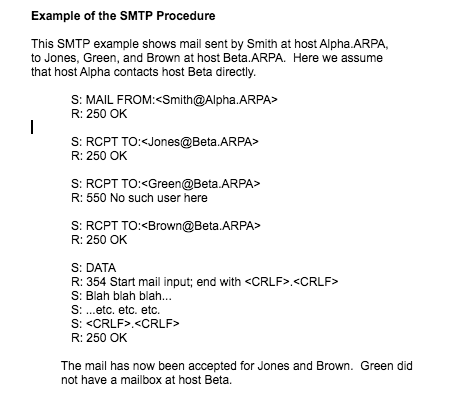
One of the original Internet services was SMTP (the Simple Mail Transfer Protocol). Within its original RFC (Request For Comments 821) which was published in August 1982 there was a lot of forward planning and most likely as a result it remains one of the fundamental cornerstones of the Internet that we know and love today. A reminder of how a typical SMTP transaction looks is visible within the RFC itself:
Figure One: Example SMTP transaction as found at: https://www.ietf.org/rfc/rfc821.txt
As intimated in Figure One there are actually only a handful of commands used in sending an e-mail. Let’s not forget everyone’s favourite “hello” command of course, namely the “HELO” command which initiates a connection, whereas “QUIT” closes it. The “HELO” command is as straightforward as this:
HELO chrisbinnie.tld
With the above line we are simply saying “Hi, I’m a Mail Server called chrisbinnie.tld” as the opening gambit in an e-mail exchange.
As simple, as the “simple” in SMTP is however, sometimes the server and client software involved in forwarding and receiving e-mails isn’t quite as straightforward as you might think.
Let’s have a quick look at getting the sending of outbound e-mails working from the command line and then we’ll explore how to install and test a very popular Mail Server.
Command Line SMTP
Sometimes, when testing a Mail Server’s installation, you need to send e-mails directly from the command line. When you’re not testing you might also need the same functionality from within system scripts. Let us briefly look at a miniscule package that is useful to have sitting alongside a Mail Server which fulfills that very requirement.
If you’re using any derivatives of Debbie and Ian’s favourite Linux distribution then you can install an outbound e-mail tool, run from the command line, to assist you in your testing endeavours as so:
apt-get install heirloom-mailx
There’s a lot of history behind the “mail” and “mailx” packages, which is so far-reaching and detailed that we’ll save it for another day, but trust me when I say that you are likely to have success on some, if not all, Red Hat derivatives by using the following command to install the package rather than using the Debian package name as so:
yum install mailx
Now that’s installed, here is a simple example of how we can send e-mail directly from the command line. The functionality which we have at our fingertips is not just that of the old style “mail” command (as truly clever as it was upon release) but instead we can also manipulate a number of other e-mail related tweaks too.
Having looked at our example you can clearly see that we can alter the “-r” option to change which “from line” is presented to the mail client when the e-mail is picked up at the other end. This is sometimes surprisingly difficult to get working with other command line Mail Clients so cherish the moment as a test e-mail arrives in your inbox and it doesn’t say that it’s been sent by “root@localhost” or something equally disappointing.
Hopefully the other options are equally easy to follow. The “-s” option lets you edit your e-mail’s subject whereas “-a” is the filename of your attachment. You might need to compress the file if the plain text file arrives with extra carriage returns. Also ensure that you’re definitely using the full path to the file if you have other issues with attachments. The above “mailx” command example can either be completed with “< /dev/null” appended to the end or by manually typing a dot and then hitting the Enter key. This dot acts as an End Of File (EOF) marker and is used to populate the body of the e-mail with some content, even if the content is non-existent. Here’s an example of that full command, without an attachment, for ease of reading:
You can see that we’re using “/dev/null” to populate an empty e-mail body to save you interacting further with the software once you’ve hit the Enter key. Don’t be concerned if you see a warning of little consequence such as “Null body. Hope that’s okay.” which is helpfully telling you that there’s no content to the e-mail, just headers and a subject line.
Install Postfix, Undisputed Heavyweight Champion
On now to the star of the show, our Mail Server. The rocket-fueled MTA (Mail Transfer Agent) that is Postfix has such a wide array of features that quite honestly it’s a struggle to know where to begin. However starting with an overview of a handful of its features might help introduce them to any newcomers and additionally act as a refresher to anyone that’s used them before.
Rather than relying on an ISP’s SMTP Servers let’s have a quick look at running your own. Postfix was written by the award-winning programmer and physicist Wietse Venema, who brought us other excellent software packages such as TCP Wrappers and security tool SATAN (Security Administrator Tool for Analyzing Networks). The highly performant Postfix rapidly became my MTA of choice when I discovered it, having used “qmail”for years. Indeed it became the default MTA on a number of the larger Linux distributions shortly afterwards too. This is of benefit to anyone looking for a well-supported piece of software, with ever-increasing levels of unofficial online documentation, to help you solve a tricky problem.
I’m certain that one of the reasons that Postfix gained popularity was that even straight out of the box it’s relatively secure and should meet most people’s needs. As with many powerful software packages there’s a multitudinous array of features which range from the abstract, and therefore rarely needed, to those which many people will want to use.
I find that even when delving much deeper into the more complex facets of Postfix it’s remarkably difficult to get lost inside its config thanks to its undeniable simplicity. The installation of this powerhouse won’t keep you up at night, either. Simply use the correct commands for either Debian or Red Hat derivatives respectively as shown below:
apt-get install postfix
yum install postfix
From the console itself you’ll see a handful of colourful ANSI menu screens. Amongst other easy questions you need to answer when you’re asked you should choose “Internet Site” and then enter your Mail Server’s fully qualified hostname, including your Domain Name such as this example shows:
mail.chrisbinnie.tld
To all intents and purposes you’re up and running having followed those remarkably simple installation steps. Let’s, however, look at the main config file “/etc/postfix/main.cf” to get our bearings.
Upon opening that file you’re dutifully reminded that only a tiny percentage of the mammoth number of features available to Postfix are mentioned within it by default. You can query its many “postconf” options inside the manual as so:
man 5 postconf
If you’re sitting down and not prone to any sudden heart issues then I’ll surprise you with the fact that there’s around 8,800 lines of content in that single manual alone and Postfix uses several additional manuals too. The extensive, (almost entirely) crystal clear documentation is exceptionally readable and the simplicity of the config very rarely trips you up with its dependencies. This is a far cry from other MTAs I’ve battled with in the past and there’s no doubt Postfix should be heralded as a shining beacon of usability and functionality. Needless to say that it’s popularity speaks volumes.
Incidentally if you’re using Debian, or of course one of its derivatives like Ubuntu Linux, then if you mess up the installation steps you can always re-run the initialisation of Postfix like so:
dpkg-reconfigure postfix
On Red Hat derivatives apparently there isn’t a generic reconfiguration utility however some packages do offer similar support to help effectively reconfigure a piece of software’s basic configuration options from scratch; a little like a factory-reset I suppose, despite maintaining other config options afterwards.
Lay Of The Land
Now that we’ve got a working Mail Server we can forge ahead and examine some of its config. However before we do that consider another scenario briefly, partly to introduce Postfix’s preferred config syntax and also to see how to refresh Postfix after you’ve made any changes.
If you ever felt the need to only set up a Mail Server to send outbound e-mails from your localhost address (to avoid exposing an MTA on an external IP Address for example and/or running a fully configured MTA) then read on. You might want to do this in order to only allow software installed on your server to send outbound e-mails, for example, too. Think of it as a mini installation of sorts.
With Postfix this is quite possible to achieve with a simple change to your config file. Begin by making sure that this line appears as so:
inet_interfaces = localhost
As you can see there’s simply a “key: value” style of config formatting. It’s usual to separate multiple entries with commas. Add a space after the commas and it makes more sense when reading it back later on.
For comparison, by default, that setting would usually look like this:
inet_interfaces = all
Populating that key with multiple values (according to the online docs) might look like this for example:
inet_interfaces = 10.10.10.1, 127.0.0.1, [::1]
As you can see the entries sit nicely separated by commas and spaces. The final entry is the IPv4 “localhost” equivalent on IPv6 (and only applies to Postfix 2.2 onwards apparently).
There’s a good chance that you can simply reload Postfix after making changes, to only introduce a tiny pause in service, as opposed to a full restart. If I’m not sure I tend to try a reload first, especially on busy production servers. Typically config changes that need a restart (if my memory serves, they’re not needed that often) might be bigger alterations such as renewing expired TLS (Transport Layer Support) certificates and the like.
If you’re on a “systemd” Operating System then you can reload and restart Postfix respectively as so (or use “service postfix restart” or ““service postfix reload” or their equivalents):
systemctl reload postfix
systemctl restart postfix
Since we now have a functioning Mail Server, by using the magical “mailx” you can now send a test e-mail using a command along these lines:
mail -s “Local Outbound SMTP Test” chris@chrisbinnie.tld < /dev/null
The body of the e-mail will be empty (thanks to the null content from “/dev/null”). Otherwise hopefully your Inbox is now in receipt of a test e-mail.
Summary
Now that you have the basics you should have a good look at the main config file (found in “/etc/postfix/main.cf”) and visit the Postfix website to answer any queries you may have. Postfix is capable of some genuinely amazing functionality and once you get used to the config file’s syntax then you can use the docs on its website to add them to your config. I still find the fact that such a massive amount of config options are available staggering considering the rocket-powered performance that the powerful Postfix achieves.
In the next article, we’ll set up email aliases and do some troubleshooting on our Postfix server.
Chris Binnie is a Technical Consultant with 20 years of Linux experience and a writer for Linux Magazine and Admin Magazine. His new book Linux Server Security: Hack and Defend teaches you how to launch sophisticated attacks, make your servers invisible and crack complex passwords.