The Open Container Initiative has agreed to work on a common open container Image Format Specification.
Server and cloud admins all agree that containers are great. What we don’t agree on is which containers are the best. Rather than let this spark into a standards fire-fight, the Open Container Initiative (OCI), has sought to create common container standards. The newest of these is open container Image Format Spec project.
Cloud computing startup Mesosphere has decided to open source its platform for managing data center resources, with the backing of over 60 tech companies, including Microsoft, Hewlett Packard Enterprise, and Cisco Systems.
Derived from its Datacenter Operating System, a service that Mesosphere set out to build as an operating system for all servers in a data center as if they were a single pool of resources, the open source DC/OS offers capabilities for container operations at scale and single-click, app-store-like installation of over 20 complex distributed systems, including HDFS, Apache Spark, Apache Kafka and Apache Cassandra, the company said in a statement Tuesday.
Already it’s looking like the research from the recently covered The Linux Scheduler: a Decade of Wasted Cores that called out the Linux kernel in being a poor scheduler is having an impact.
While we haven’t seen any major upstream improvements yet to the Linux kernel scheduler, it looks like some parties are beginning to take note and better analyze the scheduler for possible performance improvements….
“Android’s open source model has also allowed device manufacturers to introduce new security capabilities. Samsung KNOX, for example, has taken advantage of unique hardware capabilities to strengthen the root of trust on Samsung devices. Samsung has also introduced new kernel monitoring capabilities on their Android devices. Samsung is not unique in their contributions to the Android ecosystem.”…
The group that created GPS wants it opened up so it’s easier for people to compete on its individual components.
Californian nonprofit The Aerospace Corporation also wants to address the weaknesses that have emerged in GPS in the decades since it was first created – things like jamming and resiliency – without compromising accuracy.
Its so-called “Project Sextant” – outlined in detail in this document (PDF) obtained by Breaking Defense – also notes that while there are many alternative PNT (position, navigation and timing) proposals around, the vertically-integrated nature of GPS makes it hard to adopt them.
Replicating databases creates redundancy which can protect against data loss, and permit optimized performance for applications. This tutorial will cover the basics of replicating an existing MariaDB 10.0 master database to one or more slaves. In the following examples, the host operating system is Debian 8.
While our updated Linux.com boasts a clean look and fresh interface for our users, there’s also an entirely new infrastructure stack that we’re happy to take you on a tour of. Linux.com serves over two million page views a month: providing news and technical articles as well as hosting a dynamic community of logged-in users in our forums and Q&A parts of our site.
The previous platform running Linux.com suffered from several scalability problems. Most significantly, it had no native ability to cache and re-serve the same pages to anonymous visitors, but beyond that, the underlying web application and custom code was also slow to generate each individual pageview.
The new Linux.com is built on Drupal, an open source content management platform (or web development framework, depending on your perspective). By default, Drupal serves content in a such a way as to ensure that pages served to anonymous users are general enough (not based on sessions or cookies), and have the correct flags in them (HTTP cache control headers), to allow Drupal to be placed below a stack of standards-compliant caches to improve the performance and reliability of both page content (for anonymous visitors) and static content like images (to all visitors including logged-in users).
The Drupal open-source ecosystem provides many modular components that can be assembled in different ways to build functionality. One advantage of reusable smaller modules is the combined development contributions of the many developers building sites with Drupal who use, reuse, and improve the same modules. While developers may appreciate more features, or fewer bugs in code refined by years of development, on the operations side this often translates into consistent use of performance best practices, like widespread use of application caching mechanisms and implementing extensible backends that can swap between basic configurations and high availability ones.
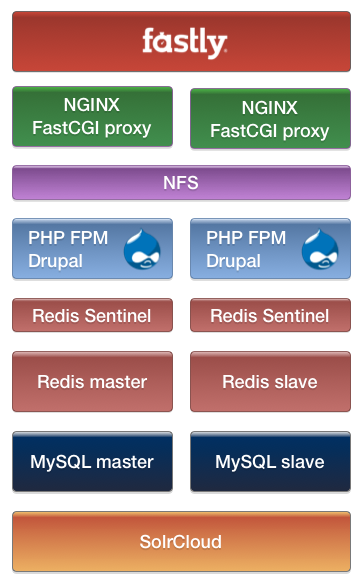
Linux.com takes the performance-ready features of Drupal and combines it with the speed and agility of the Fastly CDN network to re-serve our content from locations around the world that are closer to our site visitors and community. Fastly is a contributor to and supporter of open source software, including the open source Varnish cache. Their use of Varnish provides an extra level of transparency into the caching configuration, making it easier to integrate with the rest of our stack. Fastly provides a very flexible cache configuration interface, but as an added bonus, they let you add your own custom Varnish VCL configuration. The Drupal ecosystem already provides a module to integrate with Fastly, which in typical Drupal fashion doesn’t reinvent the wheel, but leverages the Expire module, a robust community module that provides configurable cache clearing triggers and external integrations used on over 25,000 sites (as of April 2016).
While Varnish provides a very powerful cache configuration language, Linux.com also uses another caching reverse proxy, NGINX, as an application load balancer in front of our FastCGI Drupal application servers. While NGINX is less flexible for advanced caching scenarios, it is also a full-featured web server. This allows us to use NGINX to re-serve some cached dynamic content from our origin to Fastly at the same time as serving the static content portions of our site (like uploads and aggregated CSS and JS, which are shared between NGINX and our PHP backends with NFS). We run two bare-metal NGINX load balancers to distribute this load, running Pacemaker to provide highly available virtual IPs. We also use separate bare-metal servers to horizontally scale out our Drupal application servers. These run the PHP FastCGI Process Manager. Our NGINX load balancers maintain a pool of FastCGI connections to all the application backends (that’s right, no Apache httpd is needed!).
We’re scaling out the default Drupal caching system by using Redis, which provides much faster key/value storage than storing the cache in a relational database. We have opted to use Redis in a master/slave replication configuration, with Redis Sentinel handling master failover and providing a configuration store that Drupal uses to query the current master. Each Drupal node has its own Redis Sentinel process for a near-instant master lookup. Of course, the cache isn’t designed to store everything, so we have separate database servers to store Linux.com’s data. These are in a fairly-typical MySQL replication setup, using slaves to scale out reads and for failover.
Finally, we’ve replaced the default Drupal search system with a search index powered by SolrCloud: multiple Solr servers in replication, with cluster services provided by ZooKeeper. We’re using Drupal SearchAPI with the Solr backend module, which is pointing to an NGINX HTTP reverse proxy that load balances the Solr servers.
I hope you’ve enjoyed this tour and that it sparks some ideas for your own infrastructure projects. I’m proud of the engineering that went into assembling these—configuration nuances, tuning, testing, and myriad additional supporting services—but it’s also hard to do a project like this and not appreciate all the work done by the individual developers and companies who contribute to open source and have created incredible open source technologies. The next time the latest open source pro blog or technology news loads snappily on Linux.com, you can be grateful for this too!
The Node.js Foundation recently conducted an expansive user survey to better understand Node.js users (you, or maybe you :). We were interested in getting a better sense of the type of development work you use Node.js for, what other technologies you use with Node.js, how the Node.js Foundation can help you get more out of Node.js, how you learn new languages, and more.
We were really excited that over 1,700 people took the survey, which was open for 15 days from January 13 to January 28, 2016. Thank you for those that participated.
In addition to revealing interesting insights about the current state of play and trends in development, the survey provided important information to help The Node.js Foundation be even more successful in our mission “to enable widespread adoption and help accelerate development of Node.js and other related modules.”
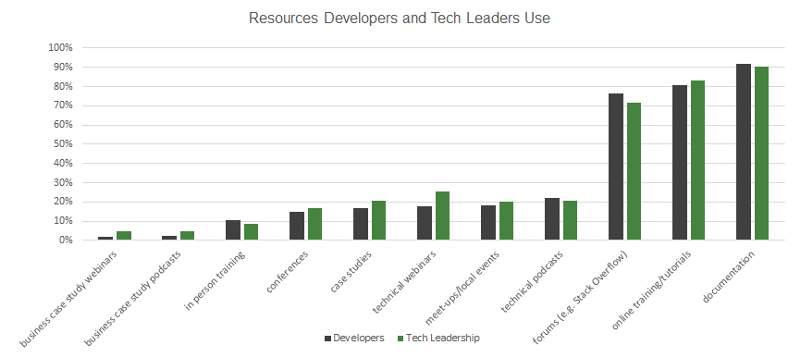
The report, which you can download here, provides charts with detail on demographic information about Node.js users and that break down the other languages and tech they use according to the type of dev work they do.
A couple highlights/takeaways that we found particularly interesting are:
Interesting Findings in IoT: IoT developers using Node.js have more experience than their front end and back end counterparts, tend to use different languages in addition to Node.js, and tend to use more Node.js across their stack
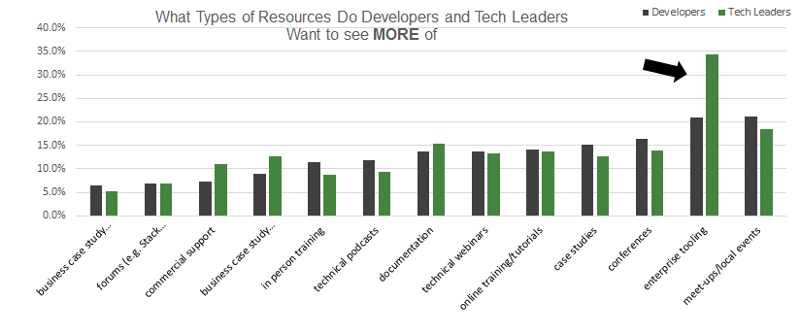
Node.js Pervasive in Enterprises: More than 45 percent already using the Node.js Long Term Support release (v4) geared toward medium to large enterprise users, and enterprise tooling is in high demand.
Strong interest among tech leaders in enterprise tooling.
Node.js and Containers Take Off: Both Node.js and containers are a good match for efficiently developing and deploying microservices architectures.
Full “MEAN” Stack Explodes: Real-time, social networking and interactive game applications use MongoDB, Express, Angular.js and Node.js to address concurrent connections and extreme scalability.
Of course, we’d really love to hear what you find most interesting/surprising in these results. We’re also planning to do another survey later this year, so please let us know what questions you’d like us to include.
Along with Docker Compose, Docker Machine is one of the tools that helps developers get started with Docker. Specifically, Machine allows Windows and OS X users to create a remote Docker host within a cloud provider infrastructure (e.g., Amazon AWS, Google Container Engine, Azure, DigitalOcean). With the Docker client installed on your local machine, you will be able to talk to the remote Docker API and feel like you have a local Docker Engine running. Machine is a single binary that you can install on your local host and then use it to create a remote Docker host and even a local Docker host using VirtualBox. The source code is hosted on GitHub.
In this article, I will give you a brief introduction to Machine and show you how to use it to create a cluster of Docker hosts called a Swarm. This is extremely useful, as soon you will want to go beyond single host testing and start deploying your distributed applications on multiple hosts. Docker Compose can be used to start your application on a Swarm cluster, which I will show you in a future post.
To begin, you need to install Docker Machine. The official documentation is very good and, in these first steps, I’ll show a summary of the commands highlighted in the documentation.
Install Docker Machine
Similar to Docker Compose and other Docker tools, you can grab the Machine binary from the GitHub releases. You could also compile it from source yourself or install the Docker Toolbox, which packages all Docker tools into a single UI-driven install.
For example on OS X, you can grab the binary from GitHub, store it in `/usr/local/bin/docker-machine`, make it executable, and test that it all worked by checking the Docker Machine version. Do this:
Because Machine will create an instance in the cloud, install the Docker Engine in it, and set up the TLS authentication between the client and the Engine properly, you will need to make sure you have a local Docker client as well. If you do not have it yet, on OS X, you can get it via homebrew.
$ brew install docker
You are now ready to create your first Docker machine.
Using Docker Machine
As I mentioned previously, you can use Machine to start an instance in a public cloud provider. But, you can also use it to start a VirtualBox virtual machine, install the Docker Engine in it, and get your local client to talk to it as if everything were running locally. Let’s try the VirtualBox driver first before diving into using a public cloud.
The `docker-machine` binary has a `create` command to which you pass a driver name and then specify the name of the machine you want to create. If you have not started any machines yet, use the `default` name. The next command-line snippet shows you how:
$ docker-machine create -d virtualbox defaultRunning pre-create checks...<snip>Docker is up and running!To see how to connect your Docker Client to the Docker Engine
running on this virtual machine, run: docker-machine env default
Once the machine has been created, you should see a VM running in your VirtualBox installation with the name default. To configure your local Docker client to use this machine, use the `env` command like this:
$ docker-machine env defaultexport DOCKER_TLS_VERIFY="1"export DOCKER_HOST="tcp://192.168.99.102:2376"export DOCKER_CERT_PATH="/Users/sebastiengoasguen/.docker/machine/machines/default"export DOCKER_MACHINE_NAME="default"# Run this command to configure your shell: # eval $(docker-machine env default)$ eval $(docker-machine env default)$ docker ps
Of course, your IP might be different and the path to the certificate will be different. What this does is to set some environment variables that your Docker client will use to communicate with the remote Docker API running in the machine. Once this set, you will have access to Docker on your local host.
At this stage, you can start containerizing on OSX or Windows.
Machine goes further. Indeed, the same commands can be used to start a Docker Machine on your favorite cloud provider and can be used to start a cluster of Docker hosts. Each driver has its own reference well documented. Once you have selected a provider, make sure to check the reference to learn how to set up a few key variables — like access and secret keys or access tokens. These can be set as environment variables or passed to the `docker-machine` commands.
Creating a Swarm Cluster with Docker Machine
The very important point is that so far we have only used a single Docker host. If we really want to run a distributed application and scale it, we will need access to a cluster of Docker hosts so that containers can get started on multiple hosts. In Docker speak, a cluster of Docker hosts is called a Swarm. Thankfully, Docker Machine lets you create a Swarm. Note that you could also create a Swarm with well-known configuration management tools (e.g., Ansible, Chef, Puppet) or other tools, such as Terraform.
In this section, I will dive straight into a more advanced setup in order to take advantage of a network overlay in our Swarm. Creating an overlay will allow our containers to talk to each other on the private subnet they get started in.
To be able to use a network overlay, we start the Swarm using an separate key-value store. Several key-value store back ends are supported, but here we are going to use Consul. Typically, we will create a Docker Machine and run consul as a container on that machine, exposing the ports to the hosts. Additional nodes will be started with Docker Machine (i.e., one master and a couple workers). Each of these will be able to reach the key-value store, which will help in bootstrapping the cluster and managing the network overlays. For a simpler setup, you can refer to this guide, which does not use overlays.
Let’s get started and create a Machine on DigitalOcean. You will need to have an access token set up, and don’t forget to check the cloud providers references. The only difference with VirtualBox is the name of the driver. Once the machine is running and the environment is set, you can create a consul container on that host. Here are the main steps:
Now that our key-value store is running, we are ready to create a Swarm master node. Again, we can use Docker Machine for this, using the `–swarm` and `swarm-master` options. This advanced setup makes use of key-value store via the `–engine-opt` options. This configures the Docker Engine to use the key-value store we created.
$ docker-machine create -d digitalocean --swarm --swarm-master

  --swarm-discovery="consul://$(docker-machine ip kvstore):8500"

  --engine-opt="cluster-store=consul://$(docker-machine ip kvstore):8500"

  --engine-opt="cluster-advertise=eth0:2376" swarm-master
Once the Swarm master is running, you can add as many worker nodes as you want. For example, here is one. Note that the `–swarm-master` option is removed.
$ docker-machine create -d digitalocean --swarm

  --swarm-discovery="consul://$(docker-machine ip kvstore):8500"

  --engine-opt="cluster-store=consul://$(docker-machine ip kvstore):8500"

  --engine-opt="cluster-advertise=eth0:2376" swarm-node-1
And that’s it, you now have a cluster of Docker hosts running on DigitalOcean. Check the output of `docker-machine ls`. You should see your default machine running in VirtualBox and several other machines, including your key-value store, your Swarm master, and the nodes you created.
What is very useful with Machine, is that you can easily switch between the machines you started. This helps with testing locally and deploying in the cloud.
Using your Cluster or your Local Install
The active Docker Machine — the one with a start in the `docker-machine ls` output — is shell dependent. This means if you open two terminals, and in one you set your default VirtualBox-based machine to be the active one, and in the other you point to your Swarm master, you will be able to switch Docker endpoints by just switching terminals. That way you can test the same Docker Compose file locally and on a Swarm.
To point to your Swarm, the syntax is slightly different than for a single host. You need to pass the `–swarm` option to the `docker env` command like so:
Check that your cluster has been properly set up with `docker info`. You should see your master nodes and all the workers that you have started. For example:
In this example, I used a Consul based key-value store for discovery mechanism. You might want to use a different mechanism. Now that we have a Swarm at hand, we are ready to start containers on it.
To make sure that our containers can talk to each other regardless of the node they start on, in the next article, I will show how to use an overlay network. Overlay networks in Docker are based on libnetwork and are now part of the Docker Engine. Check the libnetwork project if you want to learn more.
Well, that’s a blog title I never expected to use here.
Back in 2003, over 800 blog posts ago, I decided to launch something I called the Standards Blog. Not surprisingly, it focused mostly on the development, implementation and importance of open standards. But I also wrote about other areas of open collaboration, such as open data, open research, and of course, open source software. Over time, there were more and more stories about open source worth writing, as well as pieces on the sometimes tricky intersection of open standards and open source.
I also launched a daily-updated news aggregation service around the same time. That news feed also focused on stories relating to open standards. You can find 8,352 news items in that archive now, sorted by topic and technology area. I still update that feed every week day. For most of the last twelve years, the problem wasn’t finding important and interesting open standards stories, but deciding which four or five I should select every day for posting. Here, too, the number of open source stories relating to the achievement of the same business goals began to increase.
Two years ago something new and different began to happen: the number of open standards stories pulled in by the Google Alerts I use to source them began to plummet. Even more tellingly, the number of open source stories mentioning open standards began to markedly increase. And also this: the number of launch announcements of new standards consortia dropped in rough proportion to the increasing number of stories reporting on the launch of new, significantly funded open source foundations.
Do you sense a pattern here?
Of course you do. And here’s what it means: The top IT companies are increasingly opting to use open source software to solve problems that they used to address with open standards. And where standards must still play a role, the same companies are deciding to develop the open source software first and the related standards later, rather than the traditional practice of doing it the other way around. The reasons are many and obvious: time to market is faster, interoperability is often more easily obtainable, development economies are dramatic, and the number of standards ultimately needed is far less.
The shift in the focus from open standard to open source should therefore not surprise, nor should the fact that the cash and personnel resources dedicated to these new collaborative organizations is dramatically greater than those historically dedicated to new standards consortia.
Interestingly, when standards have been needed to support new platforms also being enabled by open source software, such as the Cloud, Internet of Things, networking and virtualization, IT companies have almost always opted to develop them in pre-existing consortia and traditional standards development bodies, instead of new consortia launched for that purpose.
This is a major change from practices prevailing over the last twenty years, when the advent of any new technology was accompanied by a veritable algal bloom of new, often competing standards consortia. Each of these new organizations was created as much to give credibility to, and promote, the new technology as the inevitable next big thing. Now this sort of full-court press is being carried out through new, dedicated open source foundations and projects instead. That’s where the strategic battles are being won or lost, so any related standards development needs can be satisfied in any competent organization.
This change, too, has been dramatic. In the past, any diagram of standards developers supporting a new technology or platform was dominated by new consortia launched for the purpose of developing those standards. But a diagram of IoT or Cloud standards today almost exclusively includes only old, familiar names.
Further transformations are occurring behind the scenes. Directors of standards development within major IT companies are not being replaced when they retire. At the same time, budgets funding participation in open source projects are exploding. And where young engineers automatically incorporate open source code into their work, they may be only dimly aware at best of the role of standards in achieving their objectives, or how those standards are developed.
The change in the press is even more dramatic. Without anyone ever reporting on the change, or perhaps even noticing it, the word “standards” has been repurposed to describe code bases rather than specifications. And perhaps advisedly so, because these code bases solve the problems that standards used to address. Whenever the phrase “open source and open standards is used,” much more often than not it’s in a story focusing on open source software rather than open standards. Usually, the inclusion of the words open standards is more of a rote afterthought than a conscious reference to any specific standards. Perhaps this is because the change in methodologies has been so natural and inevitable. But these changes are profound.
It may be that we are living in one of those times when the significance of change is recognized only by the historians who identify and analyze it in retrospect. When they do, I hope they conclude that this transformation was managed wisely, and that the competencies and best practices that have been carefully developed over the last 130 years of standards setting are not forgotten. After all, while the need for open IT standards may be diminishing, it will not disappear. And there is much to be learned from that long, hard road that open source developers would do well to study and repurpose to their own cause, something they have rarely done to date.