
As a Linux administrator you’ve got various tools to use in order to configure your network connections, such as: nmtui, your NetworkManager with GNOME graphical user interface and of course nmcli (network manager command line tool).
Navigating OPNFV’s Brahmaputra Release
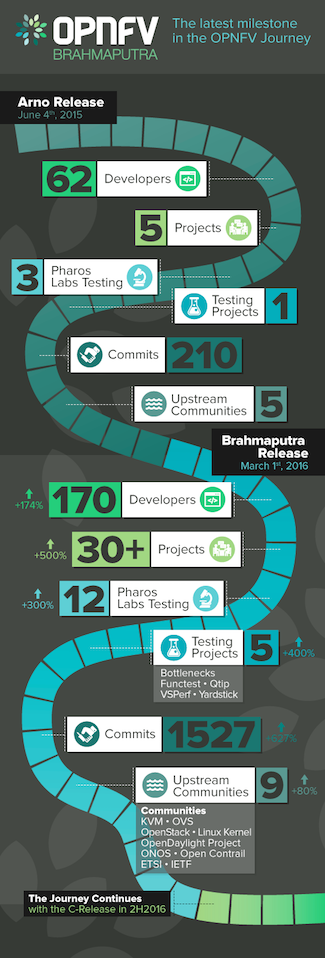 This week, we celebrate the second OPNFV platform release: Brahmaputra. I am so proud of the entire OPNFV community who have come together to create this incredibly rich and diverse experience that marks significant progress toward a deployable open source platform for NFV. It’s our first full experience with a massively parallel simultaneous release process and demonstrates that we can meet the complex challenge of collaborating upstream to advance the ecosystem. (Learn more about Brahmaputra here: www.opnfv.org/brahmaputra)
Brahmaputra software delivers enhanced testing capabilities (system and performance), new deployment and integration scenarios (weaving in new controllers and installers), improved automation of our continuous integration and continuous deployment toolchain, and last (but not least) many new carrier-grade features (such as IPv6, VPN configuration, fault detection, resource reservation, and dataplane acceleration).
But what I’m most proud of is the growth and strength of our community: Systems integration is hard, requires diligent collaboration, and is essential in our march toward NFV viability. It’s been said before, but bears repeating: the strength of any open source project depends on the community involved in developing it.
What we’ve seen with Brahmaputra is key stakeholders collaborating across the industry and a marked increase in community engagement overall. For example, 35 projects were involved in the Brahmaputra release, compared to just five in Arno. That’s a six-fold increase in just ten months! Even more telling is the more than 140 developers involved in the release—which means we’ve seen developer participation in OPNFV as a whole increase five-fold since August of 2015.
But at the same time, so much of what we do is upstream collaboration, which has also grown in size and impact with Brahmaputra. A great deal of the effort going on behind the scenes is in working with other communities, including KVM, OVS, OpenStack, Linux kernel, OpenDaylight Project, ONOS, Open Contrail, ETSI, and IETF. If you think about how many developers across all these various organizations have contributed to the release, it’s a feat that could only be achieved through open source development.
Brahmaputra represents a significant milestone in project maturity. It’s now “lab-ready,” which means it provides a viable starting point for evolving NFV use cases (such as SFC and L3VPN) and composing services in an actual lab environment. It brings improvements to platform-level testing and project infrastructure, including framework and documentation updates that set the stage for further development of the platform, but also scenarios that can be tested now.
Brahmaputra’s continuous integration mechanisms provide a stable framework for deploying and testing new use cases across the extensive Pharos community labs, which played a pivotal role in the development of Brahmaputra as they were used for release validation along with the OPNFV bare metal lab hosted by the Linux Foundation.
OPNFV releases are centered around scenarios, i.e., compositions of components and their configuration as well as associated installation, integration and testing. Brahmaputra will deliver the entire set of deployment scenarios incrementally, with additional scenarios becoming available in a set of release editions as they achieve stability. Moving forward, we’ll continue to improve the platform tooling, enhance testing capabilities, and work with upstream communities to introduce new features.
I encourage you to get involved! Today you can download OPNFV Brahmaputra and if you’re a developer, join the mailing lists or weekly Technical Steering Committee (TSC) calls to help shape the direction of OPNFV. We’ll be hosting our first plugfest the week of May 9th at at the CableLabs headquarters in Louisville, CO, which will provide a great opportunity to collaborate and test interoperability of different products with the Brahmaputra release.
Comments from OPNFV Brahmaputra Developers
“I am proud of the Brahmaputra release for its lab-readiness–we will be able to develop innovative applications, experiment with new use cases and demonstrate the interoperability of the platform. I am particularly proud of the IPv6 feature in OPNFV, which extends the current capabilities of the Neutron Router and the ODL L3 Router to any VM that is managed by OPNFV and acts as an IPv6 vRouter. Thus, it allows flexible service design, provisioning and deployment on OPNFV.” – Bin Hu
“This release includes the results of the NFV feature development pipeline, which start from the real operator requirements and go through code development in the relevant upstream projects towards a reliable NFV platform, powered by open collaboration.” – Ryota Mibu, NEC/Doctor Lead
 About the author: Chris Price leads open source industry collaboration for Ericsson in the areas of NFV, Cloud & SDN from the CTO’s office in Sweden and is an active member of the technical steering comitee’s of the OpenDaylight and OPNFV Projects. Chris’ experiences include leading Ericssons’ IP&Broadband network architecture and standardization teams with a rich history in development of systems and technology in the areas of network management, policy control and user service management, user session control plane solutions, and DPI technologies.
Cloning Linux from a Bundle
 If you find yourself on an unreliable Internet connection and need to perform a fresh clone of Linux.git, you may find it tricky to do so if your connection resets before you are able to complete the clone. There is currently no way to resume a git clone using git, but there is a neat trick you can use instead of cloning directly — using git bundle files.
Here is how you would do it.
-
Start with “wget -c“, which tells wget to continue interrupted downloads. If your connection resets, just rerun the same command while in the same directory, and it will pick up where it left off:
wget -c https://cdn.kernel.org/pub/scm/linux/kernel/git/torvalds/linux.git/clone.bundle
-
Once the download is completed, verify that the bundle has downloaded correctly:
git bundle verify clone.bundle
...
clone.bundle is okay
-
Next, clone from the bundle:
git clone clone.bundle linux
-
Now, point the origin to the live git repository and get the latest changes:
cd linux
git remote remove origin
git remote add origin https://git.kernel.org/pub/scm/linux/kernel/git/torvalds/linux.git
git pull origin master
Once this is done, you can delete the “clone.bundle” file, unless you think you will need to perform a fresh clone again in the future.
The “clone.bundle” files are generated weekly on Sunday, so they should contain most objects you need, even during kernel merge windows when there are lots of changes committed daily.
Linux Mint Devs Explain Timeline of Website Hack
 They received a lot of help from the community. The Linux Mint team is recovering from the website attack in February that seriously affected their credibility. The lead developer of the project, Clement Lefebvre explained in great detail everything that happened.
…The team is now working to fix the image of the project and the first step in this process is to inform the users about everything that happened. Nothing was held back, and we now know the entire timeline of the events.
Read more at Softpedia Linux News