
Want to find what is using all of your bandwidth on Linux server? Try iftop tool. This command listens to network traffic on a given interface (such as eth0 or eth1), and shows a table of current bandwidth usage by pairs of hosts. iftop must be run with sufficient permissions (usually as root user) to monitor all network traffic on the interface. You can monitor bandwidth usage in a real time on RHEL or CentOS Linux based server.
Publisher’s Picks: 29 Open Source Books for 2015
 Whether you prefer reading technical content online, in print, or both, technical book publishers have you covered. Six publishers share picks for top 2015 open source-related book releases.
Read more at OpenSource.com
System76 Meerkat: God of Small Things
 This little Linux powered mini PC is capable of doing desktop grade work.
I run a file and media server at home to host all my files. It’s a very important machine for my work and personal life. And while I do use public and private cloud to collaborate or share files with others, I don’t use the public cloud to save personal photos or work documents. Everything lives on my local machine away from the prying eyes of spy agencies and companies.
Read more at CIO.com
Getting Started With Intel’s Clear Linux High-Performance Distribution
 For the past year Intel’s Open-Source Technology Center has been working on the Clear Linux Project as a way to accelerate VMs to the point they are as fast as software containers and provide the best Linux support for Intel hardware in various cloud use-cases. As part of doing this, they’ve had to make their distribution lightning fast. Clear Linux though can be stretched outside of traditional cloud use-cases if you just want a lean and mean distribution.
Read more at Phoronix
Tips for Securing your Home Network with Linux and Open Source
Security is at a prime and that’s not going to change in the unforeseeable future. With more and more people taking advantage of technology in nearly every aspect of their lives, it’s now time for people to get serious about security.
That includes your home network.
But, outside of simply using Linux to increase the security of your data (which helps a great deal), what can you do? Can you just demand that everyone in the house switch to Linux? In a perfect world, that would be ideal—however, we do not live in a perfect world and some users won’t want to leave behind their platform of choice.
With that in mind, I’ve gathered up a few suggestions that can help you gain the extra security your home network needs. Some of these suggestions are fairly simple to implement, whereas others will require considerable further reading. With that said, let’s dive in and see how Linux can beef up your home network security.
Router
Let’s start at the heart of your network—the router. Most likely your ISP handed you a modem/router combination that does its job. You’ve probably noticed, however, that the router leaves a lot to be desired in terms of options. Your best bet is to consider that piece of equipment nothing more than a modem and deploy your own, Linux-powered, router.
There are a few ways to go about this. DD-WRT is an open source firmware that can be flashed to many commercial router hardware devices. You could go the easy route and get a router pre-installed with DD-WRT (e.g., the Buffalo line of routers), or you can go through the process of flashing the DD-WRT firmware onto a supported router (check the list of supported devices).
Once you’ve done that, check out the collection of tutorials DD-WRT has for subjects like Access Restrictions, Firewall, Easy SSH Tunnels, Port Blocking, OpenVPN Remote Access by Static Key, and more.
Make sure, when you setup your wireless router, that you use very strong passwords for both the SSID and admin access into the router.
The Production Machines
I’m talking about the desktops and laptops. There’s much to be said here, and what is said depends upon the platform being used. I’ll first make mention of Windows. Because Windows is the platform most vulnerable to attacks, you’ll need to spend a bit of extra time with it. You’ll need to install anti-malware and antivirus tools immediately. You’ll be hard-pressed to find an open source anti-malware-specific application on the market. You will, however, be happy to know there is an open source antivirus tool in ClamAV, which also happens to detect both viruses and malware—so this should be installed on all Windows machines within your home network. If you have OS X machines, you should install ClamXav as your antivirus/anti-malware solution. I also highly recommend you not use the default Windows web browser (Internet Explorer). Instead, download Firefox or Chromium.
If at all possible (and with the way the average user works today, it is very possible), I would recommend not allowing Windows machines on your home network. Insist on users work with Linux desktops, Chromebooks, or OS X for everyday work and dual boot into Windows for games (if necessary).
I would also very strongly suggest you not share out folders from within Windows. If you must share out folders on the network, do so from either a Linux machine or a dedicated NAS (more on this in a bit).
As for the Linux machines on your network? Do not assume they are invulnerable. If they are online, they can be had. To that end, make sure you get to know your distribution’s firewall tool. Most end users won’t have to dive deep into the heart of iptables, because most modern distributions work with the much simpler UFW—which is a front end for iptables that goes a very long way toward making the tool accessible to the average user.
Your distribution most likely includes a front end (for more on UFW, read “An Introduction to Uncomplicated Firewall (UFW)”). Also, make sure every user with a Linux account on a machine creates strong passwords for their account. This should be considered a must.
On all platforms, always make sure to do regular updates. Do not let these sit idly by; otherwise, your desktops, laptops, and servers will be vulnerable. Check daily and, if updates are available, install them.
Sharing Folders
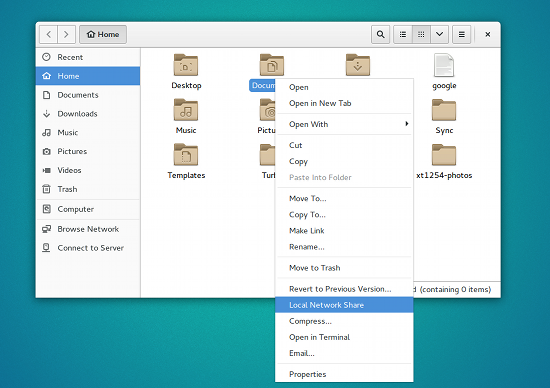
You’re probably used to sharing out folders on your company network. The one thing you must remember about this is that your company probably has shelled out quite a lot of money for security appliances (e.g., Cisco) that allow you to safely share all those folders on your Windows machine without the slightest concern for security. The thing is, without that hardened security, your best bet for sharing out folders is either from a Linux machine or from a NAS. If you want to share out from your Linux desktop, it’s quite easy, because most desktop distributions include the ability to share folders with a few quick clicks (see Figure 1 above).
If you don’t want to share your folders out from a Linux desktop, you can always go with a NAS solution. If you opt to build a NAS on your own, I highly recommend FreeNAS as the platform of choice. FreeNAS not only allows you to set up a powerful network attached storage solution, but a multi-media streaming solution as well.
If you want more of a cloud solution, you can always roll your own internal cloud with ownCloud. Not only can you easily share your data within your home network, you can also set up streaming media, a shared calendar, and even collaborate…all without having to reach beyond your LAN.
Content Filtering
Not all nefarious doings occurs from the great beyond. You, or anyone on your network, could navigate to a site containing any number of malicious software or code (this is especially important when Windows machines are involved). To avoid this, I highly recommend making use of a content filtering system like Dans Guardian. NOTE: I will be writing a much more in-depth article on this system very soon. Once setup, you can download extensive blacklists (from the likes of URLBlacklist) and even create your own.
VPN
If you have a need to get into your home network from outside, you most likely will want to set up a VPN. Yes, you can SSH into your network, but that’s not nearly as user-friendly as being able to access that LAN as if you were inside your home. If you’re looking for such an addition to your LAN, look no further than OpenVPN. For more information on setting up OpenVPN, take a look at this older piece “Install and Configure OpenVPN Server on Linux” to give you an idea where to start. For more up to date VPN information, give the “Setting up VPN on Linux” a try (this will set up a VPN using PPTP).
Test your Network
For those that really want to ensure the security of their home network, there is no better path to success than to actually test your network. For that, you’ll need a penetration testing distribution like Kali Linux. With this distribution, you can run tests for information gathering, vulnerability analysis, wireless attacks, web applications, exploitation, forensics, stress testing, sniffing and spoofing, password attacks, access attacks, reverse engineering, and hardware hacking.
When using a massive toolbox like Kali Linux, you’ll probably find your home network far less secure than you originally thought. The good news is that you now know exactly where to begin to lock it down.
Your home network does not have to fall prey to malicious software or external, nefarious users. With just a little extra work, and plenty of open source, your home LAN can become nearly as safe as the network you use within your company.
Open Source “Cloud Native” Container-Based Computing Project Grows
 The Linux Foundation has announced the first big steps of the Cloud Native Computing Foundation, which aims to deliver container-based, micro services-ready applications for open source cloud computing. The Cloud Native Computing Foundation’s open source cloud application and services project has added new members and announced the first steps toward building a software platform.
The Cloud Native Computing Foundation was created in July 2015 with the goal of advancing “the state-of-the-art for building cloud native applications and services, allowing developers to take full advantage of existing and to-be-developed open source technologies.”
Read more at The VAR Guy
LibreOffice 5.0.4 Officially Released
 The Document Foundation has revealed today that LibreOffice 5.0.4 has been released and is now available for download and upgrade.
LibreOffice 5.0.4 is now the most stable and advanced version available and it comes with a large number of fixes and other small improvements. Developers will continue to provide support for this particular branch for a few more months, so upgrading now is actually a good idea. This open source office suite has been getting better and better…
Read more at Softpedia Linux News
How to Judge the Success of Blockchain Projects?
 When there are different efforts attempting to solve a big problem, what’s the best way of figuring out which one (or ones) are succeeding? Press releases? New members joining? Hires? Integrations promised? Conference attendees?
There’s information to be gleaned from each of these, but the most reliable sign of a successful open source project is to look at the code. Healthy projects have frequent code contributions from diverse organizations and individuals. Issues are triaged and assigned. Pull requests are debated and revised, and at the end are either accepted or they are rejected with meaningful feedback.
Today, I am thrilled to announce the launch of an open source distributed ledger project. We have a truly extraordinary group of launch members, representing many of the most innovative companies in the financial and technology industries.
However, the best way to judge whether we’re actually succeeding is not via anything in this announcement but to watch the Github repos that will be coming soon. This is where, over the next several months, we expect to see not just developers from our members contributing, but also contributions from interested developers from other companies as well as unaffiliated individuals.
One of the lessons from open source that we at The Linux Foundation take from projects as diverse as the Linux Kernel and Node.js is the ability for one platform to serve many different kinds of users. When diverse users can standardize on the substrate, it enables enormous innovation to proliferate at higher layers. Good ideas can then be shared more widely. For example, changes made to the kernel to improve battery life on cellphones today help data centers save on power and cooling. We think that will be equally true for blockchain. Different industries – same code.
Please check back soon to see progress on the code, and if you’d like to get even more involved, please consider joining the project.
Read more at Jim Zemlin’s Blog