Editor’s Note: File system as two words refers to the layout of your directories, which includes things like the /dev directory that represent different hardware devices and don’t actually refer to files on your disk drive. And “filesystem” refers to the software that manages the files and directories.
 One common question we get from Linux.com readers is about how to implement a file system encryption method for Linux. Before we dive into this, I want to make two points:
First, it’s hard to find decent information on the web about this. So I’m going to point you to a couple of really good resources I managed to find.
Second, it’s important to understand the technical details of the problem. And that’s what I’m going to address here, after which I’ll give you some pointers on how to accomplish the encryption, and then point you to the other resources.
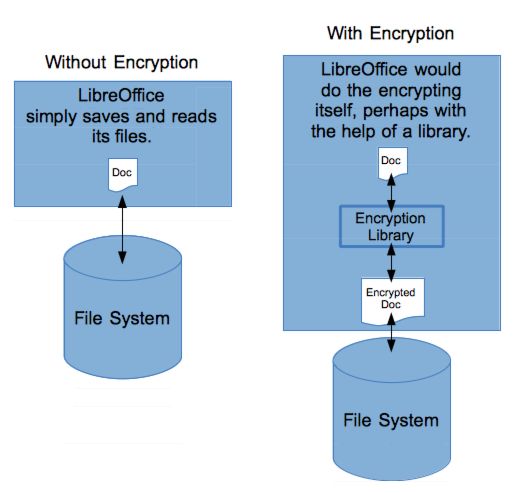
People from time to time say they want to encrypt their data, but there’s a fundamental part missing in what they’re asking: What exactly do they want to encrypt? Do they want to encrypt their data from within a software package, and then store that data to the hard drive in a single file? For example, would they like LibreOffice to create an entire .odt word processing document, and encrypt it, and then write the encrypted results to the file system as a single file, as in the following figure? Or would they like Linux to take care of the encryption itself at the file system level?
In the case of Linux taking care of it, LibreOffice would have to do nothing other than read and write the files as it currently does. Linux would encrypt the file before actually writing it to the disk, and decrypt it after reading it back. This is the approach I’m taking here, but for this there are many other questions you need to ask. And to ask the right questions, you need to understand how block storage works. Let’s look at that first.
Block Level Storage
When an operating system works with a local drive, the operating system uses filesystem software to format the drive, and then read and write individual sectors. When you save a file, the filesystem software figures out the sectors to write to. When you read a file, the filesystem figures out which sectors the data is on, and then reads those sectors and reconstructs the file for you. To manage the files, the filesystem uses different types of indexes that it also stores on the disk. Different filesystems use different means to organize the data, and also include various security mechanisms; the end result is different file systems such as ext4 and NTFS.
Low-Level Details
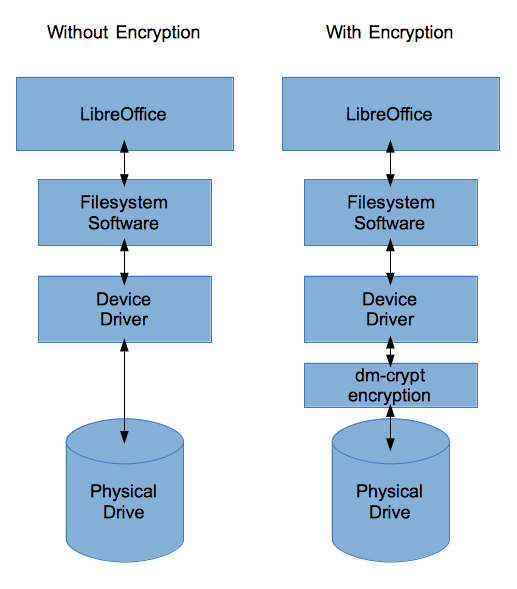 Now that we’re clear on how block-level devices work, consider this: The operating system uses its filesystem software to write the sectors of data to the drive. The filesystem software determines where to write the sectors of data and how to organize them, including the creation of metadata that describes the filenames and how they’re organized, and so on. But in order for the filesystem software to perform the actual read and writes to the drive, there needs to be present a device driver that does the actual controlling of the device itself, as shown in the left side of the next figure. (The drivers are represented in your file system hierarchy within the /dev directory.)
Right at this point–the spot from the filesystem software to the device driver–there’s a choice to be made in encryption: Do you want the filesystem software to do the encrypting before writing the data? Or, how about we effectively wedge a piece of software in between the filesystem software and the device driver? This way, the filesystem will operate as it normally does, but when it tries to access the device, its calls instead will be handled by encryption software, as shown on the right side of the following figure. This how we’re going to do it for this article. But first let’s talk about a few more issues.
(Incidentally, if you want to see how device drivers exist in the /dev directory of your Linux system, check out this article. It covers programming, but if you aren’t a programmer, click to page 2, and scroll down to the section labeled Hello, World! Using /dev/hello_world and read the first paragraph for a glorious explanation.)
If you want to encrypt an entire partition, you might consider encrypting the entire drive. However, there’s one little problem there. If the computer boots from the drive, the drive needs a small portion dedicated to the bootup code. This bootup code is machine code that the computer reads in and executes to boot the computer. If the entire hard drive is encrypted, including this data, the computer would need some way to decrypt the data. But the computer doesn’t have a file system loaded yet, so it can’t read a program that decrypts it. See where this is going? The decryption code would need to be in the BIOS itself. But most computers don’t have such code. And that means the boot record really can’t be encrypted (although people have discussed various ways around this problem such as putting the bootup on a removable USB drive, as well as how to solve other technical issues).
Remote Drives
If your drive is remote, there are ways you can access the data; this is important in understanding what type of encryption is available to you. The two ways are:
-
Block-level storage just like with local drives, whereby your filesystem software can read and write directly to the sectors on the remote disk
-
File-level storage whereby your operating system sends files to a remote server, which has its own operating system and filesystem software; this remote server in turns writes the files to its disk.
With file-level storage, you don’t have many choices regarding encryption. If you want to encrypt the data, you need to encrypt it in your application before sending it on to the remote server for storage.
But with block-level remote storage you do have options. For example, if you’re using a cloud hosting service whereby you can attach different volumes to a server you allocated, you’re usually using block-level storage. The volumes aren’t necessarily attached physically to your hosted server; yet, the server can access them as if they are, and format the volume and read and write individual sectors just as if the drive is mounted locally. What this means is with block-level remote storage you can perform encryption at the file-system level just as you might on your local computer and local drive.
The software
Now we know what we want to accomplish; the question is, how do you do it? It turns out Linux has a software package built in that uses the method I explained earlier of wedging software in between the filesystem software and the device drivers. The software is called dm-crypt. And dm-crypt encrypts the data and writes it onto the storage device (by way of the device driver) using a storage format called LUKS.
LUKS (Linux Unified Key Setup) is the format used on the drive itself, and is essentially used in place of a file system such as ext4. The dm-crypt system sits between the filesystem software; the filesystem software reads and writes ext4, and the ext4 data gets pushed through dm-crypt which then stores the data in LUKS format on the drive. Thus, you can effectively have a file system such as ext4 or NTFS sitting “on top of” the encrypted LUKS format.
Note that dm-crypt is the name of the subsystem, and that you use various tools to work with it. There is no single command called dm-crypt. There are some programs you can use to manage dm-crypt:
Note that dm-crypt is the name of the subsystem, and that you use various tools to work with it. There is no single command called dm-crypt. There are some programs you can use to manage dm-crypt:
Other Features
One cool thing about the dm-crypt system is that it doesn’t have to work directly with a disk driver. Instead, it can save all the data into a single file instead of using LUKS and a whole disk partition. What that means is you can have dm-crypt create a single file within which you could create an entire file system. Then you can mount that single file as a separate drive, and then access it from any software just like you would any other drive.
Cloud Drives
Because some cloud providers (such as Amazon Web Services) give you full roo access to the block devices connected to your servers, you can make use of dm-crypt; you can format a block device with the LUKS format, and then prepare it for your dm-crypt system; then you can format it all with an ext4 file system. The end result is a fully encrypted drive living in the cloud, one that you manage yourself. Want to try it? Here’s a tutorial on doing it using the cryptsetup program.
Some other cloud providers don’t give you direct access to the block device as AWS does. For example, Digital Ocean does not give you direct access; but you can still create a file and set up dm-crypt to use that file, and then create what they call a “container” within the file that represents the file system. In fact, the process of this is the same way you would accomplish creating an encrypted container file on your own local machine. And here’s Digital Ocean’s tutorial on creating a dm-crypt LUKS container file. Notice in this tutorial that just like with the block device, you create an entire file system (such as ext4) but in this case that file system lives inside the container file.
Local Drives
And that brings us to how to accomplish all this locally. The tutorial above for creating an encrypted drive on Amazon is the same steps for creating it locally on one of your own hard drives. But here’s another tutorial that gives step-by-step instructions for doing it locally on your own hard drive, also using cryptsetup.
If you want to create a local container drive that contains an entire encrypted file system, just follow the steps in the Digital Ocean tutorial above.
Or if you want to use the other program, cryptmount, to encrypt an entire partition or create a container file, follow this tutorial; the author, Carla Schroder, knows her stuff and provides some good steps.
Conclusion
That’s about it. The important thing about knowing how to encrypt is to fully understand first what you’re really trying to accomplish – have an application encrypt and decrypt its data, have the operating system handle the encryption; and whether to encrypt an entire partition or just individual files; and whether to create a container to hold the encrypted files. Then you can follow the steps on the tutorials I linked to here and get the job done right.


