
Building on the ground-breaking work of billionaire genius Tony Stark, the first Linux-powered Iron Man suits may soon be within the reach of homebrew builders.
Read more at Enterprise Open Source Toolkit
Last week we looked at PCLinuxOS, an excellent Linux distribution based on Mandriva Linux. Today we’re kicking the tires of Mageia Linux, which is a fork of Mandriva. Mandriva Linux has had its ups and downs as a commercial venture, but despite the financial struggles it’s a first-rate distribution that offers enterprise support and a number of enterprise products such as Pulse, their enterprise IT management system, Mandriva Business Server, and training and consulting. Mageia was created in 2010 as an independent, non-profit project, not tied to the fortunes of a commercial company, after most of the Mandriva developers were laid off.
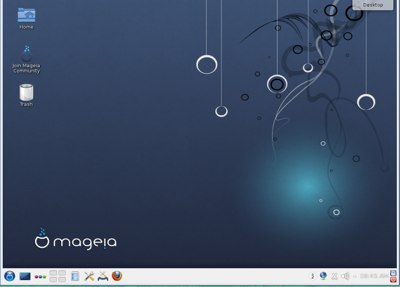 Mageia.org is the association that governs Mageia, with an annually-elected community board. I like their definition of community, because it includes more than developers:
Their Sept. 2012 announcement contains a fundamental truth: “Whatever you do in life, people are your greatest and only true asset.”
Mageia is on a nine-month release cycle, and each release is supported for 18 months. Version 1 was released in June 2011 and reached end-of-life in December 2012. Mageia 2 was released in May 2012, and Mageia 3 is scheduled for release on May 18, 2013. It comes in these editions:
Any of the download images can be used to create a bootable USB stick with unetbootin. If you’re starting from a clean installation you can use any image, but if you want to upgrade from version 2 then you need the installer DVD or CD. Though it’s probably better to upgrade from the package manager.
The live CDs are great for trying Mageia for the first time, because you can run it from the CD, or install it to your hard drive. You get a nice assortment of software on the live CDs, a complete system ready to go to work: LibreOffice, GIMP, Ardour, Firefox, and apps and utilities that come with KDE or GNOME.
Mageia, similar to Debian, makes it easy to control what goes on your system by separating Free and non-free repositories. There are three official Mageia repos: Core, Non-free, and Tainted. Core contains free/open source licensed software. Non-free includes Nvidia and ATI drivers, binary wireless firmwares, and other closed-source drivers. The Tainted repo includes FOSS multimedia codecs that may infringe patent and copyright laws in some countries. (I would call it the Rolleyes Repo because all this legal folderol is over-reaching silliness, and unenforceable.)
Then each repository has four sub-medias: Release, Updates, Backports, and Testing. And, of course, there are a lot of third-party repos. All of this is easily configured in the graphical Software Manager in the Mageia Control Center, which is Mandriva’s good ole Drakconf. There is a clean separation between system configuration and desktop configuration, which I prefer for less confusion and more consistency.
Mageia also includes a nice assortment of server software. You get PostgreSQL, MariaDB replaces MySQL, Redis, MongoDB, and CouchDB. Puppet is a fabulous tool for centralised administration, and there is a good high availability stack that includes drbd (clusters), Corosync (cluster engine) and Pacemaker (cluster manager.) And all the usual Linux favorite servers like the Cherokee and Apache HTTP servers, Samba file and printer sharing, Postfix and Dovecot for mail, OpenLDAP, and CUPS printer server.
Mageia isn’t a big noisy drama queen, like some popular distros we know and love. Rather, it’s more about stability and usability. Legacy GRUB is still the default bootloader, but you can select GRUB 2 during installation. You’ll get the shiny new kernel 3.8.8, Systemd, and kmod. You won’t get Token Ring support, because it has been removed. Sorry, but it’s true, no more Token Ring.
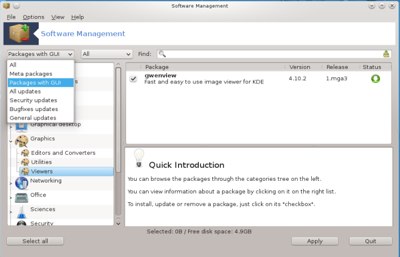 UEFI support is experimental and incomplete, and Secure Boot is not supported. Journalctl replaces rsyslog. Desktop environments include KDE 4.10, GNOME 3.6, XFCE 4.10, and LXDE 0.5.5.
So what’s it like running Mageia? Like running pretty much any Linux distribution: it works. In these good modern times you just fire ’em up and go, and the differentiators are documentation, community, and fit and finish. General-purpose distros fall into two categories: bleeding-edge and always pushing ahead, and polished and stable. Mageia, like its upstream Mandriva and cousin PCLinuxOS, gets high marks for polish and stability. It is streamlined and well-organized, with a good logical flow in the user interface, and useful helpers like the Software Manager, which not only installs new packages but walks you through a basic configuration and setup. I’ve always thought of Mandriva as one of the best KDE distros, and so is Mageia. KDE4 is a rather astonishing overdose of advanced functionality and prettiness, and Mageia does a good job of sleeking it down and making it comprehensible.
So why choose Mageia over Mandriva or PCLinuxOS? My #1 reason is community. The Mageia community is welcoming to newcomers and well-organized, so if you want to become a contributor to a FOSS project this is a good one to consider. If you’re just looking for a nice Linux to use the documentation needs improvement, but the forums, mailing lists, and IRC are pretty good. It’s ready to use out-of-the-box, and it’s easy to understand and manage what goes on your system.
What does “Mageia” mean? It’s based on the Greek word for “magic”.

At Open Source Junction 4 we invited attendees to present their hardware projects. Some were open source hardware, while some used consumer hardware components in conjunction with open source software to provide an innovative solution to a problem.