Editor’s Note: This is part two of a two-part guest post by George Dunlap, a senior software engineer on the Citrix XenServer team.
In part 1 of this series, I introduced the concepts of full virtualization and paravirtualization (PV), as well as the hardware virtualization (HVM) feature used by Xen (among other things) to implement full virtualization. I also introduced the concept of installing paravirtualized drivers on a fully virtualized system. This small step, from full virtualization towards paravirtualization, begins to hint at the idea of a spectrum of paravirtualization. In this article, I will cover the historical reasons for the development of PVHVM, and finally of the newest mode, PVH.
Problems with Paravirtualization: AMD and x86-64
It comes as a surprise to many people that while 32-bit paravirtualized guests in Xen are faster than 32-bit fully virtualized guests, when running in 64-bit mode, paravirtualized guests can sometimes be slower than fully virtualized guests. This is due to some changes AMD made when designing the architecture which simplified things for them, but made things more difficult for Xen.
 Most modern operating systems need just two levels of protection: user mode and kernel mode. Kernel mode memory is protected from user mode memory via the pagetable “supervisor mode” bit. When running a virtual machine, you need at least three levels of protection: user mode, guest kernel, and hypervisor. The hypervisor memory needs to be protected from the guest kernel, and the guest kernel memory needs to be protected from the user. The pagetable protections only provide two levels of protection, so Xen uses another processor feature, called asegmentation limit, to provide the third level of protection.
Segmentation limits are a processor feature that was in common use before paging was available. But since paging has been available, segmentation limits have basically not been used; so Xen was able to commandeer them to provide the extra level of necessary protection. The pagetable protections protect both the guest kernel and Xen from userspace; the segmentation limits protect Xen from the guest kernel.
Unfortunately, at the time that the Xen team was developing clever new uses for this little-used feature, AMD was designing their 64-bit extensions to the x86 architecture. Any unused processor feature makes hardware much more complicated to design, reason about, and verify. Since basically no operating systems use segmentation limits, AMD decided to get rid of them. This may have greatly simplified the architecture for AMD, but it made it impossible for Xen to squeeze in 3 levels of protection into the same address space.
Instead, for 64-bit PV guests, both guest kernel and guest user-space need to run in ring 3, each with their own address space. Every time a guest process needs to make a system call, it has to bounce up into Xen, which will context-switch to the guest kernel. This not only takes more time for each system call, but requires flushing one of the key CPU caches, called a TLB. Frequent flushing of the TLB causes the all of the execution to run more slowly for some time afterwards, as the TLB is filled up again.
In 64-bit HVM mode, the problem doesn’t occur. The HVM extensions make it easy to have three different protection levels without needing to play clever tricks with little-used processor features. So making system calls in 64-bit HVM mode is just as fast as on real hardware. For this reason, a lot of people began running 64-bit Linux in fully virtualized mode.
Paravirtualizing Little by Little: PVHVM Mode
But fully virtualized mode, even with PV drivers, has a number of things that are unnecessarily inefficient. One example is the interrupt controllers: fully virtualized mode provides the guest kernel with emulated interrupt controllers (APICs and IOAPICs). Each instruction that interacts with the APIC requires a trip up into Xen and a software instruction decode; and each interrupt delivered requires several of these emulations.
As it turns out, many of the the paravirtualized interfaces for interrupts, timers, and so on are actually available for guests running in HVM mode; they just need to be turned on and used. The paravirtualized interfaces use memory pages shared with Xen, and are streamlined to minimize traps into the hypervisor.
So Stefano Stabellini wrote some patches for the Linux kernel that allowed Linux, when it detects that it’s running in HVM mode under Xen, to switch from using the emulated interrupt controllers and timers to the paravirtualized interrupts and timers. This mode he called PVHVM mode, because although it runs in HVM mode, it uses the PV interfaces extensively. (“PVHVM” mode should not be confused with “PV-on-HVM” mode, which is a term sometimes used in the past for “fully virtualized with PV drivers”.)
With the introduction of PVHVM mode, we can start to see paravirtualization not as binary on or off, but as a spectrum. In PVHVM mode, the disk and network are paravirtualized, as are interrupts and timers. But the guest still boots with an emulated motherboard, PCI bus, and so on. It also goes through a legacy boot, starting with a BIOS and then booting into 16-bit mode. Privileged instructions are virtualized using the HVM extensions, and pagetables are fully virtualized, using either shadow pagetables, or the hardware assisted paging (HAP) available on more recent AMD and Intel processors.
Problems with Paravirtualization: Linux and the PV MMU
PVHVM mode allows 64-bit guests to run at near native speed, taking advantage of both the hardware virtualization extensions and the paravirtualized interfaces of Xen. But it still leaves something to be desired. For one, it still requires the overhead of an emulated BIOS and legacy boot. Secondly, it requires the extra memory overhead of a qemu instance to emulate the motherboard and PCI devices.
For this reason, memory-conscious or security-conscious users may opt to use 64-bit PV anyway, even if it is somewhat slower. But there is one PV guest that can never be run in PVHVM mode, and that is domain 0. Because having a domain 0 with the current Linux drivers will always be necessary, it will always be necessary to have a PV mode in the Linux kernel.
But what’s the problem, you ask? Weren’t all of the features necessary to run Linux as a dom0 upstreamed in Linux 3.0? Yes, they were; but they are still occasionally the source of some irritation. The core changes required to paravirtualize the page tables (also known as the “PV MMU”) are straightforward and work well once the system is up and running. However, while the kernel is booting, before the normal MMU is up and running, the story is a bit different. The changes required for the early MMU are fragile, and are often inadvertently broken when making seemingly innocent changes. This makes both the x86 maintainers and the pvops maintainers unhappy, consuming time and emotional energy that could be used for other purposes.
Almost Fully PV: PVH Mode
A lot of the choices Xen made when designing a PV interface were made before HVM extensions were available. Nearly all hardware now has HVM extensions available, and nearly all also include hardware-assisted pagetable virtualization. What if we could run a fully PV guest — one that had no emulated motherboard, BIOS, or anything like that — but used the HVM extensions to make the PV MMU unnecessary, as well as to speed up system calls in 64-bit mode?
This is exactly what Mukesh’s PVH mode is. It’s a fully PV kernel mode, running with paravirtualized disk and network, paravirtualized interrupts and timers, no emulated devices of any kind (and thus no qemu), no BIOS or legacy boot — but instead of requiring PV MMU, it uses the HVM hardware extensions to virtualize the pagetables, as well as system calls and other privileged operations. We fully expect PVH to have the best characteristics of all the modes — a simple, fast, secure interface, low memory overhead, while taking full advantage of the hardware.
If HVM had been available at the time the Xen hypervisor was designed, PVH is probably the mode we would have chosen to use. In fact, in the new ARM Xen port, it is the primary mode that guests will operate in. Once PVH is well-established (perhaps five years or so after it’s introduced), we will probably consider removing non-PVH support from the Linux kernel, making maintenance of Xen support for Linux much simpler. The Xen kernel will probably support older kernels for some time after that.
However, rest assured that none of this will be done without consideration of the community. Given the number of other things in the fully virtualized – paravirtualized spectrum, finding a descriptive name has been difficult. The developers have more or less settled on “PVH” (mainly PV, but with a little bit of HVM), but it has in the past been called other things, including “PV in an HVM container” (or just “HVM containers”), and “Hybrid mode”.
What about KVM?
At this point, some people may be wondering, how would KVM’s virtualization fit into this spectrum? Strictly speaking, KVM is just a set of kernel extensions designed to help processes implement virtualization. When most people speak of using KVM, they mean “qemu-kvm”, which means qemu running configured to use the KVM extensions. (There are other projects, such as the Native Linux KVM tool, which also use the KVM extensions.) When I say “KVM” here, I mean qemu-kvm.
KVM supports both “legacy boot”, starting in 16-bit mode with a BIOS (or EFI) to load the kernel bootloader, and booting directly into a kernel passed on the qemu command-line. It also provides an emulated motherboard, PCI bus, and so on. It can provide both emulated disk and network cards; and thus it is capable of supporting guests running in fully virtualized mode. KVM also provides virtio devices, which can be considered paravirtualized, as well as a PV clock, for operating systems that can be modified to support them.
KVM’s typical method of paravirtualization is somewhat different than Xen’s. Virtio devices expose a normal device interface, with MMIO control paths and so on, and could in theory be implemented by real hardware. Xen’s PV interfaces are based on shared memory and lockless synchronization. The kinds of actions that need an MMIO context switch for virtio devices probably correspond pretty closely to actions that need hypercalls for Xen PV devices; but in Xen no instruction emulation needs to be done.
KVM does not have a paravirtualized interface for timers or interrupts; instead (if I understand correctly) it uses an emulated local APIC. Handling a full interrupt cycle for an emulated local APIC typically requires several MMIO accesses, each of which requires a context switch and an instruction emulation.
The Xen PV interrupt interface is based on memory shared with the hypervisor, supplemented by hypercalls when necessary; so most operations can be done without context switches, and those that do require only a single context switch (and no instruction emulation). This was one of the major reasons for introducing PVHVM mode for Xen guests. So KVM has paravirtualized devices and a paravirtualized clock, but not paravirtualized interrupts; placing KVM on the spectrum, it would be one step more paravirtualized than “FV with PV drivers”, but not as paravirtualized as PVHVM.
The Paravirtualization Spectrum
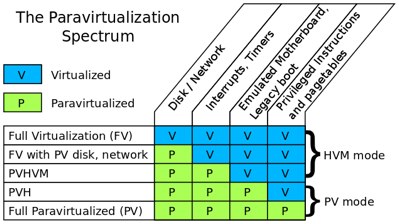
So to summarize: There are a number of things that can be either virtualized or paravirtualized when creating a VM; these include:
- Disk and network devices
- Interrupts and timers
- Emulated platform: motherboard, device buses, BIOS, legacy boot
- Privileged instructions and pagetables (memory access).
Each of these can be fully virtualized or paravirtualized independently. This leads to a spectrum of virtualization modes, summarized in the table above. The first three of these will all be classified as “HVM mode”, and the last two as “PV mode” for historical reasons.
PVH is the new mode, which we expect to be a sweet spot between full virtualization and paravirtualization: it combines the best advantages of Xen’s PV mode with full utilization of hardware support. Hopefully this has given you an insight into what the various modes are, how they came about, and what are the advantages and disadvantages of each.

 People in several states in the Eastern United States are still reeling from the effects of Hurricane Sandy, and there are many kinds of disaster relief efforts going on. At the same time, many event organizers are working overtime to ensure that some normalcy is preserved. As evidenced in the aftermath of the 9/11 attacks, technology–including open source technology–can help organize disaster relief efforts and coordinate people. Here are just a few examples of tools that can make a difference.