
OpenStack has the potential to become to the cloud what the LAMP stack is to servers, Rackspace’s chief has said, while blasting VMware and Amazon for not participating in the scheme
Read more at ZDNet News
Pretty much any Linux distribution makes a satisfactory multimedia production PC. But some are better than others, and my favorite is Arch Linux. Audio, video, and graphics are all CPU-intensive, so I want my processor cycles doing actual work rather than shoving a lardy operating system around. With Arch we get a stable, lean, clean operating system, an active developer and user community and good, up-to-date packages.
There is also the Arch User Repository (AUR), which contains thousands of user-supported packages. AUR packages that are popular enough and well-packaged often get moved into the official Arch repository. AUR does not contain binary packages that you install with pacman, Arch’s package manager. Rather, you download and compile sources using makepkg, Arch’s excellent package-builder, and then install them with pacman.
Getting and installing Arch is like any Linux distro: download an .iso image, copy it to a CD or USB stick, boot and install it. Easy peasy. You can also purchase an installation CD or USB stick for a small price. There is a smaller netinstall image, which is nice for customizing your installation exactly the way you want and for getting the freshest package versions at installation instead of having to run a big update afterwards. Both images also function as system rescues.
Arch only supports i686 and x86-64 CPUs, so you need a Pentium Pro, Pentium II or AMD Athlon (K7) processor or higher. The Pentium Pro was first released in 1995, and the K7 family in 1999, so if you still have any of those hanging around they’re pretty old machines.
Back in the olden days we had to install special kernels with low-latency patches for best audio recording. Now it’s not necessary because the newer kernels include realtime schedulers, and Linux audio applications are getting better at auto-configuration for best performance. Problems with high latency are most likely from a buggy device driver or audio application. You can download and try a linux-rt kernel from AUR easily enough to see for yourself, or to try for über-low latency, which is under 10ms. Just keep in mind that all the elements in your audio chain affect latency: hardware, software, instruments, and more complexity means more potential trouble spots.
You’ll need to do some system tweaks as well, so refer to the Realtime Kernel for details on kernel configuration, environment variables, and assorted tips and tricks.
This is just a wee taste of the dozens of great multimedia-creation programs in Linux, a starting point for using Linux as a creative platform. Enjoy and have fun!
There is a vast array of audio applications of all kinds available for Linux: recording, editing, and mixing, synthesizers, special effects, score-writing and printing.
JACK2, the JACK audio connection kit, is a professional low-latency audio server and audio router, and it is required by a lot of higher-end Linux audio applications. It lets you connect any number of devices and software, with an important limitation: it only works with a single sound card at a time. So you can hook up a batch of audio software and any hardware audio devices that connect to your sound card, and create connections between them however you like. For example, you can connect the wonderful Hydrogen software drum kit to the Ardour digital audio workstation via JACK, and add a live drum track to your Ardour recording session.
JACK also lets you configure performance for the best balance of reliability and lowest latency.
Ardour is a first-rate digital audio workstation that rivals its spendy commercial cousins. Ardour is my first choice for heavy-duty, multi-channel recording and mixing because it supports mix buses and master bus, network audio, nice video sync, MIDI, and bales of other great features. (Arch extra.)
Audacity is my other favorite recording, editing, and mixing program. It’s simpler than Ardour, but has more than enough features for making great studio and live recordings. It’s my first choice for recording live shows. (May I plug my excellent Audacity book, Book of Audacity. Buy early, buy often!) (Arch extra.)
FluidSynth is a first-rate, realtime software synthesizer based on the SoundFont 2 specification, which means broad support for MIDI devices and languages. (Arch extra.)
The MuseScore music notation program is a wonderful score writer, editor, and printer. (Download)
Be an open source DJ with Mixxx, the slick DJ app that supports playlists, iTunes, MIDI, M4A/AAC, OGG, FLAC, MP3, Shoutcast, and is easy to use. (Arch extra.)
In my day, back when velociraptors roamed the Earth, we had wind-up Super 8 cameras that used actual film, which was expensive and required nasty chemical processing. Now all you need is a digital camera and a computer, and you can easily mix multiple media formats: still images, video files, audio files, and in multiple file formats and resolutions.
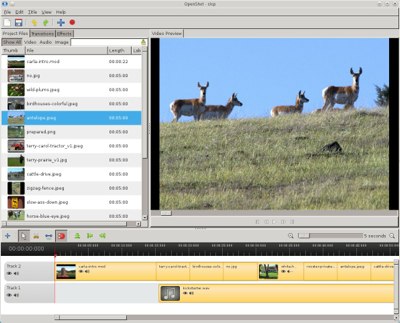 Openshot is the perfect video editor for beginners, and for users who want a good useful set of features but don’t need every bell and whistle in creation. It has a clean, simple interface, plenty of functionality and good documentation. (Arch community.)
At the other end of the scale CinelerraCV is “a movie studio in a box” for advanced capture and editing. There are two versions: the original release by Heroine Virtual LTD, and the friendlier community-supported CinelerraCV (community version). Heroine Virtual only offers a source tarball, dire warnings about its instability on Linux and no support whatsoever. They are pretty much the same thing, except CinelerraCV is in distro repos, and it has good community support. (Arch community.)
For high-end 3D creation, try the superior Blender suite for making animated movies, games, special 3D effects. (Arch community.)
It seems that people always get stuck on GIMP, as though it were the only graphics app in Linux, and always complain that it’s not an Adobe Photoshop replacement. It is a Photoshop replacement for all those bazillions of users who poach Photoshop for free, and use a tiny fraction of its capabilities. It is not a replacement for professionals who actually need Photoshop for high-end print work.
Of course Arch Linux includes GIMP. There are many other graphics applications you might consider as well.
Once upon a time I called Krita “a real jewel, a hidden Linux treasure”, and I still feel that way. With Krita you can create beautiful, detailed illustrations, comics, matte paintings, and gorgeous images of all kinds. If you can imagine it, Krita can draw it. (Arch extra.)
Digikam, of course, is one of the best photo managers and editors on any platform. Organize, tag, RAW editing and import, HDR, slideshow and calendar creator, and tons more. (Arch extra.)
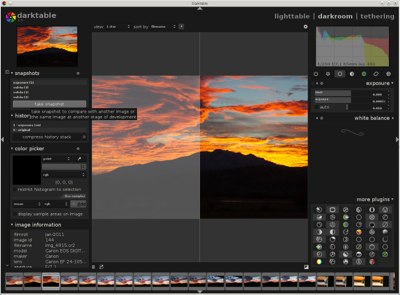
 If you want a great RAW editor, try Darktable. It’s a powerhouse of advanced tweaks and even supports tethered shooting.
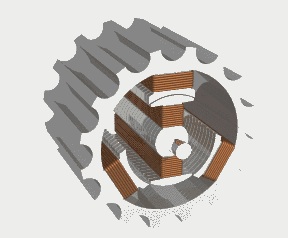
For amazing 3D graphics try POV-ray, the Persistence of Vision Raytracer for creating stunning still and animated images. The graphic at right shows how it can render objects moving in multiple directions, with changing light.
Don’t forget Inkscape, the advanced vector graphics drawing program, and CinePaint, the excellent GIMP fork for creating and editing high-resolution (8-bit, 16-bit, and 32-bit) images.
Have you been considering launching an open source project? Doing so involves a series of decisions that can give you a proper chance at rallying community support, staying on the right side of the law, and building a strong user base. Issues pertaining to licensing, distribution, support options and even branding require thinking ahead if you want your project to flourish. In this post, you’ll find our newly updated collection of good, free resources to pay attention to if you’re starting an open source project.
 The Open Source Definition is where every project leader should start when it comes to how open source projects should be distributed, and what actually qualifies as open source. It’s also good to review Open Standards requirements.
As we noted in this post, the Software Freedom Law Center has a set of very good online resources on how open source licenses and copyrights work, and much more. Legal issues are smart to anticipate up front. The authors are attorneys who were part of creating popular open source licenses. It’s also an excellent idea to keep up with urrent and archived editions of the International Free and Open Source Software Law Review
Since Google announced Android 4.1 (“Jelly Bean”) on June 27, the update has appeared on Galaxy Nexus phones, and this week showed up on Google’s Nexus 7 tablet. Last week, Google released Android 4.1 source code along with developer background, and this week followed up with a changelog offering further details. A number of in-depth reviews have also appeared in recent days.
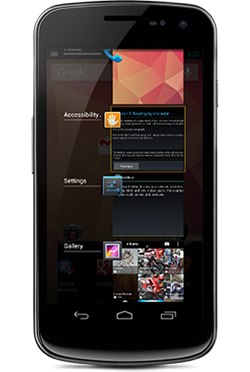 Now that Jelly Bean has been more thoroughly chewed over, what have we learned? Is this just a consumer confection, or is there anything here for the enterprise?
Some of the hottest new features will be of tangential importance to the enterprise, at least for now. The new Google Play and Google+ features, Android Beam improvements, and camera features are cool indeed, but are not yet essential to most enterprises. The fledgling Google Now voice search extension may well be better than Apple’s Siri, but it’s currently of limited corporate utility.
Still, there’s plenty in Android 4.1 to interest enterprise customers, including accessibility, security, and localization enhancements, improved notifications and a better predictive keyboard. Jelly Bean also seems quite stable, thereby building confidence among IT leaders. The buggy Android 3.0 (“Honeycomb”) seems like a distant memory.
Here are some Jelly Bean features that enterprises should love, including accessibility and keyboard features recently illuminated by the changelog:
Project Butter — The underlying technology delivers smoother UI transitions and better responsiveness. Specifics include improved vsync timing for faster frame rates, triple graphic buffering, touch anticipation, and a systrace tool that collects performance data from the Linux kernel.
The reviews agree that Project Butter provides the sensation of smoother, faster performance. In PhoneArena’s tests, Jelly Bean “often” made the Galaxy Nexus outperform the faster new Galaxy S III running Android 4.0 (“Ice Cream Sandwich”). The Verge review noted that while benchmarks were similar to ICS, Jelly Bean “felt” faster, especially when multitasking. “The overall feeling of responsiveness is just plain better,” wrote reviewer Dieter Bohn.
TechRadar’s JR Bookwalter not only praised Project Butter, but reported the Galaxy Nexus booted in 34 seconds with Android 4.1, compared to 50 seconds with Android 4.04. Concluded Bookwalter: “Android is now fast, fluid and ready to go toe-to-toe with Apple on performance and features.”
Accessibility — Android 4.1 now appears to be much easier for blind users. This is especially good news for organizations that need to meet client and regulatory requirements.
Both the blind and the sighted will appreciate the new offline voice dictation, as well as the major improvements to voice search, voice recognition, and text-to-speech. New accessibility tools include a gesture mode that integrates touch with speech output, and plugin support to enable external Braille I/O devices. Other enhancements include an accessibility focus feature, improved text-traversal controls, and an upgraded TalkBack screen reader.
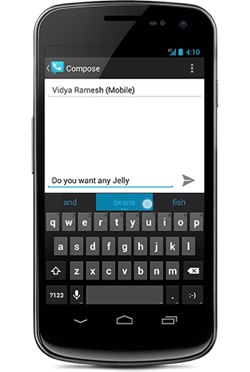 Keyboard — With corporate users increasingly using virtual keyboards as their primary input, Jelly Bean’s keyboard enhancements are especially welcome. As noted in the changelog and several reviews, predictive typing and autocorrect are much more fluid and accurate. The keyboard language model adapts to users over time, and the firmware provides more custom keyboards and input styles. According to The Verge’s Bohn, the SwiftKey-like upgrade is “the first Android keyboard that hasn’t sent me running to third party alternatives.”
Security — Aside from announcing enhancements to device encryption and the Android 4.0’s Face Unlock function, Google had little to say about security. Yet, a July 16 analysis by Duo Security’s Jon Oberheide reported that the ASLR (address space layout randomization) feature that debuted in ICS to thwart malware exploits has been vastly improved. (The advance was confirmed by Accuvant researcher Charlie Miller in Ars Technica.) For the first time, Android comes close to matching iOS’ malware protection, thereby greatly reducing one of the major arguments against Android in the enterprise.
ASLR aims to confuse malware with a digital shell game based on randomizing the memory locations of key data structures. The ICS version was said to be largely useless because it didn’t randomize the executable and linker memory regions.
Jelly Bean fills these gaps, and adds security enhancements such as hardened binaries and an “infoleak prevention” capability borrowed from the Linux kernel that shields memory buffers from unauthorized inspection. It also improves Data Execution Prevention (DEP) to stop malware from executing code from a non-executable memory region.
UI — Jelly Bean’s user interface has been refined with a more buttoned-down, understated appearance that should please corporate professionals. As Bohn notes, “the Tron-like futurism that was introduced in Honeycomb has been almost entirely excised.” Other UI improvements include an expanded search interface, resizable app widgets, and simplified task navigation. In addition, Adobe Flash is gone, replaced by much-improved HTML5 support, and Chrome is now the official browser.
Notifications — Corporate developers have always liked Android’s notifications, and the latest version should continue that trend. Jelly Bean displays larger, richer notifications that can be expanded and collapsed. In addition, users can respond to notifications without having to open the related app, email and SMS notifications have improved, and developers can use APIs to develop new notification actions.
Clouds, localization, and more — Android 4.1’s Google Cloud Messaging (GCM) feature enables developers to send SMS texts toAndroid devices without requiring a proprietary sync solution. Meanwhile, improved internationalization support includes support for right-to-left scripts. Finally, there are a host of minor improvements that should play well in the enterprise, including enhancements to the calendar as well as that oft-forgotten feature: the phone.
 This week PC giant Dell Computer has served up a series of announcements that the company claims show how committed it is to open source. First, the company has pledged through its “Project Sputnik” effort, to deliver an Ubuntu-based laptop that will focus on developers. And, the company has announced enhancements to its OpenStack-driven cloud computing solutions.
Dell’s OpenStack-based cloud platform is now available with additional server, networking and services options, and in additional regions including the U.K., Germany and China. Along with OpenStack Essex, customers can buy Dell 12th generation PowerEdge servers including the R720, R720XD, or PowerEdge C servers that are cloud-ready. They can also purchase PowerConnect or Force10 switches and services from Dell, Canonical or Mirantis.
If a business is interested in deploying a cloud-focused cluster, Dell and Cloudera offer a Hadoop-centric solution. It includes Cloudera’s distribution of Apache Hadoop running on optimized Dell PowerEdge C2100 servers, and is delivered with service and support.
Dell has also served up a case study about a California-based web hosting company that uses Dell’s OpenStack-based cloud platform and the accompanying support.
And, Dell officials are at the OSCON conference in Portland, Oregon this week discussing various open source initiatives. You can find out more about these here.
PORTLAND, Ore. – The open source community creates tremendous value for the U.S. economy, driving small and medium businesses (SMBs) and empowering entrepreneurs, according to a top open source supporter. At the OReilly Open Source Convention 2012 (OSCON) here, Tim OReilly, founder of OReilly Media…