In this video, T-Platforms’ Alexey Nechuyatov shows us the new TB2-TL blade system. Announced at the 2010 GPU Technology Conference, the TBL-T2 has attracted a lot of attention at the show with it’s extremely performance per watt.
OpenShot 1.2.2 Further Pushes Open-Source Video Editing
OpenShot, one of the popular and promising non-linear open-source video editing projects, is out today with their first major release in nearly a half-year. OpenShot 1.2.2 is this new release and it brings a number of new features and other bug-fixes as it attempts to close the gap between open and closed-source video editors…
The People Who Support Linux: “My Heart for Open Source Began with Linux”
This is an ongoing Linux.com series that profiles The Linux Foundation’s individual members and begins to collectively illustrate a very important part of the Linux community. Individual members help support the work of Linux creator Linus Torvalds and other important activities that advance Linux, while getting a variety of other fun and valuable benefits. It is this collective support from thousands of individual members that enables The Linux Foundation to provide important services for industry and community.
Linux has a way of inspiring all of us. Joshua Drake is a major contributor to the PostgreSQL.org community, lead consultant at Command Prompt, Inc., and is president of United States PosgreSQL, but he says his love for open source began with Linux.
“I honestly don’t know exactly how long {I’ve been using Linux} but my first distribution was SLS and then Yggdrasil. It was pre-Linux 1.0 IIRC.”
Five points to each of our readers who can say the same.
Today, Linux is his operating system of choice for 98% of his computing. He says his company has it deployed on every laptop and workstation and that it is used “exclusively for all development and collocation services my company provides.”
Drake says his work with PostgreSQL includes ongoing work with Linux, because it is the most widely-deployed OS for PostgreSQL.
“Linux provides a lot of secondary tools as a platform to help PostgreSQL be the most successful database for open source deployments today. Tools such as DRBD, KVM and LVM2 are essential to managing a properly deployed PostgreSQL instance.”
When asked, he listed off a variety of other favorite open source tools he loves, including Drupal and Python.
“Drupal just works better than any other CMS I have had the torture of working with. Python makes bad programmers like me seem like they know what they are doing.”
Drake also works with Software in the Public Interest (SPI), and says it’s one of his favorite efforts to support open source. SPI is the nonprofit organization that represents global work for Debian, OpenOffice.org and PostgresSQL. SPI was founded to help organizations develop and distribute open hardware and software and encourages programmers to use any license that allows for the free modification, redistribution and use of software, and hardware developers to distribute documentation that will allow device drivers to be written for their product.
When I asked him about his favorite Linux distro, Drake took out his Ubuntu flag.
“No other community has been as helpful and friendly to new users as Ubuntu. There is a downside if you are an advanced user; to get answers you generally have to revert to asking the Debian community but the driving distribution for Linux ‘user’ growth is Ubuntu.”
Drake believes that the single most important thing we should all be thinking about as we look at Linux in the decade ahead is “making it work.” And, he goes back to Ubuntu to make his point:
“This is what Ubuntu is working on, but even now, after all these years, depending on what application I am running and what keyboard or mouse combination I use (copy and paste, for example), it might or might not work. Now your pedantic folks will say, ‘That is an X problem.’ No. It is a Linux problem because that is the only place X matters anymore.”
Given what we’ve learned about him, you might be surprised to learn that Drake’s favorite color is pink. But this peek at his lighter side doesn’t mask the serious advice he has for new Linux users and developers. He say to have a “thick skin and patience.”
And while Drake is taking advantage of the lifetime Linux.com email address and employee pricing discounts with HP, he says he is a member of The Linux Foundation mostly because his “heart for open source began with Linux.” He adds, “I wanted to be a part of its {Linux} future and part of the organization that is finally helping it move forward in a centralized manner.”
If you’re interested in being profiled for this Linux.com series, please email
This e-mail address is being protected from spambots. You need JavaScript enabled to view it
This e-mail address is being protected from spambots. You need JavaScript enabled to view it . To learn more about becoming an individual member of The Linux Foundation, please visit the Linux Foundation member website.
Simplify Computerized Testing with Open Source Education Tool iTest
In the classroom, testing can be a test of an instructors patience, organizational skills, time management, and more. With schools (and students) placing more demands to modernize the way educational institutions work, computerized examinations are looking more and more sensible. You’ll find plenty of tools to assist computerized exams, but few that are open source and cross-platform. Teachers on the hunt for computer exams should start by looking at iTest.
iTest is a full-featured client/server testing platform that allows instructors to enable the power of open source in their classroom for a reliable testing platform that will make everyone’s life a little bit easier. But what can iTest do? iTest can create and organize a full database of tests (on the server) that can be given at any time (to the clients). The installation is easy (at least on a Ubuntu machine) and can be installed on:
- Linux
- Windows
- Mac OS X
And, if you are really bold, you can open up the server to clients outside of the classroom so students can take tests remotely.
Let’s look at installing the server, client software, and setting up a test.
Installation
For this tutorial, this installation for both server and client will take place on a Ubuntu machine (specifically Ubuntu 10.4). So this will require you to add sources to your /etc/apt/sources.list file. This is simple:
- Open up a terminal window.
-
Issue the command
sudo nano /etc/apt/sources.list -
Add the following at the end of that file
deb http://ppa.launchpad.net/nagos/ppa/ubuntu karmic mainNOTE: You can substitute whichever Ubuntu release you are using in place ofkarmic, but thekarmicentry will work forlucid. - Save that file.
-
Issue the command
sudo apt-get update. -
Issue the command
sudo apg-get install itest.NOTE: This will install both client and server on the machine, this is necessary. - You may have to OK a few dependencies (this will be dictated by your installation).
That’s it! You are now ready to start working with iTest.
Creating a Test
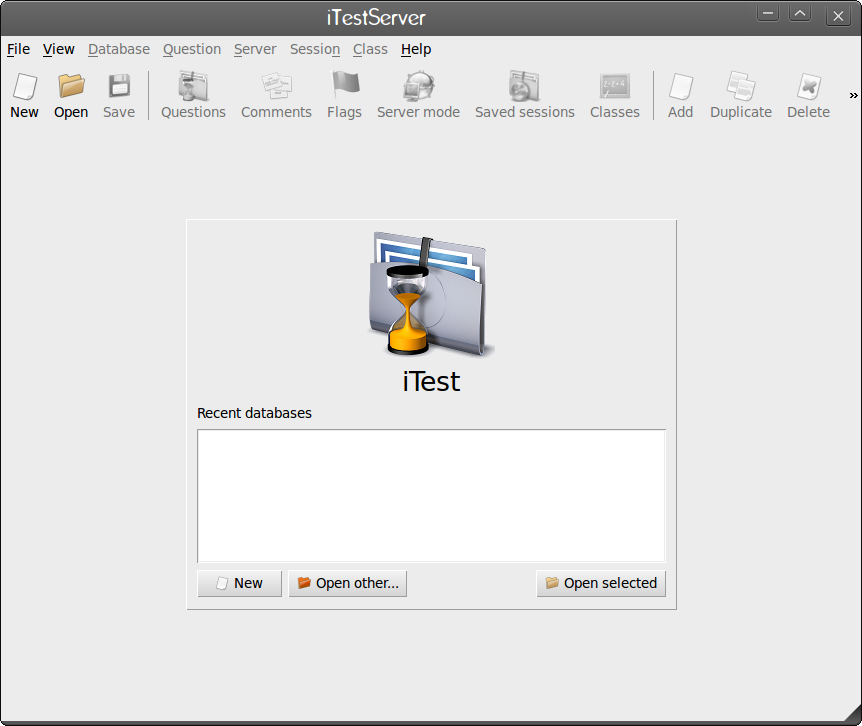
The very first thing you must do is create a test. You do this with the iTestServer. To start up the iTestServer click on Applications > Education > iTest Server. When you open the iTest Server main window (see Figure 1) you will be greeted by a very user-friendly graphical interface.
In order to create a new test follow these simple steps:
1. Click the New button which will open a small window asking for a name.
2. Give your new test a name (for example Linux 101).
3. You will then have to save the database file, so choose a location which to house your database and click Save.
You have successfully created your test. Now it’s time to populate your first test with questions. To do this, follow these steps:
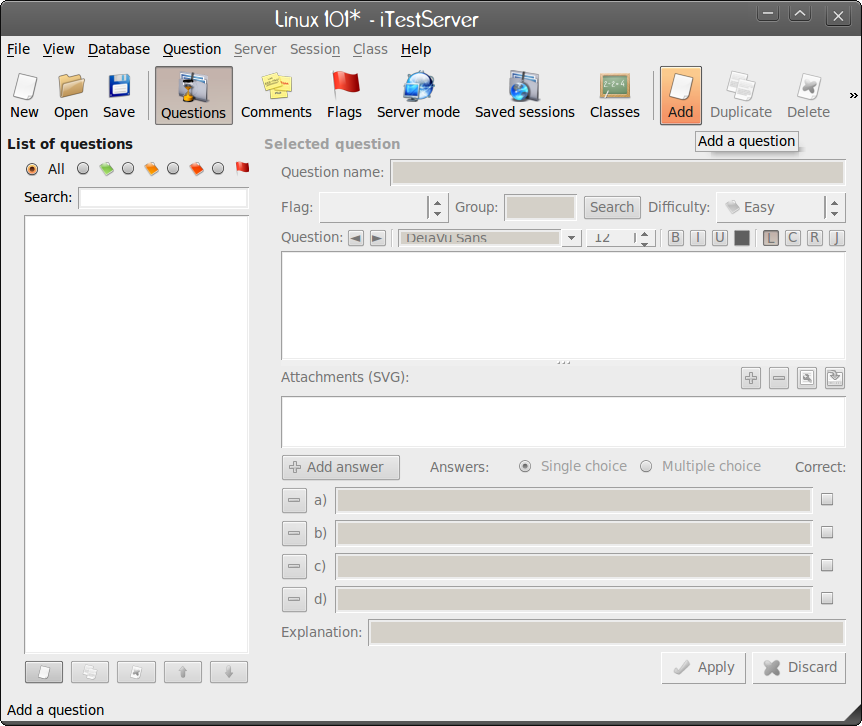
1. Click the Add button near the top right corner (see Figure 2).
2. In the small window that pops up, give the question a name.
3. Type in your question in the Question text box.
4. Enter your answers in the Answers section (if you need more than the defaul four click Add Answer).
5. Select which of the answers is the correct answer.
6. Fill in any miscellaneous formatting.
7. Click Apply.
Repeat these steps until you have the entire test created. Once you have added all of your answers click the Save button to save your test.
Before you attempt to fire up the client you have to place iTestServer in Server Mode. To do this click the Server Mode button on the iTestServer Gui.
Server Mode
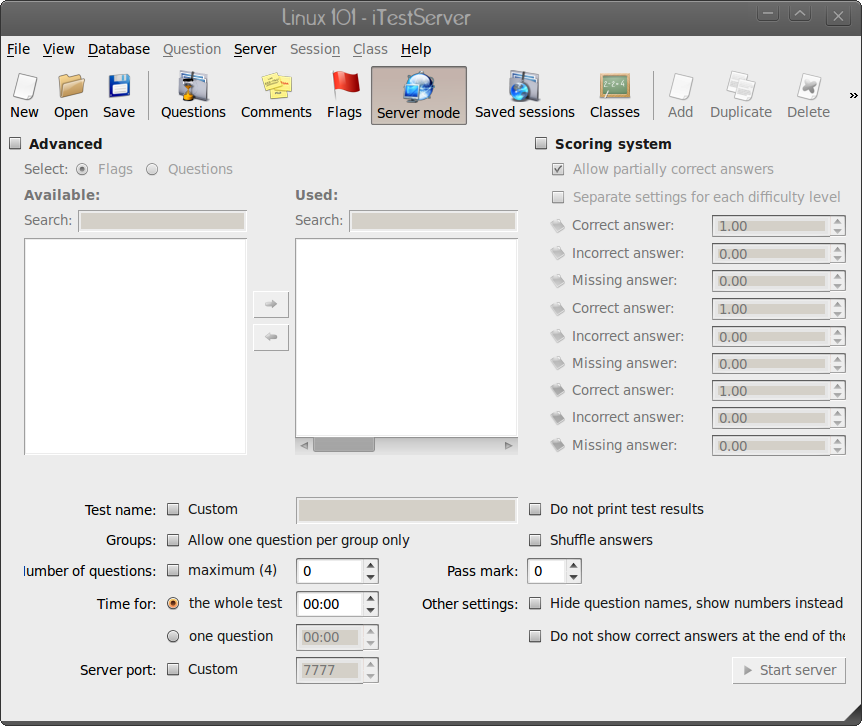
This mode of iTest has its own GUI. Here you can add some nice advanced features to your test such as a scoring system, custom test name, time limit, custom server port, and more (see Figure 3). There is only one option here that you MUST configure, the “Time for” option. By default, iTest Server has 00:00 as the time limit. You must at least give 1 minute for the exam.
After you finish customizing server mode click the Start Server. If you haven’t already configured a printer for test results, you will be given the option now.
After the server starts your clients can then connect to the server. If you do not define a custom port, take note of the port your server is running on (it will tell you in the Server Mode window once you start the server).
Starting the Client
When you (and your students) are ready, it is time to start the client. To do this click Applications > Education > iTest Client which will open up a single window in full screen mode. Full screen mode ensures the students will not use their web browser to cheat. Of course if the students are resourceful enough they will know ways around this.
In order to connect to the server all you need to do is enter the address of the server and the port. It might be good to make sure the server IP address is mapped in /etc/hosts so the students aren’t having to type in an IP address. When the student is ready to begin the test, they only need click Ready and then enter their name. Once the test has started the process is very straight forward.
Managing the Tests
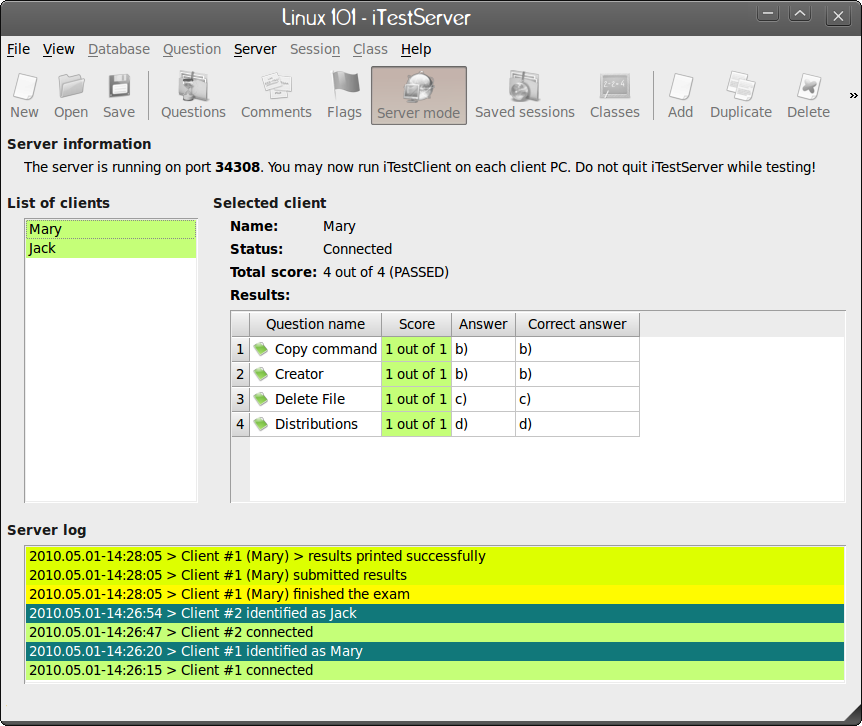
When you start the server and clients begin connecting to take the tests, you will see them show up on the server. You can view their exams as they take them and monitor their success from the Server Mode window (see Figure 4).
A Few Thoughts
If you plan on allowing students to use iTest outside of the classroom you will want to make sure the address of the iTest Server is visible from the outside world. You will also want to make sure to take the time to lock down this server so that anyone gaining access to that server can’t do something they shouldn’t do.
You might also consider removing the iTest Server entry from the students menus. Since the server has to install with the client, it will be listed in the menu. You won’t want students starting up their own iTest Server in your classroom!
You can connect to your iTest Server from any of the supported platforms.
I have yet to come across a computerized testing tool that is as easy to use as iTest. Although it does take some time to set up, the cost-benefits far outweigh this time involved. If you are looking for a reliable, open source testing environment, iTest should be at the top of your class.

One-Third of Enterprises Suffer From Data Loss
New study from security firm Proofpoint finds that nearly one-third of businesses with more than 1,000 employees were hit with some form of data loss in the past year.
Solid State Drives in Enterprise Applications
SSDs can improve database and file system performance, but there are a number of issues that need to be addressed to make the most of the pricey drives.
Zenoss Finds VMware Leads the Pack: 2010 Virtualization Study Released
Today Zenoss released its 2010 virtualization and cloud computing survey. The survey takes a look at use of virtualization and cloud computing in the enterprise. Survey says, VMware has a solid lead in virtualization, KVM is making good strides, and companies want better management tools for their infrastructure.
The sample size was a bit small, about 200 members of the Zenoss open source management community. However, the target audience was right on the money. The survey touched on IT managers, server and network admins, virtualization admins, and a number of other job classifications. The conclusions, though from a small slice of the industry, are interesting.
Though the virtualization space has become much more competitive, VMware dominated the survey with nearly four in five (79.3%) saying that they used VMware. Xen was a distant second, with 32.7%, and VirtualBox at 22%. This suggests that respondents are mixing in the use of workstation and server virtualization. Microsoft’s HyperV was only in use by 14.7% of those surveyed. It would be good to see more detailed results, and how each company is using the products and which products are in use. For instance, are respondents talking about ESXi, or are they referring to VMware Workstation?
KVM had a good showing in the survey, with nearly 22% saying that KVM was in use. Given that KVM is still relatively new, this is a pretty impressive result. It will be interesting to see how widely used KVM is in 2011.
Trends and Rationale
In addition to asking what platforms are in use, Zenoss also surveyed its community to see which OSes were being deployed on hosted (3rd party) platforms or planning to move to those in 2010. Nearly half (49.2%) are deploying Linux onto virtualization platforms, while nearly a third (32.6%) say they’re deploying Microsoft Windows. Just under half are using Software as a Service (Saas) applications like CRMs, and a quarter (25.8%) are planning on hosting data with third parties or doing so already.
It should surprise no one that the number one goal for companies working with virtualization software is cost savings. For the question “what are your goals for improving your virtual infrastructure?” more than 64% of respondents picked cost savings, followed by deployment control — also known as “containing virtual sprawl.” 40% of the respondents said that they were “challenged” by virtual sprawl in their environments.
What is surprising is that only 8.7% replied that administrative ease-of-use was a reason for choosing virtualization software. Flexibility was the top reason, more than 43.3% chose that, and 33.3% said they chose virtualization software to save money on hardware.
There’s plenty of room left in the management tools space for cloud deployments. According to the survey, fully half of the respondents answered “none” to the question “what tools are you using to manage your cloud infrastructure?” A third of respondents are using Web-based tools from the hosting provider, and just under 10% are using tools specifically meant for cloud infrastructure management. More than 70% of the respondents are on the hunt for a single toolset to rule them all.
Security is the greatest concern with cloud deployments at 39.4%, followed by management tools with 26.5%, and monitoring at 17.4%. Surprisingly, at least to this user, availability concerns came in fourth overall. Presumably this means that IT folks have faith in cloud providers, rather than indicating they’re simply not thinking about availability.
Lack of proper accounting tools is another major concern. Not accounting in terms of user quotas, but actually charging departments for the proper use of resources. About 20% of those surveyed said that they would like to see better tools for charging users of virtual resources. Not surprising, since many companies want to ensure that each department is carrying its share of the IT budget. This was much easier to accomplish with physical servers.
Overall, no major surprises from the Zenoss survey. Companies are still finding their way with virtualization and cloud computing, but it’s becoming entrenched in most organizations. Management of virtualized resources is still a challenge, and security is the first concern for new technologies — and cost savings a primary motivator.
Bug Labs Open Source Hardware on Verizon’s ODI
Day 2 of the Verizon Developer Community Conference 2010 offered a deep dive into ares such as open source hardware, network APIs and more. RWH sat down with developers attending and gathered feedback that other mobile app developers will appreciate and hopefully apply in their own endeavors.
Let’s take a closer look.
Wait. We can do that?!?
Verizon? Open source hardware? What? Yes. That’s right. The folks behind Bug Labs were at the VDCC and packed the room with developers eager to learn more about the just announced inclusion of Bug Labs into the Verizon Wireless’ Open Development Initiative (ODI).
Peter Semmelhack, Founder & Chief Executive Officer, Bug Labs opened a lot of eyes on Day 1 during the opening panel and again on Day 2.
When asked about how Bug Labs might compare/compete with open-source Arduino hardware and software prototyping environment, Semmelhack shared his thoughts and indicated Bug Labs targets the developers that are more software oriented than electrical engineering oriented. Semmelhack added that Bug Labs is a way to get going faster for the software developers that want to take advantage of a hardware platform on carrier networks. Further, Bug Labs is committed to making prototyping on carrier networks better and encourages feedback from the community.
Zim Desktop Brings Wiki Wizardry to Note Taking
Typically, we use computers to help us track our information and organize our data. Most everything else involves the computer functions related to accessing and processing all that information. Often, we use software apps to handle our journals, wikis and to-do lists. Putting all three of those functions into one app can greatly enhance our productivity. That is what Zim Desktop Wiki does. When I first stumbled upon Zim, I thought it was more focused on Web site publishing than note-taking management.
PiTiVi Video Editor Updated Ready for Maverick Freeze
A quiet update to the open source video editor PiTiVi has been released to beat the final freeze of Ubuntu Maverick Meerkat, which is due for release on October 10th