Two sets of utilities—the GNU Core Utilities and util-linux—comprise many of the Linux system administrator’s most basic and regularly used tools. Their basic functions allow sysadmins to perform many of the tasks required to administer a Linux computer, including management and manipulation of text files, directories, data streams, storage media, process controls, filesystems, and much more….
These tools are indispensable because, without them, it is impossible to accomplish any useful work on a Unix or Linux computer. Given their importance, let’s examine them…
You can learn about all the individual programs that comprise the GNU Utilities by entering the command info coreutils at a terminal command line. The following list of the core utilities is part of that info page. The utilities are grouped by function to make specific ones easier to find; in the terminal, highlight the group you want more information on and press the Enter key.
Bash is known for admin utilities and text manipulation tools, but the venerable command shell included with most Linux systems also has some powerful commands for manipulating binary data.
One of the most versatile scripting environments available on Linux is the Bash shell. The core functionality of Bash includes many mechanisms for tasks such as string processing, mathematical computation, data I/O, and process management. When you couple Bash with the countless command-line utilities available for everything from image processing to virtual machine (VM) management, you have a very powerful scripting platform.
One thing that Bash is not generally known for is its ability to process data at the bit level; however, the Bash shell contains several powerful commands that allow you to manipulate and edit binary data. This article describes some of these binary commands and shows them at work in some practical situations.
I’m a Software Engineer. Every day, I come into work and write code. That’s what I’m paid to do. As I write my code, I need to be confident that it’s of the highest quality. I can test it locally, but anyone who’s ever heard the words, “…but it works on my machine,” knows that’s not enough. There are huge differences between my local environment and my company’s production systems, both in terms of scale and integration with other components. Back in the day, production systems were complex, and setting them up required a deep knowledge of the underlying systems and infrastructure. To get a production-like environment to test my code, I would have to open a ticket with my IT department and wait for them to get to it and provision a new server (whether physical or virtual). This was a process that took a few days at best. That used to be OK when release cycles were several months apart. Today, it’s completely unacceptable.
Instant Environments Have Arrived
We all know this, it’s almost a cliché. Customers today will not wait months, weeks, or even days for urgent fixes and new features. They expect them almost instantly. Competition is fierce and if you snooze you lose. You must release fast or die! This is the reality of the software industry today. Everything is software and software needs to be continuously tested and updated.
To keep up with the growing velocity of release cycles and provide quality software at near-real-time speed with bug fixes, new features and security updates, developers need the tooling to support quick and accurate verification of their work. This need is met by virtualization and container technologies that put on-demand development environments at developers’ fingertips. Today, a developer can easily spin up a production-like Linux box on their own computer to run their application and test their work almost effortlessly.
The K8s Solution for O11n
Over the past few years, the evolution of orchestration (o11n) tools has made it incredibly easy to deploy containerized applications to remote production-like environments while seamlessly taking care of developer overhead such as security, networking, isolation, scaling and healing.
Kubernetes is one of the most popular tools and has quickly become the leading orchestration platform for containerized applications. As an open-source tool, it has one of the biggest developer communities in the world. With many companies using Kubernetes in production, it has proven mileage and continues to lead the container orchestration pack.
Much of Kubernetes’ popularity comes from the ease in which you can spin up a cluster, deploy your applications to it and scale it to your needs. It’s really DIY-friendly and you won’t need any system or IT engineers to support your development efforts.
Once your cluster is ready, anyone can deploy an application to it using a simple set of endpoints provided by the Kubernetes API.
In the following sections, I’ll show you how easy it can be to run and test your code on a production-like environment.
An Effective Daily Routine with Kubernetes
The illustration below suggests an effective flow that, as a developer, you could adopt as your daily routine. It assumes that you have a production-like Kubernetes cluster set up as your development or staging environment.
Optimizing Deployment to Kubernetes with a Helm Repository
Several tools have evolved to help you integrate your development with Kubernetes letting you easily deploy changes to your cluster. One of the most popular tools is Helm, the Kubernetes packages manager. Helm gives you an easy way to manage the settings and configurations needed for your applications in Kubernetes. It also provides a way to specify all the pieces of your application as a single package and distribute in an easy-to-use format.
But things get really interesting when you use a repository manager that supports Helm. A Kubernetes Helm repository adds capabilities like security and access control over your Helm charts and a REST API to automate the use of Helm charts when deploying your application to Kubernetes. The more advanced repository managers even offer features such as high availability and massively scalable storage making them ready for use in enterprise-grade systems.
Other Players in the Field
Helm is not the only tool you can use to deploy an application to Kubernetes. There are other alternatives, some of them even integrate with IDEs and CI/CD tools. To help you decide which tool best meets your needs you can read this post that compares: Draft vs Gitkube vs Helm vs Ksonnet vs Metaparticle vs Skaffold. There are many other tools the help setup and integrate with Kubernetes. You can see a flat list in this Kubernetes tools repository.
Your One Takeaway
Several container orchestration tools are available; however, the ease with which Kubernetes lets you spin up a cluster and deploy your applications to it has fueled its dominance in the market. The combination of Kubernetes and a tool like Helm puts production-like systems at the hands of every developer. With the ability to spin up a Kubernetes cluster on virtually any development machine, developers can easily implement a fully automated CI/CD pipeline and deliver bug fixes, security patches and new features with the confidence that they will run as expected when deployed to production. If there’s one takeaway you should get from this article it’s that even if you’re already releasing fast, with Kubernetes and Helm, your development cycles can get even shorter and be more reliable letting you release better quality code faster.
Eldad Assis, DevOps Architect, JFrog
Eldad Assis has been working on infrastructure for years, and loving it! DevOps architect and advocate. Automation everywhere!
For similar topics on Kubernetes and Helm, consider attending KubeCon + CloudNativeCon EU, May 2-4, 2018 in Copenhagen, Denmark.
The goal of the National Oceanic and Atmospheric Administration (NOAA) is to put all of its data — data about weather, climate, ocean coasts, fisheries, and ecosystems – into the hands of the people who need it most. The trick is translating the hard data and making it useful to people who aren’t necessarily subject matter experts, said Edward Kearns, the NOAA’s first ever data officer, speaking at the recent Open Source Leadership Summit (OSLS).
NOAA’s mission is similar to NASA’s in that it is science based, but “our mission is operations; to get the quality information to the American people that they need to run their businesses, to protect their lives and property, to manage their water resources, to manage their ocean resources,” said Kearns, during his talk titled “Realizing the Full Potential of NOAA’s Open Data.
Now the NOAA is looking to find a way to make the data available to an even wider group of people and make it more easily understood. Those are their two biggest challenges: how to disseminate data and how to help people understand it, Kearns said.
Heptio added a new load balancer to its stable of open-source projects Monday, targeting Kubernetes users who are managing multiple clusters of the container-orchestration tool alongside older infrastructure.
Gimbal, developed in conjunction with Heptio customer Actapio, was designed to route network traffic within Kubernetes environments set up alongside OpenStack, said Craig McLuckie, co-founder and CEO of Heptio. It can replace expensive hardware load-balancers — which manage the flow of incoming internet traffic across multiple servers — and allow companies with outdated but stable infrastructure to take advantage of the scale that Kubernetes can allow.
“We’re just at the start of figuring out what are the things (that) we can build on top of Kubernetes,” said McLuckie in an interview last week at Heptio’s offices in downtown Seattle. The startup, founded by McLuckie and fellow Kubernetes co-creator Joe Beda, has raised $33.5 million to build products and services designed to make Kubernetes more prevalent and easy to use.
Author Note: this is a post by long-time Linux kernel networking developer and creator of the Cilium project, Thomas Graf
The Linux kernel community recently announced bpfilter, which will replace the long-standing in-kernel implementation of iptables with high-performance network filtering powered by Linux BPF, all while guaranteeing a non-disruptive transition for Linux users.
From humble roots as the packet filtering capability underlying popular tools like tcpdump and Wireshark, BPF has grown into a rich framework to extend the capabilities of Linux in a highly flexible manner without sacrificing key properties like performance and safety. This powerful combination has led forward-leaning users of Linux kernel technology like Google, Facebook, andNetflix to choose BPF for use cases ranging from network security and load-balancing to performance monitoring and troubleshooting. Brendan Gregg of Netflix first called BPF Superpowers for Linux. This post will cover how these “superpowers” render long-standing kernel sub-systems like iptables redundant while simultaneous enabling new in-kernel use cases that few would have previously imagined were possible….
Over the years, iptables has been a blessing and a curse: a blessing for its flexibility and quick fixes. A curse during times debugging a 5K rules iptables setup in an environment where multiple system components are fighting over who gets to install what iptables rules.
Let’s cut to the chase. Android is the most popular of all Linux distributions. Period. End of statement. But that’s not the entire story.
But, setting Android aside, what’s the most popular Linux? It’s impossible to work that out. The website-based analysis tools, such as those used by StatCounter, NetMarketShare, and the Federal government’s Digital Analytics Program (DAP), can’t tell the difference between Fedora, openSUSE, and Ubuntu.
As for what most people think of as “Linux distros,” the best data we have comes from the DistroWatch’s Page Hit ranking. DistroWatch is the most comprehensive desktop Linux user data and news site.
Communicating with key subject matter experts in the DevOps space plays an important role in helping us understand where the industry is headed. To gain insight into trends for 2018, we caught up with six DevOps experts and asked them:
What’s the number-one trend you see for log analysis and monitoring in 2018?
Here’s what our panel of influencers had to say.
1. Joe Beda
“By far the biggest trend that I see is the application itself getting more involved in exporting structured metrics and logs. These logs are built so that they can be filtered and aggregated. Being able to say ‘show me all the logs impacting customer X’ is a huge, powerful step forward. Doing this in a way that crosses multiple microservices is even more powerful.
Do you remember Crunchbang Linux? Crunchbang (often referred to as #!) was a fan-favorite, Debian-based distribution that focused on using a bare minimum of resources. This was accomplished by discarding the standard desktop environment and using a modified version of the Openbox Window Manager. For some, Crunchbang was a lightweight Linux dream come true. It was lightning fast, easy to use, and hearkened back to the Linux of old.
However, back in 2015, Philip Newborough made this announcement:
For anyone who has been involved with Linux for the past ten years or so, I’m sure they’ll agree that things have moved on. Whilst some things have stayed exactly the same, others have changed beyond all recognition. It’s called progress, and for the most part, progress is a good thing. That said, when progress happens, some things get left behind, and for me, CrunchBang is something that I need to leave behind. I’m leaving it behind because I honestly believe that it no longer holds any value, and whilst I could hold on to it for sentimental reasons, I don’t believe that would be in the best interest of its users, who would benefit from using vanilla Debian.
Almost immediately, developers began their own efforts to keep Crunchbang alive. One such effort is Viperr. Viperr is a Fedora respin that follows in the footsteps of its inspiration by using the Openbox window manager. By merging some of the qualities that made Crunchbang popular, with the Fedora distribution, Viperr creates a unique Linux distribution that feels very much old school, with a bit of new-school technology under the hood.
The one thing to keep in mind is that Viperr development is incredibly slow. At the moment, the most recent stable release is Viperr 9, based on Fedora 24. I read in the forums that, as of 2017, work was started on Viperr 10, but it’s still in alpha. So using Viperr might seem a bit of a mixed bag. After installing, I ran an update to find the running kernel at 4.7.5. That’s a pretty old kernel (relatively speaking). Even still, Viperr is a worthwhile distribution that might appeal to users looking for a lightweight Linux akin to Crunchbang.
Let’s install Viperr and see what gives this distribution its bite.
Installation
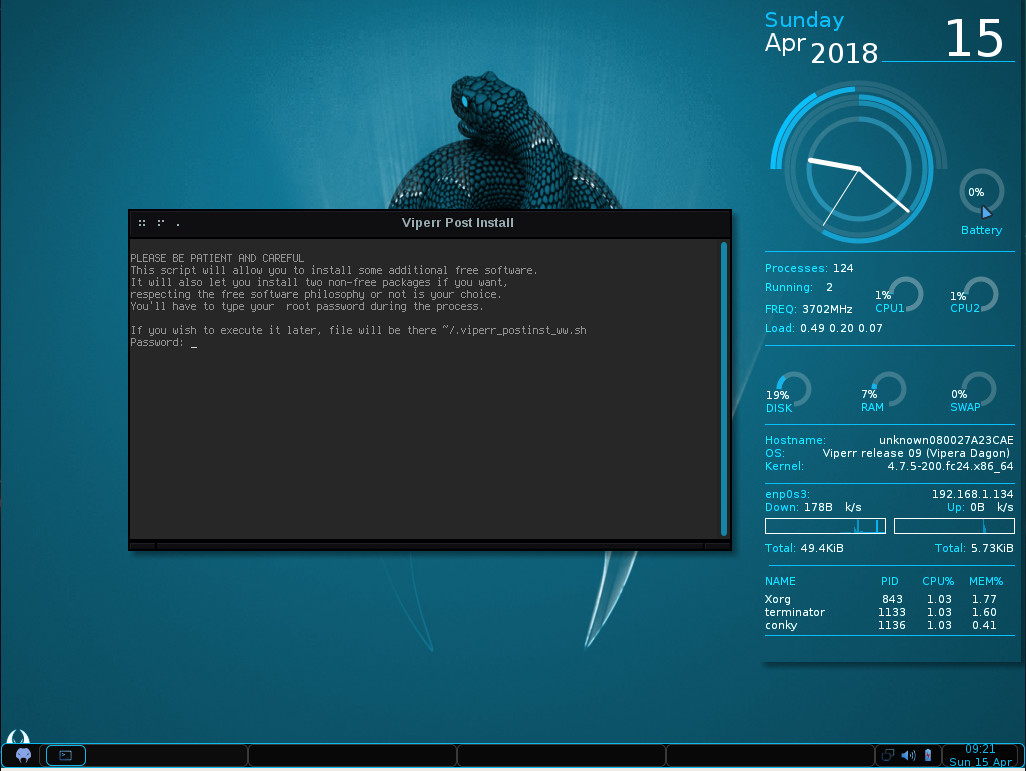
We’ve reached the point in Linux where walking through an installation is almost pointless—the installs are that easy. That being said, if you’ve installed Fedora or CentOS, you’ve installed Viperr. The Anaconda Installer makes installing any distribution incredibly simple. It’s all point and click, with a minimal of user interaction and steps. The only difference with Viperr is the post-Anaconda installation. Once you’ve completed the installation and rebooted the system, you’ll be greeted with a terminal window, in which a post-install script is run (Figure 1).
Figure 1: The post-install script in action.
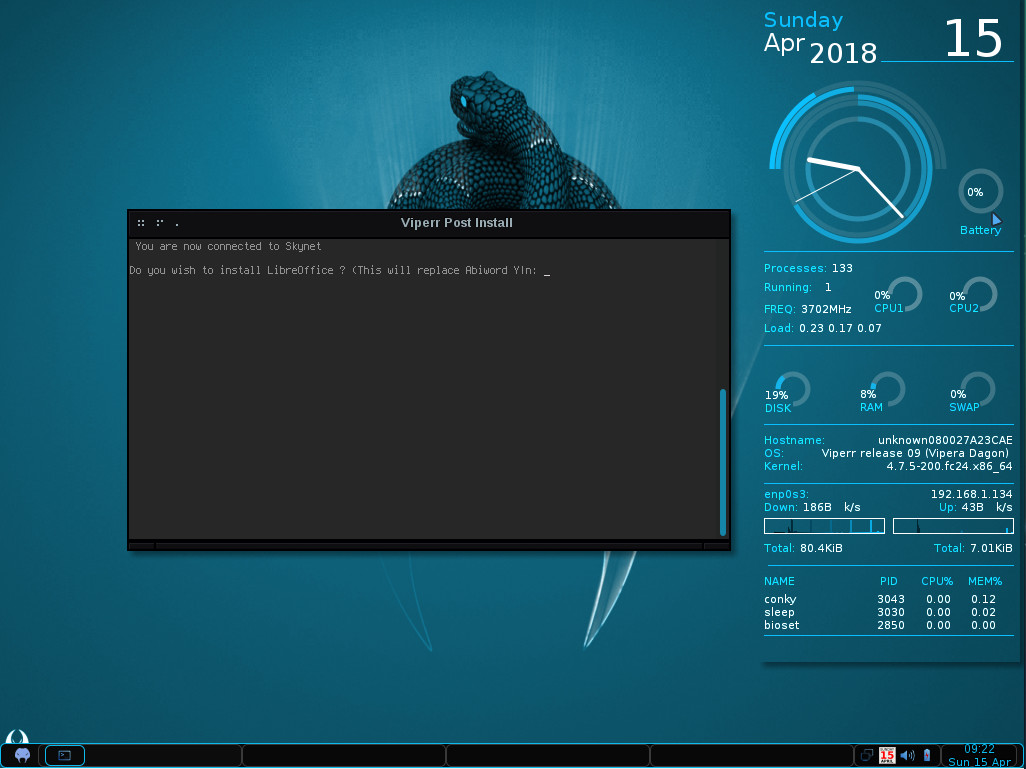
That script will first prompt you for your user password (created during the installation). Once you’ve authenticated, it will ask you a number of questions regarding software to be installed. During the run of the script, you can have LibreOffice installed (Figure 2), as well as other applications.
Figure 2: Installing LibreOffice by way of the post-install script.
You will also be asked if you want to include the free and non-free Fusion repo. This repository is filled with software that Fedora or Red Hat doesn’t want to ship (such as Audacity, MPlayer, Streamripper, MythTV, GStreamer, Bombono-DVD, Xtables, Pianobar, LiVES, Telegram-Desktop, Ndiswrapper, VLC, some games, and more). It’s not a huge number of titles, but there are some items many Linux users consider must-haves.
Once the script completes its run, you can close out the terminal and start using Viperr.
Usage
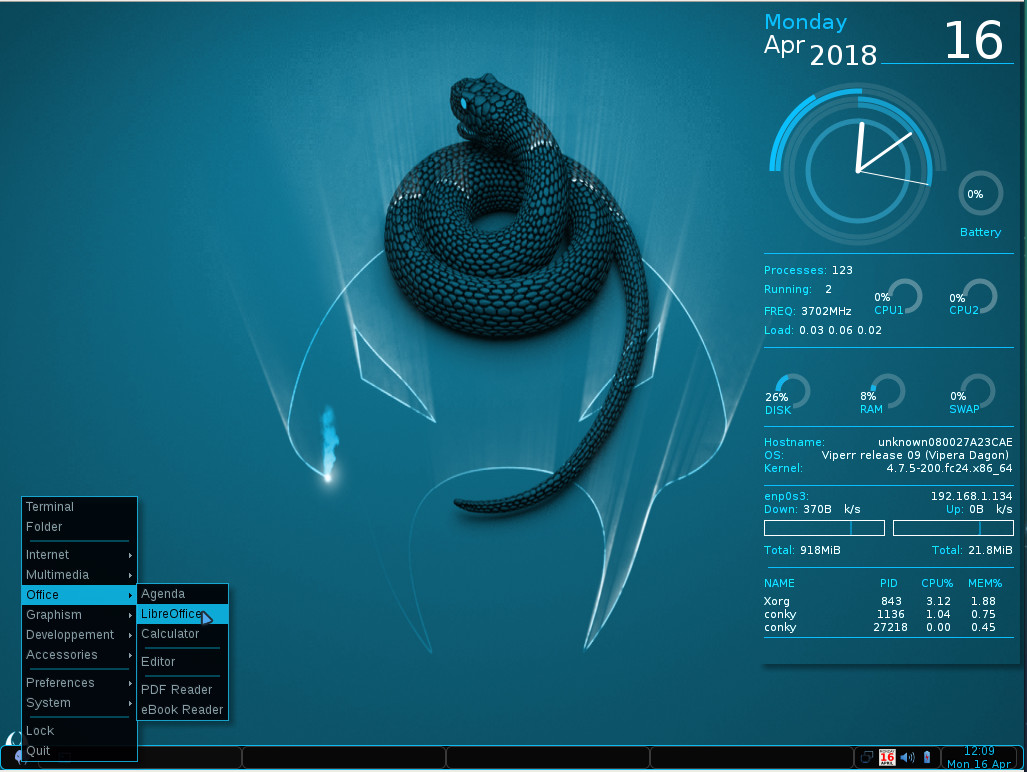
As you probably expect, using Viperr is incredibly simple. The combination of the Openbox window manager and Conky giving a real-time read-out on system resources (Figure 3) is certainly a throwback to old-school Linux that many users will appreciate.
Figure 3: The default Viperr desktop.
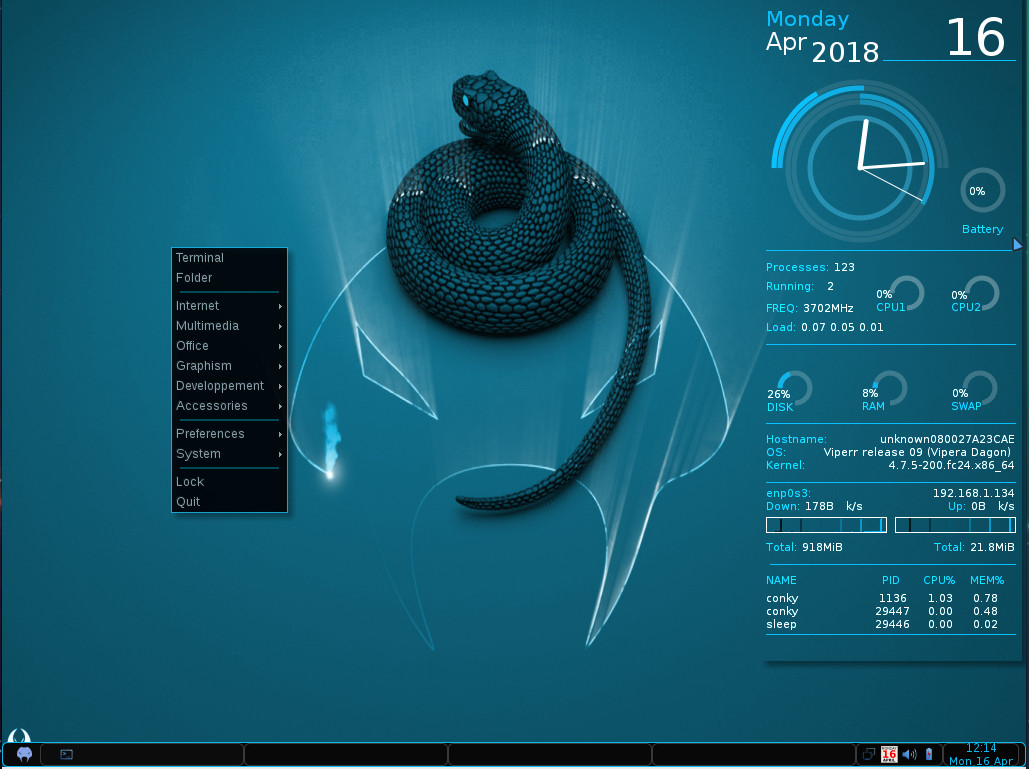
Click on the Viperr start button to gain access to all of the installed applications. Open an application and use it. That start menu, however, isn’t the only route to starting applications. If you right-click anywhere on the desktop, you gain access to the same menu (Figure 4).
Figure 4: The Viperr right-click desktop menu.
I’ve always been a big fan of this type of menu system, as it makes interacting with that main menu incredibly efficient.
If you want to bring Viperr even further into the new world order, you can open up a terminal window and install Flatpak with the command sudo yum install flatpak (or sudo dnf install flatpak). Once you’ve installed Flatpak, you’ll find even more software can be installed, via Flathub.
Updates needed
Obviously, the one glaring problem is that Viperr is way out of date. However, you could go through the process of doing a distribution upgrade, via the dnf command. To do this, you would first have to install the DNF plugin with the command:
sudo dnf install dnf-plugin-system-upgrade
Once that command completes, you can upgrade from a base of Fedora 24 to 25 with the command:
sudo dnf system-upgrade download --releasever=25
When that command completes, reboot with the command:
sudo dnf system-upgrade reboot
The above command does take some time to complete (I had 2339 packages to upgrade), but it will eventually land you back on your Viperr desktop. I successfully completed that upgrade (which upgraded the kernel to 4.13), but I didn’t continue with the process to upgrade from 25 to 26 and then 26 to 27. Theoretically, it could work.
Outside of that, you’d be hard-pressed to find anything really wrong with a lightweight distribution like Viperr. It’s a fast, reliable throwback to a distribution so many users quickly fell in love with. With Crunchbang long gone, for those longing to return to the days of a more basic version of the operating system, Viperr fits that bill to a tee.
Learn more about Linux through the free “Introduction to Linux” course from The Linux Foundation and edX.
This week in Linux and open source news, Arpit Joshipura sheds light on the networking harmonization initiative, Hyperledger opens the doors of its bug bounty program to the public & more! Read on to stay abreast of the latest open source news.
1) Arpit Joshipura, General Manager of Networking at The Linux Foundation, speaks about the Harmonization 1.0 initiative
3) Nextcloud “has announced it will be supplying the German federal government with a private, on-premises cloud platform as part of a three-year contract.”
5) “Open source is being heavily adopted in China and many companies are now trying to figure out how to best contribute to these kind of projects. Joining a foundation is an obvious first step.”