Home Blog Page 452

Testing IPv6 Networking in KVM: Part 2

When last we met, in Testing IPv6 Networking in KVM: Part 1, we learned about IPv6 private addressing. Today, we’re going to use KVM to create networks for testing IPv6 to our heart’s content.

Should you desire a refresh in using KVM, see Creating Virtual Machines in KVM: Part 1 and Creating Virtual Machines in KVM: Part 2 – Networking.

Creating Networks in KVM

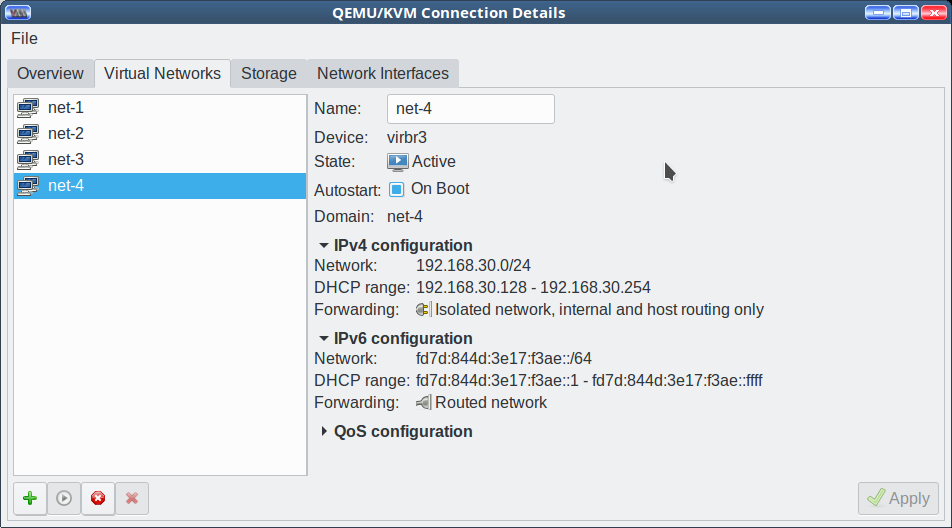
You need at least two virtual machines in KVM. Of course, you may create as many as you like. My little setup has Fedora, Ubuntu, and openSUSE. To create a new IPv6 network, open Edit > Connection Details > Virtual Networks in the main Virtual Machine Manager window. Click on the button with the green cross on the bottom left to create a new network (Figure 1).
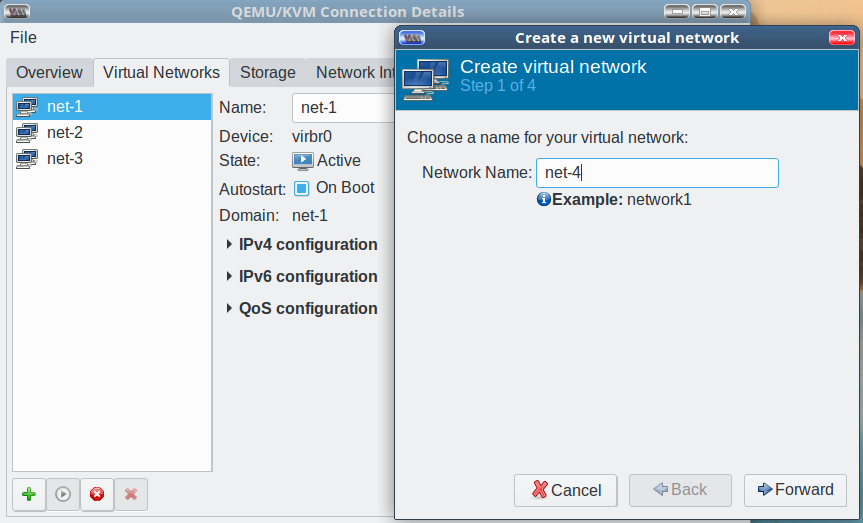
Figure 1: Create a network.

Give your new network a name, then click the Forward button. You may opt to not create an IPv4 network if you wish. When you create a new IPv4 network the Virtual Machine Manager will not let you create a duplicate network, or one with an invalid address. On my host Ubuntu system a valid address is highlighted in green, and an invalid address is highlighted in a tasteful rosy hue. On my openSUSE machine there are no colored highlights. Enable DHCP or not, and create a static route or not, then move on to the next window.

Check “Enable IPv6 network address space definition” and enter your private address range. You may use any IPv6 address class you wish, being careful, of course, to not allow your experiments to leak out of your network. We shall use the nice IPv6 unique local addresses (ULA), and use the online address generator at Simple DNS Plus to create our network address. Copy the “Combined/CID” address into the Network field (Figure 2).
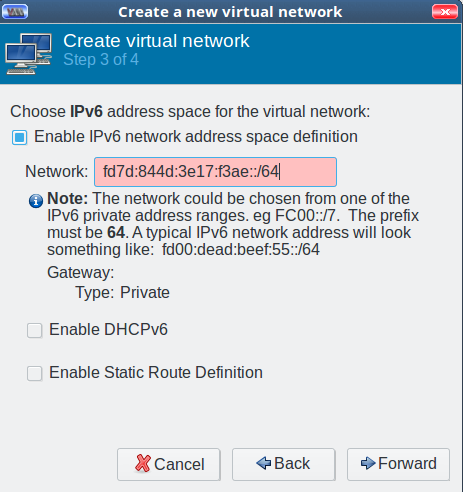
Figure 2: Copy the “Combined/CID” address into the Network field.

Virtual Machine Manager thinks my address is not valid, as evidenced by the rose highlight. Can it be right? Let us use ipv6calc to check:

$ ipv6calc -qi fd7d:844d:3e17:f3ae::/64
Address type: unicast, unique-local-unicast, iid, iid-local
Registry for address: reserved(RFC4193#3.1)
Address type has SLA: f3ae
Interface identifier: 0000:0000:0000:0000
Interface identifier is probably manual set

ipv6calc thinks it’s fine. Just for fun, change one of the numbers to something invalid, like the letter g, and try it again. (Asking “What if…?” and trial and error is the awesomest way to learn.)

Let us carry on and enable DHCPv6 (Figure 3). You can accept the default values, or set your own.
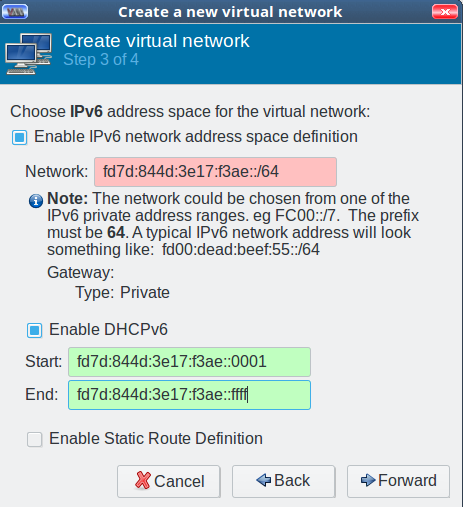
Figure 3: Enable DHCPv6.

We shall skip creating a default route definition and move on to the next screen, where we shall enable “Isolated Virtual Network” and “Enable IPv6 internal routing/networking”.

VM Network Selection

Now you can configure your virtual machines to use your new network. Open your VMs, and then click the “i” button at the top left to open its “Show virtual hardware details” screen. In the “Add Hardware” column click on the NIC button to open the network selector, and select your nice new IPv6 network. Click Apply, and then reboot. (Or use your favorite method for restarting networking, or renewing your DHCP lease.)

Testing

What does ifconfig tell us?

$ ifconfig
ens3: flags=4163 UP,BROADCAST,RUNNING,MULTICAST  mtu 1500
 inet 192.168.30.207  netmask 255.255.255.0  
   broadcast 192.168.30.255
 inet6 fd7d:844d:3e17:f3ae::6314  
   prefixlen 128  scopeid 0x0
 inet6 fe80::4821:5ecb:e4b4:d5fc  
   prefixlen 64  scopeid 0x20

And there is our nice new ULA, fd7d:844d:3e17:f3ae::6314, and the auto-generated link-local address that is always present. Let’s have some ping fun, pinging another VM on the network:

vm1 ~$ ping6 -c2 fd7d:844d:3e17:f3ae::2c9f
PING fd7d:844d:3e17:f3ae::2c9f(fd7d:844d:3e17:f3ae::2c9f) 56 data bytes
64 bytes from fd7d:844d:3e17:f3ae::2c9f: icmp_seq=1 ttl=64 time=0.635 ms
64 bytes from fd7d:844d:3e17:f3ae::2c9f: icmp_seq=2 ttl=64 time=0.365 ms

vm2 ~$ ping6 -c2 fd7d:844d:3e17:f3ae:a:b:c:6314
PING fd7d:844d:3e17:f3ae:a:b:c:6314(fd7d:844d:3e17:f3ae:a:b:c:6314) 56 data bytes
64 bytes from fd7d:844d:3e17:f3ae:a:b:c:6314: icmp_seq=1 ttl=64 time=0.744 ms
64 bytes from fd7d:844d:3e17:f3ae:a:b:c:6314: icmp_seq=2 ttl=64 time=0.364 ms

When you’re struggling to understand subnetting, this gives you a fast, easy way to try different addresses and see whether they work. You can assign multiple IP addresses to a single interface and then ping them to see what happens. In a ULA, the interface, or host, portion of the IP address is the last four quads, so you can do anything to those and still be in the same subnet, which in this example is f3ae. This example changes only the interface ID on one of my VMs, to show how you really can do whatever you want with those four quads:

vm1 ~$ sudo /sbin/ip -6 addr add fd7d:844d:3e17:f3ae:a:b:c:6314  dev ens3

vm2 ~$ ping6 -c2 fd7d:844d:3e17:f3ae:a:b:c:6314
PING fd7d:844d:3e17:f3ae:a:b:c:6314(fd7d:844d:3e17:f3ae:a:b:c:6314) 56 data bytes
64 bytes from fd7d:844d:3e17:f3ae:a:b:c:6314: icmp_seq=1 ttl=64 time=0.744 ms
64 bytes from fd7d:844d:3e17:f3ae:a:b:c:6314: icmp_seq=2 ttl=64 time=0.364 ms

Now try it with a different subnet, which in this example is f4ae instead of f3ae:

$ ping6 -c2 fd7d:844d:3e17:f4ae:a:b:c:6314
PING fd7d:844d:3e17:f4ae:a:b:c:6314(fd7d:844d:3e17:f4ae:a:b:c:6314) 56 data bytes
From fd7d:844d:3e17:f3ae::1 icmp_seq=1 Destination unreachable: No route
From fd7d:844d:3e17:f3ae::1 icmp_seq=2 Destination unreachable: No route

This is also a great time to practice routing, which we will do in a future installment along with setting up auto-addressing without DHCP.

Cloud Foundry: Focusing on Flexibility and Choice for a Cloud-Native World

For some organizations working outside of technology hubs such as Silicon Valley, there is a vast shortage of developer talent to choose from. As a result, many have taken a proactive learning approach to help bring their developers up-to-speed with the demands of today’s cloud-native software platforms.

Cloud Foundry is evolving its technology to benefit these users’ goals, explained Cloud Foundry Executive Director Abby Kearns, in this live-streamed episode of The New Stack Makers podcast recorded at Cloud Foundry Summit Europe last month.

“For each of these companies that are becoming software companies, they’re trying to find out, where do they find that talent?” Kearns said, adding that, “We’re seeing a lot of companies invest in training and re-training people, teaching them to be cloud-native developers and I think that is the most fascinating piece of all this.”

Read more at The New Stack

Kubernetes by the Numbers: 10 Compelling Stats

How quickly has Kubernetes’ popularity soared? By most accounts, very quickly. Earlier this year, Cloud Native Computing Foundation executive director Dan Kohn penned a blog post that dug into that claim. People regularly tout Kubernetes as one of the highest velocity projects ever in open source history: Does the data back it up?

As Kohn found, there may not be a single definitive metric, but they all point in the same conclusion: “You can pick your preferred statistic, such as that Kubernetes is in the top 0.00006% of the projects on GitHub,” Kohn wrote. “I prefer to just think of it as one of the fastest moving projects in the history of open source.”

You can find plenty of numbers that illuminate Kubernetes’ path to becoming one of the most popular container orchestration tools, as well as other important characteristics of the platform. We rounded up some of the best for your consideration – and your potential use in making the case for Kubernetes in your organization.

Read more at Enterprisers Project

Why Senior Devs Write Dumb Code and How to Spot a Junior From A Mile Away

One of my all time favorite quotes is from Brian Goetz, a smart dude in the Java world who is one of the authors of Java Concurrency in Practice, among other things. The quote appears in an interview that Oracle published under the title, “Write Dumb Code”. Goetz was asked how to write code that performs well. Here is what he had to say:

Often, the way to write fast code in Java applications is to write dumb code — code that is straightforward, clean, and follows the most obvious object-oriented principles.

The rest of the ~1000 words is devoted to explaining why trying to optimize code and trying to be clever is a common programmer mistake 

Read more at HackerNoon

Small Tools for Managing HPC: It’s the Little Things

The HPC world has some amazing “big” tools that help administrators monitor their systems and keep them running, such as the Ganglia and Nagios cluster monitoring systems. Although they are extremely useful, sometimes it is the smaller tools that can help debug a user problem or find system issues.

ldd

The introduction of sharable objects, or “dynamic libraries,” has allowed for smaller binaries, less “skew” across binaries, and a reduction in memory usage, among other things. Users, myself included, tend to forget that when code is compiled, we only see the size of the binary itself, not the “shared” objects.

For example, the following simple Hello World program, called test1, uses the PGI compilers (16.10).

Read more at ADMIN Magazine

Black Duck Launches New Container Security Solution

Black Duck announced the release of its OpsSight automatic open source vulnerability detection solution for containers at its Flight 2017 conference in Boston today.

According to the company’s CEO Lou Shipley, OpsSight is Black Duck’s first product that targets the production phase of the software lifecycle.

“…as the number of containers grows, so does the complexity of validating the contents and securing container images in production. OpsSight allows operations team to be sure deployments are free from known open source security vulnerabilities because it provides full visibility into and control over the open source in the container images.

Read more at SDTimes

Arduino Create Expands to Support Linux on Intel Chips

When we talk about open source hardware, we often think about the Raspberry Pi and other community-backed single board computers running Linux. Yet all these communities were modeled on the success of the 14-year-old Arduino project, in which Linux has been only tangentially involved, and only over the past four years. The two platforms should grow closer, however, now that Arduino has extended its Arduino Create development environment to support Linux on x86 platforms.

With the new Linux support, “users are now able to program their Linux devices as if they were regular Arduinos,” says Arduino. Arduino Create works in concert with embedded Linux distributions – initially Ubuntu or Intel’s Wind River Pulsar Linux – to let developers load Arduino sketches to control lower level interfaces to sensors and other Internet of Things peripherals.

Arduino Create was unveiled as a private beta in May 2016, intended as a modern, web-based companion application – and perhaps and eventual replacement – for the desktop-based Arduino IDE. The software provides a browser plugin, letting developers upload sketches to any connected Arduino board from the browser. It features a web editor, as well as cloud-based sharing and collaboration tools.

Arduino Create enables program-to-program, and program-to-cloud communications via the MQTT protocol. This is implemented with a new open source Arduino Connector program.

UP Squared IoT Grove Development Kit

Intel unveiled the revised Arduino Create on Nov. 2 as a collaboration between itself, Arduino, Aaeon, Canonical, and Seeed. This was followed the next day by Arduino’s announcement.

The Linux-ready version of Arduino Create is debuting on a version of Aaeon’s UP Squared (UP2) hacker SBC called the UP Squared IoT Grove Development Kit. In addition to the SBC, which runs Ubuntu 16.04 on an Intel Apollo Lake SoC, the kit includes Seeed’s Arduino compatible Grove Pi+ extension board, a display, and Grove sensors.

Arduino Create can also run on any system controlled by Ubuntu or Pulsar that uses 64-bit Intel Atom, Core, or Xeon processors. Arduino’s announcement points to tutorials for setting up Arduino Create on the Intel NUC, Dell Wyse, and Gigabyte GB-BXT mini-PCs.

Arduino’s announcement suggests that ARM could be the next target: “In the coming months, we plan to expand support for Linuxbased IoT devices running on other hardware architectures,” says Arduino.    

The version of Arduino Create available on the UP Squared kit combines Arduino programming libraries with a simplified installation process, code sharing, and cloud services. Developers can make system calls and run multiple sketches simultaneously. The software ships with examples for integrating Amazon Web Services (AWS) and Microsoft Azure.

The UP Squared kit version provides example code specifically designed for the kit and its Arduino-programmable Grove sensors and I/O peripherals. It includes libraries such as OpenCV, Intel’s Math Kernel Library (MKL), and Intel’s MRAA HAL library for low-speed I/O links. Developers can also export sketches as CMake projects that can bridge to more advanced tools like Intel System Studio 2018.

Next step in the Arduino Linux dance

The newly Linux friendly Arduino Create adds another wrinkle to the continuing evolution of Arduino/Linux integration. Because the Arduino IDE is PC-based, as opposed to an autonomous embedded RTOS such as FreeRTOS or ARM’s Mbed, Arduino is well positioned to act as a bridge between the application processor and microprocessor unit (MCU) realms.

The first Arduino board that also ran Linux the Arduino Yún arrived only four years ago. Arduino sketches running on an ATmega32u4 MCU control the Yún, but the software hands off to the OpenWRT Linux based Linino distro running on an Atheros wireless SoC when it needs to communicate with the outside world.

Several other hybrid Arduino/Linux boards that followed had similar designs. These included the Arduino Yún Mini, Arduino Industrial 101, and Arduino TIAN.

At the same time the Arduino/Linux hybrids were advancing, open hardware Linux projects were adding Arduino support. Out of the 98 community backed Linux hacker boards that appeared in our June 2017 survey, 15 offered standard or optional Arduino shield support. A few of these are official Arduino hybrids, but most are Linux-driven boards such as the pcDuino, Udoo, and Link-It SBCs.

Our survey showed increasing preference for Arduino-ready Linux SBCs just as several of these boards – the Intel Edison and Galileo – were being discontinued. Most of the Linux-enabled Arduinos boards, meanwhile, have emerged from the forked Arduino.org wing of the once feuding Arduino camps. Now that the groups have reunified, and Arduino.org’s Federico Musto has been ousted, the future of Linux-ready Arduino boards (as opposed to Arduino-compatible Linux boards) – is in doubt.

This has less to do with Arduino politics than with the advent of increasingly sophisticated Cortex-M MCUs and wireless chips such as Espressif’s open source ESP8266 and newer ESP32 SoCs, as well as the evolution of the Arduino IDE. The ESP8266, for example, stood in for Linino-on-Atheros on non-Linux, wireless-enabled Arduino offerings such as the Arduino STAR Otto and Arduino Primo.

More recently, Arduino has focused on its smaller, IoT-targeted MKR boards, which do not run Linux. The original MKR1000 offloads WiFi services to an Atmel ATSAMW25H18 WiFi module, and the new MKR WAN 1300 and MKR GSM 1400 use Murata (LoRa) and U-Blox (3G) modules, respectively in addition to their Arduino-compatible MCUs.

Arduino’s new philosophy appears to be that 1) Arduino should focus more on cloud connected IoT software than hardware, and 2) that the best path to Arduino/Linux integration is to run Arduino code under the umbrella of an embedded Linux OS rather than add a separate Linux subsystem to an Arduino board. This would seem to make sense since Linux is no longer needed on Arduino boards to do basic web-enabled networking. The hardware required to run Linux costs more, and Linux adds complexity, especially considering its weak integration with Arduino.

With Arduino Create, however, Linux developers can use Arduino to gain better control over sensors and motor control gizmos, and Arduino developers can piggyback their designs on platforms with more powerful processors and additional resources. The revised Arduino Create aims to bring Intel Linux developers gently into the world of Arduino while also opening up Linux boards to Arduino developers. This is a powerful combination that could prove even more significant if Arduino creates an ARM version of Arduino Create.

How to Measure HPC

Measuring high performance computing can be very powerful for the businesses that rely on it and the end users that directly employ it. Based on NAG’s experience helping organizations with HPC measurement, we have put together this overview of the subject for TOP500 News.

Measuring usage and costs of your current HPC capability can inform service delivery and policies to extract the optimum science or business impact from your existing set-up. Collecting data on the usage patterns, costs, and value delivered by current HPC capability can also help ensure future decisions are optimal. This enables that subsequent investments can be made with confidence, at the right scale, type and timing for maximum value, and with well understood risks. However, measuring the right things, and making sure they drive the best business or science impact is a surprisingly complex undertaking.

Read more at TOP500

Project Treble Brings Extended Linux Kernel Security Support to Combat Fragmentation

One of the major issues for Android over the years has been device fragmentation. The Android version and Linux kernel version a device are on can have a massive impact on the device’s security and usability, and Google is making a concerted effort to improve Android’s update lifecycle with Project Treble.

At Linaro Connect San Francisco 2017, Google Project Treble team member Iliyan Malchev gave a talk on what Project Treble is attempting to do for Android, and on what it has achieved so far. He revealed that as part of their efforts to improve the security lifecycle for Android devices, Google has managed to get the Linux Foundation to agree to extend the support life of the Linux Long-Term Support (LTS) kernel branch from the 2 years that it has historically lasted, to 6 years for future versions of the LTS kernel, starting with Linux kernel 4.4. Greg Kroah-Hartman (GKH) of the Linux Foundation, the head maintainer for the Linux stable kernel branch (including LTS), felt that the timing was right to implement the change with the direction the entire computing market is heading, and gave Iliyan Malchev permission to announce the extended support life.

Read more at XDA

Best Practices for Using Open Source Code

However, diving in and using open source code without an understanding of everything from legal risks to best development practices is perilous. Approaching open source code usage without best practices in place can also tarnish an organization’s reputation. That’s where the free, new Using Open Source Code guide comes in. It can help you craft and codify a comprehensive strategy.

One of the most important steps in using open source code effectively within your program is to set explicit guidelines to be followed, which are often summarized in a strategy document. What if code comes into one of your projects from a project with a different licensing setup? What acceptance, rejection, and exception policies should developers follow? What is your organization’s overall stance toward open source development?

Read more at The Linux Foundation

Download the free guides and stay tuned for our continuing coverage.